1
Appendix D
Email/Cell Phone Message User’s Guide
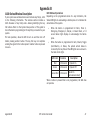
Your XTL Series security system’s reporting capability can be used
to send reports to an email address or cell phone number (XTL and
XTLC only) in much the same way as someone sending you an email
would do. You can receive reports of alarms, troubles, or system
armings and disarmings and know at a glance your system status.
The following are types of messages that can be sent:
* Zone Alarms by Zone Name
* Zone Troubles by Zone Name
* Zone Bypass by User
* Armings (Closings) by User
* Disarming (Openings) by User
* Late to Close
* Late to Open
* Early to Close
* AC Power (and restoral)
* System Low Battery
* Ambush
* Abort & Cancel by User
* Alarm Verified by User
* Check-in by User
* In-Activity
For alarm messages, the message provides the system name, zone
name, zone number, message type, and the time at which the
panel sent the message.
For alarm messages sent to a cell phone number, you have the
option to reply with “cancel” to cancel the existing alarm.
Appendix D
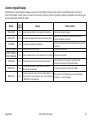
From: John's Home System (mailto: [email protected])
Sent: Wednesday, October 07, 2009 8:33 AM
To: [email protected]
Subject: Fire Alarm Message
The John's Home System has a **Fire Alarm** on the Hall Smoke Alarm.
Message sent at: 8:31 AM
From: John's Home System (mailto: [email protected])
Sent: Wednesday, October 07, 2009 9:01 AM
To: [email protected]
Subject: Check-in Message
Cindy H has checked in at the John's Home System.
Message sent at: 9:00 AM
From: John's Home System (mailto: [email protected])
Sent: Wednesday, October 07, 2009 10:05 AM
To: [email protected]
Subject: System Message
John's Home System has an AC Power Failure.
Message sent at 10:02 AM
XTL Series User Guide
Examples of email messages
45