1
ES-600C
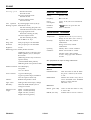
Scanning speed:
Monochrome mode:
about 20 seconds
Color page sequence mode:
about 70 seconds
Color line sequence mode:
about 80 seconds
Color separation:
By switching light sources (G, R, B)
Reading sequence: Monochrome mode:
One-time scanning (Dropout color
selectable from Green, Red, or Blue.)
Electrical Specifications
Voltage:
120 VAC, ± 10%
Frequency:
49.5 to 60.5 Hz
Power
consumption:
Approx. 20 W (self test in monochrome
mode)
Insulation
resistance:
10 Mn between AC power line and
chassis at 500 VDC
Color page sequence mode:
Three-time scanning (G, R, B)
Environmental Conditions
Color line sequence mode:
One-time scanning (G, R, B)
Temperature:
Size:
50% to 200% in 1% steps.
Image data:
8 bits per pixel per color maximum
Gradation:
8 bits per pixel per color maximum
Brightness:
7 levels
Halftoning process: Enable/disable selectable.
3 halftoning modes (A, B, and C) and
4 dither patterns (A, B, C, and D) for
bi-level data
(Halftoning mode A only in color line
sequence mode)
(2 downloadable dither patterns)
Operation: 40° F to 95° F (5° C to 35° C)
Storage: 10° F to 150° F (-20° C to 60° C)
Humidity:
Operation: 10% to 80%, without
condensation
Storage: 10% to 85%, without
condensation
Operating
conditions:
Ordinary office or home conditions.
Extreme dust should be avoided.
Operation under direct sunlight
or near a strong light source should be
avoided.
Note: Specifications are subject to change without notice.
Halftoning mode A for quad-level data
Gamma correction: 2 for CRT display
3 for printer
1 for user defined
Color correction:
1 type for CRT display
3 types for printer output, available in
color line sequence mode only
Interface:
Bidirectional parallel or SCSI
Light source:
Noble gas fluorescent lamps (3 lamps)
Reliability:
Main unit: MCBF 100,000 cycles of
carriage movement
Dimensions and
weight:
Width: 333 mm (13 inches)
Depth: 568 mm (22 inches)
Height: 125 mm (5 inches)
Weight: about 9 kg (20 lbs)
ES-600C-2
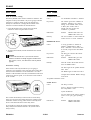
The Control Panel
Buttons
OPERATE button
Turns the scanner on and off. When
the power is turned on, the scanner
is reset.
RESET button
Initializes the scanner. Every value is
reset to the default value. The RESET
button is located under the
DIP-switch cover.
Indicators
READY (green LED)
Comes on when the scanner is ready
to receive data.
ERROR (red LED)
Indicates that an error has occurred.
11/2/92
Scanners