1
B
Control panel menus
198
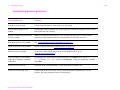
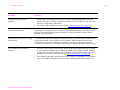
Item
Values
Explanation
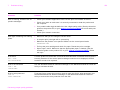
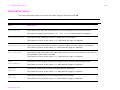
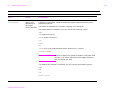
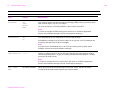
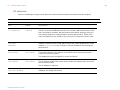
PAPER DESTINATION=
STANDARD OUTPUT BIN
STANDARD OUTPUT
FACE UP
OPTIONAL BIN
Allows the user to configure the output paper bin destination. Only
installed bins will appear on the menu.
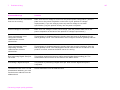
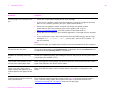
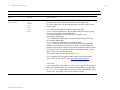
DUPLEX=OFF
OFF
ON
Set the value to ON to print on both sides (duplex) or OFF to print on one
side (simplex) of a sheet of paper.
For more information, see the introduce guide on the product CD, or go
to www.hp.com/cposupport/.
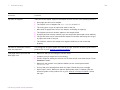
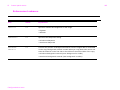
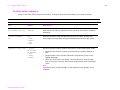
BINDING=LONG EDGE
LONG EDGE
SHORT EDGE
Allows the user to change the binding edge for duplex printing. The
menu item is displayed when a duplex printing accessory is installed in
the product and DUPLEX=ON.
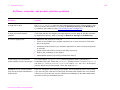
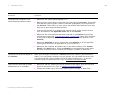
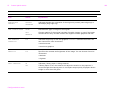
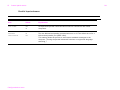
OVERRIDE A4/LETTER=
NO
YES
NO
This command is used to print on letter-size paper when an A4 job is
sent, but no A4-size paper is loaded in the product (or to print on
A4-size paper when a letter job is sent, but no letter paper is loaded in
the product).
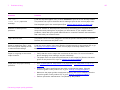
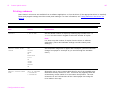
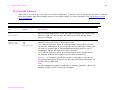
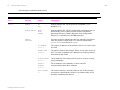
MANUAL FEED=OFF
OFF
ON
Feed the paper manually from Tray 1, rather than automatically from a
tray. When MANUAL FEED=ON and Tray 1 is empty, the product goes
offline when it receives a print job. It then displays MANUALLY FEED
[PAPER SIZE].
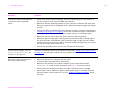
For more information, see “Manually feeding paper from Tray 1” on
page 66.
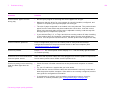
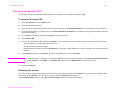
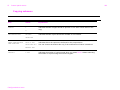
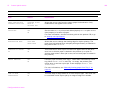
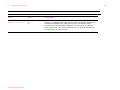
EDGE TO EDGE
OVERRIDE=OFF
Configure device menu
OFF
ON
Turns the edge-to-edge mode on or off for all print jobs. This mode can
be overridden inside a print job by an edge-to-edge PJL variable.