1
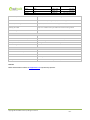
=5, 300m
File Name:
MEITRACK VT300 User Guide
Creator:
Project:
VT300
Sub Project:
Revision:
User Guide
V7.4
Creation Date:
Update Date:
Page:
Confidential:
=6, 500m
=7, 1000m
Cavana Cheung
2010-08-26
2013-06-26
- 13 - of 25
External Documentation
=8, 2000m
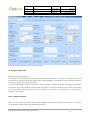
2. Radii: [1, 4294967295] meter(s), suggest to be set above 100 meters.
3. GPRS command is 0x12.
Example: W000000,006,1
When tracker moves out of this circle scope, it will send out an SMS alarm.
10.2 Geo-fence Alarm
Command: W******,302,X
Description: Turns on Geo-fencing alarm. When the tracker moves in/out the preset scope, it will send an SMS alarm to the
authorized phone number for SOS.
1. X is the parameters which includes: latitude, longitude, radii, in, out.
2. Latitude and longitude should be in ASCII format as follows:
Latitude is ddd.dddddd, ‘0’ is needed to be stuffed if no value available. ‘-’ should be added for south.
Longitude is dd.dddddd, ‘0’ is needed to be stuffed if no value available. ‘-’ should be added for west.
3. Radii: [1, 4294967295] meter(s), suggested to be set above 100 meters, if set above 8, it is corresponding radii.
4. If In and Out are 0, corresponding function is invalid. If In and Out are 1, valid.
5. Reply as Geo-Fence Alarm.
6. GPRS exiting command is 0x12, entering command is 0x13.
7. Send W******, 302 to turn off Geo-fence function.
Example:
W000000,302,22.000000,-114.123456,3000,1,1
Remarks:
1. Only one alarm can be set in either In or Out;
2. Only one alarm can be set in either Movement Alarm or Geo-fence Alarm.
11. Track by Distance
Command: W******,303,X
Description: Send this command to set distance interval
Note:
1.
X= [1, 4294967295], suggested to be set above 300 meters;
2.
X=0, turn off.
Example: W000000,303,1000
Copyright © 2013 Meitrack Group All rights reserved.
- 13 -