1
Security Escort | Installation and Setup Guide |3.0
Installation Instructions
3.4.4 ProxLink Setup
Configuration Procedure
Note:
For more details refer to the
ProxLink Radio Module User’s
Manual.
Required Equipment
•
ProxLink Radio Module
•
PC with RS-232 port running a
terminal emulation software
package. Select Start → Programs
→ Accessories. Click Hyper
Terminal.
•
ProxLink DB-9 to DB-25 Female RS232 Cable
•
9 VDC Power Supply
Configure
Select one of seven radio channels
(902 MHz to 928 MHz). Make certain
that the channel chosen is the same
for all the ProxLink located at the
transponders and for the ProxLink at
the central console computer.
Select one ProxLink for your central
control computer. The serial number
(located on a silver tag on the bottom
of the ProxLink) of this ProxLink must
be entered in the Destination Serial
Number and Serial # Filter location on
all ProxLink Radios connected to the
transponders.
Bosch Security Systems | 1/09 | 33831E
EN | 36
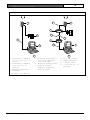
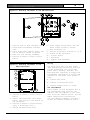
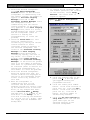
1. Attach the PC to the ProxLink using
the ProxLink RS-232 cable. Attach
the DB-9 Connector to the ProxLink
and attach the DB-25 female
connector the PC. Gender changers
or DB-25 to DB-9 converters may be
required depending on your serial
port connector type.
2. Start your terminal emulation
software (Hyper Terminal).
Configure the ProxLink as follows:
9600 Baud, 8 Data Bits, 1 Stop Bit,
and no parity.
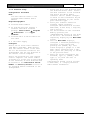
3. Put the ProxLink in User Interface
Mode by pressing the
[CONFIGURATION] button on the front
of the unit. The ProxLink should
respond by displaying the Main Menu
screen.
4. Once the Main Menu displays,
configure a ProxLink parameter by
selecting a menu option and
pressing the [ENTER] key. This
either displays a prompt or a submenu. After finishing with a submenu, press the [ESC] key to return
to the previous menu.
5. After you finish configuring the
ProxLink, type [L] [ENTER], then
type [Y] to place the unit in
operating mode.
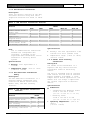
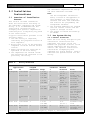
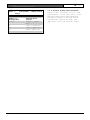
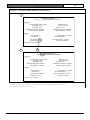
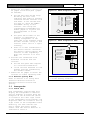
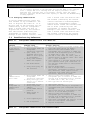
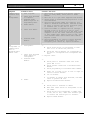
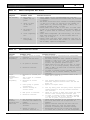
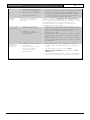
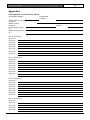
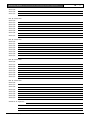
Configuration should look as follows
in Main Menu, D - Display ProxLink
Radio Module Parameters: