1
MC4285.O/M.QXD
1/3/02
1:36 PM
Page 6
TELEPHONE OPERATION
SETTING THE MENU OPTIONS
1
2
1
1
3
2
3
2
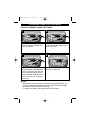
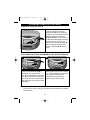
Press the SET button ❶ once; “SET
LANGUAGE” will appear in the display.
Press the REVIEW (▼) ❷ or (▲) ❸
button to select the desired language
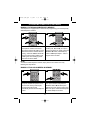
Press the SET button ❶ again;
“CONTRAST” will appear in the
display. Press the REVIEW (▼) ❷ or
(▲) ❸ button to select the Contrast (1
being lightest, 8 being darkest).
3
4
1
1
3
2
3
2
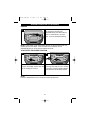
Press the SET button ❶ again; “SET
TIME/DATE” will appear in the display
and the hours will blink. Press the
REVIEW (▼) ❷ or (▲) ❸ button to set
the current hour. Make sure the
AM/PM setting is shown correctly when
setting the hours.
Press the SET button ❶ again. Press
the REVIEW (▼) ❷ or (▲) ❸ button to
set the current minute.
CONTINUED ON NEXT PAGE.
NOTES:
• While setting the menu options, a button must be pressed within 10
seconds, otherwise the display will revert back to the default display
and the menu settings may not be saved.
• To cancel any setting, simply press the DELETE button.
6