1
AL-1670
c. Network board
Value:
Example:
Not Installed.
Default:
Not Installed.
Description: Ubducates the network board installation status.
1. Samples
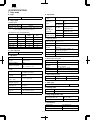
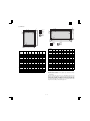
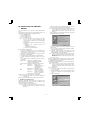
Printer Configuration Page
(Firmware version)
a. PCL6
Value:
#.##
Example:
1.00
Default:
Depends on the printer firmware version.
HARDWARE STATUS
Machine Information
Language:
English
Hardware Specs
Base Memory:
Total Memory:
Network Board:
8MB
8MB
Not Installed
Version Information
PCL:
1.xx
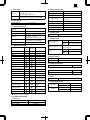
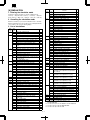
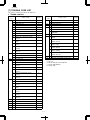
Available Paper Size
Appearance on Configuration Page
Input Paper Trays
-SizePaper Inserted
Letter (8.5x11)
Letter (8.5x11R)
Bypass Tray:
Tray 1:
Tray 2:
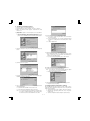
KEY MENU STATUS
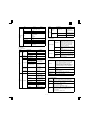
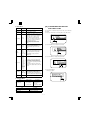
Letter (8 1/2 × 11)
Letter/Long Edge Feed
Letter (8 1/2 × 11R)
Letter/Short Edge Feed
Legal (8 1/2 × 14)
Legal/Short Edge Feed
Ledger (11 × 17)
Ledger/Short Edge Feed
Executive (7 1/4 × 10 1/2)
Main Menu
Copies:
Resolution:
Smoothing:
Toner Save:
Paper Source:
Paper Size:
Orientation:
Emulation:
1
600dpi
On
Off
Auto
Letter (8.5x11)
Portrait
PCL
Interface Menu
I/O Time Out
60 sec.
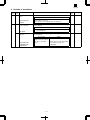
Description
Executive/Short Edge Feed
Invoice (5 1/2 × 8 1/2)
Invoice/Long Edge Feed
Foolscap (8 1/2 × 13)
Foolscap/Short Edge Feed
A4
A4/Long Edge Feed
A4R
A4/Short Edge Feed
B5
B5/Long Edge Feed
B5R
B5/Short Edge Feed
B4
B4/Short Edge Feed
A3
A3/Short Edge Feed
A5
A5/Long Edge Feed
A6
A6/Short Edge Feed
(Unknown)
Other size (EXTRA)
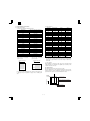
PCL is a registered trademark of Hewlett-Packard Cmpany. All other trademarks and copyrights are the property of their respective owners.
2. Items and contents
(No Paper)
A. Hardware status
(No Tray)
(Machine information)
a. Language
Value:
(English/French/German/Italian/Dutch/Spanish/Swedish)
Example:
English
Default:
Depends on the Destination setting
Description: Depends on the LCD display, the configuration page,
and the font list language.
(Tray Open)
No paper available on this tray.
There is a problem with this
tray.
This tray is opened (except
Bypass-Tray) or Tray is lifting
up.
a. Manual paper feed tray
Value:
(Suitable paper size)
Example:
Letter (8 1/2 × 11")
Default:
Depends on the size of paper set on the manual paper
feed tray.
Description: Indicates the size of paper set on the manual paper feed
tray. Depends on the paper size detected on the manual
paper feed tray. “Unclear” means that the paper size is
not detected. If there is no paper, no print is made here.
(Hardware specifications)
a. Base memory
Value:
8MB
Example:
8MB
Default:
8MB
Description: Indicates the printer PWB base memory capacity.
b. Total memory
Value:
8MB
Example:
8MB
Default:
8MB
Description: Indicates the printer PWB total memory capacity, which
is the total of the base memory and the option memory.
b. Tray 1, tray 2
Value:
(Suitable paper size)
Example:
Letter (8 1/2 × 11")
Default:
Depends on the paper tray configuration.
Description: Indicates the paper size configuration of tray 1, tray 2
9–3