1
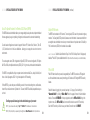
If you have trouble connecting to the
internet with a supported 4G/3G modem,
you may need to update your firmware.
See page 9.
/ / / / / / / GETTING STARTED
/ / / / / / / GETTING STARTED (continued)
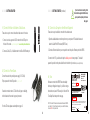
#1 ) Connect the Router to a Modem or Data Source.
#3 ) Connect to a Computer or other Network Equipment.
There are two ways to connect a broadband data source to the router.
There are two ways to establish a connection to the wireless router.
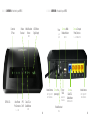
1: Connect an active, supported 4G/3G modem into the USB port on
the back of the router. is your modem supported? www.cradlepoint.com/modems
CradlePoint
MBR95
PRODUCT
1: Open the available wireless connection options on your computer
or WiFi-enabled
devices
and
select the CradlePoint WiFi broadcast (MBR95-xxx).
2: Connect a Cable, DSL, or Satellite modem to the Blue WAN Ethernet port.
2: Connect an Ethernet cable from your computer into one of the yellow Ethernet ports of the MBR95.
!
LABEL
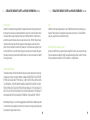
To connect to the WiFi, you will need to input the default password when prompted. The default
password is provided on the product label found on the bottom of your router. (see example below)
#2 ) Connect to a Power Source.
Connect the router to the provided power supply (12V DC Wall).
Flip the power switch to the ON position. | = on O = off
Model No.: MBR95
Part No.: MBR95
H/W ver.: 1.0
#4 ) Use.
Most users connect to the MBR95 Router immediately
without any configuration changes. If you’d like to change
the network name, level of WiFi security, etc. follow the First
Time Setup Wizard steps on the next page.
Ensure the connected modem LED is lit with a solid green or blue light,
which indicates that the modem is properly connected.
NOTE: The default WiFi network name broadcast will be seen as “MBR95xxx”, where “xxx” is the last three characters of your router’s MAC address,
shown as SSID on the product label.
For other LED states, please see descriptions on page 10.
4
www.cradlepoint.com
Default Password : 440c1fc1
MAC Address : 0030440c1fc1
Serial No.: MM100167900418
FCC ID:UXX-MBR95
IC: 6921A-MBR95
SSID: MBR95-fc1
This device complies with Part 15 of the FCC Rules. Operation is subject to the following two conditions
(1) This device may not cause harmful interference and (2)This device must accept any interference
received, including interference that may cause undesired operation
MFG DATE: MAR 2011
12V
Made in Taiwan
1.5A
RoHS
5