1
Application note
Getting started with e100
AN00187-002
Emergency stop input:
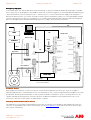
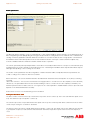
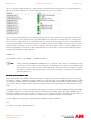
As described earlier, each drive enable signal can be wired through a safety relay if required. Additionally an Emergency stop input
from a safety relay can be wired back to the NextMove e100. This can then be assigned as an axis STOPINPUT in the Mint program
onboard the Nextmove e100. E-stop logic may also control the state of a contactor either in the AC supply to the e100 drive or
between the drive and motor. It is common to provide an instant signal to the Nextmove e100 (to act as the STOPINPUT) and delay
removal of drive and/or motor power (so the Nextmove can command an immediate powered stop before finally removing power)
but the actual implementation must be determined by the user according to the result of risk assessment.
EPL
PC
USB
Filter
NextMove e100
MicroFlex e100
24Vdc
Contactor
Mains
Estop
logic
USB
Motor Power
Stop Input
Drive Enable
Motor Feedback
24Vdc PSU
24V Logic Supply
Connection Overview
Feedback devices
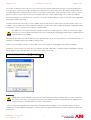
Motor feedback is essential for accurate “closed loop” control for both the Speed and Position loops. There are a number of
different feedback devices commonly fitted to motors. For a brushless AC servo system it is important that the feedback to the drive
provides both absolute positional information as well as speed. The positional information is used to commutate the motor. The
speed is derived by measuring the rate of change of position. The MicroFlex e100 drives have a built in position loop. It is not
hnecessary to pass the encoder signal to an external motion controller.
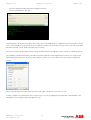
Switching c ommunication between devices
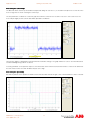
This application note was written using Workbench Version 5624. The firmware on the NextMove e100 and MicroFlex e100 was
5615. It is recommended that this or more recent firmware is used (www.abbmotion.com provides downloads for the most up-todate software and firmware).
ABB Motion control products
www.abbmotion.com
3