1
Editing a Play List
6
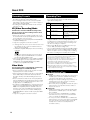
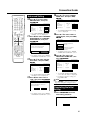
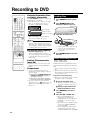
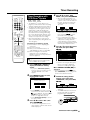
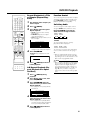
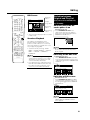
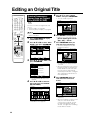
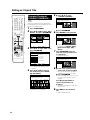
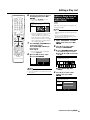
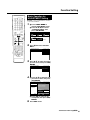
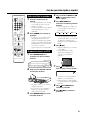
Find the place where you want to
end copying, then press SET/
ENTER.
• If you press RETURN, you can
reselect the start point.
EDIT(ORIGINAL)
12 / 25 SAT 10 : 28 AM
TITLE: CH33 FINE
1
07
00 : 00 : 32
14
CONFIRM CONTENT?
• When the end point is set to near the
end of a chapter, the end of the
chapter will be selected as the end
point. To make the original designated end point effective, set it again
after combining the chapter with the
next chapter (page 66).
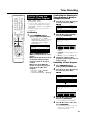
Press Red (B) (CONFIRMING) to
confirm the content.
Press Yellow (D) (CREATE) to
execute copy.
Go to step 8.
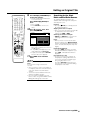
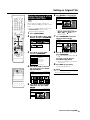
• You can reselect the end point by
pressing RETURN.
8
DVD-RW
VR MODE
TITLE INFO: 10/4 MON 8:09 PM – 8:14 PM
CREATE NEW
7
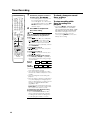
Adding a Scene from an
Original to a Play List
(ADD SCENE)
Adds video selected from an original to the
end of play list titles.
NOTE
• The selected scene cannot be added if
adding it will make the title longer than 12
hours.
• Scenes can be added as long as the
length of the title after adding is less than
the maximum of 12 hours.
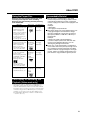
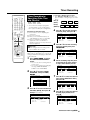
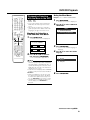
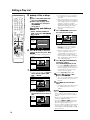
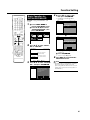
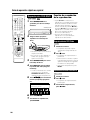
1
Select “EDIT/ERASE” in START
MENU screen, then press SET/
ENTER.
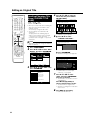
2
Press ' / " to select “EDIT”,
then press SET/ENTER.
3
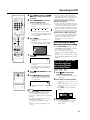
1 Press ORIGINAL/PLAY LIST
to switch to Play List screen.
2 Press ' / " / \ / | to select title
to edit.
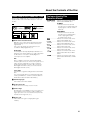
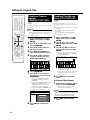
1 Press \ / | to select “YES”.
2 Press SET/ENTER.
EDIT(PLAY LIST)
12 / 25 SAT 10 : 28 AM
TITLE: CH33 FINE
SAVE AS A NEW PLAYLIST?
TITLE INFO: 10/4 MON 8:09 PM – 8:14 PM
1
2
3
NEW
YES
SELECT
ENTER
ENTER
NO
n
4
RETURN
5
6
• One play list title is created.
NOTE
Selecting start or end point to add a scene.
• You cannot add a scene which is less than
3 seconds.
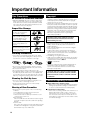
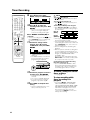
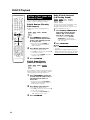
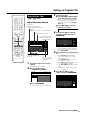
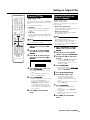
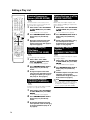
3 Press Yellow (D) (EDIT
MENU).
4
Press ' / " to select “ADD
SCENE” then press SET/
ENTER.
EDIT(PLAYLIST)
TITLE: CH33 FINE
12 / 25 SAT 10 : 28 AM
TITLE INFO: 10/4 MON 8:09 PM – 8:14 PM
ERASE SCENE
CHANGE TITLE NAME
ADD CHAPTER/TITLE
CHANGE THUMBNAIL
SELECT ORIGINAL TITLE/CHAPTER AND ADD IT
DIVIDE CHAPTER
ADD SCENE
MOVE TITLE
SPECIFY SCENE TO ADD
SELECT A SCENE FROM ORIGINAL VIDEO AND
ADD IT
SELECT
ENTER
ENTER
n
RETURN
Continued on Next Page |||
69