1
Appendix C. The X Window System
where <version-number> is the version number of the initscripts package.
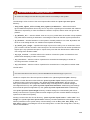
Each of the display managers reference the /etc/X11/xdm/Xsetup_0 file to set up the login
screen. Once the user logs into the system, the /etc/X11/xdm/GiveConsole script runs to assign
ownership of the console to the user. Then, the /etc/X11/xdm/Xsession script runs to accomplish
many of the tasks normally performed by the xinitrc script when starting X from runlevel 3,
including setting system and user resources, as well as running the scripts in the /etc/X11/xinit/
xinitrc.d/ directory.
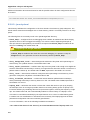
Users can specify which desktop environment they want to use when they authenticate using the
GNOME or KDE display managers by selecting it from the Sessions menu item accessed by selecting
System��� Preferences��� More Preferences��� Sessions. If the desktop environment is
not specified in the display manager, the /etc/X11/xdm/Xsession script checks the .xsession
and .Xclients files in the user's home directory to decide which desktop environment to load. As a
last resort, the /etc/X11/xinit/Xclients file is used to select a desktop environment or window
manager to use in the same way as runlevel 3.
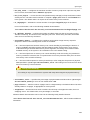
When the user finishes an X session on the default display (:0) and logs out, the /etc/X11/xdm/
TakeConsole script runs and reassigns ownership of the console to the root user. The original
display manager, which continues running after the user logged in, takes control by spawning a new
display manager. This restarts the X server, displays a new login window, and starts the entire process
over again.
The user is returned to the display manager after logging out of X from runlevel 5.
For more information on how display managers control user authentication, refer to the /usr/share/
doc/gdm-<version-number>/README , where <version-number> is the version number for the
gdm package installed, or the xdm man page.
C.6. Additional Resources
There is a large amount of detailed information available about the X server, the clients that connect to
it, and the assorted desktop environments and window managers.
C.6.1. Installed Documentation
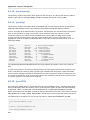
• /usr/share/X11/doc/ — contains detailed documentation on the X Window System
architecture, as well as how to get additional information about the Xorg project as a new user.
• /usr/share/doc/gdm-<version-number>/README — contains information on how display
managers control user authentication.
• man xorg.conf — Contains information about the xorg.conf configuration files, including the
meaning and syntax for the different sections within the files.
• man Xorg — Describes the Xorg display server.
C.6.2. Useful Websites
• http://www.X.org/ — Home page of the X.Org Foundation, which produces major releases of the
X Window System bundled with Fedora to control the necessary hardware and provide a GUI
environment.
508