1
Mobile Computer MC 95xxex-NI
Type B7-A29.-…………
−
Maintenance, Inspection,
Repair
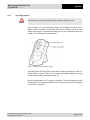
The MC 95xxex-NI is equipped with a screen protector. BARTEC recommends using
this, to avoid wear marks. A screen protector contributes to the user friendliness of
the equipment and protects the touch screen. The advantages at a glance:
■
■
■
■
■
■
8.1
Resistant and non-slip writing and touch screen surface
Protection against abrasion and chemicals
Reflection reduction
Equipment screen always looks brand new
Simple and quick installation
−
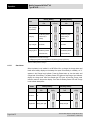
As the battery power diminishes over the course of time, the batteries should be
completely discharged and recharged every now and then in order to retain the full
capacity. For that purpose the devices are left switched on until the devices switch off
themselves. Then recharge the battery completely outside the Ex area.
−
Before a lengthy idle time it is essential to charge the battery completely and to
recharge it regularly (every 3 months).
Servicing
Caution!
8.2
Protection against scratches and dents
In accordance with IEC 60079-19 and IEC 60079-17, the owner-operator of the
electrical installations in potentially explosive areas has an obligation to have these
installations checked by a qualified electrician to ensure that they are in a proper
condition.
Inspection
Caution!
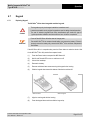
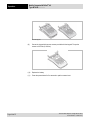
Repairs on explosion-protected operating equipment may be done only by authorised
persons using original spare parts and working in accordance with the latest
developments of technology. The relevant applicable regulations must be observed.
Please direct any questions you may have to BARTEC GmbH.
Technical data subject to change without notice.
Issue: Revision 1 / March 2011
Page 47 of 57