1
OpenVMS Version 7.3 Release
Notes
Order Number: AA–QSBTD–TE
June 2001
This manual describes changes to the software; installation, upgrade,
and compatibility information; new and existing software problems and
restrictions; and software and documentation corrections.
Note
This online version of the release notes manual has the most current
information compared to the printed version of this manual.
Revision/Update Information:
This is a new manual.
Software Version:
OpenVMS Alpha Version 7.3
OpenVMS VAX Version 7.3
Compaq Computer Corporation
Houston, Texas
© 2001 Compaq Computer Corporation
Compaq, AlphaServer, POLYCENTER, VAX, VMS, and the Compaq logo Registered in U.S. Patent
and Trademark Office.
OpenVMS and Tru64 are trademarks of Compaq Information Technologies Group, L.P. in the United
States and other countries.
Motif, OSF1, and UNIX are trademarks of The Open Group in the United States and other
countries.
PostScript is a trademark of Adobe Systems, Inc.
All other product names mentioned herein may be trademarks of their respective companies.
Confidential computer software. Valid license from Compaq required for possession, use, or copying.
Consistent with FAR 12.211 and 12.212, Commercial Computer Software, Computer Software
Documentation, and Technical Data for Commercial Items are licensed to the U.S. Government
under vendor’s standard commercial license. Compaq shall not be liable for technical or editorial
errors or omissions contained herein.
The information in this document is provided ‘‘as is’’ without warranty of any kind and is subject
to change without notice. The warranties for Compaq products are set forth in the express
limited warranty statements accompanying such products. Nothing herein should be construed as
constituting an additional warranty.
ZK6637
The Compaq OpenVMS documentation set is available on CD-ROM.
This document was prepared using DECdocument, Version 3.3-1b.
Contents
Preface . . . . . . . . . . . . . . . . . . . . . . . . . . . . . . . . . . . . . . . . . . . . . . . . . . . . . . . . . . . .
xiii
1 Introduction
1.1
1.1.1
1.1.2
1.1.3
1.1.4
1.2
1.3
1.4
OpenVMS Releases . . . . . . . . . . . . . . . . . . . . . . . . . .
OpenVMS Major Release . . . . . . . . . . . . . . . . . . .
OpenVMS New Feature Release . . . . . . . . . . . . .
OpenVMS Minor Release . . . . . . . . . . . . . . . . . . .
OpenVMS Limited Hardware Release . . . . . . . . .
Upgrade Paths . . . . . . . . . . . . . . . . . . . . . . . . . . . . . .
Upgrade and Installation Documentation Correction .
Compaq’s Support Policy . . . . . . . . . . . . . . . . . . . . . .
.
.
.
.
.
.
.
.
.
.
.
.
.
.
.
.
.
.
.
.
.
.
.
.
.
.
.
.
.
.
.
.
.
.
.
.
.
.
.
.
.
.
.
.
.
.
.
.
.
.
.
.
.
.
.
.
.
.
.
.
.
.
.
.
.
.
.
.
.
.
.
.
.
.
.
.
.
.
.
.
.
.
.
.
.
.
.
.
.
.
.
.
.
.
.
.
.
.
.
.
.
.
.
.
.
.
.
.
.
.
.
.
.
.
.
.
.
.
.
.
.
.
.
.
.
.
.
.
1–1
1–1
1–1
1–1
1–2
1–2
1–4
1–4
Installation and Upgrade Information Common to Alpha and VAX . . . . .
Compatibility Kits Required in Some OpenVMS Cluster Systems . . .
Networking Options . . . . . . . . . . . . . . . . . . . . . . . . . . . . . . . . . . . . . .
Upgrading Systems Running PATHWORKS Version 6.0 or Advanced
Server V7.2 for OpenVMS . . . . . . . . . . . . . . . . . . . . . . . . . . . . . . . . .
Upgrading Systems Running PATHWORKS V6.0 Advanced Servers
Prior to V6.0D . . . . . . . . . . . . . . . . . . . . . . . . . . . . . . . . . . . . . . . . . .
Upgrading Advanced Server for OpenVMS V7.2 or V7.2A . . . . . . . . .
DECevent Version 3.1 or Later Required to Analyze Errors . . . . . . .
PCSI-I-RETAIN Messages During DECnet-Plus Installation . . . . . .
Installing DECwindows with Some Layered Products May Cause
Insufficient Global Sections . . . . . . . . . . . . . . . . . . . . . . . . . . . . . . . .
Daylight Savings Time Error Message When Booting with Minimum
Startup . . . . . . . . . . . . . . . . . . . . . . . . . . . . . . . . . . . . . . . . . . . . . . . .
Installation and Upgrade Information Specific to Alpha . . . . . . . . . . . . .
Upgrading to OpenVMS Alpha Version 7.3 from V7.2-1 or
V7.2-1H1 . . . . . . . . . . . . . . . . . . . . . . . . . . . . . . . . . . . . . . . . . . . . . .
Registry Considerations When Upgrading From OpenVMS V7.2-1 to
OpenVMS V7.3 . . . . . . . . . . . . . . . . . . . . . . . . . . . . . . . . . . . . . . . . .
CONFIGURE Process Replaced by QIO$CONFIGURE Process . . . .
Java™ 2 SDK v 1.2.2-1 Is Incompatible with OpenVMS Version
7.3 . . . . . . . . . . . . . . . . . . . . . . . . . . . . . . . . . . . . . . . . . . . . . . . . . . .
Error When Upgrading Compaq TCP/IP Services for OpenVMS . . . .
Rolling Upgrades for MEMORY CHANNEL Configurations . . . . . . .
Using the Extended File Cache (XFC) in Mixed Version OpenVMS
Cluster Systems . . . . . . . . . . . . . . . . . . . . . . . . . . . . . . . . . . . . . . . . .
X.25 Version 1.2 and Earlier Not Supported . . . . . . . . . . . . . . . . . . .
Installation and Upgrade Information Specific to VAX . . . . . . . . . . . . . . .
Magnetic Tape Media for OpenVMS VAX to Be Retired . . . . . . . . . . .
.
.
.
2–1
2–1
2–1
.
2–3
.
.
.
.
2–3
2–4
2–4
2–4
.
2–5
.
.
2–5
2–6
.
2–6
.
.
2–7
2–10
.
.
.
2–10
2–10
2–11
.
.
.
.
2–11
2–11
2–11
2–12
2 OpenVMS Software Installation Release Notes
2.1
2.1.1
2.1.2
2.1.3
2.1.4
2.1.5
2.1.6
2.1.7
2.1.8
2.1.9
2.2
2.2.1
2.2.2
2.2.3
2.2.4
2.2.5
2.2.6
2.2.7
2.2.8
2.3
2.3.1
iii
2.3.2
Error at Shutdown After Booting CD–ROM for Full Environment
Installation . . . . . . . . . . . . . . . . . . . . . . . . . . . . . . . . . . . . . . . . . . . . .
2–12
3 OpenVMS Associated Products Release Notes
Layered Product Support . . . . . . . . . . . . . . . . . . . . . . . . . . . . . . . . . . . . . .
Compaq Advanced Server Version 7.3 for OpenVMS (Alpha Only) . . . . . .
PATHWORKS for OpenVMS (Alpha and VAX) . . . . . . . . . . . . . . . . . . . . . .
PATHWORKS for OpenVMS Support . . . . . . . . . . . . . . . . . . . . . . . . .
PATHWORKS Version 5.0 for OpenVMS (LAN Manager) Not
Supported . . . . . . . . . . . . . . . . . . . . . . . . . . . . . . . . . . . . . . . . . . . . . .
3.4
C and C++ . . . . . . . . . . . . . . . . . . . . . . . . . . . . . . . . . . . . . . . . . . . . . . . . .
3.4.1
Changes to Compaq C RTL Time Zone Rules . . . . . . . . . . . . . . . . . . . .
3.4.2
STARLET Header Files Now Ship with OpenVMS VAX . . . . . . . . . . .
3.4.3
Pre-Version 5.2 Kits May Delete SYS$STARLET_C.TLB (VAX
Only) . . . . . . . . . . . . . . . . . . . . . . . . . . . . . . . . . . . . . . . . . . . . . . . . . .
3.4.4
Compaq C++ Version 5.3 Installation Fails (VAX Only) . . . . . . . . . . . .
3.5
COBOL (Alpha Only)—RMS Special Registers and RMS$_FNM
Compared to RMS$CRE . . . . . . . . . . . . . . . . . . . . . . . . . . . . . . . . . . . . . . .
3.6
DECdfs . . . . . . . . . . . . . . . . . . . . . . . . . . . . . . . . . . . . . . . . . . . . . . . . . . . .
3.6.1
Version 2.3-1 Required for OpenVMS Alpha and VAX . . . . . . . . . . . . .
3.6.2
Version 2.3-1 Recommended for Systems Running Compaq
DECnet-Plus for OpenVMS . . . . . . . . . . . . . . . . . . . . . . . . . . . . . . . . .
3.7
DECram Version Support . . . . . . . . . . . . . . . . . . . . . . . . . . . . . . . . . . . . . .
3.8
Lightweight Directory Access Protocol (LDAP) API . . . . . . . . . . . . . . . . . .
3.8.1
The Routine ldap_get_option Returns Error -1 When ld Is NULL . . . .
3.8.2
The Routine ber_flatten( ) Does Not Detect Mismatched Braces . . . . .
3.9
DECwindows Motif . . . . . . . . . . . . . . . . . . . . . . . . . . . . . . . . . . . . . . . . . .
3.9.1
System Parameter Values Required for Installation . . . . . . . . . . . . . .
3.9.2
Language Variants Not Available in Some Versions . . . . . . . . . . . . . .
3.10
MultiNet® Version 4.3 . . . . . . . . . . . . . . . . . . . . . . . . . . . . . . . . . . . . . . . .
3.11
Installing Compaq Open3D on OpenVMS Alpha Version 7.3 . . . . . . . . . . .
3.12
Pascal (Alpha Only)—Installing Compaq Pascal Version 5.5 After an
Upgrade . . . . . . . . . . . . . . . . . . . . . . . . . . . . . . . . . . . . . . . . . . . . . . . . . . .
3.13
DEC PL/I—RTL Support for OpenVMS . . . . . . . . . . . . . . . . . . . . . . . . . . .
3.14
Compaq Reliable Transaction Router (RTR) License . . . . . . . . . . . . . . . . .
3.15
Compaq TCP/IP Services for OpenVMS . . . . . . . . . . . . . . . . . . . . . . . . . . .
3.15.1
Compaq TCP/IP Services for OpenVMS Version 5.1 New Features . . .
3.15.2
DIGITAL TCP/IP Services for OpenVMS Version 4.2 (UCX) Not
Supported . . . . . . . . . . . . . . . . . . . . . . . . . . . . . . . . . . . . . . . . . . . . . . .
3.1
3.2
3.3
3.3.1
3.3.2
3–1
3–1
3–2
3–2
3–3
3–3
3–3
3–4
3–4
3–4
3–4
3–5
3–5
3–5
3–5
3–6
3–6
3–7
3–7
3–7
3–7
3–7
3–8
3–8
3–8
3–9
3–9
3–9
3–10
4 General User Release Notes
4.1
4.1.1
4.1.2
4.1.3
4.1.4
4.1.5
4.2
iv
AlphaServer GS Series Systems . . . . . . . . . . . . . . . . . . . . . . . . . . . . . .
AlphaServer GS Series Systems Supported in OpenVMS Version
7.3 . . . . . . . . . . . . . . . . . . . . . . . . . . . . . . . . . . . . . . . . . . . . . . . . .
OpenVMS Galaxy License Enforcement . . . . . . . . . . . . . . . . . . . . .
V5.9B Console Firmware Required for OpenVMS on AlphaServer
GS80/160/320 Systems . . . . . . . . . . . . . . . . . . . . . . . . . . . . . . . . . .
Device Restriction on AlphaServer GS80/160/320 Systems . . . . . .
Booting an AlphaServer GS140 . . . . . . . . . . . . . . . . . . . . . . . . . . .
Booting OpenVMS Version 7.3 on a Personal Workstation with IDE
Controllers . . . . . . . . . . . . . . . . . . . . . . . . . . . . . . . . . . . . . . . . . . . . . .
...
4–1
...
...
4–1
4–1
...
...
...
4–2
4–2
4–2
...
4–2
4.3
4.4
4.5
4.6
COM for OpenVMS (Alpha Only) Not Supported in a Mixed-Version
Cluster . . . . . . . . . . . . . . . . . . . . . . . . . . . . . . . . . . . . . . . . . . . . . . . .
Online Help New and Changed Topics . . . . . . . . . . . . . . . . . . . . . . . .
OpenVMS Alpha Firmware for OpenVMS Alpha Version 7.3 . . . . . . .
OpenVMS Freeware CD–ROMs . . . . . . . . . . . . . . . . . . . . . . . . . . . . .
.
.
.
.
.
.
.
.
.
.
.
.
.
.
.
.
4–3
4–3
4–4
4–5
.
.
.
.
.
.
.
.
.
.
.
.
.
.
5–2
5–2
5–3
5–4
5–4
5–4
5–4
5–5
5–5
5–5
5–5
5–6
5–6
5–7
.
.
.
.
5–7
5–7
5–7
5–7
.
5–8
.
.
5–8
5–9
.
.
5–9
5–9
.
.
.
5–9
5–9
5–9
.
.
.
.
.
.
5–10
5–10
5–10
5–11
5–11
5–11
.
.
.
.
.
5–12
5–12
5–13
5–13
5–13
5 System Management Release Notes
ECP Data Collector and ECP Performance Analyzer V5.4 Available with
V7.3 . . . . . . . . . . . . . . . . . . . . . . . . . . . . . . . . . . . . . . . . . . . . . . . . . . . . .
5.2
Extended File Specifications . . . . . . . . . . . . . . . . . . . . . . . . . . . . . . . . . .
5.3
External Authentication . . . . . . . . . . . . . . . . . . . . . . . . . . . . . . . . . . . . . .
5.3.1
FTP Server Uses External Authentication . . . . . . . . . . . . . . . . . . . .
5.3.2
DCL Command Interface to Control External Authentication . . . . . .
5.3.3
Failed Connection Attempts on POP Server . . . . . . . . . . . . . . . . . . .
5.3.4
SET PASSWORD Behavior Within a DECterm Terminal Session . . .
5.3.5
Compaq DECnet-Plus Requirement . . . . . . . . . . . . . . . . . . . . . . . . . .
5.3.6
DECwindows Pause Screen Uses SYSUAF Password . . . . . . . . . . . .
5.3.7
DECnet-Plus and NET_CALLOUTS Parameter . . . . . . . . . . . . . . . . .
5.3.8
Impact on Layered Products and Applications . . . . . . . . . . . . . . . . . .
5.3.9
Mixed-Version OpenVMS Cluster Systems . . . . . . . . . . . . . . . . . . . . .
5.3.10
LGI Callout Services Disable External Authentication . . . . . . . . . . .
5.3.11
No Password Expiration Notification on Workstations . . . . . . . . . . .
5.4
FDL Utility—Fixing EDIT/FDL Recommended Bucket Size When Disk
Cluster Size Is Large . . . . . . . . . . . . . . . . . . . . . . . . . . . . . . . . . . . . . . . .
5.5
OpenVMS Galaxy Version 7.3 . . . . . . . . . . . . . . . . . . . . . . . . . . . . . . . . .
5.5.1
Using Fibre Channel in OpenVMS Galaxy Configurations . . . . . . . . .
5.5.2
CPU Migration Restriction . . . . . . . . . . . . . . . . . . . . . . . . . . . . . . . . .
5.5.3
Compatibility of Galaxy Computing Environment and Non-Galaxy
Cluster Members . . . . . . . . . . . . . . . . . . . . . . . . . . . . . . . . . . . . . . . .
5.5.4
AlphaServer GS60/GS60E/GS140 Multiple I/O Port Module
Configuration Restriction . . . . . . . . . . . . . . . . . . . . . . . . . . . . . . . . . .
5.5.5
MOP Booting Restrictions . . . . . . . . . . . . . . . . . . . . . . . . . . . . . . . . .
5.5.6
Restriction on KFMSB and CIXCD Adapters in Galaxy
Configurations . . . . . . . . . . . . . . . . . . . . . . . . . . . . . . . . . . . . . . . . . .
5.6
LAN ATM (Alpha Only) . . . . . . . . . . . . . . . . . . . . . . . . . . . . . . . . . . . . . .
5.6.1
Requirements/Restrictions Using DAPBA/DAPCA Adapters for LAN
Emulation over ATM (Alpha Only) . . . . . . . . . . . . . . . . . . . . . . . . . . .
5.7
Lock Manager . . . . . . . . . . . . . . . . . . . . . . . . . . . . . . . . . . . . . . . . . . . . .
5.7.1
Lock Manager System Parameter Renamed (Alpha Only) . . . . . . . . .
5.7.2
Instituting the Dedicated CPU Lock Manager Functionality (Alpha
Only) . . . . . . . . . . . . . . . . . . . . . . . . . . . . . . . . . . . . . . . . . . . . . . . . .
5.7.3
Fast Lock Remastering and PE1 (Alpha Only) . . . . . . . . . . . . . . . . . .
5.7.4
Lock Manager and Nonpaged Pool (Alpha Only) . . . . . . . . . . . . . . . .
5.8
OPCOM . . . . . . . . . . . . . . . . . . . . . . . . . . . . . . . . . . . . . . . . . . . . . . . . . .
5.8.1
OPCOM Messages Changed (Alpha Only) . . . . . . . . . . . . . . . . . . . . .
5.8.2
Handling of Invalid Operator Classes . . . . . . . . . . . . . . . . . . . . . . . .
5.8.3
Handling OPC$ALLOW_INBOUND and
OPC$ALLOW_OUTBOUND . . . . . . . . . . . . . . . . . . . . . . . . . . . . . . .
5.8.4
Workstations in OpenVMS Clusters . . . . . . . . . . . . . . . . . . . . . . . . .
5.9
OpenVMS Cluster Systems . . . . . . . . . . . . . . . . . . . . . . . . . . . . . . . . . . .
5.9.1
New Error Message About Packet Loss . . . . . . . . . . . . . . . . . . . . . . .
5.9.2
Class Scheduler in a Mixed Version Cluster . . . . . . . . . . . . . . . . . . .
5.1
v
5.9.3
5.9.4
5.9.5
5.9.6
5.9.7
5.9.8
5.9.9
5.9.10
5.9.11
5.9.12
5.9.13
5.9.14
5.9.15
5.9.16
5.9.17
5.9.18
5.9.19
5.9.20
5.9.21
5.9.22
5.9.23
5.9.24
5.9.25
5.9.26
5.9.27
5.9.28
5.9.29
5.10
5.10.1
5.10.2
5.11
5.12
5.13
5.14
5.14.1
5.14.2
5.14.3
5.14.4
5.14.5
5.15
5.16
5.16.1
vi
Remedial Kits Required for Extended File Cache (XFC) Used in Mixed
Version OpenVMS Cluster Systems . . . . . . . . . . . . . . . . . . . . . . . . . . .
Fibre Channel Remedial Kits Support for SANWorks DRM . . . . . . . . .
Remedial Kits Needed for Cluster Compatibility . . . . . . . . . . . . . . . .
OpenVMS Version 7.2-1 Installation Restrictions for Fibre
Channel . . . . . . . . . . . . . . . . . . . . . . . . . . . . . . . . . . . . . . . . . . . . . . . .
Devices Not Configured if HSG Host Connection Table Is Full . . . . . .
KGPSA NVRAM Error with Console V5.6 and Later . . . . . . . . . . . . . .
Selective Autoconfiguration Not Supported in Some Fibre Channel
and SCSI Configurations . . . . . . . . . . . . . . . . . . . . . . . . . . . . . . . . . . .
SHOW Command Displays Wrong Device Type for Fibre Channel
Devices (VAX Only) . . . . . . . . . . . . . . . . . . . . . . . . . . . . . . . . . . . . . . .
MEMORY CHANNEL Rolling Upgrade Restriction (Alpha Only) . . . .
Boot Support for Multipath Devices with an HSZ Allocation Class . . .
Failover Between Local Paths and MSCP Served Paths . . . . . . . . . . .
Multipath SCSI and Fibre Channel Shadow Sets: Adjustments to
System Parameters . . . . . . . . . . . . . . . . . . . . . . . . . . . . . . . . . . . . . . .
Multipath Devices: Volume Rebuilds During Mount Operation . . . . . .
Multipath Device Dismount Problem with Volume Shadowing . . . . . .
Multipath Failover Fails Infrequently on HSZ70/HSZ80
Controllers . . . . . . . . . . . . . . . . . . . . . . . . . . . . . . . . . . . . . . . . . . . . . .
SCSI Multipath Incompatibility with Some Third-Party Products . . .
Gigabit Ethernet Switch Restriction in an OpenVMS Cluster
System . . . . . . . . . . . . . . . . . . . . . . . . . . . . . . . . . . . . . . . . . . . . . . . . .
DQDRIVER Namespace Collision Workaround . . . . . . . . . . . . . . . . . .
Shadowing Restriction on Fibre Channel Multiple-Switch Fabrics
Removed . . . . . . . . . . . . . . . . . . . . . . . . . . . . . . . . . . . . . . . . . . . . . . .
Fibre Channel Installation May Require Additional NPAGEVIR . . . . .
Fibre Channel Adapters Off Line After a System Boot . . . . . . . . . . . .
SHOW DEVICE Might Fail in Large Fibre Channel
Configurations . . . . . . . . . . . . . . . . . . . . . . . . . . . . . . . . . . . . . . . . . . .
Boot Failure with the KGPSA Loopback Connector Installed . . . . . . .
Fibre Channel Path Name Syntax Permits Quotation Marks . . . . . . .
Reconfigured Fibre Channel Disks Do Not Come On Line . . . . . . . . . .
Device Identifier Requirement for the HSG80 CCL . . . . . . . . . . . . . . .
Undesired Automatic Path Switches . . . . . . . . . . . . . . . . . . . . . . . . . .
OpenVMS Registry . . . . . . . . . . . . . . . . . . . . . . . . . . . . . . . . . . . . . . . . . . .
Registry Services in a Mixed OpenVMS V7.3/V7.2-1 Cluster . . . . . . . .
Backup and Restore of the OpenVMS NT Registry Database . . . . . . .
Performance—Comparing Application Performance Data . . . . . . . . . . . . .
Point-to-Point Utility Documentation . . . . . . . . . . . . . . . . . . . . . . . . . . . . .
Queue Manager—Long Boot Times . . . . . . . . . . . . . . . . . . . . . . . . . . . . . .
RMS Journaling . . . . . . . . . . . . . . . . . . . . . . . . . . . . . . . . . . . . . . . . . . . . .
Modified Journal File Creation . . . . . . . . . . . . . . . . . . . . . . . . . . . . . .
Recovery Unit Journaling Incompatible with Kernel Threads (Alpha
Only) . . . . . . . . . . . . . . . . . . . . . . . . . . . . . . . . . . . . . . . . . . . . . . . . . .
After-Image (AI) Journaling . . . . . . . . . . . . . . . . . . . . . . . . . . . . . . . . .
Remote Access of Recovery Unit Journaled Files in an OSI
Environment . . . . . . . . . . . . . . . . . . . . . . . . . . . . . . . . . . . . . . . . . . . .
VFC Format Sequential Files . . . . . . . . . . . . . . . . . . . . . . . . . . . . . . .
Security—DIRECTORY Command Now Summarizes Suppressed
PATHWORKS ACEs . . . . . . . . . . . . . . . . . . . . . . . . . . . . . . . . . . . . . . . . .
System Parameters . . . . . . . . . . . . . . . . . . . . . . . . . . . . . . . . . . . . . . . . . .
MAXBOBMEM System Parameter Not Obsolete . . . . . . . . . . . . . . . . .
5–14
5–14
5–14
5–16
5–16
5–17
5–18
5–18
5–18
5–19
5–19
5–19
5–20
5–20
5–21
5–21
5–21
5–22
5–23
5–23
5–23
5–24
5–24
5–25
5–25
5–25
5–25
5–26
5–26
5–26
5–27
5–27
5–27
5–28
5–28
5–29
5–29
5–29
5–30
5–30
5–30
5–30
5.16.2
VCC_MAXSIZE System Parameter Definition Corrected . . . . . . . . . . .
5.16.3
NISCS_MAX_PKTSZ System Parameter Definition Corrected . . . . . . .
5.16.4
Parameter Description Changes . . . . . . . . . . . . . . . . . . . . . . . . . . . . .
5.16.5
Obsolete System Parameters . . . . . . . . . . . . . . . . . . . . . . . . . . . . . . . .
5.17
Terminal Fallback Facility (TFF) (Alpha Only) . . . . . . . . . . . . . . . . . . . . .
5.18
Volume Shadowing for OpenVMS . . . . . . . . . . . . . . . . . . . . . . . . . . . . . . . .
5.18.1
Minicopy Version Required on All Nodes . . . . . . . . . . . . . . . . . . . . . . .
5.18.2
Multipath HSG/HSZ Disk Partitions and Volume Shadowing
Restriction . . . . . . . . . . . . . . . . . . . . . . . . . . . . . . . . . . . . . . . . . . . . . .
5.18.3
Dismount of Client Using /MINICOPY; First Dismount Might Fail . . .
5.18.4
SHADOW_MAX_UNIT Settings . . . . . . . . . . . . . . . . . . . . . . . . . . . . . .
5.18.5
SHADOW_MAX_COPY VAX Setting for Using Minicopy in
Mixed-Architecture Cluster . . . . . . . . . . . . . . . . . . . . . . . . . . . . . . . . .
5.18.6
HSD10 Virtual Disks . . . . . . . . . . . . . . . . . . . . . . . . . . . . . . . . . . . . .
5–30
5–31
5–31
5–32
5–32
5–34
5–34
5–34
5–34
5–35
5–35
5–35
6 Programming Release Notes
Backup API . . . . . . . . . . . . . . . . . . . . . . . . . . . . . . . . . . . . . . . . . . . . . .
Unexpected Informational Message . . . . . . . . . . . . . . . . . . . . . . . . .
Journaling Callback Events Restriction . . . . . . . . . . . . . . . . . . . . . .
Repetitive Calls to BACKUP$START Can Cause an Error . . . . . . .
Batch and Print Queues—Terminating Executing Batch Jobs . . . . . . . .
COM for OpenVMS (Alpha Only) . . . . . . . . . . . . . . . . . . . . . . . . . . . . . .
Compaq Ada Run-Time Library . . . . . . . . . . . . . . . . . . . . . . . . . . . . . .
OpenVMS Text Libraries Containing Ada Declarations . . . . . . . . . .
Unexpected Storage Errors (Alpha Only) . . . . . . . . . . . . . . . . . . . . .
AST Procedures No Longer Receive Access Violations . . . . . . . . . . .
Compaq C Run-Time Library . . . . . . . . . . . . . . . . . . . . . . . . . . . . . . . .
The strptime Function Is Now XPG5 Compliant . . . . . . . . . . . . . . .
The times and clock Functions Are Now AST Reentrant . . . . . . . . .
Limitation of Eight Nested Directory Levels Is Lifted (Alpha Only) .
Long OpenVMS Style File Names Accepted as Arguments (Alpha
Only) . . . . . . . . . . . . . . . . . . . . . . . . . . . . . . . . . . . . . . . . . . . . . . . .
6.5.5
Case Preservation Supported in File Names (Alpha Only) . . . . . . . .
6.5.6
Exact Case argv Arguments Supported (Alpha Only) . . . . . . . . . . .
6.5.7
Opening Files for Shared Access . . . . . . . . . . . . . . . . . . . . . . . . . . .
6.5.8
Alternate Way to Translate UNIX File Specifications . . . . . . . . . . .
6.5.9
Internationalization Support . . . . . . . . . . . . . . . . . . . . . . . . . . . . . .
6.5.10
New Functions . . . . . . . . . . . . . . . . . . . . . . . . . . . . . . . . . . . . . . . . .
6.5.11
New LINK Command for Linking /NOSYSSHR (VAX Only) . . . . . .
6.5.12
The select Socket Function Returns Failure for Invalid File
Descriptor . . . . . . . . . . . . . . . . . . . . . . . . . . . . . . . . . . . . . . . . . . . .
6.6
Compaq COBOL Run-Time Library (Alpha Only) . . . . . . . . . . . . . . . . .
6.6.1
New Routines to Support Y2K Intrinsic Functions . . . . . . . . . . . . .
6.6.2
Performance Improvements . . . . . . . . . . . . . . . . . . . . . . . . . . . . . . .
6.6.3
RTL Compatibility with Programs Linked Against Older Version . .
6.6.4
UNSTRING with /NATIONALITY=JAPAN . . . . . . . . . . . . . . . . . . .
6.6.5
ON SIZE ERROR Support . . . . . . . . . . . . . . . . . . . . . . . . . . . . . . . .
6.6.6
READ PRIOR Support . . . . . . . . . . . . . . . . . . . . . . . . . . . . . . . . . . .
6.7
Compaq COBOL Run-Time Library (VAX Only)—New Routines to
Support Y2K Intrinsic Functions . . . . . . . . . . . . . . . . . . . . . . . . . . . . . .
6.8
Compaq Distributed Computing Environment (DCE) for OpenVMS . . .
6.8.1
DCE System Management Command Procedure . . . . . . . . . . . . . . .
6.8.2
NTLM Authenticated RPC Functionality Now Available . . . . . . . . .
6.1
6.1.1
6.1.2
6.1.3
6.2
6.3
6.4
6.4.1
6.4.2
6.4.3
6.5
6.5.1
6.5.2
6.5.3
6.5.4
.
.
.
.
.
.
.
.
.
.
.
.
.
.
.
.
.
.
.
.
.
.
.
.
.
.
.
6–1
6–1
6–1
6–2
6–2
6–3
6–3
6–3
6–3
6–3
6–3
6–4
6–4
6–4
.
.
.
.
.
.
.
.
.
.
.
.
.
.
.
.
6–4
6–5
6–5
6–5
6–5
6–5
6–5
6–6
.
.
.
.
.
.
.
.
.
.
.
.
.
.
.
.
6–6
6–6
6–6
6–6
6–7
6–7
6–7
6–7
.
.
.
.
.
.
.
.
6–7
6–8
6–8
6–8
vii
6.9
Debugger . . . . . . . . . . . . . . . . . . . . . . . . . . . . . . . . . . . . . . . . . . . . . . . . . .
6.9.1
ANALYZE/PROCESS_DUMP Command (Alpha Only) . . . . . . . . . . . . .
6.9.2
SET MODULE Command . . . . . . . . . . . . . . . . . . . . . . . . . . . . . . . . . .
6.9.3
SET EVENT Ada Command . . . . . . . . . . . . . . . . . . . . . . . . . . . . . . . .
6.9.4
Enumerated Lists . . . . . . . . . . . . . . . . . . . . . . . . . . . . . . . . . . . . . . . .
6.9.5
Enumeration Literals as Class Members . . . . . . . . . . . . . . . . . . . . . . .
6.9.6
Global Symbol Table Search . . . . . . . . . . . . . . . . . . . . . . . . . . . . . . . . .
6.9.7
Global Section Watchpoints (Alpha Only) . . . . . . . . . . . . . . . . . . . . . . .
6.9.8
Array Elements Displayed Differently on VAX and Alpha . . . . . . . . . .
6.9.9
Wrong Address in C++ . . . . . . . . . . . . . . . . . . . . . . . . . . . . . . . . . . . . .
6.9.10
Cross-Image Symbol Fixup . . . . . . . . . . . . . . . . . . . . . . . . . . . . . . . . .
6.9.11
Interrupting Program Execution in Compaq DECwindows Motif
Interface . . . . . . . . . . . . . . . . . . . . . . . . . . . . . . . . . . . . . . . . . . . . . . . .
6.9.12
Nested Anonymous Unions . . . . . . . . . . . . . . . . . . . . . . . . . . . . . . . . .
6.9.13
Anonymous Structs in C . . . . . . . . . . . . . . . . . . . . . . . . . . . . . . . . . . .
6.9.14
Symbolization of C++ References . . . . . . . . . . . . . . . . . . . . . . . . . . . . .
6.9.15
Enumerators as Class Symbols . . . . . . . . . . . . . . . . . . . . . . . . . . . . . .
6.9.16
Inline Code . . . . . . . . . . . . . . . . . . . . . . . . . . . . . . . . . . . . . . . . . . . . . .
6.9.17
Symbols in Nested Ada Packages . . . . . . . . . . . . . . . . . . . . . . . . . . . . .
6.9.18
Symbol Table Errors . . . . . . . . . . . . . . . . . . . . . . . . . . . . . . . . . . . . . .
6.9.19
Debugger Runs out of Memory at Startup . . . . . . . . . . . . . . . . . . . . . .
6.9.20
Nonunique COBOL Symbol Lookups (VAX Only) . . . . . . . . . . . . . . . . .
6.9.21
Register View . . . . . . . . . . . . . . . . . . . . . . . . . . . . . . . . . . . . . . . . . . . .
6.9.22
Source View Errors . . . . . . . . . . . . . . . . . . . . . . . . . . . . . . . . . . . . . . .
6.9.23
Source View Update . . . . . . . . . . . . . . . . . . . . . . . . . . . . . . . . . . . . . . .
6.9.24
SHOW SYMBOL IN Clause . . . . . . . . . . . . . . . . . . . . . . . . . . . . . . . . .
6.9.25
Corrupted Stack Errors (Alpha Only) . . . . . . . . . . . . . . . . . . . . . . . . .
6.9.26
Just-in-Time Debugging . . . . . . . . . . . . . . . . . . . . . . . . . . . . . . . . . . . .
6.9.27
Debugger Does Not Support Previous Version of Client/Server
Interface . . . . . . . . . . . . . . . . . . . . . . . . . . . . . . . . . . . . . . . . . . . . . . . .
6.10
Debugging Modes—Avoiding CPUSPINWAIT Bugchecks . . . . . . . . . . . . . .
6.11
Hypersort (SORT/MERGE/CONVERT)—Alpha Only . . . . . . . . . . . . . . . . .
6.11.1
Hypersort and /FORMAT=RECORD_SIZE - Restriction . . . . . . . . . . .
6.11.2
Hypersort and Input Asterisk (*)—Restriction . . . . . . . . . . . . . . . . . . .
6.11.3
Hypersort and Free Disk Space for Work Files—Restriction . . . . . . . .
6.11.4
Hypersort Work File Directories—Restriction . . . . . . . . . . . . . . . . . . .
6.11.5
Hypersort and VFC Files—Known Problem . . . . . . . . . . . . . . . . . . . . .
6.11.6
Hypersort and /STATISTICS Working-Set Display—Known
Problem . . . . . . . . . . . . . . . . . . . . . . . . . . . . . . . . . . . . . . . . . . . . . . . .
6.11.7
Hypersort and INSVIRMEM—Restriction . . . . . . . . . . . . . . . . . . . . . .
6.12
Lexical Functions—F$GETSYI Lexical: Item NODE_HWTYPE Is
Obsolete . . . . . . . . . . . . . . . . . . . . . . . . . . . . . . . . . . . . . . . . . . . . . . . . . . .
6.13
Librarian Utility—PGFLQUOTA Should Exceed 23000 (Alpha Only) . . . .
6.14
Linker Utility . . . . . . . . . . . . . . . . . . . . . . . . . . . . . . . . . . . . . . . . . . . . . . .
6.14.1
Problem with Linker Utility—Omits Solitary Attribute . . . . . . . . . . . .
6.14.2
Linker Utility—Limit of 25 Elements on Stack . . . . . . . . . . . . . . . . . .
6.15
LTDRIVER—CANCEL SELECTIVE Cannot Cancel IO$_TTY_PORT
Functions . . . . . . . . . . . . . . . . . . . . . . . . . . . . . . . . . . . . . . . . . . . . . . . . . .
6.16
MACRO–32 Compiler for OpenVMS Alpha (Alpha Only) . . . . . . . . . . . . . .
6.17
Mail Utility—Threads Restriction for Callable Mail . . . . . . . . . . . . . . . . .
6.18
Mathematics (MTH$) Run-Time Library—Linking Images . . . . . . . . . . . .
6.19
OpenVMS Registry (Alpha Only) . . . . . . . . . . . . . . . . . . . . . . . . . . . . . . . .
6.19.1
Registry Key Attribute Change Notifications Unsupported . . . . . . . . .
6.19.2
Easing of Registry Data Transfer Size Restriction . . . . . . . . . . . . . . . .
viii
6–9
6–9
6–9
6–9
6–9
6–10
6–10
6–10
6–10
6–10
6–10
6–11
6–11
6–11
6–11
6–11
6–12
6–12
6–12
6–12
6–13
6–13
6–13
6–14
6–14
6–14
6–14
6–14
6–15
6–15
6–15
6–15
6–15
6–15
6–16
6–16
6–16
6–16
6–16
6–17
6–17
6–17
6–17
6–17
6–17
6–18
6–18
6–18
6–19
6.20
POSIX Threads Library . . . . . . . . . . . . . . . . . . . . . . . . . . . . . . . . . . . . . . .
6.20.1
Process Dumps . . . . . . . . . . . . . . . . . . . . . . . . . . . . . . . . . . . . . . . . . . .
6.20.2
Dynamic CPU Configuration Changes . . . . . . . . . . . . . . . . . . . . . . . . .
6.20.3
Enhanced Debugging of Threaded Programs . . . . . . . . . . . . . . . . . . . .
6.20.4
POSIX 1003.4a Draft 4 Interface Retirement . . . . . . . . . . . . . . . . . . . .
6.20.5
Setting of the MULTITHREAD SYSGEN Parameter on NUMA
Systems . . . . . . . . . . . . . . . . . . . . . . . . . . . . . . . . . . . . . . . . . . . . . . . .
6.20.6
POSIX Threads Library Debugger Metering Function . . . . . . . . . . . . .
6.20.7
C Run-Time Library errno Value . . . . . . . . . . . . . . . . . . . . . . . . . . . . .
6.20.8
SET TASK/ACTIVE Command . . . . . . . . . . . . . . . . . . . . . . . . . . . . . .
6.21
Privileged Interfaces and Data Structures (Alpha Only) . . . . . . . . . . . . . .
6.21.1
Per-Thread Security and Backward Compatibility . . . . . . . . . . . . . . . .
6.21.2
Privileged Code Changes at Version 7.0 . . . . . . . . . . . . . . . . . . . . . . . .
6.21.3
Per-Thread Security Impacts Privileged Code and Device Drivers . . . .
6.22
Record Management Services (RMS) . . . . . . . . . . . . . . . . . . . . . . . . . . . . .
6.22.1
Potential CONVERT-I-SEQ Error on CONVERT/NOSORT with
Collated Key . . . . . . . . . . . . . . . . . . . . . . . . . . . . . . . . . . . . . . . . . . . .
6.22.2
Circular Directory Path Detection (Alpha Only) . . . . . . . . . . . . . . . . .
6.22.3
Directory Cache Limits Removed . . . . . . . . . . . . . . . . . . . . . . . . . . . .
6.23
Run-Time Library (LIB$)—LIB$FIND_IMAGE_SYMBOL Signals
Warning for Modules with Compilation Errors . . . . . . . . . . . . . . . . . . . . .
6.24
Screen Management (SMG$) Facility Documentation . . . . . . . . . . . . . . . .
6.25
Soft Affinity—Soft Affinity Disabled (Alpha Only) . . . . . . . . . . . . . . . . . . .
6.26
SORT32 (SORT/MERGE/CONVERT) . . . . . . . . . . . . . . . . . . . . . . . . . . . . .
6.26.1
SORT32 with /WORK_FILES=2 or Higher—Restriction . . . . . . . . . . .
6.26.2
SORT32 Work File Directories—Restriction . . . . . . . . . . . . . . . . . . . . .
6.26.3
SORT32 and VFC Format Files (Restriction) . . . . . . . . . . . . . . . . . . . .
6.26.4
SORT32 and /STATISTICS Working-Set Display . . . . . . . . . . . . . . . . .
6.27
System Services . . . . . . . . . . . . . . . . . . . . . . . . . . . . . . . . . . . . . . . . . . . .
6.27.1
Performance API - $GETRMI . . . . . . . . . . . . . . . . . . . . . . . . . . . . . . .
6.27.2
$PERSONA System Services: Flags Ignored (Alpha Only) . . . . . . . . .
6.27.3
$PERSONA System Services: Default Privilege Change (Alpha
Only) . . . . . . . . . . . . . . . . . . . . . . . . . . . . . . . . . . . . . . . . . . . . . . . . . .
6.27.4
$PERSONA System Services: Audit Record Change (Alpha Only) . . .
6.27.5
Linking SECURESHR Images to Run on Older Versions . . . . . . . . . . .
6.27.6
$SUSPND Behaves Incorrectly in a Cluster Environment . . . . . . . . .
6.27.7
$PERSONA Restrictions Removed (Alpha Only) . . . . . . . . . . . . . . . . .
6–19
6–19
6–20
6–20
6–20
6–21
6–21
6–21
6–21
6–22
6–22
6–23
6–24
6–25
6–25
6–25
6–25
6–26
6–26
6–27
6–27
6–27
6–27
6–27
6–28
6–28
6–28
6–28
6–29
6–29
6–29
6–30
6–30
7 Device Support on OpenVMS Systems
7.1
7.1.1
7.1.2
7.1.3
7.2
7.3
7.4
7.4.1
7.4.2
7.5
7.6
7.7
7.8
Recompiling and Relinking OpenVMS Device Drivers . . . . . . . . . . . .
Possible Per-Threads Security Impacts Alpha Device Drivers . . .
Alpha and VAX SCSI Device Drivers . . . . . . . . . . . . . . . . . . . . . .
OpenVMS Alpha Device Drivers . . . . . . . . . . . . . . . . . . . . . . . . .
Restriction: Parallel SCSI Support for Logical Unit Numbers . . . . . .
Selective Autoconfiguration Unsupported in Some SCSI
Configurations . . . . . . . . . . . . . . . . . . . . . . . . . . . . . . . . . . . . . . . . . .
Changes to the IO$_DIAGNOSE Function . . . . . . . . . . . . . . . . . . . . .
Change to S2DGB$L_32PHSTMO and S2DGB$L_64PHSTMO . .
IO$_DIAGNOSE Behavior Changes . . . . . . . . . . . . . . . . . . . . . . .
Changed Behavior of IO$_SKIPFILE Function . . . . . . . . . . . . . . . . .
CRCTX Routines Enhanced (Alpha Only) . . . . . . . . . . . . . . . . . . . . .
Device Driver MON Version Handling (Alpha Only) . . . . . . . . . . . . .
New Values for Length Parameter in System Routines (Alpha Only)
.
.
.
.
.
.
.
.
.
.
.
.
.
.
.
.
.
.
.
.
7–1
7–1
7–1
7–1
7–2
.
.
.
.
.
.
.
.
.
.
.
.
.
.
.
.
.
.
.
.
.
.
.
.
.
.
.
.
.
.
.
.
7–2
7–2
7–2
7–2
7–3
7–3
7–4
7–4
ix
7.9
7.10
7.11
7.12
7.13
7.14
7.15
7.16
7.17
7.17.1
7.17.2
7.17.3
7.17.4
7.18
7.18.1
7.18.2
7.19
7.20
ISA_CONFIG.DAT Unsupported in Future Release (Alpha Only) . . . . . . .
Required Change in ISA_CONFIG.DAT on AlphaStation 200/400 . . . . . . .
Memory Holes on AlphaServer 4100 Systems . . . . . . . . . . . . . . . . . . . . . .
SYS$MSBDRIVER Removed from OpenVMS Alpha Distribution . . . . . . .
Device IPL Setup for OpenVMS Alpha Drivers . . . . . . . . . . . . . . . . . . . . .
AlphaStation 255: PCI Configuration Restriction . . . . . . . . . . . . . . . . . . .
Recommendation for RZ25M and RZ26N Disk Drives (Alpha) . . . . . . . . . .
SCSI Controller Restriction on AlphaServer 2100 Systems . . . . . . . . . . . .
OpenVMS Alpha SCSI Firmware Support . . . . . . . . . . . . . . . . . . . . . . . .
Recommended Firmware Support for RZ26N and RZ28M Disks . . . . .
Required Firmware for Multihost Use of RZ26L and RZ28 Disks . . . .
Firmware Revision Level 442 Requirements . . . . . . . . . . . . . . . . . . . .
Firmware Revision Level 442 Installation Procedure . . . . . . . . . . . . . .
OpenVMS Alpha SCSI Port and Class Drivers . . . . . . . . . . . . . . . . . . . . .
Add-On SCSI Adapters . . . . . . . . . . . . . . . . . . . . . . . . . . . . . . . . . . . .
SCSI Disk I/O Performance Degradation for KZMSA XMI and
Adaptec 1742A Adapters . . . . . . . . . . . . . . . . . . . . . . . . . . . . . . . . . . .
OpenVMS Alpha Device Support Documentation . . . . . . . . . . . . . . . . . . . .
Stricter Requirement for Mode Page 01h on SCSI Tape Drives . . . . . . . . .
7–6
7–6
7–7
7–9
7–9
7–10
7–10
7–10
7–10
7–10
7–11
7–11
7–11
7–12
7–12
7–12
7–12
7–13
8 Interlocked Memory Instructions (Alpha Only)
8.1
8.2
8.3
8.4
8.5
8.6
Required Code Checks . . . . . . . . . . . . . . . . . . . . . . . .
Using the Code Analysis Tool . . . . . . . . . . . . . . . . . . . .
Characteristics of Noncompliant Code . . . . . . . . . . . . .
Coding Requirements . . . . . . . . . . . . . . . . . . . . . . . . . .
Compiler Versions . . . . . . . . . . . . . . . . . . . . . . . . . . . .
Recompiling Code with ALONONPAGED_INLINE or
LAL_REMOVE_FIRST Macros . . . . . . . . . . . . . . . . . .
.
.
.
.
.
.
.
.
.
.
.
.
.
.
.
.
.
.
.
.
.
.
.
.
.
.
.
.
.
.
.
.
.
.
.
.
.
.
.
.
.
.
.
.
.
.
.
.
.
.
.
.
.
.
.
.
.
.
.
.
.
.
.
.
.
.
.
.
.
.
.
.
.
.
.
8–1
8–1
8–2
8–3
8–5
...............
8–5
A Product Retirement Notices
A.1
A.2
A.3
A.4
A.5
A.6
A.7
A.8
A.9
A.10
A.11
Adobe Display PostScript Software No Longer Available . . . . . . . .
POSIX 1003.4a Draft 4 Interface to Be Retired . . . . . . . . . . . . . . .
Adobe Display PostScript Extension Support No Longer Available
ISA_CONFIG.DAT Unsupported in Future Release (Alpha Only) .
TK50 and Magnetic Tape Media for OpenVMS VAX to Be Retired
Netscape Navigator Version 3.03 Retiring . . . . . . . . . . . . . . . . . . .
Netscape FastTrack Version 3.02 Retiring . . . . . . . . . . . . . . . . . . .
PATHWORKS for OpenVMS (NetWare) . . . . . . . . . . . . . . . . . . . . .
POLYCENTER Software Installation Utility: DECwindows Motif
Interface Retired . . . . . . . . . . . . . . . . . . . . . . . . . . . . . . . . . . . . . .
X.25 Client for OpenVMS Alpha Retirement (Alpha Only) . . . . . .
Archived Manuals . . . . . . . . . . . . . . . . . . . . . . . . . . . . . . . . . . . . .
.
.
.
.
.
.
.
.
.
.
.
.
.
.
.
.
.
.
.
.
.
.
.
.
.
.
.
.
.
.
.
.
.
.
.
.
.
.
.
.
.
.
.
.
.
.
.
.
A–1
A–1
A–2
A–2
A–2
A–3
A–3
A–3
......
......
......
A–4
A–4
A–4
.
.
.
.
.
.
.
B–1
B–1
B–2
B–2
B–2
B–4
B–5
B Hardware Release Notes
B.1
B.1.1
B.1.2
B.1.3
B.1.4
B.1.5
B.1.6
x
ALPHAbook 1 (Alpha Only) . . . . . . . . .
Using the SCSI_MODE Utility . . .
Naming Serial Line Devices . . . . . .
Graphics Display Modes . . . . . . . . .
Customizing the Graphics Display .
PCMCIA Bus Support . . . . . . . . . .
Audio Support . . . . . . . . . . . . . . . .
.
.
.
.
.
.
.
.
.
.
.
.
.
.
.
.
.
.
.
.
.
.
.
.
.
.
.
.
.
.
.
.
.
.
.
.
.
.
.
.
.
.
.
.
.
.
.
.
.
.
.
.
.
.
.
.
.
.
.
.
.
.
.
.
.
.
.
.
.
.
.
.
.
.
.
.
.
.
.
.
.
.
.
.
.
.
.
.
.
.
.
.
.
.
.
.
.
.
.
.
.
.
.
.
.
.
.
.
.
.
.
.
.
.
.
.
.
.
.
.
.
.
.
.
.
.
.
.
.
.
.
.
.
.
.
.
.
.
.
.
.
.
.
.
.
.
.
.
.
.
.
.
.
.
.
.
.
.
.
.
.
.
.
.
.
.
.
.
.
.
.
.
.
.
.
.
.
.
.
.
.
.
B.1.7
B.1.8
B.2
B.2.1
B.2.2
B.3
B.3.1
B.3.2
B.4
B.5
B.5.1
B.5.2
B.6
B.7
B.7.1
B.8
B.8.1
B.8.2
B.8.3
B.9
B.9.1
B.9.2
B.10
B.10.1
B.10.2
B.11
B.11.1
Keyboard Mapping . . . . . . . . . . . . . . . . . . . . . . . . . . . . . . . . . . . . . .
OpenVMS Cluster Restrictions . . . . . . . . . . . . . . . . . . . . . . . . . . . .
AlphaServer 1000A (Alpha Only) . . . . . . . . . . . . . . . . . . . . . . . . . . . . . .
Bus Probe Algorithm Default . . . . . . . . . . . . . . . . . . . . . . . . . . . . . .
Installation Failure with DEFPA Adapter . . . . . . . . . . . . . . . . . . . .
AlphaServer 2100 (Alpha Only) . . . . . . . . . . . . . . . . . . . . . . . . . . . . . . .
Console Display . . . . . . . . . . . . . . . . . . . . . . . . . . . . . . . . . . . . . . . .
SCSI Controller Restriction . . . . . . . . . . . . . . . . . . . . . . . . . . . . . . .
AlphaServer 4100 (Alpha Only)—EISA Configuration Utility (ECU) . . .
AlphaServer 8200 and AlphaServer 8400 (Alpha Only) . . . . . . . . . . . . .
Field Replaceable Units (FRU) Table Error . . . . . . . . . . . . . . . . . .
Environmental Data Restrictions . . . . . . . . . . . . . . . . . . . . . . . . . . .
AlphaStation 255 (Alpha Only) . . . . . . . . . . . . . . . . . . . . . . . . . . . . . . .
DEC 7000 (Alpha Only) . . . . . . . . . . . . . . . . . . . . . . . . . . . . . . . . . . . . .
Ctrl/P Behavior Change During Boot . . . . . . . . . . . . . . . . . . . . . . . .
DECwindows X11 Display Server (Alpha Only) . . . . . . . . . . . . . . . . . . .
Graphics Boards Support . . . . . . . . . . . . . . . . . . . . . . . . . . . . . . . .
S3 Multihead Graphics . . . . . . . . . . . . . . . . . . . . . . . . . . . . . . . . . .
Integrated Graphics Boards Supported . . . . . . . . . . . . . . . . . . . . . .
DIGITAL Modular Computing Components (DMCC) (Alpha Only) . . . .
Alpha 5/366 and 5/433 PICMG SBC Restriction . . . . . . . . . . . . . . .
Updating the SRM Console . . . . . . . . . . . . . . . . . . . . . . . . . . . . . . .
PowerStorm 300/350 PCI Graphics Controller . . . . . . . . . . . . . . . . . . . .
PowerStorm 300/350 OpenVMS Graphics Support Release Notes . .
AlphaStation 255 PowerStorm Graphics Cards . . . . . . . . . . . . . . . .
RF73 and Other RFnn DSSI Disk Devices . . . . . . . . . . . . . . . . . . . . . .
RF73 and Other RFnn DSSI Disk Devices and Controller Memory
Errors . . . . . . . . . . . . . . . . . . . . . . . . . . . . . . . . . . . . . . . . . . . . . . .
.
.
.
.
.
.
.
.
.
.
.
.
.
.
.
.
.
.
.
.
.
.
.
.
.
.
.
.
.
.
.
.
.
.
.
.
.
.
.
.
.
.
.
.
.
.
.
.
.
.
.
.
B–5
B–7
B–7
B–7
B–7
B–7
B–7
B–8
B–8
B–9
B–9
B–10
B–10
B–10
B–10
B–10
B–10
B–10
B–11
B–11
B–11
B–11
B–11
B–11
B–12
B–12
..
B–12
OpenVMS Alpha Upgrade Paths . . . . . . . . . . . . . . . . . . . . . . . . . . . . .
OpenVMS VAX Upgrade Paths . . . . . . . . . . . . . . . . . . . . . . . . . . . . . .
Example Memory Diagram . . . . . . . . . . . . . . . . . . . . . . . . . . . . . . . . .
1–3
1–3
7–8
Index
Figures
1–1
1–2
7–1
Tables
1–1
2–1
5–1
5–2
5–3
6–1
6–2
6–3
7–1
7–2
7–3
8–1
OpenVMS Cluster Warranted and Migration Support . . . . . . . .
Documentation: Configuring and Managing Networks . . . . . . .
Remedial Kits Required for Cluster Compatibility . . . . . . . . . . .
System Parameter Settings for Multipath Shadow Sets . . . . . . .
TFF Character Fallback Tables . . . . . . . . . . . . . . . . . . . . . . . . .
Obsolete Data Cells and New Location of Security Information .
Ignored $PERSONA_ASSUME Flags . . . . . . . . . . . . . . . . . . . . .
Ignored $PERSONA_CREATE Flags . . . . . . . . . . . . . . . . . . . . .
Values for Length Parameter . . . . . . . . . . . . . . . . . . . . . . . . . . .
Changes to Device Description Block . . . . . . . . . . . . . . . . . . . . .
Revision Level 442 Firmware Compatibility . . . . . . . . . . . . . . .
OpenVMS Compilers . . . . . . . . . . . . . . . . . . . . . . . . . . . . . . . . .
.
.
.
.
.
.
.
.
.
.
.
.
.
.
.
.
.
.
.
.
.
.
.
.
.
.
.
.
.
.
.
.
.
.
.
.
.
.
.
.
.
.
.
.
.
.
.
.
.
.
.
.
.
.
.
.
.
.
.
.
1–4
2–2
5–15
5–20
5–33
6–23
6–28
6–28
7–5
7–7
7–11
8–5
xi
A–1
B–1
B–2
xii
OpenVMS VAX SPL Subscription Services . . . . . . . . . . . . . . . . . . . . . .
Supported Microcode Revision Levels . . . . . . . . . . . . . . . . . . . . . . . . .
Commands for Updating Microcode in Certain DSSI Disk Devices . . .
A–3
B–13
B–14
Preface
Intended Audience
This manual is intended for all OpenVMS operating system users. Read this
manual before you install, upgrade, or use Version 7.3 of the operating system.
Document Structure
This manual contains the following chapters and appendixes:
•
Chapter 1 contains information describing the type of OpenVMS releases,
upgrade paths, and support policy.
•
Chapter 2 contains release notes that pertain to installing the OpenVMS
operating system.
•
Chapter 3 contains installation and support information about OpenVMS
associated products.
•
Chapter 4 contains release notes about the general use of the OpenVMS
operating system.
•
Chapter 5 contains release notes specific to system management issues.
•
Chapter 6 contains release notes that relate to programming on an OpenVMS
system, including notes for compilers, linkers, and run-time library routines.
•
Chapter 7 contains release notes pertaining to OpenVMS device support on
Alpha and VAX systems.
•
Chapter 8 describes the proper use of interlocked memory instructions, which
is crucial for the Alpha 21264 (EV6) processor.
•
Appendix A contains information about OpenVMS products that are no longer
supported, as of this release, or that are slated for retirement.
•
Appendix B contains information pertaining to hardware that runs on the
OpenVMS operating system.
In Chapters 2 through 8, notes are organized by facility or product name;
facilities and products are listed alphabetically.
This manual contains release notes introduced in the current release and notes
from previous OpenVMS versions that still apply to the new release. Margin
notes for each release note indicate the version of origin (for example, V7.3).
Notes from previous releases are published when:
•
The information in the release note has not been documented in hard copy in
any other manual in the OpenVMS documentation set, and the note is still
pertinent.
xiii
•
The release note may be pertinent in multiple-version OpenVMS Cluster
systems.
Related Documents
For a list of additional documents that are available in support of this version of
the OpenVMS operating system, refer to the OpenVMS Version 7.3 New Features
and Documentation Overview.
For additional information about OpenVMS products and services, access the
following Compaq web site:
http://www.compaq.com/openvms
Reader’s Comments
Compaq welcomes your comments on this manual. Please send comments to
either of the following addresses:
Internet
[email protected]
Mail
Compaq Computer Corporation
OSSG Documentation Group, ZKO3-4/U08
110 Spit Brook Rd.
Nashua, NH 03062-2698
How to Order Additional Documentation
Use the following World Wide Web address to order additional documentation:
http://www.compaq.com/openvms
If you need help deciding which documentation best meets your needs, call
800-282-6672.
Conventions
The following conventions are used in this manual:
Ctrl/x
A sequence such as Ctrl/x indicates that you must hold down
the key labeled Ctrl while you press another key or a pointing
device button.
PF1 x
A sequence such as PF1 x indicates that you must first press
and release the key labeled PF1 and then press and release
another key or a pointing device button.
Return
In examples, a key name enclosed in a box indicates that
you press a key on the keyboard. (In text, a key name is not
enclosed in a box.)
In the HTML version of this document, this convention appears
as brackets, rather than a box.
xiv
...
A horizontal ellipsis in examples indicates one of the following
possibilities:
•
Additional optional arguments in a statement have been
omitted.
•
The preceding item or items can be repeated one or more
times.
•
Additional parameters, values, or other information can be
entered.
.
.
.
A vertical ellipsis indicates the omission of items from a code
example or command format; the items are omitted because
they are not important to the topic being discussed.
()
In command format descriptions, parentheses indicate that you
must enclose the choices in parentheses if you specify more
than one.
[]
In command format descriptions, brackets indicate optional
choices. You can choose one or more items or no items.
Do not type the brackets on the command line. However,
you must include the brackets in the syntax for OpenVMS
directory specifications and for a substring specification in an
assignment statement.
|
In command format descriptions, vertical bars separate choices
within brackets or braces. Within brackets, the choices are
optional; within braces, at least one choice is required. Do not
type the vertical bars on the command line.
{}
In command format descriptions, braces indicate required
choices; you must choose at least one of the items listed. Do
not type the braces on the command line.
bold text
This typeface represents the introduction of a new term. It
also represents the name of an argument, an attribute, or a
reason.
italic text
Italic text indicates important information, complete titles
of manuals, or variables. Variables include information that
varies in system output (Internal error number), in command
lines (/PRODUCER=name), and in command parameters in
text (where dd represents the predefined code for the device
type).
UPPERCASE TEXT
Uppercase text indicates a command, the name of a routine,
the name of a file, or the abbreviation for a system privilege.
Monospace text
Monospace type indicates code examples and interactive screen
displays.
In the C programming language, monospace type in text
identifies the following elements: keywords, the names
of independently compiled external functions and files,
syntax summaries, and references to variables or identifiers
introduced in an example.
-
A hyphen at the end of a command format description,
command line, or code line indicates that the command or
statement continues on the following line.
numbers
All numbers in text are assumed to be decimal unless
otherwise noted. Nondecimal radixes—binary, octal, or
hexadecimal—are explicitly indicated.
xv
1
Introduction
This chapter contains information about the following topics:
•
OpenVMS releases
•
Upgrade paths
•
Support policy
1.1 OpenVMS Releases
The following sections describe the differences in OpenVMS releases. Full
upward compatibility of user-mode code is part of any OpenVMS release.
1.1.1 OpenVMS Major Release
The purpose of a major release is to identify to our customers and application
providers that we are providing significant new features, particularly changes to
kernel interfaces and kernel-mode data structures. These changes may require
the recoding or recompilation of applications that use these privileged-mode
interfaces. Full upward compatibility of user-mode code is expected.
An example of a major release is OpenVMS Alpha Version 6.0 or OpenVMS
Version 7.0. Major releases are sometimes referred to as point-zero releases.
Major releases are shipped to all customers with the appropriate software service
contracts.
1.1.2 OpenVMS New Feature Release
The purpose of a new feature release is to provide new features, as well as
enhancements to existing features and maintenance updates. These changes do
not generally require recoding or recompiling of privileged-mode applications.
Full upward compatibility of user-mode code is expected.
An example of a new feature release is OpenVMS VAX Version 6.2 or OpenVMS
Alpha Version 7.3. New feature releases are sometimes referred to as point
releases.
New feature releases are shipped to all customers with the appropriate software
service contracts.
1.1.3 OpenVMS Minor Release
The purpose of a minor release is to provide some new features, enhancements
to existing features, new hardware and option support, and maintenance for
the previous release. Minor releases are not expected to have any impact on
applications. Full upward compatibility of user-mode code is expected.
An example of a minor release is OpenVMS Alpha Version 7.2-1 or OpenVMS
VAX Version 5.5-2. Minor releases are sometimes referred to as dash releases.
Introduction 1–1
Introduction
1.1 OpenVMS Releases
Minor releases are shipped to all customers with the appropriate software service
contracts.
1.1.4 OpenVMS Limited Hardware Release
Limited hardware releases are specific to, tested for, and targeted at new systems,
new option support, and new hardware configurations.
These releases may include specific remedial fixes that are required to support
the new hardware, but they do not include enhancements or general maintenance.
No application impact is expected. Full upward compatibility of user-mode code
is expected.
Limited hardware releases are ordered explicitly by customers and are not
automatically shipped to customers with software service contracts. A customer
receives the limited hardware release when they acquire new systems, new
options, or new configurations.
An example of a limited hardware release is OpenVMS Alpha Version 7.2-1H1 or
OpenVMS VAX Version 5.5-2H4.
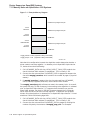
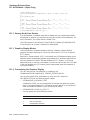
1.2 Upgrade Paths
The following figures show the upgrade and rolling upgrade paths for OpenVMS
Alpha and OpenVMS VAX.
During a cluster rolling upgrade, you upgrade each system disk individually,
allowing old and new versions of the operating system to run together in the
same cluster. You must have more than one system disk. The systems that are
not being upgraded remain available.
During a concurrent upgrade, you must shut down the entire cluster and upgrade
each system disk. No one can use the cluster until you upgrade and reboot each
computer. Once you reboot, each computer will be running the upgraded version
of the operating system.
The bold lines in Figure 1–1 and Figure 1–2 indicate direct supported upgrade
paths to Version 7.3. All other lines indicate supported upgrade paths, some for
prior versions.
1–2 Introduction
Introduction
1.2 Upgrade Paths
OpenVMS Alpha
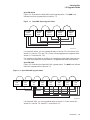
Figure 1–1 illustrates the OpenVMS Alpha upgrade paths. The bold lines
indicate the direct upgrade paths to Version 7.3.
Figure 1–1 OpenVMS Alpha Upgrade Paths
OpenVMS
Alpha
V6.2-1Hx
OpenVMS
Alpha
V7.0
OpenVMS
Alpha
V7.1-2
OpenVMS
Alpha
V7.2x
OpenVMS
Alpha
V7.3
VM-0572A-AI
For OpenVMS Alpha, you can upgrade directly to Version 7.3 from Version 6.2x,
Version 7.0, Version 7.1x, and 7.2x. Cluster rolling upgrades are supported from
Version 7.1-2 and Version 7.2x.
For complete instructions on installing or upgrading to OpenVMS Alpha Version
7.3, refer to the OpenVMS Alpha Version 7.3 Upgrade and Installation Manual.
OpenVMS VAX
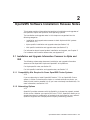
Figure 1–2 illustrates the OpenVMS VAX upgrade paths. The bold lines indicate
the direct upgrade paths to Version 7.3.
Figure 1–2 OpenVMS VAX Upgrade Paths
OpenVMS
VAX
V5.5-2
OpenVMS
VAX
V6.0
OpenVMS
VAX
V6.1
OpenVMS
VAX
V6.2
OpenVMS
VAX
V7.0
OpenVMS
VAX
V7.1
OpenVMS
VAX
V7.2
OpenVMS
VAX
V7.3
VM-0573A-AI
For OpenVMS VAX, you can upgrade directly to Version 7.3 from Version 6.1,
Version 6.2, Version 7.0, Version 7.1, and Version 7.2.
Introduction 1–3
Introduction
1.2 Upgrade Paths
If you are running Version 5.5-2, you can upgrade to Version 6.1 and then to
Version 7.3.
Caution
Install the following remedial kit before upgrading from Version 6.1 to
Version 7.3.
VAXBACK04_061
Remedial kits can be accessed at the following World Wide Web (WWW) address:
http://www.compaq.com/support/
If you have a service contract and cannot download software from the Internet,
call your Compaq support representative to receive the remedial kit on media
appropriate for your system.
Cluster rolling upgrades are supported from Version 7.1 and Version 7.2.
For complete instructions on installing or upgrading to OpenVMS VAX Version
7.3, refer to the OpenVMS Alpha Version 7.3 Upgrade and Installation Manual.
1.3 Upgrade and Installation Documentation Correction
V7.3
The warranted and migration support information in the printed version of the
OpenVMS Alpha and VAX Upgrade and Installation Manuals is incorrect. Please
use the corrected information in the following table or refer to the OpenVMS
Version 7.3 New Features and Documentation Overview.
Compaq provides two levels of support, warranted and migration, for mixedversion and mixed-architecture OpenVMS Cluster systems.
Compaq supports only two versions of OpenVMS running in a cluster at the same
time, regardless of architecture. Migration support helps customers move to
warranted OpenVMS Cluster version mixes with minimal impact on their cluster
environments.
Table 1–1 shows the level of support provided for all possible version pairings.
Table 1–1 OpenVMS Cluster Warranted and Migration Support
Alpha/VAX V7.3
Alpha V7.2x/
VAX V7.2
Alpha V7.1–2/
VAX V7.1
Alpha/VAX V7.3
WARRANTED
Migration
Migration
Alpha V7.2x/VAX V7.2
Migration
WARRANTED
Migration
Alpha V7.1–2/VAX V7.1
Migration
Migration
WARRANTED
1.4 Compaq’s Support Policy
V7.3
Compaq provides support for the current version and the previous version (for up
to 12 months) of the OpenVMS operating system. For earlier software versions, a
Prior Version Support contract may be available.
1–4 Introduction
Introduction
1.4 Compaq’s Support Policy
A software release is considered a current version when it is the most recent
release and for the twelve months following the release of a subsequent version.
A subsequent version is defined as a Major or New Feature release. Major
releases contain substantial new functionality. The version number increases to
the next integer (for example, 6.2 to 7.0). New Feature releases contain some
additional functionality. The version number increases to the next decimal
fraction (for example, 7.2 to 7.3). Thereafter, Prior Version Support may be
available.
For information about all levels of support, contact your Compaq support
representative or access the following Compaq web site:
http://www.compaq.com/support
For information about Prior Version Support services, access the following
Compaq web sites:
http://www.compaq.com/services/software/ss_mature.html
http://www.compaq.com/services/software/ss_pvs.html
Introduction 1–5
2
OpenVMS Software Installation Release Notes
This chapter contains information that applies to installations and upgrades of
the OpenVMS Alpha and OpenVMS VAX operating systems.
The installation and upgrade notes in this chapter are organized into the
following categories:
•
Installation and upgrade notes common to both Alpha and VAX systems
(see Section 2.1)
•
Alpha specific installation and upgrade notes (see Section 2.2)
•
VAX specific installation and upgrade notes (see Section 2.3)
For information about layered product installation and support, see Chapter 3.
For hardware and firmware release notes, see Appendix B.
2.1 Installation and Upgrade Information Common to Alpha and
VAX
The following release notes document installation and upgrade information
common to both OpenVMS Alpha and OpenVMS VAX platforms.
For Alpha-specific notes, see Section 2.2.
For VAX-specific installation and upgrade notes, see Section 2.3.
2.1.1 Compatibility Kits Required in Some OpenVMS Cluster Systems
V7.3
If you are planning to install OpenVMS Version 7.3 in an OpenVMS Cluster
system, in either a mixed-version cluster or a mixed-architecture cluster, you
need to install certain remedial kits (if you have not already installed them). For
more information, see Section 5.9.5.
2.1.2 Networking Options
V7.3
OpenVMS provides customers with the flexibility to choose the network protocol
of their choice. Whether you require DECnet or TCP/IP, OpenVMS allows you to
choose the protocol or combination of protocols that works best for your network.
OpenVMS supports both Compaq and third-party networking products.
OpenVMS Software Installation Release Notes 2–1
OpenVMS Software Installation Release Notes
2.1 Installation and Upgrade Information Common to Alpha and VAX
During the main installation procedure for OpenVMS Version 7.3, you have the
option of installing the following Compaq networking software:
•
Compaq TCP/IP Services for OpenVMS
TCP/IP Services and DECnet can run concurrently on your system. Once
you have installed Compaq DECnet-Plus for OpenVMS and TCP/IP Services
on your system, you can run DECnet applications and OSI applications, or
both, over your TCP/IP network. Refer to the DECnet-Plus for OpenVMS
Management Guide for more information about running DECnet over TCP/IP
(RFC 1859) and OSI over TCP/IP (RFC 1006).
•
Either DECnet-Plus for OpenVMS or Compaq DECnet for OpenVMS Phase
IV for OpenVMS. (Note that both DECnet products cannot run concurrently
on your system.)
DECnet-Plus contains all the functionality of the DECnet Phase IV product,
plus the ability to run DECnet over TCP/IP or OSI protocols.
Support for DECnet Phase IV is provided to customers with a Prior Version
Support Contract. For more information about the Prior Version Support
service, see Section 1.4.
Or, after you install OpenVMS, you can install a supported third-party
networking product of your choice.
For information about how to configure and manage your Compaq networking
software after installation, see the manuals listed in Table 2–1. The manuals in
online format are available on the OpenVMS Documentation CD-ROM and can be
ordered in printed format through Compaq (800-282-6672).
Table 2–1 Documentation: Configuring and Managing Networks
Compaq TCP/IP Services for OpenVMS
Compaq TCP/IP Services for OpenVMS Installation and
Configuration
AA–LU49M–TE1
Compaq TCP/IP Services for OpenVMS Management
AA–LU50L–TE1
Compaq TCP/IP Services for OpenVMS Management Commands
Reference
AA–PQQGH–TE1
Compaq TCP/IP Services for OpenVMS Sockets API and System
Services Programming
AA–LU51L–TE1
Compaq TCP/IP Services for OpenVMS Tuning and
Troubleshooting
AA–RN1VA–TE1
Compaq TCP/IP Services for OpenVMS Guide to IPv6
AA–RNJ3A–TE1
Compaq TCP/IP Services for OpenVMS SNMP Programming and
Reference
AA–R04BC–TE1
DECnet-Plus for OpenVMS (Phase V)
DECnet-Plus for OpenVMS Installation and Basic Configuration
AA–QPSUB–TE
1 These
manuals have been updated for TCP/IP Services Version 5.1 and are available to customers on
the OpenVMS layered products documentation CD–ROM. Look for PDF format, as well as HTML and
PostScript.
(continued on next page)
2–2 OpenVMS Software Installation Release Notes
OpenVMS Software Installation Release Notes
2.1 Installation and Upgrade Information Common to Alpha and VAX
Table 2–1 (Cont.) Documentation: Configuring and Managing Networks
DECnet-Plus for OpenVMS (Phase V)
DECnet-Plus for OpenVMS Applications Installation and
Advanced Configuration
AA–QPSVB–TE
DECnet-Plus for OpenVMS Network Management
AA–R1UHA–TE
DECnet for OpenVMS (Phase IV)
DECnet for OpenVMS Guide to Networking
AA–PV5ZA–TK
DECnet for OpenVMS Networking Manual
AA–PV60A–TK
DECnet for OpenVMS Network Management Utilities
AA–PV61A–TK
2.1.3 Upgrading Systems Running PATHWORKS Version 6.0 or Advanced
Server V7.2 for OpenVMS
V7.3
Both the PATHWORKS V6.0D for OpenVMS (Advanced Server) and the Compaq
Advanced Server V7.3 for OpenVMS ship with OpenVMS Version 7.3 and provide
file and print services for the OpenVMS system. Advanced Server V7.3 for
OpenVMS runs on OpenVMS Alpha Versions 7.2-1 and 7.3 only and is based on,
and succeeds, PATHWORKS Version 6.0. PATHWORKS V6.0D for OpenVMS
runs on OpenVMS Alpha Versions 7.3, 7.2-1, and 6.2 and on OpenVMS VAX
Versions 7.3, 7.2, and 6.2.
If you want to run OpenVMS V7.3, you must upgrade PATHWORKS and
Advanced Server for OpenVMS servers to their latest versions. PATHWORKS
servers prior to V6.0D, and Advanced Server for OpenVMS servers prior to V7.3
do not run on OpenVMS Version 7.3.
For more details about upgrading PATHWORKS V6.0 and Advanced Server V7.2x
servers, see Section 2.1.4 and Section 2.1.5, respectively.
For more information about the Advanced Server for OpenVMS product, see
Section 3.2.
2.1.4 Upgrading Systems Running PATHWORKS V6.0 Advanced Servers Prior
to V6.0D
V7.3
If you are upgrading an OpenVMS system that is currently running older versions
of the PATHWORKS for OpenVMS (Advanced Server), follow these steps:
1. Upgrade your PATHWORKS for OpenVMS (Advanced Server) to V6.0D.
2. Upgrade your OpenVMS Version 7.2 system to OpenVMS Version 7.3.
3. To upgrade a PATHWORKS for OpenVMS server to Advanced Server V7.3 for
OpenVMS:
a. If you are on a VAX-based system, migrate to an Alpha-based system.
b. Upgrade your Alpha system to OpenVMS Version 7.3.
c. Upgrade your PATHWORKS server to Advanced Server V7.3 for
OpenVMS.
OpenVMS Software Installation Release Notes 2–3
OpenVMS Software Installation Release Notes
2.1 Installation and Upgrade Information Common to Alpha and VAX
For information on PATHWORKS (LAN Manager) servers, see Section 3.3.2.
For more information about the Advanced Server for OpenVMS product, see
Section 3.2.
2.1.5 Upgrading Advanced Server for OpenVMS V7.2 or V7.2A
V7.3
If you you want to upgrade your Advanced Server for OpenVMS server, follow
these steps:
1. Upgrade your Advanced Server V7.2/7.2A for OpenVMS server to Advanced
Server V7.3 for OpenVMS.
2. Upgrade your OpenVMS Alpha system to OpenVMS Version 7.3.
Note
Because of changes to the OpenVMS Registry protocol, you cannot run
Advanced Server for OpenVMS software on OpenVMS Alpha Version 7.3
systems and non-Version 7.3 systems in the same cluster.
For more information about the Advanced Server for OpenVMS product, see
Section 3.2.
2.1.6 DECevent Version 3.1 or Later Required to Analyze Errors
V7.3
DECevent Version 3.1 or later is required to analyze OpenVMS error log files on
supported computers.
In OpenVMS Version 7.0 and earlier releases of OpenVMS, the DECevent DCL
command DIAGNOSE was defined during the operating system installation or
upgrade.
When you install OpenVMS Version 7.3, the DIAGNOSE command is disabled.
To enable the DIAGNOSE command, you must install the DECevent software
(included in the DECevent kit on the Compaq Systems Tool CD–ROM) after
you install OpenVMS Version 7.3. Otherwise, when you attempt to use the
DIAGNOSE command, you will receive the following system message:
$ DIAGNOSE [parameters]
%DIA-E-NOINSTAL, DIAGNOSE has not been installed on this system
For more information about DECevent, see OpenVMS System Manager’s Manual,
Volume 2: Tuning, Monitoring, and Complex Systems.
2.1.7 PCSI-I-RETAIN Messages During DECnet-Plus Installation
V7.2
If you upgrade to OpenVMS Version 7.3 and your system has either DCE
for OpenVMS or DECnet-Plus for OpenVMS installed on it, when you install
DECnet-Plus you may get PCSI-I-RETAIN informational messages for the
following files:
[SYSEXE]DTSS$SET_TIMEZONE.EXE
[SYSLIB]DTSS$RUNDOWN.EXE
[SYSUPD]DTSS$TIMEZONE_RULES.DAT
[SYSLIB]DTSS$SHR.EXE
2–4 OpenVMS Software Installation Release Notes
OpenVMS Software Installation Release Notes
2.1 Installation and Upgrade Information Common to Alpha and VAX
For example:
%PCSI-I-RETAIN, file [SYSEXE]DTSS$SET_TIMEZONE.EXE was not replaced
because file from kit has a lower generation number
You can ignore these messages. The DECnet-Plus kit has been properly
installed.
2.1.8 Installing DECwindows with Some Layered Products May Cause
Insufficient Global Sections
V7.3
Compaq DECwindows does not calculate sufficient global sections to start up if
you install it together with certain layered products. If you install DECwindows
together with one or more other layered products, DECwindows may fail to start
up during the first system startup after reboot. You will see a message similar to
the following on the console:
%DECW-W-BADVALUE, Free GBLSECTIONS is 251, should be at least 280
At this point, DECwindows offers to run AUTOGEN for you:
Do you want the system to run AUTOGEN for you [YES]?
Some SYSGEN parameters must be reset for DECwindows to start. If you
type YES, AUTOGEN changes these parameters and reboots your system, but
DECwindows does not start. If you type NO, AUTOGEN does not run or cause
a reboot, allowing you to login and adjust the SYSGEN parameters manually to
enable DECwindows to start.
Perform the following steps so that DECwindows starts:
1. Type NO to the question:
Do you want the system to run AUTOGEN for you [YES]?
2. When the system completes startup, log in to the console.
3. Manually update SYS$SYSTEM:MODPARAMS.DAT to increase the size
of the global sections. For example, you may add the following line to
SYS$SYSTEM:MODPARAMS.DAT:
MIN_GBLSECTIONS = 700
4. Run AUTOGEN to correct the system parameters.
$ @SYS$UPDATE:AUTOGEN GETDATA TESTFILES NOFEEDBACK
$ @SYS$UPDATE:AUTOGEN GENPARAMS REBOOT NOFEEDBACK
5. Check whether current values are sufficient to run DECwindows by running:
$ @SYS$MANAGER:DECW$GETPARAMS.COM
2.1.9 Daylight Savings Time Error Message When Booting with Minimum
Startup
V7.3
When you boot with minimum startup (STARTUP_P1 "MIN"), the job controller
indicates that Daylight Savings Time adjustments are not possible with the
following message:
%JBC-W-SYSERROR, SYS$MANAGER:JBC$DST_COMMAND.COM daylight savings time process
failed system service error at PC 00000000
OpenVMS Software Installation Release Notes 2–5
OpenVMS Software Installation Release Notes
2.1 Installation and Upgrade Information Common to Alpha and VAX
This is correct and normal information to ensure awareness of a possible effect on
the system time during the minimum startup procedure. It can safely be ignored
if it does not affect your own requirements for the startup of the system (such as,
during an upgrade or installation).
2.2 Installation and Upgrade Information Specific to Alpha
The release notes in this section pertain only to installations or upgrades
of OpenVMS Alpha operating systems. See Section 2.1 for additional notes
that pertain to both Alpha and VAX systems. For complete information about
installing or upgrading to OpenVMS Alpha Version 7.3, refer to the OpenVMS
Alpha Version 7.3 Upgrade and Installation Manual.
2.2.1 Upgrading to OpenVMS Alpha Version 7.3 from V7.2-1 or V7.2-1H1
V7.3
If you are upgrading from OpenVMS Alpha Version 7.2-1 or 7.2-1H1, and you
have any of the following remedial kits installed on your system, follow these
instructions before performing the upgrade:
•
DEC-AXPVMS-VMS721_DRIVER-V0200-4.PCSI
•
DEC-AXPVMS-VMS721_MANAGE-V0100-4.PCSI
•
DEC-AXPVMS-VMS721_VX1-V0200-4.PCSI
•
DEC-AXPVMS-VMS721H1_CPU2308-V0100-4.PCSI
•
DEC-AXPVMS-VMS721H1_ACRTL-V0200-4.PCSI
During an OpenVMS Version 7.3 upgrade, operating system files from the
previous version of OpenVMS are deleted. Due to errors in the above remedial
kits, files from the newly installed system may be deleted. This may cause the
system to be unbootable.
To prevent the Version 7.3 files from being deleted, you must perform the
following steps on your system prior to installing the OpenVMS Version 7.3
Operating System:
1. Edit the file SYS$COMMON:[SYSUPD]VMS$REMEDIAL_OLD_FILES.TXT.
Change the incorrect lines (as shown in the following table) with the corrected
lines. Note that the lines may appear within the file in any order, not
necessarily in the order of this table.
Incorrect lines
[SYSLIB]SYS$ICBM.EXE
VMS721_DRIVER-V0200
[SYSLIB]SMI$SHR.EXE
VMS721_MANAGE-V0100
[SYS$LDR]SYS$GFDRIVER.EXE _OLD
VMS721_VX1-V0200
[SYSEXE]SYS$CONFIG.DAT_0LD
VMS721_VX1-V0200
[SYSLIB]DECC$SHR_OLD
VMS721H1_ACRTL-V0200
[SYS$LDR]SYS$CPU_ROUTINES_2308.EXE
VMS721H1_CPU2308-V0100
[SYSEXE]SYS$SMHANDLER_SLAVE_2308.EXE
VMS721H1_CPU2308-V0100
2–6 OpenVMS Software Installation Release Notes
OpenVMS Software Installation Release Notes
2.2 Installation and Upgrade Information Specific to Alpha
Corrected lines
[SYSLIB]SYS$ICBM.EXE_OLD
VMS721_DRIVER-V0200
[SYSLIB]SMI$SHR.EXE_OLD
VMS721_MANAGEV0100
[SYS$LDR]SYS$GFDRIVER.EXE_OLD
VMS721_VX1-V0200
[SYSEXE]SYS$CONFIG.DAT_OLD
VMS721_VX1-V0200
[SYSLIB]DECC$SHR.EXE_OLD
VMS721H1_ACRTLV0200
[SYS$LDR]SYS$CPU_ROUTINES_2308.EXE_OLD
VMS721H1_CPU2308V0100
[SYSEXE]SYS$SMHANDLER_SLAVE_2308.EXE_OLD
VMS721H1_CPU2308V0100
Corrections explained
[SYSLIB]SYS$ICBM.EXE_OLD
adds _OLD to name
[SYSLIB]SMI$SHR.EXE_OLD
adds _OLD to name
[SYS$LDR]SYS$GFDRIVER.EXE_OLD
deletes a space
[SYSEXE]SYS$CONFIG.DAT_OLD
changes 0 (zero) to O
[SYSLIB]DECC$SHR.EXE_OLD
adds .EXE in name
[SYS$LDR]SYS$CPU_ROUTINES_2308.EXE_OLD
adds _OLD to name
[SYSEXE]SYS$SMHANDLER_SLAVE_2308.EXE_OLD
adds _OLD to name
2. Close the SYS$COMMON:[SYSUPD]VMS$REMEDIAL_OLD_FILES.TXT file.
3. Purge the previous version of the file.
After changing the SYS$COMMON:[SYSUPD]VMS$REMEDIAL_OLD_
FILES.TXT file, you can install the OpenVMS Version 7.3 Operating System
kit using the documented installation instructions.
A remedial kit that automates this workaround will be available at the following
web site:
http://ftp.support.compaq.com/patches/.new/openvms.shtml
2.2.2 Registry Considerations When Upgrading From OpenVMS V7.2-1 to
OpenVMS V7.3
V7.3
Because Registry components in OpenVMS Version 7.3 are incompatible with
their counterparts in OpenVMS Version 7.2-1, you may need to take special steps
when upgrading Alpha cluster members from V7.2-1 to V7.3.
If you choose to upgrade all Alpha nodes in the cluster at once, then Compaq
recommends that you shutdown only the Registry and all applications using
the Registry before upgrading, and then reverse the process for startup after
upgrading.
If you choose to upgrade only some nodes in the cluster at a time, then be aware
that you can run Registry servers and applications on only the V7.2-1 nodes in
the cluster, or on only the V7.3 nodes in the cluster, but not both. Thus, before
you upgrade each node in the cluster, you need to inhibit the startup of the
following on the upgraded node:
OpenVMS Software Installation Release Notes 2–7
OpenVMS Software Installation Release Notes
2.2 Installation and Upgrade Information Specific to Alpha
•
The Registry
•
Advanced Server
•
COM layered products
•
Any other applications using Registry
At some point, you will have to shutdown all remaining Registry-based activity
in the cluster just before you start up Registry and applications using Registry
services on the V7.3 nodes.
Note
If you are running Compaq Advanced Server for OpenVMS on OpenVMS
V7.2-1, you must upgrade all nodes to Advanced Server for OpenVMS
V7.3 before you upgrade any OpenVMS V7.2-1 node to OpenVMS V7.3.
The following steps describe the procedure you can use when upgrading from
V7.2-1 to V7.3 on systems running the OpenVMS NT Registry:
1. Though not required, it is best to shut down the Registry in a graceful
manner. Before shutting down the Registry, shut down all layered products
that use the Registry. First, shut down applications specific to your
environment, if any, which are known to use Registry services. Next, shut
down layered products which use Registry services: for example, first shut
down COM for OpenVMS, then Advanced Server. COM can be shut down
using the command:
$ @SYS$STARTUP:DCOM$SHUTDOWN.COM
Advanced Server can be shut down using the command:
$ @SYS$STARTUP:PWRK$SHUTDOWN.COM
2. Create a snapshot of the Registry database by using the command:
$ MCR REG$CP CREATE SNAPSHOT
3. Export the Registry database by using the command:
$ MCR REG$CP EXPORT DATABASE [/LOG/OUTPUT=filename]
4. If you are upgrading all nodes in the cluster at the same time, make a note as
to which node was acting as the master Registry server. You can determine
which node was the master by issuing the command:
$ SHOW SERVER REGISTRY/MASTER
5. Shut down the Registry server or servers. If you are upgrading all nodes in
the cluster at the same time, this can be performed using the command:
$ SET SERVER REGISTRY/CLUSTER/EXIT
If you are upgrading just one node in the cluster, issue the following command
on the node:
$ SET SERVER REGISTRY/EXIT
If that node was the master, wait until it exits before you take any other
action. Another node in the cluster will become the master.
2–8 OpenVMS Software Installation Release Notes
OpenVMS Software Installation Release Notes
2.2 Installation and Upgrade Information Specific to Alpha
6. Ensure that the Registry server does not restart on the node or nodes you are
upgrading until the upgrade is complete, or, if you are selectively upgrading
nodes, until you determine that you wish to switch over to the new server.
To prevent Registry startup on reboot, you need to check two things on each
node:
a. In the file SYS$MANAGER:SYLOGICALS.COM, comment out any logical
name definitions that contain the string:
"TO_BE_STARTED"
b. Make a note of the original settings for restoring later.
c. If your SYS$MANAGER:SYSTARTUP_VMS.COM automatically starts up
Advanced Server, for example, by issuing the command:
$ @SYS$STARTUP:PWRK$STARTUP.COM
Comment out that line so that Advanced Server does not start on that
node.
7. Proceed with the upgrade on each node.
8. Once all nodes have been upgraded, restart the master server by using the
following command on the node that was originally running the master
server:
$ SET SERVER REGISTRY/START
If you are selectively upgrading nodes, and you are ready to switch to using
Registry services on the upgraded nodes, shut down the Registry server, and
applications using Registry services, on all remaining OpenVMS V7.2-1 nodes
in the cluster using steps 1-6 outlined above. Then you can start the Registry
server on one of the upgraded nodes.
9. Verify that the Registry is operational by using the command:
$ MCR REG$CP LIST KEY HKEY_LOCAL_MACHINE
This command should display at least four subkeys of the HKEY_LOCAL_
MACHINE root key. The same command should be repeated with the HKEY_
USERS root key, which should display at least one subkey.
Note
In the unlikely event that the Registry is not operational, perform the
following: follow the steps in the OpenVMS Connectivity Developer Guide
describing how to restore your database from the snapshot files. If this
fails, delete all the files in the SYS$REGISTRY directory, or rename
the directory, and invoke SYS$STARTUP:REG$CONFIG to reconfigure
the Registry server (see the OpenVMS Connectivity Developer Guide for
details), then import the database file that was saved in step 3.
10. Start the backup Registry servers on the other upgraded nodes using the
command:
$ SET SERVER REGISTRY/START
11. Restore the values of "TO_BE_STARTED" logical name definitions in
SYS$MANAGER:SYLOGICALS.COM and the invocation of Advanced Server
startup in the SYS$MANAGER:SYSTARTUP_VMS.COM file.
OpenVMS Software Installation Release Notes 2–9
OpenVMS Software Installation Release Notes
2.2 Installation and Upgrade Information Specific to Alpha
If you are selectively upgrading nodes, you should comment
out the "TO_BE_STARTED" logical name definitions in the
SYS$MANAGER:SYLOGICALS.COM file and the invocation of Advanced
Server startup in the SYS$MANAGER:SYSTARTUP_VMS.COM file on any
remaining OpenVMS V7.2-1 nodes in the cluster, as described in step 6.
12. Restart the Advanced Server, COM for OpenVMS and any other applications
that use Registry on the upgraded nodes. If you are using Advanced Server,
but not COM for OpenVMS, you will also have to start the ACME Server
using the command file:
$ @SYS$STARTUP:NTA$STARTUP_NT_ACME
2.2.3 CONFIGURE Process Replaced by QIO$CONFIGURE Process
V7.3
The CONFIGURE process is one phase of the system startup procedure, which
is controlled by SYS$SYSTEM:STARTUP.COM. Starting with OpenVMS Version
7.3, the QIO$CONFIGURE process replaces the CONFIGURE process. The
QIO$CONFIGURE process contains the CONFIGURE process and other software
specific to QIOserver. If you have included the CONFIGURE process in a
command procedure, you must change its name to QIO$CONFIGURE.
For more information about SYS$SYSTEM:STARTUP.COM and the role of
the QIO$CONFIGURE process in system startup, see the OpenVMS System
Manager’s Manual.
2.2.4 Java™ 2 SDK v 1.2.2-1 Is Incompatible with OpenVMS Version 7.3
V7.3
Due to contractual agreements with Adobe Systems Incorporated, Compaq has
removed the Display PostScript files and libraries from the Compaq DECwindows
Motif for OpenVMS V1.2-6 software. Consequently, OpenVMS Alpha Version 7.3
does not include the files necessary to run a Java application with a GUI using
the Java Software Development Kit (J2SDK) v 1.2.2-1.
The restriction applies only to the Java 2 SDK v 1.2.2-1 release. The Java
Development Kit (JDK) version 1.1 as well as all Java 2 SDK releases subsequent
to Java 2 SDK v 1.2.2-1 are not dependent on the Adobe Display PostScript
software or its libraries.
Note that the Java 2 SDK v 1.2.2-3 is included on the Compaq OpenVMS
e-Business Infrastructure Package Version 1.1 CD–ROM.
2.2.5 Error When Upgrading Compaq TCP/IP Services for OpenVMS
V7.2
When upgrading a version of Compaq TCP/IP Services for OpenVMS Alpha that
is earlier than Version 5.0, you may encounter the following error:
%PCSI-I-PRCOUTPUT, output from subprocess follows ...
%LIBRAR-E-LOOKUPERR, error looking up UCX in
$4$DKA300:[SYS0.SYSCOMMON.][SYSHLP]SDA.HLB;1
-LBR-E-KEYNOTFND, key not found
%PCSI-E-EXERMVFAIL, product supplied EXECUTE REMOVE procedure failed
%PCSI-E-OPFAILED, operation failed
Terminating is strongly recommended.
Do you want to terminate? [YES]
2–10 OpenVMS Software Installation Release Notes
OpenVMS Software Installation Release Notes
2.2 Installation and Upgrade Information Specific to Alpha
This error can occur either when you are upgrading Compaq TCP/IP Services as
part of an OpenVMS upgrade, or during a separate TCP/IP Services upgrade.
When the old version of TCP/IP Services is removed, it attempts to remove
the module UCX from the SDA Help library. However, if OpenVMS has been
upgraded since TCP/IP Services was installed, the SDA Help library has been
replaced by a new library and the UCX module that TCP/IP Services inserted
into the old SDA Help library is not found.
This problem can also occur if you attempt to remove Compaq TCP/IP Services
for OpenVMS.
The workaround to upgrade or remove Compaq TCP/IP Services is to answer
"NO" to the question "Do you want to terminate?" A NO response allows the
operation to complete.
Note
Normally you should answer "YES" (the default) to the "Do you want
to terminate?" question unless Compaq (or another software provider)
specifically instructs you to answer otherwise.
2.2.6 Rolling Upgrades for MEMORY CHANNEL Configurations
V7.3
If you are performing a rolling upgrade from Version 7.1 (or a Version 7.1
variant) to Version 7.2 (or a Version 7.2 variant), or to Version 7.3, and are
using MEMORY CHANNEL adapters (CCMAA-xx), see Section 5.9.11 for special
instructions before you upgrade.
2.2.7 Using the Extended File Cache (XFC) in Mixed Version OpenVMS Cluster
Systems
V7.3
If you have an OpenVMS Cluster system that contains earlier versions of
OpenVMS Alpha or OpenVMS VAX and you want to use XFC with OpenVMS
Version 7.3, see Table 5–1 for a list of remedial kits you must install on the
systems that are running the earlier versions of OpenVMS.
2.2.8 X.25 Version 1.2 and Earlier Not Supported
V7.3
X.25 Version 1.2 and earlier will not operate on OpenVMS Version 7.3.
If you are planning to upgrade to OpenVMS Version 7.3, make sure you remove
X.25 Version 1.2 or earlier before you initiate the upgrade. Compaq recommends
that you install X.25 Version 1.5.
2.3 Installation and Upgrade Information Specific to VAX
The release notes in this section pertain only to installations or upgrades of
OpenVMS VAX operating systems. See Section 2.1 for additional notes that
pertain to both Alpha and VAX systems. For complete information about
installing or upgrading to OpenVMS VAX Version 7.3, refer to the OpenVMS VAX
Version 7.3 Upgrade and Installation Manual.
OpenVMS Software Installation Release Notes 2–11
OpenVMS Software Installation Release Notes
2.3 Installation and Upgrade Information Specific to VAX
2.3.1 Magnetic Tape Media for OpenVMS VAX to Be Retired
V7.3
OpenVMS VAX Version 7.3 is the last OpenVMS release for which TK50 and
magnetic tape media will be distributed. All future OpenVMS VAX releases will
be available on CD–ROM media only. For more information, see Appendix A.
2.3.2 Error at Shutdown After Booting CD–ROM for Full Environment
Installation
V7.2
When you select to shut down the system (option 2) after booting a CD–ROM
during a full OpenVMS VAX environment installation, you may encounter a
problem on certain CPU types. However, these problems do not adversely affect
the installation. The problems affect the following CPU types:
•
VAXstation 4000-96
After completing the shutdown on a VAXstation 4000-96, the keyboard no
longer responds. To recover, power down your CPU, then power it back up.
•
VAX 3100 or a VAX 3100-M48
On either a VAX 3100 or a VAX 3100-M48, the system may crash with a fatal
bugcheck. To continue the installation, boot the new system disk.
2–12 OpenVMS Software Installation Release Notes
3
OpenVMS Associated Products Release Notes
This chapter contains installation and support information about a broad range
of OpenVMS associated products.
For notes about using compilers, linkers, and run-time library routines, see
Chapter 6.
3.1 Layered Product Support
The Software Public Rollout Reports for OpenVMS list the availability of
Compaq’s software products shipping on the Software Products Library kits
(CD–ROM consolidations) for OpenVMS Alpha and OpenVMS VAX.
The reports contain the product name and version, the operating system version
required to support the product, and the volume ship date for the product. The
information in these tables is continually evolving and is subject to change.
The reports are intended for public distribution and are updated monthly. The
information is not provided in these release notes because of the changing nature
of the information.
These reports are available from the OpenVMS home page on the World Wide
Web in the OpenVMS Products section. Use the following URL to access the
OpenVMS Software Public Rollout Reports for OpenVMS:
http://www.openvms.compaq.com/openvms/os/swroll/index.html
If you do not have Internet access, you can find the operating system support
information on any of the quarterly Software Products Libraries, in the following
directory:
[README]SW_COMPAT_MATRIX.PS (.TXT)
The Software Public Rollout Reports are also available from your Compaq support
representative.
3.2 Compaq Advanced Server Version 7.3 for OpenVMS (Alpha
Only)
V7.3
Advanced Server V7.3 for OpenVMS includes support of the following features:
•
Member server role (allowing the server to participate in Windows 2000
native-mode domains)
•
Greater compatibility with a wide variety of clients and legacy applications,
with support of:
–
Extended character sets, in addition to Extended File Specifications
OpenVMS Associated Products Release Notes 3–1
OpenVMS Associated Products Release Notes
3.2 Compaq Advanced Server Version 7.3 for OpenVMS (Alpha Only)
–
Alias file names, created for shared files whose names do not comply with
the more restricted file-naming conventions of legacy applications, such as
MS-DOS
•
Remote Windows NT printer management (SpoolSS) for printers shared on
the Advanced Server for OpenVMS
•
DNS for resolving NetBIOS names
•
Cluster load balancing using DNS to resolve the server cluster alias name
•
PCSI for installing the server
•
Windows 2000 client and domain support
The Compaq Advanced Server V7.3 for OpenVMS is the only version of the
Advanced Server for OpenVMS supported on OpenVMS Alpha Version 7.3. You
must upgrade previous versions of the Advanced Server for OpenVMS (versions
7.2 and 7.2A) to V7.3.
Note
Because of changes to the OpenVMS Registry protocol, you cannot run
Advanced Server for OpenVMS software on OpenVMS Alpha Version 7.3
systems and non-Version 7.3 systems in the same cluster.
For more information about the OpenVMS Registry protocol change, see
Section 6.19. For more information, see Section 2.1.5.
Both the current and preceding versions of the Advanced Server for OpenVMS
(Versions 7.3, 7.2A, and 7.2) also run on OpenVMS Alpha Version 7.2-1.
For information about upgrading from Compaq PATHWORKS for OpenVMS to
the Advanced Server for OpenVMS, see Section 2.1.4. For more information on
upgrading PATHWORKS for OpenVMS and about installing Advanced Server for
OpenVMS, refer to the Advanced Server for OpenVMS Server Installation and
Configuration Guide provided with the kit documentation.
To access Advanced Server V7.3 for OpenVMS on OpenVMS Alpha Version
7.3, clients must be licensed using the new Advanced Server V7.3 license PAK:
PWLMXXXCA07.03. For more information, refer to the Advanced Server for
OpenVMS Guide to Managing Advanced Server Licenses.
3.3 PATHWORKS for OpenVMS (Alpha and VAX)
This section contains release notes pertaining to Compaq PATHWORKS for
OpenVMS.
3.3.1 PATHWORKS for OpenVMS Support
V7.3
PATHWORKS V6.0D for OpenVMS (Advanced Server) is the only PATHWORKS
for OpenVMS server supported on OpenVMS Version 7.3. (As noted in
Section 3.2, Advanced Server V7.3 for OpenVMS is also supported on OpenVMS
Version 7.3.) Earlier versions of PATHWORKS for OpenVMS servers must be
upgraded. For more information, see Section 2.1.4.
3–2 OpenVMS Associated Products Release Notes
OpenVMS Associated Products Release Notes
3.3 PATHWORKS for OpenVMS (Alpha and VAX)
You can run PATHWORKS V6.0D for OpenVMS (Advanced Server) on either
OpenVMS Alpha Versions 7.3, 7.2-1, or 6.2, or on OpenVMS VAX Versions 7.3,
7.2, or 6.2.
To access PATHWORKS V6.0D for OpenVMS (Advanced Server) on OpenVMS
Version 7.3, clients must be licensed using the license PAK PWLMXXXCA06.00,
PWLMXXXCA07.02, or PWLMXXXCA07.03. For more information, refer to the
Advanced Server for OpenVMS Guide to Managing Advanced Server Licenses.
3.3.2 PATHWORKS Version 5.0 for OpenVMS (LAN Manager) Not Supported
V7.3
PATHWORKS Version 5.0 for OpenVMS (LAN Manager) is not supported on
OpenVMS Version 7.3.
If you are running PATHWORKS Version 5.0 for OpenVMS (LAN Manager)
and want to offer file and print services after you install OpenVMS Version
7.3, you must upgrade the file and print server to PATHWORKS V6.0D for
OpenVMS (Advanced Server) before you install OpenVMS Version 7.3. For
information about upgrading from PATHWORKS Version 5.0 for OpenVMS (LAN
Manager) to PATHWORKS Version 6.0 for OpenVMS (Advanced Server), refer
to the PATHWORKS for OpenVMS (Advanced Server) Server Installation and
Configuration Guide provided with the kit documentation. For information about
upgrading PATHWORKS V6.0 for OpenVMS (Advanced Server) to PATHWORKS
V6.0D for OpenVMS (Advanced Server), see Section 2.1.4.
You cannot upgrade directly from PATHWORKS Version 5.0 for OpenVMS (LAN
Manager) to Advanced Server Version 7.3 for OpenVMS.
3.4 C and C++
This section contains release notes pertaining to Compaq C and Compaq C++
(formerly named DEC C and DEC C++).
3.4.1 Changes to Compaq C RTL Time Zone Rules
V7.3
In OpenVMS V7.3, the time zone database has been updated as follows:
•
•
In the Europe timezone file, the rules for the following time zones have been
updated:
Time Zone Name
Territory or State
Reykjavik
Iceland
Turkey
Turkey
In the Asia timezone file, the rules for the following time zones have been
updated:
Time Zone Name
Territory or State
Jerusalem
Israel
ROK
Republic of Korea
OpenVMS Associated Products Release Notes 3–3
OpenVMS Associated Products Release Notes
3.4 C and C++
•
In the Australia timezone file, the rules for the following time zones have
been updated:
Time Zone Name
Territory or State
ACT
Australia Capital Territory
NSW
New South Wales
NT
Northern Territory
QLD
Queensland
SA
South Australia
TAS
Tasmania
VIC
Victoria
WA
Western Australia
3.4.2 STARLET Header Files Now Ship with OpenVMS VAX
V7.1
Starting with Version 7.1, OpenVMS VAX directly supplies the STARLET header
files for Compaq C and Compaq C++ in SYS$LIBRARY:SYS$STARLET_C.TLB, as
has always been done on OpenVMS Alpha systems. Compaq C and Compaq C++
compiler Versions 5.2 or later are required to access the STARLET headers. See
a warning about installing earlier Compaq C and Compaq C++ compiler versions
on OpenVMS VAX in Section 3.4.3.
The content of the STARLET headers has also been edited to correct deficiencies
in versions supplied by the Compaq C and Compaq C++ compilers in releases
prior to Version 7.1.
3.4.3 Pre-Version 5.2 Kits May Delete SYS$STARLET_C.TLB (VAX Only)
V7.1
Installing a version of the Compaq C or Compaq C++ compiler lower than
Version 5.2 on OpenVMS VAX Version 7.1 or higher might damage or delete
SYS$LIBRARY:SYS$STARLET_C.TLB. (See Section 3.4.4 for another warning
about installing Compaq C++ Version 5.3 on OpenVMS VAX.)
3.4.4 Compaq C++ Version 5.3 Installation Fails (VAX Only)
V7.1
When you attempt to install Compaq C++ Version 5.3 on VAX systems running
OpenVMS, the installation fails because the Version 5.3 kit fails to install the
system headers.
Compaq C++ Version 5.4 corrects these problems.
3.5 COBOL (Alpha Only)—RMS Special Registers and RMS$_FNM
Compared to RMS$CRE
V7.3
Due to the addition of Extended File Support in OpenVMS Alpha V7.2 you
may notice changes in the handling of I/O runtime diagnostics and RMS special
registers on OpenVMS Alpha V7.2 and higher. In particular, a long filename
that produced RMS$_FNM under versions of OpenVMS Alpha prior to V7.2 now
produces RMS$_CRE on OpenVMS Alpha V7.2 and higher. This difference is
3–4 OpenVMS Associated Products Release Notes
OpenVMS Associated Products Release Notes
3.5 COBOL (Alpha Only)—RMS Special Registers and RMS$_FNM Compared to RMS$CRE
reflected in I/O runtime diagnostics and RMS special registers. You do not need
to use the new ODS-5 support to see these RMS differences.
3.6 DECdfs
This section contains release notes pertaining to Compaq DECdfs for OpenVMS
(formerly named DECdfs).
3.6.1 Version 2.3-1 Required for OpenVMS Alpha and VAX
V7.3
If you want to run Compaq DECdfs for OpenVMS on OpenVMS Alpha Version
7.3, you must install Version 2.3-1. If you install earlier versions of DECdfs
on OpenVMS Alpha Version 7.3, your system will fail. Compaq DECdfs for
OpenVMS Version 2.3-1 ships with OpenVMS Version 7.3.
Compaq DECdfs for OpenVMS Version 2.3-1 is also recommended for OpenVMS
VAX Version 7.3 systems. Earlier versions of DECdfs for OpenVMS might cause
your OpenVMS VAX system to fail, causing DECdfs to function with limited
capacity.
3.6.2 Version 2.3-1 Recommended for Systems Running Compaq DECnet-Plus
for OpenVMS
V7.3
Compaq DECdfs Version 2.3-1 contains corrections for a number of connectionrelated issues when running on a system with DECnet-Plus — particularly on
systems with multiple network circuits. Therefore, Compaq DECdfs Version
2.3-1 is highly recommended for any supported system running DECnet/OSI or
DECnet-Plus.
In addition, Compaq DECdfs Version 2.3-1 adds support for DECnet-over-IP
connections. For more information, please refer to the release notes left in
SYS$HELP by the product installation.
3.7 DECram Version Support
V7.3
The following table summarizes Compaq DECram version level support on
OpenVMS systems for creating a DECram disk:
Platform
OpenVMS Version
DECram Version Support
VAX
All versions
DECram Version 3.0 is not supported.
Alpha
Prior to OpenVMS Version
7.2-1H1
DECram Version 2.3 is supported.
DECram Version 3.0 is not supported.
Alpha
Version 7.2-1H1
Either DECram Version 3.0 or DECram
Version 2.3 is supported.
Alpha
Version 7.3
DECram Version 3.0 is supported.
DECram Version 2.3 is supported.
DECram Version 3.0 is designed specifically to take advantage of some of the
advanced capabilities, such as clustering and Galaxy shared memory, of the
newest Alpha systems. One of the major differences between Version 2.3 and
Version 3.0 capabilities is that Version 3.0 moves the virtual device addressing
OpenVMS Associated Products Release Notes 3–5
OpenVMS Associated Products Release Notes
3.7 DECram Version Support
from the S1 address into the S2 address space. This change allows for the
creation and addressing of devices larger than 2 gigabytes (GBs).
Any Alpha-based system can be easily upgraded to DECram Version 3.0. With
Version 3.0 you can use the new DECRAM command interface or continue
using the same familiar commands from SYSMAN for creating, initializing, and
mounting DECram disks.
DECRAM Version 3.0 disks are created and formatted by the DECRAM> prompt
and are initialized using the DCL INITIALIZE (INIT) command. If you are
configuring DECram Version 3.0 or later on OpenVMS Alpha (Version 7.2-1H1
and later), you can generate a DECram startup procedure to set up the disk and
copy any required files to it. Usually, this procedure is called from the system
startup procedure SYS$MANAGER:SYSTARTUP_VMS.COM.
It is important to remember to check for disk errors after issuing any DECRAM
command. Not all errors are returned to the user interface. Errors specific to
a device are sent to the system errorlog. Type SHOW DEVICE MD at the DCL
prompt to see if any device errors were generated as a result of a DECram
command. You will need to use an errorlog analyzer tool to recover the error.
Errors are logged in ASCII file format so you could search for errors with an
MD-E-FAILURE prefix in the SYS$SYSROOT:[SYSERR]ERRLOG.SYS file.
On OpenVMS Alpha systems (Version 7.2-1H1 or later) running DECram Version
3.0, the only requirements are that a DECram disk must have 516 bytes of free
page list per block (512 bytes) of disk space allocated.
If you plan to use freeze writes with OpenVMS Volume Shadowing for OpenVMS,
be sure to verify that the version of volume shadowing that you are using
supports this feature. If it does not, then be aware that if the physical disk goes
away, you will be writing to a volatile disk.
DECram Version 3.0 and supporting documentation are included in the OpenVMS
Version 7.3 kit in the following directory:
[.DECRAM_030]
DECram documentation is also included on the OpenVMS Documentation
CD–ROM.
For the next major release of OpenVMS, DECram Version 3.0 will be the only
version supported on OpenVMS Alpha. We will continue to support DECram
Version 2.3 on OpenVMS VAX.
For more information about the contents of the DECram directory, refer to
the Guide to OpenVMS Version 7.3 CD–ROMs. For information about the new
features of DECram V3.0, refer to the OpenVMS Version 7.3 New Features and
Documentation Overview.
3.8 Lightweight Directory Access Protocol (LDAP) API
The following sections contain release notes pertaining to the LDAP API.
3.8.1 The Routine ldap_get_option Returns Error -1 When ld Is NULL
V7.3
Using a value of NULL for the ld parameter in a call to ldap_get_options( )
results in an error of -1 being returned, rather than the routine returning a set of
global default data.
3–6 OpenVMS Associated Products Release Notes
OpenVMS Associated Products Release Notes
3.8 Lightweight Directory Access Protocol (LDAP) API
3.8.2 The Routine ber_flatten( ) Does Not Detect Mismatched Braces
V7.3
The routine ber_flatten( ) does not correctly detect the situation where ’{’ and ’}’
format modifiers in a BerElement are incorrectly matched.
3.9 DECwindows Motif
This section contains release notes pertaining to the Compaq DECwindows Motif
for OpenVMS layered product.
3.9.1 System Parameter Values Required for Installation
V7.2
The installation procedure for DECwindows Motif for OpenVMS Versions 1.2-4,
1.2-5, and 1.2-6 can fail if the values for the GBLPAGES, FREE_GBLPAGES, and
CLISYMTBL system parameters are set too low.
The installation fails with the following error:
%SYSTEM-W-NOSUCHFILE, no such file
\sys$library:decw$xlibshr.exe\
If the installation fails, set these parameters to the minimum values shown in
the following table, then reinstall the product.
GBLPAGES
FREE_GBLPAGES
CLISYMTBL
Alpha
150000
92000
512
VAX
62000
47000
265
3.9.2 Language Variants Not Available in Some Versions
V7.3
Language variants are not available for Compaq DECwindows Motif for
OpenVMS Version 1.2-6. The Japanese and German variants are available
for DECwindows Motif Version 1.2-5, and the Hebrew variant is available for
DECwindows Motif Version 1.2-4. Consult your Compaq support representative
for more information.
3.10 MultiNet® Version 4.3
V7.3
Users of Process Software MultiNet Version 4.3 (or earlier) who are also using
DCE should install the UCXDRIVER-041_a043 (or later) ECO from Process
Software.
Refer to the following web site to obtain the most recent patch and any
dependencies for you version and/or contact Process Software Technical Support:
http://www.multinet.process.com/eco.html
OpenVMS Associated Products Release Notes 3–7
OpenVMS Associated Products Release Notes
3.11 Installing Compaq Open3D on OpenVMS Alpha Version 7.3
3.11 Installing Compaq Open3D on OpenVMS Alpha Version 7.3
V7.3
During installation of Open3D on OpenVMS Alpha Version 7.3, an older version
of the SYS$LOADABLE_IMAGES:SYS$GYCDRIVER.EXE image is installed.
Before you install Open3D on OpenVMS Alpha Version 7.3 perform one of the
following tasks:
•
Create a backup copy of the SYS$LOADABLE_
IMAGES:SYS$GYCDRIVER.EXE image. Once Open3D is installed, restore
the backup copy of SYS$LOADABLE_IMAGES:SYS$GYCDRIVER.EXE.
•
Do not purge files during the Open3D installation, and enter the following
command after installation:
$ RENAME SYS$LOADABLE_IMAGES:SYS$GYCDRIVER.EXE;-1 ;0
3.12 Pascal (Alpha Only)—Installing Compaq Pascal Version 5.5
After an Upgrade
V7.3
After upgrading to OpenVMS, you should reinstall Compaq Pascal to produce
new versions of STARLET.PAS and other definition files to match the upgraded
system.
If you do not reinstall Compaq Pascal after upgrading to OpenVMS, the compiler
on your system will still work correctly. However, STARLET.PAS and the other
definition files will not contain any new or corrected definitions supplied by the
OpenVMS upgrade.
Note that because of changes in OpenVMS, the Compaq Pascal Version 5.5 kit
can sometimes go into an infinite loop when it is installed on OpenVMS Alpha.
This problem is solved in Compaq Pascal Version 5.6.
3.13 DEC PL/I—RTL Support for OpenVMS
V7.3
There is a known incompatibility between the PL/I RTL distributed with
the OpenVMS operating system and the more recent PL/I RTL owned and
distributed by Kednos Corporation. The older version shipped with the OpenVMS
operating system may overwrite a newer version. The image in question is
SYS$LIBRARY:DPLI$RTLSHR.EXE.
OpenVMS distributes the following version of the file, which can be identified by
using the ANALYZE/IMAGE command:
Image Identification Information
image name: "DPLI$RTLSHR"
image file identification: "V4.0-6"
If you perform an ANALYZE/IMAGE command before upgrading to OpenVMS
V7.3 and find a newer version of DPLI$RTLSHR.EXE, you either copy it and
restore it after the upgrade or reinstall the PL/I kit afterward.
3–8 OpenVMS Associated Products Release Notes
OpenVMS Associated Products Release Notes
3.13 DEC PL/I—RTL Support for OpenVMS
Any questions about DEC PL/I and VAX PL/I should be directed to Kednos
Corporation at the following address:
Kednos Corporation
2857 Sloat Rd.
Pebble Beach, CA. 93953
Phone: (831) 373-7003
3.14 Compaq Reliable Transaction Router (RTR) License
V7.3
Reliable Transaction Router (RTR) is fault tolerant transactional messaging
middleware used to implement large, distributed applications using client/server
technology. RTR is no longer licensed as a separate product but is licensed as part
of the OpenVMS product. The RTR binaries and hardcopy documentation are
available separately. For more information on RTR, see the Reliable Transaction
Router V4.0 SPD, 51.04.xx.
3.15 Compaq TCP/IP Services for OpenVMS
This section contains release notes pertaining to Compaq TCP/IP Services for
OpenVMS and DIGITAL TCP/IP Services for OpenVMS.
3.15.1 Compaq TCP/IP Services for OpenVMS Version 5.1 New Features
V7.3
New features in TCP/IP Services Version 5.1 include:
•
New kernel, based on Compaq Tru64 UNIX V5.1
•
Support for Internet Protocol Version 6 (IPv6)
•
GATED enhancements
•
Services that can be restarted individually
•
Cluster failover for the Berkeley Internet Name Domain (BIND) server
•
BIND dynamic updates management enhancements
•
Updated Simple Network Management Protocol (SNMP) that supports
AgentX
•
SMTP AntiSPAM (configuration to control mail relay)
•
SMTP SFF (Send From File)
•
SMTP outbound alias
•
Metric server logicals that can be changed without restarting the Metric
server
•
Cluster failover for LBROKER
•
DHCP server can be configured to dynamically update BIND database
•
Xterminal support using XDM
•
TELNET client enhancements to support SNDLOC and NAWS
•
NFS server and client enhancements
•
DHCP client support
OpenVMS Associated Products Release Notes 3–9
OpenVMS Associated Products Release Notes
3.15 Compaq TCP/IP Services for OpenVMS
For information about upgrading to TCP/IP Services for OpenVMS Version 5.1,
see the Compaq TCP/IP Services for OpenVMS Release Notes.
3.15.2 DIGITAL TCP/IP Services for OpenVMS Version 4.2 (UCX) Not
Supported
V7.3
DIGITAL TCP/IP Services for OpenVMS Version 4.2 (UCX) is not supported on
OpenVMS Version 7.0 and later releases.
3–10 OpenVMS Associated Products Release Notes
4
General User Release Notes
This chapter provides information for all users of the OpenVMS operating
system. It includes information about commonly used commands and utilities.
For information about new features included in this version of the software, refer
to the OpenVMS Version 7.3 New Features and Documentation Overview.
4.1 AlphaServer GS Series Systems
This section contains release notes of general interest to most users of the
AlphaServer GS Series Systems.
4.1.1 AlphaServer GS Series Systems Supported in OpenVMS Version 7.3
V7.3
OpenVMS Version 7.3 includes support for Compaq AlphaServer GS80, GS160,
and GS320 systems. This support includes:
•
OpenVMS support for hard and soft (Galaxy) partitions on AlphaServer GS80,
GS160, and GS320 systems
•
OpenVMS Resource Affinity Domain (RAD) support for applications
•
OpenVMS support for CPU online replace
For complete information about using hard partitions, OpenVMS Galaxy, or
the OpenVMS RAD features to manage OpenVMS workloads on the new Alpha
Server GS Series systems, refer to the OpenVMS Alpha Partitioning and Galaxy
Guide.
4.1.2 OpenVMS Galaxy License Enforcement
V7.3
In an OpenVMS Galaxy computing environment, the OPENVMS-GALAXY license
units are checked during system startup and whenever a CPU reassignment
between instances occurs.
If you attempt to start a CPU and there are insufficient OPENVMS-GALAXY
license units to support it, the CPU will remain in the instance’s configured set
but it will be stopped. You can subsequently load the appropriate license units
and start the stopped CPU while the system is running. This is true of one or
more CPUs.
General User Release Notes 4–1
General User Release Notes
4.1 AlphaServer GS Series Systems
4.1.3 V5.9B Console Firmware Required for OpenVMS on AlphaServer
GS80/160/320 Systems
V7.3
If you are running OpenVMS Alpha Version 7.3 on AlphaServer GS80/160/320
systems, you must download console firmware V5.9B or later from the following
location:
http://ftp.digital.com/pub/DEC/Alpha/firmware/
Note that you need the V5.9B console firmware to use the new CPU online
replace feature.
4.1.4 Device Restriction on AlphaServer GS80/160/320 Systems
V7.3
Only one set of the following devices found on the legacy bus adapter is configured
and supported per partition in OpenVMS Alpha Version 7.3. These devices
include:
•
Serial ports COM1 and COM2
•
Parallel port
•
Keyboard
•
Mouse
If multiple legacy bus adapters exist, only the adapter that includes the console
port is configured and supported.
4.1.5 Booting an AlphaServer GS140
V7.3
If you are booting an AlphaServer GS140 system with a Fibre Channel HSG80
system disk using Alpha Firmware Version 5.7, the system fails to reboot when
the system is set to boot automatically. Enter the following command to show
whether the system has been set to boot automatically:
SHOW AUTO_ACTION
Compaq recommends the following workaround:
After a failed power-cycle or INIT boot startup, enter a BOOT command at the
console and press Return.
OpenVMS shutdown and reboot commands will perform as expected.
This automatic boot failure is due to a timing problem and will be corrected in a
future release of the Alpha firmware.
4.2 Booting OpenVMS Version 7.3 on a Personal Workstation with
IDE Controllers
If you are using the Compaq Personal Workstation 433au, 500au, and 600au
series systems, you can boot OpenVMS Version 7.3 from an IDE CD–ROM if the
controller chip is a Cypress PCI Peripheral Controller. You cannot boot OpenVMS
on an Compaq Personal Workstation au series system from an IDE CD–ROM
with an Intel Saturn I/O (SIO) 82378 chip in your configuration. You must use a
SCSI CD–ROM if the Intel SIO chip is present.
4–2 General User Release Notes
General User Release Notes
4.2 Booting OpenVMS Version 7.3 on a Personal Workstation with IDE Controllers
To determine which IDE chip you have in your configuration, enter the following
SRM console command:
SHOW CONFIGURATION
If you see Cypress PCI Peripheral Controller, you can boot OpenVMS.
If you see Intel SIO 82378, you will need to use and boot from a SCSI CD–ROM.
4.3 COM for OpenVMS (Alpha Only) Not Supported in a
Mixed-Version Cluster
V7.3
Because of changes to the OpenVMS Registry protocol, you cannot run COM for
OpenVMS software on OpenVMS Alpha Version 7.3 systems and non-Version 7.3
systems in the same cluster.
If you have a mixed-version OpenVMS Cluster system, you can run COM for
OpenVMS only on the OpenVMS Alpha system that is running the OpenVMS
Registry server or on other OpenVMS Alpha systems running the same version of
OpenVMS as the system running the Registry Server.
For more information about the OpenVMS Registry protocol change, see
Section 5.10.
For information about installing and configuring COM for OpenVMS, see the
OpenVMS Connectivity Developer Guide.
4.4 Online Help New and Changed Topics
V7.3
With Version 7.3, a number of new Help topics have been added and the names of
some old Help topics have been changed.
Online Help now includes all the OpenVMS utility routines that are described in
the OpenVMS Utility Routines Manual, as follows:
ACL_Editor
BACKUP_API
CLI_Routines
CONV$_Routines
CQUAL_Routines
DCX_Routines
DECTPU
EDT_Routines
FDL_Routines
LBR_Routines
LGI_Routines
MAIL_Routines
NCS_Routines
PSM_Routines
SMB_Routines
SOR_Routines
General User Release Notes 4–3
General User Release Notes
4.4 Online Help New and Changed Topics
Some of these utility names begin with strings that match the names of
previously existing Help topics, so the names of the following older Help topics
have been changed to make them unique when you enter a sufficient number of
characters:
Old Topic Name
New Topic Name
BACKUP
BACKUP_Command
FDL
FDL_Files
MAIL
MAIL_Command
NCS
NCS_Command
A few more changes and additions have been made to Help topics:
•
Help for the MIME utility has been added to both Alpha and VAX systems.
•
DECthreads Help has been replaced with the POSIX_Threads Help topic.
This change reflects a product name change.
•
Help formerly located under DPML on Alpha systems is now found under
CPML to reflect the product name change to Compaq Portable Mathematics
Library routines.
•
On Alpha systems, Help has been added for WWPPS (World-Wide PostScript
Printing Subsystem).
•
The CDA messages that used to be included under the CONVERT Help topic
can now be accessed using the Help Message facility.
•
The DVR$ messages that used to be included under the VIEW Help topic can
now be accessed using the Help Message facility.
4.5 OpenVMS Alpha Firmware for OpenVMS Alpha Version 7.3
V7.3
The OpenVMS Version 7.3 CD–ROM package includes the Alpha Systems
Firmware Update Version 5.9 CD–ROM and Release Notes. Read the Release
Notes before installing the firmware.
Note:
•
If you are running OpenVMS Version 7.3 on AlphaServer GS80/160/320
systems, you need console firmware V5.9B, which you can download from the
following location:
http://ftp.digital.com/pub/DEC/Alpha/firmware/
•
If you are running OpenVMS Version 7.3 on AlphaServer GS80/160/320
systems, you need the V5.9B console firmware to use the new CPU online
replace feature.
•
If you are running OpenVMS Version 7.3 on AlphaServer GS60E/140 systems,
do not use Version 5.9-2 firmware. Access the following web site for firmware
V5.9B and the most current information on firmware:
http://ftp.digital.com/pub/DEC/Alpha/firmware/
4–4 General User Release Notes
General User Release Notes
4.6 OpenVMS Freeware CD–ROMs
4.6 OpenVMS Freeware CD–ROMs
V7.3
Included in the OpenVMS Version 7.3 CD–ROM kit are the OpenVMS Freeware
Version 5.0 CD–ROMs. The Freeware CD–ROMs contain free software tools and
utilities for creating applications and managing OpenVMS systems.
To mount the Freeware CD–ROMs, insert a CD–ROM into the CD–ROM drive
and enter the following commands appropriate to the freeware volume being
mounted. For additional information on the freeware, refer to the FREEWARE_
README.TXT files.
Freeware CD–ROM 1
$ MOUNT ddcu:FREEWARE50_1
$ TYPE DISK$FREEWARE50_1:[000000]$FREEWARE_README.TXT
Freeware CD–ROM 2
$ MOUNT ddcu:FREEWARE50_2
$ TYPE DISK$FREEWARE50_2:[000000]$FREEWARE_README.TXT
In the previous commands, the u in ddcu is the unit number of the CD–ROM
device on your system. If you do not know the name of the CD–ROM drive on
your system, use the following command:
$ PIPE SHOW DEV DK/FULL | SEARCH SYS$INPUT RRD
Once the appropriate CD–ROM disk is mounted, use the following command to
invoke the menu:
@DISK$FREEWARE:[FREEWARE]FREEWARE_MENU
General User Release Notes 4–5
5
System Management Release Notes
This chapter contains information that applies to system maintenance and
management, performance management, and networking.
For information about new features included in this version of the software, refer
to the OpenVMS Version 7.3 New Features and Documentation Overview.
V7.3
This note pertains to ACMS users, possibly Rdb users, and anyone else running
a user-written application that calls DECdtm to participate in a distributed
transaction with a remote system having these characteristics:
•
The network connection is Compaq DECnet-Plus for OpenVMS over TCP/IP.
•
The nodes are connected using only an IP router.
Users may see the following error, which is returned by DECnet:
IPC-E-BCKTRNSFAIL, failure on the back translate address request
This error is displayed upon a logical connection failure when the remote node
name cannot be translated by DECnet-Plus. The error can be triggered when
the DECnet-Plus node name for the remote system is not defined in the local
DECnet-Plus database and is defined only as ALIAS in the TCP/IP name server
for the remote node. For example, node XXYZZY may be defined as follows:
20.43.136.54
XXYZZY.ABC.DEF.COM, XXYZZY
To avoid this situation, either define the node name in the local DECnet-Plus
database or define the logical SYS$DECDTM_NODE_NAME to be equivalent to
one of the following:
•
The value of the SYSGEN parameter SCSNODE
•
The DECnet-Plus simple name
•
The TCP/IP alias (that is, a six-character node name string such as XXYZZY,
as shown in the preceding example)
For other requirements and restrictions, refer to the section about managing
DECdtm Services in the OpenVMS System Manager’s Manual.
System Management Release Notes 5–1
System Management Release Notes
5.1 ECP Data Collector and ECP Performance Analyzer V5.4 Available with V7.3
5.1 ECP Data Collector and ECP Performance Analyzer V5.4
Available with V7.3
V7.3
Starting with the shipment of OpenVMS Version 7.3, the Enterprise Capacity and
Performance (ECP) Data Collector Version 5.4 for OpenVMS and the Enterprise
Capacity and Performance (ECP) Analyzer Version 5.4 for OpenVMS will be
provided to users with a valid operating system license at no additional cost.
Both the Data Collector and the Performance Analyzer are also backward
compatible with V6.2 (or later) of the OpenVMS operating system at no additional
charge. It supports both OpenVMS Alpha and OpenVMS VAX platforms.
The Enterprise Capacity and Performance Data Collector provides data collecting
capabilities for input to the Version 5.4 Enterprise Capacity and Performance
(ECP) Analyzer for OpenVMS. The Data Collector metrics include CPU, disk I/O,
memory, process, network, lock, cluster, and diskset configuration information.
The ECP Analyzer provides both graphic (MOTIF-based) and tabular reports
for the data assembled by the collector(s), including metrics for CPU, disk I/O,
memory, paging, processes, locks, SCS, and TCP/IP.
The Data Collector and the Performance Analyzer are available as down-line
loadable kits from the Compaq OpenVMS System Management web page at:
http://www.openvms.compaq.com/openvms/system_management.html
For more information about the new features of the ECP Data Collector and the
ECP Performance Analyzer, see the OpenVMS Version 7.3 New Features and
Documentation Overview.
Software Support Service for these products is sold separately and is available
on an incremental basis. Please contact your Compaq Services representative for
further details.
5.2 Extended File Specifications
V7.3
Mixed UNIX and OpenVMS Style File Names Not Supported
This release note pertains to Extended File Specifications. For more information
about Extended File Specifications, see the OpenVMS Guide to Extended File
Specifications.
The ODS-5 volume structure supports long file names, allows the use of a wider
range of characters within file names and preserves case within file names.
However, the C RTL shipped with OpenVMS Alpha Version 7.3 does not provide
full support for extended file names on ODS-5 devices. This lack of full support
imposes certain restrictions on users running Netscape FastTrack Server or
Apache Web Server for OpenVMS Alpha, or deploying Java applications on an
ODS-5 device.
In general, users running Netscape FastTrack Server or Apache Server, or
deploying Java applications on OpenVMS can input either UNIX style file names
or OpenVMS style file names. (FastTrack and Apache Server usually output
UNIX style file names.) With these products, file names are often constructed by
the FastTrack server, the Apache server, or the Java Virtual Machine.
5–2 System Management Release Notes
System Management Release Notes
5.2 Extended File Specifications
Because mixed UNIX and OpenVMS style extended file names are not yet
supported by the Compaq C RTL, you may be required to use UNIX style
syntax when interacting with Java applications or FastTrack or Apache Server.
For example, you may want to modify a root to which you append additional
directories or a file name.
The following example illustrates sample mixed UNIX and OpenVMS style file
names that are not supported on OpenVMS Alpha Version 7.3:
doc/foo.bar.bar
./tmp/foo.bar.b^_ar
~foo^.bar
However, you can modify the last example so that it will work as an OpenVMS
extended file name that has a tilde (~) as the first character. Precede the leading
tilde (~) with the extended file specifications escape character (^). For example:
^~foo^.bar
See the OpenVMS Guide to Extended File Specifications for more information
about using the tilde (~) in OpenVMS extended file names.
In addition, C RTL functions that return file names do not work correctly if any
of the following conditions are true:
•
The VMS file specification contains ODS-5 characters.
•
The VMS file specification contains a directory name in Directory ID (DID)
format.
•
The VMS file specification contains a file name in File ID (FID) format.
•
The file specification is larger than the receiving buffer.
If any of the above conditions is true, the following C RTL routines will fail:
getname( )
fgetname( )
getcwd( )
decc$from_vms( )
decc$translate_vms( )
Files meeting any of the above conditions will be skipped by the following C RTL
routines:
ftw( )
readdir( )
These mixed UNIX and OpenVMS style file names will be supported in a future
release of Compaq C RTL for OpenVMS.
5.3 External Authentication
This section contains release notes pertaining to external authentication.
External authentication is an optional feature introduced in OpenVMS Version
7.1 that enables OpenVMS systems to authenticate designated users using their
external user IDs and passwords.
Starting with OpenVMS Version 7.2, if you are running DECwindows and you
want a DECwindows user to be externally authenticated, you must be running
DECwindows Version 1.2-4 or later and Advanced Server for OpenVMS, and
meet any requirements outlined in the Advanced Server for OpenVMS Server
System Management Release Notes 5–3
System Management Release Notes
5.3 External Authentication
Installation and Configuration Guide. See this manual and the OpenVMS Guide
to System Security for detailed information about using external authentication.
5.3.1 FTP Server Uses External Authentication
V7.2
With the release of Compaq TCP/IP Services for OpenVMS Version 5.0, the
File Transfer Protocol (FTP) server uses external authentication to authenticate
connections on the OpenVMS system.
5.3.2 DCL Command Interface to Control External Authentication
V7.2
Chapter 7 of the OpenVMS Guide to System Security describes the SYS$SINGLE_
SIGNON and SYS$ACME_MODULE logical names currently used for external
authentication. Note that in a future release, the current interface for enabling
and controlling external authentication will be replaced by a DCL command
interface.
5.3.3 Failed Connection Attempts on POP Server
V7.2
The Post Office Protocol (POP) server does not use external authentication
to authenticate connection attempts on the OpenVMS system. This causes
connection attempts to fail if either of the following conditions exist:
•
The external user ID is different from the OpenVMS user name.
•
The OpenVMS password is not synchronized with the external user password.
5.3.4 SET PASSWORD Behavior Within a DECterm Terminal Session
V7.2
A DECterm terminal session does not have access to the external user name
used for login and must prompt for one during SET PASSWORD operations. The
external user name defaults to the process’s OpenVMS user name. If the default
is not appropriate (that is, if the external user name and mapped OpenVMS user
name are different), you must enter the correct external user name.
The following example shows a SET PASSWORD operation initiated by a user
with the external user name JOHN_DOE. The mapped OpenVMS user name is
JOHNDOE and is the default used by the SET PASSWORD operation. In this
case, the default is incorrect and the actual external user name was specified by
the user.
$ set password
External user name not known; Specify one (Y/N)[Y]? Y
External user name [JOHNDOE]: JOHN_DOE
Old password:
New password:
Verification:
%SET-I-SNDEXTAUTH, Sending password request to external authenticator
%SET-I-TRYPWDSYNCH, Attempting password synchronization
$
5–4 System Management Release Notes
System Management Release Notes
5.3 External Authentication
5.3.5 Compaq DECnet-Plus Requirement
V7.2-1
Users with the EXTAUTH bit set in their SYSUAF account record cannot use
explicit access control strings with systems running Compaq DECnet-Plus unless
their externally authenticated password is all uppercase characters.
For example, if you enter the following command:
$ DIRECTORY nodename"username password"::
where nodename is a system running DECnet-Plus and username is an
EXTAUTH account, DECnet-Plus converts the string supplied in the password to
uppercase characters before it is passed to the external authentication agent (a
PATHWORKS or NT domain controller).
There are two workarounds:
•
If you are using DECnet-Plus and you want to use explicit access control
strings, define an uppercase NT password.
•
Set up a proxy account on your DECnet-Plus nodes so that you do not have to
use explicit access control strings to perform functions.
5.3.6 DECwindows Pause Screen Uses SYSUAF Password
V7.1
The DECwindows pause screen unlock mechanism does not use the external
authentication service for password validation. It continues to use the password
in the SYSUAF file, even if you have external authentication enabled on your
system.
Password synchronization is enabled by default. If you have disabled password
synchronization, be sure to keep the LAN Manager and SYSUAF passwords
synchronized manually.
5.3.7 DECnet-Plus and NET_CALLOUTS Parameter
V7.3
To run DECnet-Plus for OpenVMS with external authentication enabled, set the
system parameter NET_CALLOUTS to 255. This causes user verification and
proxy lookups to be done in LOGINOUT rather than DECnet.
5.3.8 Impact on Layered Products and Applications
V7.1
Certain layered products and applications that use an authentication mechanism
based on the traditional SYSUAF-based user name and password (for example,
software that calls $HASH_PASSWORD or $GETUAI/$SETUAI to alter, fetch,
or verify OpenVMS passwords) will encounter problems in either of the following
cases:
•
When external authentication is used in an environment where a given user’s
external user ID and OpenVMS user name are different
•
Where the user’s SYSUAF password is different from the external user
password
In such cases, the problem symptom is a user authentication failure from the
layered product or application.
System Management Release Notes 5–5
System Management Release Notes
5.3 External Authentication
For externally authenticated users, the normal system authorization database
(SYSUAF.DAT) is used to construct the OpenVMS process profile (UIC, privileges,
quotas, and so on) and to apply specific login restrictions. However, there are two
key differences between externally authenticated users and normal OpenVMS
users. The following is true for externally authenticated users:
•
The password stored in the SYSUAF is not the password used to verify the
user.
•
The user name stored in the SYSUAF and used to identify the OpenVMS
process is not necessarily the same as the external user ID used to
authenticate the user during login.
OpenVMS attempts to keep a user’s SYSUAF and external user password
synchronized to minimize these problems. An up-to-date copy of the user’s
external password is kept in the SYSUAF, but this is not the case if, for example,
the external password contains characters that are invalid in OpenVMS, or if
SYSUAF password synchronization is disabled by the system manager. (Password
synchronization is enabled by default.)
If you enable external authentication, Compaq recommends you do the following
to minimize incompatibility with layered products or applications that use
traditional SYSUAF-based authentication:
•
Do not disable password synchronization.
•
Limit external user passwords to those characters from the OpenVMS valid
password character set (A–Z, 0–9, underscore (_), and dollar sign ($)).
•
Assign users the same user name in both the external authentication service
and OpenVMS.
•
Do not assign the same user name or user ID to more than one user.
The $GETUAI and $SETUAI system services do not support external passwords.
These services operate only on passwords stored in the SYSUAF, and updates
are not sent to the external authentication service. Sites using software that
makes calls to these services to check passwords or updates should not enable
external authentication. Compaq expects to provide a new programming interface
to support external passwords in a future release.
5.3.9 Mixed-Version OpenVMS Cluster Systems
V7.1
Compaq recommends using external authentication on OpenVMS Cluster systems
only if all systems are running OpenVMS Version 7.1 or later.
LOGINOUT on earlier version systems continues to enforce normal OpenVMS
password policy (password expiration, password history, and so on), on all users,
including externally authenticated users.
5.3.10 LGI Callout Services Disable External Authentication
V7.1
Starting with Version 7.1, the presence of LOGINOUT (LGI) callouts disables
external authentication.
5–6 System Management Release Notes
System Management Release Notes
5.3 External Authentication
5.3.11 No Password Expiration Notification on Workstations
V7.1
In the LAN Manager domain, a user cannot log in once a password expires.
Users on personal computers (PCs) receive notification of impending external
user password expiration and can change passwords before they expire. However,
when a user logs in from an OpenVMS workstation using external authentication,
the login process cannot determine if the external password is about to expire.
Therefore, sites that enforce password expiration, and whose user population
does not primarily use PCs, may elect not to use external authentication for
workstation users.
5.4 FDL Utility—Fixing EDIT/FDL Recommended Bucket Size When
Disk Cluster Size Is Large
V7.3
Prior to OpenVMS V7.3, when running EDIT/FDL, the calculated bucket sizes
were always rounded up to the closest disk-cluster boundary, with a maximum
bucket size of 63. This could cause problems when the disk-cluster size was large,
but the "natural" bucket size for the file was small, because the bucket size was
rounded up to a much larger value than required. Larger bucket sizes increase
record and bucket lock contention, and can seriously impact performance.
OpenVMS V7.3 modifies the algorithms for calculating the recommended bucket
size to suggest a more reasonable size when the disk cluster is large.
5.5 OpenVMS Galaxy Version 7.3
This section contains OpenVMS Galaxy release notes for OpenVMS Version 7.3
and notes from OpenVMS Versions 7.2-1H1, 7.2-1, and 7.2 that apply to this
release.
5.5.1 Using Fibre Channel in OpenVMS Galaxy Configurations
V7.2-1H1
Fibre Channel support for OpenVMS Galaxy configurations is included in
OpenVMS Alpha Version 7.3 and OpenVMS Alpha Version 7.2-1H1. For
OpenVMS Alpha Version 7.2-1, Fibre Channel support for OpenVMS Galaxy
configurations is available in Fibre Channel remedial kits, starting with V721_
FIBRECHAN-V0200. For the most current information about OpenVMS Fibre
Channel configurations, go to:
http://www.openvms.compaq.com/openvms/fibre/index.html
5.5.2 CPU Migration Restriction
V7.2-1H1
The release of the Compaq Analyze service tool that supports the new Compaq
AlphaServer GS Series systems includes a Director process that sets hard affinity
to a CPU. A CPU with processes hard affinitized to it cannot be reassigned from
one Galaxy instance to another.
This is a temporary restriction.
For more information about Compaq Analyze and its operation, contact your
Compaq support representative.
System Management Release Notes 5–7
System Management Release Notes
5.5 OpenVMS Galaxy Version 7.3
5.5.3 Compatibility of Galaxy Computing Environment and Non-Galaxy Cluster
Members
V7.2
OpenVMS Version 7.2 introduced new security classes that are used in an
OpenVMS Galaxy computing environment. The new security classes are not valid
on non-Galaxy systems. If your OpenVMS Galaxy is configured in an existing
OpenVMS Cluster, you must ensure that all the nodes in the cluster recognize
the new security classes as described in this release note.
This situation applies if all of the following conditions are met:
•
If your OpenVMS Galaxy is configured in a cluster with non-Galaxy systems
•
If the non-Galaxy cluster nodes share the VMS$OBJECTS.DAT security
database file
•
If you use Galaxywide global sections in your OpenVMS Galaxy
•
If versions of OpenVMS prior to OpenVMS Version 7.1-2 are in use
OpenVMS VAX and Alpha systems running OpenVMS Version 6.2 or
Version 7.1 will crash if they encounter an unknown security class in the
VMS$OBJECTS.DAT file.
To allow VAX and Alpha systems running older versions of OpenVMS to cooperate
with Version 7.2 Galaxy instances in the same OpenVMS Cluster environment,
a SECURITY.EXE image is provided for each of these versions. The appropriate
remedial kit from the following list must be installed on all system disks used by
these systems. (Later versions of these remedial kits may be used if available.)
Alpha V7.1 and V7.1-1xx
ALPSYS20_071
Alpha V6.2 and V6.2-1xx
ALPSYSB03_062
VAX V7.1
VAXSYSB02_071
VAX V6.2
VAXSYSB03_062
Before you create any galaxywide global sections, you must reboot all cluster
members sharing one of the updated system disks.
5.5.4 AlphaServer GS60/GS60E/GS140 Multiple I/O Port Module Configuration
Restriction
V7.2-1
AlphaServer GS60/GS60E/GS140 configurations with more than a single I/O Port
Module, KFTHA-AA or KFTIA-AA, might experience system crashes.
When upgrading OpenVMS Galaxy and non-Galaxy AlphaServer 8200/8400
configurations with multiple I/O Port Modules to GS60/GS60E/GS140 systems,
customers must install one minimum revision B02 KN7CG-AB EV6 CPU (E2063DA/DB rev D01) module as described in Compaq Action Blitz # TD 2632.
For complete details about this restriction and its solution, refer to Compaq
Action Blitz # TD 2632.
5–8 System Management Release Notes
System Management Release Notes
5.5 OpenVMS Galaxy Version 7.3
5.5.5 MOP Booting Restrictions
V7.2
In an OpenVMS Galaxy computing environment, MOP (Maintenance Operations
Protocol) Booting is only supported on Instance 0. This restriction will be
removed in a future release.
5.5.6 Restriction on KFMSB and CIXCD Adapters in Galaxy Configurations
Permanent Restriction
Due to firmware addressing limitations on driver-adapter control data structures,
KFMSB and CIXCD adapters can only be used on hardware partitions based at
physical address (PA) = 0. In OpenVMS Galaxy configurations, this restricts their
use to Instance 0.
5.6 LAN ATM (Alpha Only)
This section contains a release note pertaining to the local area network (LAN)
asynchronous transfer mode (ATM) software.
5.6.1 Requirements/Restrictions Using DAPBA/DAPCA Adapters for LAN
Emulation over ATM (Alpha Only)
V7.3
The DAPBA (155 Mb/s) and the DAPCA (622 Mb/s) are ATM adapters for PCI-bus
systems that are supported by SYS$HWDRIVER4.EXE.
Both adapters require a great deal of non-paged pool, and therefore, care should
be taken when configuring them. For each DAPBA, Compaq recommends
increasing the SYSGEN parameter NPAGEVIR by 3000000. For each DAPCA,
Compaq recommends increasing NPAGEVIR by 6000000. To do this, add the
ADD_NPAGEVIR parameter to MODPARAMS.DAT and then run AUTOGEN.
For example, add the following command to MODPARAMS.DAT on a system with
two DAPBAs and one DAPCA:
ADD_NPAGEVIR = 12000000
The following restrictions apply to the DAPBA and DAPCA adapters:
•
The adapter cannot be located on a PCI bus that is located behind a PCI-toPCI bridge.
•
Classical IP is not supported.
5.7 Lock Manager
This section contains notes pertaining to the lock manager.
5.7.1 Lock Manager System Parameter Renamed (Alpha Only)
V7.3
The OpenVMS Performance Management incorrectly refers to the LOCKMGR_
CPU system parameter in its discussion of the Dedicated CPU lock manager.
The LOCKMGR_CPU system parameter name has been changed to LCKMGR_
CPUID.
System Management Release Notes 5–9
System Management Release Notes
5.7 Lock Manager
5.7.2 Instituting the Dedicated CPU Lock Manager Functionality (Alpha Only)
V7.3
With OpenVMS Version 7.3, Compaq introduces an alternative locking mode
that allows a CPU to be dedicated to the lock manager. The dedicated CPU
lock manager can perform better than the traditional lock manager under heavy
locking loads. The performance gains are a result of reducing SMP contention
and obtaining the benefits of improved CPU cache utilization on the CPU
dedicated to the lock manager.
Usage of the dedicated CPU lock manager is only of benefit to systems with a
large number of CPUs and heavy SMP contention due to the lock manager. By
default, a CPU will not be dedicated to the lock manager. See the OpenVMS
Version 7.3 New Features and Documentation Overview for information and
details about enabling the dedicated CPU lock manager.
5.7.3 Fast Lock Remastering and PE1 (Alpha Only)
V7.3
The OpenVMS Distributed Lock Manager has a feature called lock remastering.
A lock remaster is the process of moving the lock mastership of a resource tree to
another node in the cluster. The node that masters a lock tree can process local
locking requests much faster because communication is not required with another
node in the cluster. Having a lock tree reside on the node doing the most locking
operations can improve overall system performance.
Prior to OpenVMS Version 7.3, lock remastering resulted in all nodes sending
one message per local lock to the new master. For a very large lock tree, it could
require a substantial amount of time to perform the lock remastering operation.
During the operation, all application locking to the lock tree is stalled.
Starting with OpenVMS Version 7.3, sending lock data to the new master is done
with very large transfers. This is a much more efficient process and results in
moving a lock tree from 3 to 20 times faster.
Only nodes running Version 7.3 or later can use large transfers for lock
remastering. Remastering between OpenVMS Version 7.3 nodes and prior
version nodes still requires sending a single message per lock.
If you currently use the PE1 system parameter to limit the size of lock trees that
can be remastered, Compaq recommends that you either try increasing the value
to allow large lock trees to move or try setting the value to zero (0) to allow any
size lock tree to move.
5.7.4 Lock Manager and Nonpaged Pool (Alpha Only)
V7.2
To improve application scalability on OpenVMS Alpha systems, most of the lock
manager data structures have been moved from nonpaged pool to S2 space. On
many systems, the lock manager data structures accounted for a large percentage
of nonpaged pool usage.
5–10 System Management Release Notes
System Management Release Notes
5.7 Lock Manager
Because of this change to nonpaged pool, Compaq recommends the following
steps:
•
Use AUTOGEN with feedback information to tune the size of nonpaged pool.
•
Inspect MODPARAMS.DAT to check for any NPAGEDYN or NPAGEVIR
settings previously made to increase the size of nonpaged pool due to the lock
manager’s usage.
You may find that these parameters can be either trimmed back or removed
due to changes to the lock manager.
The SHOW MEMORY documentation in the OpenVMS DCL Dictionary: N–Z
describes the memory associated with the lock manager.
5.8 OPCOM
This section contains release notes pertaining to the Operator Communication
Manager (OPCOM).
5.8.1 OPCOM Messages Changed (Alpha Only)
V7.2
In OpenVMS Alpha Version 7.2 and later, OPCOM messages from the job
controller and the queue manager now display SYSTEM as the user process. For
example:
%%%%%%%%%%% OPCOM 16-NOV-2000 15:07:49.33 %%%%%%%%%%%
Message from user SYSTEM on NODEX
%JBC-E-FAILCREPRC, job controller could not create a process
%%%%%%%%%%% OPCOM 16-NOV-2000 15:07:49.34 %%%%%%%%%%%
(from node BENN at 16-NOV-2000 15:07:49.34)
Message from user SYSTEM on NODEX
-QMAN-I-QUEAUTOOFF, queue NODEX$BATCH is now autostart inactive
The examples in the OpenVMS System Manager’s Manual do not currently reflect
this change.
5.8.2 Handling of Invalid Operator Classes
V7.3
Previously, if the OPC$OPA0_CLASSES or OPC$LOGFILE_CLASSES logicals
contained an invalid class, it would cause OPCOM to signal the error and run
down the process.
This problem has been corrected in OpenVMS Version 7.3.
The following two messages have been added to OPCOM:
%%%%%%%%%%% OPCOM 18-MAY-2000 13:28:33.12 %%%%%%%%%%%
"BADCLASS" is not a valid class name in OPC$LOGFILE_CLASSES
%%%%%%%%%%% OPCOM 18-MAY-2000 13:28:33.12 %%%%%%%%%%%
"BADCLASS" is not a valid class name in OPC$OPA0_CLASSES
If an invalid class name is specified in either of the logicals, the appropriate error
message is displayed. These messages are displayed on the console at system
startup and logged to the OPERATOR.LOG.
The list of all operator classes is:
CARDS
CENTRAL
System Management Release Notes 5–11
System Management Release Notes
5.8 OPCOM
CLUSTER
DEVICES
DISKS
LICENSE
NETWORK
OPER1 through OPER12
PRINTER
SECURITY
TAPES
When you specify an invalid class, all classes are enabled. This change causes
the error messages listed to reach as many operators as possible.
5.8.3 Handling OPC$ALLOW_INBOUND and OPC$ALLOW_OUTBOUND
V7.3
The algorithm formerly used by OPCOM when OPC$ALLOW_INBOUND and
OPC$ALLOW_OUTBOUND were set to FALSE was found to be too restrictive.
These logical names do not allow messages to flow into or out of the OPCOM
process.
When these logicals were used together in an OpenVMS Cluster, it was possible
for OPCOM processes on different systems in the cluster to stop communicating.
As a result, OPERATOR.LOG files would fill up with messages similar to the
following:
%%%%%%%%%%% OPCOM 29-APR-2000 11:33:31.73 %%%%%%%%%%%
OPCOM on AAAAA is trying again to talk to BBBBB, csid 00010001, system 00001
To correct this problem, the algorithm has been relaxed to allow OPCOM
processes in an OpenVMS Cluster to pass communication messages back and
forth between one another.
Compaq still recommends caution in the use of these logical names, which should
be used only by individuals who truly understand the impact to the entire system
if OPCOM messages are disabled in one or both directions.
5.8.4 Workstations in OpenVMS Clusters
V7.3
The default behavior of OPCOM is to not enable OPA0: on workstations in
clusters. OPCOM also does not enable the logfile, OPERATOR.LOG, on these
systems. The only exception is if the system is the first system into the cluster.
OPCOM determines whether a system is a workstation by testing if it has a
graphics device. This test is specifically:
F$DEVICE ("*", "WORKSTATION", "DECW_OUTPUT")
OPCOM is treating systems shipped with graphic devices as workstations. As a
result, OPA0: and OPERATOR.LOG are not enabled by default.
To override the default behavior, define the following logical names in
SYS$MANAGER:SYLOGICALS.COM to be TRUE:
•
OPC$OPA0_ENABLE
•
OPC$LOGFILE_ENABLE
5–12 System Management Release Notes
System Management Release Notes
5.9 OpenVMS Cluster Systems
5.9 OpenVMS Cluster Systems
The release notes in this section pertain to OpenVMS Cluster systems.
5.9.1 New Error Message About Packet Loss
V7.3
Prior to OpenVMS Version 7.3, an SCS virtual circuit closure was the first
indication that a LAN path had become unusable. In OpenVMS Version 7.3,
whenever the last usable LAN path is losing packets at an excessive rate,
PEDRIVER displays the following console message:
%PEA0, Excessive packet losses on LAN Path from local-device-name _ to device-name on REMOTE NODE node-name
This message is displayed when PEDRIVER had to recently perform an
excessively high rate of packet retransmissions on the LAN path consisting
of the local device, the intervening network, and the device on the remote node.
The message indicates that the LAN path has degraded and is approaching,
or has reached, the point where reliable communications with the remote node
are no longer possible. It is likely that the virtual circuit to the remote node
will close if the losses continue. Furthermore, continued operation with high
LAN packet losses can result in significant loss in performance because of the
communication delays resulting from the packet loss detection timeouts and
packet retransmission.
Take the following corrective steps:
1. Check the local and remote LAN device error counts to see if a problem exists
on the devices. Issue the following commands on each node:
$ SHOW DEVICE local-device-name
$ MC SCACP
SCACP> SHOW LAN device-name
$ MC LANCP
LANCP> SHOW DEVICE device-name/COUNT
2. If device error counts on the local devices are within normal bounds, contact
your network administrators to request that they diagnose the LAN path
between the devices.
If necessary, contact your Compaq Support representative for assistance in
diagnosing your LAN path problems.
For additional PEDRIVER troubleshooting information, see Appendix F of the
OpenVMS Cluster Systems manual.
5.9.2 Class Scheduler in a Mixed Version Cluster
V7.3
When using the new permanent Class Scheduler in a mixed-version cluster
environment with nodes running OpenVMS Alpha Version 7.2x, the SMISERVER
process on these nodes aborts when you issue any SYSMAN CLASS_SCHEDULE
subcommand that involves those nodes.
If this happens, you can quickly restart the SMISERVER process on those nodes
with the following command:
@SYS$SYSTEM:STARTUP SMISERVER
System Management Release Notes 5–13
System Management Release Notes
5.9 OpenVMS Cluster Systems
A remedial kit will be available from the following web site to correct this
problem:
http://www.support.compaq.com/patches/
This problem exists only on Alpha platforms running OpenVMS Alpha Version
7.2x.
5.9.3 Remedial Kits Required for Extended File Cache (XFC) Used in Mixed
Version OpenVMS Cluster Systems
V7.3
The Extended File Cache (XFC), introduced in this version of the OpenVMS
Alpha operating system, improves I/O performance and gives you control over the
choice of cache and cache parameters.
If you have an OpenVMS Cluster system that contains earlier versions of
OpenVMS Alpha or OpenVMS VAX and you want to use XFC with OpenVMS
Version 7.3, you must install remedial kits on the systems that are running the
earlier versions of OpenVMS. See Section 5.9.5 for information on the required
kits.
Caution:
These remedial kits correct errors in the cache locking protocol and allow
older versions of the caches to operate safely with the new XFC. Without
the remedial kit functionality, the system or processes could hang.
5.9.4 Fibre Channel Remedial Kits Support for SANWorks DRM
V7.2-1
OpenVMS supports SANworks Data Replication Manager (DRM), except
when using the DEC-AXPVMS-VMS721_FIBRECHAN-V0300-4.PCSI kit. An
incompatibility exists between DRM and this kit that causes hard hangs. This
problem has been addressed in two new remedial kits, one for OpenVMS Alpha
Version 7.2-1 and one for OpenVMS Alpha Version 7.2-1H1. For kit names, see
Section 5.9.5.
Note that the kit name format has changed. The SCSI and Fibre Channel
remedial kits have been consolidated into one kit; the new name format reflects
this consolidation.
This remedial kit is not required for V7.3 because the relevant fix is included
with the operating system.
5.9.5 Remedial Kits Needed for Cluster Compatibility
V7.3
Before you introduce an OpenVMS Version 7.3 system into an existing OpenVMS
Cluster system, you must apply certain remedial kits to your systems running
earlier versions of OpenVMS. If you are using Fibre Channel, XFC or Volume
Shadowing, additional remedial kits are required. Note that these kits are
version-specific.
Table 5–1 indicates the facilities that require remedial kits and the file names of
the remedial kit files.
5–14 System Management Release Notes
System Management Release Notes
5.9 OpenVMS Cluster Systems
You can either download the remedial kits from the following web site, or contact
your Compaq support representative to receive the remedial kits on
http://www.compaq.com/support
Note
Remedial kits are periodically updated on an as-needed basis. Always use
the most recent remedial kit for the facility, as indicated by the version
number in the kit’s ReadMe file. The most recent version of each kit is
the version posted to the WWW site.
Note
The list of remedial kits in Table 5–1 in this version of the release notes
is more up-to-date than the printed version of the release notes.
Table 5–1 Remedial Kits Required for Cluster Compatibility
Facility
File Name
OpenVMS Alpha Version 7.2-1H1
All facilities
except kits
named below
DEC-AXPVMS-VMS721H1_UPDATE-V0400–4.PCSI
VCC
DEC-AXPVMS-VMS721H1_SYS-V0100–4.PCSI
OpenVMS Alpha Version 7.2-1
All facilities
except kits
named below
DEC-AXPVMS-VMS721_UPDATE-V100–4.PCSI
Fibre Channel
DEC-AXPVMS-VMS721_FIBRE_SCSI-V0400–4.PCSI
Volume
Shadowing
DEC-AXPVMS-VMS721_SHADOWING-V0500–4.PCSI
This kit provides Fibre Channel disaster-tolerant support.
VCC
DEC-AXPVMS-VMS721_SYS-V0900–4.PCSI
OpenVMS Versions 7.1 and 7.1-2
All facilities
except kits
names below
DEC-AXPVMS-VMS712_UPDATE-V0300–4.PCSI (Alpha 7.1-2)
Fibre Channel
DEC-AXPVMS-VMS712_DRIVER-V0300–4.PCSI (Alpha 7.1-2)
VAXDRIV05_071 (VAX 7.1)
Monitor
VAXMONT02_071 (VAX 7.1)
Mount
VAXMOUN05_071 (VAX 7.1)
Volume
Shadowing
VAXSHAD06_071 (VAX 7.1)
VCC
DEC-AXPVMS-VMS712_SYS-V0300–4.PCSI (Alpha 7.1-2)
System Management Release Notes 5–15
System Management Release Notes
5.9 OpenVMS Cluster Systems
5.9.6 OpenVMS Version 7.2-1 Installation Restrictions for Fibre Channel
V7.2-1
Note that the OpenVMS Alpha Version 7.2-1 CD–ROM does not support the
KGPSA-BC or KGPSA-CA. You must install the operating system to a disk that
is not accessed through the KGPSA-BC or KGPSA-CA, then apply the latest
FIBRECHAN kit, and reboot to use the KGPSA-BC or KGPSA-CA.
This restriction applies only to OpenVMS Alpha Version 7.2-1. It does not apply
to OpenVMS Alpha Version 7.2-1H1 or OpenVMS Alpha Version 7.3. Also note
that although versions prior to DEC-AXPVMS-VMS721_FIBRECHAN-V03004.PCSI will configure disks on the HSG60, you may have errors when you use
these devices. These errors may be logged as INVALID INQUIRY errors, and
redundant paths to the HSG60 may fail to be configured.
Before using the HSG60, Compaq recommends the following procedure:
1. Install the operating system to a disk that is not on an HSG60.
2. Apply the DEC-AXPVMS-VMS721_FIBRECHAN-V0300-4.PCSI kit.
3. Reboot.
5.9.7 Devices Not Configured if HSG Host Connection Table Is Full
V7.3
When a Fibre Channel host bus adapter is connected (through a Fibre Channel
switch) to an HSG controller, the HSG creates an entry in the HSG connection
table. There is a separate connection for each host bus adapter, and for each HSG
port to which the adapter is connected. (Refer to the HSG CLI command SHOW
CONNECTIONS.)
Once a connection exists, you can modify its parameters by using commands that
are described in the HSG Array Controller ACS Configuration and CLI Reference
Guide. Since a connection can be modified, the HSG does not delete connection
information from the table when a host bus adapter is disconnected. Instead,
when the user is done with a connection, the user must explicitly delete the
connection using a CLI command.
The HSG supports a limited number of connections: ACS V8.5 allows a maximum
of 64 connections and ACS V8.4 allows a maximum of 32 connections. The
connection limit is the same for both single and dual redundant controllers. Once
the maximum number of connections is reached, new connections will not be
made. When this happens, OpenVMS will not configure disk devices, or certain
paths to disk devices, on the HSG.
The solution to this problem is to delete old connections that are no longer
needed. However, if your Fibre Channel fabric is large and the number of active
connections exceeds the HSG limit, then you must reconfigure the fabric or use
FC switch zoning to ‘‘hide’’ some adapters from some HSG ports to reduce the
number of connections.
In a future version of OpenVMS, a message will be displayed when OpenVMS
detects that the HSG connection table is full.
5–16 System Management Release Notes
System Management Release Notes
5.9 OpenVMS Cluster Systems
5.9.8 KGPSA NVRAM Error with Console V5.6 and Later
V7.2-1
When you use V5.6 or later versions of the console, you will see the error message
kgpsaa0.0.0.2.4 - Nvram read failed, when the console KGPSA driver starts.
This error indicates that NVRAM on the KGPSA is unformatted or not working
properly. The more likely reason is that the NVRAM is unformatted. The
NVRAM was always unformatted prior to V5.6. As of V5.6, a portion of the
NVRAM on the KGPSA adapter is used to indicate whether the adapter should
be initialized for a fabric (switch) topology or a loop topology. By default, the
console initializes the KGPSA to a fabric topology.
The NVRAM is formatted automatically when you set the topology, as shown in
the following example:
P00>>>set mode diag
P00>>>wwidmgr -show adapter
item adapter WWN Cur. Topo Next Topo
kgpsaa0.0.0.8.1 - Nvram read failed.
[ 0] kgpsaa0.0.0.8.1 1000-0000-c920-05ab FABRIC UNAVAIL
kgpsab0.0.0.10.1 - Nvram read failed.
[ 1] kgpsab0.0.0.10.1 1000-0000-c921-0ce0 FABRIC UNAVAIL
[9999] All of the above.
P00>>>wwidmgr -set adapter -item 9999 -topo fabric
kgpsaa0.0.0.8.1 - Nvram read failed.
Reformatting nvram
kgpsab0.0.0.10.1 - Nvram read failed.
Reformatting nvram
P00>>>wwidmgr -show adapter
item adapter WWN Cur. Topo Next Topo
[ 0] kgpsaa0.0.0.8.1 1000-0000-c920-05ab FABRIC FABRIC
[ 1] kgpsab0.0.0.10.1 1000-0000-c921-0ce0 FABRIC FABRIC
[9999] All of the above.
P00>>>init
While formatting the NVRAM of the KGPSA you may see a
*** MBX not ready *** error when you issue the wwidmgr -set adapter command.
Reissuing this command should succeed, as shown in the following example:
P00>>>wwidmgr -set adapter -item 9999 -topo fab
pga0.0.0.6.1 - Nvram read failed.
Reformatting nvram
*** MBX not ready ***
pgb0.0.0.1.2 - Nvram read failed.
Reformatting nvram
P00>>>wwidmgr -show adapter
item adapter WWN Cur. Topo Next Topo
*** MBX not ready ***
pga0.0.0.6.1 - Nvram format incorrect.
[ 0] pga0.0.0.6.1 1000-0000-c920-a763 FABRIC UNAVAIL
[ 1] pgb0.0.0.1.2 1000-0000-c920-c9fe FABRIC FABRIC
[9999] All of the above.
P00>>>wwidmgr -set adapter -item 9999 -topo fab
P00>>>wwidmgr -show adapter
item adapter WWN Cur. Topo Next Topo
[ 0] pga0.0.0.6.1 1000-0000-c920-a763 FABRIC FABRIC
[ 1] pgb0.0.0.1.2 1000-0000-c920-c9fe FABRIC FABRIC
[9999] All of the above.
For more information about the wwidmgr -set adapter command, see the
WWIDMGR User’s Manual in the [.DOC] directory of the Alpha Systems
Firmware Update CD-ROM.
System Management Release Notes 5–17
System Management Release Notes
5.9 OpenVMS Cluster Systems
5.9.9 Selective Autoconfiguration Not Supported in Some Fibre Channel and
SCSI Configurations
V7.2-1
OpenVMS Alpha provides SYSMAN commands that enable system managers to
specify which devices will be autoconfigured. Device autoconfiguration can be
specified permanently so that it is applied either at each system boot or for the
duration of a manual autoconfiguration command, using the following qualifiers:
SYSMAN> IO SET/EXCLUDE=(device_name)
SYSMAN> IO AUTOCONFIGURE [/EXCLUDE=(device_name)] [/SELECT=(device_name)]
You can use the /EXCLUDE and /SELECT qualifiers to exclude and include Fibre
Channel port driver devices (PG and FG) and any SCSI port driver devices (PK).
However, you cannot use these qualifiers to exclude or include any of the following
device types:
•
SCSI class-driver devices (DK, MK, GK) whose names include a port
allocation class or an HSZ allocation class
•
Fibre Channel class-driver devices (DG, GG)
This restriction also applies to SCSI devices on OpenVMS Alpha Version 7.1
systems, if the SCSI device names include a port allocation class.
5.9.10 SHOW Command Displays Wrong Device Type for Fibre Channel
Devices (VAX Only)
V7.2
Fibre Channel devices can be served to OpenVMS VAX systems. On OpenVMS
VAX Version 7.2 (and later) systems, issuing the SHOW DEVICE/FULL command
for a Fibre Channel device ($1$DGAxxxx) incorrectly displays a device type of
Snapshot-capable virtual disk device. For example:
$ SHOW DEV/FULL $1$DGA1000
Disk $1$DGA1000: (CRNPOP), device type Snapshot-capable virtual disk device, is
online, mounted, file-oriented device, shareable, available to cluster, error
logging is enabled.
The device type in this case should be DEC HSG80.
5.9.11 MEMORY CHANNEL Rolling Upgrade Restriction (Alpha Only)
V7.3
OpenVMS Version 7.3 supports rolling upgrades in an OpenVMS Cluster system,
as described in Section 1.2.
This note applies to rolling upgrades from OpenVMS Alpha Version 7.1 (or a
Version 7.1 variant) to one of the following:
•
OpenVMS Alpha Version 7.2x
•
OpenVMS Alpha Version 7.3
If MEMORY CHANNEL adapters (CCMAA-xx) have been added to the cluster
before upgrading OpenVMS to either Version 7.2 (or a Version 7.2 variant) or to
Version 7.3, an MC_FORCEDCRASH bugcheck occurs on the first system when
the second and subsequent systems perform AUTOGEN and SHUTDOWN during
their installation. This problem is caused by conflicting system parameters.
5–18 System Management Release Notes
System Management Release Notes
5.9 OpenVMS Cluster Systems
To avoid this problem when upgrading, use one of the following procedures:
•
Upgrade all systems before adding the CCMAA-xx MEMORY CHANNEL
adapters.
•
If you have MEMORY CHANNEL hubs, power them off before upgrading
each system.
After all systems have been upgraded, power on the MEMORY CHANNEL
hubs.
•
If the nodes are connected directly in a virtual hub configuration, disconnect
the MEMORY CHANNEL cables before upgrading each system.
After all systems have been upgraded, reconnect the MEMORY CHANNEL
cables.
For detailed information about setting up the MEMORY CHANNEL hardware,
see the MEMORY CHANNEL User’s Guide (order number EK–PCIMC–UG.A01).
You can copy this manual from the OpenVMS Version 7.3 CD–ROM using the
following file name:
[DOCUMENTATION]HW_MEMORY_CHANNEL2_UG.PS
5.9.12 Boot Support for Multipath Devices with an HSZ Allocation Class
V7.2
All AlphaServer systems that support the KZPBA-CB, except the AlphaServer
2x00(A), support booting from devices with an HSZ allocation class. (Allocation
class support was added to these controllers to support SCSI multipath failover
on OpenVMS.)
The minimum required Alpha console firmware for OpenVMS V7.3 is Version
5.9.
5.9.13 Failover Between Local Paths and MSCP Served Paths
V7.2
Failover from a local path (to a SCSI or Fibre Channel device) to an MSCP-served
path to that same device is not currently available. This type of failover is
planned for delivery after the release of OpenVMS Version 7.3.
Although failover to an MSCP path is not yet available, multipath devices can be
MSCP served to other systems in an OpenVMS Cluster system. Failover between
MSCP served systems works as for all devices.
5.9.14 Multipath SCSI and Fibre Channel Shadow Sets: Adjustments to
System Parameters
V7.2
The use of default settings for certain system parameters may lead to the
occasional removal of shadow set members (systems which are using Compaq
Volume Shadowing for OpenVMS) that are configured for multipath support.
Therefore, when configuring multipath shadow sets using Volume Shadowing
for OpenVMS, follow the recommendations in Table 5–2 for setting these system
parameters.
System Management Release Notes 5–19
System Management Release Notes
5.9 OpenVMS Cluster Systems
Table 5–2 System Parameter Settings for Multipath Shadow Sets
System Parameter
Recommended Setting
MSCP_CMD_TMO
60 as a minimum.
The value of 60 is appropriate for most configurations. Some
configurations may require a higher setting.
SHADOW_MBR_TMO
3 x MSCP_CMD_TMO
SHADOW_SYS_TMO
3 x MSCP_CMD_TMO
MVTIMEOUT
At least 2 x SHADOW_MBR_TMO
The following example shows the use of the recommended settings:
MSCP_CMD_TMO
60
SHADOW_MBR_TMO 180
SHADOW_SYS_TMO 180
MVTIMEOUT
1200
5.9.15 Multipath Devices: Volume Rebuilds During Mount Operation
V7.2-1
When mounting a Fibre Channel or SCSI device, a volume rebuild is sometimes
performed even though the volume was previously dismounted without any
apparent error. For example:
$ DISMOUNT $1$DGA32762:
$
$ MOUNT/CLUSTER $1$DGA32762: MYVOL
%MOUNT-I-MOUNTED, DGA1016 mounted on _$1$DGA32762: (FIBRE2)
%MOUNT-I-REBUILD, volume was improperly dismounted; rebuild in progress
Workaround
A user with privileges can work around this problem by issuing an I/O to the
device immediately before dismounting it. For example:
$ CREATE $1$DGA32762:[0,0]A.TMP
$ DELETE $1$DGA32762:[0,0]A.TMP;0
5.9.16 Multipath Device Dismount Problem with Volume Shadowing
V7.3
If a multipath member of a shadow set switched paths prior to being dismounted,
and no I/Os were issued immediately before the DISMOUNT command was
issued, the dismount fails and the following error message is displayed:
%DISM-W-CANNOTDMT
This error does not occur under the following conditions:
•
If no path switch occurred before the use of the DISMOUNT command.
•
If a path switch did occur, I/O was issued to the device before the use of the
DISMOUNT command.
A user with privileges can work around this problem by issuing an I/O to the
device immediately before dismounting it. For example:
$ CREATE $1$DGA32762:[0,0]A.TMP
$ DELETE $1$DGA32762:[0,0]A.TMP;0
5–20 System Management Release Notes
System Management Release Notes
5.9 OpenVMS Cluster Systems
5.9.17 Multipath Failover Fails Infrequently on HSZ70/HSZ80 Controllers
V7.2-1
Under heavy load, a host-initiated manual or automatic path switch from one
controller to another may fail on an HSZ70 or HSZ80 controller. Testing has
shown this to occur infrequently.
Note
This problem has been corrected for the HSZ70 in the firmware revision
HSOF V7.7 (and later versions) and will be corrected for the HSZ80 in a
future release. It does not occur on the HSG80 controller.
5.9.18 SCSI Multipath Incompatibility with Some Third-Party Products
V7.2
OpenVMS Alpha Version 7.2 introduced the SCSI multipath feature, which
provides support for failover between the multiple paths that can exist between a
system and a SCSI device.
This SCSI multipath feature may be incompatible with some third-party disk
caching, disk shadowing, or similar products. Compaq advises you to avoid the
use of such software on SCSI devices that are configured for multipath failover
(for example, SCSI devices that are connected to HSZ70 and HSZ80 controllers
in multibus mode) until this feature is supported by the manufacturer of the
software.
Third-party products that rely on altering the Driver Dispatch Table (DDT) of
the OpenVMS Alpha SCSI disk class driver (SYS$DKDRIVER.EXE) may require
changes to work correctly with the SCSI multipath feature. Manufacturers
of such software can contact Compaq at [email protected] for more
information.
For more information about OpenVMS Alpha SCSI multipath features, see
Guidelines for OpenVMS Cluster Configurations.
5.9.19 Gigabit Ethernet Switch Restriction in an OpenVMS Cluster System
V7.3
Attempts to add a Gigabit Ethernet node to an OpenVMS Cluster system over a
Gigabit Ethernet switch will fail if the switch does not support autonegotiation.
The DEGPA enables autonegotiation by default, but not all Gigabit Ethernet
switches support autonegotiation. For example, the current Gigabit Ethernet
switch made by Cabletron does not.
Furthermore, the messages that are displayed may be misleading. If the node
is being added using CLUSTER_CONFIG.COM and the option to install a local
page and swap disk is selected, the problem may look like a disk-serving problem.
The node running CLUSTER_CONFIG.COM displays the message ‘‘waiting for
node-name to boot,’’ while the booting node displays ‘‘waiting to tune system.’’
The list of available disks is never displayed because of a missing network path.
The network path is missing because of the autonegotiation mismatch between
the DEGPA and the switch.
System Management Release Notes 5–21
System Management Release Notes
5.9 OpenVMS Cluster Systems
To avoid this problem, disable autonegotiation on the new node’s DEGPA, as
follows:
•
Perform a conversational boot when first booting the node into the cluster.
•
Set the new node’s system parameter LAN_FLAGS to a value of 32 to disable
autonegotiation on the DEGPA.
5.9.20 DQDRIVER Namespace Collision Workaround
V7.3
Multiple systems in a cluster could each have IDE, ATA, or ATAPI devices
potentially sharing the following names: DQA0, DQA1, DQB0, and DQB1.
Such sharing of device names could lead to confusion or errors. Starting with
OpenVMS Version 7.2-1, you can avoid this problem by creating devices with
unique names.
To create a list of uniquely named devices on your cluster, use the following
procedure:
1. In SYSGEN, make sure DEVICE_NAMING is set to 1 and ALLOCLASS is
set to a nonzero value.
2. Create a file named SYS$SYSTEM:SYS$DEVICES.DAT that specifies a port
allocation class of 0 for the two DQ controllers (DQA and DQB).
You can either edit this file to add the information manually, or update this
file automatically by using the following commands at bootstrap time:
SYSBOOT> SET /CLASS DQA 0
SYSBOOT> SET /CLASS DQB 0
Following is a sample SYS$SYSTEM:SYS$DEVICES.DAT file (for node
ACORN::):
[Port ACORN$DQA]
Allocation Class = 0
[Port ACORN$DQB]
Allocation Class = 0
This procedure causes all DQ devices to be named according to the following
format, which allows for unique device names across the cluster:
node-name$DQxn:
where:
node-name is the system name.
x is either A or B.
n is either 0 or 1.
Port allocation classes are described in the OpenVMS Cluster Systems manual,
where this technique is fully documented.
You have the option of using a nonzero port allocation class in the
SYS$DEVICES.DAT file. However, if you use nonzero port allocation classes,
be sure to follow the rules outlined in the OpenVMS Cluster Systems manual.
5–22 System Management Release Notes
System Management Release Notes
5.9 OpenVMS Cluster Systems
Restriction:
If you attempt to use the DCL command $INITIALIZE to initialize an IDC hard
drive on a remote system using the mass storage control protocol (MSCP) server,
you may receive a warning message about the lack of a bad block file on the
volume. You can safely ignore this warning message.
Additionally, previously unused drives from certain vendors contain factorywritten data that mimics the data pattern used on a head alignment test disk.
In this case, the OpenVMS software will not initialize this disk remotely. As a
workaround, initialize the disk from its local system. Note that this workaround
also avoids the bad block file warning message.
5.9.21 Shadowing Restriction on Fibre Channel Multiple-Switch Fabrics
Removed
V7.3
Multiple-switch Fibre Channel fabrics are supported by OpenVMS, starting
with the DEC-AXPVMS-VMS721_FIBRECHAN-V0200 remedial kit. However,
a significant restriction existed in the use of Volume Shadowing for OpenVMS
in configurations with a multiple-switch fabric. All Fibre Channel hosts that
mounted the shadow set had to be connected to the same switch, or all the Fibre
Channel shadow set members had to be connected to the same switch. If the
Fibre Channel host or shadow set member was connected to multiple fabrics,
then this rule had to be followed for each fabric.
Changes have been made to Volume Shadowing for OpenVMS in OpenVMS
Version 7.3 that remove these configuration restrictions. These same changes are
available for OpenVMS Versions 7.2-1 and 7.2-1H1 in the current version-specific
Volume Shadowing remedial kits.
5.9.22 Fibre Channel Installation May Require Additional NPAGEVIR
V7.3
This problem is corrected in OpenVMS Alpha Version 7.2-1H1 and OpenVMS
Alpha Version 7.3 with a new system parameter, NPAGECALC, which
automatically calculates a value for NPAGEVIR and NPAGEDYN based on
the amount of physical memory in the system.
5.9.23 Fibre Channel Adapters Off Line After a System Boot
V7.3
The problem of Fibre Channel adapters being off line after a system boot has
been corrected in the following versions:
•
OpenVMS Alpha Version 7.2-1 with the remedial kit DEC-AXPVMS-VMS721_
FIBRECHAN-V0300-4.PCSI
•
OpenVMS Alpha Version 7.2-1H1
•
OpenVMS Alpha Version 7.3
System Management Release Notes 5–23
System Management Release Notes
5.9 OpenVMS Cluster Systems
5.9.24 SHOW DEVICE Might Fail in Large Fibre Channel Configurations
V7.2-1
The problem of SHOW DEVICE failing in large Fibre Channel configurations has
been corrected in the following versions:
•
OpenVMS Alpha Version 7.2-1 with the remedial kit DEC-AXPVMS-VMS721_
UPDATE-V0100-4.PCSI
•
OpenVMS Alpha Version 7.2-1H1
•
OpenVMS Alpha Version 7.3
Before the correction, SHOW DEVICE might fail with a virtual address space
full error on systems with more than 2400 unit control blocks (UCBs). In
multipath SCSI and FC configurations, there is a UCB for each path from the
host to every storage device.
Note that any procedure that calls SHOW DEVICE, such as CLUSTER_CONFIG,
can also experience this problem.
5.9.25 Boot Failure with the KGPSA Loopback Connector Installed
V7.2-1
The problem of boot failure with the KGPSA loopback connector has been
corrected in the following versions:
•
OpenVMS Version 7.2-1 systems with the current FIBRE_SCSI update kit for
OpenVMS Alpha Version 7.2-1 installed
•
OpenVMS Alpha Version 7.2-1H1
•
OpenVMS Alpha Version 7.3
Before the correction, the system failed to boot if there was a KGPSA in the
system with a loopback connector installed. The loopback connector is the black
plastic protective cover over the GLMs/fiber-optic ports of the KGPSA.
If possible, install OpenVMS Alpha Version 7.2-1 and the current FIBRE_SCSI
update kit for OpenVMS Alpha Version 7.2-1 kit before installing the KGPSA in
your system.
If the KGPSA is installed on your system and the current FIBRE_SCSI update
kit for OpenVMS Alpha Version 7.2-1 is not installed, you can connect the KGPSA
to your Fibre Channel storage subsystem and then boot OpenVMS.
If you are not ready to connect the KGPSA to your Fibre Channel storage
subsystem, you can do either of the following:
•
Remove the loopback connector but leave the KGPSA in the Alpha system,
then boot OpenVMS. Do not replace the loopback connector after you boot
OpenVMS.
•
Remove the KGPSA from the Alpha system, then boot OpenVMS.
If you attempt to boot OpenVMS when a KGPSA is installed with the loopback
connector still attached, the system hangs early in the boot process, at the point
when it should configure the Fibre Channel adapters.
5–24 System Management Release Notes
System Management Release Notes
5.9 OpenVMS Cluster Systems
5.9.26 Fibre Channel Path Name Syntax Permits Quotation Marks
V7.2
Enclosing a Fibre Channel path name in quotation marks is valid, starting in
OpenVMS Alpha Version 7.3.
Prior to OpenVMS Version 7.3, the documentation and help text indicated that a
path name could be enclosed in quotation marks, for example:
$ SET DEVICE $1$dga166:/PATH="PGA0.5000-1FE1-0000-1501"/SWITCH
In versions of the system prior to OpenVMS Version 7.3, this command fails with
the following error:
%SET-E-NOSUCHPATH, path "PGA0.5000-1FE1-0000-1501" does not exist for device $1$DGA166:
To prevent this problem on systems running prior versions of OpenVMS, omit the
quotation marks that surround the path identifier string, as follows:
$ SET DEVICE $1$dga166:/PATH=PGA0.5000-1FE1-0000-1501/SWITCH
5.9.27 Reconfigured Fibre Channel Disks Do Not Come On Line
V7.2
The following problem is corrected in OpenVMS Alpha Version 7.2-1H1 and
OpenVMS Alpha Version 7.3.
Each Fibre Channel device has two identifiers on the HSG80. The first is the
logical unit number (LUN). This value is established when you use the command
ADD UNIT Dnnn on the HSG80, where nnn is the LUN value. The LUN value is
used by the HSG80 to deliver packets to the correct destination. The LUN value
must be unique on the HSG80 subsystem. The second identifier is the device
identifier. This value is established when you use the following command, where
nnnnn is the device identifier:
$ SET Dmmm IDENTIFIER=nnnnn
The device identifier is used in the OpenVMS device name and must be unique in
your cluster.
5.9.28 Device Identifier Requirement for the HSG80 CCL
V7.2
In OpenVMS Alpha Version 7.2-1H1 and OpenVMS Alpha Version 7.3, assigning
a device identifier to the HSG CCL is optional. If you do not assign one,
OpenVMS will not configure the $1$GGA device but will configure the other
devices on the HSG subsystem.
5.9.29 Undesired Automatic Path Switches
V7.2
The problem described in this note is corrected in OpenVMS Alpha Version 7.3
by giving preference to the current path, thereby avoiding path switching after a
transient error.
Every I/O error that invokes mount verification causes the multipath failover
code to search for a working path. In earlier versions of OpenVMS, the multipath
algorithm started with the primary path (that is, the first path configured by
OpenVMS) and performed a search, giving preference to any direct paths to an
HSx controller that has the device on line. Before the correction, the algorithm
System Management Release Notes 5–25
System Management Release Notes
5.9 OpenVMS Cluster Systems
did not test the current path first, and did not stay on that path if the error
condition had cleared.
5.10 OpenVMS Registry
The release notes in this section pertain to the OpenVMS Registry.
5.10.1 Registry Services in a Mixed OpenVMS V7.3/V7.2-1 Cluster
V7.3
Removing the data transfer size restrictions on the OpenVMS NT Registry
required a change in the communication protocol used by the Registry. The
change means that components of the Registry (the $REGISTRY system
service and the Registry server) in OpenVMS V7.3 are incompatible with their
counterparts in OpenVMS V7.2-1.
If you plan to run a cluster with mixed versions of OpenVMS, and you plan to use
the $REGISTRY service or a product that uses the $REGISTRY service (such as
Advanced Server, or COM for OpenVMS) then you are restricted to running these
services on the OpenVMS V7.3 nodes only, or on the V7.2-1 nodes only, but not
both.
If you need to run Registry services on both V7.3 and V7.2-1 nodes in the same
cluster, please contact your Compaq Services representative.
5.10.2 Backup and Restore of the OpenVMS NT Registry Database
V7.3
The backup and restore of the OpenVMS NT Registry database is discussed in
the OpenVMS Connectivity Developer Guide. Compaq would like to stress the
importance of periodic backups. Database corruptions are rare, but have been
exposed during testing of previous versions of OpenVMS with databases larger
than 2 megabytes. A database of this size is itself rare; initial database size is 8
kilobytes. The corruptions are further isolated by occurring only when rebooting
an entire cluster.
The Registry server provides a way of backing up the database automatically.
By default, the Registry server takes a snapshot of the database once per day.
However, this operation is basically a file copy and, by default, it purges the
copies to the most recent five. It is conceivable that a particular area of the
database may become corrupted and Registry operations will continue as long as
applications do not access that portion of the database. This means that the daily
backup could in fact be making a copy of an already corrupt file.
To safeguard against this, Compaq recommends that you take these additional
steps:
1. Ensure that the SYS$REGISTRY directory is part of your incremental or
full backup regimen, so that previous versions of the database are always
preserved. If, for example, you perform backups on a weekly basis, you may
want to increase the number of snapshot versions that are retained from 5 to
8. See the OpenVMS Connectivity Developer Guide for instructions on how to
change this parameter.
2. Periodically export the database. Exporting the database has several
advantages. First, it causes the server to read every key and value, so it
effectively performs a validation of the database. Second, it writes out the
database in a form that can be edited and repaired. This is not true of
5–26 System Management Release Notes
System Management Release Notes
5.10 OpenVMS Registry
the snapshot files which may be difficult to repair. Third, by periodically
exporting the database, creating a new database, and importing the saved
export file; you are effectively compacting the database and thereby keeping
it smaller and more efficient.
It should also be noted that in previous versions of OpenVMS, the EXPORT
command may have failed to complete the operation under some conditions. You
could normally recover simply by re-invoking the REG$CP image and retrying
the operation until it was successful.
In addition, in previous versions of OpenVMS, the IMPORT command failed to
properly import keys with classnames or links. The only way to recover from this
was to modify the keys to add in the classnames or links, or to recreate the keys
in question.
5.11 Performance—Comparing Application Performance Data
V7.3
The OpenVMS virtual I/O cache (VIOC) and the extended file cache (XFC) are
file-oriented disk caches that can help to reduce I/O bottlenecks and improve
performance. (Note that the XFC appears on Alpha systems beginning with
Version 7.3.) Cache operation is transparent to application software. Frequently
used file data can be cached in memory so that the file data can be used to satisfy
I/O requests directly from memory rather than from disk.
Prior to Version 7.0, when an I/O was avoided because the data was returned
from the cache, the direct I/O (DIO) count for the process was not incremented
because the process did not actually perform an I/O operation to a device.
Starting with Version 7.0, a change was made to cause all I/O requests—even
those I/Os that were actually avoided because of data being returned from the
cache—to be counted as direct I/Os.
This change can be a potential cause for confusion when you are comparing
application performance data on different versions of OpenVMS. Applications
running on Version 7.0 and later may appear to be performing more I/O than
they did when run on earlier versions, even though the actual amount of I/O to
the disk remains the same.
5.12 Point-to-Point Utility Documentation
V7.3
The Point-to-Point utility (PPPD) initiates and manages a Point-to-Point Protocol
(PPP) network connection and its link parameters from an OpenVMS Alpha host
system.
A chapter in the OpenVMS System Management Utilities Reference Manual:
M–Z describes the PPPD commands with their parameters and qualifiers, which
support PPP connections.
5.13 Queue Manager—Long Boot Times
V7.3
At certain instances the queue journal file (SYS$QUEUE_
MANAGER.QMAN$JOURNAL) may grow to a large size (over 500,000 blocks),
especially if there is a very large volume of queue activity. This may cause either
a long boot time or the display of an error message, QMAN-E-NODISKSPACE, in the
System Management Release Notes 5–27
System Management Release Notes
5.13 Queue Manager—Long Boot Times
OPERATOR.LOG. The long boot time is caused by the queue manager needing a
large space to accommodate the queue journal file.
The following example shows the error messages displayed in the operator.log:
%%%%%%%%%%% OPCOM 2-MAR-2000 23:05:31.24 %%%%%%%%%%%
Message from user QUEUE_MANAGE on PNSFAB
%QMAN-E-OPENERR, error opening $1$DUA0:[SYS3.SYSCOMMON.][SYSEXE]
SYS$QUEUE_MANAGER.QMAN$JOURNAL;1
%%%%%%%%%%% OPCOM 2-MAR-2000 23:05:32.42 %%%%%%%%%%%
Message from user QUEUE_MANAGE on PNSFAB
-RMS-F-FUL, device full (insufficient space for allocation)
%%%%%%%%%%% OPCOM 2-MAR-2000 23:05:32.87 %%%%%%%%%%%
Message from user QUEUE_MANAGE on PNSFAB
-SYSTEM-W-DEVICEFULL, device full - allocation failure
%%%%%%%%%%% OPCOM 2-MAR-2000 23:05:32.95 %%%%%%%%%%%
Message from user QUEUE_MANAGE on PNSFAB
%QMAN-E-NODISKSPACE, disk space not available for queue manager to continue
%%%%%%%%%%% OPCOM 2-MAR-2000 23:05:33.07 %%%%%%%%%%%
Message from user QUEUE_MANAGE on PNSFAB
-QMAN-I-FREEDISK, free up 191040 blocks on disk _$1$DUA0
You can shrink the size of the journal file by having a privileged user issue the
following DCL command:
$ MCR JBC$COMMAND DIAG 7
Executing this DCL command check points the queue journal file and shrinks the
file to the minimum size required for queue system operation.
Until this problem is fixed, use this workaround to shrink the size to a small file.
5.14 RMS Journaling
The following release notes pertain to RMS Journaling for OpenVMS.
5.14.1 Modified Journal File Creation
V7.2
Prior to Version 7.2, recovery unit (RU) journals were created temporarily in the
[SYSJNL] directory on the same volume as the file that was being journaled.
The file name for the recovery unit journal had the form RMS$process_id (where
process_id is the hexadecimal representation of the process ID) and a file type of
RMS$JOURNAL.
The following changes have been introduced to RU journal file creation in
OpenVMS Version 7.2:
•
The files are created in node-specific subdirectories of the [SYSJNL] directory.
•
The file name for the recovery unit journal has been shortened to the form:
YYYYYYYY, where YYYYYYYY is the hexadecimal representation of the
process ID in reverse order.
These changes reduce the directory overhead associated with journal file creation
and deletion.
The following example shows both the previous and current versions of journal
file creation:
5–28 System Management Release Notes
System Management Release Notes
5.14 RMS Journaling
Previous versions: [SYSJNL]RMS$214003BC.RMS$JOURNAL;1
Current version: [SYSJNL.NODE1]CB300412.;1
If RMS does not find either the [SYSJNL] directory or the node-specific directory,
RMS creates them automatically.
5.14.2 Recovery Unit Journaling Incompatible with Kernel Threads (Alpha
Only)
V7.3
Because DECdtm Services is not supported in a multiple kernel threads
environment and RMS recovery unit journaling relies on DECdtm Services,
RMS recovery unit journaling is not supported in a process with multiple kernel
threads enabled.
5.14.3 After-Image (AI) Journaling
V6.0
You can use after-image (AI) journaling to recover a data file that becomes
unusable or inaccessible. AI recovery uses the AI journal file to roll forward a
backup copy of the data file to produce a new copy of the data file at the point of
failure.
In the case of either a process deletion or system crash, an update can be written
to the AI journal file, but not make it to the data file. If only AI journaling
is in use, the data file and journal are not automatically made consistent. If
additional updates are made to the data file and are recorded in the AI journal, a
subsequent roll forward operation could produce an inconsistent data file.
If you use Recovery Unit (RU) journaling with AI journaling, the automatic
transaction recovery restores consistency between the AI journal and the
data file.
Under some circumstances, an application that uses only AI journaling can
take proactive measures to guard against data inconsistencies after process
deletions or system crashes. For example, a manual roll forward of AI-journaled
files ensures consistency after a system crash involving either an unshared AI
application (single accessor) or a shared AI application executing on a standalone
system.
However, in a shared AI application, there may be nothing to prevent further
operations from being executed against a data file that is out of synchronization
with the AI journal file after a process deletion or system crash in a cluster.
Under these circumstances, consistency among the data files and the AI journal
file can be provided by using a combination of AI and RU journaling.
5.14.4 Remote Access of Recovery Unit Journaled Files in an OSI
Environment
V6.1
OSI nodes that host recovery unit journaled files that are to be accessed remotely
from other nodes in the network must define SYS$NODE to be a Phase IV-style
node name. The node name specified by SYS$NODE must be known to any
remote node attempting to access the recovery unit journaled files on the host
node. It must also be sufficiently unique for the remote node to use this node
name to establish a DECnet connection to the host node. This restriction applies
System Management Release Notes 5–29
System Management Release Notes
5.14 RMS Journaling
only to recovery unit journaled files accessed across the network in an OSI or
mixed OSI and non-OSI environment.
5.14.5 VFC Format Sequential Files
VAX V5.0
Alpha V1.0
You cannot update variable fixed-length control (VFC) sequential files when
using before-image or recovery unit journaling. The VFC sequential file format
is indicated by the symbolic value FAB$C_VFC in the FAB$B_RFM field of the
FAB.
5.15 Security—DIRECTORY Command Now Summarizes
Suppressed PATHWORKS ACEs
V7.1
In OpenVMS Version 7.1 and later, if you execute the DCL command
DIRECTORY/SECURITY or DIRECTORY/FULL for files that contain
PATHWORKS access control entries (ACEs), the hexadecimal representation
for each PATHWORKS ACE is no longer displayed. Instead, the total number
of PATHWORKS ACEs encountered for each file is summarized in this message:
‘‘Suppressed n PATHWORKS ACE.’’ To display the suppressed PATHWORKS
ACEs, use the DUMP/HEADER command.
5.16 System Parameters
The release notes in this section pertain to OpenVMS system parameters.
5.16.1 MAXBOBMEM System Parameter Not Obsolete
V7.3
When you are using the AUTOGEN utility, the following warning may occur in
the AGEN$PARAMS.REPORT:
** WARNING - Parameter MAXBOBMEM is Obsolete .
The MAXBOBMEM system parameter is not obsolete.
5.16.2 VCC_MAXSIZE System Parameter Definition Corrected
V7.3
The system parameter VCC_MAXSIZE is incorrectly described in online help and
in the OpenVMS System Management Utilities Reference Manual: M–Z as follows:
‘‘This special parameter is used by Compaq and is subject to change. Do not
change this parameter unless Compaq recommends that you do so.’’
Please ignore the quoted paragraph; VCC_MAXSIZE is not a special parameter,
and you can change it. Also, its maximum value is now correctly set at 3700000.
If you want to adjust the XFC size, use the system parameter VCC_MAX_CACHE
to do so.
5–30 System Management Release Notes
System Management Release Notes
5.16 System Parameters
5.16.3 NISCS_MAX_PKTSZ System Parameter Definition Corrected
V7.3
PEDRIVER uses NISCS_MAX_PKTSZ to compute the maximum amount of data
to transmit in any LAN packet:
LAN packet size <= LAN header (padded Ethernet format)
+ NISCS_MAX_PKTSZ
+ NISCS checksum (only if data checking is enabled)
+ LAN CRC or FCS
The following table shows the minimum NISCS_MAX_PKTSZ value required to
use the maximum packet size supported by specified LAN types. These values
are corrections of the values shown in online help and in the System Parameters
appendix of the OpenVMS System Management Utilities Reference Manual: M–Z.
Type of LAN
Minimum Value for NISCS_MAX_PKTSZ
Ethernet
1498
FDDI
4468
Gigabit Ethernet
7532
ATM
7606
5.16.4 Parameter Description Changes
V7.3
Descriptions of the following system parameters have been changed or corrected
since the last release:
•
DEVICE_NAMING (Alpha only)
•
FAST_PATH (Alpha only)
•
GLX_INST_TMO
•
IO_PREFER_CPUS (Alpha only)
•
LAN_FLAGS (Alpha only)
•
LGI_BRK_TERM
•
MAXBOBMEM (Alpha only)
•
MPDEV_REMOTE (Alpha only)
•
MULTITHREAD
•
NISCS_MAX_PKTSZ
•
NPAGECALC
•
NPAGERAD (Alpha only)
•
S2_SIZE (Alpha only)
•
SECURITY_POLICY
•
SHADOW_MBR_TMO
•
SHADOW_SYS_WAIT
•
SMP_LNGSPINWAIT
•
SMP_SPINWAIT
System Management Release Notes 5–31
System Management Release Notes
5.16 System Parameters
•
VCC_FLAGS (Alpha only)
•
VCC_MAX_CACHE (Alpha only)
•
VCC_MAX_LOCKS (Alpha only)
•
VCC_WRITEBEHIND (Alpha only)
•
VCC_WRITE_DELAY (Alpha only)
•
VIRTUALPAGECNT
•
XQPCTL2
•
XQPCTLD1
You can read the new descriptions of these system parameters in online help. For
example:
$ HELP SYS_PARAMETERS FAST_PATH
5.16.5 Obsolete System Parameters
V7.3
Starting with OpenVMS Version 7.3, the following system parameters are
obsolete:
•
MAXBOBS0S1
•
MAXBOBS2
•
NISCS_LAN_OVRHD
•
PAGFILCNT
•
SWPFILCNT
MAXBOBS0S1 and MAXBOBS2
Initially, the MAXBOBS0S1 and MAXBOBS2 parameters were intended to
ensure that users could not adversely affect the system by creating huge buffer
objects. However, as users began to use buffer objects more widely, managing the
combination of these parameters proved to be too complex.
Users who want to create buffer objects must either hold the VMS$BUFFER_
OBJECT_USER identifier or execute in executive or kernel mode. Therefore,
these users are considered privileged applications, and the additional safeguard
that these parameters provided is unnecessary.
To determine current usage of system memory resources, enter the following
command:
$ SHOW MEMORY/BUFFER_OBJECT
5.17 Terminal Fallback Facility (TFF) (Alpha Only)
On OpenVMS Alpha systems, the Terminal Fallback Facility (TFF) includes a
fallback driver (SYS$FBDRIVER.EXE), a shareable image (TFFSHR.EXE),
a terminal fallback utility (TFU.EXE), and a fallback table library
(TFF$MASTER.DAT).
5–32 System Management Release Notes
System Management Release Notes
5.17 Terminal Fallback Facility (TFF) (Alpha Only)
Note
TFFSHR has been removed from IMAGELIB because it is not a
documented, user-callable interface. The image is still available in
the SYS$LIBRARY: directory.
To start TFF, invoke the TFF startup command procedure located in
SYS$MANAGER, as follows:
$ @SYS$MANAGER:TFF$SYSTARTUP.COM
To enable fallback or to change fallback characteristics, invoke the Terminal
Fallback Utility (TFU), as follows:
$ RUN SYS$SYSTEM:TFU
TFU>
To enable default fallback to the terminal, enter the following DCL command:
$ SET TERMINAL/FALLBACK
OpenVMS Alpha TFF differs from OpenVMS VAX TFF in the following ways:
•
On Alpha systems, the TFF fallback driver is named SYS$FBDRIVER.EXE.
On VAX systems, the TFF fallback driver is named FBDRIVER.EXE.
•
On Alpha systems, TFF is capable of handling 16-bit character fallback. The
OpenVMS Alpha fallback table library (TFF$MASTER.DAT) contains four
more 16-bit character tables than the VAX library. Table 5–3 describes these
additional tables.
Table 5–3 TFF Character Fallback Tables
Table Name
Base
Description
BIG5_HANYU
BIG5
BIG5 for CNS 11643 (SICGCC) terminal/printer
HANYU_BIG5
CNS
CNS 11643 (SICGCC) for BIG5 terminal/printer
HANYU_TELEX
CNS
CNS 11643 for MITAC TELEX-CODE terminal
HANGUL_DS
KS
KS for DOOSAN 200 terminal
These tables are used mainly by the Asian region. Also, the table format was
changed due to the support of 16-bit character fallback.
•
On Alpha systems, the TFU command SHOW STATISTICS does not display
the size of the fallback driver (SYS$FBDRIVER.EXE).
RT terminals are not supported by TFF.
For more information about the Terminal Fallback Facility, refer to the OpenVMS
Terminal Fallback Utility Manual. The order number for this manual is AA–
PS6BA–TE, and you can also access it on line from the OpenVMS Documentation
CD-ROM (in the archived manuals directory).
System Management Release Notes 5–33
System Management Release Notes
5.18 Volume Shadowing for OpenVMS
5.18 Volume Shadowing for OpenVMS
The following release notes pertain to Volume Shadowing for OpenVMS.
5.18.1 Minicopy Version Required on All Nodes
7.3
OpenVMS Alpha Version 7.3 introduces minicopy support in Compaq Volume
Shadowing for OpenVMS.
To use this new feature of volume shadowing in an OpenVMS Cluster system,
OpenVMS Version 7.3, or an upgrade to OpenVMS Version 7.2–xx that will
contain this support, must be installed on every node. This restriction also
pertains to all storage controllers, such as the HS121, that use OpenVMS to serve
disks.
The upgrade to OpenVMS Version 7.2–xx that will include minicopy support is
expected to be available soon after the release of OpenVMS Version 7.3.
5.18.2 Multipath HSG/HSZ Disk Partitions and Volume Shadowing Restriction
V7.3
A partition of a multipath disk on an HSG80, HSG60, HSZ80, or HSZ70 controller
can be used as a member of a host-based volume shadow set (HBVS) if and only
if that disk is used exclusively for that partition. Specifically, the remaining space
on the partitioned disk cannot be used for another logical unit that is accessed
concurrently with the partition that is an HBVS member.
Failure to adhere to this restriction can result in:
•
Problems mounting the shadow set
•
Reduced data availability due to the unexpected removal of shadow set
members
Compaq expects to remove this restriction in the future.
5.18.3 Dismount of Client Using /MINICOPY; First Dismount Might Fail
V7.3
In an OpenVMS Cluster configuration, when a member of a shadow set
is dismounted on a client and the minicopy qualifier is specified, the first
DISMOUNT command might fail.
Workaround
If the first DISMOUNT command fails, repeat the command, as shown in the
following example:
$SHOW DEVICE DSA5555
Device
Name
DSA5555:
$80$DKA107:
(WILD3)
$80$DKA302:
(WILD3)
$80$DKA303:
(WILD3)
$
$
5–34 System Management Release Notes
Device
Error
Volume
Free Trans Mnt
Status
Count
Label
Blocks Count Cnt
Mounted
0 $80$DKA107:
7994646
1 18
ShadowSetMember
0 (member of DSA5555:)
ShadowSetMember
0 (member of DSA5555:)
ShadowSetMember
0 (member of DSA5555:)
System Management Release Notes
5.18 Volume Shadowing for OpenVMS
$DISMOUNT/POLICY=MINICOPY $80$DKA302:
%DISM-W-CANNOTDMT, $80$DKA302: cannot be dismounted
%DISM-F-SRCMEM, only source member of shadow set cannot be dismounted
$
$
$DISMOUNT/POLICY=MINICOPY $80$DKA302:
$
This problem will be corrected in a future release.
5.18.4 SHADOW_MAX_UNIT Settings
V7.3
OpenVMS Alpha Version 7.3 introduces minicopy support in Volume Shadowing
for OpenVMS.
As part of the minicopy functionality, a new volume shadowing system parameter,
SHADOW_MAX_UNIT, is provided for specifying the maximum number of
shadow sets that can exist on a node. The default value on OpenVMS Alpha
systems is 500; on OpenVMS VAX systems, the default is 100. This system
parameter is not dynamic; a reboot is required to make the change take effect.
Caution
Review carefully the default settings of SHADOW_MAX_UNIT for your
configuration. Dismounted shadow sets, unused shadow sets, and shadow
sets with no write bitmaps allocated to them are included in this total.
The setting must be equal to or greater than the number of shadow sets
you plan to have on a system. Any MOUNT command that attempts to
create more than the maximum specified by SHADOW_MAX_UNIT fails.
Note that this parameter does not affect the naming of shadow sets. For example,
with the default value of 100, a device name such as DSA999 is still valid.
5.18.5 SHADOW_MAX_COPY VAX Setting for Using Minicopy in
Mixed-Architecture Cluster
V7.3
OpenVMS Version 7.3 supports minicopy on standalone Alpha systems, in an
OpenVMS Cluster system consisting entirely of Alpha systems, and in a mixedarchitecture OpenVMS Cluster system consisting of Alpha and VAX systems. It
is possible, although highly unlikely, in a mixed-architecture cluster that a VAX
system could be assigned the task of adding a member to a shadow set. Because
a VAX system cannot perform a minicopy, it would perform a full copy.
To prevent this from happening, Compaq advises you to set the SHADOW_MAX_
COPY system parameter to 0 on any VAX systems in the cluster if you intend to
use this new minicopy feature.
5.18.6 HSD10 Virtual Disks
V7.1
The HSD10 controller supports a virtual disk capability by partitioning physical
disks. To prevent data corruption, do not use OpenVMS Volume Shadowing to
create shadow sets using HSD10 virtual disks.
System Management Release Notes 5–35
6
Programming Release Notes
This chapter provides release notes about both application and system
programming on OpenVMS systems.
For information about new programming features included in OpenVMS
Version 7.3, refer to the OpenVMS Version 7.3 New Features and Documentation
Overview.
6.1 Backup API
This section contains release notes pertaining to the Backup application
programming interface (API).
6.1.1 Unexpected Informational Message
V7.2
The Backup API may return an incorrect exit status, BACKUP-I-INCONQUALS,
and display an informational message after the backup completes. The backup
will, however, proceed as normal.
The following BCK_OPT_K_BEFORE_TYPE and BCK_OPT_K_SINCE_TYPE
flags have been removed. If one or more of these flags is used, the informational
message may be displayed.
BCK_OPTYP_BEFORE_K_CREATED
BCK_OPTYP_BEFORE_K_EXPIRED
BCK_OPTYP_BEFORE_K_MODIFIED
BCK_OPTYP_BEFORE_K_SPECIFIED
BCK_OPTYP_SINCE_K_CREATED
BCK_OPTYP_SINCE_K_EXPIRED
BCK_OPTYP_SINCE_K_MODIFIED
BCK_OPTYP_SINCE_K_SPECIFIED
6.1.2 Journaling Callback Events Restriction
V7.1
If an application registers a callback routine for any of the journaling events,
it must register a callback routine for all the journaling callback events. The
following is a list of the journaling callback events:
BCK_EVENT_K_JOURNAL_OPEN
BCK_EVENT_K_JOURNAL_WRITE
BCK_EVENT_K_JOURNAL_CLOSE
This is a permanent restriction.
See the Backup API chapter in the OpenVMS Utility Routines Manual for more
information on registering callback routines.
Programming Release Notes 6–1
Programming Release Notes
6.1 Backup API
6.1.3 Repetitive Calls to BACKUP$START Can Cause an Error
V7.1
Repetitive calls to BACKUP$START can cause the following error:
%BACKUP-F-INSBUFSPACE, insufficient buffer space
The number of repetitive calls completed before receiving this error varies,
depending on the previous backup operations performed.
The workaround for an application that receives this error is to exit the operation
and restart.
6.2 Batch and Print Queues—Terminating Executing Batch Jobs
V6.2
Under the following conditions, the DELETE/ENTRY command may fail to stop
an executing batch job:
•
The batch job is a DCL command procedure.
•
There is an ON ERROR CONTINUE command (or SET NOON command)
within the command procedure.
The DELETE/ENTRY command causes the job to terminate in phases. A delete_
process AST routine is given in user mode, supervisor mode, and then executive
mode. Because there is a small delay between each mode, it is possible that,
in a batch job, a user-mode image may terminate, and the command procedure
may continue to execute until the supervisor-mode delete_process AST routine is
executed.
The return status of the SYNCHRONIZE command is assumed to contain the
termination status of the target batch job. In addition, command procedures
would normally execute a command such as $ON ERROR THEN CONTINUE or
$SET NOON before issuing the SYNCHRONIZE command. If a DELETE/ENTRY
command is issued to the job executing the SYNCHRONIZE command, the
JBC$_JOBABORT is interpreted as being the termination status of the target
batch job rather than a return status of the SYNCHRONIZE command. The
command procedure then continues to execute for a short period with this
incorrect assumption and performs an operation such as requeuing the target
batch job or incorrectly reporting a failure of the target batch job.
This problem has been corrected for the SYNCHRONIZE command by detecting
this situation and waiting in an exit handler for longer than the delay between
the user-mode and supervisor-mode termination delay.
Any other images that would report the job completion status obtained by the
SJC$_SYNCHRONIZE_JOB function code of the $SNDJBC system service as the
return status of the program should implement logic similar to the following:
1. Declare an exit handler.
2. In the exit handler, implement the following logic:
IF (exit status is JBC$_JOBABORT)
THEN
Wait 10 seconds
ENDIF
6–2 Programming Release Notes
Programming Release Notes
6.3 COM for OpenVMS (Alpha Only)
6.3 COM for OpenVMS (Alpha Only)
V7.3
For release notes about COM for OpenVMS, see the OpenVMS Connectivity
Developer Guide, which is installed as part of the COM for OpenVMS installation
process. That document is available in PostScript, HTML, and PDF formats.
The OpenVMS Connectivity Developer Guide is also available from the OpenVMS
website at the following location:
http://www.openvms.compaq.com/openvms/products/dcom/
6.4 Compaq Ada Run-Time Library
This section contains release notes pertaining to the Compaq Ada Run-Time
Library.
6.4.1 OpenVMS Text Libraries Containing Ada Declarations
V7.2
The following OpenVMS text libraries are optional Ada bindings for STARLET:
SYS$LIBRARY:STARLET_RECENT_ADA_SUBSET.TLB
SYS$LIBRARY:LIB_ADA_SUBSET.TLB
These bindings are not supplied in the Compaq Ada V3.5A Predefined Library
(which was last updated for OpenVMS V7.1).
These bindings are not supported by Compaq Ada.
6.4.2 Unexpected Storage Errors (Alpha Only)
V7.0
In OpenVMS Alpha Version 7.0 and later, binary compatibility fails for some
Compaq Ada programs that make incorrect assumptions about the amount of
task space used by Compaq Ada tasks. If a task receives a storage error that it
did not previously receive, you may need to add a length clause specifying the
storage size for the task. If you already use a length clause, you may need to
increase the amount of storage specified. This is necessary only in cases where
the specified size (or default size) is not large enough for the task’s execution.
6.4.3 AST Procedures No Longer Receive Access Violations
V7.2
Compaq Ada written AST procedures used to receive access violations if the AST
that invoked them occurred when the null thread or a non-Compaq Ada thread
was running.
The workaround (rewrite the program to use a task entry point that has pragma
AST_ENTRY on it) is no longer necessary.
6.5 Compaq C Run-Time Library
The following sections contain release notes pertaining to the Compaq C
Run-Time Library (RTL).
Programming Release Notes 6–3
Programming Release Notes
6.5 Compaq C Run-Time Library
6.5.1 The strptime Function Is Now XPG5 Compliant
V7.3
The strptime function has been modified to be compliant with X/Open CAE
Specification System Interfaces and Headers Issue 5 (commonly known as XPG5).
The change for XPG5 is in how the strptime function processes the "%y" directive
for a two-digit year within the century if no century is specified.
When a century is not specified, XPG5 requires that values for the "%y" directive
in the range of 69 through 99 refer to years in the twentieth century (1969
through 1999), while values in the range of 00 through 68 refer to years in the
twenty-first century (2000 through 2068). Essentially, for the "%y" directive,
strptime became a "pivoting" function, with 69 being a pivoting year.
Before this change, the strptime function interpreted a two-digit year with no
century specified as a year in the twentieth century.
With OpenVMS Version 7.3, XPG5-compliant strptime becomes a default
strptime function in the Compaq C RTL. However, the previous nonpivoting
XPG4-compliant strptime function is retained for compatibility.
The pivoting is controlled by the DECC$XPG4_STRPTIME logical name. To use
the nonpivoting version of strptime, do either of the following:
•
Define DECC$XPG4_STRPTIME to any value before invoking the application.
•
Call the nonpivoting strptime directly as the function decc$strptime_xpg4.
6.5.2 The times and clock Functions Are Now AST Reentrant
V7.3
The times and clock functions are now AST reentrant.
Before this change, the times and clock functions belonged to the class of
functions that are threadsafe but not AST reentrant. (See the section about
multithread restrictions in the Compaq C Run-Time Library Reference Manual
for OpenVMS Systems.)
6.5.3 Limitation of Eight Nested Directory Levels Is Lifted (Alpha Only)
V7.3
The Compaq C RTL I/O subsystem is enhanced to remove the restriction of eight
nested directory levels for an ODS-5 device. This affects Compaq C RTL functions
such as access, mkdir, opendir, rmdir, and stat.
6.5.4 Long OpenVMS Style File Names Accepted as Arguments (Alpha Only)
V7.3
For OpenVMS Alpha Version 7.2, some basic Compaq C RTL I/O functions
(creat, stat, and the functions from the open family of functions) were enhanced
to accept long OpenVMS style file names for an ODS-5 device.
For OpenVMS Alpha Version 7.3, all other Compaq C RTL functions, except
chdir and the functions from the exec family of functions, are also enhanced to
accept long OpenVMS style file names for an ODS-5 device.
6–4 Programming Release Notes
Programming Release Notes
6.5 Compaq C Run-Time Library
6.5.5 Case Preservation Supported in File Names (Alpha Only)
V7.3
The Compaq C RTL is enhanced to support case preservation in file names
for an ODS-5 device. This feature must be explicitly enabled by the user. See
the OpenVMS Version 7.3 New Features and Documentation Overview for more
details.
6.5.6 Exact Case argv Arguments Supported (Alpha Only)
V7.3
The Compaq C RTL is enhanced to preserve the case of the arguments specified
on the command line (argv arguments). This feature must be explicitly enabled
by the user. See the OpenVMS Version 7.3 New Features and Documentation
Overview for more details.
6.5.7 Opening Files for Shared Access
V7.3
The Compaq C RTL is enhanced to open all files for shared access as if the
"shr=del,get,put,upd" option was specified in the open* or creat call. This feature
must be explicitly enabled by the user. See the OpenVMS Version 7.3 New
Features and Documentation Overview for more details.
6.5.8 Alternate Way to Translate UNIX File Specifications
V7.3
The Compaq C RTL is enhanced to allow the interpretation of the leading part of
a UNIX style file specification as either a subdirectory name or a device name.
If a certain feature-test logical name is set, the Compaq C RTL translates a
foo/bar UNIX style name to the [.foo]bar OpenVMS style name and not to the
foo:bar name, which was the only translation in previous versions of OpenVMS.
See the OpenVMS Version 7.3 New Features and Documentation Overview for
more details.
6.5.9 Internationalization Support
V7.3
The name of the save set for the I18N (internationalization) kit for OpenVMS
Version 7.3 is VMSI18N073. To install this save set, follow the standard
OpenVMS installation procedures, using the save set name as the name of
the kit. See OpenVMS Version 7.3 Software Developer Toolkit CD–ROM Guide for
the location and name of the save set.
6.5.10 New Functions
V7.3
The Compaq C RTL has added the following functions in OpenVMS Version 7.3:
fchown
hcreate
hcreate_r
hdestroy
hdestroy_r
hsearch
hsearch_r
link
utime
utimes
writev
Programming Release Notes 6–5
Programming Release Notes
6.5 Compaq C Run-Time Library
6.5.11 New LINK Command for Linking /NOSYSSHR (VAX Only)
V7.3
The LINK command for linking /NOSYSSHR on OpenVMS VAX systems is now:
$ LINK/NOSYSSHR PROG, SYS$LIBRARY:DECCRTL.OLB/INCLUDE=(CMA$TIS,CMA$TIS_VEC)/LIB
Previously, the LINK command was:
$ LINK/NOSYSSHR PROG, SYS$LIBRARY:DECCRTL.OLB/INCLUDE=CMA$TIS/LIB
6.5.12 The select Socket Function Returns Failure for Invalid File Descriptor
V7.3
The select function has been corrected to return failure status if either an
invalid file descriptor (errno set to EBADF) or a file descriptor not associated
with a socket (errno set to ENOTSOCK) is found in one of the specified file
descriptor sets. In either event, and in conformance with the standard, select
now stops processing and performs no operation.
Note that failure with errno set to EBADF is the standard requirement for the
select function. Failure with errno set to ENOTSOCK has been added as a
more informative value because currently the select function can operate only
on sockets.
In previous versions of the C RTL, select set errno to EBADF or ENOTSOCK
but ignored invalid file descriptors and file descriptors not associated with sockets
and continued to process the remaining valid file descriptors. You can choose this
old behavior by defining the logical name DECC$SELECT_IGNORES_INVALID_
FD to any value before invoking the application.
6.6 Compaq COBOL Run-Time Library (Alpha Only)
The following sections contain release notes pertaining to the Compaq COBOL
Run-Time Library (RTL) for OpenVMS Alpha (formerly named DEC COBOL and
DIGITAL COBOL).
6.6.1 New Routines to Support Y2K Intrinsic Functions
V7.3
This RTL now provides support for five new intrinsic functions with four-digit
year formats:
YEAR-TO-YYYY
DATE-TO-YYYYMMDD
DAY-TO-YYYYDDD
TEST-DATE-YYYYMMDD
TEST-DAY-YYYYDDD
6.6.2 Performance Improvements
V7.3
The RTL performance is improved for DISPLAY redirected to a file and with
programs compiled with /MATH=CIT3 and /MATH=CIT4.
6–6 Programming Release Notes
Programming Release Notes
6.6 Compaq COBOL Run-Time Library (Alpha Only)
6.6.3 RTL Compatibility with Programs Linked Against Older Version
V7.3
RTL compatibility with programs linked against the V2.4 TIMA RTL and V2.5
RTL has been restored in these areas:
ACCEPT FROM DATE YYYYMMDD
ACCEPT FROM DAY YYYYDDD
/MATH=CIT3 (/SWITCH=DC_USE_CIT3 with V2.4 TIMA)
Any program that uses any of these features and has been linked against the
older V2.6 RTLs (DEC$COBRTL V2.6-467 or V2.6-470) must be relinked against
DEC$COBRTL V2.6-496 or higher. If you do not relink, the programs fail at
run time, possibly with incorrect results. If you have not previously installed
COBORTL026 and linked any programs with V2.6, you have no programs to
relink. Also, programs that do not use the features previously listed do not need
to be relinked.
6.6.4 UNSTRING with /NATIONALITY=JAPAN
V7.3
The RTL now correctly handles UNSTRING with /NATIONALITY=JAPAN and
PIC N source strings. Previously, the RTL would incorrectly match a delimiter
that started on an even byte offset within a source string.
6.6.5 ON SIZE ERROR Support
V7.3
RTL handling of ON SIZE ERROR is now more compatible with Compaq COBOL
for OpenVMS VAX.
6.6.6 READ PRIOR Support
V7.3
The RTL now correctly handles READ PRIOR with RFAs exceeding a signed
longword.
6.7 Compaq COBOL Run-Time Library (VAX Only)—New Routines
to Support Y2K Intrinsic Functions
V7.3
This release note pertains to the Compaq COBOL Run-Time Library (RTL) for
OpenVMS VAX (formerly named VAX COBOL and DIGITAL VAX COBOL). The
RTL now provides support for five new intrinsic functions with four-digit year
formats:
YEAR-TO-YYYY
DATE-TO-YYYYMMDD
DAY-TO-YYYYDDD
TEST-DATE-YYYYMMDD
TEST-DAY-YYYYDDD
Programming Release Notes 6–7
Programming Release Notes
6.8 Compaq Distributed Computing Environment (DCE) for OpenVMS
6.8 Compaq Distributed Computing Environment (DCE) for
OpenVMS
This section contains important release notes for existing users of Compaq
Distributed Computing Environment (DCE) for OpenVMS VAX and OpenVMS
Alpha.
Remote procedure call (RPC) functionality was integrated into the operating
system beginning with OpenVMS Version 7.2. As of OpenVMS Version 7.2-1,
NT Lan Manager (NTLM) security has been available in RPC calls. For more
information about RPC functionality, refer to the Compaq DCE for OpenVMS
VAX and OpenVMS Alpha Reference Guide.
Caution
Do not install Compaq DCE for OpenVMS Version 1.4 on OpenVMS
Version 7.2 or higher. Doing so will overwrite the new RPC files with
those from Version 1.4. This problem does not occur with Compaq DCE
for OpenVMS Version 1.5 or Version 3.0.
For more information about Compaq DCE for OpenVMS, refer to the following
documentation:
•
Compaq DCE for OpenVMS VAX and OpenVMS Alpha Installation and
Configuration Guide (order number AA-PV4CD-TE)
•
Compaq DCE for OpenVMS VAX and OpenVMS Alpha Product Guide (order
number AA-PV4FD-TE)
•
Compaq DCE for OpenVMS VAX and OpenVMS Alpha Reference Guide (order
number AA-QHLZA-TE)
6.8.1 DCE System Management Command Procedure
V7.3
With the update of the DCE RPC files in OpenVMS Version 7.2-1, the following
changes have been made to the DCE system management command procedure
(SYS$MANAGER:DCE$SETUP.COM):
•
DCE$SETUP once again stops the RPC daemon when shutting down DCE,
although SYS$MANAGER:DCE$RPC_SHUTDOWN.COM may still be called
in place of DCE$SETUP if DCE is being used in RPC-only mode.
•
DCE components can no longer be started, stopped, or configured without
shutting down the RPC daemon.
6.8.2 NTLM Authenticated RPC Functionality Now Available
V7.3
The new authenticated RPC functionality in DCE for OpenVMS Version 3.0,
including impersonation and authentication with NT Lan Manager (NTLM)
protocol, is included as of OpenVMS Version 7.2-1.
The Compaq Distributed Computing Environment for OpenVMS VAX and
OpenVMS Alpha documentation that ships with OpenVMS Version 7.2-1 and
Version 7.3 provides information about using NTLM.
6–8 Programming Release Notes
Programming Release Notes
6.9 Debugger
6.9 Debugger
This section contains release notes pertaining to the OpenVMS Debugger.
6.9.1 ANALYZE/PROCESS_DUMP Command (Alpha Only)
V7.3
The documentation for the OpenVMS debugger command
ANALYZE/PROCESS_DUMP states that if you do not include the
/IMAGE_PATH=directory-spec qualifier, the debugger looks for the debugger
symbol table (.DSF or .EXE) file in the following directories:
1. In the directory that contains the dump file
2. Directory SYS$SHARE
3. Directory SYS$MESSAGE
Currently, if you do not include the /IMAGE_PATH=directory-spec qualifier, the
debugger does not look in the directory that contains the dump file, but rather, in
the directory from which you started the debugger.
The workaround is to use the qualifier /IMAGE_PATH=directory-spec to specify
the location of the debugger symbol table file.
6.9.2 SET MODULE Command
V7.3
The SET MODULE command can now handle scopes nested to 200 levels. The
previous limit was 100 levels.
6.9.3 SET EVENT Ada Command
V7.3
In previous versions of the debugger, the SET EVENT Ada command sometimes
did not work, and the event facility remained THREADS. This problem has been
corrected.
6.9.4 Enumerated Lists
V7.3
In previous versions of the debugger, matching an enumerated list by using a
declaration resulted in an error. For example, the following declaration caused a
logic error:
namespace ns { enum EE { Me, Myself, I };
main()
{ using ns::EE;
EE e = Me;
}
}
The logic error is as follows:
DBG> EXAMINE EE
%DEBUG-E-INTERR, debugger error in DBGPARSER\PATHNAME_TO_PRIMARY 10...
This problem has been corrected.
Programming Release Notes 6–9
Programming Release Notes
6.9 Debugger
6.9.5 Enumeration Literals as Class Members
V7.3
Previous versions of the debugger did not treat C++ enumeration literals as class
members. This problem has been corrected. For example, given the following
declaration, the debugger will match ’B::red’ and ’b.red’, and ’p->red’:
struct B { enum colors { yellow, red, green, purple }; } b, *p;
6.9.6 Global Symbol Table Search
V7.3
When debugging C and C++ programs, previous versions of the debugger had a
problem when searching the global symbol table, which was caused by incorrect
internal assumptions about case. For example:
DBG> EXAMINE FOO
%DEBUG-E-NOSYMBOL, symbol ’foo’ is not in the symbol table
DBG> EXAMINE FOO
X_CXXC_BUGS3560A\foo: 0
This problem has been corrected.
6.9.7 Global Section Watchpoints (Alpha Only)
V7.3
Previous versions of the debugger sometimes had difficulty setting watchpoints
on global section variables. This problem has been corrected.
6.9.8 Array Elements Displayed Differently on VAX and Alpha
V7.3
Previous versions of the Alpha debugger displayed FORTRAN arrays in rowmajor order. This problem has been corrected so that the Alpha debugger now
displays FORTRAN arrays in column-major order.
6.9.9 Wrong Address in C++
V7.3
While debugging a C++ program, previous versions of the debugger sometimes
have trouble accessing an object. For example:
DBG> EXAMINE C
%DEBUG-E-NOACCESSR, no read access to address 000000017AEF3A34
The debugger would sometimes look for a 64-bit address when it should have
been looking for a 32-bit address. This problem has been corrected.
6.9.10 Cross-Image Symbol Fixup
V7.3
When using the Version 7.2 Alpha debugger, attempts to examine or evaluate
universal data variables sometimes resolved to the wrong address because of a
cross-image symbol fixup problem. This problem has been corrected.
6–10 Programming Release Notes
Programming Release Notes
6.9 Debugger
6.9.11 Interrupting Program Execution in Compaq DECwindows Motif Interface
V7.3
In Version 7.2 of the debugger, the STOP button in the DECwindows Motif
interface and Ctrl/C in screen mode sometimes do not return control to the user.
This problem has been corrected.
6.9.12 Nested Anonymous Unions
V7.3
In previous versions of the debugger, nested anonymous unions in C++ led to
incorrect symbolizations. For example, the following definition symbolized u.s as
’u. ::s’:
struct U {
int x;
union { int l; union { int s; int t; }; };
} u;
This problem has been corrected.
6.9.13 Anonymous Structs in C
V7.3
C variant_struct is a VAX C extension in Compaq C that allows the creation of
anonymous structs. For example, the following definition allows references such
as ’u.a’:
union {
variant_struct {
int a;
int b;
} vs;
} u;
Previous versions of the debugger did not allow this. This problem has been
corrected.
6.9.14 Symbolization of C++ References
V7.3
Previous versions of the debugger symbolized C++ references with an extra period
at the end. For example:
Source:
int &k = i;
Symbolization:
REFERENCE\k.:
0
This problem has been corrected.
6.9.15 Enumerators as Class Symbols
V7.3
In previous versions of the debugger, the following C++ definition:
struct C_Outer {
struct C_Middle2 {
enum Middle2_E3 {};
} middle2;
} c_outer;
Programming Release Notes 6–11
Programming Release Notes
6.9 Debugger
led to the following error:
DBG> show SYMBOL/FULL C_Outer
type C_Outer
struct (C_Outer, 1 component), size: 1 byte
contains the following members:
%DEBUG-E-INTERR, debugger error in DBGDUMP\DBG$GET_SYMBOL_OFFSET
or session corruption
This problem has been corrected.
6.9.16 Inline Code
V7.3
Previous versions of the debugger could fail when trying to set a breakpoint
within a routine that is inlined within a program that is compiled with the
/OPTIMIZED switch. Users would receive an error message similar to the
following:
DBG> SET BREAK %LINE 37
%DEBUG-E-INTERR, debugger error
in DBGEVENT_SEMANTICS\GET_LINE_BREAK_ADDRESSES 40
or session corruption
%DEBUG-E-CMDFAILED, the SET BREAK command has failed
This problem has been corrected.
6.9.17 Symbols in Nested Ada Packages
V7.3
Previous versions of the debugger failed to find symbols declared within nested
Ada packages when the actual package names were used. For example:
DBG> EXAMINE AETS_SPECIAL_EVENTS_DETECTION_DATA_.POOL.STUB_COUNTER_PUT
AETS_SPECIAL_EVENTS_DETECTION_DATA_.POOL.STUB_COUNTER_PUT:
0
DBG> EXAMINE AETS_SPECIAL_EVENTS_DETECTION_DATA.POOL.STUB_COUNTER_PUT
%DEBUG-E-NOSYMBOL, symbol ’AETS_SPECIAL_EVENTS_DETECTION_DATA\POOL.STUB_COUNTER_PUT’
is not in the symbol table
This problem has been corrected. For example:
DBG> EXAMINE AETS_SPECIAL_EVENTS_DETECTION_DATA_.POOL.STUB_COUNTER_PUT
AETS_SPECIAL_EVENTS_DETECTION_DATA_.POOL.STUB_COUNTER_PUT:
0
DBG> EXAMINE AETS_SPECIAL_EVENTS_DETECTION_DATA.POOL.STUB_COUNTER_PUT
AETS_SPECIAL_EVENTS_DETECTION_DATA_.POOL.STUB_COUNTER_PUT:
0
6.9.18 Symbol Table Errors
V7.3
Previous versions of the debugger had trouble reading certain debugger symbol
table (DST) files. For example:
%DEBUG-E-INTERR, debugger error in DBG$RST_FROM_DST: could not find
corresponding RST or session corruption
This problem has been corrected.
6.9.19 Debugger Runs out of Memory at Startup
V7.3
Previous versions of the debugger ran out of memory when loading certain large
programs. This problem has been corrected.
6–12 Programming Release Notes
Programming Release Notes
6.9 Debugger
6.9.20 Nonunique COBOL Symbol Lookups (VAX Only)
V7.3
In previous versions of the debugger, lookups of certain COBOL record
components resulted in nonunique symbol errors. For example:
DBG> SET MODULE B_COB
DBG> EXAMINE D00_DIALLING_NO
%DEBUG-I-NOUNIQ, symbol ’D00_DIALLING_NO’ is not unique
record component A_COB\COMMON_DATA_FORMAT_WKSP.D00_CDF.CDF_WKSP.D00_DIALLING_NO
record component B_COB\COMMON_DATA_FORMAT_WKSP.D00_CDF.CDF_WKSP.D00_DIALLING_NO
%DEBUG-E-REENTER, reenter the command using a more precise pathname
This has been corrected.
6.9.21 Register View
V7.3
Previous versions of the debugger had the following problems associated with the
Register view:
•
Debugger errors occurred when selecting registers after the register display
list had changed.
•
Use of the Deposit Box shortcut menu caused unaligned register displays.
•
Vertical scrolling sometimes corrupted the righthand side register values.
•
It was difficult to change the floating point radix of register displays.
Some of these problems are internal to the debugger, and some originate in
DECwindows Motif. The display problems have been corrected as much as is
practical.
New Options on the Radix Submenus
In addition, the Change Radix and Change All Radix submenus (on the Register
menu of the Register view) have additional options. On VAX, you can now select
f_float for register display. On Alpha systems, you can now select g_float and
t_float for register display.
6.9.22 Source View Errors
V7.3
Previous versions of the debugger had problems within the source view of the
DECwindows Motif interface, including the following:
•
Breakpoints set on routines through the source browser sometimes failed to
toggle on and off.
•
The source view was unstable whenever the code was scrolled when used with
DECwindows Motif Version 1.2-5.
•
Debugger errors occurred when the user was scrolling source code after the
RUN command and before the first GO command.
These problems have been corrected.
Programming Release Notes 6–13
Programming Release Notes
6.9 Debugger
6.9.23 Source View Update
V7.3
In previous versions, the DECwindows Motif interface to the debugger did not
correctly update the source view on a return step command from a subroutine call
when the calling routine was in a different source module. This problem has been
corrected.
6.9.24 SHOW SYMBOL IN Clause
V7.3
The ability of the debugger to set modules dynamically has been improved.
6.9.25 Corrupted Stack Errors (Alpha Only)
V7.3
On Alpha systems, some recent compilers introduce certain stack errors. If
previous versions of the debugger encounter these errors while program execution
is suspended at a breakpoint, a STEP or other resume command can result in the
following error:
%DEBUG-W-NORESUME, unable to resume execution, stack or PC corrupted.
This problem has been corrected, and you should upgrade the compiler that
causes the corrupt stack.
6.9.26 Just-in-Time Debugging
V7.3
When attempting just-in-time debugging (for example, when DBG$TRACE
is defined as SYS$SHARE:DEBUG.EXE), previous versions of the debugger
sometimes fail. This has been corrected.
6.9.27 Debugger Does Not Support Previous Version of Client/Server Interface
V7.3
The OpenVMS Version 7.3 debugger does not support previous versions of the
client/server interface. You must install the client/server interface found in the
kit on the distribution media, as identified in the following table:
CPU
Operating System
Client Kit
Intel
Microsoft Windows 95,
98
[DEBUG_CLIENTS011.KIT]DEBUGX86011.EXE
Intel
Microsoft Windows NT,
2000
[DEBUG_CLIENTS011.KIT]DEBUGX86011.EXE
Alpha Microsoft Windows NT
[DEBUG_CLIENTS011.KIT]DEBUGALPHA011.EXE
These client kits are self-extracting .EXE files.
Once the appropriate executable file has been transferred to the PC, you can
run the file to install the debug client on the PC. The InstallShield installation
procedure guides you through the installation.
By default, the debug client is installed in the \Program Files\OpenVMS Debugger
folder. You can also click Browse to select an alternate location.
6–14 Programming Release Notes
Programming Release Notes
6.10 Debugging Modes—Avoiding CPUSPINWAIT Bugchecks
6.10 Debugging Modes—Avoiding CPUSPINWAIT Bugchecks
V7.1
The OpenVMS operating system has a number of special modes of operation
designed to help you debug complex hardware and software problems. In general
terms, these special modes enable an extra level of tracing, data recording,
and consistency checking that is useful in identifying a failing hardware or
software component. These modes of operation are controlled by several system
parameters: MULTIPROCESSING, POOLCHECK, BUGCHECKFATAL, and
SYSTEM_CHECK.
If you are using one of these special modes (for example, to debug a device driver
or other complex application), under certain conditions, generally related to
high I/O loads, it is possible to incur a CPUSPINWAIT bugcheck. To prevent a
CPUSPINWAIT bugcheck, either use the system default settings for these system
parameters, or reduce the loading of the system.
If you have reason to change the default settings, you can reduce the likelihood of
encountering a problem by setting the SMP_LNGSPINWAIT system parameter to
a value of 9000000.
6.11 Hypersort (SORT/MERGE/CONVERT)—Alpha Only
The following sections contain release notes pertaining to restrictions and known
problems in the use of the High-Performance Sort/Merge utility, Hypersort. These
restrictions and known problems supplement the material in the OpenVMS
Utility Routines Manual.
Hypersort (HYPERSORT.EXE) can optionally be selected for use by SORT,
MERGE, CONVERT, Compaq COBOL, and Oracle Rdb. Use SORT32 as a
work-around for problems or restrictions in Hypersort, unless the problem or
restriction also exists in SORT32.
6.11.1 Hypersort and /FORMAT=RECORD_SIZE - Restriction
V7.3
Hypersort does not support /FORMAT=RECORD_SIZE for use with SORT or
MERGE.
6.11.2 Hypersort and Input Asterisk (*)—Restriction
V7.3
Hypersort does not support asterisk (*) as an input file specification.
6.11.3 Hypersort and Free Disk Space for Work Files—Restriction
V7.3
Hypersort does not support work-file specifications that result in insufficient free
disk space to complete the sort or merge operation.
6.11.4 Hypersort Work File Directories—Restriction
V7.3
Hypersort work files must be redirected to directories that allow multiple-file
versions that can handle the number of requested work files. This restriction also
exists in SORT32.
Programming Release Notes 6–15
Programming Release Notes
6.11 Hypersort (SORT/MERGE/CONVERT)—Alpha Only
6.11.5 Hypersort and VFC Files—Known Problem
V7.3
Hypersort does not correctly calculate the byte offset for keys for VFC Format
files.
6.11.6 Hypersort and /STATISTICS Working-Set Display—Known Problem
V7.3
Hypersort overflows the working-set display in the /STATISTICS output for any
working set that is 1,000,000 pages or larger. This is also a known problem with
SORT32.
6.11.7 Hypersort and INSVIRMEM—Restriction
V7.3
Both SORT32 and Hypersort depend on the proper relationship between workingset size and page-file quota to avoid insufficient virtual memory. In general,
page-file quota may need to be three times the working-set size or even larger to
avoid insufficient virtual memory.
If insufficient virtual memory is detected, SORT32 signals INSVIRMEM and
attempts to complete the sort. Hypersort terminates in this situation with
INSVIRMEM or possibly ACCVIO.
6.12 Lexical Functions—F$GETSYI Lexical: Item NODE_HWTYPE
Is Obsolete
V7.2
The NODE_HWTYPE item is obsolete. Please use the HW_NAME item instead.
The NODE_HWTYPE item has not been removed; therefore, programs using
this item will still work. However, Compaq recommends that you migrate such
programs to use the HW_NAME item whenever possible to take advantage of
new capabilities.
On OpenVMS VAX systems, applications using NODE_HWTYPE receive cryptic,
4-character, system model names for all VAX systems and receive the string
ALPH for all Alpha systems. In contrast, the HW_NAME item operates on
both OpenVMS VAX and OpenVMS Alpha systems, and provides longer, more
descriptive names to be returned. For example, HW_NAME returns "VAXstation
II," whereas NODE_HWTYPE returns "VUV2" for the same system.
6.13 Librarian Utility—PGFLQUOTA Should Exceed 23000 (Alpha
Only)
V1.5
The OpenVMS Alpha LIBRARIAN sometimes does not inform you of errors
during compression, data reduction, or data expansion operations. This problem
occurs if the account or process in which the LIBRARIAN is running has a low
PGFLQUOTA process quota. Operation failure is not readily apparent because
the $PUTMSG system service always returns a status of SS$_NORMAL, even
when the system service fails. However, when a failure occurs, the LIBRARIAN
returns a status other than Success.
6–16 Programming Release Notes
Programming Release Notes
6.13 Librarian Utility—PGFLQUOTA Should Exceed 23000 (Alpha Only)
To work around this problem, run the compression, data reduction, or data
expansion operation in an account with a PGFLQUOTA process quota greater
than 23000. In addition, ensure that your command procedures check the return
status from the LIBRARY command.
6.14 Linker Utility
The following sections describes release notes pertaining to the Linker Utility.
6.14.1 Problem with Linker Utility—Omits Solitary Attribute
V7.3
The Linker utility shipped with OpenVMS Alpha Version 7.3 omits the solitary
attribute specified in an option file, causing solitary program sections not to be
solitary. The resulting image may be corrupted. No error message is displayed
during the link operation.
The following TIMA kit addresses this problem:
DEC-AXPVMS-VMS73_LINKER-V0100–4.PCSI
This kit will be available at the end of June 2001, from the following location:
http://www.compaq.com/support
6.14.2 Linker Utility—Limit of 25 Elements on Stack
V7.2
Developers who are creating object files should be aware that the linker’s internal
stack is guaranteed for only 25 elements. Any calculations must be done within
this constraint.
6.15 LTDRIVER—CANCEL SELECTIVE Cannot Cancel
IO$_TTY_PORT Functions
V6.1
In releases prior to OpenVMS Version 6.1, LTDRIVER did not set the "extended
DDT" bit; therefore, the POSIX function CANCEL SELECTIVE did not work with
LTDRIVER. This problem has been corrected, but a restriction remains.
Although this fix allows $QIO reads and writes to be selectively canceled,
any $QIO done to the port driver (that is, with the IO$_TTY_PORT function
modifier—like a LAT connect $QIO) cannot be canceled with CANCEL
SELECTIVE.
6.16 MACRO–32 Compiler for OpenVMS Alpha (Alpha Only)
See Chapter 8 for a number of notes that concern the MACRO–32 compiler.
6.17 Mail Utility—Threads Restriction for Callable Mail
V7.1
OpenVMS callable mail routines are not thread-safe. Refer to the Guide to
POSIX Threads Library for more information about calling non-thread-safe
routines within a threaded application.
Programming Release Notes 6–17
Programming Release Notes
6.17 Mail Utility—Threads Restriction for Callable Mail
Because callable mail context information is maintained on a per-process (rather
than a per-thread) basis, multiple threads performing context-based processing
must be synchronized so that only one mail context of a given type is active at
once. Otherwise, one thread could corrupt another thread’s mail operations.
On OpenVMS Alpha systems, there is an additional restriction when kernel
threads is enabled in a multithreaded environment. In this environment, callable
mail should be used only in the initial thread.
6.18 Mathematics (MTH$) Run-Time Library—Linking Images
V6.1
This version of OpenVMS VAX provides updated versions of the Mathematics
Run-Time Library (RTL) images MTHRTL.EXE, UVMTHRTL.EXE, and
VMTHRTL.EXE that contain new entry points in support of DEC Fortran
Version 6.0. (UVMTHRTL.EXE is an alternate form of MTHRTL.EXE; references
to MTHRTL.EXE in the following paragraphs also apply to UVMTHRTL.EXE.)
Due to the large number of entry points added to MTHRTL.EXE, that image’s
transfer vector was extended and its global section match identifier incremented.
This means that images linked against the new version of MTHRTL.EXE will not
run on a system running an earlier version of OpenVMS VAX, unless that system
has also installed DEC Fortran Version 6.0. In addition, images linked against
the new MTHRTL.EXE cannot be translated to run on OpenVMS Alpha using
DECmigrate.
To link an image so that it will run on an earlier version of OpenVMS VAX,
create a directory that contains saved copies of the .EXE and .OLB files from the
SYS$LIBRARY directory of the earliest version you want to support, and define
the logical name SYS$LIBRARY to point to that directory before linking. Because
OpenVMS VAX also defines a system logical name MTHRTL to refer to either
MTHRTL.EXE or UVMTHRTL.EXE, you must also define MTHRTL as a logical
name in the process or job table to point to the copy in the directory of older
images. For example:
$ DEFINE/USER SYS$LIBRARY disk:[OLD_SYSLIB]
$ DEFINE/USER MTHRTL SYS$LIBRARY:MTHRTL.EXE
$ LINK ...
Images to be translated using DECmigrate should be linked against the
SYS$LIBRARY files of OpenVMS VAX Version 5.5-2 or earlier.
6.19 OpenVMS Registry (Alpha Only)
The release notes in this section pertain to the OpenVMS Registry.
For general release notes about the OpenVMS Registry, refer to the OpenVMS
Connectivity Developer Guide, which is installed as part of the COM for OpenVMS
installation process and available on the OpenVMS Documentation CD–ROM.
6.19.1 Registry Key Attribute Change Notifications Unsupported
V7.3
The $REGISTRY system service provides a function code, REG$FC_NOTIFY_
CHANGE_KEY_VALUE, which you can specify to receive notification when
changes are made to a key. Along with this function code, you specify the
item code REG$_NOTIFYFILTER to pass or filter certain type changes to the
key. This item code is a mask of the types of changes to pass. At this time,
6–18 Programming Release Notes
Programming Release Notes
6.19 OpenVMS Registry (Alpha Only)
only the REG$M_CHANGENAME, REG$M_CHANGELASTSET, and REG$M_
CHANGESECURITY mask bits have any effect on which notifications are passed
or filtered. The REG$M_CHANGEATTRIBUTES mask bit is currently not
supported.
For the most part, specifying the REG$M_CHANGENAME, REG$M_
CHANGELASTSET, and REG$M_CHANGESECURITY mask bits is equivalent
to specifying the REG$M_CHANGEATTRIBUTES mask bit. Any change that
would be passed as a change to an attribute would also pass as either a name
change, update of a key, or a security descriptor change.
We expect to support notification for attribute changes in a future version of
OpenVMS.
6.19.2 Easing of Registry Data Transfer Size Restriction
V7.3
Previous versions of OpenVMS placed restrictions on the size of a data transfer
between the $REGISTRY system service and the OpenVMS Registry server. The
data transfer restrictions, in turn, placed restrictions on the maximum size of a
single block of data that can be stored or retrieved from the Registry database.
They also limited the depth of a REG$CP Search command, and placed limits
on the number of Advanced Server domain groups of which a user can be a
member. These restrictions have been eased in OpenVMS V7.3, but have not
been eliminated entirely.
Previously the restrictions were approximately 8K bytes transmit (service to
server) and approximately 4K bytes receive. The current restriction depends on
the setting of the SYSGEN parameter MAXBUF. The range for MAXBUF is 4K
to 64K, with a default of 8K.
MAXBUF is the maximum allowable size for any single buffered I/O packet. You
should be aware that by changing MAXBUF you also affect other areas of the
system that perform buffered I/O.
We expect to further ease this restriction in future versions of OpenVMS.
6.20 POSIX Threads Library
The following sections contain release notes pertaining to the Compaq POSIX
Threads Library (formerly named DECthreads).
6.20.1 Process Dumps
V7.3
If the POSIX Threads Library detects an uncorrectable serious problem at
run time (such as data structures that have been damaged by data corruption
somewhere in the application), the library may terminate the running image.
During termination, the library may trigger creation of a process dump file (which
can subsequently be used to diagnose the failure, by way of ANALYZE/PROCESS_
DUMP). The size of such a process dump file depends on the size of the process’s
address space at the time of the failure and can be quite large.
Programming Release Notes 6–19
Programming Release Notes
6.20 POSIX Threads Library
6.20.2 Dynamic CPU Configuration Changes
V7.3
Starting in OpenVMS Version 7.3, the POSIX Threads Library is sensitive to
dynamic changes in the number of CPUs that are configured for a running
multiprocessor Alpha system. When use of multiple kernel threads is enabled
(by way of the LINK/THREADS_ENABLE qualifier or the THREADCP command
verb) for an image, the POSIX Threads Library monitors the apparent parallelism
of an application and creates multiple kernel threads up to the number of CPUs
available. Each kernel thread can be scheduled by the OpenVMS executive to
execute on a separate CPU and, therefore, can execute simultaneously.
While an application is running, an operator can stop or start a CPU. Such a
dynamic change affects the allowable number of kernel threads that future image
activations can create. It also will now affect images that are currently executing.
When a CPU is added or removed, the threads library will query for the new
number of active CPUs, and compare this to the number of kernel threads that
the process is currently using. If there are now more CPUs than kernel threads,
the library will try to spread out the existing POSIX threads over the CPUs
(creating new kernel threads as needed, now or in the future). If there are now
fewer CPUs than kernel threads, the library will force the extra kernel threads
to hibernate, and will reschedule the POSIX threads onto the remaining kernel
threads. This will ensure that—so far as the process is concerned—there will not
be more kernel threads competing for CPU resources than are available.
6.20.3 Enhanced Debugging of Threaded Programs
V7.3
The POSIX Threads Library provides enhanced data collection capabilities to
support monitoring and debugging tools. These capabilities provide support for
Visual Threads, a new debugging and analysis tool for threaded programs on
OpenVMS Alpha systems. Visual Threads, which is licensed with OpenVMS
Version 7.3, provides monitoring, automatic debugging, and performance
evaluation of multithreaded applications. For more information about Visual
Threads, see the OpenVMS Version 7.3 New Features and Documentation
Overview.
6.20.4 POSIX 1003.4a Draft 4 Interface Retirement
V7.0
The POSIX 1003.4a, Draft 4 (or "d4") interface of the POSIX Threads Library is
slated for retirement in a future release. Applications that were written using the
POSIX 1003.4a, Draft 4 interface should be migrated to the new POSIX 1003.1c
standard (or "pthread") interface provided by the POSIX Threads Library. A
compatibility mode for the Draft 4 POSIX 1003.4a interface is provided in this
release to help ease migration. This compatibility mode will be removed in a
future release.
6–20 Programming Release Notes
Programming Release Notes
6.20 POSIX Threads Library
6.20.5 Setting of the MULTITHREAD SYSGEN Parameter on NUMA Systems
V7.3
When use of multiple kernel threads is enabled (by way of the LINK/THREADS_
ENABLE qualifier or the THREADCP command verb) for an image, the POSIX
Threads Library monitors the apparent parallelism of an application and creates
multiple kernel threads up to the number of CPUs available. The OpenVMS
Executive can schedule each kernel thread to execute on a separate CPU and,
therefore, can execute simultaneously. The number of kernel threads that a
single process can create may be further bounded by the value of the SYSGEN
parameter MULTITHREAD.
In OpenVMS Version 7.3, when running on a Non-Uniform Memory Access
(NUMA) platform (for example, GS160), all of the kernel threads created by the
threads library are limited to execution on the CPUs that are located in the home
Resource Affinity Domain (RAD) of the process. Typically, there are four CPUs
in a RAD. When optimizing the performance of a threaded application, you may
want to set the MULTITHREAD parameter to four or fewer to ensure that any
one process creates no more than four kernel threads.
If a process creates more than four kernel threads, all of those kernel threads
compete for the four (say) CPUs within the process’s home RAD. At best, little or
no gain would be realized, while in fact performance could decrease due to extra
scheduling overhead.
6.20.6 POSIX Threads Library Debugger Metering Function
V7.0
The metering capability of the POSIX Threads Library debugger does not work in
this release.
6.20.7 C Run-Time Library errno Value
V7.0
When errno is accessed from the OpenVMS Debugger, the value of the global
errno (not the per-thread errno) is returned. (This is not a new condition; it just
has not been documented previously.)
6.20.8 SET TASK/ACTIVE Command
V6.2
The OpenVMS Debugger command SET TASK/ACTIVE does not work either for
the POSIX Threads Library (on both OpenVMS Alpha and VAX systems) or for
Compaq Ada for OpenVMS Alpha systems, the tasking for which is implemented
using the POSIX Threads Library.
Instead, you can use the following effective substitutes on the POSIX Threads
Library:
•
For query-type actions, use the SET TASK/VISIBLE command.
•
To gain control to step through a particular thread, use strategic placement of
breakpoints.
Programming Release Notes 6–21
Programming Release Notes
6.21 Privileged Interfaces and Data Structures (Alpha Only)
6.21 Privileged Interfaces and Data Structures (Alpha Only)
This section contains release notes concerning privileged code and data
structures.
6.21.1 Per-Thread Security and Backward Compatibility
V7.2
The security information previously stored in several data structures has moved
to a new Persona Security Block (PSB) data structure, making the relevant fields
in those structures obsolete in OpenVMS Version 7.2. The affected structures
include the Access Rights Block (ARB), Process Control Block (PCB), Process
Header Descriptor (PHD), Job Information Block (JIB), and Process Control
(CTL) region fields.
Table 6–1 shows the obsolete data cells and where the information in those cells
has moved.
For single persona execution within a process, the obsolete data cells are
maintained for backward compatibility. The cells are not maintained while a
process is executing with multiple user-level personae (because any code checking
the old cells would likely make the wrong security decision).
Note
Security information within the JIB (JIB$T_ACCOUNT, the account cell)
is not backward compatible because the JIB is shared among all processes
in a job tree. Modifying the JIB user-name cell (JIB$T_USERNAME) in a
multiprocess job tree can adversely affect other processes in that job tree.
Note
A process is created with a single user-mode security profile known as
the natural persona. Backward compatibility based on the current value
of the new SYSGEN parameter ARB_SUPPORT, which defines the level
of backward compatibility between the obsolete cells and the new PSB
data structure, is maintained while the process remains in this user-mode
persona state. (See the OpenVMS System Management Utilities Reference
Manual for information about the ARB_SUPPORT parameter.)
Backward compatibility is not supported when multiple user-mode
personae exist. Multiple user-mode personae are created using the
$PERSONA_CREATE system service.
Backward compatibility of the obsolete data cells may not be maintained in future
releases of OpenVMS. Writers of privileged code are encouraged to search for the
obsolete symbols in their code and make the necessary modifications to remove
the code’s dependence on the obsolete cells, and to obtain the information from
the new locations.
6–22 Programming Release Notes
Programming Release Notes
6.21 Privileged Interfaces and Data Structures (Alpha Only)
Table 6–1 Obsolete Data Cells and New Location of Security Information
Obsolete Data Cell
New Location
ARB$L_CLASS
PSB$AR_CLASS (Not supported1 )
ARB$L_RIGHTSLIST
PSB$AR_RIGHTS (Array of rights chains
pointers) — Persona, image, and system rights
chains
ARB$L_UIC
PSB$L_UIC
ARB$Q_PRIV (Working privileges
logically OR’d with image privileges)
PSB$Q_WORKPRIV, PSB$Q_IMAGE_
WORKPRIV
CTL$GQ_PROCPRIV
PSB$Q_PERMPRIV
CTL$T_ACCOUNT
PSB$T_ACCOUNT
CTL$T_USERNAME
PSB$T_USERNAME
EXE$GL_RIGHTSLIST
EXE$AR_SYSTEM_RIGHTS (Rights chain
pointer)
JIB$T_ACCOUNT2
PSB$T_ACCOUNT
JIB$T_USERNAME
2
PSB$T_USERNAME
PCB$L_NOAUDIT
PSB$L_NOAUDIT
PCB$V_SECAUDIT
PSB$L_SECAUDIT
PHD$Q_AUTHPRIV
PSB$Q_AUTHPRIV
PHD$Q_IMAGPRIV
PSB$Q_IMAGE_WORKPRIV
PHD$Q_PRIVMSK
PSB$Q_WORKPRIV, PSB$Q_IMAGE_
WORKPRIV — Working privileges logically
OR’d with image privileges (PSB)
PHD$R_MAX_CLASS
PSB$AR_CLASS (Not supported1 )
PHD$R_MIN_CLASS
PSB$AR_CLASS (Not supported1 )
1 OpenVMS
Version 7.2 does not maintain the structures to support MAC (mandatory access checking)
in a level B1 security environment.
2 Security
information within this cell is not backward compatible because the JIB is shared among all
processes in a job tree.
6.21.2 Privileged Code Changes at Version 7.0
V7.0
Privileged-code applications that were recompiled and relinked to run on
OpenVMS Alpha Version 7.0 do not require source-code changes and do not
have to be recompiled and relinked to run on OpenVMS Alpha Version 7.1 and
later.
Privileged-code applications from releases prior to OpenVMS Alpha Version 7.0
that were not recompiled and relinked for OpenVMS Alpha Version 7.0 must be
recompiled and relinked to run on OpenVMS Alpha Version 7.1 and later.
OpenVMS Alpha Version 7.0 included significant changes to OpenVMS Alpha
privileged interfaces and data structures. As a result of these changes, privilegedcode applications from releases prior to OpenVMS Alpha Version 7.0 may require
source-code changes to run correctly on OpenVMS Alpha Version 7.0 and later.
For more details about OpenVMS Alpha Version 7.0 changes that may require
source changes to privileged-code applications, refer to the OpenVMS Alpha
Guide to Upgrading Privileged-Code Applications.
For information about recompiling and relinking device drivers, see Chapter 7.
Programming Release Notes 6–23
Programming Release Notes
6.21 Privileged Interfaces and Data Structures (Alpha Only)
6.21.3 Per-Thread Security Impacts Privileged Code and Device Drivers
V7.2
The method used for attaching a security profile to the I/O Request Packet (IRP)
has changed.
In previous versions of OpenVMS, the address of the processwide Access Rights
Block (ARB) security structure was copied directly into the IRP. Beginning with
OpenVMS Alpha Version 7.2, the address of the new security profile structure
(Persona Security Block, or PSB) of the thread making the I/O request is moved
into the IRP.
The I/O subsystem maintains its access to the PSB through a reference counter.
The I/O subsystem increments this reference counter at IRP creation and
decrements the counter at I/O completion. When the counter reaches zero, the
PSB is deleted from the system.
Device drivers that created copies of IRPs to facilitate multiple I/O operations
per request, and subsequently pass the copied IRPs to the I/O subsystem for
postprocessing, must make code changes to account for the extra references to
the PSB that result. This is done by calling NSA_STD$REFERENCE_PSB and
passing the PSB address located in the copied IRP before I/O postprocessing of
the IRP copy. The include file and routine call for NSA_STD$REFERENCE_PSB
is as follows:
#include <security-macros.h>
/* Increment REFCNT of PSB that is now shared by both IRPs */
nsa_std$reference_psb( irp->irp$ar_psb );
Device drivers need to make this change under the following conditions:
•
If a device driver creates a new IRP by duplicating an existing IRP and
submits both the original and the duplicate IRPs for I/O postprocessing by
calling IOC_STD$SIMREQCOM or IOC_STD$DIRPOST1 the device driver
must call NSA_STD$REFERENCE_PSB sometime after duplicating the IRP,
but before submitting it for I/O postprocessing.
•
If a device driver creates a new IRP by duplicating an existing IRP and
does not put the address of some procedure descriptor into the IRP$L_PID
cell in either the copy or the original IRP, and the device driver submits
both the original and the duplicate IRPs for I/O postprocessing by calling
IOC_STD$REQCOM, COM_STD$POST, COM_STD$POST_NOCNT, or
IOC_STD$POST_IRP, the device driver must call NSA_STD$REFERENCE_
PSB sometime after duplicating the IRP but before submitting it for I/O
postprocessing.
Device drivers that perform these steps are also likely to put the address of
some procedure descriptor into IRP$L_PID. Therefore, most device drivers
that duplicate IRPs should be able to function correctly on OpenVMS 7.2
without making source changes, relinking, or recompiling.
Failure to call NSA_STD$REFERENCE_PSB in these circumstances will result
in corrupt tracking information within the PSB, which can result in system
crashes.
If you make code changes in a device driver to call NSA_STD$REFERENCE_PSB,
you must recompile and relink the driver to run on OpenVMS Version 7.3.
6–24 Programming Release Notes
Programming Release Notes
6.22 Record Management Services (RMS)
6.22 Record Management Services (RMS)
This section contains release notes pertaining to RMS.
6.22.1 Potential CONVERT-I-SEQ Error on CONVERT/NOSORT with Collated
Key
V7.3
This potential change in behavior is restricted to a CONVERT command that
specifies both the /NOSORT qualifier and a collated key type on one of the keys
in the output file.
The /NOSORT qualifier on a convert command indicates that the primary key
is already in sorted order in the input file and directs the convert utility not
to sort it. Prior to OpenVMS Version 7.3, the convert utility had a defect that
caused it to always sort the input file if some key specified for the output file
had a collated key type regardless of whether /NOSORT was specified. As of
OpenVMS Version 7.3, the convert utility has been fixed to appropriately obey the
/NOSORT qualifier on the command line, even if one of the keys in the output file
is a collated key.
This means that a convert operation that previously succeeded as a side-effect
of the collated key defect may now produce %CONVERT-I-SEQ messages if the
input file is not already in sorted order by the primary key and /NOSORT is
specified on the command line. The /NOSORT qualifier should not be used if the
input file is not already in sorted order by the primary key.
6.22.2 Circular Directory Path Detection (Alpha Only)
V7.2
Circular directory paths result when a SET FILE/ENTER command enters the
directory name of a higher-level directory into a lower directory in its subdirectory
tree. Prior to Version 7.2, such a directory tree appeared circular to RMS during
ellipsis processing (for example, when processing a specification such as [A...])
because RMS did not detect that a directory’s directory ID (DID) resulting from
a SET FILE/ENTER command had already been encountered higher up in the
path.
In earlier releases, an 8-deep directory limit inhibited RMS from looping while
following a potentially infinite circle of DIDs. With the introduction of deep
directories in OpenVMS Version 7.2, the 8-deep directory limit has been removed.
In this release, RMS has been enhanced to detect when a node in the path
initiates a circle. Instead of looping, RMS now treats such a node as if it were the
lowest element in the current branch of the path.
6.22.3 Directory Cache Limits Removed
V7.2
During most wildcard searches, RMS caches the target directory file in memory
to optimize calls to the file system. Prior to this release, the maximum size of a
directory file that RMS would cache was 127 blocks; wildcard lookups to larger
directories would go directly to the file system.
Beginning with Version 7.2, RMS attempts to cache directories of any size. If
memory or other resources are not available to cache the file, wildcard lookups
are then directed to the file system.
Programming Release Notes 6–25
Programming Release Notes
6.23 Run-Time Library (LIB$)—LIB$FIND_IMAGE_SYMBOL Signals Warning for Modules with Co
6.23 Run-Time Library (LIB$)—LIB$FIND_IMAGE_SYMBOL Signals
Warning for Modules with Compilation Errors
V7.1
LIB$FIND_IMAGE_SYMBOL may signal a warning (LIB$_EOMWARN) to
indicate that the image being activated contains modules that had compilation
warnings. A condition handler used with LIB$FIND_IMAGE_SYMBOL should
probably handle this as a special case.
To allow LIB$FIND_IMAGE_SYMBOL to continue execution after signaling
LIB$_EOMWARN, the condition handler should exit with SS$_CONTINUE. For
this reason, you may choose not to use LIB$SIG_TO_RET as a condition handler
for LIB$FIND_IMAGE_SYMBOL.
6.24 Screen Management (SMG$) Facility Documentation
Note the following information that should be added to topics in the reference
section at the end of the OpenVMS RTL Screen Management (SMG$) Manual:
V7.2
•
The following statement should be added to the Condition Values Returned
section of routine SMG$DELETE_VIRTUAL_DISPLAY:
"Any condition value returned by the $DELPRC system service."
•
The description of routine SMG$GET_TERM_DATA contains an error in the
Arguments section for the capability-data argument. The correction is as
follows:
access:
write-only
mechanism:
by reference, array reference
•
The description of routine SMG$READ_LOCATOR contains an error in the
Arguments section for both the row-number and the column-number
arguments. The "access:" for both arguments is write only.
•
The description of routine SMG$SET_OUT_OF_BAND_ASTS contains an
error in the Arguments section for the AST-argument argument. The
symbolic names in the Data Structure diagram are incorrect. The symbolic
names in the paragraph under this diagram are correct. The correct and
incorrect symbolic names are as follows:
Incorrect
Correct
SMG$L_PASTEBOARD_ID
SMG$L_PBD_ID
SMG$L_ARG
SMG$L_USER_ARG
SMG$B_CHARACTER
SMG$B_CHAR
V7.1
•
In the documentation for the SMG$READ_COMPOSED_LINE routine, the
following text should be appended to the description of the flags argument:
"The terminal characteristic /LINE_EDITING should be set for your terminal
for these flags to work as expected. /LINE_EDITING is the default."
6–26 Programming Release Notes
Programming Release Notes
6.24 Screen Management (SMG$) Facility Documentation
•
The description of routine SMG$SET_KEYPAD_MODE should contain this
note:
Note
Changing the keypad mode changes the physical terminal setting. This
is a global change for all virtual keyboards, not just the virtual keyboard
specified by the keyboard-id argument.
6.25 Soft Affinity—Soft Affinity Disabled (Alpha Only)
V7.3
In OpenVMS Version 7.2, soft affinity was enabled for some SMP systems
— the AlphaServer 4100 Series and the AlphaServer 2100 Series. However,
because of unanticipated hardware behavior, soft affinity for these SMP systems
has now been disabled. The $SET_IMPLICIT_AFFINITY system service
will return the SS$_UNSUPPORTED error status. The DCL command SET
PROCESS/AFFINITY=SOFT will result in the %SYSTEM-E-UNSUPPORTED
error message.
6.26 SORT32 (SORT/MERGE/CONVERT)
The following sections contain release notes pertaining to the use of SORT32.
SORT32 (SORTSHR.EXE) is used by SORT, MERGE, CONVERT, Compaq
COBOL, and Oracle Rdb.
6.26.1 SORT32 with /WORK_FILES=2 or Higher—Restriction
V7.3
SORT32 does not support /WORK_FILES=2 or higher if the SORT work files have
been redefined to point to a common directory whose owner UIC does not match
the process UIC. Note that /WORK_FILES=2 is the default for uses of SORT32
from SORT, MERGE, CONVERT, Compaq COBOL, and Oracle Rdb.
The workarounds are as follows:
•
Redefine SYS$SCRATCH instead of SORTWORKS logicals.
•
Use /WORK_FILES=1.
•
Use unique file names for SORTWORK logicals.
•
With CONVERT, use SYS$SHARE:CONVSHR_OLD.EXE.
6.26.2 SORT32 Work File Directories—Restriction
V7.3
SORT32 work files must be redirected to directories that allow multiple-file
versions that can handle the number of requested work files. This restriction also
exists in Hypersort.
6.26.3 SORT32 and VFC Format Files (Restriction)
V7.3
If you use the /PROCESS=TAG for VFC format input files, SORT32 initializes the
fixed control area to 0 for VFC format output files. Use /PROCESS_RECORD to
work around this problem.
Programming Release Notes 6–27
Programming Release Notes
6.26 SORT32 (SORT/MERGE/CONVERT)
6.26.4 SORT32 and /STATISTICS Working-Set Display
V7.3
SORT32 overflows the working-set display in the /STATISTICS output for any
working set that is 1,000,000 pages or larger. This is also a known problem
with Hypersort.
6.27 System Services
The following sections contain release notes pertaining to system services.
All system services are documented in the OpenVMS System Services Reference
Manual.
6.27.1 Performance API - $GETRMI
V7.3
The $GETRMI system service does not require the CMKRNL privilege as is
currently documented.
6.27.2 $PERSONA System Services: Flags Ignored (Alpha Only)
V7.2
The $PERSONA_ASSUME and $PERSONA_CREATE system services were
provided in previous versions of OpenVMS. These services contained a flags
argument that specified which persona services options were employed when the
persona was assumed or created.
In OpenVMS Version 7.2, these flags are ignored.
The flags are ignored in this version of OpenVMS because with per-thread
security, the process of impersonation has changed from modifying processwide
security structures to modifying individual security profiles within a process. As
a result, all the security information within a profile can be modified without
affecting jobwide security structures. This eliminates the need for the persona
flags to specify selective modification of security structures.
Table 6–2 and Table 6–3 show the values for the flags argument that are ignored
in OpenVMS Version 7.2.
Table 6–2 Ignored $PERSONA_ASSUME Flags
Flags
Description
IMP$M_ASSUME_SECURITY
Assume access rights, UIC, authorized privileges, user
name, and security audit flag.
IMP$M_ASSUME_ACCOUNT
Assume OpenVMS account.
IMP$M_ASSUME_JOB_WIDE
Assume the new persona, even in a multiprocess job.
Table 6–3 Ignored $PERSONA_CREATE Flags
Flags
Description
IMP$M_ASSUME_DEFCLASS
Create a persona with default classification.
For more information about the $PERSONA system services, refer to the
OpenVMS System Services Reference Manual: GETUTC–Z.
6–28 Programming Release Notes
Programming Release Notes
6.27 System Services
6.27.3 $PERSONA System Services: Default Privilege Change (Alpha Only)
V7.2
The default behavior in assigning persona privileges has changed in OpenVMS
Alpha Version 7.2. Prior to this release, a persona was created with the
authorized privileges from the specified user’s UAF record as the default
privileges. The user’s default privileges would be used only if the IMP$V_
ASSUME_DEFPRIV flag was set in the call to $PERSONA_CREATE.
This default behavior is inconsistent with OpenVMS security policy and has been
changed for OpenVMS Alpha Version 7.2. The new default behavior builds the
persona with privileges as specified in the user’s UAF record.
For existing programs to run correctly on OpenVMS Alpha Version 7.2, you may
need to modify the user’s UAF records so that the default privileges specified are
equivalent to authorized privileges.
Two new flags have been added to the $PERSONA_CREATE system service.
ISS$V_CREATE_DEFPRIV is equivalent to the IMP$V_ASSUME_DEFPRIV
flag of earlier releases and is provided solely for backward compatibility. ISS$V_
CREATE_AUTHPRIV is provided to allow the caller to implement the default
behavior of earlier versions of OpenVMS, that is, to use the user’s authorized
privileges as default privileges.
The behavior for $PERSONA_CREATE on OpenVMS VAX Version 7.2 remains
unchanged.
6.27.4 $PERSONA System Services: Audit Record Change (Alpha Only)
V7.2
The audit record for persona creation has changed from type Server Login to
type Persona Created. A persona is created by calling the $PERSONA_CREATE
system service.
6.27.5 Linking SECURESHR Images to Run on Older Versions
V7.0
Some additional entry points have been added to the shareable image dispatch
vector. Because of this change, any applications linked against Version 7.0 or
later of SECURESHR will not run on a pre-Version 7.0 system. System services
that use SECURESHR are the following:
$FORMAT_ACL
$PARSE_ACL
$FORMAT_AUDIT
$DELETE_INTRUSION
$SCAN_INTRUSION
$SHOW_INTRUSION
$ADD_PROXY
$DELETE_PROXY
$DISPLAY_PROXY
$VERIFY_PROXY
If your program uses any of these system services and you want to create a
version that runs on systems prior to Version 7.0, you must link your program on
a system running a version of OpenVMS prior to Version 7.0.
Programming Release Notes 6–29
Programming Release Notes
6.27 System Services
6.27.6 $SUSPND Behaves Incorrectly in a Cluster Environment
VAX V6.0
Alpha V1.5
When the $SUSPND system service is called and the target process is on a
different cluster node than that of the process calling the $SUSPND service, the
kernel mode suspend flag (bit 0) is ignored. As a result, any suspend is treated as
a supervisor-mode suspend.
6.27.7 $PERSONA Restrictions Removed (Alpha Only)
V7.2
Previous versions of OpenVMS contained restrictions on the use of the
$PERSONA system services ($PERSONA_ASSUME, $PERSONA_CREATE,
and $PERSONA_DELETE). With OpenVMS Version 7.2, these restrictions have
been removed.
•
I/O can now be in progress when you switch personae (using $PERSONA_
ASSUME).
•
You can now safely use personae in a multiprocess job tree. Previously the
$PERSONA services modified the Job Information Block (JIB), which is
shared by all processes in the job tree. In OpenVMS Version 7.2, the user
name and account cells are moved from the JIB to the Persona Block (PSB).
•
Interaction between a thread manager (for example, the thread manager
incorporated within the POSIX Threads Library) and the security subsystem
enables the automatic switching of profiles as threads scheduled for execution.
For more information about per-thread security, see the OpenVMS Guide to
System Security; for details on the $PERSONA system services, refer to the
OpenVMS System Services Reference Manual.
6–30 Programming Release Notes
7
Device Support on OpenVMS Systems
This chapter contains release notes pertaining to OpenVMS device support on
Alpha and VAX systems. Where appropriate, section headings indicate whether
specific notes contain Alpha-specific or VAX-specific information.
7.1 Recompiling and Relinking OpenVMS Device Drivers
The following sections contain release notes pertaining to recompiling and
relinking OpenVMS device drivers.
7.1.1 Possible Per-Threads Security Impacts Alpha Device Drivers
V7.2
Refer to Section 6.21.3 for information about how possible per-thread security
impacts OpenVMS Alpha device drivers.
7.1.2 Alpha and VAX SCSI Device Drivers
V7.3
OpenVMS Engineering recommends that all OpenVMS Alpha SCSI device drivers
from previous versions of OpenVMS must be recompiled and relinked to run
correctly on OpenVMS Version 7.3.
If you have an OpenVMS Alpha SCSI driver that you are upgrading from a
version prior to OpenVMS Alpha 7.0, see Section 7.1.3.
Note that for OpenVMS Version 7.1 all OpenVMS Alpha and VAX SCSI device
drivers required recompiling and relinking. OpenVMS VAX device drivers that
were recompiled and relinked to run on OpenVMS Version 7.1 will run correctly
on OpenVMS Version 7.3.
7.1.3 OpenVMS Alpha Device Drivers
V7.1
Device drivers that were recompiled and relinked to run on OpenVMS Alpha
Version 7.0 do not require source-code changes and do not have to be recompiled
and relinked to run on OpenVMS Alpha Version 7.1 and later. (Note that
Alpha SCSI drivers, however, must be recompiled and relinked as described in
Section 7.1.2.)
Device drivers from releases prior to OpenVMS Alpha Version 7.0 that were not
recompiled and relinked for OpenVMS Alpha Version 7.0 must be recompiled and
relinked to run on OpenVMS Alpha Version 7.1 and later.
OpenVMS Alpha Version 7.0 included significant changes to OpenVMS Alpha
privileged interfaces and data structures. As a result of these changes, device
drivers from releases prior to OpenVMS Alpha Version 7.0 may also require
source-code changes to run correctly on OpenVMS Alpha Version 7.0 and later.
For more details about OpenVMS Alpha Version 7.0 changes that may require
Device Support on OpenVMS Systems 7–1
Device Support on OpenVMS Systems
7.1 Recompiling and Relinking OpenVMS Device Drivers
source changes to customer-written drivers, see the OpenVMS Alpha Guide to
Upgrading Privileged-Code Applications.
7.2 Restriction: Parallel SCSI Support for Logical Unit Numbers
V7.2
OpenVMS supports up to eight Logical Unit Numbers (LUNs) per target ID on a
parallel SCSI bus.
The SCSI-2 standard is limited to eight LUNs, but the SCSI-3 standard recently
increased to 64 LUNs. The HSZ80 is the only supported device that implements
more than eight LUNs (it supports 32 LUNs per target ID). This feature cannot
be used in the current release of OpenVMS. LUN values on OpenVMS must be in
the range 0-7.
This restriction does not apply to Fibre Channel.
7.3 Selective Autoconfiguration Unsupported in Some SCSI
Configurations
V7.2
OpenVMS Alpha provides SYSMAN commands that allow system managers to
specify which devices will be autoconfigured. This can be specified permanently,
so that it is applied at each system boot or for the duration of a manual
autoconfiguration command, using the following qualifiers:
SYSMAN> IO SET/EXCLUDE=(device_name)
SYSMAN> IO AUTOCONFIGURE/EXCLUDE=(device_name) and/or /SELECT=(device_name)
These commands cannot be used selectively to autoconfigure SCSI device
names that include a port allocation class or device names that have an HSZ
allocation class. The commands also cannot be used for Fibre Channel devices.
This restriction applies to class-driver devices only (DK, MK, DG). Selective
autoconfiguration can be used for all SCSI and Fibre Channel port-driver devices
(PK, PG, and FG).
This restriction also applies to OpenVMS Version 7.1 systems that use port
allocation classes.
7.4 Changes to the IO$_DIAGNOSE Function
The following sections contain IO$_DIAGNOSE changes.
7.4.1 Change to S2DGB$L_32PHSTMO and S2DGB$L_64PHSTMO
V7.3
The legal values for S2DGB$L_32PHSTMO and S2DGB$L_64PHSTMO are now
0 to 65,535 [about 18 hours]. Previously the values were 0 to 300 [5 minutes].
7.4.2 IO$_DIAGNOSE Behavior Changes
V7.3
Appendix B of the OpenVMS I/O User’s Reference Manual for Version 7.2
formerly stated that the following values are ignored when S2DGB$V_TAGGED_
REQ is 1:
S2DGV$L_32PHSTMO
S2DGV$L_64PHSTMO
7–2 Device Support on OpenVMS Systems
Device Support on OpenVMS Systems
7.4 Changes to the IO$_DIAGNOSE Function
S2DGV$L_32DSCTMO
S2DGV$L_64DSCTMO
S2DGB$L_DISCPRIV
Although not documented at the time, the PAD counts, S2DGV$L_32PADCNT
and S2DGV$L_64PADCNT were included in this group.
The implementation inadvertently conditionalized on the port’s ability to handle
command queuing instead of S2DGB$V_TAGGED_REQ.
The code has now been changed to conditionalize on S2DGB$V_TAGGED_REQ.
The PAD counts are still included in this group.
The documentation also stated that ports that do not support tagged command
queuing always behave as if S2DGB$V_TAGGED_REQ is 0. This applies to the
tagged queuing behavior of the ports. S2DGB$V_TAGGED_REQ still controls
whether the parameters previously mentioned are ignored, even on ports that do
not support tagged command queuing.
The reason these values are ignored when tagged command queuing is in use is
that they can affect other commands to the logical unit until the IO$_DIAGNOSE
command completes. (The timeout values are used as defaults for all commands
to the logical unit for the duration of the command.)
The OpenVMS I/O User’s Reference Manual for Version 7.3 has been updated to
reflect these changes and corrections.
7.5 Changed Behavior of IO$_SKIPFILE Function
V7.2
The performance of the IO$_SKIPFILE function was significantly improved in
OpenVMS Version 7.1 for certain SCSI tape drives. The new IO$_SKIPFILE
implementation functions correctly with all built-in OpenVMS tape functions such
as INIT, MOUNT, BACKUP, and COPY when tapes are formatted according to
the ANSI Standard X3.27-1987. This is the default tape standard for OpenVMS.
Higher performance for the IO$_SKIPFILE function is requested with the
modifier (IO$M_ALLOWFAST). When the IO$M_ALLOWFAST modifier is used,
IO$_SKIPFILE stops at the end of data rather than at double filemarks. For
more information about the IO$M_ALLOWFAST modifier, refer to the OpenVMS
I/O User’s Reference Manual.
In OpenVMS Version 7.2, SKIPFILE support is implemented through
a standard DCL interface, making the old SYS$ETC:MKSET.TXT and
SYS$ETC:MKSET.EXE files obsolete. Refer to the OpenVMS I/O User’s
Reference Manual for details about using the DCL interface.
7.6 CRCTX Routines Enhanced (Alpha Only)
V7.1-2
The system routines that you can use to manage the Counted Resource Context
Block (CRCTX) data structure have been improved. The following routines now
set and check the status (CRCTX$V_ITEM_VALID) of the CRCTX data structure:
•
IOC$DEALLOC_CRCTX
•
IOC$ALLOC_CNT_RES
Device Support on OpenVMS Systems 7–3
Device Support on OpenVMS Systems
7.6 CRCTX Routines Enhanced (Alpha Only)
•
IOC$DEALLOC_CNT_RES
•
IOC$LOAD_MAP
These routines have changed as follows:
If you call IOC$DEALLOC_CRCTX with a valid CRCTX status (CRCTX$V_
ITEM_VALID set to 1), the service returns a bad status. If the SYSBOOT
parameter SYSTEM_CHECK is set, the system will crash. This prevents users
from deallocating a CRCTX when they have valid resources that have not been
deallocated.
You must call IOC$ALLOC_CNT_RES with an invalid CRCTX status (CRCTX$V_
ITEM_VALID set to 0). If you call this routine with a valid status, OpenVMS
assumes that you will lose the resources mapped by this CRCTX. OpenVMS does
not allocate new resources and returns a bad status. If SYSTEM_CHECK is set,
the system will crash. IOC$ALLOC_CNT_RES sets the valid bit before it returns.
IOC$DEALLOC_CNT_RES must be called with a valid CRCTX (CRCTX$V_
ITEM_VALID set to 1). If you call IOC$DEALLOC_CNT_RES with an invalid
CRCTX, OpenVMS assumes that the other parameters are not valid, and returns
a bad status. If SYSTEM_CHECK is set, the system will crash. IOC$DEALLOC_
CNT_RES clears the valid bit before it returns.
IOC$LOAD_MAP must be called with a valid CRCTX. If it is called with
an invalid CRCTX (CRCTX$V_ITEM_VALID set to 0), it assumes that the
other parameters are also invalid, and returns a bad status. If the SYSBOOT
parameter SYSTEM_CHECK is set, the system will crash.
These improvements indicate to device support and privileged-code application
developers whether they need to deallocate scatter gather registers, which are
treated by OpenVMS as generic resources. If the CRCTX$V_ITEM_VALID bit is
set, IOC$DEALLOC_CNT_RES still needs to be called.
7.7 Device Driver MON Version Handling (Alpha Only)
V7.3
As of OpenVMS V7.3, when SYSTEM_CHECK is enabled, device driver images
with names of the form SYS$nnDRIVER_MON.EXE will be automatically loaded
by the system loader. If a corresponding _MON version does not exist, the system
will use the default image name: SYS$nnDRIVER.EXE.
7.8 New Values for Length Parameter in System Routines (Alpha
Only)
V7.1-2
The following system routines called by OpenVMS Alpha device drivers have new
values for the length parameter:
IOC$READ_PCI_CONFIG
IOC$WRITE_PCI_CONFIG
IOC$READ_IO
IOC$WRITE_IO
7–4 Device Support on OpenVMS Systems
Device Support on OpenVMS Systems
7.8 New Values for Length Parameter in System Routines (Alpha Only)
The two new length values (IOC$K_BYTE and IOC$K_WORD) allow byte and
word data to be passed in right-aligned fashion. Table 7–1 shows the accepted
values for the length parameter.
Table 7–1 Values for Length Parameter
Value (hex)
Keyword
1
IOC$K_BYTE_LANED
2
IOC$K_WORD_LANED
4
IOC$K_LONGWORD
8
IOC$K_QUADWORD
100
IOC$K_BYTE
200
IOC$K_WORD
IOC$K_BYTE_LANED and IOC$K_WORD_LANED lane bytes in the following
way:
IOC$K_BYTE_LANED (1) Byte-Laned Byte
Depending on bits <1:0> of the address, the byte resides in a longword in one of
the following lanes:
+---+---+---+---+
| | | | X |
+---+---+---+---+
bits <1:0> = 0
+---+---+---+---+
| | | X | |
+---+---+---+---+
bits <1:0> = 1
+---+---+---+---+
| | X | | |
+---+---+---+---+
bits <1:0> = 2
+---+---+---+---+
| X | | | |
+---+---+---+---+
bits <1:0> = 3
The driver must use the low 2 bits of the address to select the correct byte.
IOC$K_WORD_LANED (2) Byte-Laned Word
Depending on bits <1:0> of the address, the word resides in a longword in one of
the following locations.
+---+---+---+---+
| | | XXXXX |
+---+---+---+---+
bits <1:0> = 0
+---+---+---+---+
| | XXXXX | |
+---+---+---+---+
bits <1:0> = 1
+---+---+---+---+
| XXXXX | | |
+---+---+---+---+
bits <1:0> = 2
The driver must use the low 2 bits of the address to select the correct word.
However, if IOC$K_BYTE and IOC$K_WORD are used, the data is always
right-aligned:
Device Support on OpenVMS Systems 7–5
Device Support on OpenVMS Systems
7.8 New Values for Length Parameter in System Routines (Alpha Only)
IOC$K_BYTE (hex 100) Right-Aligned Byte
The byte is always in the right-most lane:
+---+---+---+---+
| | | | X |
+---+---+---+---+
bits <1:0> = 0,1,2,3
Note that the high-order byte contains unpredictable data and must be masked to
operate correctly.
IOC$K_WORD (hex 200) Right-Aligned Word
The word is always in the right-most lane:
+---+---+---+---+
| | | XXXXX |
+---+---+---+---+
bits <1:0> = 0,1,2
Note that the high-order word contains unpredictable data and must be masked
to operate correctly.
By using the new values for the length parameter, programmers who write device
drivers no longer have to put data into the correct lanes before writes and after
reads.
7.9 ISA_CONFIG.DAT Unsupported in Future Release (Alpha Only)
V7.1
Support for using the SYS$MANAGER:ISA_CONFIG.DAT file to configure ISA
devices will be discontinued in a future release of OpenVMS Alpha. If you
use this file, you should convert both to using the ISACFG utility from the
console and to using the new file-based autoconfiguration method for loading
device drivers (as described in OpenVMS System Manager’s Manual, Volume 1:
Essentials).
7.10 Required Change in ISA_CONFIG.DAT on AlphaStation
200/400
V7.1
Customers configuring ISA devices on AlphaStation 200/400 Family systems
must change their SYS$MANAGER:ISA_CONFIG.DAT file, so that the node
information for each device appears at the end of each device description block.
Warning
For upgrades from OpenVMS Version 6.2 or 7.0 systems, this change
must be made before starting the upgrade procedure.
7–6 Device Support on OpenVMS Systems
Device Support on OpenVMS Systems
7.10 Required Change in ISA_CONFIG.DAT on AlphaStation 200/400
The following table shows the changes to the device description block.
Table 7–2 Changes to Device Description Block
Before Version 7.1
After Version 7.1
[AUA0]
NAME=AU
NODE=3
DRIVER=SYS$MSBDRIVER
IRQ=9
DMA=(0,1)
PORT=(388:4.530:8)
[AUA0]
NAME=AU
DRIVE=SYS$MSBDRIVER
IRQ=9
DMA=(0,1)
PORT=(388:4,530:8)
NODE=3
Customers using SYS$MANAGER:ISA_CONFIG.DAT files should read
Section 7.9.
7.11 Memory Holes on AlphaServer 4100 Systems
V7.1
Physical memory holes may exist on AlphaServer 4100 systems. As illustrated
in Figure 7–1, there are three different sizes of memory daughter card pairs:
512 MB, 256 MB, and 128 MB. In accordance with AlphaServer 4100 systems
configuration rules, memory card pairs must be arranged in descending order of
size.
The AlphaServer 4100 hardware reads the first set of memory daughter cards
and assumes that any memory card pairs that follow are the same size. Memory
holes occur because memory card pairs following the first set of cards read by
the hardware may not be the same size. As shown in Figure 7–1, the hole at
3000.0000 must be dealt with by OpenVMS. The hole at 4800.0000 is at the top
of the address space and can be ignored by OpenVMS.
Note
Previous versions of OpenVMS Alpha did not efficiently support systems
with physical memory holes and ultimately led to an inefficient use of
system memory. The memory management data structures in OpenVMS
Alpha Version 7.1 and later have been slightly modified to recognize
the memory holes. As a result, inefficiencies in previous versions of the
OpenVMS Alpha operating system have been eliminated.
Device Support on OpenVMS Systems 7–7
Device Support on OpenVMS Systems
7.11 Memory Holes on AlphaServer 4100 Systems
Figure 7–1 Example Memory Diagram
0
512 MB memory daughter card pair
1fff.ffff
2000.0000
256 MB memory daughter card pair
2fff.ffff
3000.0000
256 MB hole
3fff.ffff
1GB=4000.0000
128 MB memory daughter card pair
47ff.ffff
4800.0000
384 MB hole
mmg$gl_memsize = 1C000 (regardless of setting of SET MEM)
mmg$gl_maxpfn = 23fff (regardless of setting of SET MEM)
ZK−8860A−GE
Note that this configuration impacts the algorithm used to determine whether a
driver needs to use map registers. In releases prior to OpenVMS Alpha Version
7.1, device drivers do the following:
1. Call IOC$NODE_DATA with key IOC$K_DIRECT_DMA_SIZE to obtain the
size of the direct DMA window (in megabytes). This is usually 1 GB.
2. Convert the size returned from IOC$NODE_DATA to pages and compare the
size with mmg$gl_memsize, which contains the number of pages in physical
memory.
3. If mmg$gl_memsize is greater than the size returned from IOC$NODE_
DATA, use map registers; otherwise, use the direct DMA window.
The mmg$gl_memsize global cell does not contain the memory hole. As a result,
the system has only 7/8 GB of memory, but according to the algorithm in releases
prior to OpenVMS Alpha Version 7.1, it appears that the device can use the
direct DMA window. Yet there is 128 MB of memory beyond the 1 GB border,
which requires that the drivers use map registers. To eliminate this problem,
drivers using the algorithm in releases prior to OpenVMS Alpha Version 7.1 must
substitute it with the following algorithm:
1. Call IOC$NODE_DATA with key IOC$K_DIRECT_DMA_SIZE to obtain the
size of the direct DMA window (in megabytes). This is usually 1 GB.
2. Convert the size returned from IOC$NODE_DATA to pages by dividing the
number of bytes by the contents of mmg$gl_page_size. For example:
7–8 Device Support on OpenVMS Systems
Device Support on OpenVMS Systems
7.11 Memory Holes on AlphaServer 4100 Systems
int dma_size;
int pages;
status = IOC$NODE_DATA (crb, IOC$K_DIRECT_DMA_SIZE, &dma_size);
/* dma_size contains the number of megabytes.
* convert number of megabytes to bytes.
*/
dma_size = dma_size * (1024 * 1024);
/* Convert number of bytes to number of pages by
* dividing by number of bytes per page.
*/
pages = dma_size / MMG$GL_PAGE_SIZE;
3. Compare the resulting number of pages with mmg$gl_maxpfn + 1.
4. If mmg$gl_maxpfn + 1 is greater than the size returned from IOC$NODE_
DATA, use map registers; otherwise use the direct DMA window.
7.12 SYS$MSBDRIVER Removed from OpenVMS Alpha Distribution
V7.0
The driver for the Microsoft Windows Sound System ISA sound card (MSB),
SYS$MSBDRIVER, has been removed from the OpenVMS Alpha distribution as
of Version 7.0. The following files have been removed:
•
SYS$LOADABLE_IMAGES:SYS$MSBDRIVER.EXE
•
SYS$EXAMPLES:SOUND_SERVICES.C
•
SYS$EXAMPLES:SOUND_SAMPLE.C
•
SYS$EXAMPLES:SOUND_SAMPLE.SND
•
SYS$LIBRARY:SYS$STARLET_C.TLB module MSB.H
An enhanced version of this driver, called MMOV$MSBDRIVER, is included
in Multimedia Services Version 2.0 for OpenVMS Alpha. This layered product
also includes support for video capture and playback, an enhanced version of
DECsound, and other audio and video applications.
MMOV$MSBDRIVER provides the same $QIO programming interface as
SYS$MSBDRIVER. Compaq recommends that the WAVE Applications
Programming Interface provided by Multimedia Services for OpenVMS be
used instead because it is more flexible and is portable to other platforms.
(Multimedia Services Version 2.0 for OpenVMS is described in SPD 64.24.00.)
7.13 Device IPL Setup for OpenVMS Alpha Drivers
V6.2
Alpha hardware platforms that support PCI, EISA, and ISA buses deliver I/O
device interrupts at different IPLs, either 20 or 21. The IPL at which device
interrupts are delivered can change if you move the device from one platform to
another. This is a problem if the driver declares its device IPL to be 20, and then
that driver is executed on a machine that delivers I/O device interrupts at IPL
21.
The simplest solution to this problem is for PCI, EISA, and ISA device drivers to
use IPL 21. This works correctly on platforms that deliver I/O device interrupts
at IPL 20 and on platforms that deliver I/O device interrupts at IPL 21.
A future release of OpenVMS Alpha may provide a platform-independent
mechanism for drivers to determine the device IPL dynamically.
Device Support on OpenVMS Systems 7–9
Device Support on OpenVMS Systems
7.14 AlphaStation 255: PCI Configuration Restriction
7.14 AlphaStation 255: PCI Configuration Restriction
V7.1
The OpenVMS Alpha operating system does not support PCI option cards
configured in PCI slot 0 on any AlphaStation 255 series systems.
PCI slot 0 is the lowest physical PCI option slot on AlphaStation 255 series
systems. The interrupt signal for this slot is shared with the built-in Ethernet
port. Because the OpenVMS Alpha operating system does not currently permit
PCI devices to share an interrupt line, a PCI device installed in slot 0 will not
function correctly or may cause errors to occur with the built-in Ethernet port. As
a result of this restriction, AlphaStation 255 series systems support a maximum
of two PCI option cards, configured in slot 1 and slot 2.
7.15 Recommendation for RZ25M and RZ26N Disk Drives (Alpha)
V7.1
During the testing of Compaq supported SCSI disk drives on configurations with
DWZZAs and long differential SCSI buses, two drives (RZ25M and RZ26N) were
found to have bus phase problems. For this reason, do not use these drives in
configurations where the differential bus length connecting DWZZAs equals or
exceeds 20 meters.
This recommendation applies only to the RZ25M and RZ26N drives. All
other disk drives, listed as supported in the OpenVMS SPD, may be used in
configurations to the full bus lengths of the SCSI-2 specification.
7.16 SCSI Controller Restriction on AlphaServer 2100 Systems
V6.2
The Adaptec 1740/1742 SCSI controller (PB2HA–SA) is not supported on
AlphaServer 2100 systems having more than 1 gigabyte (GB) of memory. If the
controller is connected to such a system, the following message appears on the
operator’s console:
%PKJDRVR-E- PKX0, Port is going OFFLINE.
7.17 OpenVMS Alpha SCSI Firmware Support
The following sections relate to SCSI firmware support.
7.17.1 Recommended Firmware Support for RZ26N and RZ28M Disks
V6.2-1H3
The minimum firmware revision level recommended for RZ26N and RZ28M disks
is Revision 0568.
If the latest firmware revision level is not used with these disks, multiple
problems may occur.
7–10 Device Support on OpenVMS Systems
Device Support on OpenVMS Systems
7.17 OpenVMS Alpha SCSI Firmware Support
7.17.2 Required Firmware for Multihost Use of RZ26L and RZ28 Disks
V6.2
If you install RZ26L or RZ28 disks on a multihost SCSI bus in an OpenVMS
Cluster, the disk’s minimum firmware revision is 442.
The following sections describe a procedure that can be used to update the
firmware on some RZ26L and RZ28 drives. This procedure can only be used with
drives that are directly connected to a SCSI adapter on a host system. Drives
that are attached through an intelligent controller (such as an HSZ40 or KZPSC)
cannot be updated using this procedure. Refer to the intelligent controller’s
documentation to determine whether an alternative firmware update procedure
exists.
Important Note
Only certain RZ26L and RZ28 firmware revisions can be safely upgraded
to firmware revision level 442. Refer to Section 7.17.3 to determine if
your disks are capable of being upgraded to firmware revision level 442.
If your disk is capable of supporting firmware revision level 442, use the
RZTOOLS utility that is described in Section 7.17.4 to update the disk’s
firmware.
7.17.3 Firmware Revision Level 442 Requirements
Only the combinations of disk drives and firmware revision levels listed in
Table 7–3 are capable of being upgraded safely to firmware revision level 442.
Performing the update procedure on any other combination can permanently
damage the disk.
Table 7–3 Revision Level 442 Firmware Compatibility
Disk Drive
Firmware Revision
Disk File Name
RZ26L
440C
RZ26L_442D_DEC.FUP
RZ28
441C or D41C
435 or 436
RZ28_442D_DEC2104.FUP
RZ28P4_442C_DEC.FUP
7.17.4 Firmware Revision Level 442 Installation Procedure
If you determine that your disk requires revision level 442 firmware and it is
capable of being upgraded safely, use the following procedure to update the
firmware. (See Table 7–3 for the file name of the disk you are upgrading.)
$ MCR SYS$ETC:RZTOOLS_ALPHA DKB500 /LOAD=SYS$ETC:filename.FUP
Read in 262144 bytes.
Current FW version - X440C
Upgrading to
- DEC0
Loading code ......
New code has been sent to the drive.
Device Support on OpenVMS Systems 7–11
Device Support on OpenVMS Systems
7.18 OpenVMS Alpha SCSI Port and Class Drivers
7.18 OpenVMS Alpha SCSI Port and Class Drivers
V6.2
The following sections describe OpenVMS Alpha SCSI class and port device
driver restrictions.
7.18.1 Add-On SCSI Adapters
V6.2
Version 6.2 and later of OpenVMS Alpha supports various add-on SCSI adapters.
Compaq’s AlphaGeneration platforms typically support one or more integral SCSI
adapters, with the option of installing additional add-on SCSI adapters. Due to
differences in device-naming conventions used between the Alpha console and
OpenVMS, the OpenVMS device name may not match the name displayed by the
console.
For example, the console designation for a SCSI device on the integral SCSI
adapter may be DKA100. However, when two additional add-on SCSI adapters
are added, the ‘‘A’’ designation becomes ‘‘C’’, and DKA100 appears as DKC100
when OpenVMS is running.
Note that although the console and OpenVMS device names may be different,
the unique specification of a device name from the console to the device name
under OpenVMS stays consistent, provided add-on SCSI adapters are not added
or removed.
7.18.2 SCSI Disk I/O Performance Degradation for KZMSA XMI and Adaptec
1742A Adapters
V6.2
As a result of the SCSI-2 Tagged Command Queuing (TCQ) support in OpenVMS
Alpha Version 6.2, Compaq has determined that customers with KZMSA XMI
to SCSI and Adaptec 1742A adapters may experience a 20% SCSI disk I/O
performance degradation because TCQ is not implemented for these adapters.
The performance degradation is in the area of increased CPU cost per I/O.
Customers running at less than maximum CPU utilization under OpenVMS
Alpha Version 6.1 may not experience any degradation under OpenVMS Alpha
Version 6.2.
Compaq does not expect this situation to significantly affect DEC 7000 customers
planning to upgrade to DEC 8000 Family systems using KZMSA adapters
because the speed of those processors should offset the performance degradation.
However, DEC 7000 customers who upgrade to OpenVMS Alpha Version 6.2 will
experience the SCSI I/O disk performance degradation.
Compaq expects that this will significantly affect existing DEC 2000 Model 300
systems customers that use the Adaptec 1742A SCSI adapter.
7.19 OpenVMS Alpha Device Support Documentation
As of OpenVMS Version 7.2, the Writing OpenVMS Alpha Device Drivers in
C manual no longer ships with the OpenVMS documentation set. The latest
revision of this manual is available from Digital Press. For more information, see
the following web site:
http://www.bh.com/digitalpress
7–12 Device Support on OpenVMS Systems
Device Support on OpenVMS Systems
7.20 Stricter Requirement for Mode Page 01h on SCSI Tape Drives
7.20 Stricter Requirement for Mode Page 01h on SCSI Tape Drives
V7.3
OpenVMS Alpha Version 7.3 has implemented stricter requirements for SCSI
Mode Page 01h (the Read Write Error Recovery Page) for SCSI tape drives.
These requirements help guard against possible data loss during write operations
to SCSI tape, by defining the recovery actions to be taken in the event of deferred
recoverable errors. For most Compaq-supported drives, these changes will not
affect the drive’s behavior. For some drives, however, these new requirements
may impact SCSI tape behavior in the following two ways:
1. OpenVMS Alpha V7.3 now creates an error log entry whenever the firmware
of a SCSI tape drive is found not to support the Read Write Error Recovery
Page (SCSI mode page 01h). Such an entry is made in the error log at the
time the tape is mounted. The entry is characterized by a SCSI Status of
Check Condition, with a Sense Key of Illegal Request, on a Command Opcode
of Mode Sense.
This entry is informational only, and not indicative of an error condition
on the drive. It may be ignored by the user, and is of use only to service
personnel. It may occur on a number of different SCSI tape drives, including
the TLZ09, as well as on various third party tape drives.
2. If a deferred recoverable error occurs on a SCSI tape drive, then OpenVMS
Alpha V7.3 recognizes that data may have been lost, and therefore a fatal
drive error is returned to the caller. This behavior is unlikely to occur on
Compaq-supported SCSI tape drives, because their default behavior is to
suppress deferred recoverable errors.
Device Support on OpenVMS Systems 7–13
8
Interlocked Memory Instructions (Alpha Only)
The Alpha Architecture Reference Manual, Third Edition (AARM) describes
strict rules for using interlocked memory instructions. The Alpha 21264
(EV6) processor and all future Alpha processors are more stringent than their
predecessors in their requirement that these rules be followed. As a result, code
that has worked in the past, despite noncompliance, could fail when executed on
systems featuring the 21264 processor and its successors. Occurrences of these
noncompliant code sequences are believed to be rare. Note that the 21264
processor is not supported on versions prior to OpenVMS Alpha Version 7.1-2.
Noncompliant code can result in a loss of synchronization between processors
when interprocessor locks are used, or can result in an infinite loop when an
interlocked sequence always fails. Such behavior has occurred in some code
sequences in programs compiled on old versions of the BLISS compiler, some
versions of the MACRO–32 compiler and the MACRO–64 assembler, and in some
Compaq C and C++ programs.
The affected code sequences use LDx_L/STx_C instructions, either directly in
assembly language sources or in code generated by a compiler. Applications most
likely to use interlocked instructions are complex, multithreaded applications or
device drivers using highly optimized, hand-crafted locking and synchronization
techniques.
8.1 Required Code Checks
OpenVMS recommends that code that will run on the 21264 processor be checked
for these sequences. Particular attention should be paid to any code that does
interprocess locking, multithreading, or interprocessor communication.
The SRM_CHECK tool (named after the Code Management System Reference
Manual, which defines the Alpha architecture) has been developed to analyze
Alpha executables for noncompliant code sequences. The tool detects sequences
that may fail, reports any errors, and displays the machine code of the failing
sequence.
8.2 Using the Code Analysis Tool
The SRM_CHECK tool can be found in the following location on the OpenVMS
Alpha Version 7.3 Operating System CD–ROM:
SYS$SYSTEM:SRM_CHECK.EXE
To run the SRM_CHECK tool, define it as a foreign command (or use the
DCL$PATH mechanism) and invoke it with the name of the image to check. If
a problem is found, the machine code is displayed and some image information
is printed. The following example illustrates how to use the tool to analyze an
image called myimage.exe:
Interlocked Memory Instructions (Alpha Only) 8–1
Interlocked Memory Instructions (Alpha Only)
8.2 Using the Code Analysis Tool
$ define DCL$PATH []
$ srm_check myimage.exe
The tool supports wildcard searches. Use the following command line to initiate a
wildcard search:
$ srm_check [*...]* -log
Use the -log qualifier to generate a list of images that have been checked. You
can use the -output qualifier to write the output to a data file. For example, the
following command directs output to a file named CHECK.DAT:
$ srm_check ’file’ -output check.dat
You can use the output from the tool to find the module that generated the
sequence by looking in the image’s MAP file. The addresses shown correspond
directly to the addresses that can be found in the MAP file.
The following example illustrates the output from using the analysis tool on an
image named SYSTEM_SYNCHRONIZATION.EXE:
** Potential Alpha Architecture Violation(s) found in file...
** Found an unexpected ldq at 00003618
0000360C AD970130
ldq_l
R12, 0x130(R23)
00003610 4596000A
and
R12, R22, R10
00003614 F5400006
bne
R10, 00003630
00003618 A54B0000
ldq
R10, (R11)
Image Name:
SYSTEM_SYNCHRONIZATION
Image Ident: X-3
Link Time:
5-NOV-1998 22:55:58.10
Build Ident: X6P7-SSB-0000
Header Size: 584
Image Section: 0, vbn: 3, va: 0x0, flags: RESIDENT EXE (0x880)
The MAP file for system_synchronization.exe contains the following:
EXEC$NONPAGED_CODE
00000000 0000B317 0000B318 (
45848.) 2 ** 5
SMPROUT
00000000 000047BB 000047BC (
18364.) 2 ** 5
SMPINITIAL
000047C0 000061E7 00001A28 (
6696.) 2 ** 5
The address 360C is in the SMPROUT module, which contains the addresses
from 0-47BB. By looking at the machine code output from the module, you can
locate the code and use the listing line number to identify the corresponding
source code. If SMPROUT had a nonzero base, you would need to subtract the
base from the address (360C in this case) to find the relative address in the
listing file.
Note that the tool reports potential violations in its output. Although SRM_
CHECK can normally identify a code section in an image by the section’s
attributes, it is possible for OpenVMS images to contain data sections with those
same attributes. As a result, SRM_CHECK may scan data as if it were code, and
occasionally, a block of data may look like a noncompliant code sequence. This
circumstance is rare and can be detected by examining the MAP and listing files.
8.3 Characteristics of Noncompliant Code
The areas of noncompliance detected by the SRM_CHECK tool can be grouped
into the following four categories. Most of these can be fixed by recompiling
with new compilers. In rare cases, the source code may need to be modified. See
Section 8.5 for information about compiler versions.
•
Some versions of OpenVMS compilers introduce noncompliant code sequences
during an optimization called "loop rotation." This problem can be triggered
8–2 Interlocked Memory Instructions (Alpha Only)
Interlocked Memory Instructions (Alpha Only)
8.3 Characteristics of Noncompliant Code
only in C or C++ programs that use LDx_L/STx_C instructions in assembly
language code that is embedded in the C/C++ source using the ASM function,
or in assembly language written in MACRO–32 or MACRO–64. In some
cases, a branch was introduced between the LDx_L and STx_C instructions.
This can be addressed by recompiling.
•
Some code compiled with very old BLISS, MACRO–32, DEC Pascal, or DEC
COBOL compilers may contain noncompliant sequences. Early versions of
these compilers contained a code scheduling bug where a load was incorrectly
scheduled after a load_locked.
This can be addressed by recompiling.
•
In rare cases, the MACRO–32 compiler may generate a noncompliant code
sequence for a BBSSI or BBCCI instruction where there are too few free
registers.
This can be addressed by recompiling.
•
Errors may be generated by incorrectly coded MACRO–64 or MACRO–32 and
incorrectly coded assembly language embedded in C or C++ source using the
ASM function.
This requires source code changes. The new MACRO–32 compiler flags
noncompliant code at compile time.
If the SRM_CHECK tool finds a violation in an image, you should recompile the
image with the appropriate compiler (see Section 8.5). After recompiling, you
should analyze the image again. If violations remain after recompiling, examine
the source code to determine why the code scheduling violation exists. Then
make the appropriate changes to the source code.
8.4 Coding Requirements
The Alpha Architecture Reference Manual describes how an atomic update of
data between processors must be formed. The Third Edition, in particular, has
much more information on this topic. This edition details the conventions of the
interlocked memory sequence.
Exceptions to the following two requirements are the source of all known
noncompliant code:
•
There cannot be a memory operation (load or store) between the LDx_L (load
locked) and STx_C (store conditional) instructions in an interlocked sequence.
•
There cannot be a branch taken between an LDx_L and an STx_C instruction.
Rather, execution must "fall through" from the LDx_L to the STx_C without
taking a branch.
Any branch whose target is between an LDx_L and matching STx_C creates
a noncompliant sequence. For instance, any branch to "label" in the following
example would result in noncompliant code, regardless of whether the branch
instruction itself was within or outside of the sequence:
LDx_L Rx, n(Ry)
...
label: ...
STx_C Rx, n(Ry)
Therefore, the SRM_CHECK tool looks for the following:
•
Any memory operation (LDx/STx) between an LDx_L and an STx_C
Interlocked Memory Instructions (Alpha Only) 8–3
Interlocked Memory Instructions (Alpha Only)
8.4 Coding Requirements
•
Any branch that has a destination between an LDx_L and an STx_C
•
STx_C instructions that do not have a preceding LDx_L instruction
This typically indicates that a backward branch is taken from an LDx_L to
the STx_C Note that hardware device drivers that do device mailbox writes
are an exception. These drivers use the STx_C to write the mailbox. This
condition is found only on early Alpha systems and not on PCI-based systems.
•
Excessive instructions between an LDx_L and an STxC
The AARM recommends that no more than 40 instructions appear between
an LDx_l and an STx_C. In theory, more than 40 instructions can cause
hardware interrupts to keep the sequence from completing. However, there
are no known occurrences of this.
To illustrate, the following are examples of code flagged by SRM_CHECK.
** Found an unexpected
00082914 AC300000
00082918 2284FFEC
0008291C A6A20038
ldq at 0008291C
ldq_l
R1, (R16)
lda
R20, 0xFFEC(R4)
ldq
R21, 0x38(R2)
In the above example, an LDQ instruction was found after an LDQ_L before
the matching STQ_C. The LDQ must be moved out of the sequence, either by
recompiling or by source code changes. (See Section 8.3.)
** Backward branch from
00040598 C3E00003
0004059C 47F20400
000405A0 B8100000
000405A4 F4000003
000405A8 A8300000
000405AC 40310DA0
000405B0 F41FFFFA
000405B0 to a STx_C sequence at 0004059C
br
R31, 000405A8
bis
R31, R18, R0
stl_c
R0, (R16)
bne
R0, 000405B4
ldl_l
R1, (R16)
cmple
R1, R17, R0
bne
R0, 0004059C
In the above example, a branch was discovered between the LDL_L and STQ_C.
In this case, there is no "fall through" path between the LDx_L and STx_C, which
the architecture requires.
Note
This branch backward from the LDx_L to the STx_C is characteristic of
the noncompliant code introduced by the "loop rotation" optimization.
The following MACRO–32 source code demonstrates code where there is a "fall
through" path, but this case is still noncompliant because of the potential branch
and a memory reference in the lock sequence.
getlck: evax_ldql
movl
tstl
beql
movl
is_clear:
incl
evax_stqc
tstl
beql
r0, lockdata(r8)
index, r2
r0
is_clear
r3, r2
;
;
;
;
;
Get the lock data
and the current index.
If the lock is zero,
skip ahead to store.
Else, set special index.
r0
r0, lockdata(r8)
r0
getlck
;
;
;
;
Increment lock count
and store it.
Did store succeed?
Retry if not.
8–4 Interlocked Memory Instructions (Alpha Only)
Interlocked Memory Instructions (Alpha Only)
8.4 Coding Requirements
To correct this code, the memory access to read the value of INDEX must first
be moved outside the LDQ_L/STQ_C sequence. Next, the branch between the
LDQ_L and STQ_C, to the label IS_CLEAR, must be eliminated. In this case,
it could be done using a CMOVEQ instruction. The CMOVxx instructions are
frequently useful for eliminating branches around simple value moves. The
following example shows the corrected code:
movl
index, r2
getlck: evax_ldql r0, lockdata(r8)
evax_cmoveq r0, r3, r2
incl
r0
evax_stqc r0, lockdata(r8)
tstl
r0
beql
getlck
;
;
;
;
;
;
;
Get the current index
and then the lock data.
If zero, use special index.
Increment lock count
and store it.
Did write succeed?
Retry if not.
8.5 Compiler Versions
This section contains information about versions of compilers that may generate
noncompliant code sequences and the recommended versions to use when
recompiling.
Table 8–1 contains information for OpenVMS compilers.
Table 8–1 OpenVMS Compilers
Old Version
Recommended Minimum Version
BLISS V1.1
BLISS V1.3
DEC Ada V3.5
Compaq Ada V3.5A
DEC C V5.x
DEC C V6.0
DEC C++ V5.x
DEC C++ V6.0
DEC COBOL V2.4, V2.5
Compaq COBOL V2.6
DEC Pascal V5.0-2
DEC Pascal V5.1-11
MACRO–32 V3.0
V3.1 for OpenVMS Version 7.1-2
V4.1 for OpenVMS Version 7.2
MACRO–64 V1.2
See below.
Current versions of the MACRO–64 assembler may still encounter the loop
rotation issue. However, MACRO–64 does not perform code optimization by
default, and this problem occurs only when optimization is enabled. If SRM_
CHECK indicates a noncompliant sequence in the MACRO–64 code, it should
first be recompiled without optimization. If the sequence is still flagged when
retested, the source code itself contains a noncompliant sequence that must be
corrected.
8.6 Recompiling Code with ALONONPAGED_INLINE or
LAL_REMOVE_FIRST Macros
Any MACRO–32 code on OpenVMS Alpha that invokes either the
ALONONPAGED_INLINE or the LAL_REMOVE_FIRST macros from the
SYS$LIBRARY:LIB.MLB macro library must be recompiled on OpenVMS Version
7.2 or later versions to obtain a correct version of these macros. The change to
these macros corrects a potential synchronization problem that is more likely to
be encountered on newer processors, starting with Alpha 21264 (EV6).
Interlocked Memory Instructions (Alpha Only) 8–5
Interlocked Memory Instructions (Alpha Only)
8.6 Recompiling Code with ALONONPAGED_INLINE or LAL_REMOVE_FIRST Macros
Note
Source modules that call the EXE$ALONONPAGED routine (or any of its
variants) do not need to be recompiled. These modules transparently use
the correct version of the routine that is included in this release.
8–6 Interlocked Memory Instructions (Alpha Only)
A
Product Retirement Notices
This appendix contains notifications about OpenVMS products that are no
longer supported as of this release or that are slated for retirement. It also lists
manuals that have been archived with this release.
Freeware
Once a product is retired, Compaq does not accept or act on problem reports
posted against the product. However, for those interested in doing their own
development and support, the source code for many former products is available
as freeware from the following sources:
•
On the freeware CD–ROM that ships with the OpenVMS operating system.
The freeware CD-ROM also includes internal tools such as SDL, NMAIL,
MAILWATCH, and popular Internet programs.
•
On the World Wide Web at the following URL:
http://www.openvms.compaq.com/openvms/freeware/index.html
A.1 Adobe Display PostScript Software No Longer Available
V7.3
Starting August 1, 1998, Compaq discontinued support for the Adobe Display
PostScript software. Compaq took this action because Adobe Systems
Incorporated discontinued its former ongoing support for Display PostScript.
This action has had a varying degree of impact on the behavior of those Compaq
DECwindows Motif applications that used the Adobe Display PostScript software.
For example, starting with DECwindows Motif Version 1.2-6, Bookreader can no
longer continue to display graphics in PostScript format.
For detailed information about the effects of this action on applications designed
for the DECwindows Motif environment, see the Compaq DECwindows Motif for
OpenVMS Release Notes, included on the OpenVMS Documentation CD–ROM.
A.2 POSIX 1003.4a Draft 4 Interface to Be Retired
V7.0
The POSIX 1003.4a, Draft 4 (or "d4") interface of the Compaq POSIX Threads
Library (formerly named DECthreads) is slated for retirement in a future release.
Applications that were written using the POSIX 1003.4a, Draft 4 interface should
be migrated to the new POSIX 1003.1c standard (or "pthread") interface provided
by the POSIX Threads Library. A compatibility mode for the Draft 4 POSIX
1003.4a interface has been provided in this release to help ease migration. This
compatibility mode will be removed in a future release.
Product Retirement Notices A–1
Product Retirement Notices
A.3 Adobe Display PostScript Extension Support No Longer Available
A.3 Adobe Display PostScript Extension Support No Longer
Available
V7.3
Support for the Display PostScript extension (XDPS) has been removed from
DECwindows Motif Version 1.2-6. The XDPS extension and its associated files
are no longer supplied by Compaq and are removed from the system during
an upgrade. If your system has been configured to use a nondefault list of
extensions that includes XDPS, modify the system startup procedure to remove
the dependency on this extension.
In addition, the PSWRAP application has been removed from the DECwindows
Motif client and the associated online help has been removed from the OpenVMS
base operating system. As a result, the font compiler (DECW$FONTCOMPILER)
ignores the DPS_INFO qualifier and no longer produces Display PostScript font
map information.
A.4 ISA_CONFIG.DAT Unsupported in Future Release (Alpha Only)
V7.1
Support for using the SYS$MANAGER:ISA_CONFIG.DAT file to configure ISA
devices will be discontinued in a future release of OpenVMS Alpha. If you use
this file, you should convert to using the ISACFG utility from the console, and the
new file-based autoconfiguration method for loading device drivers (as described
in Writing OpenVMS Alpha Device Drivers in C).
A.5 TK50 and Magnetic Tape Media for OpenVMS VAX to Be
Retired
V7.3
OpenVMS VAX Version 7.3 is the last OpenVMS release for which TK50 and
magnetic tape media will be distributed. The release of layered software products
that supports OpenVMS VAX Version 7.3 will also be the last release distributed
on TK50 and magnetic tape media. Future OpenVMS VAX and layered software
releases will be distributed only on CD–ROM until new media types become
available.
If you are a Software Update Distribution service customer, your Service
Agreement will automatically be changed to remove the software update options
on TK50 and magnetic tape. OpenVMS VAX Operating System software
updates will continue to be available on CD–ROM or through the Software
Product Library (SPL) subscription service. For Layered Software Products, it
is recommended that you obtain updates through the Software Product Library
subscription service.
A–2 Product Retirement Notices
Product Retirement Notices
A.5 TK50 and Magnetic Tape Media for OpenVMS VAX to Be Retired
Table A–1 lists the replacement OpenVMS VAX subscription services:
Table A–1 OpenVMS VAX SPL Subscription Services
Service Description
Part Numbers
Distribution of the OpenVMS VAX Operating System
binaries on CD–ROM, plus hardcopy manuals for the full
documentation set
QA-001AA-H8
QT-001AA-E8
Consolidated Distribution of Binaries only on CD–ROM
for the OpenVMS VAX Operating System and all Layered
Products on the Software Product Library
QA-VWJ8A-A8
QT-VWJ8A-C8
Consolidated Distribution of Binaries and Online
Documentation on CD–ROM for the OpenVMS VAX
Operating System and all Layered Products on the
Software Product Library
QA-YL48A-A8
QT-YL48A-C8
Consolidated Distribution of Binaries and Online
Documentation on CD–ROM for all OpenVMS VAX
Layered Products on the Software Product Library
QA-5G88A-A8
QT-5G88A-C8
Please contact your Compaq Services representative if you want to revise your
Service Agreement to include updates for the OpenVMS VAX Operating System
on CD–ROM, or Operating System and Layered Software Products updates
through one of the Software Product Library subscription services listed in
Table A–1.
A.6 Netscape Navigator Version 3.03 Retiring
V7.3
Netscape Navigator Version 3.03 will be retired as of December 31, 2001. The
replacement product is Mozilla for OpenVMS Alpha and is expected to be
available in Q3 2001 by way of a download from the OpenVMS web site and in
a future version of the Compaq OpenVMS e-Business Infrastructure Package
CD–ROM (order number QA-6LYAA-H8).
Note that the Mozilla 0.8 technology demonstration kit is currently available for
download at:
http://www.openvms.compaq.com/openvms/products/ips/register_mozilla.html
A.7 Netscape FastTrack Version 3.02 Retiring
V7.3
Netscape FastTrack 3.02 will be available for download on the OpenVMS web
site through September 30, 2001 and will be retired as of December 31, 2001.
The replacement product is the Compaq Secure Web Server (based upon Apache)
and is currently available for download from the OpenVMS web site and on
the OpenVMS e-Business Infrastructure Package CD–ROM (order number
QA-6LYAA-H8) bundled into the OpenVMS Alpha V7.3 media kit.
A.8 PATHWORKS for OpenVMS (NetWare)
PATHWORKS for OpenVMS (NetWare) was retired in July 1998. This product
still ships with PATHWORKS for OpenVMS Version 6.0A, but it is not available
on PATHWORKS for OpenVMS Version 6.0B or on OpenVMS Version 7.2.
Product Retirement Notices A–3
Product Retirement Notices
A.9 POLYCENTER Software Installation Utility: DECwindows Motif Interface Retired
A.9 POLYCENTER Software Installation Utility: DECwindows Motif
Interface Retired
V7.2
The DECwindows Motif interface for the POLYCENTER Software Installation
utility has been retired. All functions of the POLYCENTER Software Installation
utility are still available from the DCL interface using the PRODUCT command.
A.10 X.25 Client for OpenVMS Alpha Retirement (Alpha Only)
V7.3
The X.25 Client for OpenVMS Alpha product has been retired and is not
supported on OpenVMS Alpha Version 7.2 or 7.3. However, the X.25 for
OpenVMS Alpha product provides the functionality previously provided by the
X.25 Client for OpenVMS Alpha product.
Customers who need X.25 Client functionality for OpenVMS Alpha Version 7.3
can achieve it with the following:
•
X.25 Version 1.5 for OpenVMS Alpha systems
•
An X.25 Client or X.25 license
Note: You can use your X.25 Client license on the X.25 for OpenVMS Alpha
product to get the same functionality.
•
DECnet-Plus Version 7.3 for OpenVMS
On OpenVMS VAX Version 7.3, X.25 functionality is included in DECnet-Plus for
OpenVMS and has not changed.
X.25 for OpenVMS Alpha Systems, Version 1.5 also includes:
•
GAP Server support
•
X.25 over TCP/IP (supporting the XOT protocol)
•
X.25 tracepoints facility
•
New PBXDD-XX synchronous card support
•
Replacement for V1.3 and V1.4
A.11 Archived Manuals
V7.3
As products are retired and the operating system evolves, certain OpenVMS
manuals are archived. Archived manuals are no longer maintained and are not
part of the OpenVMS documentation set. However, they are available on the
OpenVMS Documentation CD–ROM and the external website:
http://www.compaq.com/openvms
A–4 Product Retirement Notices
B
Hardware Release Notes
This appendix contains information specific to certain hardware products:
•
ALPHAbook 1
•
AlphaServer 1000A
•
AlphaServer 2100
•
AlphaServer 4100
•
AlphaServer 8200
•
AlphaServer 8400
•
AlphaServer GS Series
•
AlphaStation 255
•
DEC 7000
•
DECwindows X11 Display Server
•
DIGITAL Modular Computing Components
•
RF73 and other RFnn DSSI Disk Devices
B.1 ALPHAbook 1 (Alpha Only)
V7.1
The following sections contain release notes specific to the ALPHAbook 1
notebook computer.
B.1.1 Using the SCSI_MODE Utility
The OpenVMS Alpha operating system includes a generic SCSI_MODE utility
that allows privileged users to modify a SCSI device’s mode pages. By using this
utility to enable automatic disk spindown, users can save approximately 2 watts
of power. Because mode pages are saved on the disk drive, the state is saved
across power cycles.
The following example shows how to enable automatic SCSI disk spindown after a
1-minute timeout period. (To select a spindown time other than 1 minute, replace
the ‘‘01’’ following the " - offset f" with the desired number of minutes expressed
as a 2-digit hexadecimal value.) Use this procedure only on the internal drive of
the ALPHAbook 1 notebook computer. Note that the parameter values shown in
this example apply only to DVAS-2810 devices. To identify the SCSI disk devices
on your system, use the SHOW DEVICE/FULL DK command.
Hardware Release Notes B–1
Hardware Release Notes
B.1 ALPHAbook 1 (Alpha Only)
$ define dcl$path sys$etc
$ scsi_mode -devnam dka0 -devtyp DVAS-2810 -offset f 01 -page 38 -mount
$!
$! Processing Page #38h
$!
$! Cur 00______ 04______ 08______ 0C______ 10______ 14______ 18______
$! 0000 11000008 001829D0 00000200 B80400B4 0000
$!
$! Chng 00______ 04______ 08______ 0C______ 10______ 14______ 18______
$! 0000 11000008 001829D0 00000200 B80400FF 0000
$!
$! Sel 00______ 04______ 08______ 0C______ 10______ 14______ 18______
$! 0000 00000008 001829D0 00000200 38040001 0000
$! Perform MODE SELECT to page 38h [y/n] ? y
-save
1C______
1C______
1C______
B.1.2 Naming Serial Line Devices
If an ALPHAbook 1 notebook computer is booted with the console environment
variable set to graphics, the name of the serial line (COM1) will be different. On
an ALPHAbook 1, the COM1 device is called TTA0.
The COM1 device is controlled by SYS$YSDRIVER instead of SYS$OPDRIVER.
If the console is set to serial, the device is called OPA0.
B.1.3 Graphics Display Modes
The ALPHAbook 1 notebook computer contains a Western Digital 90C24A
graphics controller displayed on a 10.4-inch active matrix Thin Film Transistor
(TFT) display.
Note that if a video monitor (CRT) is connected, the DECwindows display server
software (which automatically detects the presence of an attached video monitor)
sets the resolution to 1024 x 768 and disables the TFT display. If the server
determines that no monitor is connected, it forces the size to match the LCD (800
x 600) and disables the CRT outputs (which saves power when the computer is
running on battery).
B.1.4 Customizing the Graphics Display
You can override the size selection by modifying the
SYS$MANAGER:DECW$PRIVATE_SERVER_SETUP.COM file.
You can also modify other parameters by using the DCL command
DEFINE/SYSTEM for the following logical names:
•
DECW$SERVER_DYNAMIC_SIZE
If defined as TRUE, you are prompted for the screen size when the system
boots. The prompt times out in 10 seconds and the default is set (unless you
have overridden the default in your private server setup).
•
DECW$SERVER_DISPLAY_SELECT
You can specify one of the following values:
Value
Result
1
LCD-only operation
2
CRT-only operation
3
Simultaneous operation
B–2 Hardware Release Notes
Hardware Release Notes
B.1 ALPHAbook 1 (Alpha Only)
Note the following conventions:
•
–
The default is either 3 (if a monitor is available) or 1 (if no monitor is
available.
–
If you have not explicitly selected the display or the resolution, then
1024 x 768 CRT-only is the default when a monitor is detected. If no
monitor is detected, then 800 x 600 LCD-only is selected.
–
If you explicitly select the display, then that selection takes precedence
over any other size requests. For example, if you select LCD, the
800 x 600 size supersedes any previous size specification.
DECW$SERVER_REFRESH_RATE
This logical name selects an alternate vertical refresh rate in Hertz (for
example, 60 Hz). The defaults are as follows:
Mode
Resolution
Vertical Refresh
Frequency in Hz
LCD-only
800 x 600
56
CRT-only
640 x 480
72
800 x 600
72
1024 x 768
70
640 x 480
60
640 x 480
70
800 x 600
56
800 x 600
601
1024 x 768
60
1024 x 768
75
Other CRT
1 Actual
•
refresh is 62 Hz.
DECW$SERVER_VIRTUAL_MODE
If this logical name is set to 1, note the following characteristics:
–
The server operates as a virtual frame buffer.
–
The resolution can be any of the previously listed sizes (or higher).
–
An 800 x 600 window is displayed for the internal (TFT) monitor and
a 1024 x 768 window is displayed for an external monitor. Moving the
pointer to the screen edges pans the display within the virtual frame.
–
Drawing can be slower (due to offscreen memory requirements). Changed
areas are updated on a batch count or when the server has no more work.
You can set the batch count with the logical DECW$SERVER_BATCH_
COUNT (the default is 10).
Hardware Release Notes B–3
Hardware Release Notes
B.1 ALPHAbook 1 (Alpha Only)
B.1.5 PCMCIA Bus Support
The following notes apply to the PCMCIA bus.
Supported PCMCIA Cards
OpenVMS support for the PCMCIA bus on the ALPHAbook 1 system is limited to
the following cards:
•
3Com EtherLink III (3C589C)
•
Megahertz 28.8 FAX/Modem (XJ2288)
•
Apex Data ClipperCom V.34 International Data/FAX Modem (011–20811)
The OpenVMS operating system can configure a maximum of one Ethernet card
and one FAX/Modem card.
Hot Swapping PCMCIA Cards Not Supported
Hot swapping (removing and replacing cards while the computer is running)
PCMCIA cards is not supported. If a PCMCIA card is inserted or removed while
the OpenVMS operating system is running, it could result in a system hang
(the system is unresponsive) or a system crash. A future release of the OpenVMS
operating system is expected to include support for hot swapping PCMCIA cards.
PCMCIA Modem Setting
The highest recommended baud rate for the Apex Data ClipperCom V.34
International Data/FAX Modem card is 9600. For access to the modem, Compaq
recommends that you use the following DCL and modem commands:
$ SET TERM/PERM/SPEED=9600/ALT/MODEM TTB0:
$ SET HOST/DTE TTB0:
at*ncxx
at&k6
at&s1
at\g1
at\q1
at\x1)
(Note that xx represents the country number; for example, the United States
is 22. See the Apex Data ClipperCom V.34 documentation for a list of country
numbers.)
The highest recommended baud rate for the Megahertz 28.8 FAX/Modem card is
9600. For access to the modem, Compaq recommends that you use the following
DCL and modem commands:
$ SET TERM/PERM/SPEED=9600/ALT/MODEM TTB0:
$ SET HOST/DTE TTB0:
at&s1
at&r1
Audio Feedback Supported on PCMCIA Modem
Audio feedback is available for the telephone call status.
PCMCIA FAX Support
The Apex Data ClipperCom V.34 International Data/FAX Modem works correctly
with the PMDF FAX and Gold-FAX software to transmit data.
The Megahertz 28.8 FAX/Modem works correctly with the PMDF FAX software
to send and receive data with line speeds up to 19.2 baud. However, if you are
using Gold-FAX software to send a FAX, the maximum baud rate allowed with a
Megahertz 28.8 FAX/Modem card is 9600 baud.
B–4 Hardware Release Notes
Hardware Release Notes
B.1 ALPHAbook 1 (Alpha Only)
B.1.6 Audio Support
The DECsound utility included with DECwindows Motif Version 1.2-3 does not
support the sound processor on the ALPHAbook 1 system. Audio support is
available on the OpenVMS Multimedia services kit, a separately licensed layered
product available from Compaq.
B.1.7 Keyboard Mapping
The ALPHAbook 1 keyboard is an 88-key, PC layout keyboard. The following
notes describe how to set up the keyboard and enable particular key functions.
Keyboard Setup
You can set up the keyboard either to follow the engravings or to map the keys
in a manner that makes it easier for you as an OpenVMS user. To set up your
keyboard either way, do the following:
1. Click on Options in the Session Manager box.
2. Select Keyboard from the list of options.
3. Select one of the following LK443 or LK444 keyboard types:
•
A keyboard type with the suffix _PC maps the keyboard to follow the
engravings, for example, US_LK443AA_PC.
•
A keyboard type with the suffix _LK sets the keyboard to
follow the LK-style mapping common to OpenVMS systems,
for example, US_LK443AA_LK.
The procedure for setting up your keyboard is the same as that required for all
current AlphaServer and AlphaStation systems. The only difference is that the
ALPHAbook 1 keyboard does not have all of the keys directly on it. (The next
section describes how to generate those missing keys.)
You can also attach an LK411 (LK401 layout) compatible keyboard or a PCXAL
(PS2 layout) keyboard directly to the AlphaBOOK 1 computer using the minidocking station.
Key Functions
When mapping to an LK-style keyboard, note the following:
•
The right ALT key does not transmit any code. Instead, the keyboard
controller generates missing LK-style keys when you press it in combination
with this key. These alternate keys are engraved in grey on the keyboard.
For example, pressing RIGHT-ALT-U ([grey 4]) provides the function of KP4.
Note
By default, the right ALT key is set for the special functions described in
the ALPHAbook 1 User Guide (such as increasing or decreasing display
brightness). To set the right ALT key to perform different functions so
you can emulate a LK-style keyboard, you must change this setting at the
console level by entering the following command at the console prompt:
>>> SET HOTKEY OFF
After you enter this command, either enter the INIT command or
powercycle the system. You can then use the right ALT key to perform
the LK-style keyboard actions described in this section.
Hardware Release Notes B–5
Hardware Release Notes
B.1 ALPHAbook 1 (Alpha Only)
•
Two keys are mislabeled. The KP_Subtract and KP_Add are engraved in grey
on the minus ( - ) and plus ( + ) keys. However, the 0 (zero) and P keys actually
provide the function for KP- and KP+, respectively.
•
NUMLOCK is generated by SHIFT-NUMLOCK, and KP_ENTER is generated
by RIGHT-ALT-ENTER.
•
There is no way to generate directly RIGHT-ALT, RIGHT-COMPOSE, or
LEFT-COMPOSE. You can provide the function of the compose key by
pressing LEFT ALT-SPACE.
•
You can generate missing function keys by pressing CAPS LOCK-Fn.
Pressing CAPS LOCK adds a value of 10 to the function key (Fn) that you
also press. For example, pressing CAPS LOCK-F1 generates the F11 key;
pressing CAPS LOCK-F2 generates the F12 key.
•
Use the following table to help you determine which keys to press to provide
the function of the corresponding LK-style key.
LK-Style Key
ALPHAbook Key Combination
PF1
[SHIFT] [grey Numlock]
PF2
[RIGHT ALT] [grey /]
PF3
[RIGHT ALT] [grey *]
PF4
[RIGHT ALT] [0]
KP,
[RIGHT ALT] [P]
KP-
[LOCK] [RIGHT ALT] [P]
KP_ENTER
[RIGHT ALT] [ENTER]
KP.
[RIGHT ALT] [grey .]
KP0
[RIGHT ALT] [grey 0]
KP1
[RIGHT ALT] [grey 1]
KP2
[RIGHT ALT] [grey 2]
KP3
[RIGHT ALT] [grey 3]
KP4
[RIGHT ALT] [grey 4]
KP5
[RIGHT ALT] [grey 5]
KP6
[RIGHT ALT] [grey 6]
KP7
[RIGHT ALT] [grey 7]
KP8
[RIGHT ALT] [grey 8]
KP9
[RIGHT ALT] [grey 9]
FIND
INS
INS
HOME
REMOVE
PAGE UP
SELECT
DEL
PREV
END
NEXT
PAGE DOWN
HELP
PRINT SCREEN
DO
SCROLL LOCK
B–6 Hardware Release Notes
Hardware Release Notes
B.1 ALPHAbook 1 (Alpha Only)
B.1.8 OpenVMS Cluster Restrictions
Due to controller limitations of the PCMCIA Ethernet card, Compaq recommends
that you use the ALPHAbook 1 computer only as a satellite node in a cluster
environment rather than as a cluster boot node.
B.2 AlphaServer 1000A (Alpha Only)
The following sections contain release notes pertaining to the AlphaServer 1000A
computer.
B.2.1 Bus Probe Algorithm Default
V7.1
You cannot set the console variable BUS_PROBE_ALGORITHM to OLD on
AlphaServer 1000A computers. The default setting is NEW. If you reset the bus
probe algorithm to OLD, your OpenVMS system will not boot correctly.
B.2.2 Installation Failure with DEFPA Adapter
V7.1
When you attempt to install the OpenVMS operating system on an AlphaServer
1000A computer that uses a DEFPA adapter, the installation may fail, resulting
in a KERNEL STACK NOT VALID HALT error message. If this failure occurs, powercycle
your system and restart the installation.
B.3 AlphaServer 2100 (Alpha Only)
V7.2
The following sections contain information specific to the AlphaServer 2100 series
computer.
B.3.1 Console Display
On AlphaServer 2100 and 2100A systems, a console display similar to the
following is normal and does not represent system errors:
P00>>>SET CONSOLE SERIAL
P00>>>INIT
VMS PALcode X5.48-112, OSF PALcode X1.35-81
starting console on CPU 0
initialized idle PCB
initializing semaphores
initializing heap
initial heap 1c0c0
memory low limit = 132000
heap = 1c0c0, 13fc0
.
.
.
Hardware Release Notes B–7
Hardware Release Notes
B.3 AlphaServer 2100 (Alpha Only)
probing hose 0, PCI
probing PCI-to-EISA bridge, bus 1
probing PCI-to-PCI bridge, bus 2
*** unable to assign PCI base address
*** bus 2, slot 7, function 0, size 00001000 (16 bit I/O)
bus 1, slot 1 -- fra -- DEFEA
bus 1, slot 2 -- vga -- Compaq Qvision
bus 1, slot 3 -- pua -- KFESA
bus 2, slot 1 -- pka -- NCR 53C810
bus 2, slot 6 -- pkb -- NCR 53C810
bus 2, slot 7 -- pkc -- DEC KZPSA
bus 0, slot 7 -- ewa -- DECchip 21041-AA
initializing keyboard
Memory Testing and Configuration Status
Module Size
Base Addr Intlv Mode Intlv Unit Status
------ ----- --------- ---------- ---------- -----0
64MB 00000000
1-Way
0
Passed
Total Bad Pages 0
Testing the System
Testing the Disks (read only)
Testing the Network
econfig:
20041 99
econfig:
20042 04
econfig:
20043 00
AlphaServer 2100A Console V4.3-130, built on Oct 26 1996 at 19:44:57
P00>>>P
Note that in the previous display, the KZPSA adapter is successfully installed
despite the error message displayed in the following lines:
*** unable to assign PCI base address
*** bus 2, slot 7, function 0, size 00001000 (16 bit I/O)
B.3.2 SCSI Controller Restriction
The Adaptec 1740/1742 SCSI controller (PB2HA–SA) is not supported on
AlphaServer 2100 systems having more than 1 gigabyte (GB) of memory. If
the controller is connected to such a system, the following message appears on
the operator’s console:
%PKJDRVR-E- The direct DMA window does not map all of memory. Port is going OFF LINE.
B.4 AlphaServer 4100 (Alpha Only)—EISA Configuration Utility
(ECU)
V7.1
AlphaServer 4100 systems do not support automatic startup of the ECU (EISA
Configuration Utility). Instead, follow the procedure described in this section.
1. In the SRM console, enter the arc command. This starts the AlphaBIOS
facility.
2. Press the F2 key after the following display:
No Operating System Selections Found
Press <F2> to enter Setup and configure the system.
F2=Setup
VM-0009A-AI
B–8 Hardware Release Notes
Hardware Release Notes
B.4 AlphaServer 4100 (Alpha Only)—EISA Configuration Utility (ECU)
3. Use the down arrow key to select Utilities. Then use either the right arrow
or Enter key to highlight the first submenu entry, "Run ECU From Floppy..."
The display is as follows:
AlphaBIOS Setup
Display System Configuration...
Upgrade AlphaBIOS
Hard Disk Setup...
CMOS Setup...
Install Windows NT
>>
Utilities
About AlphaBIOS...
F1=Help
Run ECU From Floppy...
OS Selection Setup...
Run Maintenance Program...
Press ENTER to highlight available utilities
ESC=Exit
VM-0010A-AI
4. Insert the ECU diskette in the floppy drive (if it is not there already).
5. Press the Enter key to run the ECU.
6. After the ECU has run and returns control to AlphaBIOS, press the reset
button to restart the system.
If you switch from another operating system to OpenVMS on AlphaServer 4100
systems, you may have to remove EISA boards that have not been qualified on
OpenVMS and run the EISA Configuration Utility (ECU).
To run the ECU on other platforms, use the ECU command. To run the ECU on
the AlphaServer 4100, use the ALPHABIOS command, and then run the ECU
from the ALPHABIOS utility menu.
For more information about using the ECU, refer to the AlphaServer 4100 System
Drawer User’s Guide.
B.5 AlphaServer 8200 and AlphaServer 8400 (Alpha Only)
This section contains release notes pertaining to AlphaServer 8200/8400
systems.
B.5.1 Field Replaceable Units (FRU) Table Error
V7.2
The error log buffer size is controlled by the SYSGEN parameter
ERLBUFFERPAGES, which has a maximum value of 32 pagelets. If the Field
Replaceable Unit (FRU) table exceeds this limit during a boot of the OpenVMS
Alpha operating system on an AlphaServer 8200/8400 or 4100 system, an entry
will not be written to the error log file.
Hardware Release Notes B–9
Hardware Release Notes
B.5 AlphaServer 8200 and AlphaServer 8400 (Alpha Only)
B.5.2 Environmental Data Restrictions
V7.1-1H1
On AlphaServer 8200 systems, the power regulators do not contain sensors for
environmental conditions. Therefore, data cannot be reported in the thermal and
power supply MIB groups of the DSM System subagent.
On AlphaServer 8400 systems, the power regulators do contain environmental
sensors, but some configurations may not report environmental information
correctly to the DSM System subagent. This problem affects the thermal and
power supply MIB groups and will be resolved in a future release of the software.
B.6 AlphaStation 255 (Alpha Only)
See Section B.10.2 for a release note about using PowerStorm graphics cards on
an AlphaStation 255.
B.7 DEC 7000 (Alpha Only)
This section contains a release note pertaining to DEC 7000 systems.
B.7.1 Ctrl/P Behavior Change During Boot
V7.1
Starting with OpenVMS Alpha Version 7.1, the remote halt command, issued by
typing Ctrl/P at the system console, does not work during boot until the copyright
banner appears.
In previous versions of OpenVMS, typing Ctrl/P at the system console always
returned the system to the console prompt at any time during the boot.
B.8 DECwindows X11 Display Server (Alpha Only)
This section contains release notes pertaining to the DECwindows X11 display
server for OpenVMS Alpha systems.
B.8.1 Graphics Boards Support
V7.3
You must install Compaq Open3D (Version 4.9A or later) for OpenVMS Alpha to
support the following types of graphics boards on Version 7.3:
•
ZLX–M
•
ZLX–L
•
ZLXp–L
B.8.2 S3 Multihead Graphics
Alpha computers equipped with S3 Trio32 or Trio64 graphics cards support
single-screen display only. Multihead graphics are not supported.
B–10 Hardware Release Notes
Hardware Release Notes
B.8 DECwindows X11 Display Server (Alpha Only)
B.8.3 Integrated Graphics Boards Supported
V7.3
Under V7.3, support for graphics boards is fully integrated with the OpenVMS
operating system. The following new boards are now supported:
•
Elsa GLoria (PowerStorm 4D10T)
•
OXYGEN VX1
•
PowerStorm 300
•
PowerStorm 350
B.9 DIGITAL Modular Computing Components (DMCC) (Alpha
Only)
This section contains release notes pertaining to DMCC.
B.9.1 Alpha 5/366 and 5/433 PICMG SBC Restriction
V7.2
The KZPDA SCSI Controller and the PBXGA Graphics Card cannot be placed
in a slot behind the bridge on the DIGITAL Modular Computing Components
(DMCC) Alpha 5/366 and 5/433 PICMG SBCs.
B.9.2 Updating the SRM Console
V7.2
To update the SRM console on the Alpha 4/233 (21064a), 4/266 (21164a), 5/366,
and 5/433 DMCC systems, you must choose either the SRM console or the
AlphaBIOS setup. You can store only one console.
•
If you are running OpenVMS on these systems, update only the SRM console.
•
If you are running Windows NT on these systems, update only the AlphaBIOS
setup.
If you accidentally update both the SRM and the AlphaBIOS consoles, you will
enter the AlphaBIOS Setup menu, and you will not have the option to return to
the SRM console. The only way to exit the AlphaBIOS Setup menu and return
to the SRM console is to use a Firmware Update Utility located at the following
Internet site:
ftp://ftp.digital.com/pub/Digital/Alpha/firmware/index.html
B.10 PowerStorm 300/350 PCI Graphics Controller
This section contains release notes pertaining to the PowerStorm 300 and
Powerstorm 350 graphics cards.
B.10.1 PowerStorm 300/350 OpenVMS Graphics Support Release Notes
V7.3
For release notes on the Powerstorm 300/350 PCI graphics controller support
for a Compaq Workstation running OpenVMS Alpha, refer to the PowerStorm
300/350 OpenVMS Graphics Release Notes Version 1.1. You can find these release
notes on the OpenVMS Documentation CD–ROM in the following directory:
Hardware Release Notes B–11
Hardware Release Notes
B.10 PowerStorm 300/350 PCI Graphics Controller
Directory
File Name
[73.DOCUMENTATION.PS_TXT]
P300_350_REL_NOTES.PS,TXT
These documents, release notes, and installation guides are shipped with the
Graphics cards.
Starting with OpenVMS V7.3, the following parameter settings are not relevant
for PowerStorm 300 and 350 graphics cards: MAXBOBMEM, MAXBOBS0S1, and
MAXBOBS2.
B.10.2 AlphaStation 255 PowerStorm Graphics Cards
V7.3
On AlphaStation 255 systems using the PowerStorm 3D30 and 4D20 (TGA2)
graphics cards, the system no longer hangs under OpenVMS Version 7.3 when
the user selects the InlayColor or InlayPlain backdrop in the Style Manager’s
Backdrop dialog box.
B.11 RF73 and Other RFnn DSSI Disk Devices
Release notes in this section pertain to the RF31T, RF31T+, RF35, RF35+, RF73,
and RF74 DSSI disk devices.
B.11.1 RF73 and Other RFnn DSSI Disk Devices and Controller Memory Errors
V6.2
A problem exists with the microcode for earlier versions of RF31T, RF31T+, RF35,
RF35+, RF73, and RF74 DSSI disk devices that can cause data loss. The problem
can occur when reading data from one of these devices if the device has had a
controller memory error (also known as an error detection and correction (EDC)
error). The error could have been induced by a virtual circuit closure or faulty
hardware.
Compaq advises customers with any of these devices to check their microcode
revision levels. If the microcode revision levels are lower than the numbers
shown in Table B–1, Compaq recommends that you update the microcode. The
microcode for all models, except RF31T, RF31T+, and RF35+, is provided on the
latest OpenVMS binary distribution CD–ROM.
The RF_VERS utility, a utility program that displays the microcode revision level
of the DSSI disk devices, is also provided on the CD–ROM. Instructions both for
using the utility program and for updating the microcode are provided in this
section.
Note
If you have an RF31T, RF31T+, or RF35+ disk drive with a version of
microcode that is not supported (see Table B–1), and if you have a support
contract, contact your Compaq support representative. Otherwise, contact
your authorized reseller.
The earliest supportable revision levels of the DSSI disk microcode are shown in
Table B–1.
B–12 Hardware Release Notes
Hardware Release Notes
B.11 RF73 and Other RFnn DSSI Disk Devices
Table B–1 Supported Microcode Revision Levels
Device Type
Minimum Level with Supported Microcode
RF31T
T387E
RF31T+
T387E
RF35
T392D
RF35+
T392D
RF36
V427P
RF73
T392D
RF74
V427P
To display the microcode revision level of your DSSI disk devices, perform the
following steps:
1. Log in to the SYSTEM account or another account that has the CMKRNL,
DIAGNOSE, and SYSPRV privileges.
2. Enter the following commands:
$ SET PROCESS /PRIVILEGE=(DIAGNOSE,CMKRNL,SYSPRV)
$ SHOW DEVICE FYA0:
On VAX systems, if the SHOW DEVICE command produces an error, enter
the following commands:
$ RUN SYS$SYSTEM:SYSGEN
SYSGEN> CONN FYA0/NOADAP
SYSGEN> ^Z
On Alpha systems, if the SHOW DEVICE command produces an error, enter
the following commands:
$ RUN SYS$SYSTEM:SYSMAN
SYSMAN> IO CONNECT FYA0: /NOADAP
SYSGEN> ^Z
The following is an example of the display produced by the RF_VERS utility:
Program Name: RF_VERS
Revision Level: V1.2s
NOTICE: This program does not currently support the RF72 or any
HSDxx controllers. See next version for support.
DSSI disks currently on this system as seen by RF_VERS
Device
Name
Node
Name
Status
Hardware
Type
Firmware
Version
_$22$DIA7:
_$22$DIA6:
_$22$DIA8:
_$22$DIA2:
_$22$DIA3:
_$22$DIA4:
_$22$DIA9:
_$22$DIA1:
R4JL2I
R4I0BG
R4XLWE
R4FCZK
R4CKCG
R4ZKUE
R4GYYI
R4XRYI
mounted
mounted
mounted
mounted
mounted
mounted
mounted
mounted
RF73
RF73
RF73
RF73
RF73
RF73
RF73
RF73
T387A
T387A
T387A
T387A
T387A
T387A
T387A
T387A
Hardware Release Notes B–13
Hardware Release Notes
B.11 RF73 and Other RFnn DSSI Disk Devices
To update the microcode in your device, use the appropriate command for your
device and platform from Table B–2.
Caution
Back up the disk before updating the microcode.
Table B–2 Commands for Updating Microcode in Certain DSSI Disk Devices
Device Type
Platform
Command
RF35
Alpha
$RUN SYS$ETC:RF35_T392F_DEC_ALPHA.EXE
RF35
VAX
$RUN SYS$ETC:RF35_T392F_DEC.EXE
RF36
Alpha
$RUN SYS$ETC:RF36_V427P_DEC_ALPHA.EXE
RF36
VAX
$RUN SYS$ETC:RF36_V427P_DEC.EXE
RF73
Alpha
$RUN SYS$ETC:RF73_T392F_DEC_ALPHA.EXE
RF73
VAX
$RUN SYS$ETC:RF73_T392F_DEC.EXE
RF74
Alpha
$RUN SYS$ETC:RF74_V427P_DEC_ALPHA.EXE
RF74
VAX
$RUN SYS$ETC:RF74_V427P_DEC.EXE
Caution
Do not delete SCSI_INFO.EXE, RF_VERS.EXE, or any of the files listed
in Table B–2. If these files are deleted, VMSKITBLD.COM (on VAX) will
not be able to find them. Similarly, on Alpha systems, the PRODUCT
INSTALL commands in AXPVMS$PCSI_INSTALL and AXPVMS$PCSI_
INSTALL_MIN will fail.
B–14 Hardware Release Notes
Index
A
ACMS IPC-E-BCKTRNSFAIL error message, 5–1
Ada Run-Time Library
AST procedure workarounds no longer needed,
6–3
text libraries with Ada declarations, 6–3
unexpected storage errors, 6–3
Adobe Display PostScript Extension support no
longer available, A–2
Adobe Display PostScript not supported for
DECwindows Motif, A–1
Advanced Server for OpenVMS, 3–1
upgrade path, 2–4
upgrade path for PATHWORKS users, 2–3
After-image journaling, 5–29
ALPHAbook 1, B–1 to B–7
Alpha Firmware, 4–2, 4–4
AlphaServer 1000A
BUS_PROBE_ALGORITHM default, B–7
installation failure with DEFPA adapter, B–7
AlphaServer 2100
console display, B–7
SCSI controller restriction, 7–10, B–8
AlphaServer 4100, B–8 to B–9
EISA Configuration Utility (ECU), B–8
FRU table restriction, B–9
memory holes, 7–7
AlphaServer 8200 systems FRU table restriction,
B–9
AlphaServer 8400 systems FRU table restriction,
B–9
AlphaServer GS60E system
multiple I/O port restriction, 5–8
AlphaServer GS60 system
multiple I/O port restriction, 5–8
AlphaServer GS Series device restriction, 4–2
AlphaServer GS systems supported in V7.3, 4–1
AlphaStation 255
PCI configuration restriction, 7–10
PowerStorm graphics cards, B–12
ANALYZE/PROCESS_DUMP Command, 6–9
Anonymous structs in C, 6–11
Application performance data, 5–27
Applications support for current release, 3–1
Archived manuals, A–4
Array elements display, 6–10
ATM LAN emulation requirements/restrictions,
5–9
B
Backup and restore, 5–26
Backup API
problems and restrictions
BACKUP$START error, 6–2
journaling events, 6–1
unexpected message, 6–1
BACKUP Help topic name change, 4–4
Batch and print queues terminating batch jobs,
6–2
BCKTRNSFAIL error message, 5–1
BLISS compiler, consequences of noncompliant
code, 8–1
Booting an AlphaServer GS140, 4–2
Booting OpenVMS
See IDE CD–ROM
BUGCHECKFATAL system parameter, 6–15
BUS_PROBE_ALGORITHM settings, B–7
C
C++ compiler
changes and enhancements
STARLET header files on VAX, 3–4
problems and restrictions
SYS$STARLET_C.TLB on VAX deleted by
pre-Version 5.2 kits, 3–4
Version 5.3 installation fails (VAX Only),
3–4
CANCEL SELECTIVE function, improved use
with LTDRIVER, 6–17
Case preservation in file names, 6–5
C compiler
changes and enhancements
STARLET header files on VAX, 3–4
problems and restrictions
SYS$STARLET_C.TLB on VAX deleted by
pre-Version 5.2 kits, 3–4
CIXCD adapter restriction, 5–9
Index–1
Class Scheduler, 5–13
CLISYMTBL system parameter, 3–7
clock function, 6–4
Cluster compatibility kits, 2–1, 5–14
Cluster interconnects
LANs as cluster interconects, 5–13
Clusters
See OpenVMS Cluster systems
COM for OpenVMS, 6–3
cluster restriction, 4–3
Compaq C++ compiler, consequences of
noncompliant code, 8–1
Compaq C compiler, consequences of noncompliant
code, 8–1
Compaq C RTL time zone rules, 3–3
Compaq C Run-Time Library
See Compaq C RTL
Compaq DCE for OpenVMS notes for existing
users, 6–8
Compaq Open3D product, B–10
Compaq TCP/IP Services for OpenVMS, 2–1
upgrade problem on Alpha systems, 2–10
CONFIGURE process, 2–10
CONVERT, 6–27
CONVERT Help changes, 4–4
CONVERT-I-SEQ error
CONVERT/NOSORT, 6–25
CPU migration restriction, 5–7
CPUSPINWAIT bugcheck, 6–15
Cross-image symbol fixup, 6–10
C RTL
changes and enhancements
case preservation in file names, 6–5
clock function, 6–4
exact case argv arguments, 6–5
internationalization support, 6–5
long file names as arguments, 6–4
nested directory limitation lifted, 6–4
new functions, 6–5
new LINK command to link /NOSYSSHR,
6–6
select function, 6–6
shared access, 6–5
strptime function, 6–4
times function, 6–4
UNIX file-spec translation, 6–5
D
DAPBA adapter
requirements/restrictions for LAN emulation
over ATM, 5–9
DAPCA adapter
requirements/restrictions for LAN emulation
over ATM, 5–9
Index–2
Daylight Savings Time message, 2–5
DCL commands
changes and enhancements
DIRECTORY command, 5–30
displaying suppressed PATHWORKS ACEs,
5–30
Debugger
Bug
ANALYZE/PROCESS_DUMP Command,
6–9
changes and enhancements
anonymous structs in C, 6–11
array elements display, 6–10
corrupted stack errors, 6–14
cross-image symbol fixup, 6–10
enumerated lists, 6–9
enumeration literals, 6–10
enumerators as class symbols, 6–11
global section watchpoints, 6–10
global symbol table search, 6–10
inline code, 6–12
insufficient memory at startup, 6–12
interrupting program execution in
DECwindows Motif, 6–11
just-in-time debugging, 6–14
nested anonymous unions, 6–11
non-unique COBOL symbol lookups, 6–13
register view, 6–13
SET EVENT Ada Command, 6–9
SET MODULE command, 6–9
SHOW SYMBOL IN clause, 6–14
source view, 6–13
source view update, 6–14
symbolization of C++ references, 6–11
symbols in nested Ada packages, 6–12
symbol table errors, 6–12
wrong address in C++, 6–10
client/server interface support, 6–14
Debugging enhanced, using POSIX Threads
Library, 6–20
DEC 7000 change in behavior, B–10
DECdfs for OpenVMS
Version 2.3-1 recommended for systems running
DECnet-Plus, 3–5
Version 2.3-1 required for Alpha, 3–5
DECdtm
IPC-E-BCKTRNSFAIL error message, 5–1
DECevent
enabling the DIAGNOSE command, 2–4
DEC Fortran
See Fortran
DECnet/OSI
See DECnet-Plus for OpenVMS
DECnet for OpenVMS, 2–1
external authentication requirement, 5–5
DECnet-Plus for OpenVMS, 2–1
external authentication requirement, 5–5
NET_CALLOUTS parameter, 5–5
DEC PL/I, 3–8
DECram version support, 3–5
DECwindows, 2–5
DECwindows Motif
changes and enhancements
Adobe Display PostScript not supported,
A–1
problems and restrictions
language variant availability, 3–7
system parameter values required for
installation, 3–7
DECwindows pause screen
unlock mechanism password validation, 5–5
DECwindows X11 display server
graphics boards support, B–10
DEFPA adapter
on AlphaServer 1000A computer, B–7
Device driver MON, 7–4
Device support, 7–1 to 7–12
3D extensions, B–10
DIAGNOSE command, enabling, 2–4
Digital Fortran
See Fortran
DIGITAL Modular Computing Components
(DMCC)
problems and restrictions
KZPDA controller and PBXGA Graphics
Card, B–11
updating the SRM console, B–11
DIGITAL TCP/IP Services, 3–10
Display PostScript Extension, no longer supported,
A–2
Documentation changes and corrections
archived manuals, A–4
Fibre Channel support of Volume Shadowing,
5–26
OpenVMS RTL Screen Management (SMG$)
Manual, 6–26
Documentation correction
SMG$DELETE_VIRTUAL_DISPLAY, 6–26
SMG$GET_TERM_DATA, 6–26
SMG$READ_COMPOSTED_LINE, 6–26
SMG$READ_LOCATOR, 6–26
SMG$SET_KEYPAD_MODE, 6–27
SMG$SET_OUT_OF_BAND_ASTS, 6–26
DRM support, 5–14
DSSI disk devices, microcode revision levels, B–12
Dynamic CPU configuration
POSIX Threads Library, 6–20
E
ECP
Data Collector, 5–2
Performance Analyzer, 5–2
EDIT/FDL, fixing recommended bucket size, 5–7
EISA Configuration Utility (ECU)
no automatic startup on AlphaServer 4100
systems, B–8
Enumerated lists, 6–9
Enumeration literals, 6–10
Enumerators as class symbols, 6–11
EV6 Alpha processor, 8–1
Extended DDT bit, problem corrected, 6–17
Extended File Specifications
Restrictions
mixed Unix-style and OpenVMS style file
names, 5–2
External authentication
changes and enhancements
DCL command interface, 5–4
FTP server, 5–4
problems and restrictions
DECnet, 5–5
DECnet-Plus, 5–5
DECwindows pause screen, 5–5
failed connection attempts on POP server,
5–4
impact on layered products and
applications, 5–5
LGI callout services, 5–6
on mixed-version OpenVMS Cluster
systems, 5–6
password expiration notification, 5–7
SET PASSWORD command, 5–4
requirements, 5–3
F
F$GETSYI lexical function
NODE_HWTYPE is obsolete, 6–16
Fast I/O change correction, 5–27
Fast lock remastering, 5–10
FDL Help topic name change, 4–4
Fibre Channel
OpenVMS Galaxy configuration, 5–7
Fibre Channel configurations
compatibility kits, 5–14
multipath volume rebuild problem, 5–20
path switches, 5–25
Firmware, 4–2, 4–4
Fixing recommended bucket size, EDIT/FDL, 5–7
Fortran, Mathematics RTL interoperability
restrictions, 6–18
Freeware, A–1
Index–3
FREE_GBLPAGES system parameter, 3–7
FTP server, external authentication support, 5–4
G
Galaxy, 5–7
Galaxy license enforcement, 4–1
GBLPAGES system parameter, 3–7
$GETRMI system service, 6–28
Gigabit Ethernet switch restriction, 5–21
Global
section watchpoints, 6–10
symbol table search, 6–10
Graphics boards support, B–10
H
HSD10 virtual disks, 5–35
HSZ70/HSZ80 multipath failover problem, 5–21
HSZ allocation class, multipath device naming,
5–19
Hypersort, 6–15
I
IDE CD–ROM, 4–2
Installation and upgrade information
Alpha and VAX
changes and enhancements
enabling the DIAGNOSE command,
2–4
networking options, 2–1
problems and restrictions
PCSI-I-RETAIN messages, 2–4
Alpha only
problems and restrictions
error when upgrading TCP/IP Services,
2–10
VAX only
error on shutdown after booting CD–ROM,
2–12
Insufficient memory at startup, 6–12
Integrated graphics boards, B–11
Interlocked memory instructions, 8–1
IO$_DIAGNOSE, behavior corrections, 7–2
IPC-E-BCKTRNSFAIL error message, 5–1
K
Kernel threads
incompatibility with recovery unit journaling,
5–29
KFSB adapter restriction, 5–9
Index–4
L
LAN ATM, 5–9
Layered products
impact of external authentication on, 5–5
Software Public Rollout Reports, 3–1
versions supported for current release, 3–1
LCKMGR_CPUID, 5–9
LDAP API
problem, 3–7
LDAP API problem, 3–6
LGI callout services, external authentication
disabled, 5–6
LIB$FIND_IMAGE_SYMBOL routine
LIB$_EOMWARN warning, 6–26
Librarian utility (LIBRARIAN)
error reporting problem and workaround, 6–16
Licensing
RTR
Linker utility, linking with MTHRTL, 6–18
Lock manager nonpaged pool size, 5–10
LOCKMGR_CPU system parameter renamed, 5–9
Long
boot times
See, 5–27
file names
as arguments to C RTL functions, 6–4
LTDRIVER restriction, 6–17
M
MACRO–32 compiler, consequences of
noncompliant code, 8–1
MACRO–64 assembler, consequences of
noncompliant code, 8–1
Magnetic tape for retirement, A–2
MAIL Help topic name change, 4–4
Mail utility (MAIL)
problems and restrictions
callable mail used with kernel threads
enabled, 6–17
Mathematics (MTH$) Run-Time Library
See MTH$ RTL
MEMORY CHANNEL
problems and restrictions
hardware guide, 5–18
rolling upgrades, 5–18
Memory holes on AlphaServer 4100 systems, 7–7
MERGE, 6–27
Microcode revision levels
commands for updating, B–14
on DSSI disk devices, B–12
Minicopy requirement, 5–34
Mixed UNIX and OpenVMS style file names
extended ODS-5 syntax not supported, 5–2
MMOV$MSBDRIVER, 7–9
Monitor utility, compatibility kits, 5–14
MOP booting restriction, 5–9
Mount utility, compatibility kits, 5–14
MTH$ RTL executable image restrictions, 6–18
MultiNet, 3–7
Multipath
devices
volume rebuild problem, 5–20
failover
HSZ70/HSZ80 problem, 5–21
Multipath HSG/HSZ disk partition restriction with
volume shadowing, 5–34
MULTIPROCESSING system parameter, 6–15
N
Name change
BACKUP Help topic, 4–4
FDL Help topic, 4–4
MAIL Help topic, 4–4
NCS Help topic, 4–4
NCS Help topic name change, 4–4
Nested anonymous unions, 6–11
Network options, 2–1
NISCS_MAX_PKTSZ
minimum values, 5–31
Non-Galaxy cluster members
compatibility issues, 5–8
security classes, 5–8
Nonpaged pool, lock manager changes, 5–10
Nonunique COBOL symbol lookups, 6–13
O
Online Help, new and changed topics, 4–3
OPC$ALLOW_INBOUND, 5–12
OPC$ALLOW_OUTBOUND, 5–12
OPCOM
changes and enhancements
invalid operator classes, 5–11
OPC$ALLOW_INBOUND, 5–12
OPC$ALLOW_OUTBOUND, 5–12
problems and restrictions
workstations in OpenVMS Clusters, 5–12
OPCOM Messages, 5–11
user process identification, 5–11
Open3D graphics boards support, B–10
OpenVMS Cluster systems, 5–13
compatibility kits, 5–14
compatibility kits for mixed versions, 5–14
corrections
Fibre Channel support, 5–23
multipath volume rebuild, 5–20
problems and restrictions
DRM support, 5–14
OpenVMS Cluster systems
problems and restrictions (cont’d)
external authentication on mixed version,
5–6
Gigabit Ethernet switch restriction, 5–21
HSZ70/HSZ80 multipath failover problem,
5–21
multipath and Fibre Channel support,
5–19, 5–26
SCSI multipath failover, 5–21
OpenVMS Cluster Systems
changes and enhancements
packet loss message, 5–13
OpenVMS Debugger
problems and restrictions
errno value in threaded applications, 6–21
OpenVMS Freeware, 4–5
OpenVMS Galaxy, 5–7
OpenVMS NT Registry database, 5–26
OpenVMS release information
See Releases
P
Packet loss message, 5–13
Pascal
problems and restrictions
reinstalling after an upgrade (Alpha), 3–8
PATHWORKS ACEs, displaying, 5–30
PATHWORKS for OpenVMS
replaced by Advanced Server for OpenVMS on
Alpha, 3–1
upgrade path, 2–3
V6.0C or earlier not supported on OpenVMS
V7.3, 3–2
PATHWORKS for OpenVMS (NetWare)
retired, A–3
PATHWORKS V5 for OpenVMS
not supported on OpenVMS V7.2, 3–3
PCSI-I-RETAIN message, 2–4
PE1 system parameter, 5–10
Persona restrictions lifted, 6–30
$PERSONA system services
audit record change, 6–29
default privilege change, 6–29
flags ignored, 6–28
Per-thread security, 6–22, 6–28, 6–30
impact on device drivers, 6–24
impact on privileged code, 6–24
PGFLQUOTA problems, 6–16
PL/I RTL, 3–8
Point-to-Point utility, 5–27
POOLCHECK system parameter, 6–15
POP server, failed connection attempts, 5–4
Port driver $QIO
restriction, 6–17
Index–5
POSIX for OpenVMS
1003.4a Draft 4 interface retirement, 6–20
POSIX Threads Library
changes and enhancements
application coding errors, 6–20
Dynamic CPU configuration, 6–20
POSIX 1003.4a Draft 4 interface, 6–20
problems and restrictions
debugger metering function, 6–21
errno value, 6–21
using OpenVMS Debugger SET
TASK/ACTIVE command, 6–21
PowerStorm, B–11
PowerStorm graphics cards, B–12
Q
QIO$CONFIGURE process, 2–10
Queue Manager, 5–27
R
Rdb
IPC-E-BCKTRNSFAIL error message, 5–1
Recovery unit journaling
file creation changes, 5–28
problems and restrictions
kernel threads, 5–29
restriction, 5–30
Registry
backup and restore OpenVMS NT database,
5–26
considerations when upgrading, 2–7
easing of data transfer size restriction, 6–19
key attribute change, 6–18
mixed OpenVMS cluster, 5–26
services in Mixed OpenVMS Cluster, 5–26
Releases
description of a limited hardware release, 1–2
description of a major release, 1–1
description of a minor release, 1–1
description of a new feature release, 1–1
upgrade paths, 1–2
Reliable Transaction Router, 3–9
Remedial kits for OpenVMS Cluster systems, 2–1
Restriction in a mixed-version cluster
See Class Scheduler
Restriction on KFMSB and CIXCD adapters, 5–9
Retired products information, A–1
RF73 and RFnn disks, controller memory errors,
B–12
RMS
directory cache limits removed, 6–25
ellipsis processing
circular directory paths, 6–25
RMS Journaling, 5–29
after-image journaling, 5–29
journal file creation modification, 5–28
Index–6
RMS Journaling (cont’d)
remote access of recovery unit journal files,
5–30
Rolling upgrades for MEMORY CHANNEL
configurations, 5–18
RTR, 3–9
RU journaling
See Recovery unit journaling
Run-time library (LIB$), 6–26
S
SCSI configurations
boot support, 5–19
multipath volume rebuild problem, 5–20
SCSI controllers
restrictions on AlphaServer 2100 systems,
7–10, B–8
SCSI multipath incompatibility, 5–21
SCSI tape errors, 7–13
SECURESHR images, 6–29
select function, 6–6
SET EVENT Ada command, 6–9
SET MODULE command, 6–9
SET PASSWORD command, 5–4
Shadow sets, multipath, 5–19
SHADOW_MAX_COPY, mixed-architecture
cluster, 5–35
SHADOW_MAX_UNIT settings, 5–35
SMG$DELETE_VIRTUAL_DISPLAY,
documentation correction, 6–26
SMG$GET_TERM_DATA, documentation
correction, 6–26
SMG$READ_COMPOSED_LINE, documentation
correction, 6–26
SMG$READ_LOCATOR, documentation
correction, 6–26
SMG$SET_KEYPAD_MODE, documentation
correction, 6–27
SMG$SET_OUT_OF_BAND_ASTS, documentation
correction, 6–26
Soft affinity disabled, 6–27
Software Public Rollout Reports, 3–1
SORT, 6–27
SORT32, 6–27
SRM_CHECK tool
location on kit, 8–1
using to analyze code, 8–1
STARTUP.COM, QIO$CONFIGURE process, 2–10
strptime function, 6–4
Support policy for software, 1–4
$SUSPND system service
cluster problem, 6–30
Symbol table errors, 6–12
SYS$MSBDRIVER, removed from OpenVMS
distribution, 7–9
SYS$STARLET_C.TLB on VAX
deleted by pre-Version 5.2 kits, 3–4
System management
restriction
Queue Manager Database File, 5–27
System parameters
BUGCHECKFATAL, 6–15
CLISYMTBL, 3–7
description changes, 5–31
FREE_GBLPAGES, 3–7
GBLPAGES, 3–7
MAXBOBS0S1 obsolete, 5–32
MAXBOBS2 obsolete, 5–32
MULTIPROCESSING, 6–15
NISCS_LAN_OVERHEAD obsolete, 5–32
NISCS_MAX_PKTSZ
minimum values, 5–31
obsolete parameters, 5–32
PAGFILCNT obsolete, 5–32
PE1, 5–10
POOLCHECK, 6–15
SWPFILCNT obsolete, 5–32
SYSTEM_CHECK, 6–15
VCC_MAXSIZE
definition, 5–30
System services
changes and enhancements
$PERSONA audit record change, 6–29
$PERSONA default privilege change, 6–29
$PERSONA flags ignored, 6–28
corrections
$GETRMI, 6–28
$PERSONA, 6–30
problems and restrictions
calling $SUSPND in cluster environment,
6–30
linking SECURESHR images, 6–29
SYSTEM_CHECK system parameter, 6–15
T
TCP/IP
See Compaq TCP/IP Services for OpenVMS
Terminal Fallback Facility (TFF), 5–32
restrictions, 5–33
TFF
See Terminal Fallback Facility
times function, 6–4
TK50 retirement, A–2
U
UNIX file-spec translation, 6–5
Upgrade paths
OpenVMS Alpha, 1–3
OpenVMS releases, 1–2
OpenVMS VAX, 1–3
V
VCC_MAXSIZE
definition, 5–30
VIEW Help changes, 4–4
Visual Threads, debugging with, 6–20
Volume Shadowing
compatibility kits, 5–14
multipath shadow sets, 5–19
problems and restrictions
HSD10 virtual disks, 5–35
minicopy and SHADOW_MAX_COPY,
5–35
minicopy requirement, 5–34
partition of multipath disk, 5–34
SHADOW_MAX_UNIT setting, 5–35
W
Workstations in OpenVMS Clusters, 5–12
Wrong address in C++, 6–10
X
X.25, Version 1.2 unsupported, 2–11
X.25 Client for OpenVMS Alpha
retirement, A–4
X.25 for OpenVMS Alpha
provides X.25 Client functionality, A–4
Index–7