1
Quick Start Guide
Is Cisco documentation helpful? Click here or go to http://www.cisco.com/warp/public/732/docsurvey/rtg/ to
give us your feedback.
CO
NS
OL
E
AU
X.
HA
LT
RE
SE
T
CP
U
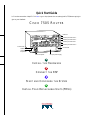
RSP slot
ROUTE SWITCH PROCESSOR
Interface processor slot 3
AB
LE
EJ
EC
T
SL SLO
OT T
0 1
EN
AB
EN
LE
NO
RM
AL
CISCO 7505 ROUTER
Interface processor slot 2
Interface processor slot 1
Interface processor slot 0
H2761
Power switch
Chassis
grounding
receptacles
Power receptacle
DC OK LED
AC-input power supply
1
INSTALL THE HARDWARE
2
CONNECT THE RSP
3
START AND CONFIGURE THE SYSTEM
4
INSTALL FIELD REPLACEABLE UNITS (FRUS)
5
CO
NS
OL
E
AU
X.
HA
LT
RE
SE
T
CP
U
RSP slot
ROUTE SWITCH PROCESSOR
Interface processor slot 3
EN
AB
LE
EJ
EC
T
SL SLO
OT T
0 1
EN
AB
LE
NO
RM
AL
Install the Hardware
Interface processor slot 2
Interface processor slot 1
Interface processor slot 0
H2761
Power switch
Chassis
grounding
receptacles
Power receptacle
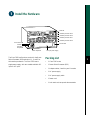
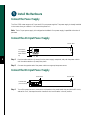
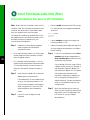
The Cisco 7505 has five slots: one slot for the Route
Switch Processor (RSP) and slots 0, 1, 2, and 3 for
the interface processors. The Cisco 7505 uses a
single power supply, with two models available: DC
input or AC input.
DC OK LED
AC-input power supply
Packing List
•
1 Cisco 7505 router
•
1 Route Switch Processor (RSP)
•
Y-Adapter cables, 1 auxiliary and 1 console
•
1 AC power supply
•
1 AC power supply cable
•
1 Power cord
•
1 Anti-static wrist strap and documentation
1
Install the Hardware
Prepare to Install the Router
Note For detailed hardware installation
instructions and safety guidelines, refer to the Cisco
7500 Series Router Installation and Configuration
Guide, Site Preparation and Safety Guide, and the
Cisco 7500 Regulatory Compliance and Safety
Guide.
•
Eight 10-32 x 3/8-inch slotted binderhead
screws to secure the chassis ears to the mounting
strips (also called rails) in the rack
For cable-management brackets:
•
Number 1 Phillips screwdriver
•
Two cable-management brackets
personnel should install, replace, or service
this equipment.
•
Six M3 x 8-mm Phillips panhead screws
Step 1
Lift the router safely out of the packing
container.
•
Step 2
Ensure the power service at the site is
suitable for the router you are installing.
For DC-Input Power Supply:
Warning Only trained and qualified
2
Step 3
Step 4
Check the packing slip to ensure that all
the proper components are present.
Confirm that you have the required tools
and parts:
For rack-mounting (optional):
•
Number 1 and Number 2 Phillips screwdrivers
•
1/4-inch and 3/16-inch flat-blade screwdrivers
•
Tape measure
•
Level (optional)
•
Two chassis ears (rack brackets included with
Cisco 7505)
•
Four M4 x 10-mm Phillips flathead screws to
secure the ears to the chassis (included)
For interface modules:
Number 1 Phillips or 3/16-inch flat-blade
screwdriver
•
Twin-lead, 10-AWG cable terminal block
connection
•
Single 10-AWG wire for the ground connection
•
3/16-inch flat-blade screwdriver
Install the Hardware
Rack-Mount the Router (Optional)
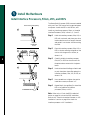
Step 1
Measure the space between the vertical
mounting strips on the rack. Confirm that
the rack conforms to the measurements
shown in A.
Step 2
Use the four M4 x 10-mm screws
provided to attach the ears to the sides of
the chassis, as shown in B. (Use two
screws per ear.)
A
18.312"
(46.51 cm)
hole centerline
to hole centerline
17.72" min.
(45 cm)
Mounting strips
Warning To prevent injury, two people
are required to lift the chassis. Grasp the
chassis underneath the lower edge, and lift
with both hands. To prevent injury, keep
your back straight and lift with your legs,
not your back.
B
Step 3
Use the eight 10-32 x 3/8-inch screws
provided to attach the ears to the
mounting strips, as shown in C. Use four
screws per ear and mounting strip.
Step 4
Level the chassis as required. Provide
two inches of clearance on either side of
the chassis.
M4 x 10-mm
screws (4)
Ears (2)
10-32 x 3/8-inch
screws (8)
53373
C
3
Install the Hardware
Install Interface Processors, Fillers, VIPs, and RSPs
Card carrier guide (black)
A
The Route Switch Processor (RSP) comes uninstalled
with your Cisco 7505 router, but is a required system
component. Install the RSP in the RSP slot, and
install any interface processors, fillers, or Versatile
Interface Processors (VIPs) in slots 0, 1, 2, and 3.
Step 1
Hold the interface processor, filler, VIP, or
RSP with one hand, and place your other
hand under the carrier to support the card
and guide it into the slot. Avoid touching
the card.
Step 2
Place the interface processor, filler, VIP, or
RSP in the slot and align the guide on the
carrier with the groove in the slot, as
shown in A.
Step 3
Carefully slide the interface processor,
filler, VIP, or RSP into the slot until the
faceplate makes contact with the ejector
levers.
Step 4
Use the thumb and forefinger of each hand
to push the ejector levers flat against the
interface processor, filler, VIP, or RSP, as
shown in B.
Step 5
Use a screwdriver to tighten the captive
installation screws, as shown in C.
Step 6
Repeat Step 1 through Step 5 to install the
RSP or any additional interface
processors, fillers, or VIPs.
Captive
installation
screw
B
4
53375
C
Note Refer to the “Check the RSP Installation”
section on page 19 to check the RSP installation.
Refer to the “Check the Interface Processor or VIP
Installation” section on page 20 to check the
interface processor or VIP installation.
Install the Hardware
Attach the Cable-Management Brackets
M3 screw (6)
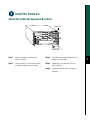
Step 1
Step 2
53372
CO
NS
OLE
HA
LT
ROUTE SWITCH PROCESSOR
RE
SE
T
CP
U
EJE
CT
SLO SLO
T0 T1
NO
RM
AL
Bracket (2)
Place the bracket on the rear of the
chassis, as shown.
Step 3
Insert three M3 x 8-mm Phillips screws,
and tighten slightly with your finger.
Step 4
Repeat Step 1 through Step 3 for the
second bracket.
Step 5
Route the interface cables through the
brackets.
Use a Phillips Number 1 screwdriver to
tighten all three screws.
5
Install the Hardware
Connect the Power Supply
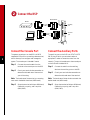
The Cisco 7505 router supports AC-input and DC-input power supplies. The power supply is already installed
in the router when you receive it. You connect the power to it.
Note The AC-input power supply is the shipped as the default if no power supply is specified at the time of
purchase.
Connect the AC-Input Power Supply
DC OK LED
On/off switch
H1998
AC receptacle
Cable retention
clip
Step 1
Push the cable retention clip away from the power supply receptacle, and push the power cable in
until the cable retention clip snaps into place.
Step 2
Connect the opposite end of the power cable to an appropriate power source.
Connect the DC-Input Power Supply
On/off switch
Terminal block
(cover removed)
Step 1
DC OK LED
H9713
6
Turn off the power source. Locate the circuit breaker on the panel board that services the DC circuit,
and switch it off, then tape the switch handle of the circuit breaker in the off position.
Install the Hardware
A
B Caution: Do not strain the connection at the terminal block
-48/-60V —
20/16A
-48
RTN
-48/-60V —
20/16A
-48
RTN
POWER SUPPLY
TERM. BLOCK COVER
- USE ONLY WITH
NEC CLASS 3
WIRING
- USE COPPER
CONDUCTORS
POWER SUPPLY
TERM. BLOCK COVER
- USE ONLY WITH
NEC CLASS 3
WIRING
- USE COPPER
CONDUCTORS
Terminal block
cover and
captive screws
C
D
-48/-60V —
20/16A
-48
RTN
Ground
terminal
53422
Cable strain relief
nylon cable tie
7
Step 2
Loosen the two captive screws that secure
the terminal block cover, as shown in A.
Step 3
Pull the terminal block cover away from
the terminal block, as shown in B.
Step 4
Feed the return (RTN) and –48V wires
through the large hole in the terminal
block cover, as shown in C.
Step 5
Step 6
Attach a nylon cable tie to secure the
cables to the terminal block cover.
Attach the RTN and –48 leads to the
terminal block, as shown in C.
Note Match the color coding at the DC source.
Typically, green or green/yellow is used for ground,
black is used for RTN, and red or white is used for
–48V.
Step 7
Attach the ground cable to the ground
terminal.
Step 8
Replace the terminal block cover, as
shown in B.
Step 9
Tighten the captive screws on the terminal
block cover, as shown in A.
Connect the RSP
DB-25 female
Modem
Auxiliary
port
Console
port
RSP
8
H3538
DB-25 male
Console terminal
Connect the Console Port
Connect the Auxiliary Ports
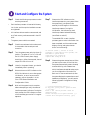
The system console port on the RSP is a DB-25
receptacle DCE port for connecting a data terminal,
which allows you to configure and manage the
system. The console port is labeled Console.
The auxiliary port on the RSP is an ETA/TIA DTE
DB-25 plug to which you can attach external
equipment in order to access the router from the
network. The port is located next to the console port
on the RSP and is labeled AUX.
Step 1
Step 2
Connect the console cable from the
terminal to the console port on the RSP.
Check your terminal’s documentation to
determine the baud rate of the terminal
you will be using.
Step 1
Connect the cable from the auxiliary
device to the auxiliary port on the RSP.
Step 2
Check your terminal’s documentation to
determine the baud rate of the terminal.
Note The baud rate of the terminal you are using
Note The baud rate of the terminal must match the
must match the default baud rate (9600 baud).
default baud rate (9600 baud).
Step 3
Step 3
Set up the terminal as follows: 9600 baud,
8 data bits, no parity, and 2 stop bits
(9600, 8N2).
Set up the terminal as follows: 9600 baud,
8 data bits, no parity, and 2 stop bits
(9600, 8N2).
Start and Configure the System
Step 1
Check the following components to make
sure they are secure:
•
Each interface processor is inserted all the way
into its slot, and the captive installation screws
are tightened.
•
All interface cable connections are secured, and
any Flash memory cards are secured in their PC
slots.
•
Step 7
The enabled LED on each interface
processor goes on when initialization has
been completed, and the console screen
displays a script and system banner
similar to the following:
The system power cable is connected.
Step 2
Check the console terminal to make sure it
is connected to the console port and
turned on.
Step 3
Turn the system power switch to the on (|)
position. The green AC (or DC) OK and
fan OK LEDs on each power supply
should go on. After a few seconds, the red
output fail LED will turn off.
Step 4
Listen for the system blower; you should
immediately hear it operating.
Step 5
Observe the normal LED indicator on the
RSP. If this indicator is not on after system
initialization, an error has occurred. If
necessary, refer to Appendix A in the
Cisco 7500 Series Installation and
Configuration Guide.
Step 6
Wait until the system boot is complete
before attempting to verify the status of
interface processor indicators. During the
boot process, the LED indicators on most
of the interfaces go on and off in irregular
sequence.
Observe the LED indicators on the
interface processors in your system. When
the system boot is complete (a few
seconds), the RSP begins to initialize the
interface processors. During this
initialization, the indicators on each
interface processor behave differently
(most flash on and off).
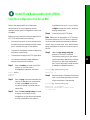
GS Software (RSP-K ), Version 11.1(8)CA
Copyright (c) 1986-1995 by Cisco Systems, Inc.
This RSP2 is system master
Other RSP2 is not plugged in
Compiled Wed 10-May-95 11:06
Step 8
Observe the system startup banner. When
you start up the router for the first time,
the system automatically enters the setup
command facility, which determines
which interfaces are installed and prompts
you for configuration information for
each one. On the console terminal, after
the system displays the system banner and
hardware configuration, you will see the
following System Configuration Dialog
prompt:
--- System Configuration Dialog --At any point you may enter a questions mark
`?' for help.
Refer to the `Getting Started' Guide for
additional help.
Default settings are in square brackets `[]'.
continue with configuration dialog? [yes]:
9
Start and Configure the System
Start a Basic Configuration
Step 7
Many privileged-level EXEC commands are used to
set operating parameters. To enter the
privileged-level:
•
AutoInstall (proceed to Step 8)
•
Setup facility (proceed to the “Perform a Basic
Configuration Using Setup” section on page 11)
•
Configuration mode (proceed to the “Perform a
Basic Configuration Using Configuration
Mode” section on page 13)
Step 1
Enter the enable command at the EXEC
prompt (>), and then enter a
privileged-level password, as follows:
Router> enable
Password:
Router#
Step 2
Enter the configure terminal command to
enter configuration mode:
Router# configure terminal
Enter configuration commands, one per line.
End with CNTL/Z.
Router(config)#
10
Step 3
Enter the config-register value
configuration command, where value is a
hexadecimal number preceded by 0x, as in
the following example:
Router(config)# config-register 0x010F
Reboot the router, and then perform a
basic configuration using:
Note Configuration register changes take effect
only when the system reloads, such as when you
issue a reload command from the console.
Configure Using AutoInstall
Step 8
Connect to the network using a serial
(WAN) cable to the channel service
unit/data service unit (CSU/DSU).
Step 9
Contact your system administrator to
verify that the TCP/IP host on your
network is preconfigured.
Step 4
Press Ctrl-Z to exit configuration mode.
Step 10 Press Ctrl-Z to exit configuration mode.
Step 5
Save the new settings to NVRAM. Enter
the copy running-config startup-config
command.
Step 11 At the # prompt, enter the copy
running-config startup-config command
to save the configuration to NVRAM as
follows:
Note The new settings do not take effect until the
system software is reloaded by rebooting the router.
Hostname# copy running-config startup-config
Step 6
This completes the procedure for performing a basic
configuration using AutoInstall.
Enter the show version command to view
the configuration register value currently
in effect. The value is displayed on the last
line of the screen display:
Configuration register is 0x141 (will be 0x101
at next reload)
Start and Configure the System
Perform a Basic Configuration Using Setup
Note The router’s serial (WAN) cable should not be
connected to the CSU/DSU unless you are planning
to use AutoInstall. If you are using the console
Y-cable that shipped with your router, use either of
the two DB-25 male plug ends of the Y-cable.
Step 1
Select the protocols supported on your
interfaces. For Internet Protocol (IP)-only
installations, accept the default values. A
typical minimal configuration using IP,
IPX, and AppleTalk follows:
Configuring global parameters:
Step 5
Configure AppleTalk? [no]: yes
Multizone networks? [no]: yes
Configure IPX? [no]: yes
Step 6
Configure
Configure
Configure
Configure
Step 7
Enter host name [Router]: Router
Step 2
Enter the enable secret password and the
enable password when the following is
displayed:
The enable secret is a one-way cryptographic
secret used
instead of the enable password when it exists.
Enter enable secret: barney
The enable password is used when there is no
enable secret
and when using older software and some boot
images.
Enter enable password: betty
Step 3
Enter yes or no to accept or refuse SNMP
management:
Configure SNMP Network Management? [yes]: yes
Community string [public]:
Step 4
Enter no to refuse to enable CLNS:
Configure CLNS? [no]: no
Enter yes to enable routing on AppleTalk
and IPX:
Enter no to refuse to enable Vines, XNS,
DECnet, or bridging:
Vines? [no]: no
XNS? [no]: no
DECnet? [no]: no
bridging? [no]: no
Enter yes or press Return to configure IP,
and then select an interior routing
protocol for IP, if you are using IP routing:
Configure IP? [yes]: yes
Configure IGRP routing? [yes]: yes
Your IGRP autonomous system number [1]: 15
Step 8
At the # prompt, enter the copy
running-config startup-config command
to save the configuration to NVRAM as
follows:
Hostname# copy running-config startup-config
Note Consult your network administrator to
obtain network addresses and subnet mask
information.
11
Start and Configure the System
Configure an Ethernet Interface
Step 1
To configure your system for an Ethernet
LAN, respond to the prompts as follows,
using your own IP address and subnet
mask information:
Configuring interface parameters:
Configuring interface Ethernet0/0:
Is this interface in use? [no]: yes
Configure IP on this interface? [no]: yes
IP address for this interface: 1.1.1.10
Number of bits in subnet field [0]:
Class A network is 1.0.0.0, 0 subnet bits;
mask is 255.0.0.0
Step 2
Enter yes to enable IPX on this interface,
using the IPX network number:
Configure IPX on this interface? [no]: yes
IPX network number [2]:
12
Step 3
Enter yes to enable AppleTalk on this
interface, to configure for extended
AppleTalk networks, and then enter the
cable range number. Enter the zone name
and any other additional zones that will
be associated with your local zone:
Configure AppleTalk on this interface? [no]:
yes
Extended AppleTalk network? [no]: yes
AppleTalk starting cable range [0]:
Step 4
At the # prompt, enter the copy
running-config startup-config command
to save the configuration to NVRAM as
follows:
Hostname# copy running-config startup-config
Configure a Synchronous Serial
Interface
Step 1
Enter yes to configure serial port 0:
Configuring interface Serial1/0:
Is this interface in use? [no]: yes
Step 2
Determine which protocols you want to
allow on the synchronous serial interface
and enter the appropriate responses:
Configure IP unnumbered on this interface?
[no]:
IP address for this interface: 1.1.1.20
Number of bits in subnet field [0]:
Class A network is 1.0.0.0, 0 subnet bits;
mask is 255.0.0.0
Configure IPX on this interface? [no]: yes
IPX network number [2]:
Configure AppleTalk on this interface? [no]:
yes
Extended AppleTalk network? [no]:
AppleTalk network number [1]:
Step 3
Press Ctrl-Z to exit configuration mode.
Step 4
At the # prompt, enter the copy
running-config startup-config command
to save the configuration to NVRAM as
follows:
Hostname# copy running-config startup-config
Your Cisco 7505 router is now minimally configured
and ready to use. If you want to modify the
parameters after the initial configuration, use the
setup command. To perform more complex
configurations, use the configure command. For
more information on additional interface
configuration and information on more specific
system configurations, refer to the Cisco 7500 Series
Installation and Configuration Guide.
Start and Configure the System
Perform a Basic Configuration Using Configuration Mode
At the reboot, the following example appears:
Step 3
Press Ctrl-Z to exit configuration mode.
Any interface listed with OK? value "NO" does
not have a valid configuration.
Step 4
At the # prompt, enter the copy
running-config startup-config command
to save the configuration to NVRAM as
follows:
Interface IP-Address OK? Method Status
Protocol
Ethernet0/0 unassigned NO not set down down
Serial1/0 unassigned NO not set down down
Hostname# copy running-config startup-config
Step 1
Enter the configure terminal command at
the enable prompt to enter configuration
mode from the terminal, as follows:
Router# configure terminal
Enter configuration commands, one per line.
End with CNTL/Z.
Router(config)#
Step 2
Enter the interface type slot/port
command at the enable prompt to enter
interface configuration mode, as follows:
Router(config)# interface serial slot/port
Router(config-if)#
Your Cisco 7505 router is now minimally configured
and ready to use. If you want to modify the
parameters after the initial configuration, use the
setup command. To perform more complex
configurations, use the configure command. For
more information on additional interface
configuration and information on more specific
system configurations, refer to the Cisco 7500 Series
Installation and Configuration Guide.
13
Install Field Replaceable Units (FRUs)
Flash Memory Cards
A Flash memory card that ships with your Cisco
7505 contains the Cisco IOS software image to boot
your router. You do not need to format it.
A
T
EC
EJ
The RSP has two PC Card slots—slot 0 and slot
1—into which you can install a Flash memory card.
PC Card slot 0 is on the top and slot 1 is on the
bottom.
UP
Note A Flash memory card can be inserted and
removed with the system power on. Both PC Card
slots can be used at the same time.
B
T
EC
EJ
UP
14
Step 1
To eject the card, press the appropriate
eject button until the card is free of the
connector at the back of the slot.
Step 2
Remove the card from the slot and place it
in an antistatic bag to protect it.
Step 3
Face the front panel of the RSP, and hold
the Flash memory card with the connector
end of the card toward the slot.
C
Note The Flash memory card is keyed and cannot
T
EC
EJ
UP
be seated the wrong way. The eject button will not
pop out if the card is not properly inserted.
57301
Step 4
Insert the card into the appropriate slot
until the card completely seats in the
connector at the back of the slot and the
eject button pops out toward you.
Note The card does not insert all the way inside the
RSP; a portion of the card remains outside of the
slot. Do not attempt to force the card past this point.
Install Field Replaceable Units (FRUs)
Format a Flash Memory Card
Copy Files to Flash Memory
Flash memory cards shipped as spare parts must be
formatted. Use only Intel Series 2+ Flash memory
cards.
To upgrade to a new Cisco IOS image, copy the
image file to Flash memory. Upgrade images one at a
time; do not delete all known good images at one
time. You cannot copy an image while the system is
running from Flash memory.
Step 1
Enter format slot0: (or format slot1:) to
format the Flash memory card, as follows:
Router# format slot0:
Step 2
At the erase all sectors prompt, press
Enter to proceed.
All sectors will be erased, proceed? [confirm]
Step 3
At the volume ID prompt, enter the ID
name:
Enter volume id (up to 30 characters):
MyNewCard
Formatting sector 1
Format device slot0 completed
Router#
Use the command copy tftp:filename [bootflash |
slot0 | slot1]: filename for the copy procedure, where
tftp:filename is the source of the file and [bootflash |
slot0 | slot1]: filename is the destination in bootflash
memory or on either of the Flash memory cards.
An example of the copy tftp:filename command
follows for a file in the Flash memory card in PC
Card slot 0:
Router# copy tftp:myfile1 slot0:myfile1
20575008 bytes available on device slot0,
proceed? [confirm]
Address or name of remote host [1.1.1.1]?
Loading new.image from 1.1.1.1 (via
Ethernet1/0):
!!!!!!!!!!!!!!!!!!!!!!!!!!!!!![OK 7799951/15599616 bytes]
CCCCCCCCCCCCCCCCCCCCCCCCCCCCCCCCCCCCCCCCC
Router#
15
Install Field Replaceable Units (FRUs)
Make a Flash Memory Card
Image Bootable
Enable Booting from Flash
Memory
Note In this example, the filename is new.image,
To enable booting from Flash memory, set
configuration register bits 3, 2, 1, and 0 to a value
between 2 and 15 in conjunction with the boot
system flash device:filename configuration
command, where device is bootflash:, slot0:, or
slot1:, and filename is the name of the file from
which you want to boot the system. In the following
example, the Flash memory card is in slot 0.
and the Flash memory card is located in slot 0.
Step 1
Enter the configure terminal command at
the enable prompt, as follows:
Router# configure terminal
Step 2
Enter the no boot system command, as
follows.
Router(config)# no boot system
Step 3
16
Enter the boot system flash
slot0:new.image command, as follows:
Router(config)# boot system flash
slot0:new.image
Step 4
Enter the config-register 0x2102
command to enable loading an image
from Flash memory:
Router(config)# config-register 0x2102
Step 5
Press Ctrl-Z to exit configuration mode.
Step 6
Enter the copy running-config
startup-config command to save the
configuration to NVRAM as follows:
Step 1
Router# configure terminal
Step 2
Enter the reload command. When the
system reloads, it will boot the image
new.image from the Flash memory card in
slot 0.
Router# reload
At the prompt, enter configuration
commands, one per line.
Enter configuration commands, one per line.
Step 3
Press Ctrl-Z to exit configuration.
Step 4
Enter the boot system flash
bootflash:slot0: filename command, as
follows:
Router(config)# boot system flash
blootflash:slot0:filename
Step 5
Hostname# copy running-config startup-config
Step 7
Enter the configure terminal command at
the enable prompt, as follows:
Enter the config-register command with
the value shown in the following example:
Router(config)# config-reg 0x0102
Ctrl-Z
Router#
Step 6
Press Ctrl-Z to exit enable booting mode.
Install Field Replaceable Units (FRUs)
Prepare to Remove and Install an RSP
To remove and install an RSP, you will perform the
following steps:
•
Copy the configuration file using a Trivial File
Transfer Protocol (TFTP) server
•
Remove the RSP
•
Install the RSP
•
Connect the console terminal and ensure that it
is connected
•
Turn the system power back on
•
Retrieve the configuration file
17
Install Field Replaceable Units (FRUs)
Remove and Install an Interface Processor, Filler, VIP, or RSP
Note Do not shut down the system power when
removing an interface processor or VIP. However, if
you are removing the RSP, first copy the
configuration file to a TFTP server (see the “Copy the
Configuration File for an RSP” section on page 21),
and then return to this section to complete the
procedure.
Bottom ejector lever
A
Captive
installation
screw
Card
carrier
guide
Card
slot
Step 1
Attach an ESD-preventive wrist strap
between you and any unpainted chassis
surface.
Step 2
Disconnect all cables from the interface
processor, VIP, or RSP port adapters. If
you are only moving a carrier, skip this
step.
Step 3
Use a screwdriver to loosen the captive
installation screws, as shown in A.
Step 4
Place your thumbs on both ejector levers
and simultaneously pull them both
outward, as shown in B.
Step 5
Grasp the interface processor, filler, VIP,
or RSP handle with one hand and pull the
carrier straight out of the slot, keeping
your other hand under the carrier to guide
it.
Step 6
Store the interface processor, VIP, or RSP
in an antistatic bag.
Step 7
Repeat Step 2 through Step 6 to remove
any additional interface processors, fillers,
VIPs, or RSPs. Refer to the “Install
Interface Processors, Fillers, VIPs, and
RSPs” section on page 4 to install an
interface processor, filler, VIP, or RSP.
B
18
STOP!
on contact
53376
C
Install Field Replaceable Units (FRUs)
Check the RSP Installation
Step 1
•
•
Check the RSP connections to make sure
they are secure:
The RSP is inserted all the way into its slot, and
both the captive installation screws are
tightened.
The console terminal is turned on and is
connected to the console port.
Step 2
Observe the RSP LEDs. While the system
initializes, the CPU halt LED on the RSP
stays on. It goes off when the boot process
is complete. As the RSP initializes each
interface processor, the status LEDs on
each interface processor go on and off in
irregular sequence.
Step 3
Verify that the console terminal displays
the system banner and startup screen as
the system restarts.
Step 4
Verify that all the enabled LEDs (on the
interface processors) are on.
Step 5
When you have verified all the conditions
in Step 1 through Step 4, the installation is
complete.
If you replaced the RSP and saved your configuration
file to a remote server before doing so, proceed to the
“Retrieve the Configuration File for RSPs” section
on page 23.
An error condition exists if no LEDs go on at power
up or after initialization, or if the boot error or CPU
halt LEDs go on and remain on. If this happens, see
Appendix A in the Cisco 7500 Series Installation and
Configuration Guide.
19
Install Field Replaceable Units (FRUs)
Check the Interface Processor or VIP Installation
20
Note When a new VIP is inserted or when a VIP is
•
moved to a new slot, the system recognizes the new
interfaces, but leaves them in the shutdown state
until you configure them. After the system
reinitializes all interfaces, the enabled LED on the
port adapters and on all interface processors, VIPs,
and RSPs should go on, depending on your
connections and configuration.
Router> enable
Password:
Router#
•
Use the configure command to configure the
interface processor or VIP.
Step 1
•
Refer to the appropriate configuration section of
your port adapter documentation to configure
the port adapter.
Observe the console display messages
when the system reinitializes each
interface as follows:
•
For a new interface processor or VIP, the system
should recognize all new interfaces, but leave
them configured as down.
•
For a replaced interface processor or VIP, the
system should recognize each interface and place
it in the same state (up or down) each was in
when you removed the interface processor or
VIP.
Step 2
Step 4
If the VIP is new, configure the new
interfaces.
If the VIP is a replacement, use the show
interfaces type slot/port adapter/port or
show controllers cbus command to verify
the status of the interfaces.
If you replaced a VIP with a new VIP with
a greater number of ports (for example, if
you replaced a single-port adapter VIP
with a dual-port adapter VIP), the system
will recognize the interfaces on the
previously configured port adapter, but
will not recognize the additional port
adapter interfaces. The new interfaces will
remain in the shutdown state until you
configure them.
Verify that the enabled LED on each port
adapter goes on and remains on.
If the enabled LED on a port adapter fails
to go on, the interface processor or VIP
may not be fully seated in the backplane.
Refer to Appendix A in the Cisco 7500
Series Installation and Configuration
Guide.
Step 3
Enter the enable command at the EXEC prompt
(>), and then enter a privileged-level password,
as follows:
Step 5
When the interfaces are up, check the
activity of each interface by observing the
status LEDs, which are described in the
LED section of your port adapter
documentation.
Install Field Replaceable Units (FRUs)
Copy the Configuration File for an RSP
Refer to the appropriate Cisco IOS software
documentation for the configuration options
available, and for specific configuration instructions,
as needed.
Before you copy (save) the running configuration to
a TFTP file server, ensure the following:
•
You have a connection to the router either with
a console terminal connected to the RSP console
port or remotely through a Telnet session.
•
The router is connected to a network supporting
a file server (remote host).
•
The remote host supports the TFTP application.
•
You have the interface processor address or
name of the remote host available.
Step 1
Enter the enable command at the EXEC
prompt (>), and then enter a
privileged-level password, as follows:
Router> enable
Password:
Router#
Step 2
Step 3
Enter the ping command followed by the
name or IP address of the remote server,
and then press Return to check the
connection between the router and the
remote host.
Enter the show running-config command
to display the currently running
configuration on the terminal and ensure
that the configuration information is
complete and correct. If it is not, use the
configure command to add or modify the
existing configuration.
Step 4
Create a file on the TFTP server.
Note Before you can save a file to a TFTP server, a
file must first exist on the TFTP server. Create this
file. Ensure that the filename matches the filename
you will copy from the router. Also, ensure that the
server permissions are set so the router can copy to
this file.
Step 5
Issue the copy startup-config tftp
command. The EXEC command
interpreter prompts you for the name or
interface processor address of the remote
host that is to receive the configuration
file. (The prompt might include the name
or address of a default file server.)
Router# copy startup-config tftp
Remote host []?
Step 6
Enter the name or IP address of the remote
host. In the following example, the name
of the remote server is servername:
Router# copy startup-config tftp
Remote host []? servername
Translating "servername"...domain server
(1.1.1.1) [OK]
21
Install Field Replaceable Units (FRUs)
Step 7
Enter the name of the configuration file.
The default is to use the name of the
router with the suffix -confg. Press Return
to accept the default filename, or enter a
different name for the file, then press
Return. In the following example, the
default is accepted:
Name of configuration file to write
[Router-confg]?
Write file Router-confg on host 1.1.1.1?
[confirm]
Writing Router-confg .....
Step 8
22
The system displays the instructions you
entered for confirmation. If the
instructions are not correct, enter n (no),
and then press Return to cancel the
process. To accept the instructions, press
Return, or press y and then press Return.
In the following example, the default is
accepted:
Write file Router-confg on host 1.1.1.1?
[confirm]
Writing Router-confg: !!!! [ok]
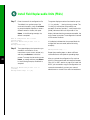
The system displays a series of exclamation points
(! ! !) or periods (. . .) during the copy process. The
!!!! and [ok] indicate that the operation was
successful. A series of periods (...) and [timed out] or
[failed] indicates a failure of the process. If the
display indicates that the process was successful, the
copy process is complete. The configuration is stored
on the remote file server.
If the display indicates that the process failed, the
configuration was not saved (see the following
example):
Writing Router-confg .....
Repeat the preceding steps, or select a different
remote file server and repeat the preceding steps.
After you upload the configuration file, continue
with the “Remove and Install an Interface Processor,
Filler, VIP, or RSP” section on page 18 to install the
RSP. If you are unable to copy the configuration to a
remote host successfully, contact your network
administrator or contact Cisco technical assistance.
Install Field Replaceable Units (FRUs)
Retrieve the Configuration File for RSPs
Retrieve the saved configuration and copy it to
NVRAM by accessing the router through a console
terminal, or from a remote terminal.
Step 1
Step 5
Enter the enable command at the EXEC
prompt (>), and then enter a
privileged-level password, as follows:
Enter the name of the configuration file.
The default is to use the name of the
router with the suffix -confg
(Router-confg in the following example).
If you specified a different filename when
you copied the configuration, enter the
filename; otherwise, press Return to
accept the default.
Router> enable
Password:
Router#
Name of configuration file [Router-confg]?
Note The router runs from the default
Step 6
configuration in NVRAM until the previous
configuration is retrieved. Passwords configured on
the previous system are not valid until they are
retrieved.
Step 2
Step 3
Enter the ping command followed by the
name or IP address of the remote server,
and then press Return to check the
connection between the router and the
remote host.
Enter the copy tftp startup-config
command and press Return to enter the
configuration mode and specify that you
will configure the system from a network
device (instead of from the console
terminal, which is the default).
Router# copy tftp startup-config
Step 4
Enter the IP address or name of the remote
host (the remote TFTP server to which
you originally saved the configuration
file).
Address of remote host [255.255.255.255]?
10.1.1.1
Before the system reloads the new
configuration file in NVRAM, it displays
the instructions you entered for
confirmation. If the instructions are not
correct, enter n (no), and then press
Return to cancel the process. To accept the
instructions, press Return, or press y and
then press Return. Output similar to the
following appears:
Configure using Router-confg from 10.1.1.1?
[confirm]
Loading Router-confg from 10.1.1.1: ! ! [OK 1186/126927 bytes]
Warning: distilled config is not generated
[OK]
%SYS-5-CONFIG_NV: Non-volatile store
configured from Router-confg
by console tftp from 10.1.1.1
23
Install Field Replaceable Units (FRUs)
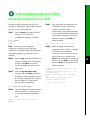
The console display indicates whether or not the
operation was successful. A series of exclamation
points (!!!!) and [OK] (as shown in the preceding
example) indicates that the operation was successful.
A series of periods (. . .) and [timed out] or [failed]
indicates a failure due to a network fault or an
incorrect server name, address, or filename. The
following is an example of a failed attempt to boot
from a remote server:
Booting Router-confg ..... [timed out]
If the display indicates that the process was
successful, as shown in Step 6, proceed to the next
step.
24
If the display indicates that the process failed, verify
the name or IP address of the remote server and the
filename, and repeat the preceding steps. If the
process fails again, contact your network
administrator.
Step 7
Enter the show startup-config command
to confirm that the configuration file was
retrieved correctly. Look at the first line
for the configuration file size. Compare it
with the file you retrieved from the TFTP
server to confirm that it is correct.
Following is an example:
Router# show startup-config
Using 1186 out of 126968 bytes
!
version 12.0(9)S
hostname Router
!
Router#
Step 8
To ensure that the startup configuration
file stored in NVRAM is the default
running configuration file used by the
system, enter the copy
system:running-config
nvram:startup-config command:
Router# copy system:running-config
nvram:startup-config
Router#
%SYS-5-CONFIG_I: Configured from memory by
console
Router#
This completes the process for retrieving the
configuration file for the RSP.
Install Field Replaceable Units (FRUs)
Remove and Install Port Adapters
Note First remove the VIP from the chassis before
removing the port adapter from the VIP. See the
“Remove and Install an Interface Processor, Filler,
VIP, or RSP” section on page 18 for instructions.
Step 1
Remove the screw that secures the port
adapter (or blank port adapter), as shown
in A.
Step 2
Grasp the handle and carefully pull it out
of its slot, away from the edge connector
at the rear of the slot. (See A.)
Step 3
To insert the port adapter, align the carrier
between the upper and the lower edges of
the port adapter slot. (See B.)
Step 4
Carefully slide the port adapter into the
slot until the connector is completely
seated in the connector at the rear of the
port adapter slot, as shown in B.
Step 5
Install the screw in the rear of the port
adapter slot on the VIP. Do not
overtighten the screw. (See A.)
Step 6
Carefully slide the VIP motherboard into
the interface processor slot until the
connectors at the rear of the VIP are
completely seated in the connectors at the
rear of the interface processor slot. Use the
ejector levers to seat the VIP in the
interface processor slot. Tighten the
captive installation screws on the VIP.
(See C.)
A
Screw
B
Carrier
Upper edge
Lower edge
NS
OLE
CO
AU
X.
HA
LT
ET
RE
S
CP
U
EJE
CT
ROUTE SWITCH PROCESSOR
53377
C
SLO SLO
T0 T1
NO
RM
AL
Captive
installation
screw
25
Install Field Replaceable Units (FRUs)
Remove the Power Supply
DC OK LED
On/off switch
H1998
AC receptacle
Cable retention
clip
Note The following procedure assumes you have
already removed the chassis cover panel, the fan tray,
the power harness cover, and the power harness. If
you have not, refer to the appropriate sections in the
Cisco 7500 Series Installation and Configuration
Guide for instructions.
26
Note AC-input power supply is shown above.
Step 1
tie with a new one after the new power
supply is installed.) Remove the DC-input
cable from the terminal block.
Step 3
Attach an ESD-preventive strap between
you and any unpainted chassis surface.
Step 4
Disconnect the power harness plug from
the backplane receptacle by pulling the
polarized plug out of the receptacle; do
not pull on the wires.
Step 5
Use a Number 2 Phillips screwdriver to
remove the two M4 x 10-mm Phillips
panhead screws that secure the power
supply ears (one on each side of the power
supply) to the chassis frame.
Step 6
Using both hands, grasp both of the
power supply handles and pull the power
supply about halfway out of the bay. Then
grasp the sides of the power supply and
pull it out of the chassis.
Turn off the system power switch.
Warning Before working on the chassis or
near power supplies, disconnect the power
cable on AC units or disconnect the power
at the circuit breaker on DC units.
Step 2
Disconnect the power cable from the
power supply.
For the AC-input power supply: Move the
cable retention clip away from the power
cable and disconnect the power cable
from the AC receptacle.
For the DC-input power supply: Use a
wire cutter to cut the nylon cable tie that
provides strain relief for the DC power
cable. (You must replace this nylon cable
Install Field Replaceable Units (FRUs)
Replace the Power Supply
Step 1
Hold the power supply as shown in C, and
slide it into the bottom of the chassis. Use
the handles to push the supply all the way
into the chassis until the ears on both sides
are flush against the chassis frame.
Step 2
Use a Number 2 Phillips screwdriver to
replace the two M4 x 10-mm Phillips
panhead screws to secure the two power
supply ears to the chassis frame.
Step 3
Reattach the power harness plug to the
backplane receptacle. Ensure that the plug
is fully seated in the receptacle.
Step 4
Replace the power harness cover.
Step 5
Replace the fan tray.
Step 6
Replace the cover panel.
Step 7
For AC-input power supplies: On the
interface processor side of the power
supply, replace the cable retention clip on
the AC input port by pinching the sides of
the retention clip together and letting the
ends of the retention clip snap outward
into the holes in the jackscrews.
Power supply ears
A
Power harness
Phillips
screws
(2 places)
B
Backplane
power
receptacle
57097
Removing/replacing
power supply
C
Handling the
power supply
For DC-input power supplies: To provide
strain relief for the DC-input cable,
replace the nylon cable tie with a new
nylon cable tie.
27
Corporate Headquarters
Cisco Systems, Inc.
170 West Tasman Drive
San Jose, CA 95134-1706
USA
http://www.cisco.com
Tel: 408 526-4000
800 553-NETS (6387)
Fax: 408 526-4100
European Headquarters
Cisco Systems Europe
11, Rue Camille Desmoulins
92782 Issy Les Moulineaux Cedex
9
France
http://www-europe.cisco.com
Tel: 33 1 58 04 60 00
Fax: 33 1 58 04 61 00
Americas
Headquarters
Cisco Systems, Inc.
170 West Tasman Drive
San Jose, CA 95134-1706
USA
http://www.cisco.com
Tel: 408 526-7660
Fax: 408 527-0883
Asia Pacific Headquarters
Cisco Systems Australia, Pty., Ltd
Level 17, 99 Walker Street
North Sydney
NSW 2059 Australia
Tel: +61 2 8448 7100
Fax: +61 2 9957 4350
Cisco Systems has more than 200 offices in the following countries. Addresses, phone numbers, and fax numbers are listed on the
C i s c o C o n n e c t i o n O n l i n e We b s i t e a t h t t p : / / w w w. c i s c o . c o m / g o / o f fi c e s .
Argentina • Australia • Austria • Belgium • Brazil • Bulgaria • Canada • Chile • China • Colombia • Costa Rica • Croatia • Czech
Republic • Denmark • Dubai, UAE • Finland • France • Germany • Greece • Hong Kong • Hungary • India • Indonesia • Ireland Israel
Italy • Japan • Korea • Luxembourg • Malaysia • Mexico • The Netherlands • New Zealand • Norway • Peru • Philippines Poland
Portugal • Puerto Rico • Romania • Russia • Saudi Arabia • Scotland • Singapore • Slovakia • Slovenia • South Africa • Spain •
Sweden Switzerland • Taiwan • Thailand • Turkey • Ukraine • United Kingdom • United States • Venezuela • Vietnam • Z i m b a b w e
AccessPath, AtmDirector, Browse with Me, CCDA, CCDE, CCDP, CCIE, CCNA, CCNP, CCSI, CD-PAC, CiscoLink, the Cisco NetWorks logo, the Cisco Powered Network
logo, Cisco Systems Networking Academy, the Cisco Systems Networking Academy logo, Fast Step, Follow Me Browsing, FormShare, FrameShare, GigaStack, IGX,
Internet Quotient, IP/VC, iQ Breakthrough, iQ Expertise, iQ FastTrack, the iQ Logo, iQ Net Readiness Scorecard, MGX, the Networkers logo, Packet, RateMUX,
ScriptBuilder, ScriptShare, SlideCast, SMARTnet, TransPath, Unity, Voice LAN, Wavelength Router, and WebViewer are trademarks of Cisco Systems, Inc.; Changing the
Way We Work, Live, Play, and Learn, Discover All That’s Possible, and Empowering the Internet Generation, are service marks of Cisco Systems, Inc.; and Aironet, ASIST,
BPX, Catalyst, Cisco, the Cisco Certified Internetwork Expert logo, Cisco IOS, the Cisco IOS logo, Cisco Systems, Cisco Systems Capital, the Cisco Systems logo,
Enterprise/Solver, EtherChannel, EtherSwitch, FastHub, FastSwitch, IOS, IP/TV, LightStream, MICA, Network Registrar, PIX, Post-Routing, Pre-Routing, Registrar,
StrataView Plus, Stratm, SwitchProbe, TeleRouter, and VCO are registered trademarks of Cisco Systems, Inc. and/or its affiliates in the U.S. and certain other countries.
All other brands, names, or trademarks mentioned in this document or Web site are the property of their respective owners. The use of the word partner does not imply a
partnership relationship between Cisco and any other company. (0104R)
Printed in the USA on recycled paper containing 10% postconsumer waste.
78-12949-01