1
Managing and Selecting Video
Inputs
SYNC I/O has two independent video inputs, referred to as “Video In” and “Video Ref” on the
SYNC I/O rear panel. These let you use one of
the video inputs as a Clock Reference (the resolver sample clock master reference) and use
the other input for working with VITC time
code and the character generator (window dub).
If you have just a single video source, SYNC I/O
provides a very simple method for connecting
your single video source to both of the video inputs. See “Using Video Inputs with VITC and
the Character Generator” on page 65.
In a typical video setup, you will supply a reference video signal (black burst or color bars) to
your VCR and to the SYNC I/O Video Ref input.
You will then connect the VCR's video output to
the SYNC I/O Video In port. Finally, the
SYNC I/O Video Out will be fed to your picture
monitor and/or another VCR.
Using Video Inputs with VITC and the Character
Generator
Unlike selecting a video input to use for Clock
Reference, input selection for VITC and character generator functions follows a simple rule.
This rule is explained in the following sections
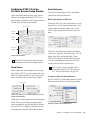
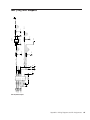
and in Figure 1 on page 66.
Video Ref If the Clock Reference is one of the
two video inputs, and the Positional Reference is
Generate, then VITC and character generator
functions are applied to the video arriving at the
Video Ref input connector. This helps you avoid
re-patching video cables whenever you want to
stripe a videotape with your reference blackburst or color bars, along with internally generated time addresses for VITC (and/or LTC,
and/or CG dub window). In Figure 1 on
page 66, this scenario is identical to “Route A.”
Video In For all other combinations of Clock
Reference and Positional Reference, VITC and
character generator functions are applied to the
video signal arriving at the Video In connector.
In this way, SYNC I/O can read VITC from your
videotape, or add VITC with or without character generation (window burn) while dubbing to
a second VCR. In Figure 1 on page 66, this scenario is identical to “Route B.”
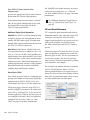
To understand why these rules exist, let us examine how the circuitry works within SYNC I/O
(see Figure 1 on page 66):
The clock reference (labelled Sample Clock Resolver Circuit in Figure 1 on page 66) is selectable at all times. You can decide which input
signal to use to generate the digital clock signal.
However, when the clock reference is set to
Video, the positional (time code) reference circuitry (labelled Time Code and Window Dub
Circuit in the illustration) is not switchable.
This is because the positional (time code) reference circuitry is always used to derive time code,
whether SYNC I/O is reading incoming time
code or generating new time code. Even in Generate mode, SYNC I/O needs to use this circuitry
to detect the frame edge of the video in order to
generate time code.
Chapter 5: Additional Operational Information
65













![Guida di SYNC™ HD - akmedia.[bleep]digidesign.](http://vs1.manualzilla.com/store/data/006124188_1-822f431325888ec14269d9216e9ac6fc-150x150.png)