1
2.2.1
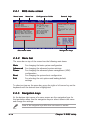
BIOS menu screen
Menu items
Menu bar
Configuration fields
General help
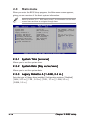
System Time
System Date
Legacy Diskette A
[10:55:25]
[Mon 03/14/2005]
[1.44M, 3.5 in]
Use [ENTER], [TAB] or
[SHIFT-TAB] to select
a field.
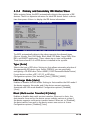
Primary IDE Master
Primary IDE Slave
Secondary IDE Master
Secondary IDE Slave
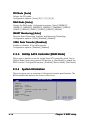
OnChip SATA Controller
[ST320410A]
[ASUS CD-S520/A]
[Not Detected]
[Not Detected]
[RAID Mode]
Use [+] or [-] to
configure the System
Time.
System Information
Sub-menu items
2.2.2
Navigation keys
Menu bar
The menu bar on top of the screen has the following main items:
Main
Advanced
For changing the basic system configuration
Power
For changing the advanced power management (APM)
configuration
Boot
Exit
For changing the system boot configuration
For changing the advanced system settings
For selecting the exit options and loading default
settings
To select an item on the menu bar, press the right or left arrow key on the
keyboard until the desired item is highlighted.
2.2.3
Navigation keys
At the bottom right corner of a menu screen are the navigation keys for
that particular menu. Use the navigation keys to select items in the menu
and change the settings.
Some of the navigation keys differ from one screen to another.
2-12
Chapter 2: BIOS setup