1
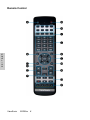
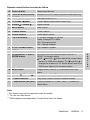
Remote control button function as follow
A Source button
Select Input Source
B *PIP/POP button (Guide)
Activate PIP or POP feature (Activate Guide-WMA only)
C *SLEEP button
Set timer to turn off TV
D CC button (
Close Caption (Back button-WMA only)
E Volume
F
Back)
/ Volume
MUTE button
Adjust Volume
Mute On/Off
G POWER button
Power ON/OFF
H Device buttons
Select desire device
I
*PIP sub-buttons
P. Source: change PIP source
Swap: Change PIP to Main
CH+: Change channel
CH-: Change channel
J
0~100+ number button
Input channel number
K *WIDE button
Change Aspect Ratio
L
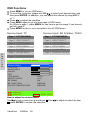
UP/DOWN for OSD function select and LEFT/
RIGHT for function adjust
VOL- and VOL+ button=adjust the volume when
there is no OSD menu display. CH- and CH+ =
change the channel on TV mode when there is no
OSD menu display (For certain models)
UP/DOWN/LEFT/ RIGHT/
ENTER button
M Menu button
Display menu, hold for 2~3 seconds to exit OSD
menu.
N Channel
Change channel for TV only
/ Channel
O **Control buttons
Play/ Stop/ Pause/ Record/ Forward/ Rewind
P ***WMA buttons (MTS/AAP) Shortcut buttons for: Videos, Music, Pictures and
Radio Menu
Note:
* This feature may not be supported under all models.
** For use on other device.
*** WMA adapters sold separately. Contact View Sonic for details.
ViewSonic
N3250w
9
E
N
G
L
I
S
H