1
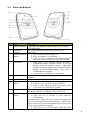
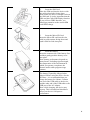
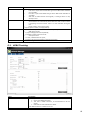
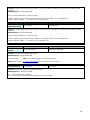
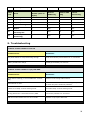
10 Volume-/GPRS Button 11 12 Lanyard Loop Battery Cover “BI” twice, and the logger will stop automatically. Note: you can make turn on/off function of logger (default: valid) invalid through Meitrack Manager to avoid operating failure. Light press to turn down the volume. In standby mode, long press for 2 seconds, when the buzzer “BI” once, GPRS function will be enabled automatically. ( Precondition: GPRS parameter must be set in advance, default GPRS message interval is 10 minutes) Long press for 2 seconds again, when the buzzer “BI” twice, GPRS function will be disabled automatically. Note: you can make turn on/off function of logger (default: valid) invalid through Meitrack Manager to avoid operating failure. For connecting lanyard. Install the battery, SIM card and Micro SD card by removing the battery cover. 3.2. LED Indications Long press the switch for 2 seconds to turn on/off MT90. GPS LED (Blue) On Charging Flashing (every 5 secs.) Sleeping Flash (1 sec on, 1 sec off) No GPS fix or initializing Off GPS fix Fast flash (0.3 sec on, 0.3 Low battery sec off) GSM LED (Green) On A call is coming in or busy Flashing (every 5 secs.) Sleeping Flash (1 sec on, 1 sec off) No GSM signal or initializing Off MT90 is connected to GSM network 3.3. First Use 1. Remove the Battery Cover With the device turned off, place your MT90 with the front facing down. Use the mini screwdriver to remove the two screws to release the back cover. Lift up the back cover from the notch at the bottom of the device. 5