1
DTU-710_Manual.fm Page 7 Monday, August 30, 2004 3:49 PM
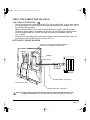
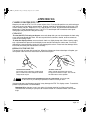
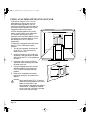
REAR VIEW
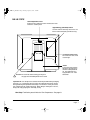
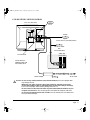
Stand Adjustment Lever
Pull this lever to adjust the stand. Release the lever
to lock the stand in place.
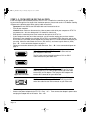
Digital/Analog (DVI/VGA) Switch
Use this switch to correctly set the DTU-710
for the video connection you will be using.
Connector Panel Cover
To remove the cover, slide
it to the right.
Stand
The stand can be used to
adjust the tilt angle of the
unit from a low position of
18˚ from horizontal to a
high position of 72˚ from
horizontal.
CAUTION Be careful to avoid catching your finger in
the gap of the movable portion of the stand.
Important: Be sure to adjust the stand to the low tilt position before packaging
the DTU-710. If you do not close the stand, the notched mechanism may be
damaged during transportation and storage. Do not lift the unit by the stand;
this may damage the stand mechanism. When lifting or moving the DTU-710,
always do so by grasping the main body casing.
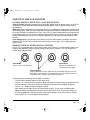
Next Step: Familiarize yourself with the Pen Components. See page 8.
INTERACTIVE PEN DISPLAY COMPONENTS
Page 7