1
Redsail Laser machine user manual
﹡.PLT、﹡.BMP、﹡.DXF、﹡.DST、﹡.AI、﹡.Dwg2 etc. files.
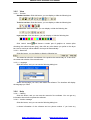
3.2.1.3 Save
The corresponding icon is
.
Save the graph data that is defined processing parameters as laser
machining file (﹡.LAS).
3.2.1.4 Save As
Save a laser machining file (﹡.LAS) as another laser machining file
(﹡.LAS).
3.2.1.5 Export
Save the vector graph data that is in current window as a standard PLT file
(*.PLT).
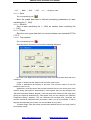
3.2.1.6 Test machine
The corresponding icon is
.
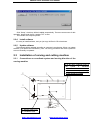
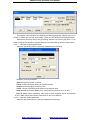
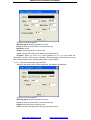
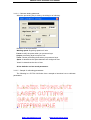
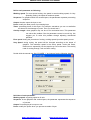
Click this button, and then you can see the following dialog box:
Up, Down, Left, Right: Move the laser head. Click once and the laser head will move
a distance.
Length: It determines the distance that the laser head moves.
Power: It determines the intensity of the laser. The minimum value is 0 and the
maximum value is 100.
Adjustment: Click this button and the laser head will move to the home point of the
machine slowly (the speed is determined by “Slow Speed” that you can change in the
“Machine Parameters Setting” diagram). Then the laser head will move to the origin point
quickly (the speed is determined by “Fast Speed” that you can change in the “Machine
Parameters Setting” diagram). This can eliminate the cumulate error. Generally, the
machine should be adjusted before processing. When you run the software, it will be
adjusted automatically (this function can be cancelled as you prefer).
To Define Origin: Click this button and the laser head will move to the origin point of
the machine quickly.
http://www.hflaser.com
http://www.easycut.cn