1
New Voicemail
The handset will store up to 16 voicemails if missed callers decide to leave a message at the door
/ gate unit.
Press OK button to listen to a new voicemails.
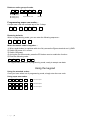
Settings
The following settings can be changed in the system. To make any of the following settings, put
the system into monitoring mode by pressing and holding the
key for a few seconds.
1. Brightness – Adjusts screen brightness.
2. Language – Select English, French or German.
3. Messages – Listen to or delete saved or older voicemails. (press KEY to delete any message).
4. Bell – Change ring tone.
5. Colour – Increase or decrease screen colour.
Use up and down arrows to navigate, and OK to select an option. Press right arrow to exit.
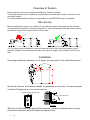
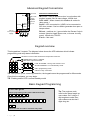
Optional Audio Handset
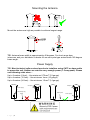
The audio handset should be charged for 8 hours before use. It is recommended to give it at least
1 hour charge before range testing.
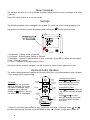
Voicemail
When a call is not answered
within 40 seconds, the visitor
can leave a message. Once
complete, the handset will
display the
symbol. The unit
can store up to 16 messages.
Reception
indicator
Battery
Level
12.21
Voicemail
Symbol
Vibration
ON/OFF
ON/OFF
MENU
Charging
base
Power
LED
Code
Button
Change Ring Volume
Press and
to increase
and decrease ring volume
and press MENU to save.
Change Ring Tone
Press
and the handset will
ring with its currently selected
tone.
Press and
to cycle
through available ring tones
and press MENU to select
and save.
To listen to voicemail, press MENU to play. If there are more than 1 message, press
and
to select the message required and press MENU to play.
= Delete. Long press = delete all.
P a g e | 10