1
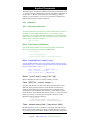
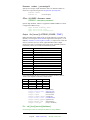
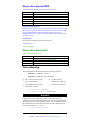
Ways to Run Suprtool/MPE
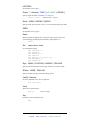
:Run Suprtool.Pub.Robelle [;parm=value] [;info="string"]
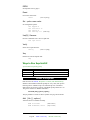
Parm=
1,2
4
8
16
32
64
Meaning
Not used
Execute Info = string
Repeat Info = string on every activate
Copy file input to output
Default Set Suspend to Off
Verify Exit with user
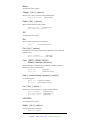
Job Control Words (JCW)
Suprtool sets the system JCW to a fatal state when Suprtool fails in a batch
job. Suprtool sets a JCW named SuprtoolOutCount to the number of output
records. SuprtoolOutCount has a maximum number of 65,535. On
MPE/iX, Suprtool sets a variable named SuprtoolFullCount to the number
of output records.
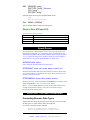
Suprmgr files
This usefile is executed every time Suprtool runs:
Suprmgr.Pub.Sys
/opt/robelle/suprmgr
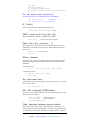
Ways to Run Suprtool/UX
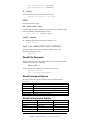
/opt/robelle/bin/suprtool [option]
Option
-c
-lw
-v
-oc
Meaning
Execute specified command string.
Execute and print any loader warnings
Exit with verify.
Write count to specified file.
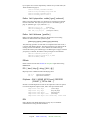
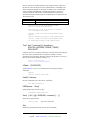
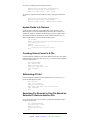
Pattern Matching
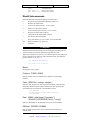
The If command can search a byte field for a pattern of characters.
if bytefield == "pattern" {match}
if bytefield >< "pattern" {does not match}
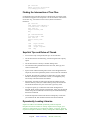
@ Zero or more characters (any)
&
Escape character
~
Zero or more blanks
!
Reserved for future use
?
One alphanumeric character
^
Reserved for future use
#
One numeric character
>if item-desc >< "@bolt@"
>if address=="e@"
{look for # sign}
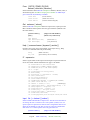
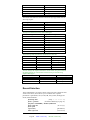
Suprlink
Suprlink can access multiple files, produce a sorted disc file with a
composite record of related fields from up to 7 files, and feed the merged
file into your report program. Suprlink accepts only one command per line,
but commands can be continued on the next line with an ampersand (&).
The prompt character is "+", not ">."
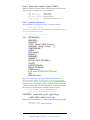
:run Suprlink.Pub.Robelle
16
Legend:
MPE version only
HP-UX version only