1
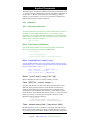
To convert a numeric field from ASCII to binary:
define ascii-field,start,length,display
define binary-field,1,size,integer
extract binary-field = ascii-field
To convert a numeric field from ASCII to binary with sign and decimal
place :
define ascii-field,start,length,display
define binary-field,1,size,integer
extract binary-field = $number(ascii-field)
Update Fields in A Dataset
Update a field in a dataset, using replacement values stored in a selfdescribing file. (Create the self-describing file using the Link option of
Suprtool or Suprlink.) Load the self-describing file into a Suprtool table,
then update the dataset field with the values loaded in the table. E.g., to
update credit-balance with new values found in myfile:
get dataset
table t,acct-no,file,myfile,data(new-balance)
if $lookup(t,acct-no)
update
extract credit-balance = &
$lookup(t,acct-no,new-balance)
xeq
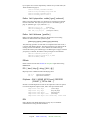
Counting Values Found in A File
Use the Duplicate command to list all the different values in a field, and to
count how many times each value occurs. E.g., to list how many shipments
we have made, by state:
get ship-dataset
sort state-code
extract state-code
duplicate none keys count
list standard
xeq
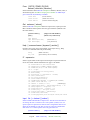
Subtotaling A Field
Use the Duplicate command to total a field based on a sort key. E.g., to
report the sales figures by date:
get invoices
sort invoice-date
extract invoice-date
duplicate none keys total sales-amount
list standard
xeq
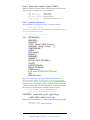
Searching For Records in One File Based on
Selection Criteria in Another File
E.g., to select all invoices for customers in California, when state-code is
not in the invoices file:
get customer-master
if state-code = "CA"
extract acct-no
output myfile,link
xeq
25
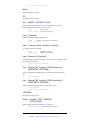
Legend:
MPE version only
HP-UX version only