1
Other
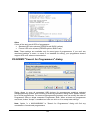
Colors of the work result LEDs of programmer:
• Standard LED color scheme (ERROR=red, BUSY=yellow)
• Former LED color scheme (ERROR=yellow, BUSY=red)
Note: These settings are available only for some types of programmers. If you can't see
mentioned settings in menu, or menu is not enabled for editing, your programmer doesn't
support LED color scheme customization.
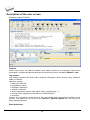
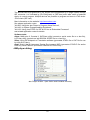
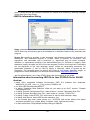
PG4UWMC "Search for Programmers" dialog
Dialog allows to scan all connected USB devices for programmers matching selected
multiprogramming system. After finishing of scanning operation, dialog offers "Search results"
list of found programmers. For some multiprogramming systems user can modify the order of
Programmer Sites or delete unwanted Programmer Sites. When at least one programmer
was found, button “Accept” is enabled and user can click on it to accept new settings.
Note: Option "n x 866C/866B/866" in "Search for Programmers" dialog will find any
combination of mentioned programmers.
123