1
Troubleshooting
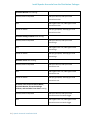
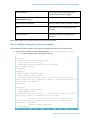
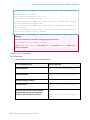
Service
Base Log Name
Master
master.FQDN.*
Monitor
monitor.FQDN.*
Tracer
tracer.FQDN.*
TabletServer
tserver.FQDN.*
Review the logs on the Master as well as the TabletServers if you encounter issues.
Example: Troubleshooting missing native libraries for tarball installations
If the native libraries Accumulo relies on aren't in /usr/lib/accumulo/lib/native, the
TabletServers will throw an error (yet continue to run). You can see this by running the following
command after starting a TabletServer where /usr/lib/accumulo/lib/native doesn't exist:
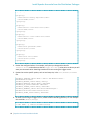
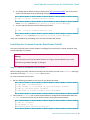
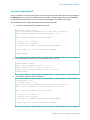
$ grep ERROR /var/log/accumulo/tserver_localhost.localdomain.log
2013-08-28 10:28:15,813 [tabletserver.NativeMap] ERROR: Failed to
load native map library
/usr/lib/accumulo/lib/native/map/libNativeMap-Linux-amd64-64.so
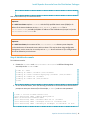
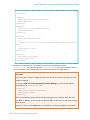
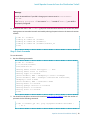
To fix this error, run the following commands to rebuild the native libraries Accumulo needs, and then
restart your TabletServer:
$ sudo make -C /usr/lib/accumulo/src/server/src/main/c++
$ sudo -i -u accumulo /usr/lib/accumulo/bin/tdown.sh && \
sudo -i -u accumulo /usr/lib/accumulo/bin/tup.sh
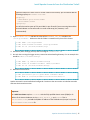
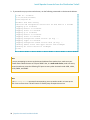
If you look at the /var/log/accumulo/tserver_localhost.localdomain.log file, you will see
there are no additional entries related to the missing library.
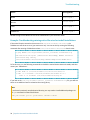
Note:
If you haven't previously compiled native libraries, you may need to install additional packages via
the yum command in order to build them:
sudo yum install gcc-c++ glibc-devel libstdc++-devel
24 | Apache Accumulo Installation Guide