1
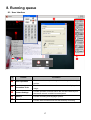
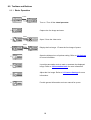
8.2.2. Annotation Tools
1. This is the default mode.
2. Draw a small color dot.
3. Draw free-handedly.
4. Add text.
5. Draw a straight line.
6. Draw an oval or circular graph.
7. Draw a square or rectangle.
8. Erase the drawing.
9. Clear the drawing altogether.
10. Choose the color for the selected drawing
11. Increase or decrease the thickness of the
lines. (If the value is higher, the line is thicker).
8.2.3. Camera Settings
Control the live image via the Camera Settings interface. The
operating procedure is the same as the remote control and control
panel of the Visual Presenter. Refer to the user manual for more
information.
<Note> The display of the button may vary depending on
product functions. An inactive button will grey out.
19