1
November 08, 2002
AlphaEclipse™ 3500 Series B Sign Installation Manual (pn 9711-6015B)
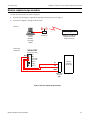
Wired (RS485) computer-to-sign connection
NOTE: Wired (RS485) connection can NOT be used with signs that are part of a Master/Slave network.
1.
Open the sign according to “Appendix D: Opening and closing the sign” on page 35.
2.
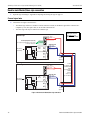
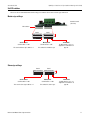
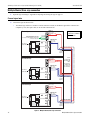
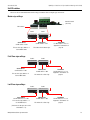
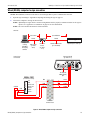
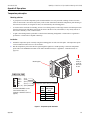
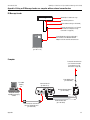
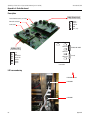
Connect the computer to the sign as shown below:
NOTE: AlphaEclipse™ signs that are connected using RS485 must be properly terminated in order for the signs to
operate. See “Appendix F: Termination” on page 45 for more information.
NOTE: The Converter Box III cannot be located outdoors.
Overview
Computer
running
AlphaNET
messaging
software
10 feet max.
up to 4000 feet
RS232
RS485
RS232 cable
(pn 10888634)
Converter
Box III
(pn 10881111)
Message 1
AlphaEclipse™ 3500 sign
RS485 outdoor cable
(pn 7122-0284)
Internal sign
connections
Converter Box III
(pn 1088-1111)
To computer
COM (RS232)
port
SERIAL PORT
(on Controller board)
SHEILD
RED
BLK
+ 5V
GND
RS232 RxD
RS232 TxD
SHIELD
RS485 –
RS485 +
BLK
RS485+
RED
RS485-
SHIELD
SHIELD
Serial I/O
terminal block
Figure 9: Wired RS485 computer-to-sign connection
Wired (RS485) computer-to-sign connection
19