1
Chapter 1: Overview of System and ESM Duties
Overview: What is E-Com?
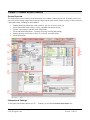
E-Com is a multi-user relational database. Multi-user means that staff across a network can gather all of a
student’s forms in one location for easier review and auditing of student history. Though E-Com does not
eliminate the requirement of printed forms stored in permanent student records, it does greatly simplify the
process of creating and managing the forms.
E-Com helps special education staff quickly create, store, and print special education forms, thereby helping
to eliminate inconsistencies and promoting compliance. The purpose of the E-Com system is to allow special
education teachers, psychologists, and other professionals to:
• Better collaborate in a team environment and provide improved student support.
• Create, store, and print special education forms required by the State of Washington for Special Education
students.
• Organize and store student, parent, school, and staff information related to students.
• Promote compliance with state and federal requirements
This manual will provide the E-Com System Manager (ESM) with system information and instructions for
tasks involved in maintaining the E-Com system.
How to Use This Manual
•
•
•
•
Use the Table of Contents to find a topic quickly.
The “Glossary” section at the back of this manual explains terms associated with the E-Com system and
referred to in this manual.
A list of do’s and don’ts called “Tips from the Trenches” appears in Chapter 6, along with
troubleshooting tips.
Most of the specific task instructions are listed in tables with pictures of buttons and other screen
elements you need to work with along. Be sure to do each step in the order shown.
Duties of the E-Com System Manager
The E-Com System Manager (ESM) has the following duties:
• In cooperation with Portage Bay Solutions, to add new forms and to change or delete existing forms to
conform to new state requirements or district standards. The ESM also maintains the E-Com system’s list
of active forms.
• To add new staff members to the staff table and to add or change staff member data.
• To add new schools to the school table and to add or change school data.
• To assign and change user IDs, passwords, and access levels.
• To insure that E-Com data is appropriately backed up and to test restores of backups.
• To help users search for and correct data entry problems such as incomplete records.
• To install the E-Com system for new users as needed, in cooperation with district technical staff.
Copyright © 2000-2013, Portage Bay Solutions
www.portagebay.com
Page 4
Printed: 11/07/13