1
Operation and Features
PRELIMINARY
3.4.1 Balancing the Gain on Odd and Even Pixels
As described on the previous page, gain alignment between the channels is important to maintain
uniform output data with minimal gray value differences between odd and even pixels.
In some applications, multiple cameras are used, for example, when several line scan cameras
are used next to each other to form one large image. Another example is that a camera in an
existing application is replaced. In these cases, it is also necessary to balance the gain between
cameras.
To meet the goals of balanced channels and comparable camera output, each Basler camera is
calibrated before it leaves the factory. This calibration procedure has the following effects:
• The factory gain settings for the odd and even channels are aligned so that they equally
amplify the signal and a uniform output is achieved on both channels. In addition, they are
set to a low gain value to obtain an optimal operating point (low noise, good odd/even channel match)
• There are reference gain values which can be used to calculate higher or lower odd and
even gain settings so that the channels remain balanced.
• All cameras have default gain settings and reference gain values which match the output of a
factory master camera of the same type. This output is referred to as 0 dB. So if a camera’s
gain is set to 2 dB, this means 2 dB more than the gain of the master camera.
The reference gain values can be used to calculate higher or lower gain settings that will keep the
odd and even channels in balance and comparable to other cameras of the same type.
If you use the Camera Configuration Tool (see Section 4.1) to set the gain on your camera, the
“auto-balance” feature on the Gain and Offset Tab will automatically use the stored reference
values to keep the channels in balance.
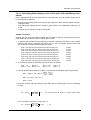
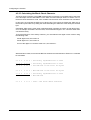
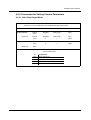
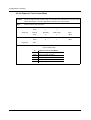
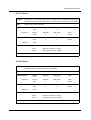
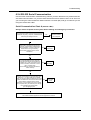
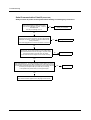
If you use binary commands (see Section 4.2) to set the gain, you can use the reference values
to calculate gain settings that will keep the channels in balance. To do this, you must select a
desired gain in dB to achieve and then use the reference values along with the formula shown on
the next page to calculate the required settings for the odd pixel gain and for the even pixel gain.
You can then enter the calculated settings into the camera using the appropriate commands.
3-8
BASLER L100b Series