1
PRELIMINARY
Operation and Features
3.8 Configuration Sets
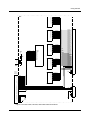
The camera’s adjustable parameters are stored in
configuration sets and each configuration set contains
all of the parameters needed to control the camera.
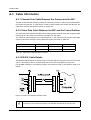
There are three different types of configuration sets: the
Work Set, the Factory Set, and User Sets.
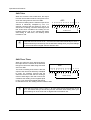
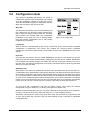
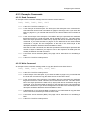
Work Set
The Work Set contains the current camera settings and
thus determines the camera’s present performance,
that is, what your image currently looks like. The Work
Set is stored in the camera RAM. The configuration
parameters in the Work Set can be altered directly
using the Camera Configuration Tool or using binary
programming commands.
Figure 3-13: Config Sets
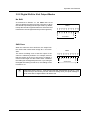
Factory Set
When a camera is manufactured, a test set up is performed on the camera and an optimized
configuration is determined. The Factory Set contains the camera’s factory optimized
configuration. The Factory Set is stored in non-volatile memory on the EEPROM and can not be
altered.
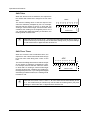
User Sets
User Sets are also stored in the non-volatile EEPROM of the camera. The camera has 15 User
Sets. Each User Set initially contains factory settings but User Sets can be modified. Modification
is accomplished by making changes to the Work Set and then copying the Work set into one of
the User Sets. The Camera Configuration Tool or binary commands can be used to copy the Work
Set into one of the User Sets.
Startup Pointer
When power to the camera is switched off, the Work set in the RAM is lost. At the next power on,
a configuration set is automatically copied into the Work Set. The Startup Pointer is used to specify
which of the configuration sets stored in the EEPROM will be copied into the Work Set at power
on. The Startup Pointer is initially set so that the Factory Set is loaded into the Work Set at power
on. This can be changed using the Camera Configuration Tool or binary commands. The Startup
Pointer can be set to the Factory Set or to any one of the User Sets. So, for example, if the Startup
Pointer is set to User Set 13, then User Set 13 will be copied into the Work Set at power on.
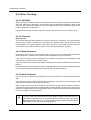
You can work with configuration sets and the startup pointer using either the Camera
Configuration Tool (see Section 4.1) or binary commands (see Section 4.2).
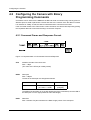
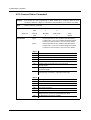
With the Camera Configuration Tool, you can use the Sets Tab to copy the Work Set to a User Set,
to Copy a User Set or the Factory Set to the Work Set, or to set the Startup Pointer.
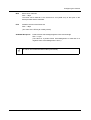
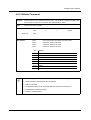
With binary commands you use the Copy Work Set to User Set command, the Copy Factory Set
or User Set to Work Set command, and the Select Startup Pointer command to manipulate
configuration sets.
BASLER L100b Series
3-21