1
are actually used in the pre-processing are taken into account. Every time a
token enters a place by firing a transition, a timestamp is logged for this token.
When the token is consumed again, timing information is added to the place.
This timing information consist of three parts. First, there is the waiting time.
This is the time a token has spent in a place while the transition consuming the
token was enabled. Second, there is the synchronization time. This is the time
a token spent in a place while the transition consuming the token was not yet
enabled. This typically happens if that transition needs multiple tokens to fire.
Finally there is the sojourn time, which is the sum of the two. An example of
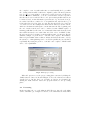
these times for the place connecting D-complete with G-schedule can be found
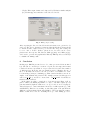
in the lower right part of Figure 3.
This process is repeated for all cases. If everything goes well, then a message
is given and the picture showing the Petri net is updated. This update is done
to show the probabilities for each choice in the Petri net. If a place has multiple
outgoing arcs, a choice has to be made. The probability that each arc is chosen
is basically the number of occurrences of the transition on that arc in the log
divided by the sum of all occurrences of all transitions with an incoming arc
from that place. The timing information for each place can be made visible in
the lower right corner of the window by just clicking on a specific place in the
picture. Some metrics for the waiting time, the synchronization time and the
sojourn time are shown.
If, when replaying the original log, a transition is unable to fire, a message
is generated stating the name of the transition. Such a message is only given
for the first error. The second error message that can be generated is that after
completing a case there are still tokens remaining in the net. In order to solve
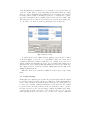
problems generated by the program, it is possible to change the set of ordering
relations that are inferred in the pre-processing phase. By clicking on a transition
in the Petri net, all relations involving that transition will be shown (except the
# relation, which represents the fact that two tasks have no causal or parallel
relation). These relations can then be altered.
5
Exporting the Petri net
After the Petri net has been rediscovered, it can be exported. By clicking the
“Export Petri net” button the Petri net is saved in three different formats. Each
format is saved in a separate file(s):
– low detail dot: This output format is used to export only the basic Petri net
with probabilities added to all arcs (if available). No timing information
will be shown in this output file. Together with the dot file, a number of
HTML files are created. These files can be used together with the dot “jpg”
and “imap” export to make a web page. Each of these HTML files contain
timing information for a specific place.
– high detail dot: This output format is used to export the basic Petri net with
probabilities added to all arc (if available) and timing information.