1
Chapter 15: Forms
SharpSchool User Manual
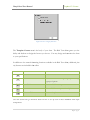
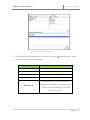
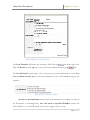
Id:: the identification name for the input field
Name:: the display name of the input field as it
would appear in submission reports
Value: the display value in submission reports
when the checkbox is Selected
Selected:: sets whether the checkbox is Selected
by default
Figure 13:: Checkbox Properties
Tip: The checkbox can be used in a Contact Me form to indicate whether the user would
like to be emailed. The checkbox can also be used to ask whether or not a student has
completed a pre-requisite
requisite course of study.
Tip: It is also possible to access the checkbox properties window by right-clicking
right
on the
checkbox, and selecting Checkbox Properties.
Pitfall: The Name and Id fields are case-sensitive, and should not include any special
characters or spaces. Underscores “_” are accepted.
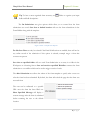
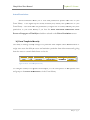
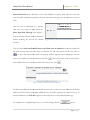
Enter the Name and Value for your
checkbox. You can also specify if you
want the checkbox to be selected by
default by checking the Selected
checkbox. Click OK.
Note: When creating a new checkbox
field, it is not necessary to fill in the Id
field – the Id field is automatically be
Figure 14: Form - Checkbox Properties (Populated)
generated whenn the form is being
validated.
13 | P a g e