1
16
Configuration
2.5
Automatically Exporting Reports
Proctor can automatically export versions of its test reports into a selected hard disk subdirectory. This feature can be used to maintain an archival copy of a project’s reports (which is useful
because it’s always better to store your data in as many formats as is possible if you want to be able
to review your results many years down the road), or, if your webserver’s directories are available
from your local network, you can make your test reports web-accessible by configuring Proctor to
automatically store copies of each test report in a webserver directory.
; If your webserver is not accessible from your local network, you can use the
GEOSYSTEM Bindery program to export your grain size test reports to the web
and notify your clients via e-mail that new reports are available for review. The
program can also fax and e-mail your reports directly to clients.
For more information, please see www.geosystemsoftware.com/bindery.
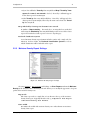
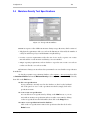
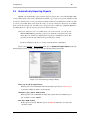
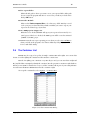
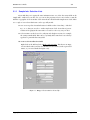
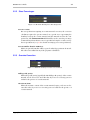
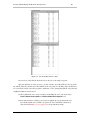
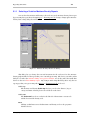
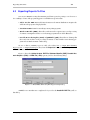
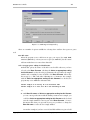
If you select Options > Proctor Setup then click on Automatic Report Export in the lefthand navigation panel, you’ll be presented with the following dialog and options:
Figure 2.11: Automatic Report Export Dialog
Chart report (Adobe .PDF format)
If this option is checked, Proctor will automatically export the test’s chart report
in a format readable by Adobe Acrobat Reader.
Summary report (Adobe .PDF format)
If this option is selected, Proctor automatically exports the test’s summary report
into an Adobe Acrobat .PDF file.
Raw data (XML format)
If this option is selected, Proctor exports an XML file listing the test’s data and
calculated results.
www.geosystemsoftware.com
Proctor by GEOSYSTEM Software