1
ARC™ Quick Start Guide 1.0
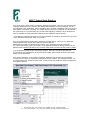
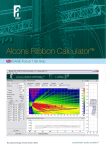
5) go to the upper centre section, mentioning “Mapping Properties”. Here you can select the type
of design results read-out; Frequency, Bandwidth, SPL weighting and Level read-out. For the
most accurate (“fine”) simulation, select 10.000Hz* and 1/3 octave* (Weighting and Level are only
SPL-related, not frequency related). For realistic listening response “3 octaves” can be selected.
For quick set-up, it is recommended only to select SPL mapping “checkbox” when simulation is
done to visualize the result (otherwise slows down the software’s response time).
* if the Mapping Properties frequencies only show 8.000Hz as maximum, then press F9, go to tab
rd
“View” and select “Advanced, show 1/3 octaves”
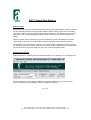
6) go to left-hand section (bottom left), mentioning “System Set-up”. Here you can define the
system specifications; system trim height and system cabinets.
Determine the number of cabinets at “Box-Count”; Then determine the type of cabinets.
For a quick start setting, press “Auto Splay”; This algorithm spreads the energy evenly over the
different areas. Please note that this is not a final / best result, but meant as easy start-up setting.
7) go to bottom left-hand section, mentioning “Project”. Here you can set the atmospheric
circumstances, like temperature, air pressure and humidity. Also notes and name of the system
design can be stored here.
8) for more information on the system’s response, additional view screens can be selected:
“Combined Level View” and “Frequency Response (in both “relative” and “absolute” levels). It is
recommended to use “Combined Level View” for set-up and use “Relative Frequency Response”
for system evaluation.
Alcons Audio B.V., De Corantijn 69, 1689AN. Zwaag, The Netherlands.
Tel. +31(0)229–283090, Fax +31(0)229-283099, E-mail [email protected]