1
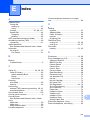
F
J
Fax codes
changing ...............................................43
Remote Activation Code .......... 31, 42, 43
Remote Deactivation Code ............ 42, 43
using .....................................................43
Fax Detect ................................................31
Fax, from PC
See Software and Network User’s Guide.
Fax, stand-alone
receiving ................................................27
difficulties .................................... 91, 92
F/T Ring Time, setting ........................30
Fax Detect ..........................................31
from extension telephone ............ 42, 43
Ring Delay, setting .............................30
telephone line interference / VoIP ......97
sending .................................................24
change scanner glass size .................25
colour fax ...........................................25
difficulties ...........................................93
telephone line interference / VoIP ......97
Transmission Verification Report .......26
Fax/Tel mode
answering at extension
telephones ..................................... 42, 43
Remote Activation Code ................ 42, 43
Remote Deactivation Code ............ 42, 43
Ring Delay ............................................30
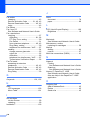
Jams
document .............................................. 78
paper .................................................... 80
G
Greyscale ...................................... 123, 125
H
Help
LCD messages ...................................100
Menu Table .........................................101
I
Ink cartridges
ink dot counter ......................................59
replacing ...............................................59
Innobella™ .............................................130
132
L
LCD (Liquid Crystal Display) ................. 100
Brightness ............................................ 10
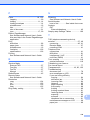
M
Macintosh
See Software and Network User’s Guide.
Maintenance, routine
replacing ink cartridges ........................ 59
Manual
dialling .................................................. 44
receive .................................................. 27
Multi-line connections (PABX) ................. 41
N
Network
Printing
See Software and Network User’s Guide.
Scanning
See Software and Network User’s Guide.
Nuance™ PaperPort™ 12SE
See Software and Network User’s Guide.
Also see Help in the PaperPort™ 12SE
application.
O
Outgoing Call
Add to Address Book ............................ 45
Delete ................................................... 45
Send a fax ............................................ 45