1
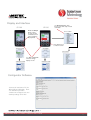
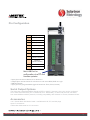
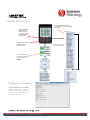
Display and Interface
Use Action Screen to Zero,
Preset, Print, and setup shortcut
commands
ŻLeft and ŹRight
Arrows can be
used
d as shortcut
h t t
commands to Zero
or Preset while in
Display Mode
Use ŸUp and źDown
arrows to change
display screens
ACTION SCREEN
Press ƔEnter to go
t “Action”
to
“A ti ” Screen
S
You can also display
just two channels at a
time (A and B, or C
and D)
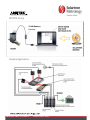
Configurator Software
Connect SI400 to PC via Mini
MiniUSB to USB cable. Then use
Solartron provided software to
configure unit, and backup
settings to PC file!
EDCR number: 20908 Issue number: 1 Datasheet number: 503174
4