1
hybmod.cal: To be used when a robot is comprised of SmartAmp axes (SmartModules
and/or Servo Kits) in addition to FireBlox-1 and/or sMI6 axes.
NOTE: If the system was configured from the DC_SETUP utility, the correct
calibration routine should be selected automatically.
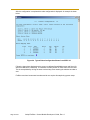
To specify the calibration routine select Edit robot specifications from the main SPEC menu.
From the sub-menu select Edit robot initialization specs. From the sub-menu select
Calibration file name.
Exit to the main menu and select Save ALL specifications to system disk.
NOTE: Failure to specify the correct calibration routine will result in a *Not
configured as accessed* error message while attempting to calibrate the robot.
Edit General Parameters
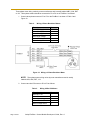
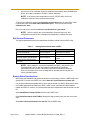
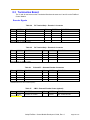
The general parameters listed in the table below should be verified from the SPEC utility.
Table 7.
Editing General Parameters in SPEC
Parameter
Main Menu
Sub Menu
Encoder scale/factor
Edit robot specs
Edit motor enc specs
Joint Motion Specifications
Edit robot specs
Cartesian Motion Specifications
Edit robot specs
Edit joint motion specs
Edit Cartesian motion
specs
General Motion Specifications
(optional)
Edit robot specs
Edit general motion specs
NOTE: When editing the Joint Motion parameters in SPEC, verify that the joint
limits (specified in mm or deg) are inside the limits specified in BloxView
(specified in encoder counts). If the SPEC joint limits are outside the BloxView
limits, an *Overtravel Limit* error message will be reported when driving the axis
from the SmartController.
Backup Robot Specifications
After editing the calibration and general parameters it is necessary to save the SPEC data to the
system disk. From the main SPEC menu select Save ALL specifications to system disk.
It is recommended that a separate backup of the data be stored to a disk file. Before this is done
the FireBlox data should be loaded into SPEC. While it is not required that FireBlox data be
loaded into SPEC for runtime, it is recommended that the comprehensive data be stored to a disk
file.
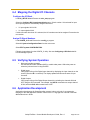
Select Read/Write to Adept FireBlox from the main SPEC menu.
Select Read Parameters from FireBlox. Repeat this step for both joints, then exit to the main
menu.
Select Save robot specifications to a disk file. Exit the SPEC utility.
Page 42 of 61
Adept FireBlox-1 Control Module Developer’s Guide, Rev. A