1
Controller Operation
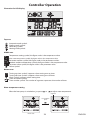
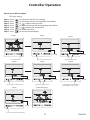
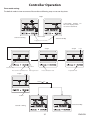
How to set an OFF time point
OFF timer setting
Step 1 :
Step 2 :
Step 3 :
Step 4 :
Step 5 :
Step 6 :
Step 7 :
press
press
press
press
press
press
press
for 3 times to start OFF time setting.
to select hour and the corresponding value flashes.
or
to adjust the hour value.
to select minute and the corresponding value flashes.
or
to adjust the minute value.
to confirm the value.
to return to normal display.
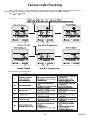
S tep 2
S tep 1
S tep 3
F lash
Press to select hour v alue
Press f or 3 times
A djust the hour v alue
S tep5
S tep4
A djust the minute value
N or mal d isplay
S tep7
S tep 6
F lash
F lash
Press to turn to minute value
F lash
F lash
C onfirm the value, and turn to
nexe ON /OF F t imer setting
F lash
Press to return to normal display
27
ENGLISH