1
Controller Operation
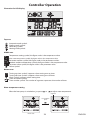
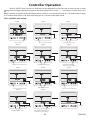
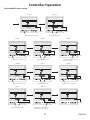
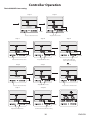
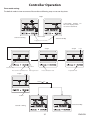
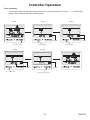
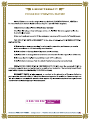
Totally 3 ON/OFF timers can be set. And they can be applied to use for every day or only one day. In timer
setting status, the figure below NO represents the timer sequence. If it shows “--:---“ on bottom, it means timer invalid.
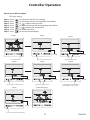
Below examples show how to set the heat pump to switch on at 9:10 and switch off at 12:30, and switch on again
at 14:10 and switch off at 17:30, and switch on again at 19:10 and switch off at 23:30.
The 1 st ON/OFF time setting:
S tep 1
S tep 2
S tep 3
F lash
Press f or twice
Press to select hour v alue
F lash
Press to turn to minute value
S tep 6
F lash
S tep 8
F lash
S tep 9
F lash
A djust the hour v alue
Press to select hour v alue
S tep 10
F lash
C onfirm the value and
turn to OF F t imer setting
A djust the minute value
S tep 7
F lash
Press to turn to minute value
S tep 11
F lash
A djust the minute value
Adjust the hour v alue
S tep 5
S tep 4
F lash
F lash
F lash
C onfirm the value and turn to
next ON /OF F t imer setting
28
ENGLISH