1
CHAPTER 6. TIPS AND TRICKS
64
Note that the DOS command prompt cannot handle paths including blanks properly. Thus,
if you have installed HALCON to a directory like
C:\Program Files\MVTec\Halcon
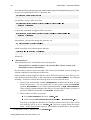
you will have to type either (one line)
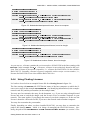
C:\Progra~1\MVTec\Halcon\FLEXlm\i586-nt4\installs -r -n
"Halcon Licenses"
or quote the command as suggested here (one line)
"C:\Program Files\MVTec\Halcon\FLEXlm\i586-nt4\installs" -r -n
"Halcon Licenses"
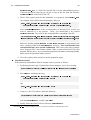
Alternatively, you can also change the directory via
cd %HALCONROOT%\FLEXlm\i586-nt4
which is possible even without quotes and type
installs -r -n "Halcon Licenses"
afterwards.
“Internal Error”
If the uninstall process is terminates with a message like
“Internal Error, unable to load or call external DLL. Please contact your
distributor for more information.”
the most likely reason is that a new HALCON version was installed over an existing one
without completely removing the old files first.
Other possible reasons might be that the whole HALCON directory was moved to another position on the hard disk, or the environment variable %HALCONROOT% was changed
manually. You have to follow the following steps to recover from the error:
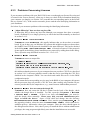
1. Check if the environment variable %HALCONROOT% matches the location of your
HALCON directory. You can check this via the system control panel System
(look for Environment) or in a DOS command prompt via echo %HALCONROOT%.
If the variable contains nothing or the files are in some other location, you have to
set HALCONROOT manually via the System control panel.
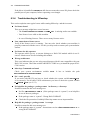
2. Check if these two files are present:
In your %HALCONROOT% directory: Uninst.isu
In the directory %HALCONROOT%nFLEXlmi586-nt4: HalconUninst.dll2
Note that by default the Windows NT Explorer doesn’t show DLL files, unless
you explicitly tell it to do so. Uninst.isu has been created during the installation. If this file has been removed, an automatic uninstallation is not possible.
2
For HALCON 5.0 and 5.1, this DLL was called CSUninst.dll.
Getting Started with HALCON / 2000-11-16