1
Version 3.604 (31/03/05) p17
INNER RANGE IQ PLUS. Quick Programmer’s Manual.
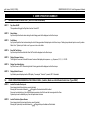
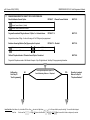
No Reporting.
Go to Step 30.
“User Programming”
t
Contact ID or Domestic Dialer Reporting.
18.
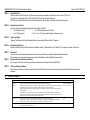
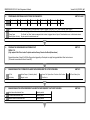
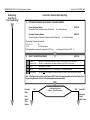
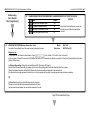
PROGRAM THE PRIMARY AND SECONDARY TELEPHONE NUMBERS.
Primary Telephone Number.
Program the Primary Telephone number for Reporting.
NEXT 500
Up to 16 digits allowed.
Secondary Telephone Number.
If required, program a Secondary Telephone number for Reporting.
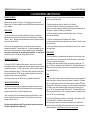
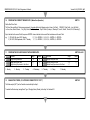
Programming Telephone number digits:
0 to 9 = 0 to 9
10 = *
11 = #
12 = 4 Second pause
Multi-digit numbers are entered by pressing the <OFF> key.
19.
NEXT 501
Up to 16 digits allowed.
e.g. To program a #, Press <OFF>, 1, 1.
t
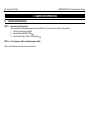
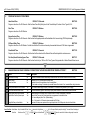
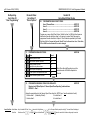
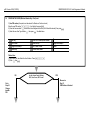
SELECT THE REPORTING FORMAT.
NEXT 505
1
Contact ID.
Reports to a Central Monitoring Station in Contact ID format via the PSTN Line connection.
2
Domestic Dialer.
Reports to a private telephone with simple tone beeps via the PSTN Line connection.
3
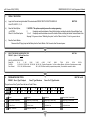
CFSK
Not available in this version
Securitel
Reports Securitel via Port 0 or Port 1 (see Section 8 of Programming Manual)
Dual Reporting
Reports to both of the programmed telephone numbers in Contact ID and/or Domestic Dialer formats.
4
Note: If Dual Reporting is required, select Option 8 FIRST. Refer to Programming Advanced Features Section 8 and
Programming Reference, Section 9 of Programming Manual for further details.
t
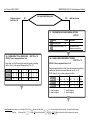
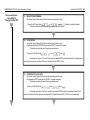
Domestic
Dialer.
t
Go to
Step 21
Dialer
Options.
NO
t
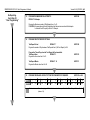
Is the Reporting Format
- Option 1 - Contact ID enabled?
YES
Contact ID
Move on to
Step 20
Client Codes.
t