1
p20 Version 3.604 (31/03/05)
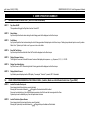
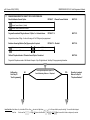
No Reporting.
Go to Step 30
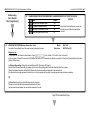
“User Programming”
t
INNER RANGE IQ PLUS. Quick Programmer’s Manual.
26.
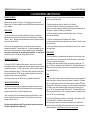
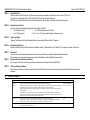
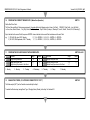
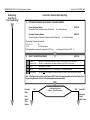
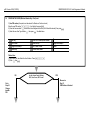
PROGRAM THE DIALER SWINGER SHUTDOWN COUNT.
NEXT 914
DEFAULT: 16
(Only required if the “Dialer Lockout” option is selected for any Zones in the Zone Options in Step 25 above)
Program the number of times (0 to 255) the Dialer can be triggered by a Zone Input, in a single Arming period, before Siren
Lockout occurs.
(The counter is reset when the Area is turned Off)
t
27.
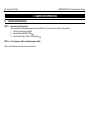
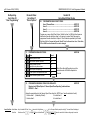
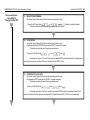
ENABLE/DISABLE ANY GENERAL OPTIONS THAT ARE REQUIRED FROM “GENERAL OPTIONS 2”.
NEXT 891
Option
Default
Description
6
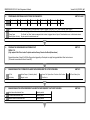
Delay Siren until Comms complete.
No
8
Dialer enabled in Home Mode.
No
Siren operation will not be initiated until a report has been sucessfully
sent, or a Comms Fail alarm generated.
If selected, Alarms and Open/Close reports will be sent for Areas armed
in Home Mode.
t
28.
t
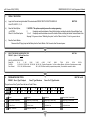
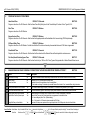
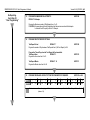
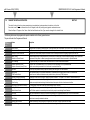
ENABLE/DISABLE THE SYSTEM INPUT ALARMS THAT ARE REQUIRED TO ACTIVATE THE DIALER.
NEXT 898.
Option
Default
1
2
3
AC Fail.
Low Battery.
Cabinet Tamper.
Yes
Yes
Yes
4
5
6
7
Keypad Lockout.
Comms Fail / System Reset.
Siren Monitor.
LAN Fuse / Battery Fuse.
No
Yes
Yes
Yes
8
Zone Self-Test Fail.
No
Default
Door Forced
NO
t
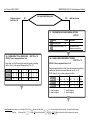
How to Enter Data. Select Address: Key in the Installer PIN Code; Press
Enter Data:
15
Option
Enter the new Data
then enter the 3 digit Address
.. (1-16 digits) OR Option/s to Select/De-select
(A1 to A3 Lamps will flash to prompt for each digit). The current Data will be displayed.
, then
.
NOTE:
clears the current field of all data or settings ready for new data.