1
Why Choose Solid PDF Tools?
Well, here I am once again to share
with you - just as I did way back in
September 2005 in my BCM Review
of Solid Converter PDF to Word1
&2
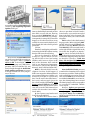
(SCPDFW2) - that to recover, manipulate and/or reuse your PDF (content
or document) with Solid PDF Tools,
you simply open your PDF file(s) in
Microsoft Word, then edit them just like
you always have done. Only this time,
it’s a super-/duper-powered “Solid
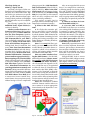
PDF Tools that delivers the PDF content right to your fingertips.” It’s really
that simple (See below).
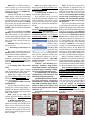
Not to be outdone (such as Solid
Converter PDF to Word), you can
actually reverse the process and save
your Word documents straight to PDF
too (See below)! So now, with Solid
PDF Tools, you also will no longer
need to buy Adobe Acrobat simply to
get the job done.
FYI However just to set the record
straight, and this comes directly from
the FAQ’s:
Q. Do I need Adobe Acrobat or
Adobe Reader to use Solid Converter
PDF?
A. No. However, to view or download PDF files (separately) you must
have Adobe Reader installed on your
computer.
Note. The Adobe Reader program
is free (it’s up to version 9.1 the last time
I checked), and
can be downloaded from their
web site. “Now
how’s that
for limiting
your budget
in these tough
times?”
Speaking of tough times, a C-note
expenditure could be challenging to
some, especially at this particular vexing
time in our “stressed out economy,” so
this might be just the right time to list
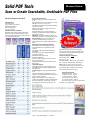
some of the features you do get with your
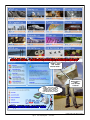
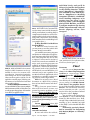
purchase of SPDFT5? (Also, see the
graphic. Each topic in the graphic has
its own “slide show” to better illustrate
and/or explain itself. Please check them
all out for yourself on their web site.)
You know, Solid PDF Tools can
even be used to extract, one to many,
images from PDF files. In so doing, you
then have the option of saving them as a
file in their original format, or even as
a different graphics type.
Note. The graphics will be saved in
a separate folder with the same name
as the original file. Pretty neat too! But
wait, I’ve already started getting carried
away and getting way ahead of myself
here. There’s lots, lots more to Solid
PDF Tools - actually tons more;
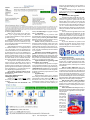
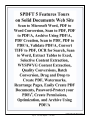
for instance, Feature Tours on
their web site (See below). (Wow!
Once again, please check them all out for
yourself on their web site, when you’ve
got the time to do so. It’s darn well worth
your time, believe you me.)
Get the general idea now?
Then, “Read on McDuff!”3
IT’S NEVER
TOO LATE
Page 6
Blue Chips Magazine — June 2009
So, What’s It All About Alfie?
Sadly, it was deja vu all over
“yet again” for me! Some things
just never seem to change for me,
do they? Here’s my story. I needed to
copy some data, like I always need
to do for my Reports4/Reviews,
only this time, for some obscure reason
or other into Microsoft Word (instead
of my favorite WordPerfect) for last
month’s Diskeeper 2009 Review
from a certain file in the DK 2009 PDF
Users Manual. Can’t recall exactly
what I needed, but my copy of Adobe
Reader(*) absolutely would not, repeat
would not let me select and copy the data
I needed so desperately; so what was I
supposed to do?
(*) BTW. You may recall my horrific
clash with the XP Pro SP3 update? Well,
you should since I’ve written about it
here in BCM for the past five (5) months
now? SP 3 had also destroyed my copy of
Solid Converter PDF to Word, and
you know the old saying, “Out’ta sight,
out’ta mind?” Bingo!
“What we
call failure is not
the falling down
but the staying
down.” - Mary
Pickford
Long story-short story. I ended up
actually manually typing in
everything I needed in the long run. Yuk!
Yuk! Triple Yuk! Be advised, that’s
not a three stooges type of “yuk”
either. After the DK 2009 Review was
done and gone, put to bed, finé, kaput; I
slapped myself on the forehead...
(Wait a sec! I remember now what
I said four years ago when I did exactly
the same thing during the Solid Converter PDF to Word Review; “That
just could be the reason I’m getting so
bald up topside? You know, that repeated slapping myself on the forehead so
often?” Or more than likely, it could be
more like what author and editor Edgar
Watson Howe, who died in 1937, said,
“A man is usually bald four or five years
before he knows it.” OK!). It was then
that I remembered that I had been given
a copy of Solid PDF Tools (Version 5)
(SPDFT5) to upgrade my “Dead” copy
of Solid Converter PDF to Word.
Double Duh!