1
12
Complete Time Tracking Database Script v3.12
4
Getting Started
4.1
Configuration
The Database Script tool, DatabaseScript.exe, is a non-interactive command line program that
runs a script containing one or more commands in a script language using the options passed on
the command line or stored in a configuration file. The actual script commands can be stored
within the configuration file or in a separate text file. The Database Script tool can be run manually
from the command prompt, or automatically from a batch file, called from another program, or run
as a scheduled task.
Configuration
Several configurable settings control what database and user to use, what script is run, and
various formatting options in the output file. These can be specified on the command line or saved
in a configuration file. An interactive editor is provided to simplify the process of creating the
command line options or configuration file to be used. Alternatively these can be constructed
manually or programmatically. When a configuration file is used a single command line option is
required to specify the filename and all other command line options are not required.
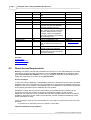
Mandatory Settings
Setting
Database
Command Configuration File
Line Option Option
-d
<Database>
"database"
Database user -u "user"
Database
password
-p
"password"
Database role
-r "role"
Output format
-f format
<DatabaseUser>
Description
Identifies the Complete Time Tracking
database to connect to. This is in the same
format as the server field entered in the
Complete Time Tracking login window. See
below.
The name of the database user (not the
Complete Time Tracking user) to connect
as. The user determines the access
privileges. Users are configured using the
Complete Time Tracking Server Manager
tool.
The password for the database user.
<
DatabasePassword
>
<DatabaseRole>
The role for the database user. Either
GENROLE for limited read only users,
ADVROLE for full read only users, or
SYSROLE for read-write users.
<OutputFormat>
Selects the format or type of data saved to
the output file. Options include CSV
(comma separated fields), TAB (tab
separated fields), or XML. See SQL
Statement.
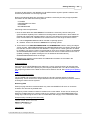
Additionally either the -c or -s command line option is required. See Optional Settings in the
following section.
Database Option
The database is specified in the following format:
ServerComputer/TCPPort:DatabaseName
The three components to Database are:
· ServerComputer: Mandatory. The host name or IP address of the Complete Time Tracking
© 2012 Backslash Pty Ltd. All Rights Reserved.