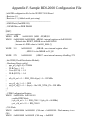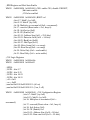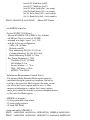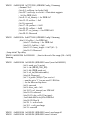
1
ChristopherHallinan
ComprehensiveReal-WorldGuidanceforEveryEmbeddedDeveloperandEngineer
This book brings together indispensable knowledge for building efficient, high-value, Linux-based embedded products:
information that has never been assembled in one place before. Drawing on years of experience as an embedded Linux
consultant and field application engineer, Christopher Hallinan offers solutions for the specific technical issues you're most
likelytoface,demonstrateshowtobuildaneffectiveembeddedLinuxenvironment,andshowshowtouseitasproductivelyas
possible.
HallinanbeginsbytouringatypicalLinux-basedembeddedsystem,introducingkeyconceptsandcomponents,andcalling
attention to differences between Linux and traditional embedded environments. Writing from the embedded developer's
viewpoint,hethoroughlyaddressesissuesrangingfromkernelbuildingandinitializationtobootloaders,devicedriverstofile
systems.
HallinanthoroughlycoverstheincreasinglypopularBusyBoxutilities;presentsastep-by-stepwalkthroughofportingLinux
to custom boards; and introduces real-time configuration via CONFIG_RT--one of today's most exciting developments in
embeddedLinux.You'llfindespeciallydetailedcoverageofusingdevelopmenttoolstoanalyzeanddebugembeddedsystems-includingtheartofkerneldebugging.
•CompareleadingembeddedLinuxprocessors
•UnderstandthedetailsoftheLinuxkernelinitializationprocess
•LearnaboutthespecialroleofbootloadersinembeddedLinuxsystems,withspecificemphasisonU-Boot
•UseembeddedLinuxfilesystems,includingJFFS2--withdetailedguidelinesforbuildingFlash-residentfilesystemimages
•UnderstandtheMemoryTechnologyDevicessubsystemforflash(andother)memorydevices
•Mastergdb,KGDB,andhardwareJTAGdebugging
•LearnmanytipsandtechniquesfordebuggingwithintheLinuxkernel
•Maximizeyourproductivityincross-developmentenvironments
•Prepareyourentiredevelopmentenvironment,includingTFTP,DHCP,andNFStargetservers
•Configure,build,andinitializeBusyBoxtosupportyouruniquerequirements
PrenticeHallOpenSourceSoftwareDevelopmentSeries
ArnoldSeriesEditorRobbins
"Realworldcodefromrealworldapplications"
OpenSourcetechnologyhasrevolutionizedthecomputingworld.Manylarge-scaleprojectsare
in production use worldwide, such as Apache, MySQL, and Postgres, with programmers writing
applicationsinavarietyoflanguagesincludingPerl,Python,andPHP.Thesetechnologiesareinuse
onmanydifferentsystems,rangingfromproprietarysystems,toLinuxsystems,totraditionalUNIX
systems,tomainframes.
ThePrenticeHallOpenSourceSoftwareDevelopmentSeriesisdesignedtobringyouthebestof
theseOpenSourcetechnologies.Notonlywillyoulearnhowtousethemforyourprojects,butyou
willlearnfromthem.Byseeingrealcodefromrealapplications,youwilllearnthebestpracticesof
OpenSourcedeveloperstheworldover.
Titlescurrentlyintheseriesinclude:
Linux®DebuggingandPerformanceTuning:TipsandTechniques
SteveBest
0131492470,Paper,©2006
UnderstandingAJAX:UsingJavaScripttoCreateRichInternetApplications
JoshuaEichorn
0132216353,Paper,©2007
EmbeddedLinuxPrimer
ChristopherHallinan
0131679848,Paper,©2007
SELinuxbyExample
FrankMayer,DavidCaplan,KarlMacMillan
0131963694,Paper,©2007
UNIXtoLinux®Porting
AlfredoMendoza,ChakaratSkawratananond,ArtisWalker
0131871099,Paper,©2006
LinuxProgrammingbyExample:TheFundamentals
ArnoldRobbins
0131429647,Paper,©2004
TheLinux®KernelPrimer:ATop-DownApproachforx86andPowerPCArchitectures
ClaudiaSalzberg,GordonFischer,StevenSmolski
0131181637,Paper,©2006
Foreword
Computersareeverywhere.
Thisfact,ofcourse,isnotasurprisetoanyonewhohasn'tbeenlivinginacaveduringthepast25
yearsorso.Andyouprobablyknowthatcomputersaren'tjustonourdesktops,inourkitchens,and,
increasingly, in our living rooms holding our music collections. They're also in our microwave
ovens,ourregularovens,ourcellphones,andourportabledigitalmusicplayers.
And if you're holding this book, you probably know a lot, or are interested in learning more
about,theseembeddedcomputersystems.
Untilnottoolongago,embeddedsystemswerenotverypowerful,andtheyranspecial-purpose,
proprietaryoperatingsystemsthatwereverydifferentfromindustry-standardones.(Plus,theywere
much harder to develop for.) Today, embedded computers are as powerful as, if not more than, a
modernhomecomputer.(Considerthehigh-endgamingconsoles,forexample.)
Alongwiththispowercomesthecapabilitytorunafull-fledgedoperatingsystemsuchasLinux.
UsingasystemsuchasLinuxforanembeddedproductmakesalotofsense.Alargecommunityof
developers are making it possible. The development environment and the deployment environment
canbesurprisinglysimilar,whichmakesyourlifeasadevelopermucheasier.Andyouhaveboththe
securityofaprotectedaddressspacethatavirtualmemory-basedsystemgivesyou,andthepower
andflexibilityofamultiuser,multiprocesssystem.That'sagooddealallaround.
Forthisreason,companiesallovertheworldareusingLinuxonmanydevicessuchasPDAs,
homeentertainmentsystems,andeven,believeitornot,cellphones!
I'm excited about this book. It provides an excellent "guide up the learning curve" for the
developerwhowantstouseLinuxforhisorherembeddedsystem.It'sclear,well-written,andwellorganized;Chris'sknowledgeandunderstandingshowthroughateveryturn.It'snotonlyinformative
andhelpfulit'salsoenjoyabletoread.
Ihopeyoubothlearnsomethingandhavefunatthesametime.IknowIdid.
ArnoldRobbins
SeriesEditor
Preface
AlthoughmanygoodbookscoverLinux,nonebringstogethersomanydimensionsofinformation
andadvicespecificallytargetedtotheembeddedLinuxdeveloper.Indeed,therearesomeverygood
books written about the Linux kernel, Linux system administration, and so on. You will find
references right here in this book to many of the ones that I consider to be at the top of their
categories.
MuchofthematerialpresentedinthisbookismotivatedbyquestionsI'vereceivedovertheyears
fromdevelopmentengineers,inmycapacityasanembeddedLinuxconsultantandmypresentroleas
a Field Application Engineer for Monta Vista Software, the leading vendor of embedded Linux
distributions.
Embedded Linux presents the experienced software engineer with several unique challenges.
First,thosewithmanyyearsofexperiencewithlegacyreal-timeoperatingsystems(RTOSes)findit
difficult to transition their thinking from those environments to Linux. Second, experienced
application developers often have difficulty understanding the relative complexities of a crossdevelopmentenvironment.
Althoughthisisa primer,intended fordevelopersnewtoembeddedLinux,Iamconfidentthat
evendeveloperswhoareexperiencedinembeddedLinuxwillfindsomeusefultipsandtechniques
thatIhavelearnedovertheyears.
PracticalAdviceforthePracticingEmbeddedDeveloper
Thisbookcontainsmyviewofwhatanembeddedengineerneedstoknowtogetuptospeedfast
inanembeddedLinuxenvironment.InsteadoffocusingonLinuxkernelinternals,thekernelchapter
inthisbookfocusesontheprojectnatureofthekernelandleavestheinternalstotheotherexcellent
texts on the subject. You will learn the organization and layout of the kernel source tree. You will
discover the binary components that make up a kernel image, and how they are loaded and what
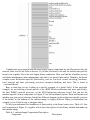
purpose they serve on an embedded system. One of my favorite figures in the book is Figure 5-1,
whichschematicallyillustratesthebuildprocessofacompositekernelimage.
Inthepagesofthisbook,youwilllearnhowthebuildsystemworksandhowtoincorporateinto
theLinuxkernelyourowncustomchangesthatarerequiredforyourownprojects.Youwilldiscover
themechanismusedtodrivetheconfigurationofdifferentarchitecturesandfeatureswithintheLinux
kernel source tree and, more important, how to modify this system to customize it to your own
requirements. We also cover in detail the kernel command-line mechanism. You will learn how it
works,howtoconfigurethekernel'sruntimebehaviorforyourrequirements,andhowtoextendthis
functionalitytoyourownproject.Youwilllearnhowtonavigatethekernelsourcecodeandhowto
configurethekernelforspecifictasksrelatedtoanembeddedsystem.Youwilllearnmanyusefultips
andtricksforyourembeddedproject,frombootloaders,systeminitialization,filesystems,andFlash
memorytoadvancedkernel-andapplication-debuggingtechniques.
IntendedAudience
ThisbookisintendedforprogrammerswithaworkingknowledgeofprogramminginC.Iassume
that you have a rudimentary understanding of local area networks and the Internet. You should
understand and recognize an IP address and how it is used on a simple local area network. I also
assume that you have an understanding of hexadecimal and octal numbering systems, and their
commonusageinatextsuchasthis.
SeveraladvancedconceptsrelatedtoCcompilingandlinkingareexplored,soyouwillbenefit
from having at least a cursory understanding of the role of the linker in ordinary C programming.
KnowledgeoftheGNUmakeoperationandsemanticswillalsoprovebeneficial.
WhatThisBookIsNot
This book is not a detailed hardware tutorial. One of the difficulties the embedded developer
faces is the huge variety of hardware devices in use today. The user manual for a modern 32-bit
processorwithsomeintegratedperipheralscaneasilyexceed1,000pages.Therearenoshortcuts.If
youneedtounderstandahardwaredevicefromaprogrammer'spointofview,youwillneedtospend
plentyofhours in yourfavoritereadingchairwithhardwaredatasheetsandreferenceguides,and
manymorehourswritingandtestingcodeforthesehardwaredevices!
ThisisalsonotabookabouttheLinuxkernelorkernelinternals.Inthisbook,youwon'tlearn
about the intricacies of the Memory Management Unit (MMU) used to implement Linux's virtual
memory-managementpoliciesandprocedures;therearealreadyseveralgoodbooksonthissubject.
Youareencouragedtotakeadvantageofthe"SuggestionsforAdditionalReading"sectionfoundat
theendofeverychapter.
ConventionsUsed
Filenames and code statements are presented in Courier. Commands issued by the reader are
indicatedinboldCourier.Newtermsorimportantconceptsarepresentedinitalics.
Whenyouseeapathnameprecededwiththreedots,thisreferencesawell-knownbutunspecified
top-level directory. The top-level directory is context dependent but almost universally refers to a
top-level Linux source directory. For example, .../arch/ppc/kernel/setup.c refers to the setup.c file
located in the architecture branch of a Linux source tree. The actual path might be something like
~/sandbox/linux.2.6.14/arch/ppc/kernel/setup.c.
OrganizationoftheBook
Chapter1,"Introduction,"providesabrieflookatthefactorsdrivingtherapidadoptionofLinux
intheembeddedenvironment.Severalimportantstandardsandorganizationsrelevanttoembedded
Linuxareintroduced.
Chapter2,"YourFirstEmbeddedExperience,"introducesthereadertomanyconceptsrelatedto
embeddedLinuxuponwhichwebuildinlaterchapters.
InChapter3,"ProcessorBasics,"wepresentahigh-levellookatthemorepopularprocessors
andplatformsthatarebeingusedtobuildembeddedLinuxsystems.Weexamineselectedproducts
from many of the major processor manufacturers. All of the major architecture families are
represented.
Chapter 4, "The Linux Kernel: A Different Perspective," examines the Linux kernel from a
slightly different perspective. Instead of kernel theory or internals, we look at its structure, layout,
and build construction so you can begin to learn your way around this large software project and,
moreimportant,learnwhereyourowncustomizationeffortsmustbefocused.Thisincludesdetailed
coverageofthekernelbuildsystem.
Chapter5,"KernelInitialization,"detailstheLinuxkernel'sinitializationprocess.Youwilllearn
howthearchitecture-andbootloader-specificimagecomponentsareconcatenatedtotheimageofthe
kernel proper for downloading to Flash and booting by an embedded bootloader. The knowledge
gained here will help you customize the Linux kernel to your own embedded application
requirements.
Chapter6,"SystemInitialization,"continuesthedetailedexaminationoftheinitializationprocess.
When the Linux kernel has completed its own initialization, application programs continue the
initialization process in a predetermined manner. Upon completing Chapter 6, you will have the
necessaryknowledgetocustomizeyourownuserlandapplicationstartupsequence.
Chapter 7, "Bootloaders," is dedicated to the booloader and its role in an embedded Linux
system.Weexaminethepopularopen-sourcebootloaderU-Bootandpresentaportingexample.We
brieflyintroduceadditionalbootloadersinusetodaysoyoucanmakeaninformedchoiceaboutyour
particularrequirements.
Chapter 8, "Device Driver Basics," introduces the Linux device driver model and provides
enoughbackgroundtolaunchintooneofthegreattextsondevicedrivers,listedas"Suggestionsfor
AdditionalReading"attheendofthechapter.
Chapter 9, "File Systems," presents the more popular file systems being used in embedded
systemstoday.WeincludecoverageoftheJFFS2,animportantembeddedfilesystemusedonFlash
memorydevices.Thischapterincludesabriefintroductiononbuildingyourownfilesystemimage,
oneofthemoredifficulttaskstheembeddedLinuxdeveloperfaces.
Chapter 10, "MTD Subsystem," explores the Memory Technology Devices (MTD) subsystem.
MTDisanextremelyusefulabstractionlayerbetweentheLinuxfilesystemandhardwarememory
devices,primarilyFlashmemory.
Chapter 11, "BusyBox," introduces BusyBox, one of the most useful utilities for building small
embedded systems. We describe how to configure and build BusyBox for your particular
requirements,alongwithdetailedcoverageofsysteminitializationuniquetoaBusyBoxenvironment.
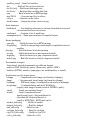
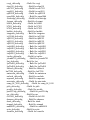
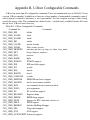
AppendixC,"BusyBoxCommands,"liststheavailableBusyBoxcommandsfromarecentBusyBox
release.
Chapter 12, "Embedded Development Environment," takes a detailed look at the unique
requirements of a typical cross-development environment. Several techniques are presented to
enhance your productivity as an embedded developer, including the powerful NFS root mount
developmentconfiguration.
Chapter13,"DevelopmentTools,"examinesmanyusefuldevelopmenttools.Debuggingwithgdb
is introduced, including coverage of core dump analysis. Many more tools are presented and
explained,withexamplesincludingstrace,ltrace,top,andps,andthememoryprofilersmtraceand
dmalloc.Thechapterconcludeswithanintroductiontothemoreimportantbinaryutilities,including
thepowerfulreadelfutility.
Chapter14,"KernelDebuggingTechniques,"providesadetailedexaminationofmanydebugging
techniquesusefulfordebugginginsidetheLinuxkernel.Weintroducetheuseofthekerneldebugger
KGDB, andpresentmanyusefuldebugging techniquesusing thecombinationof gdbandKGDB as
debugging tools. Included is an introduction to using hardware JTAG debuggers and some tips for
analyzingfailureswhenthekernelwon'tboot.
Chapter 15, "Debugging Embedded Linux Applications," moves the debugging context from the
kerneltoyourapplicationprograms.Wecontinuetobuildonthegdbexamplesfromtheprevioustwo
chapters,andwepresenttechniquesformultithreadedandmultiprocessdebugging.
Chapter16,"PortingLinux,"introducestheissuesrelatedtoportingLinuxtoyourcustomboard.
WewalkthroughasimpleexampleandhighlightthestepstakentoproduceaworkingLinuxkernelon
a custom PowerPC board. Several important concepts are presented that have trapped many
newcomerstoLinuxkernelporting.TogetherwiththetechniquespresentedinChapters13and14,
youshouldbereadytotackleyourowncustomboardportafterreadingthischapter.
Chapter 17, "Linux and Real Time," provides an introduction to one of the more exciting
developmentsinembeddedLinux:configuringforrealtimeviatheCONFIG_RToption.Wecover
thefeaturesavailablewithRTandhowtheycanbeusedinadesign.Wealsopresenttechniquesfor
measuringlatencyinyourapplicationconfiguration.
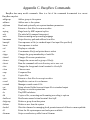
The appendixes cover the GNU Public License, U-Boot Configurable Commands, BusyBox
Commands, SDRAM Interface Considerations, resources for the open source developer, and a
sampleconfigurationfileforoneofthemorepopularhardwareJTAGdebuggers,theBDI-2000.
FollowAlong
Youwillbenefitmostfromthisbookifyoucandivideyourtimebetweenthepagesofthisbook
and your favorite Linux workstation. Grab an old x86 computer to experiment on an embedded
system.Evenbetter,ifyouhaveaccesstoasingle-boardcomputerbasedonanotherarchitecture,use
that.Youwillbenefitfromlearningthelayoutandorganizationofaverylargecodebase(theLinux
kernel),andyouwillgainsignificantknowledgeandexperienceasyoupokearoundthekerneland
learnbydoing.
Look at the code and try to understand the examples produced in this book. Experiment with
different settings, configuration options, and hardware devices. Much can be gained in terms of
knowledge,andbesides,it'sloadsoffun!
GPLCopyrightNotice
Portions of open-source code reproduced in this book are copyrighted by a large number of
individualandcorporatecontributors.Thecodereproducedherehasbeenlicensedundertheterms
oftheGNUPublicLicenseorGPL.
AppendixAcontainsthetextoftheGNUGeneralPublicLicense.
Acknowledgments
Iamconstantlyamazedbythegraciousnessofopensourcedevelopers.Iamhumbledbythetalent
inourcommunitythatoftenfarexceedsmyown.Duringthecourseofthisproject,Ireachedoutto
manypeopleintheLinuxandopensourcecommunitywithquestions.Mostoftenmyquestionswere
quicklyansweredandwithencouragement.Innoparticularorder,I'dliketoexpressmygratitudeto
thefollowingmembersoftheLinuxandopensourcecommunitywhohavecontributedanswerstomy
questions:
DanMalek providedinspiriationforsomeofthecontentsofChapter2,"YourFirst Embedded
Experience."
DanKegelandDanielJacobowitzpatientlyansweredmytoolchainquestions.
ScottAndersonprovidedtheoriginalideasforthegdbmacrospresentedinChapter14,"Kernel
DebuggingTechniques."
BradDixoncontinuestochallengeandexpandmytechnicalvisionthroughhisown.
GeorgeDavisansweredmyARMquestions.
JimLewisprovidedcommentsandsuggestionsontheMTDcoverage.
CalEricksonansweredmygdbusequestions.
JohnTwomeyadvisedonChapter3,"ProcessorBasics."
LeeRevell,Sven-ThorstenDietrich,andDanielWalkeradvisedonrealtimeLinuxcontent.
Many thanks toAMCC, Embedded Planet,UltimateSolutions,andUnitedElectronicIndustries
for providing hardware for the examples. Many thanks to my employer, Monta Vista Software, for
tolerating the occasional distraction and for providing software for some of the examples. Many
others contributed ideas, encouragement, and support over the course of the project. To them I am
alsograteful.
Iwishtoacknowledgemysincereappreciationtomyprimaryreviewteam,whopromptlyread
each chapter and provided excellent feedback, comments, and ideas. Thank you Arnold Robbins,
SandyTerrace,KurtLloyd,andRobFarber.ManythankstoArnoldforhelpingthisnewbielearnthe
ropesofwritingatechnicalbook.Whileeveryattempthasbeenmadetoeliminatemistakes,those
thatremainaresolelymyown.
IwanttothankMarkL.Taubforbringingthisprojecttofruitionandforhisencouragementand
infinitepatience!IwishtothanktheproductionteamincludingKristyHart,JenniferCramer,Krista
Hansing,andCherylLenser.
Andfinally,averyspecialandheartfeltthankyoutoCaryDillmanwhoreadeachchapterasit
waswritten,andforherconstantencouragementandheroccasionalsacrificethroughouttheproject.
ChrisHallinan
AbouttheAuthor
ChristopherHallinaniscurrentlyfieldapplicationsengineerforMontaVistaSoftware,livingand
workinginMassachusetts.Chrishasspentmorethan25yearsinthenetworkingandcommunications
marketplacemostlyinvariousproductdevelopmentroles,wherehedevelopedastrongbackground
inthespacewherehardwaremeetssoftware.PriortojoiningMontaVista,Chrisspentfouryearsas
an independent Linux consultant providing custom Linux board ports, device drivers, and
bootloaders. Chris's introduction to the open source community was through contributions to the
popularU-Bootbootloader.WhennotmessingaboutwithLinux,heisoftenfoundsingingandplaying
aTaylororMartin.
Chapter1.Introduction
The move away from proprietary operating systems is causing quite a stir in the corporate
boardroomsofmanytraditionalembeddedoperatingsystem(OS)companies.Formanywell-founded
reasons, Linux is being adopted as the operating system in many products beyond its traditional
stronghold in server applications. Examples of these embedded systems include cellular phones,
DVDplayers,video games,digitalcameras,networkswitches,andwirelessnetworkinggear.Itis
quitepossiblethatLinuxisalreadyinyourhomeoryourautomobile.
1.1.WhyLinux?
Because of the numerous economic and technical benefits, we are seeing strong growth in the
adoption of Linux for embedded devices. This trend has crossed virtually all markets and
technologies. Linux has been adopted for embedded products in the worldwide public switched
telephonenetwork,globaldatanetworks,wirelesscellularhandsets,andtheequipmentthatoperates
these networks. Linux has enjoyed success in automobile applications, consumer products such as
gamesandPDAs,printers,enterpriseswitchesandrouters,andmanyotherproducts.Theadoption
rateofembeddedLinuxcontinuestogrow,withnoendinsight.
SomeofthereasonsforthegrowthofembeddedLinuxareasfollows:
•Linuxhasemergedasamature,high-performance,stablealternativetotraditionalproprietary
embeddedoperatingsystems.
•Linuxsupportsahugevarietyofapplicationsandnetworkingprotocols.
• Linux is scalable, from small consumer-oriented devices to large, heavy-iron, carrier-class
switchesandrouters.
• Linux can be deployed without the royalties required by traditional proprietary embedded
operatingsystems.
• Linux has attracted a huge number of active developers, enabling rapid support of new
hardwarearchitectures,platforms,anddevices.
• An increasing number of hardware and software vendors, including virtually all the top-tier
manufacturersandISVs,nowsupportLinux.
Fortheseandotherreasons,weareseeinganacceleratedadoptionrateofLinuxinmanycommon
householditems,rangingfromhigh-definitiontelevisionsetstocellularhandsets.
1.2.EmbeddedLinuxToday
It might come as no surprise that Linux has experienced significant growth in the embedded
space.Indeed,thefactthatyouarereadingthisbookindicatesthatithastouchedyourownlife.Itis
difficulttoestimatethemarketsizebecausemanycompaniesstillbuildtheirownembeddedLinux
distributions.
LinuxDevices.com,thepopularnewsandinformationportalfoundedbyRichLehrbaum,conducts
an annual survey of the embedded Linux market. In its latest survey, they report that Linux has
emergedasthedominantoperatingsystemusedinthousandsofnewdesignseachyear.Infact,nearly
half of respondents reported using Linux in an embedded design, while the nearest competing
operating system was reportedly used by only about one in every eight respondents. Commercial
operatingsystemsthatoncedominatedtheembeddedmarketwerereportedlyusedbyfewerthanone
intenrespondents.Evenifyoufindreasontodisputetheseresults,noonecanignorethemomentum
intheembeddedLinuxmarketplacetoday.
1.3.OpenSourceandtheGPL
OneofthefundamentalfactorsdrivingtheadoptionofLinuxisthefactthatitisopensource.The
LinuxkernelislicensedunderthetermsoftheGNUGPL[1](GeneralPublicLicense),whichleadsto
thepopularmyththatLinuxisfree.[2]Infact,thesecondparagraphoftheGNUGPLdeclares:"When
wespeakoffreesoftware,wearereferringtofreedom,notprice."TheGPLlicenseisremarkably
shortandeasytoread.Amongthemostimportantkeycharacteristics:
•Thelicenseisself-perpetuating.
•Thelicensegrantstheuserfreedomtoruntheprogram.
•Thelicensegrantstheusertherighttostudyandmodifythesourcecode.
•Thelicensegrantstheuserpermissiontodistributetheoriginalcodeorhismodifications.
•ThelicensegrantsthesesamerightstoanyonetowhomyoudistributeGPLsoftware.
WhenasoftwareworkisreleasedunderthetermsoftheGPL,itmustforevercarrythatlicense.
[3] Even if the code is highly modified, which is allowed and even encouraged by the license, the
GPL mandates that it must be released under the same license. The intent of this feature is to
guaranteeaccesstoeveryone,evenofmodifiedversionsofthesoftware(orderivedworks,asthey
arecommonlycalled).
No matter how the software was obtained, the GPL grants the licensee unlimited distribution
rights,withouttheobligationtopayroyaltiesorper-unitfees.Thisdoesnotmeanthatavendorcan't
chargefortheGPLsoftwarethisisaveryreasonablecommonbusinesspractice.Itmeansthatoncein
possessionofGPLsoftware,itispermissibletomodifyandredistributeit,whetheritisaderived
(modified)workornot.However,asdefinedbytheGPLlicense,theauthor(s)ofthemodifiedwork
areobligatedtoreleasetheworkunderthetermsoftheGPLiftheydecidetodoso.Anydistribution
ofaderivedwork,suchasshipmenttoacustomer,triggersthisobligation.
Forafascinatingandinsightfullookatthehistoryandcultureoftheopensourcemovement,read
EricS.Raymond'sbookreferencedattheendofthischapter.
1.3.1.FreeVersusFreedom
Twopopularphrasesareoftenrepeatedinthediscussionaboutthefreenatureofopensource:
"free asinfreedom" and"freeasinbeer."(Theauthorisparticularlyfondofthelatter.)TheGPL
licenseexiststoguarantee"freeasinfreedom"ofaparticularbodyofsoftware.Itguaranteesyour
freedomtouseit,studyit,andchangeit.Italsoguaranteesthesefreedomsforanyonetowhomyou
distributeyourmodifiedcode.Thisconcepthasbecomefairlywidelyunderstood.
OneofthemisconceptionsfrequentlyheardisthatLinuxis"freeasinbeer."Sure,youcanobtain
Linuxfreeofcost.YoucandownloadaLinuxkernelinafewminutes.However,asanyprofessional
developmentmanagerunderstands,certaincostsareassociatedwithanysoftwaretobeincorporated
into a design. These include the costs of acquisition, integration, modification, maintenance, and
support.Addtothatthecostofobtainingandmaintainingaproperlyconfiguredtoolchain,libraries,
application programs, and specialized cross-development tools compatible with your chosen
architecture,andyoucanquicklyseethatitisanontrivialexercisetodeveloptheneededsoftware
componentstodeployyourembeddedLinux-basedsystem.
1.4.StandardsandRelevantBodies
As Linux continues to gain market share in the desktop, enterprise, and embedded market
segments,newstandardsandorganizationsareemergingtohelpinfluencetheuseandacceptanceof
Linux.Thissectionservesasaresourcetointroducethestandardsthatyoumightwanttofamiliarize
yourselfwith.
1.4.1.LinuxStandardBase
Probably the single most relevant standard is the Linux Standard Base (LSB). The goal of the
LSBistoestablishasetofstandardsdesignedtoenhancetheinteroperabilityofapplicationsamong
different Linux distributions. Currently, the LSB spans several architectures, including IA32/64,
PowerPC32-and64-bit,AMD64,andothers.Thestandardisbrokendownintoacorecomponent
andtheindividualarchitecturecomponents.
The LSB specifies common attributes of a Linux distribution, including object format, standard
library interfaces, minimum set of commands and utilities and their behavior, file system layout,
systeminitialization,andsoon.
YoucanlearnmoreabouttheLSBatthelinkgiveninSection1.5.1,"SuggestionsforAdditional
Reading,"sectionattheendofthischapter.
1.4.2.OpenSourceDevelopmentLabs
OpenSourceDevelopmentLabs(OSDL)wasformedtohelpacceleratetheacceptanceofLinux
inthegeneralmarketplace.Accordingtoitsmissionstatement,OSDLcurrentlyprovidesenterpriseclasstestingfacilitiesandothertechnicalsupporttotheLinuxcommunity.Ofsignificance,OSDLhas
sponsoredseveralworkinggroupstodefinestandardsandparticipateinthedevelopmentoffeatures
targetingthreeimportantmarketsegments.Thenextthreesectionsintroducetheseinitiatives.
1.4.2.1.OSDL:CarrierGradeLinux
A significant number of the world's largest networking and telecommunications equipment
manufacturers are either developing or shipping carrier-class equipment running Linux as the
operating system. Significant features of carrier-class equipment include high reliability, high
availability, and rapid serviceability. These vendors design products using redundant, hot-swap
architectures,fault-tolerantfeatures,clustering,andoftenreal-timeperformance.
The OSDL Carrier Grade Linux working group has produced a specification defining a set of
requirements for carrier-class equipment. The current version of the specification covers seven
functionalareas:
• Availability Requirements that provide enhanced availability, including online maintenance
operations,redundancy,andstatusmonitoring
• Clusters Requirements that facilitate redundant services, such as cluster membership
managementanddatacheckpointing
• Serviceability Requirements for remote servicing and maintenance, such as SNMP and
diagnosticmonitoringoffansandpowersupplies
• Performance Requirements to define performance and scalability, symmetric multiprocessing,
latencies,andmore
•StandardsRequirementsthatdefinestandardstowhichCGL-compliantequipmentshallconform
• Hardware Requirements related to high-availability hardware, such as blade servers and
hardware-managementinterfaces
•SecurityRequirementstoimproveoverallsystemsecurityfromvariousthreats
1.4.2.2.OSDL:MobileLinuxInitiative
As this book is written, several mobile handsets (cellular phones) are available on the
worldwide market that have been built around embedded Linux. It has been widely reported that
millionsofhandsetshavebeenshippedbasedonLinux.Theonlycertaintyisthatmorearecoming.
Thispromisestobeoneofthemostexplosivemarketsegmentsforwhatwasformerlytheroleofa
proprietary real-time operating system. This speaks volumes about the readiness of Linux for
commercialembeddedapplications.
TheOSDLsponsorsaworkinggroupcalledMobileLinuxInitiative.Itspurposeistoaccelerate
the adoption of Linux on next-generation mobile handsets and other converged voice/data portable
devices, according to the OSDL website. The areas of focus for this working group include
development tools, I/O and networking, memory management, multimedia, performance, power
management,security,andstorage.
1.4.2.3.ServiceAvailabilityForum
Ifyou are engagedinbuildingproductsforenvironmentsinwhichhighreliability, availability,
andserviceability(RAS)areimportant,youshouldbeawareoftheServiceAvailabilityForum(SA
Forum).Thisorganizationisplayingaleadingroleindefiningacommonsetofinterfacesforusein
carrier-grade and other commercial equipment for system management. The SA Forum website is
www.saforum.org.
1.5.ChapterSummary
• Adoption of Linux among developers and manufacturers of embedded products continues to
accelerate.
•UseofLinuxinembeddeddevicescontinuestogrowatanexcitingpace.
• In this chapter, we present many of the factors driving the growth of Linux in the embedded
market.
• Several standards and relevant organizations influencing embedded Linux were presented in
thischapter.
1.5.1.SuggestionsforAdditionalReading
TheCathedralandtheBazaar
EricS.Raymond
O'ReillyMedia,Inc.,2001
LinuxStandardBaseProject
www.linuxbase.org
OpenSourceDevelopmentLabs,Inc.
www.osdl.org
Chapter2.YourFirstEmbeddedExperience
Oftenthebestpathtounderstandingagiventaskistohaveagoodgraspofthebigpicture.Many
fundamental concepts can present challenges to the newcomer to embedded systems development.
This chapter takes you on a tour of a typical embedded system and the development environment,
withspecificemphasisontheconceptsandcomponentsthatmakedevelopingthesesystemsunique
andoftenchallenging.
2.1.EmbeddedorNot?
Several key attributes are usually associated with embedded systems. We wouldn't necessarily
callourdesktopPCanembeddedsystem.ButconsideradesktopPChardwareplatforminaremote
data center that is performing a critical monitoring and alarm task. Assume that this data center is
normally not staffed. This imposes a different set of requirements on this hardware platform. For
example, if power is lost and then restored, we would expect this platform to resume its duties
withoutoperatorintervention.
Embedded systems come in a variety of shapes and sizes, from the largest multiple-rack data
storage or networking powerhouses to tiny modules such as your personal MP3 player or your
cellularhandset.Someoftheusualcharacteristicsofembeddedsystemsincludethese:
•Containaprocessingengine,suchasageneral-purposemicroprocessor
•Typicallydesignedforaspecificapplicationorpurpose
•Includesasimple(orno)userinterfaceanautomotiveengineignitioncontroller,forexample
•Oftenisresourcelimitedforexample,hasasmallmemoryfootprintandnoharddrive
•Mighthavepowerlimitations,suchasarequirementtooperatefrombatteries
•Usuallyisnotusedasageneral-purposecomputingplatform
•Generallyhasapplicationsoftwarebuiltin,notuserselected
•Shipswithallintendedapplicationhardwareandsoftwarepreintegrated
•Oftenisintendedforapplicationswithouthumanintervention
Most commonly, embedded systems are resource constrained compared to the typical desktop
PC. Embedded systems often have limited memory, small or no hard drives, and sometimes no
external network connectivity. Frequently, the only user interface is a serial port and some LEDs.
Theseandotherissuescanpresentchallengestotheembeddedsystemdeveloper.
2.1.1.BIOSVersusBootloader
When power is first applied to the desktop computer, a software program called the BIOS
immediately takes control of the processor. (Historically, BIOS was an acronym meaning Basic
Input/Output Software, but the acronym has taken on a meaning of its own because the functions it
performs have become much more complex than the original implementations.) The BIOS might
actually be stored in Flash memory (described shortly), to facilitate field upgrade of the BIOS
programitself.
TheBIOSisacomplexsetofsystem-configurationsoftwareroutinesthathaveknowledgeofthe
low-leveldetailsofthehardwarearchitecture.MostofusareunawareoftheextentoftheBIOSand
itsfunctionality,butitisacriticalpieceofthedesktopcomputer.TheBIOSfirstgainscontrolofthe
processorwhenpowerisapplied.Itsprimaryresponsibilityistoinitializethehardware,especially
thememorysubsystem,andloadanoperatingsystemfromthePC'sharddrive.
In a typical embedded system (assuming that it is not based on an industry-standard x86 PC
hardwareplatform)abootloaderisthesoftwareprogramthatperformsthesesamefunctions.Inyour
own custom embedded system, part of your development plan must include the development of a
bootloaderspecifictoyourboard.Luckily,severalgoodopensourcebootloadersareavailablethat
youcancustomizeforyourproject.TheseareintroducedinChapter7,"Bootloaders."
Someofthemoreimportanttasksthatyourbootloaderperformsonpower-upareasfollows:
• Initializes criticalhardwarecomponents,suchastheSDRAMcontroller,I/Ocontrollers,and
graphicscontrollers
•Initializessystemmemoryinpreparationforpassingcontroltotheoperatingsystem
•Allocatessystemresourcessuchasmemoryandinterruptcircuitstoperipheralcontrollers,as
necessary
•Providesamechanismforlocatingandloadingyouroperatingsystemimage
•Loadsandpassescontroltotheoperatingsystem,passinganyrequiredstartupinformationthat
might be required, such as total memory size clock rates, serial port speeds and other low-level
hardwarespecificconfigurationdata
This is a very simplified summary of the tasks that a typical embedded-system bootloader
performs. The important point to remember is this: If your embedded system will be based on a
custom-designedplatform,thesebootloaderfunctionsmustbesuppliedbyyou,thesystemdesigner.If
your embedded system is based on a commercial off-the-shelf (COTS) platform such as an ATCA
chassis,[4]typicallythebootloader(andoftentheLinuxkernel)isincludedontheboard.Chapter7
discussesbootloadersindetail.
2.2.AnatomyofanEmbeddedSystem
Figure2-1showsablockdiagramofatypicalembeddedsystem.Thisisaverysimpleexample
ofahigh-levelhardwarearchitecturethatmightbefoundinawirelessaccesspoint.Thesystemis
centeredona32-bitRISCprocessor.Flashmemoryisusedfornonvolatileprogramanddatastorage.
Main memory is synchronous dynamic random-access memory (SDRAM) and might contain
anywherefromafewmegabytestohundredsofmegabytes,dependingontheapplication.Areal-time
clock module, often backed up by battery, keeps the time of day (calendar/wall clock, including
date). This example includes an Ethernet and USB interface, as well as a serial port for console
accessviaRS-232.The802.11chipsetimplementsthewirelessmodemfunction.
Figure2-1.Exampleembeddedsystem
OftentheprocessorinanembeddedsystemperformsmanyfunctionsbeyondthetraditionalCPU.
The hypothetical processor in Figure 2-1 contains an integrated UART for a serial interface, and
integratedUSBandEthernetcontrollers.Manyprocessorscontainintegratedperipherals.Welookat
severalexamplesofintegratedprocessorsinChapter3,"ProcessorBasics."
2.2.1.TypicalEmbeddedLinuxSetup
OftenthefirstquestionposedbythenewcomertoembeddedLinuxis,justwhatdoesoneneedto
begin development? To answer that question, we look at a typical embedded Linux development
setup(seeFigure2-2).
Figure2-2.EmbeddedLinuxdevelopmentsetup
Here we show a very common arrangement. We have a host development system, running your
favoritedesktopLinuxdistribution,suchasRedHatorSuSEorDebianLinux.OurembeddedLinux
target board is connected to the development host via an RS-232 serial cable. We plug the target
board'sEthernetinterfaceintoalocalEthernethuborswitch,towhichourdevelopmenthostisalso
attachedviaEthernet.Thedevelopmenthostcontainsyourdevelopmenttoolsandutilitiesalongwith
targetfilesnormallyobtainedfromanembeddedLinuxdistribution.
For this example, our primary connection to the embedded Linux target is via the RS-232
connection.Aserialterminalprogramisusedtocommunicatewiththetargetboard.Minicomisone
of the most commonly used serial terminal applications and is available on virtually all desktop
Linuxdistributions.
2.2.2.StartingtheTargetBoard
When power is first applied, a bootloader supplied with your target board takes immediate
control of the processor. It performs some very low-level hardware initialization, including
processorandmemorysetup,initializationoftheUARTcontrollingtheserialport,andinitialization
oftheEthernetcontroller.Listing2-1displaysthecharactersreceivedfromtheserialport,resulting
from power being applied to the target. For this example, we have chosen a target board from
AMCC, the PowerPC 440EP Evaluation board nicknamed Yosemite. This is basically a reference
design containing the AMCC 440EP embedded processor. It ships from AMCC with the U-Boot
bootloaderpreinstalled.
Listing2-1.InitialBootloaderSerialOutput
U-Boot1.1.4(Mar182006-20:36:11)
AMCCPowerPC440EPRev.B
Board:Yosemite-AMCCPPC440EPEvaluationBoard
VCO:1066MHz
CPU:533MHz
PLB:133MHz
OPB:66MHz
EPB:66MHz
PCI:66MHz
I2C:ready
DRAM:256MB
FLASH:64MB
PCI:BusDevVenIdDevIdClassInt
In:serial
Out:serial
Err:serial
Net:ppc_4xx_eth0,ppc_4xx_eth1
=>
2.3.StorageConsiderations
Oneofthemostchallengingaspectsofembeddedsystemsisthatmostembeddedsystemshave
limitedphysicalresources.AlthoughthePentium4machineonyourdesktopmighthave180GBof
hard drive space, it is not uncommon to find embedded systems with a fraction of that amount. In
manycases,theharddriveistypicallyreplacedbysmallerandlessexpensivenonvolatilestorage
devices. Hard drives are bulky, have rotating parts, are sensitive to physical shock, and require
multiplepowersupplyvoltages,whichmakesthemunsuitableformanyembeddedsystems.
2.3.1.FlashMemory
NearlyeveryoneisfamiliarwithCompactFlashmodules[5]usedinawidevarietyof consumer
devices, such as digital cameras and PDAs (both great examples of embedded systems). These
modules can be thought of as solid-state hard drives, capable of storing many megabytesand even
gigabytesofdatainatinyfootprint.Theycontainnomovingparts,arerelativelyrugged,andoperate
onasinglecommonpowersupplyvoltage.
Several manufacturers of Flash memory exist. Flash memory comes in a variety of physical
packagesandcapacities.Itisnotuncommontoseeembeddedsystemswithaslittleas1MBor2MB
of nonvolatile storage. More typical storage requirements for embedded Linux systems range from
4MBto256MBormore.AnincreasingnumberofembeddedLinuxsystemshavenonvolatilestorage
intothegigabyterange.
Flash memory can be written to and erased under software control. Although hard drive
technology remains the fastest writable media, Flash writing and erasing speeds have improved
considerablyoverthecourseoftime,thoughflashwriteanderasetimeisstillconsiderablyslower.
SomefundamentaldifferencesexistbetweenharddriveandFlashmemorytechnologythatyoumust
understandtoproperlyusethetechnology.
Flashmemoryisdividedintorelativelylargeerasableunits,referredtoaseraseblocks.Oneof
thedefiningcharacteristicsofFlashmemoryisthewayinwhichdatainFlashiswrittenanderased.
InatypicalFlashmemorychip,datacanbechangedfromabinary1toabinary0undersoftware
control,1bit/wordatatime,buttochangeabitfromazerobacktoaone,anentireblockmustbe
erased.Blocksareoftencallederaseblocksforthisreason.
A typical Flash memory device contains many erase blocks. For example, a 4MB Flash chip
mightcontain64eraseblocksof64KBeach.Flashmemoryisalsoavailablewithnonuniformerase
blocksizes,tofacilitateflexibledata-storagelayout.Thesearecommonlyreferredtoasbootblock
orbootsectorFlashchips.Oftenthebootloaderisstoredinthesmallerblocks,andthekerneland
otherrequireddataarestoredinthelargerblocks.Figure2-3illustratestheblocksizelayoutfora
typicaltopbootFlash.
Figure2-3.Bootblockflasharchitecture
TomodifydatastoredinaFlashmemoryarray,theblockinwhichthemodifieddataresidesmust
becompletelyerased.Evenifonly1byteinablockneedstobechanged,theentireblockmustbe
erased and rewritten.[6] Flash block sizes are relatively large, compared to traditional hard-drive
sector sizes. In comparison, a typical high-performance hard drive has writable sectors of 512 or
1024 bytes. The ramifications of this might be obvious: Write times for updating data in Flash
memorycanbemanytimesthatofaharddrive,dueinparttotherelativelylargequantityofdatathat
mustbewrittenbacktotheFlashforeachupdate.Thesewritecyclescantakeseveralseconds,inthe
worstcase.
AnotherlimitationofFlashmemorythatmustbeconsideredisFlashmemorycellwritelifetime.
A Flash memory cell has a limited number of write cycles before failure. Although the number of
cyclesisfairlylarge(100Kcyclestypicalperblock),itiseasytoimagineapoorlydesignedFlash
storagealgorithm(orevenabug)thatcanquicklydestroyFlashdevices.Itgoeswithoutsayingthat
youshouldavoidconfiguringyoursystemloggerstooutputtoaFlash-baseddevice.
2.3.2.NANDFlash
NANDFlashisarelativelynewFlashtechnology.WhenNANDFlashhitthemarket,traditional
FlashmemorysuchasthatdescribedintheprevioussectionwasreferredtoasNORFlash.These
distinctionsrelatetotheinternalFlashmemorycellarchitecture.NANDFlashdevicesimproveupon
someofthelimitationsoftraditional(NOR)Flashbyofferingsmallerblocksizes,resultinginfaster
andmoreefficientwritesandgenerallymoreefficientuseoftheFlasharray.
NORFlashdevicesinterfacetothemicroprocessorinafashionsimilartomanymicroprocessor
peripherals. That is, they have a parallel data and address bus that are connected directly[7] to the
microprocessor data/address bus. Each byte or word in the Flash array can be individually
addressedinarandomfashion.Incontrast,NANDdevicesareaccessedseriallythroughacomplex
interface that varies among vendors. NAND devices present an operational model more similar to
thatofatraditionalharddriveandassociatedcontroller.Dataisaccessedinserialbursts,whichare
far smaller than NOR Flash block size. Write cycle lifetime for NAND Flash is an order of
magnitudegreaterthanforNORFlash,althougherasetimesaresignificantlysmaller.
Insummary,NORFlashcanbedirectlyaccessedbythemicroprocessor,andcodecanevenbe
executeddirectlyoutofNORFlash(though,forperformancereasons,thisisrarelydone,andthen
only on systems in which resources are extremely scarce). In fact, many processors cannot cache
instruction accesses to Flash like they can with DRAM. This further impacts execution speed. In
contrast, NAND Flash is more suitable for bulk storage in file system format than raw binary
executablecodeanddatastorage.
2.3.3.FlashUsage
An embedded system designer has many options in the layout and use of Flash memory. In the
simplest of systems, in which resources are not overly constrained, raw binary data (perhaps
compressed)canbestoredontheFlashdevice.Whenbooted,afilesystemimagestoredinFlashis
readintoaLinuxramdiskblockdevice,mountedasafilesystemandaccessedonlyfromRAM.This
isoftenagooddesignchoicewhenthedatainFlashrarelyneedstobeupdated,andanydatathat
does need to be updated is relatively small compared to the size of the ramdisk. It is important to
realizethatanychangestofilesintheramdiskarelostuponrebootorpowercycle.
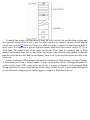
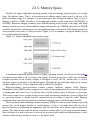
Figure2-4illustratesacommonFlashmemoryorganizationthatistypicalofasimpleembedded
systeminwhichnonvolatilestoragerequirementsofdynamicdataaresmallandinfrequent.
Figure2-4.ExampleFlashmemorylayout
The bootloader is often placed in the top or bottom of the Flash memory array. Following the
bootloader,spaceisallocatedfortheLinuxkernelimageandtheramdiskfilesystemimage,[8]which
holds the root file system. Typically, the Linux kernel and ramdisk file system images are
compressed,andthebootloaderhandlesthedecompressiontaskduringthebootcycle.
Fordynamicdatathatneedstobesavedbetweenrebootsandpowercycles,anothersmallareaof
Flash can be dedicated, or another type of nonvolatile storage[9] can be used. This is a typical
configurationforembeddedsystemswithrequirementstostoreconfigurationdata,asmightbefound
inawirelessaccesspointaimedattheconsumermarket,forexample.
2.3.4.FlashFileSystems
ThelimitationsofthesimpleFlashlayoutschemedescribedinthepreviousparagraphscanbe
overcomebyusingaFlashfilesystemtomanagedataontheFlashdeviceinamannersimilartohow
dataisorganizedonaharddrive.EarlyimplementationsoffilesystemsforFlashdevicesconsisted
of a simple block device layer that emulated the 512-byte sector layout of a common hard drive.
These simple emulation layers allowed access to data in file format rather than unformatted bulk
storage,buttheyhadsomeperformancelimitations.
OneofthefirstenhancementstoFlashfilesystemswastheincorporationofwearleveling.As
discussed earlier, Flash blocks are subject to a finite write lifetime. Wear-leveling algorithms are
usedtodistributewritesevenlyoverthephysicaleraseblocksoftheFlashmemory.
AnotherlimitationthatarisesfromtheFlasharchitectureistheriskofdatalossduringapower
failure or premature shutdown. Consider that the Flash block sizes are relatively large and that
average file sizes being written are often much smaller relative to the block size. You learned
previously that Flash blocksmustbewrittenoneblockatatime.Therefore,towriteasmall8KB
file,youmusteraseandrewriteanentireFlashblock,perhaps64KBor128KBinsize;intheworst
case,thiscantaketensofsecondstocomplete.Thisopensasignificantwindowofriskofdataloss
duetopowerfailure.
One of the more popular Flash file systems in use today is JFFS2, or Journaling Flash File
System2.Ithasseveralimportantfeaturesaimedatimprovingoverallperformance,increasingFlash
lifetime, and reducing the risk of data loss in case of power failure. The more significant
improvements in the latest JFFS2 file system include improved wear leveling, compression and
decompression to squeeze more data into a given Flash size, and support for Linux hard links. We
coverthisindetailinChapter9,"FileSystems,"andagaininChapter10,"MTDSubsystem,"when
wediscusstheMemoryTechnologyDevice(MTD)subsystem.
2.3.5.MemorySpace
Virtually all legacy embedded operating systems view and manage system memory as a single
large, flat address space. That is, a microprocessor's address space exists from 0 to the top of its
physicaladdressrange.Forexample,ifamicroprocessorhad24physicaladdresslines,itstopof
memory would be 16MB. Therefore, its hexadecimal address would range from 0x00000000 to
0x00ffffff.HardwaredesignscommonlyplaceDRAMstartingatthebottomoftherange,andFlash
memoryfromthetopdown.UnusedaddressrangesbetweenthetopofDRAMandbottomofFLASH
wouldbeallocatedforaddressingofvariousperipheralchipsontheboard.Thisdesignapproachis
oftendictatedbythechoiceofmicroprocessor.Figure2-5isanexampleofatypicalmemorylayout
forasimpleembeddedsystem.
Figure2-5.Typicalembeddedsystemmemorymap
Intraditionalembeddedsystemsbasedonlegacyoperatingsystems,theOSandallthetasks[10]
hadequalaccessrightstoallresourcesinthesystem.Abuginoneprocesscouldwipeoutmemory
contents anywhere in the system, whether it belonged to itself, the OS, another task, or even a
hardwareregistersomewhereintheaddressspace.Althoughthisapproachhadsimplicityasitsmost
valuablecharacteristic,itledtobugsthatcouldbedifficulttodiagnose.
High-performance microprocessors contain complex hardware engines called Memory
ManagementUnits(MMUs)whosepurposeistoenableanoperatingsystemtoexerciseahighdegree
of management and control over its address space and the address space it allocates to processes.
Thiscontrolcomesintwoprimaryforms:accessrightsandmemorytranslation.Accessrightsallow
an operating system to assign specific memory-access privileges to specific tasks. Memory
translationallowsanoperatingsystemtovirtualizeitsaddressspace,whichhasmanybenefits.
TheLinuxkerneltakesadvantageofthesehardwareMMUstocreateavirtualmemoryoperating
system. One of the biggest benefits of virtual memory is that it can make more efficient use of
physicalmemorybypresentingtheappearancethatthesystemhasmorememorythan isphysically
present.Theotherbenefitisthatthekernelcanenforceaccessrightstoeachrangeofsystemmemory
thatitallocatestoataskorprocess,topreventoneprocessfromerrantlyaccessingmemoryorother
resourcesthatbelongtoanotherprocessortothekernelitself.
Let's look at some details of how this works. A tutorial on the complexities of virtual memory
systems is beyond the scope of this book.[11] Instead, we examine the ramifications of a virtual
memorysystemasitappearstoanembeddedsystemsdeveloper.
2.3.6.ExecutionContexts
OneoftheveryfirstchoresthatLinuxperformswhenitbeginstorunistoconfigurethehardware
memorymanagementunit(MMU)ontheprocessorandthedatastructuresusedtosupportit,andto
enable address translation. When this step is complete, the kernel runs in its own virtual memory
space. The virtual kernel address selected by the kernel developers in recent versions defaults to
0xC0000000. In most architectures, this is a configurable parameter.[12] If we were to look at the
kernel'ssymboltable,wewouldfindkernelsymbolslinkedatanaddressstartingwith0xC0xxxxxx.
As a result, any time the kernel is executing code in kernel space, the instruction pointer of the
processorwillcontainvaluesinthisrange.
In Linux, we refer to two distinctly separate operational contexts, based on the environment in
which a given thread[13] is executing. Threads executing entirely within the kernel are said to be
operatinginkernelcontext,whileapplicationprogramsaresaidtooperateinuserspacecontext.A
user space process can access only memory it owns, and uses kernel system calls to access
privilegedresourcessuchasfileanddeviceI/O.Anexamplemightmakethismoreclear.
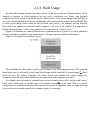
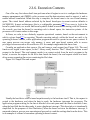
Consider an application that opens a file and issues a read request (see Figure 2-6). The read
functioncallbeginsinuserspace,intheClibraryread()function.TheClibrarythenissuesaread
request to the kernel. The read request results in a context switch from the user's program to the
kernel,toservicetherequestforthefile'sdata.Insidethekernel,thereadrequestresultsinaharddriveaccessrequestingthesectorscontainingthefile'sdata.
Figure2-6.Simplefilereadrequest
Usuallythehard-drivereadisissuedasynchronouslytothehardwareitself.Thatis,therequestis
posted to the hardware, and when the data is ready, the hardware interrupts the processor. The
applicationprogramwaitingforthedataisblockedonawaitqueueuntilthedataisavailable.Later,
whentheharddiskhasthedataready,itpostsahardwareinterrupt.(Thisdescriptionisintentionally
simplifiedforthepurposesofthisillustration.)Whenthekernelreceivesthehardwareinterrupt,it
suspendswhateverprocesswasexecutingandproceedstoreadthewaitingdatafromthedrive.This
isanexampleofathreadofexecutionoperatinginkernelcontext.
Tosummarizethisdiscussion,wehaveidentifiedtwogeneralexecutioncontexts,userspaceand
kernelspace.Whenanapplicationprogramexecutesasystemcallthatresultsinacontextswitchand
entersthekernel,itisexecutingkernelcodeonbehalfofaprocess.Youwilloftenhearthisreferred
toasprocesscontextwithinthekernel.Incontrast,theinterruptserviceroutine(ISR)handlingthe
IDE drive (or any other ISR, for that matter) is kernel code that is not executing on behalf of any
particularprocess.Severallimitationsexistinthisoperationalcontext,includingthelimitationthat
the ISR cannot block (sleep) or call any kernel functions that might result in blocking. For further
readingontheseconcepts,consultSection2.5.1,"SuggestionsforAdditionalReading,"attheendof
thischapter.
2.3.7.ProcessVirtualMemory
Whenaprocessisspawnedforexample,whentheusertypeslsattheLinuxcommandpromptthe
kernel allocates memory for the process and assigns a range of virtual-memory addresses to the
process. The resulting address values bear no fixed relationship to those in the kernel, nor to any
other running process. Furthermore, there is no direct correlation between the physical memory
addressesontheboardandthevirtualmemoryasseenbytheprocess.Infact,itisnotuncommonfor
a process to occupy multiple different physical addresses in main memory during its lifetime as a
resultofpagingandswapping.
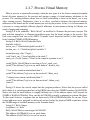
Listing2-4isthevenerable"HelloWorld,"asmodifiedtoillustratethepreviousconcepts.The
goalwiththisexampleistoillustratetheaddressspacethatthekernelassignstotheprocess.This
code was compiled and run on the AMCC Yosemite board, described earlier in this chapter. The
boardcontains256MBofDRAMmemory.
Listing2-4.HelloWorld,EmbeddedStyle
#include<stdio.h>
intbss_var;/*Uninitializedglobalvariable*/
intdata_var=1;/*Initializedglobalvariable*/
intmain(intargc,char**argv){
void*stack_var;/*Localvariableonthestack*/
stack_var=(void*)main;/*Don'tletthecompileroptimizeitout*/
printf("Hello,World!Mainisexecutingat%p\n",stack_var);
printf("Thisaddress(%p)isinourstackframe\n",&stack_var);
/*bsssectioncontainsuninitializeddata*/
printf("Thisaddress(%p)isinourbsssection\n",&bss_var);
/*datasectioncontainsinitializateddata*/
printf("Thisaddress(%p)isinourdatasection\n",&data_var);
return0;
}
Listing2-5showstheconsoleoutputthatthisprogramproduces.Noticethattheprocesscalled
hellothinksitisexecutingsomewhereinhighRAMjustabovethe256MBboundary(0x10000418).
Noticealsothatthestackaddressisroughlyhalfwayintoa32-bitaddressspace,wellbeyondour
256MBofRAM(0x7ff8ebb0).Howcanthisbe?DRAMisusuallycontiguousinsystemslikethese.
Tothecasualobserver,itappearsthatwehavenearly2GBofDRAMavailableforouruse.These
virtualaddresseswereassignedbythekernelandarebackedbyphysicalRAMsomewherewithin
the256MBrangeofavailablememoryontheYosemiteboard.
Listing2-5.HelloOutput
root@amcc:~#./hello
Hello,World!Mainisexecutingat0x10000418
Thisaddress(0x7ff8ebb0)isinourstackframe
Thisaddress(0x10010a1c)isinourbsssection
Thisaddress(0x10010a18)isinourdatasection
root@amcc:~#
OneofthecharacteristicsofavirtualmemorysystemisthatwhenavailablephysicalRAMgoes
below a designated threshold, the kernel can swap memory pages out to a bulk storage medium,
usuallyaharddiskdrive.Thekernelexaminesitsactivememoryregions,determineswhichareasin
memoryhavebeenleastrecentlyused,andswapsthesememoryregionsouttodisk,tofreethemup
for the current process. Developers of embedded systems often disable swapping on embedded
systemsbecauseofperformanceorresourceconstraints.Forexample,itwouldberidiculousinmost
casestousearelativelyslowFlashmemorydevicewithlimitedwritelifecyclesasaswapdevice.
Withoutaswapdevice,youmustcarefullydesignyourapplicationstoexistwithinthelimitationsof
youravailablephysicalmemory.
2.3.8.Cross-DevelopmentEnvironment
Beforewecandevelopapplicationsanddevicedriversforanembeddedsystem,weneedaset
oftools(compiler,utilities,andsoon)thatwillgeneratebinaryexecutablesintheproperformatfor
thetargetsystem.ConsiderasimpleapplicationwrittenonyourdesktopPC,suchasthetraditional
"Hello World" example. After you have created the source code on your desktop, you invoke the
compiler that came with your desktop system (or that you purchased and installed) to generate a
binaryexecutableimage.Thatimagefileisproperlyformattedtoexecuteonthemachineonwhichit
wascompiled. Thisisreferredtoasnative compilation. That is, using compilers on your desktop
system,yougeneratecodethatwillexecuteonthatdesktopsystem.
Notethatnativedoesnotimplyanarchitecture.Indeed,ifyouhaveatoolchainthatrunsonyour
targetboard,youcan natively compile applicationsforyourtarget'sarchitecture.Infact,onegreat
waytotestanewkernelandcustomboardistorepeatedlycompiletheLinuxkernelonit.
Developingsoftwareinacross-developmentenvironmentrequiresthatthecompilerrunningon
yourdevelopmenthostoutputabinaryexecutablethatisincompatiblewiththedesktopdevelopment
workstation on which it was compiled. The primary reason these tools exist is that it is often
impractical or impossible to develop and compile software natively on the embedded system
becauseofresource(typicallymemoryandCPUhorsepower)constraints.
Numerous hidden traps to this approach often catch the unwary newcomer to embedded
development.Whenagivenprogramiscompiled,thecompileroftenknowshowtofindincludefiles,
andwheretofindlibrariesthatmightberequiredforthecompilationtosucceed.Toillustratethese
concepts, let's look again at the "Hello World" program. The example reproduced in Listing 2-4
abovewascompiledwiththefollowingcommandline:
gcc-Wall-ohellohello.c
From Listing 2-4, we see an include the file stdio.h. This file does not reside in the same
directoryasthehello.cfilespecifiedonthegcccommandline.Sohowdoesthecompilerfindthem?
Also,theprintf()functionisnotdefinedinthefilehello.c.Therefore,whenhello.ciscompiled,it
willcontainanunresolvedreferenceforthissymbol.Howdoesthelinkerresolvethisreferenceat
linktime?
Compilershavebuilt-indefaultsforlocatingincludefiles.Whenthereferencetotheincludefile
isencountered,thecompilersearchesitsdefaultlistoflocationstolocatethefile.Asimilarprocess
exists for the linker to resolve the reference to the external symbol printf(). The linker knows by
defaulttosearchtheClibrary(libc-*)forunresolvedreferences.Again,thisdefaultbehaviorisbuilt
intothetoolchain.
Now consider that you are building an application targeting a PowerPC embedded system.
Obviously, you will need a cross-compiler to generate binary executables compatible with the
PowerPC processor architecture. If you issue a similar compilation command using your crosscompilertocompilethehello.cexampleabove,itispossiblethatyourbinaryexecutablecouldend
up being accidentally linked with an x86 version of the C library on your development system,
attempting to resolve the reference to printf(). Of course, the results of running this bogus hybrid
executable,containingamixofPowerPCandx86binaryinstructions[14]arepredictable:crash!
Thesolutiontothispredicamentistoinstructthecross-compilertolookinnonstandardlocations
topickuptheheaderfilesandtargetspecificlibraries.Wecoverthistopicinmuchmoredetailin
Chapter12,"EmbeddedDevelopmentEnvironment."Theintentofthisexamplewastoillustratethe
differencesbetweenanativedevelopmentenvironment,andadevelopmentenvironmenttargetedat
cross-compilationforembeddedsystems.Thisisbutoneofthecomplexitiesofacross-development
environment. The same issue and solutions apply to cross-debugging, as you will see starting in
Chapter14,"KernelDebuggingTechniques."Apropercross-developmentenvironmentiscrucialto
your success and involves much more than just compilers, as we shall soon see in Chapter 12,
"EmbeddedDevelopmentEnvironment."
2.4.EmbeddedLinuxDistributions
Whatexactlyisadistributionanyway?AftertheLinuxkernelboots,itexpectstofindandmounta
rootfilesystem.Whenasuitablerootfilesystemhasbeenmounted,startupscriptslaunchanumber
ofprogramsandutilitiesthatthesystemrequires.Theseprogramsofteninvokeotherprogramstodo
specific tasks, such as spawn a login shell, initialize network interfaces, and launch a user's
applications.Eachoftheseprogramshasspecificrequirementsofthesystem.MostLinuxapplication
programs depend on one or more system libraries. Other programs require configuration and log
files, and so on. In summary, even a small embedded Linux system needs many dozens of files
populatedinanappropriatedirectorystructureonarootfilesystem.
Full-blown desktop systems have many thousands of files on the root file system. These files
comefrompackagesthatareusuallygroupedbyfunctionality.Thepackagesaretypicallyinstalled
andmanagedusingapackagemanager.RedHat'sPackageManager(rpm)isapopularexampleand
is widely used for installing, removing, and updating packages on a Linux system. If your Linux
workstation is based on Red Hat, including the Fedora Core series, typing rpm -qa at a command
promptlistsallthepackagesinstalledonyoursystem.
A package can consist of many files; indeed, some packages contain hundreds of files. A
complete Linux distribution can contain hundreds or even thousands of packages. These are some
examplesofpackagesthatyoumightfindonanembeddedLinuxdistribution,andtheirpurpose:
•initscriptsContainsbasicsystemstartupandshutdownscripts.
•apacheImplementsthepopularApachewebserver.
•telnet-serverContainsfilesnecessarytoimplementtelnetserverfunctionality,whichallowsyou
toestablishTelnetsessionstoyourembeddedtarget.
•glibcStandardClibrary
• busybox Compact versions of dozens of popular command line utilities commonly found on
UNIX/Linuxsystems.[15]
This is the purpose of a Linux distribution as the term has come to be used. A typical Linux
distribution comes with several CD-ROMs full of useful programs, libraries, tools, utilities, and
documentation.Installationofadistributiontypicallyleavestheuserwithafullyfunctionalsystem
basedonareasonablesetofdefaultconfigurationoptions,whichcanbetailoredtosuitaparticular
setofrequirements.YoumaybefamiliarwithoneofthepopulardesktopLinuxdistributions,suchas
RedHatorSuse.
A Linux distribution for embedded targets differs in several significant ways. First, the
executabletargetbinariesfromanembeddeddistributionwillnotrunonyourPC,butaretargetedto
the architecture and processor of your embedded system. (Of course, if your embedded Linux
distributiontargetsthex86architecture,thisstatementdoesnotapply.)AdesktopLinuxdistribution
tends to have many GUI tools aimed at the typical desktop user, such as fancy graphical clocks,
calculators, personal time-management tools, email clients and more. An embedded Linux
distributiontypicallyomitsthesecomponentsinfavorofspecializedtoolsaimedatdevelopers,such
asmemoryanalysistools,remotedebugfacilities,andmanymore.
Another significant difference between desktop and embedded Linux distributions is that an
embedded distribution typically contains cross-tools, as opposed to native tools. For example, the
gcc toolchain that ships with an embedded Linux distribution runs on your x86 desktop PC, but
produces binary code that runs on your target system. Many of the other tools in the toolchain are
similarlyconfigured:Theyrunonthedevelopmenthost(usuallyanx86PC)butoperateonforeign
architecturessuchasARMorPowerPC.
2.4.1.CommercialLinuxDistributions
ThereareseveralvendorsofcommercialembeddedLinuxdistributions.Theleadingembedded
LinuxvendorshavebeenshippingembeddedLinuxdistributionsforsomeyears.Linuxdevices.com,
a popular embedded Linux news and information portal, has compiled a comprehensive list of
commerciallyavailableembeddedLinuxdistributions.Itissomewhatdatedbutisstillaveryuseful
startingpoint.Youcanfindtheircompilationatwww.linuxdevices.com/articles/AT9952405558.html.
2.4.2.Do-It-YourselfLinuxDistributions
You can choose to assemble all the components you need for your embedded project on your
own. You will have to decide whether the risks are worth the effort. If you find yourself involved
with embedded Linux purely for the pleasure of it, such as for a hobby or college project, this
approachmightbeagoodone.However,plantospendasignificantamountoftimeassemblingall
thetoolsandutilitiesyourprojectneeds,andmakingsuretheyallinteroperatetogether.
For starters, you will need a toolchain. Gcc and binutils are available from www.fsf.org and
othermirrorsaroundtheworld.Botharerequiredtocompilethekernelanduser-spaceapplications
foryourproject.Thesearedistributedprimarilyinsourcecodeform,andyoumustcompilethetools
tosuityourparticularcross-developmentenvironment.Patchesareoftenrequiredtothemostrecent
"stable" source trees of these utilities, especially when they will be used beyond the x86/IA32
architecture. The patches can usually be found at the same location as the base packages. The
challengeistodiscoverwhichpatchyouneedforyourparticularproblemand/orarchitecture.
2.5.ChapterSummary
This chapter covered many subjects in a broad-brush fashion. Now you have a proper
perspectiveforthematerialtofollowinsubsequentchapters.Inlaterchapters,thisperspectivewill
beexpandedtodeveloptheskillsandknowledgerequiredtobesuccessfulinyournextembedded
project.
• Embedded systems share some common attributes. Often resources are limited, and user
interfacesaresimpleornonexistent,andareoftendesignedforaspecificpurpose.
•Thebootloaderisacriticalcomponentofatypicalembeddedsystem.Ifyourembeddedsystem
isbasedonacustom-designedboard,youmustprovideabootloaderaspartofyourdesign.Often
thisisjustaportingeffortofanexistingbootloader.
•Severalsoftwarecomponentsarerequiredtobootacustomboard,includingthebootloaderand
thekernelandfilesystemimage.
•FlashmemoryiswidelyusedasastoragemediuminembeddedLinuxsystems.Weintroduced
theconceptofFlashmemoryandexpandonthiscoverageinChapters9and10.
•Anapplicationprogram,alsocalledaprocess,livesinitsownvirtualmemoryspaceassigned
bythekernel.Applicationprogramsaresaidtoruninuserspace.
•Aproperlyequippedandconfiguredcross-developmentenvironmentiscrucialtotheembedded
developer.WedevoteanentirechaptertothisimportantsubjectinChapter12.
• You need an embedded Linux distribution to begin development of your embedded target.
Embedded distributions contain many components, compiled and optimized for your chosen
architecture.
2.5.1.SuggestionsforAdditionalReading
LinuxKernelDevelopment,2ndEdition
RobertLove
NovellPress,2005
UnderstandingtheLinuxKernel
DanielP.Bovet&MarcoCesati
O'Reilly&Associates,Inc.,2002
UnderstandingtheLinuxVirtualMemoryManager
BrucePerens
PrenticeHall,2004
Chapter3.ProcessorBasics
Inthischapter,wepresentsomebasicinformationtohelpyounavigatethehugeseaofembedded
processor choices. We look at some of the processors on the market and the types of features they
contain.Stand-aloneprocessorsarehighlightedfirst.Thesetendtobethemostpowerfulprocessors
andrequireexternalchipsetstoformcompletesystems.Nextwepresentsomeofthemanyintegrated
processors that are supported under Linux. Finally, we look at some of the common hardware
platformsinusetoday.
Literally dozens of embedded processors are available to choose from in a given embedded
design. For the purposes of this chapter, we limit the available discussion to those that contain a
hardwarememory-managementunitand,ofcourse,tothosethataresupportedunderLinux.Oneof
thefundamentalarchitecturaldesignaspectsofLinuxisthatitisavirtualmemoryoperatingsystem.
[16]EmployingLinuxonaprocessorthatdoesnotcontainanMMUgivesuponeofthemorevaluable
architecturalfeaturesofthekernelandisbeyondthescopeofthisbook.
3.1.Stand-aloneProcessors
Stand-alone processors refer to processor chips that are dedicated solely to the processing
function. As opposed to integrated processors, stand-alone processors require additional support
circuitryfortheirbasicoperation.Inmanycases,thismeansachipsetorcustomlogicsurrounding
theprocessortohandlefunctionssuchasDRAMcontroller,systembusaddressingconfiguration,and
external peripheral devices such as keyboard controllers and serial ports. Stand-alone processors
oftenofferthehighestoverallCPUperformance.
Numerous processors exist in both 32-bit and 64-bit implementations[17] that have seen
widespreaduseinembeddedsystems.TheseincludetheIBMPowerPC970FX,theIntelPentiumM,
andtheFreescaleMPC74xxHostProcessors,amongothers.
Herewepresentasamplefromeachofthemajormanufacturesofstand-aloneprocessors.These
processorsarewellsupportedunderLinuxandhavebeenusedinmanyembeddedLinuxdesigns.
3.1.1.IBM970FX
TheIBM970FXprocessorcoreisahigh-performance64-bitcapablestand-aloneprocessor.The
970FX is a superscalar architecture. This means the core is capable of fetching, issuing, and
obtaining results from more than one instruction at a time. This is done through a pipelining
architecture, which provides the effect of multiple streams of instruction simultaneously. The IBM
970FX contains up to 25 stages of pipelining, depending on the instruction stream and operations
containedtherein.
Someofthekeyfeaturesofthe970FXareasfollows:
•A64-bitimplementationofthepopularPowerPCarchitecture
•Deeplypipelineddesign,forvery-high-performancecomputingapplications
•Staticanddynamicpower-managementfeatures
•Multiplesleepmodes,tominimizepowerrequirementsandmaximizebatterylife
•Dynamicallyadjustableclockrates,supportinglower-powermodes
•Optimizedforhigh-performance,low-latencystoragemanagement
TheIBM970FXhasbeenincorporatedintoanumberofhigh-endserverbladesandcomputing
platforms,includingIBM'sownBladeServerplatform.
3.1.2.IntelPentiumM
Certainly one of the most popular architectures, x86 in both 32- and 64-bit flavors (more
properlycalledIA32andIA64,respectively)hasbeenemployedforembeddeddevicesinavariety
ofapplications.Inthemostcommonform,theseplatformsarebasedonavarietyofcommercialoffthe-shelf (COTS) hardware implementations. Numerous manufacturers supply x86 single-board
computers and complete platforms in a variety of form factors. See Section 3.2, "Integrated
Processors:SystemsonChip,"laterinthischapterforadiscussionofthemorecommonplatformsin
usetoday.
TheIntelPentiumMhasbeenusedinawidevarietyoflaptopcomputersandhasfoundanichein
embedded products. Like the IBM 970FX processor, the Pentium M is a superscalar architecture.
Thesecharacteristicsmakeitattractiveinembeddedapplications:
• The Pentium M is based on the popular x86 architecture, and thus is widely supported by a
largeecosystemofhardwareandsoftwarevendors.
•Itconsumeslesspowerthanotherx86processors.
•Advancedpower-managementfeaturesenablelow-poweroperatingmodesandmultiplesleep
modes.
•Dynamicclockspeedcapabilityenhancesbattery-poweredoperationssuchasstandby.
• On chip thermal monitoring enables automatic transition to lower power modes, to reduce
powerconsumptioninovertemperatureconditions.
• Multiple frequency and voltage operating points (dynamically selectable) are designed to
maximizebatterylifeinportableequipment.
Manyofthesefeaturesareespeciallyusefulforembeddedapplications.Itisnotuncommonfor
embedded products to require portable or battery-powered configurations. The Pentium M has
enjoyedpopularityinthisapplicationspacebecauseofitspower-andthermal-managementfeatures.
3.1.3.FreescaleMPC7448
The Freescale MPC7448 contains what is referred to as a fourth-generation PowerPC core,
commonlycalledG4.[18]Thishigh-performance32-bitprocessoriscommonlyfoundinnetworking
and telecommunications applications. Several companies manufacture blades that conform to an
industry-standard platform specification, including this and other similar stand-alone Freescale
processors.WeexaminetheseplatformsinSection3.3,"HardwarePlatforms,"laterinthischapter.
The MPC7448 has enjoyed popularity in a wide variety of signal-processing and networking
applicationsbecauseoftheadvancedfeaturesethighlightedhere:
•Operatingclockratesinexcessof1.5GHz
•1MBonboardL2cache
•Advancedpower-managementcapabilities,includingmultiplesleepmodes
•AdvancedAltiVecvector-executionunit
•Voltagescalingforreduced-powerconfigurations
The MPC7448 contains a Freescale technology called AltiVec to enable very fast algorithmic
computations and other data-crunching applications. The AltiVec unit consists of a register file
containing32verywide(128-bit)registers.EachvaluewithinoneoftheseAltiVecregisterscanbe
considered a vector of multiple elements. AltiVec defines a set of instructions to manipulate this
vectordataeffectivelyinparallelwithcoreCPUinstructionprocessing.AltiVecoperationsinclude
suchcomputationsassum-across,multiply-sum,simultaneousdatadistribute(store),anddatagather
(load)instructions.
Programmers have used the AltiVec hardware to enable very fast software computations
commonly found in signal-processing and network elements. Examples include fast Fourier
Transform, digital signal processing such as filtering, MPEG video coding and encoding, and fast
generationofencryptionprotocolssuchasDES,MD5,andSHA1.
OtherchipsintheFreescalelineupofstand-aloneprocessorsincludetheMPC7410,MPC7445,
MPC7447,MPC745x,andMPC7xxfamily.
3.1.4.CompanionChipsets
Stand-alone processors such as those just described require support logic to connect to and
enableexternalperipheraldevicessuchasmainsystemmemory(DRAM),ROMorFlashmemory,
system busses such as PCI, and other peripherals, such as keyboard controllers, serial ports, IDE
interfaces,andthelike.Thissupportlogicisoftenaccomplishedbycompanionchipsets,whichmay
evenbepurpose-designedspecificallyforafamilyofprocessors.
Forexample,thePentiumMissupportedbyonesuchchipset,calledthe855GM.The855GM
chipset is the primary interface to graphics and memorythus, the suffix-GM. The 855GM has been
optimized as a companion to the Pentium M. Figure 3-1 illustrates the relationship between the
processorandchipsetsinthistypeofhardwaredesign.
Figure3-1.Processor/chipsetrelationship
Notetheterminologythathasbecomecommonfordescribingthesechipsets.TheIntel855GMis
anexampleofwhatiscommonlyreferredtoasanorthbridgechipbecauseitisdirectlyconnectedto
theprocessor'shigh-speedfrontsidebus(FSB).AnothercompanionchipthatprovidesI/OandPCI
bus connectivity is similarly referred to as the southbridge chip because of its position in the
architecture. The southbridge chip (actually, an I/O controller) in these hardware architectures is
responsible for providing interfaces such as those shown in Figure 3-1, including Ethernet, USB,
IDE,audio,keyboard,andmousecontrollers.
OnthePowerPCside,theTundraTsi110HostBridgeforPowerPCisanexampleofachipset
thatsupportsthestand-alonePowerPCprocessors.TheTsi110supportsseveralinterfacefunctions
for many common stand-alone PowerPC processors. The Tundra chip supports the Freescale
MPC74xx and the IBM PPC 750xx family of processors. The Tundra chip can be used by these
processorstoprovidedirectinterfacestothefollowingperipherals:
•DDRDRAM,integratedmemorycontroller
•Ethernet(theTundraprovidesfourgigabitEthernetports)
•PCIExpress(supports2PCIExpressports)
•PCI/X(PCI2.3,PCI-X,andCompactPCI[cPCI])
•Serialports
•I2C
•Programmableinterruptcontroller
•Parallelport
Many manufacturers of chipsets exist, including VIA Technologies, Marvell, Tundra, nVidia,
Intel, and others. Marvell and Tundra primarily serve the PowerPC market, whereas the others
specializeinIntelarchitectures.Hardwaredesignsbasedononeofthemanystand-aloneprocessors,
such as Intel x86, IBM, or Freescale PowerPC, need to have a companion chipset to interface to
systemdevices.
One of the advantages of Linux as an embedded OS is rapid support of new chipsets. Linux
currently has support for those chipsets mentioned here, as well as many others. Consult the Linux
sourcecodeandconfigurationutilityforinformationonyourchosenchipset.
3.2.IntegratedProcessors:SystemsonChip
Intheprevioussection,wehighlightedstand-aloneprocessors.Althoughtheyareusedformany
applications, including some high-horsepower processing engines, the vast majority of embedded
systemsemploysometypeofintegratedprocessor,orsystemonchip(SOC).Literallyscores,ifnot
hundreds,existtochoosefrom.Weexamineafewfromtheindustryleadersandlookatsomeofthe
featuresthatseteachgroupapart.Asinthesectiononstand-aloneprocessors,wefocusonlyonthose
integratedprocessorswithstrongLinuxsupport.
Several major processor architectures exist, and each architecture has examples of integrated
SOCs.PowerPChasbeenatraditionalleaderinmanynetworking-andtelecommunications-related
embedded applications, while MIPS might have the market lead in lower-end consumer-grade
equipment.[19] ARM is used in many cellular phones. These represent the major architectures in
widespread use in embedded Linux systems. However, as you will see in Chapter 4, "The Linux
Kernel: A Different Perspective," Linux supports more than 20 different hardware architectures
today.
3.2.1.PowerPC
PowerPC is a Reduced Instruction Set Computer (RISC) architecture jointly designed by
engineersfromApple,IBM,andMotorola'ssemiconductordivision(nowanindependententityspun
offasFreescaleSemiconductor).ManygooddocumentsdescribethePowerPCarchitectureingreat
detail. Consult the " Suggestions for Additional Reading " at the end of this chapter as a starting
point.
PowerPCprocessorshavefoundtheirwayintoembeddedproductsofeverydescription.From
automotive, consumer, and networking applications to the largest data and telecommunications
switches,PowerPCisoneofthemostpopulararchitecturesforembeddedapplications.Becauseof
this popularity, there exists a large array of hardware and software solutions from numerous
manufacturerstargetedatPowerPC.
3.2.2.AMCCPowerPC
Some of the examples later in this book are based on the AMCC PowerPC 440EP Embedded
Processor. The 440EP is a popular integrated processor found in many networking and
communicationsproducts.Thefollowinglisthighlightssomeofthefeaturesofthe440EP:
•On-chipdual-data-rate(DDR)SDRAMcontroller
•IntegratedNANDFlashcontroller
•PCIbusinterface
•Dual10/100MbpsEthernetports
•On-chipUSB2.0interface
•Uptofouruser-configurableserialports
•DualI2Ccontrollers
•ProgrammableInterruptController
•SerialPeripheralInterface(SPI)controller
•Programmabletimers
•JTAGinterfacefordebugging
Thisisindeed acomplete systemonchip(SOC).Figure3-2isablockdiagram oftheAMCC
PowerPC 440EP Embedded Processor. With the addition of memory chips and physical I/O
hardware,acompletehigh-endembeddedsystemcanbebuiltaroundthisintegratedmicroprocessor
withminimalinterfacecircuitryrequired.
Figure3-2.AMCCPPC440EPEmbeddedProcessor(CourtesyAMCCCorporation)
Many manufacturers offer reference hardware platforms to enable a developer to explore the
capabilities of the processor or other hardware. The examples later in this book (Chapters 14,
"KernelDebuggingTechniques";and15,"DebuggingEmbeddedLinuxApplications")wereexecuted
on the AMCC Yosemite board, which is the company's reference platform containing the 440EP
showninFigure3-2.
Numerous product configurations are available with PowerPC processors. As demonstrated in
Figure3-2,theAMCC440EPcontainssufficientI/Ointerfacesformanycommonproducts,withvery
littleadditionalcircuitry.Becausethisprocessorcontainsanintegratedfloating-pointunit(FPU),it
isideallysuitedforproductssuchasnetwork-attachedimagingsystems,generalindustrialcontrol,
andnetworkingequipment.
AMCC'sPowerPCproductlineupincludesseveralconfigurationspoweredbytwoprovencores.
Their 405 core products are available in configurations with and without Ethernet controllers. All
405coreconfigurationsincludeintegratedSDRAMcontrollers,dualUARTsforserialports,I 2C
for low-level onboard management communications, general-purpose I/O pins, and integral timers.
TheAMCC405coreintegratedprocessorsprovideeconomicalperformanceonaprovencorefora
widerangeofapplicationsthatdonotrequireahardwareFPU.
The AMCC 440-based core products raise the performance level and add peripherals. The
440EP featured in some of our examples includes a hardware FPU. The 440GX adds two triplespeed10/100/1000MB Ethernetinterfaces(inadditiontothe two10/100MbpsEthernetports)and
TCP/IP hardware acceleration for high-performance networking applications. The 440SP adds
hardwareaccelerationforRAID5/6applications.AlltheseprocessorshavematureLinuxsupport.
Table3-1summarizesthehighlightsoftheAMCC405xxfamily.
Table3-1.AMCCPowerPC405xxHighlightsSummary
Feature
405CR
405EP
405GP
405GPr
PowerPC405133- PowerPC405133- PowerPC405133- PowerPC405266Core/speeds
266MHz
333MHz
266MHz
400MHz
DRAM
SDRAM/133
SDRAM/133
SDRAM/133
SDRAM/133
controller
Ethernet
N
2
1
1
10/100
GPIOlines 23
32
24
24
UARTs
2
2
2
2
DMA
4channel
4channel
4channel
4channel
controller
I2Ccontroller Y
Y
Y
Y
PCIhost
N
Y
Y
Y
controller
Interrupt
Y
Y
Y
Y
controller
SeetheAMCCwebsite,atwww.amcc.com/embedded,forcompletedetails.
Table3-2summarizesthefeaturesoftheAMCC440xxfamilyofprocessors.
Table3-2.AMCCPowerPC440xxHighlightsSummary
Feature
440EP
440GP
440GX
440SP
PowerPC440333- PowerPC440400- PowerPC440533- PowerPC440533Core/speeds
667MHz
500MHz
800MHz
667MHz
DRAM
DDR
DDR
DDR
DDR
controller
Ethernet
2
2
2
viaGigE
10/100
Gigabit
Ethernet
N
GPIOlines 64
UARTs
4
DMA
4channel
controller
I2Ccontroller 2
PCIhost
Y
controller
SPIcontroller Y
Interrupt
Y
controller
N
2
1
32
2
32
2
32
3
4channel
4channel
3channel
2
2
2
PCI-X
PCI-X
threePCI-X
N
N
N
Y
Y
Y
3.2.3.FreescalePowerPC
FreescaleSemiconductorhasalargerangeofPowerPCprocessorswithintegratedperipherals.
The manufacturer is currently advertising its PowerPC product portfolio centered on three broad
vertical-market segments: networking, automotive, and industrial. Freescale PowerPC processors
have enjoyed enormous success in the networking market segment. This lineup of processors has
wideappealinalargevarietyofnetworkequipment,fromthelowendtothehighendoftheproduct
space.
Inarecentpressrelease,FreescaleSemiconductorannouncedthatithadshippedmorethan200
millionintegratedcommunicationsprocessors.[20]Partofthissuccessisbasedaroundthecompany's
PowerQUICCproductline.ThePowerQUICCarchitecturehasbeenshippingformorethanadecade.
It is based on a PowerPC core integrated with a QUICC engine (also called a communications
processormoduleorCPMintheFreescaleliterature).TheQUICCengineisanindependentRISC
processor designed to offload the communications processing from the main PowerPC core, thus
freeingupthePowerPCcoretofocusoncontrolandmanagementapplications.TheQUICCengineis
acomplexbuthighlyflexiblecommunicationsperipheralcontroller.
[5]Initscurrentincarnation,PowerQUICCencompassesfourgeneralfamilies.Forconvenience,
aswediscussthesePowerQUICCproducts,werefertoitasPQ.
The PQ I family includes the original PowerPC-based PowerQUICC implementations and
consistsoftheMPC8xxfamilyofprocessors.Theseintegratedcommunicationsprocessorsoperateat
50-133MHzandfeaturetheembeddedPowerPC8xxcore.ThePQIfamilyhasbeenusedforATM
andEthernetedgedevicessuchasroutersforthehomeandsmalloffice(SOHO)market,residential
gateways,ASDLandcablemodems,andsimilarapplications.
TheCPMorQUICCengineincorporatestwouniqueandpowerfulcommunicationscontrollers.
TheSerialCommunication Controller(SCC)isaflexibleserialinterfacecapableofimplementing
many serial-based communications protocols, including Ethernet, HDLC/SDLC, AppleTalk,
synchronousandasynchronousUARTs,IrDA,andotherbitstreamdata.
TheSerialManagementController(SMC)isamodulecapableofsimilarserial-communications
protocols,andincludessupportforISDN,serialUART,andSPIprotocols.
Using a combination of these SCCs and SMCs, it is possible to create very flexible I/O
combinations. An internal time-division multiplexer even allows these interfaces to implement
channelizedcommunicationssuchasT1andE1I/O.
Table3-3summarizesasmallsamplingofthePQIproductline.
Table3-3.FreescaleSelectPowerQUICCIHighlights
Feature
MPC850
MPC860
MPC875
MPC885
PowerPC8xx PowerPC8xx PowerPC8xx PowerPC8xx
Core/speeds
Upto80MHz Upto80MHz Upto133MHz Upto133MHz
DRAMcontroller
Y
Y
Y
Y
USB
Y
N
Y
Y
SPIcontroller
Y
Y
Y
Y
I2Ccontroller
Y
Y
Y
Y
SCCcontrollers
2
SMCcontrollers
2
Securityengine
N
DedicatedFastEthernetcontroller N
4
2
N
N
1
1
Y
2
3
1
Y
2
ThenextstepupintheFreescalePowerPCproductlineisPowerQUICCII.PQIIincorporates
thecompany'sG2PowerPCcorederivedfromthe603eembeddedPowerPCcore.Theseintegrated
communications processors operate at 133-450MHz and feature multiple 10/100Mbps Ethernet
interfaces,securityengines,andATMandPCIsupport,amongmanyothers.ThePQIIencompasses
theMPC82xxproducts.
PQ II adds two new types of controllers to the QUICC engine. The FCC is a full-duplex fast
serial communications controller. The FCC supports high-speed communications such as 100Mbps
EthernetandT3/E3upto45Mbps.TheMCCisamultichannelcontrollercapableof128KBx64KB
channelizeddata.
Table3-4summarizesthehighlightsofselectedPowerQUICCIIprocessors.
Table3-4.FreescaleSelectPowerQUICCIIHighlights
Feature
MPC8250
MPC8260
MPC8272
MPC8280
G2/603e150G2/603e100G2/603e266G2/603e266Core/speeds
200MHz
300MHz
400MHz
400MHz
DRAM
Y
Y
Y
Y
controller
USB
N
N
Y
ViaSCC4
SPIcontroller Y
Y
Y
Y
I2Ccontroller Y
Y
Y
Y
SCC
4
4
3
4
controllers
SMC
2
2
2
2
controllers
FCC
3
3
2
3
controllers
MCC
1
2
0
2
controllers
Based on the Freescale PowerPC e300 core (evolved from the G2/603e), the PowerQUICC II
Profamilyoperatesat266-667MHzandfeaturessupportforGigabitEthernet,dualdatarate(DDR)
SDRAMcontrollers,PCI,high-speedUSB,securityacceleration,andmore.ThesearetheMPC83xx
familyofprocessors.ThePQIIandPQIIProfamiliesofprocessorshavebeendesignedintoawide
varietyofequipment,suchasLANandWANswitches,hubsandgateways,PBXsystems,andmany
othersystemswithsimilarcomplexityandperformancerequirements.
ThePowerQUICCIIProcontainsthreefamilymemberswithouttheQUICCengine,andtwothat
arebasedonanupdatedversionoftheQUICCengine.TheMPC8358EandMPC8360Ebothadda
newUniversalCommunicationsController,whichsupportsavarietyofprotocols.
Table3-5summarizesthehighlightsofselectmembersofthePQIIProfamily.
Table3-5.FreescaleSelectPowerQUICCIIProHighlights
Feature
MPC8343E
MPC8347E
MPC8349E
MPC8360E
Core/speeds
e300266-400MHz e300266-667MHz e300400-667MHz e300266-667MHz
DRAMcontroller
Y-DDR
Y-DDR
Y-DDR
Y-DDR
USB
Y
2
2
Y
SPIcontroller
Y
Y
Y
Y
I2Ccontroller
2
2
2
2
Ethernet10/100/1000 2
2
2
ViaUCC
UART
2
2
2
2
PCIcontroller
Y
Y
Y
Y
Securityengine
Y
Y
Y
Y
MCC
0
0
0
1
UCC
0
0
0
8
AtthetopofthePowerQUICCfamilyarethePQIIIprocessors.Theseoperatebetween600MHz
and1.5GHz.Theyarebasedonthee500coreandsupportGigabitEthernet,DDRSDRAM,RapidIO,
PCIandPCI/X,ATM,HDLC,andmore.ThisfamilyincorporatestheMPC85xxproductline.These
processors have found their way into high-end products such as wireless base station controllers,
opticaledgeswitches,centralofficeswitches,andsimilarequipment.
Table3-6highlightssomeofthePQIIIfamilymembers.
Table3-6.FreescaleSelectPowerQUICCIIIHighlights
Feature
MPC8540
MPC8548E
MPC8555E
MPC8560
Core/speeds
e500Upto1.0GHz e500Upto1.5GHz e500Upto1.0GHz e500Upto1.0GHz
DRAMcontroller Y-DDR
Y-DDR
Y-DDR
Y-DDR
USB
N
N
ViaSCC
N
SPIcontroller
N
N
Y
Y
I2Ccontroller
Y
Y
Y
Y
Ethernet10/100 1
ViaGigE
ViaSCC
ViaSCC
GigabitEthernet 2
4
2
2
UART
2
2
2
ViaSCC
PCIcontroller
PCI/PCI-X
PCI/PCI-X
PCI
PCI/PCI-X
RapidIO
Y
Y
N
Y
Securityengine N
Y
Y
N
SCC
3
4
FCC
2
3
SMC
2
0
MCC
0
2
3.2.4.MIPS
Youmightbesurprisedtolearnthat32-bitprocessorsbasedontheMIPSarchitecturehavebeen
shipping for more than 20 years. The MIPS architecture was designed in 1981 by a Stanford
UniversityengineeringteamledbyDr.JohnHennessey,wholaterwentontoformMIPSComputer
Systems, Inc. That company has morphed into the present-day MIPS Technologies, whose primary
roleisthedesignandsubsequentlicensingofMIPSarchitectureandcores.
The MIPS core has been licensed by many companies, several of which have become
powerhouses in the embedded processor market. MIPS is a Reduced Instruction Set Computing
(RISC)architecturewithboth32-bitand64-bitimplementationsshippinginmanypopularproducts.
MIPSprocessorsarefoundinalargevarietyofproducts,fromhigh-endtoconsumerdevices.Itis
publicknowledgethatMIPSprocessorspowermanypopularwell-knownconsumerproducts,such
as Sony high definition television sets, Linksys wireless access points, and the popular Sony
PlayStation2gameconsole.[21]
The MIPS Technology website lists 73 licensees who are currently engaged in manufacturing
productsusingMIPSprocessorcores.Someofthesecompaniesarehouseholdnames,aswithSony,
Texas Instruments, Cisco's Scientific Atlanta (a leading manufacturer of cable TV set-top boxes),
Motorola, and others. Certainly, one of the largest and most successful of these is Broadcom
Corporation.
3.2.5.BroadcomMIPS
Broadcom is a leading supplier of SOC solutions for markets such as cable TV set-top boxes,
cablemodems, HDTV,wirelessnetworks,GigabitEthernet,andVoiceoverIP(VoIP).Broadcom's
SOCshavebeenverypopularinthesemarkets.WementionedearlierthatyoulikelyhaveLinuxin
yourhomeevenifyoudon'tknowit.Chancesare,ifyoudo,itisrunningonaBroadcomMIPS-based
SOC.
In 2000, Broadcom acquired SiByte Inc., which resulted in the communications processor
product lineup the company is currently marketing. These processors currently ship in single-core,
dual-core,andquad-coreconfigurations.ThecompanystillreferstothemasSiByteprocessors.
Thesingle-coreSiByteprocessorsincludetheBCM1122andBCM1125H.Theyarebothbased
ontheMIPS64coreandoperateatclockspeedsat400-900MHz.Theyincludeon-chipperipheral
controllers such as DDR SDRAM controller, 10/100Mbps Ethernet, and PCI host controller. Both
includeSMBusserialconfigurationinterface,PCMCIA,andtwoUARTsforserialportconnections.
The BCM1125H includes a triple-speed 10/100/1000Mbps Ethernet controller. One of the more
strikingfeaturesoftheseprocessorsistheirpowerdissipation.Bothfeaturea4Woperatingbudgetat
400MHzoperation.
Thedual-coreSiByteprocessorsincludetheBCM1250,BCM1255,andBCM1280.Alsobased
ontheMIPS64core,theseprocessorsoperateatclockratesfrom600MHz(BCM1250)toashighas
1.2GHz(BCM1255andBCM1280).Thesedual-corechipsincludeintegratedperipheralcontrollers
suchasDDRSDRAMcontrollers,variouscombinationsofGigabitEthernetcontrollers,64-bitPCIX interfaces,andSMBus,PCMCIA,andmultipleUARTinterfaces.Liketheirsingle-corecousins,
these dual-core implementations also feature low power dissipation. For example, the BCM1255
featuresa13Wpowerbudgetat1GHzoperation.
The quad-core SiByte processors include the BCM1455 and BCM1480 communications
processors.AswiththeotherSiByteprocessors,thesearebasedontheMIPS64core.Thecorescan
be run from 800MHz to 1.2GHz. These SOCs include integrated DDR SDRAM controllers, four
separate Gigabit Ethernet MAC controllers, and 64-bit PCI-X host controllers, and also contain
SMBus,PCMCIA,andfourserialUARTs.
Table3-7summarizesselectBroadcomSiByteprocessors.
Table3-7.BroadcomSelectSiByteProcessorHighlights
Feature
BCM1125H BCM1250
BCM1280
BCM1480
SB-1
DualSB-1
DualSB-1
QuadSB-1
Core/speeds
MIPS64
MIPS64
MIPS64
MIPS64
400-900MHz 600-1000MHz 800-1200MHz 800-1200MHz
DRAMcontroller
Y-DDR
Y-DDR
Y-DDR
Y-DDR
Serialinterface
2-55Mbps 2-55Mbps
4UART
4UART
SMBusinterface
2
2
2
2
PCMCIA
Y
Y
Y
Y
GigabitEthernet(10/100/1000Mbps) 2
3
4
4
PCIcontroller
Y
Y
YPCI/PCI-X YPCI/PCI-X
Securityengine
High-speedI/O(HyperTransport)
N
1
N
1
N
3
3
3.2.6.AMDMIPS
AdvancedMicroDevicesalsoplaysasignificantroleintheembeddedMIPScontrollermarket.
The company's 2002 acquisition of Alchemy Semiconductor garnered several popular single-chip
integratedSOCsbasedontheMIPS32coreandarchitecture.TheAlchemylinefromAMDisbased
on the popular MIPS32 core. All feature relatively low power dissipation and a high level of
onboardsystemintegration.
TheAu1000andAu1100operateatclockratesof266-500MHz.BothfeatureonboardSDRAM
controllers and separate bus controllers for attachment to external devices such as Flash and
PCMCIA.Table3-8summarizesthecurrentAlchemyproductline.
Table3-8.AMDAlchemyMIPSHighlightsSummary
Feature[22]
Au1000
Au1100
Au1200
Au1500
Au1550
MIPS32266MIPS32333MIPS32333MIPS32333MIPS32333Core/speeds
500MHz
500MHz
500MHz
500MHz
500MHz
DRAM
SDRAM
SDRAM
DDRSDRAM SDRAM
DDRSDRAM
controller
Ethernet
2
1
2
2
10/100
GPIOlines 32
48
48
39
43
UARTs
4
3
2
2
3
USB1.1
Host+device Host+device USB2.0
Host+device Host+device
AC-97audio 1
1
ViaSPC
1
ViaSPC
I2S
1
1
ViaSPC
ViaSPC
controller
SD/MMC
N
2
2
N
N
3.2.7.OtherMIPS
As we pointed out earlier, nearly 100 current MIPS licensees are shown on the MIPS
Technologies licensees web page, at www.mips.com/content/Licensees/ProductCatalog/licensees. Unfortunately, it
is not possible in the space provided here to cover them all. Start your search at the MIPS
technologieswebsiteforagoodcross-sectionoftheMIPSprocessorvendors.
Forexample,ATITechnologiesusesaMIPScoreinitsXilleonset-topboxfamilyofchipsets.
Cavium Network's Octeon family uses MIPS64 cores in a variety of multicore processor
implementations. Integrated Device Technology, Inc., (IDT) has a family of integrated
communications processors called Interprise, based on the MIPS architecture. PMC-Sierra, NEC,
Toshiba, and others have integrated processors based on MIPS. All of these and more are well
supportedunderLinux.
3.2.8.ARM
The ARM architecture has achieved a very large market share in the consumer electronics
marketplace. Many popular and now ubiquitous products contain ARM cores. Some well-known
examples include the Sony PlayStation Portable (PSP), Apple iPod Nano,[23] Nintendo Game Boy
Micro and DS, TomTom GO 300 GPS, and the Motorola E680i Mobile Phone, which features
embeddedLinux.ProcessorscontainingARMcorespoweramajorityoftheworld'sdigitalcellular
phones,accordingtotheARMCorporateBackgrounderatwww.arm.com/miscPDFs/3822.pdf.
The ARM architecture is developed by ARM Holdings, plc and licensed to semiconductor
manufacturersaroundtheglobe.Manyoftheworld'sleadingsemiconductorcompanieshavelicensed
ARMtechnologyandarecurrentlyshippingintegratedprocessorsbasedononeoftheseveralARM
cores.
3.2.9.TIARM
Texas Instruments uses ARM cores in the OMAP family of integrated processors. These
processors contain many integrated peripherals intended to be used as single-chip solutions for
various consumer products, such as cellular handsets, PDAs, and similar multimedia platforms. In
addition to the interfaces commonly found on integrated processors, such as UARTs and I2C, the
OMAPdevicescontainawiderangeofspecial-purposeinterfaces,includingthefollowing:
•LCDscreenandbacklightcontrollers
•Buzzerdriver
•Camerainterface
•MMC/SDcardcontroller
•Battery-managementhardware
•USBclient/hostinterfaces
•Radiomodeminterfacelogic
•Integrated2Dor3Dgraphicsaccelerators
•Integratedsecurityaccelerator
•S-Videooutputs
•IrDAcontroller
•DACsfordirectTV(PAL/NTSC)videooutput
•IntegratedDSPsforvideoandaudioprocessing
Many popular cellular handsets and PDA devices have been marketed based on the TI OMAP
platform.BecausetheyarebasedonanARMcore,theseprocessorsaresupportedbyLinuxtoday.
Table3-9comparessomeofthemorerecentmembersoftheTIOMAPfamily.
Table3-9.TIARMOMAPHighlightsSummary
Feature
OMAP1710
OMAP2420
OMAP2430
OMAP3430
ARM926
ARM11
ARM1136
ARMCortexA8
TEJ
Core/speeds
Upto
330MHz
330MHz
550MHz
200MHz
DRAMcontroller
Y
Y
Y
Y
UARTs
Y
Y
Y
Y
USB
Client+host Client+host
Client+host
Client+host
I2Ccontroller
Y
Y
Y
Y
MMC-SDinterface
Y
Y
Y
Y
Keypadcontroller
Y
Y
Y
Y
Camerainterface
Y
Y
Y
Y
Graphicsaccelerator
2D
2D/3D
2D/3D
Y
IntegratedDSP
TM320C55x TM320C55x
N
N
ImagingVideo
Videoacceleration
ImagingVideo
ImagingVideo
N
Accelerator(IVA2
hardware
Accelerator(IVA) Accelerator(IVA2)
+)
Securityaccelerator
Audiocodecsupport
Bluetooth&RFmodem
supportinterface
LCDcontroller
Y
Y
Y
Y
Y
Y
Y
Y
Y
Y
Y
Y
Y
Displaycontrollers
N
Y
PAL/NTSC
VGA/QVGA
Y
PAL/NTSC
VGA/QVGA
Y
PAL/NTSC
QVGA/XGA
3.2.10.FreescaleARM
ThesuccessoftheARMarchitectureismademoreevidentbythefactthatleadingmanufacturers
of competing architectures have licensed ARM technology. As a prime example, Freescale
Semiconductor has licensed ARM technology for its line of i.MX application processors. These
popularARM-basedintegratedprocessorshaveachievedwidespreadindustrysuccessinmultimedia
consumerdevicessuchasportablegameplatforms,PDAs,andcellularhandsets.
TheFreescaleARMproductportfolioincludesthei.MX21andi.MX31applicationprocessors.
Thei.MX21featuresanARM9core,andthei.MX31hasanARM11core.LiketheirTIcounterparts,
theseSOCscontainmanyintegratedperipheralsrequiredbyportableconsumerelectronicsdevices
withmultimediarequirements.Thei.MX21/31containsomeofthefollowingintegratedinterfaces:
•Graphicsaccelerator
•MPEG-4encoder
•KeypadandLCDcontrollers
•Camerainterface
•Audiomultiplexer
•IrDAinfraredI/O
•SD/MMCinterface
•NumerousexternalI/O,suchasPCMCIA,USB,DRAMcontrollers,andUARTsforserialport
connection
3.2.11.IntelARMXScale
Intel manufactures and markets several integrated processors based on the ARM v5TE
architecture.IntelusestheXScalenameforthearchitecture.Theseproductsaregroupedintoseveral
applicationcategories.Table3-10summarizestheXScalefamiliesbyapplicationtype.
Table3-10.IntelXScaleProcessorSummary
Category
Application
ExampleProcessors
Application
CellularhandsetsandPDAs
PXA27x,PXA29x
processors
High-speeddataprocessingusedinstorage,printing,
I/Oprocessors
IOP331/332/333
telematics,andsoon
Network
Networkingandcommunicationsdataplaneprocessing,
IXP425,IXP465
processors
fastpacketprocessing,andsoon
IXP2350,IXP2855
Many consumer and networking products have been developed using Intel XScale architecture
processors. Some well-known examples include the GPS iQue M5 from Garmin, the iPAQ by
Hewlett-Packard, smart phones from Palm (Treo) and Motorola (A760), and many others. Linux
currentlysupportsalltheseprocessors.
Intel's network processors are found in high-performance networking equipment where
requirements exist for fast data-path processing. Examples include deep packet inspection, data
encryption/decryption, packet filtering, and signal processing. These network processors each
contain an ARM core coupled with one or more dedicated processing engines, called a network
processingengine(NPE).TheseNPEsarededicatedtospecificdata-pathmanipulationinrealtime
atwirespeeds.TheNPEisamicroprocessor,inthesensethatitcanexecutemicrocodedalgorithms
inparallelwiththethreadofexecutionintheARMcore.RefertotheIntelwebsite,at www.intel.com,
foradditionalinformationonthispowerfulfamilyofintegratedprocessors.
3.2.12.OtherARM
More than 100 semiconductor companies are developing integrated solutions based on ARM
technologyfartoomanytolisthere.Manyofferspecializedapplicationprocessorsservingvertical
marketssuchasthehandsetmarket,storageareanetworking,networkprocessing,andtheautomotive
market,aswellasmanymore.ThesecompaniesincludeAltera,PMC-Sierra,SamsungElectronics,
PhilipsSemiconductor,Fujitsu,andmore.SeetheARMTechnologieswebsiteatwww.arm.comfor
additionalARMlicenseesandinformation.
3.2.13.OtherArchitectures
We have covered the major architectures in widespread use in embedded Linux systems.
However,forcompleteness,youshouldbeawareofotherarchitecturesforwhichsupportexistsin
Linux.ArecentLinuxsnapshotrevealed25architecturebranches(subdirectories).Insomeinstances,
the64-bitimplementationofanarchitectureisseparatedfromits32-bitcounterpart.Inothercases,
portsarenotcurrentorarenolongermaintained.
TheLinuxsourcetreecontainsportsforSunSparcandSparc64,theXtensafromTensilica,and
thev850fromNEC,tonameafew.Spendafewminuteslookingthroughthearchitecturebranchesof
theLinuxkerneltoseetherangeofarchitecturesforwhichLinuxhasbeenported.Beware,however,
that not all these architectures might be up-to-date in any given snapshot. You can be reasonably
certainthatthemajorarchitecturesarefairlycurrent,buttheonlywaytobecertainistofollowthe
developmentintheLinuxcommunityorconsultwithyourfavoriteembeddedLinuxvendor.Appendix
E, "Open Source Resources," contains a list of resources you can consult to help you stay current
withLinuxdevelopments.
3.3.HardwarePlatforms
The idea of a common hardware reference platform is not new. The venerable PC/104 and
VMEbus are two examples of hardware platforms that have withstood the test of time in the
embeddedmarket.[24]MorerecentsuccessfulplatformsincludeCompactPCIanditsderivatives.
3.3.1.CompactPCI
The CompactPCI (cPCI) hardware platform is based on PCI electrical standards and Eurocard
physicalspecifications.cPCIhasthefollowinggeneralfeatures:
•Verticalcardsof3Uor6Uheights
•Latchsystemforsecuringandejectingcards
•Front-orrear-panelI/Oconnectionssupported
•High-densitybackplaneconnector
•Staggeredpowerpinsforhot-swapsupport
•Supportbymanyvendors
•CompatibilitywithstandardPCIchipsets
You can view highlights of and obtain specifications for the cPCI architecture at the PCI
Industrial
Computer
Manufacturers
Group
(PICMG)
cPCI
web
page,
at
www.picmg.org/compactpci.stm.
3.3.2.ATCA
AsuccessortothesuccessfulcPCI,AdvancedTelecommunicationsComputingArchitectureisthe
name given to the architecture and platforms designed around the PICMG 3. x series of
specifications.Manytop-tierhardwaremanufacturersareshippingordevelopingnewATCA-based
platforms. The primary applications for ATCA platforms are carrier-class telecommunications
switchingandtransportequipment,andhigh-enddata-centerserverandstorageequipment.
ATCA platforms are leading the industry trend away from in-house proprietary hardware and
software platforms. Many of the largest equipment manufacturers in the telecommunications and
networking markets have been slowly moving away from the custom, in-house-designed hardware
platforms.Thistrendisalsoevidentinthesoftwareplatforms,fromoperatingsystemstoso-called
middleware such as high-availability and protocol stack solutions. Downsizing and time-to-market
pressuresaretwokeyfactorsdrivingthistrend.
ATCAisdefinedbyseveralPICMGspecifications.Table3-11summarizesthesespecifications.
Table3-11.ATCAPICMG3.xSpecificationSummary
Specification
Summary
Mechanicalspecifications,includinginterconnects,power,cooling,andbasesystem
PICMG3.0
management
PICMG3.1 EthernetandFiberChannelswitchingfabricinterface
PICMG3.2 Infinibandswitchingfabricinterface
PICMG3.3 StarFabricinterface
PICMG3.4 PCIExpressinterface
PICMG3.5 RapidIOInterface
The platforms described in this section are the most relevant in any discussion of embedded
Linux platforms today. Especially with ATCA, the industry is increasingly moving toward
commercial off-the-shelf (COTS) technology. Both ATCA and Linux play increasingly important
rolesinthisindustrytrend.
3.4.ChapterSummary
•Manystand-aloneprocessorsaresupportedunderLinux.Themostwidelysupportedofthese
areIA32/IA64andPowerPCarchitectures.Thesestand-aloneprocessorsareusedasbuildingblocks
tobuildvery-high-performancecomputingengines.WepresentedseveralexamplesfromIntel,IBM,
andFreescale.
• Integrated processors, or systems on chip (SOCs), dominate the embedded Linux landscape.
ManyvendorsandseveralpopulararchitecturesareusedinembeddedLinuxdesigns.Severalofthe
mostpopulararepresentedinthischapterbyarchitectureandmanufacturer.
• An increasingly popular trend is to move away from proprietary hardware and software
platforms,towardcommercialoff-the-shelf(COTS)solutions.Twopopularplatformsinwidespread
useinembeddedLinuxsystems:cPCIandATCA.
3.4.1.SuggestionsForAdditionalReading
PowerPC32-bitarchitecturereferencemanual:
ProgrammingEnvironmentsManualfor32-BitImplementationsofthePowerPC
ArchitectureRevision2
FreescaleSemiconductor,Inc.
www.freescale.com/files/product/doc/MPCFPE32B.pdf
PowerPC64-bitarchitecturereference:
TheProgrammingEnvironmentsManualfor64-BitMicroprocessorsVersion3.0
InternationalBusinessMachines,Inc.
ShortsummaryofPowerPCarchitecture:
ADeveloper'sGuidetothePOWERArchitecture
BrettOlsson,ProcessorArchitect,IBMCorp.
AnthonyMarsala,SoftwareEngineer,IBMCorp.
www-128.ibm.com/developerworks/linux/library/l-powarch/
IntelXScalesummarypage
www.intel.com/design/intelxscale/
Chapter4.TheLinuxKernelADifferentPerspective
Ifyouwanttolearnaboutkernelinternals,manygoodbooksareavailableonkerneldesignand
operation.SeveralarepresentedinSection4.5.1,"SuggestionsforAdditionalReading,"inthisand
other chapters throughout the book. However, very little has been written about how the kernel is
organizedandstructuredfromaprojectperspective.Whatifyou'relookingfortherightplacetoadd
somecustomsupportforyournewembeddedproject?Howdoyouknowwhichfilesareimportant
foryourarchitecture?
Atfirstglance,itmightseemanalmostimpossibletasktounderstandtheLinuxkernelandhowto
configureitforaspecificplatformorapplication.InarecentLinuxkernelsnapshot,theLinuxkernel
sourcetreeconsistsofmorethan20,000filesthatcontainmorethansixmillionlinesandthat'sjust
thebeginning.Youstillneedtools,arootfilesystem,andmanyLinuxapplicationstomakeausable
system.
This chapter introduces the Linux kernel and covers how the kernel is organized and how the
sourcetreeisstructured.Wethenexaminethecomponentsthatmakeupthekernelimageanddiscuss
thekernelsourcetreelayout.Followingthis,wepresentthedetailsofthekernelbuildsystemandthe
filesthatdrivethekernelconfigurationandbuildsystem.Thischapterconcludesbyexaminingwhat
isrequiredforacompleteembeddedLinuxsystem.
4.1.Background
Linus TorvaldswrotetheoriginalversionofLinuxwhilehewasastudentattheUniversityof
HelsinkiinFinland.Hisworkbeganin1991.InAugustofthatyear,Linuspostedthisnow-famous
announcementoncomp.os.minix:
From:[email protected](LinusBenedictTorvalds)
Newsgroups:comp.os.minix
Subject:Whatwouldyouliketoseemostinminix?
Summary:smallpollformynewoperatingsystem
Message-ID:<[email protected]>
Date:25Aug9120:57:08GMT
Organization:UniversityofHelsinki
HelloeverybodyoutthereusingminixI'mdoinga(free)operatingsystem(justahobby,won'tbebigandprofessional
likegnu)for386(486)ATclones.Thishasbeenbrewingsinceapril,andis
startingtogetready.I'dlikeanyfeedbackonthingspeoplelike/dislikein
minix,asmyOSresemblesitsomewhat(samephysicallayoutofthefile-system
(duetopracticalreasons)amongotherthings).
I'vecurrentlyportedbash(1.08)andgcc(1.40),andthingsseemtowork.This
impliesthatI'llgetsomethingpracticalwithinafewmonths,andI'd
liketo
knowwhatfeaturesmostpeoplewouldwant.Anysuggestionsarewelcome,butI
won'tpromiseI'llimplementthem:-)
Linus([email protected])
PS.Yes-it'sfreeofanyminixcode,andithasamulti-threadedfs.
ItisNOTprotable(uses386taskswitchingetc),anditprobablynever
willsupportanythingotherthanAT-harddisks,asthat'sallIhave:-(.
Sincethatinitialrelease,Linuxhasmaturedintoafull-featuredoperatingsystemwithrobustness,
reliability,andhigh-endfeaturesthatrivalthoseofthebestcommercialoperatingsystems.Bysome
estimates,morethanhalfoftheInternetserversontheWebarepoweredbyLinuxservers.Itisno
secret that the online search giant Google uses a large collection of low-cost PCs running a faulttolerantversionofLinuxtoimplementitspopularsearchengine.
4.1.1.KernelVersions
YoucanobtainthesourcecodeforaLinuxkernelandcomplementarycomponentsinnumerous
places.YourlocalbookstoremighthaveseveralversionsascompanionCD-ROMsinbooksabout
Linux.YoualsocandownloadthekernelitselforevencompleteLinuxdistributionsfromnumerous
locationsontheInternet.TheofficialhomefortheLinuxkernelisfoundatwww.kernel.org.Youwill
often hear the terms mainline source or mainline kernel referring to the source trees found at
kernel.org.
Asthisbookisbeingwritten,LinuxVersion2.6isthecurrentversion.Earlyinthedevelopment
cycle,thedeveloperschoseanumberingsystemdesignedtodifferentiatebetweenkernelsourcetrees
intended for development and experimentation and source trees intended to be stable, productionreadykernels.Thenumberingschemecontainsamajorversionnumber,aminorversionnumber,and
thenasequencenumber.BeforeLinuxVersion2.6,iftheminorversionnumberiseven,itdenotesa
productionkernel;ifitisodd,itdenotesadevelopmentkernel.Forexample:
•Linux2.4.xProductionkernel
•Linux2.5.xExperimental(development)
•Linux2.6.xProductionkernel
Currently, there is no separate development branch of the Linux 2.6 kernel. All new features,
enhancements, and bug fixes are funneled through a series of gatekeepers who ultimately filter and
push changes up to the top-level Linux source trees maintained by Andrew Morton and Linus
Torvalds.
Itiseasytotellwhatkernelversionyouareworkingwith.Thefirstfewlinesofthetop-level
makefile[25]inakernelsourcetreedetailtheexactkernelversionrepresentedbyagiveninstance.It
lookslikethisforthe2.6.14productionkernel:
VERSION=2
PATCHLEVEL=6
SUBLEVEL=14
EXTRAVERSION=
NAME=AffluentAlbatross
Laterinthesamemakefile,thesemacrosareusedtoformaversion-levelmacro,likethis:
KERNELRELEASE=$(VERSION).$(PATCHLEVEL).$(SUBLEVEL)$(EXTRAVERSION)
Thismacroisusedinseveralplacesinthekernelsourcetreetoindicatethekernelversion.In
fact,versioninformationisusedwithsufficientfrequencythatthekerneldevelopershavededicateda
set of macros derived from the version macros in the makefile. These macros are found in
…/include/linux/version.h[26][2]intheLinuxkernelsourcetree.TheyarereproducedhereasListing
4-1.
Listing4-1.KernelincludeFile:…/include/linux/version.h
#defineUTS_RELEASE"2.6.14"
#defineLINUX_VERSION_CODE132622
#defineKERNEL_VERSION(a,b,c)(((a)<<16)+((b)<<8)+(c))
YoucancheckthekernelversionfromacommandpromptonarunningLinuxsystemlikethis:
$cat/proc/version
Linuxversion2.6.13(chris@pluto)(gccversion4.0.0(DENXELDK4.04.0.0))#2
ThuFeb1619:30:13EST2006
Onefinalnoteaboutkernelversions:Youcanmakeiteasytokeeptrackofthekernelversionin
yourownkernelprojectbycustomizingtheEXtrAVERSIONfield.
Forexample,ifyouweredevelopingenhancementsforsomenewkernelfeature,youmightset
EXtrAVERSIONtosomethinglikethis:
EXTRAVERSION=-foo
Later,whenyouusecat/proc/version,youwouldseeLinuxversion2.6.13-foo,andthiswould
helpyoudistinguishbetweendevelopmentversionsofyourownkernel.
4.1.2.KernelSourceRepositories
Theofficialhomeforthekernelsourcecodeiswww.kernel.org.Thereyoucanfindbothcurrent
andhistoricalversionsoftheLinuxkernel,aswellasnumerouspatches.TheprimaryFTPrepository
foundatftp.kernel.orgcontainssubdirectoriesgoingallthewaybacktoLinuxVersion1.0.Thissite
istheprimaryfocusfortheongoingdevelopmentactivitieswithintheLinuxkernel.
IfyoudownloadarecentLinuxkernelfromkernel.org,youwillfindfilesinthesourcetreefor
25 different architectures and subarchitectures. Several other development trees support the major
architectures.Oneofthereasonsissimplythesheervolumeofdevelopersandchangestothekernel.
Ifeverydeveloperoneveryarchitecturesubmittedpatchestokernel.org,themaintainerswouldbe
inundatedwithchangesandpatchmanagement,andwouldnevergettodoanyfeaturedevelopment.
Asanyoneinvolvedwithkerneldevelopmentwilltellyou,it'salreadyverybusy!
Several other public source trees exist outside the mainline kernel.org source, mostly for
architecture-specificdevelopment.Forexample,adeveloperworkingontheMIPSarchitecturemight
find a suitable kernel at www.linux-mips.org. Normally, work done in an architecture tree is eventually
submittedtothekernel.orgkernel.Mostarchitecturedeveloperstrytosyncuptothemainlinekernel
often, to keep up with new developments whenever possible. However, it is not always
straightforwardtogetone'spatchesincludedinthemainlinekernel,andtherewillalwaysbealag.
Indeed,differencesinthearchitecturekerneltreesexistatanygivenpointintime.
Ifyouarewonderinghowtofindakernelforyourparticularapplication,thebestwaytoproceed
istoobtainthelateststableLinuxsourcetree.Checktoseeifsupportforyourparticularprocessor
exists, and then search the Linux kernel mailing lists for any patches or issues related to your
application.Alsofindthemailinglistthatmostcloselymatchesyourinterest,andsearchthatarchive
also.
Appendix E, "Open Source Resources," contains several good references and sources of
informationrelatedtokernelsourcerepositories,mailinglists,andmore.
4.2.LinuxKernelConstruction
Inthenextfewsections,weexplorethelayout,organization,andconstructionoftheLinuxkernel.
Armedwiththisknowledge,youwillfinditmucheasiertonavigatethislarge,complexsourcecode
base. Over time, there have been significant improvements in the organization of the source tree,
especiallyinthearchitecturebranch,whichcontainssupportfornumerousarchitecturesandspecific
machines. As this book is being written, an effort is underway to collapse the ppc and ppc64
architecture branches into a single common powerpc branch. When the dust settles, there will be
many improvements, including elimination of duplicate code, better organization of files, and
partitioningoffunctionality.
4.2.1.Top-LevelSourceDirectory
Wemakefrequentreferencetothetop-levelsourcedirectorythroughoutthebook.Ineverycase,
we are referring to the highest-level directory contained in the kernel source tree. On any given
machine, it might be located anywhere, but on a desktop Linux workstation, it is often found in
/usr/src/linux-x.y.z, where x.y.z represents the kernel version. Throughout the book, we use the
shorthand.../torepresentthetop-levelkernelsourcedirectory.
Thetop-levelkernelsourcedirectorycontainsthefollowingsubdirectories.(Wehaveomittedthe
nondirectory entries in this listing, as well as directories used for source control for clarity and
brevity.)
archcryptoDocumentationdriversfsincludeinitipckernellibmmnetscriptssecuritysoundusr
Many of these subdirectories contain several additional levels of subdirectories containing
sourcecode,makefiles,andconfigurationfiles.ByfarthelargestbranchoftheLinuxkernelsource
tree is found under .../drivers. Here you can find support for Ethernet network cards, USB
controllers,andthenumeroushardwaredevicesthattheLinuxkernelsupports.Asyoumightimagine,
the .../arch subdirectory is the next largest, containing support for more than 20 unique processor
architectures.
Additionalfilesfoundinthetop-levelLinuxsubdirectoryincludethetop-levelmakefile,ahidden
configuration file (dot-config, introduced in Section 4.3.1, "The Dot-Config") and various other
informationalfilesnotinvolvedinthebuilditself.Finally,twoimportantbuildtargetsarefoundin
thetop-levelkernelsourcetreeafterasuccessfulbuild:System.mapandthekernelproper,vmlinux.
Botharedescribedshortly.
4.2.2.CompilingtheKernel
Understanding alargebodyofsoftwaresuchasLinuxcanbeadauntingtask.Itistoolargeto
simply"stepthrough"thecodetofollowwhatishappening.Multithreadingandpreemptionaddtothe
complexityofanalysis.Infact,evenlocatingtheentrypoint(thefirstlineofcodetobeexecutedupon
entrytothekernel)canbechallenging.Oneofthemoreusefulwaystounderstandthestructureofa
largebinaryimageistoexamineitsbuiltcomponents.
The output of the kernel build system produces several common files, as well as one or more
architecture-specificbinarymodules.Commonfilesarealwaysbuiltregardlessofthearchitecture.
Two of the common files are System.map and vmlinux, introduced earlier. The former is useful
during kernel debug and is particularly interesting. It contains a human-readable list of the kernel
symbols and their respective addresses. The latter is an architecture-specific ELF[27] file in
executableformat.Itisproducedbythetop-levelkernelmakefileforeveryarchitecture.Ifthekernel
was compiled with symbolic debug information, it will be contained in the vmlinux image. In
practice,althoughitisanELFexecutable,thisfileisusuallyneverbooteddirectly,asyouwillsee
shortly.
Listing4-2isasnippetofoutputresultingfromexecutingmakeinarecentkerneltreeconfigured
for the ARM XScale architecture. The kernel source tree was configured for the ADI Engineering
CoyotereferenceboardbasedontheIntelIXP425networkprocessorusingthefollowingcommand:
makeARCH=armCROSS_COMPILE=xscale_be-ixp4xx_defconfig
This command does not build the kernel; it prepares the kernel source tree for the XScale
architectureincludinganinitialdefaultconfigurationforthisarchitectureandprocessor.Itbuildsa
defaultconfiguration(thedot-configfile)thatdrivesthekernelbuild,basedonthedefaultsfoundin
theixp4xx_defconfigfile.Wehavemoretosayabouttheconfigurationprocesslater,inSection4.3,
"KernelBuildSystem."
Listing4-2showsthecommandthatbuildsthekernel.Onlythefirstfewandlastfewlinesofthe
buildoutputareshownforthisdiscussion.
Listing4-2.KernelBuildOutput
$makeARCH=armCROSS_COMPILE=xscale_be-zImage
CHKinclude/linux/version.h
HOSTCCscripts/basic/fixdep
.
.<hundredsoflinesofoutputomittedhere>
.
LDvmlinux
SYSMAPSystem.map
SYSMAP.tmp_System.map
OBJCOPYarch/arm/boot/Image
Kernel:arch/arm/boot/Imageisready
ASarch/arm/boot/compressed/head.o
GZIParch/arm/boot/compressed/piggy.gz
ASarch/arm/boot/compressed/piggy.o
CCarch/arm/boot/compressed/misc.o
ASarch/arm/boot/compressed/head-xscale.o
ASarch/arm/boot/compressed/big-endian.o
LDarch/arm/boot/compressed/vmlinux
OBJCOPYarch/arm/boot/zImage
Kernel:arch/arm/boot/zImageisready
Buildingmodules,stage2.
...
Tobegin,noticetheinvocationofthebuild.Boththedesiredarchitecture(ARCH=arm)andthe
toolchain(CROSS_COMPILE=xscale_be-)werespecifiedonthecommandline.Thisforcesmaketo
usetheXScaletoolchaintobuildthekernelimageandtousethearm-specificbranchofthekernel
sourcetreeforarchitecture-dependentportionsofthebuild.WealsospecifyatargetcalledzImage.
ThistargetiscommontomanyarchitecturesandisdescribedinChapter5,"KernelInitialization."
Thenextthingyoumightnoticeisthattheactualcommandsusedforeachstephavebeenhidden
andreplacedwithashorthandnotation.Themotivationbehindthiswastocleanupthebuildoutputto
draw more attention to intermediate build issues, particularly compiler warnings. In earlier kernel
source trees, each compilation or link command was output to the console verbosely, which often
requiredseverallinesforeachstep.Theendresultwasvirtuallyunreadable,andcompilerwarnings
slippedbyunnoticedinthenoise.Thenewsystemisdefinitelyanimprovementbecauseanyanomaly
in the build process is easily spotted. If you want or need to see the complete build step, you can
forceverboseoutputbydefiningV=1onthemakecommandline.
We have omitted most of the actual compilation and link steps in Listing 4-2, for clarity. (This
particularbuildhasmorethan900individualcompileandlinkcommandsinthebuild.Thatwould
havemadeforalonglisting,indeed.)Afteralltheintermediatefilesandlibraryarchiveshavebeen
builtandcompiled,theyareputtogetherinonelargeELFbuildtargetcalledvmlinux.Althoughitis
architecture specific, this vmlinux target is a common targetit is produced for all supported Linux
architectures.
4.2.3.TheKernelProper:vmlinux
NoticethislineinListing4-2:
LD/arch/arm/boot/compressed/vmlinux
The vmlinux file is the actual kernel proper. It is a fully stand-alone, monolithic image. No
unresolvedexternalreferencesexistwithinthevmlinuxbinary.Whencausedtoexecuteintheproper
context(byabootloaderdesignedtoboottheLinuxkernel),itbootstheboardonwhichitisrunning,
leavingacompletelyfunctionalkernel.
Inkeepingwiththephilosophythattounderstandasystemonemustfirstunderstanditsparts,let's
lookattheconstructionofthevmlinuxkernelobject.Listing4-3reproducestheactuallinkstageof
the build process that resulted in the vmlinux ELF object. We have formatted it with line breaks
(indicatedbytheUNIXline-continuationcharacter,'\')tomakeitmorereadable,butotherwiseitis
theexactoutputproducedbythevmlinuxlinkstepinthebuildprocessfromListing4-2.Ifyouwere
buildingthekernelbyhand,thisisthelinkcommandyouwouldissuefromthecommandline.
Listing4-3.LinkStage:vmlinux
xscale_be-ld-EB-p--no-undefined-X-ovmlinux\
-Tarch/arm/kernel/vmlinux.lds\
arch/arm/kernel/head.o\
arch/arm/kernel/init_task.o\
init/built-in.o\
--start-group\
usr/built-in.o\
arch/arm/kernel/built-in.o\
arch/arm/mm/built-in.o\
arch/arm/common/built-in.o\
arch/arm/mach-ixp4xx/built-in.o\
arch/arm/nwfpe/built-in.o\
kernel/built-in.o\
mm/built-in.o\
fs/built-in.o\
ipc/built-in.o\
security/built-in.o\
crypto/built-in.o\
lib/lib.a\
arch/arm/lib/lib.a\
lib/built-in.o\
arch/arm/lib/built-in.o\
drivers/built-in.o\
sound/built-in.o\
net/built-in.o\
--end-group\
.tmp_kallsyms2.o
4.2.4.KernelImageComponents
From Listing 4-3, you can see that the vmlinux image consists of several composite binary
images. Right now, it is not important to understand the purpose of each component. What is
importantistounderstandthetop-levelviewofwhatcomponentsmakeupthekernel.Thefirstline
ofthelinkcommandinListing4-3specifiestheoutputfile(-ovmlinux.)Thesecondlinespecifies
thelinkerscriptfile(-Tvmlinux.lds),adetailedrecipeforhowthekernelbinaryimageshouldbe
linked.[28]
ThethirdandsubsequentlinesfromListing4-3specifytheobjectmodulesthatformtheresulting
binary image. Notice that the first object specified is head.o. This object was assembled from
/arch/arm/kernel/head.S, an architecture-specific assembly language source file that performs very
low-levelkernelinitialization.Ifyouweresearchingforthefirstlineofcodetobeexecutedbythe
kernel,itwouldmakesensetostartyoursearchherebecauseitwillultimatelybethefirstcodefound
inthebinaryimagecreatedbythislinkstage.WeexaminekernelinitializationindetailinChapter5.
The next object, init_task.o, sets up initial thread and task structures that the kernel requires.
Followingthisisalargecollectionofobjectmodules,eachhavingacommonname:built-in.o.You
willnotice,however,thateachbuilt-in.oobjectcomesfromaspecificpartofthekernelsourcetree,
asindicatedbythepathcomponentprecedingthebuilt-in.oobjectname.Thesearethebinaryobjects
thatareincludedinthekernelimage.Anillustrationmightmakethisclearer.
Figure4-1illustratesthebinarymakeupofthevmlinuximage.Itcontainsasectionforeachline
ofthelinkstage.It'snottoscalebecauseofspaceconsiderations,butyoucanseetherelativesizesof
eachfunctionalcomponent.
Figure4-1.vmlinuximagecomponents
Itmightcomeasnosurprisethatthethreelargestbinarycomponentsarethefilesystemcode,the
network code, andall thebuilt-indrivers.If youtakethekernel code andthearchitecture-specific
kernelcodetogether,thisisthenext-largestbinarycomponent.Hereyoufindthescheduler,process
andthreadmanagement,timermanagement,andothercorekernelfunctionality.Naturally,thekernel
contains some architecture-specific functionality, such as low-level context switching, hardwarelevel interrupt and timer processing, processor exception handling, and more. This is found in
.../arch/arm/kernel.
Bear in mind that we are looking at a specific example of a kernel build. In this particular
example,wearebuildingakernelspecifictotheARMXScalearchitectureand,morespecifically,
the Intel IXP425 network processor on the ADI Engineering reference board. You can see the
machine-specific binarycomponentsin Figure4-1 asarch/arm/mach-ixp4xx.Eacharchitectureand
machinetype(processor/referenceboard)hasdifferentelementsinthearchitecture-specificportions
of the kernel, so the makeup of the vmlinux image is slightly different. When you understand one
example,youwillfinditeasytonavigateothers.
Tohelpyouunderstandthebreakdownoffunctionalityinthekernelsourcetree,Table4-1lists
eachcomponentinFigure4-1,togetherwithashortdescriptionofeachbinaryelementthatmakesup
thevmlinuximage.
Table4-1.vmlinuxImageComponentsDescription
Component
Description
arch/arm/kernel/head.o
Kernelarchitecture-specificstartupcode.
init_task.o
Initialthreadandtaskstructsrequiredbykernel.
init/built-in.o
Mainkernel-initializationcode.SeeChapter5.
usr/built-in.o
Built-ininitramfsimage.SeeChapter5.
arch/arm/kernel/built-in.o
Architecture-specifickernelcode.
arch/arm/mm/built-in.o
Architecture-specificmemory-managementcode.
arch/arm/common/built-in.o
Architecture-specificgenericcode.Variesbyarchitecture.
arch/arm/mach-ixp4xx/built-in.o Machine-specificcode,usuallyinitialization.
arch/arm/nwfpe/built-in.o
Architecture-specificfloatingpoint-emulationcode.
kernel/built-in.o
Commoncomponentsofthekernelitself.
mm/built-in.o
Commoncomponentsofmemory-managementcode.
ipc/built-in.o
Interprocesscommunications,suchasSysVIPC.
security/built-in.o
Linuxsecuritycomponents.
lib/lib.a
Archiveofmiscellaneoushelperfunctions.
arch/arm/lib/lib.a
Architecture-specificcommonfacilities.Variesbyarchitecture.
lib/built-in.o
Commonkernelhelperfunctions.
drivers/built-in.o
Allthebuilt-indriversnotloadablemodules.
sound/built-in.o
Sounddrivers.
net/built-in.o
Linuxnetworking.
.tmp_kallsyms2.o
Symboltable.
When we speak of the kernel proper, this vmlinux image is being referenced. As mentioned
earlier, very few platforms boot this image directly. For one thing, it is almost universally
compressed.Atabareminimum,abootloadermustdecompresstheimage.Manyplatformsrequire
sometypeofstubboltedontotheimagetoperformthedecompression.LaterinChapter5,youwill
learnhowthisimageispackagedfordifferentarchitectures,machinetypes,andbootloaders,andthe
requirementsforbootingit.
4.2.5.SubdirectoryLayout
Now that you've seen how the build system controls the kernel image, let's take a look at a
representativekernelsubdirectory.Listing4-4detailsthecontentsofthemach-ixp425subdirectory.
Thisdirectoryexistsunderthe.../arch/armarchitecture-specificbranchofthesourcetree.
Listing4-4.KernelSubdirectory
$ls-llinux-2.6/arch/arm/mach-ixp425
total92
-rw-rw-r--1chrischris11892Oct1014:53built-in.o
-rw-rw-r--1chrischris6924Sep2915:39common.c
-rw-rw-r--1chrischris3525Oct1014:53common.o
-rw-rw-r--1chrischris13062Sep2915:39common-pci.c
-rw-rw-r--1chrischris7504Oct1014:53common-pci.o
-rw-rw-r--1chrischris1728Sep2915:39coyote-pci.c
-rw-rw-r--1chrischris1572Oct1014:53coyote-pci.o
-rw-rw-r--1chrischris2118Sep2915:39coyote-setup.c
-rw-rw-r--1chrischris2180Oct1014:53coyote-setup.o
-rw-rw-r--1chrischris2042Sep2915:39ixdp425-pci.c
-rw-rw-r--1chrischris3656Sep2915:39ixdp425-setup.c
-rw-rw-r--1chrischris2761Sep2915:39Kconfig
-rw-rw-r--1chrischris259Sep2915:39Makefile
-rw-rw-r--1chrischris3102Sep2915:39prpmc1100-pci.c
The directory contents in Listing 4-4 have common components found in many kernel source
subdirectories: Makefile and Kconfig. These two files drive the kernel configuration-and-build
process.Let'slookathowthatworks.
4.3.KernelBuildSystem
TheLinuxkernelconfigurationandbuildsystemisrathercomplicated,asonewouldexpectof
software projects containing more than six million lines of code! In this section, we cover the
foundationofthekernelbuildsystemfordeveloperswhoneedtocustomizethebuildenvironment.
ArecentLinuxkernelsnapshotshowedmorethan800makefiles[29]inthekernelsourcetree.This
mightsoundlikealargenumber,butitmightnotseemsolargewhenyouunderstandthestructureand
operationofthebuildsystem.TheLinuxkernelbuildsystemhasbeensignificantlyupdatedsincethe
daysofLinux2.4andearlier.Forthoseofyoufamiliarwiththeolderkernelbuildsystem,we'resure
you will find the new Kbuild system to be a huge improvement. We limit our discussion in this
sectiontothisandlaterkernelversionsbasedonKbuild.
4.3.1.TheDot-Config
Introduced earlier, the dot-config file is the configuration blueprint for building a Linux kernel
image. You will likely spend significant effort at the start of your Linux project building a
configuration that is appropriate for your embedded platform. Several editors, both text based and
graphical,aredesignedtoedityourkernelconfiguration.Theoutputofthisconfigurationexerciseis
written to a configuration file named .config, located in the top-level Linux source directory that
drivesthekernelbuild.
Youhavelikelyinvestedsignificanttimeperfectingyourkernelconfiguration,soyouwillwantto
protectit.Severalmakecommandsdeletethisconfigurationfilewithoutwarning.Themostcommon
is make mrproper. This make target is designed to return the kernel source tree to its pristine,
unconfigured state. This includes removing all configuration data from the source treeand, yes, it
deletesyour.config.
As you might know, any filename in Linux preceded by a dot is a hidden file in Linux. It is
unfortunatethatsuchanimportantfileismarkedhidden;thishasbroughtconsiderablegrieftomore
thanonedeveloper.Ifyouexecutemakemrproperwithouthavingabackupcopyofyour.configfile,
you,too,willshareourgrief.(Youhavebeenwarnedbackupyour.configfile!)
The.configfileisacollectionofdefinitionswithasimpleformat.Listing4.5showsasnippetof
a.configfromarecentLinuxkernelrelease.
Listing4-5.SnippetfromLinux2.6.config
...
#USBsupport
#
CONFIG_USB=m
#CONFIG_USB_DEBUGisnotset
#MiscellaneousUSBoptions
#
CONFIG_USB_DEVICEFS=y
#CONFIG_USB_BANDWIDTHisnotset
#CONFIG_USB_DYNAMIC_MINORSisnotset
#USBHostControllerDrivers
#
CONFIG_USB_EHCI_HCD=m
#CONFIG_USB_EHCI_SPLIT_ISOisnotset
#CONFIG_USB_EHCI_ROOT_HUB_TTisnotset
CONFIG_USB_OHCI_HCD=m
CONFIG_USB_UHCI_HCD=m
...
Tounderstandthe.configfile,youneedtounderstandafundamentalaspectoftheLinuxkernel.
Linux has a monolithic structure. That is, the entire kernel is compiled and linked as a single
staticallylinkedexecutable.However,itispossibletocompileandincrementallylink[30]aset of
sourcesintoasingleobjectmodulesuitablefordynamicinsertionintoarunningkernel.Thisisthe
usual method for supporting most common device drivers. In Linux, these are called loadable
modules. They are also generically called device drivers. After the kernel is booted, a special
applicationprogramisinvokedtoinserttheloadablemoduleintoarunningkernel.
Armedwiththatknowledge,let'slookagainatListing4-5.Thissnippetoftheconfigurationfile
(.config) shows a portion of the USB subsystem configuration. The first configuration option,
CONFIG_USB=m,declaresthattheUSBsubsystemistobeincludedinthiskernelconfigurationand
thatitwillbecompiled asadynamically loadablemodule (=m), to be loaded sometime after the
kernelhasbooted.Theotherchoicewouldhavebeen=y,inwhichcasetheUSBmodulewouldbe
compiled and statically linked as part of the kernel image itself. It would end up in the
.../drivers/built-in.ocompositebinarythatyousawinListing4-3andFigure4-1.Theastutereader
willrealizethatifadriverisconfiguredasaloadablemodule,itscodeisnotincludedinthekernel
proper,butratherexistsasastand-aloneobjectmodule,aloadablemodule,tobeinsertedintothe
runningkernelafterboot.
Notice in Listing 4-5 the CONFIG_USB_DEVICEFS=y declaration. This configuration option
behaves in a slightly different manner. In this case, USB_DEVICEFS (as configuration options are
commonlyabbreviated)isnotastand-alonemodule,butratherafeaturetobeenabledordisabledin
theUSBdriver.Itdoesnotnecessarilyresultinamodulethatiscompiledintothekernelproper(=y);
instead, it enables one or more features, often represented as additional object modules to be
includedintheoverallUSBdevicedrivermodule.Usually,thehelptextintheconfigurationeditor,
orthehierarchypresentedbytheconfigurationeditor,makesthisdistinctionclear.
4.3.2.ConfigurationEditor(s)
Early kernels used a simple command line driven script to configure the kernel. This was
cumbersome even for early kernels, in which the number of configuration parameters was much
smaller.Thiscommandlinestyleinterfaceisstillsupported,butusingitistedious,tosaytheleast.A
typical configuration from a recent kernel requires answering more than 600 questions from the
command line, entering your choice followed by the Enter key for each query from the script.
Furthermore, if you make a mistake, there is no way to back up; you must start from the beginning
again.Thatcanbeprofoundlyfrustratingifyoumakeamistakeonthe599thentry!
Insomesituations,suchasbuildingakernelonanembeddedsystemwithoutgraphics,usingthe
commandlineconfigurationutilityisunavoidable,butthisauthorwouldgotogreatlengthstofinda
wayaroundit.
The kernel-configuration subsystem uses several graphical front ends. In fact, a recent Linux
kernel release included 10 such configuration targets. They are summarized here, from text taken
directlyfromtheoutputofmakehelp:
•configUpdatecurrentconfigusingaline-orientedprogram
•menuconfigUpdatecurrentconfigusingamenu-basedprogram
•xconfigUpdatecurrentconfigusingaQT-basedfrontend
•gconfigUpdatecurrentconfigusingaGTK-basedfrontend
•oldconfigUpdatecurrentconfigusingaprovided.configasthebase
•randconfigNewconfigwithrandomanswertoalloptions
•defconfigNewconfigwithdefaultanswertoalloptions
•allmodconfigNewconfigthatselectsmodules,whenpossible
•allyesconfigNewconfiginwhichalloptionsareacceptedwithyes
•allnoconfigNewminimalconfig
The first four of these makefile configuration targets invoke a form of configuration editor, as
describedinthelist.Becauseofspaceconsiderations,wefocusourdiscussioninthischapterand
othersonlyontheGTK-basedgraphicalfrontend.Realizethatyoucanusetheconfigurationeditorof
yourchoicewiththesameresults.
The configuration editor is invoked by entering the command make gconfig from the top-level
kernel directory.[31] Figure 4-2 shows the top-level configuration menu presented to the developer
whengconfigisrun.Fromhere,everyavailableconfigurationparametercanbeaccessedtogenerate
acustomkernelconfiguration.
Figure4-2.Top-levelkernelconfiguration
Whentheconfigurationeditorisexited,youarepromptedtosaveyourchanges.Ifyouelectto
saveyourchanges,theglobalconfigurationfile.configisupdated(orcreated,ifitdoesnotalready
exist). This .config file, introduced earlier, drives the kernel build via the top-level makefile. You
willnoticeinthismakefilethatthe.configfileisreaddirectlybyanincludestatement.
Most kernel software modules also read the configuration indirectly via the .config file as
follows. During the build process, the .config file is processed into a C header file found in the
.../include/linuxdirectory,calledautoconf.h.Thisisanautomaticallygeneratedfileandshouldnever
beediteddirectlybecauseeditsarelosteachtimeaconfigurationeditorisrun.Manykernelsource
files include this file directly using the #include preprocessor directive. Listing 4-6 reproduces a
section of this header file that corresponds to the earlier USB example above. Note that, for each
entryinthe.configfilesnippetinListing4-5,acorrespondingentryiscreatedinautoconf.h.Thisis
howthesourcefilesinthekernelsourcetreereferencethekernelconfiguration.
Listing4-6.Linuxautoconf.h
/*
*USBsupport
*/
#defineCONFIG_USB_MODULE1
#undefCONFIG_USB_DEBUG
/*
*MiscellaneousUSBoptions
*/
#defineCONFIG_USB_DEVICEFS1
#undefCONFIG_USB_BANDWIDTH
#undefCONFIG_USB_DYNAMIC_MINORS
/*
*USBHostControllerDrivers
*/
#defineCONFIG_USB_EHCI_HCD_MODULE1
#undefCONFIG_USB_EHCI_SPLIT_ISO
#undefCONFIG_USB_EHCI_ROOT_HUB_TT
#defineCONFIG_USB_OHCI_HCD_MODULE1
#defineCONFIG_USB_UHCI_HCD_MODULE1
Ifyou haven'talreadydoneso,executemake gconfiginyourtop-levelkernelsourcedirectory,
and poke around this configuration utility to see the large number of subsections and configuration
optionsavailabletotheLinuxdeveloper.Aslongasyoudon'texplicitlysaveyourchanges,theyare
lostuponexitingtheconfigurationeditorandyoucansafelyexplorewithoutmodifyingyourkernel
configuration.[32]Manyconfigurationparameterscontain helpfulexplanationtext, whichcanaddto
yourunderstandingofthedifferentconfigurationoptions.
4.3.3.MakefileTargets
If you type make help at the top-level Linux source directory, you are presented with a list of
targets that can be generated from the source tree. The most common use of make is to specify no
target. This generates the kernel ELF file vmlinux and is the default binary image for your chosen
architecture (for example, bzImage for x86). Specifying make with no target also builds all the
device-drivermodules(kernel-loadablemodules)specifiedbytheconfiguration.
Many architectures and machine types require binary targets specific to the architecture and
bootloader in use. One of the more common architecture specific targets is zImage. In many
architectures, this is the default target image that can be loaded and run on the target embedded
system.OneofthecommonmistakesthatnewcomersmakeistospecifybzImageasthemaketarget.
ThebzImagetargetisspecifictothex86/PCarchitecture.Contrarytopopularmyth,thebzImageis
not a bzip2 -compressed image. It is a big zImage. Without going into the details of legacy PC
architecture,itisenoughtoknowthatabzImageissuitableonlyforPC-compatiblemachineswithan
industry-standardPC-styleBIOS.
Listing4-7containstheoutputfrommakehelpfromarecentLinuxkernel.Youcanseefromthe
listingthatmanytargetsareavailableinthetop-levelLinuxkernelmakefile.Eachislistedalongwith
ashortdescriptionofitsuse.Itisimportanttorealizethateventhehelpmaketarget(asinmakehelp)
is architecture specific. You get a different list of architecture-specific targets depending on the
architectureyoupassonthemakeinvocation.Listing4-7illustratesaninvocationthatspecifiesthe
ARMarchitecture,asyoucanseefromthemakecommandline.
Listing4-7.MakefileTargets
$makeARCH=armhelp
Cleaningtargets:
clean-removemostgeneratedfilesbutkeeptheconfig
mrproper-removeallgeneratedfiles+config+variousbackupfiles
Configurationtargets:
config-Updatecurrentconfigutilisingaline-orientedprogram
menuconfig-Updatecurrentconfigutilisingamenubasedprogram
xconfig-UpdatecurrentconfigutilisingaQTbasedfront-end
gconfig-UpdatecurrentconfigutilisingaGTKbasedfront-end
oldconfig-Updatecurrentconfigutilisingaprovided.configasbase
randconfig-Newconfigwithrandomanswertoalloptions
defconfig-Newconfigwithdefaultanswertoalloptions
allmodconfig-Newconfigselectingmoduleswhenpossible
allyesconfig-Newconfigwherealloptionsareacceptedwithyes
allnoconfig-Newminimalconfig
Othergenerictargets:
all-Buildalltargetsmarkedwith[*]
*vmlinux-Buildthebarekernel
*modules-Buildallmodules
modules_install-Installallmodules
dir/-Buildallfilesindirandbelow
dir/file.[ois]-Buildspecifiedtargetonly
dir/file.ko-Buildmoduleincludingfinallink
rpm-BuildakernelasanRPMpackage
tags/TAGS-Generatetagsfileforeditors
cscope-Generatecscopeindex
kernelrelease-Outputthereleaseversionstring
Staticanalysers
buildcheck-Listdanglingreferencestovmlinuxdiscardedsectionsand
initsectionsfromnon-initsections
checkstack-Generatealistofstackhogs
namespacecheck-Namespaceanalysisoncompiledkernel
Kernelpackaging:
rpm-pkg-BuildthekernelasanRPMpackage
binrpm-pkg-Buildanrpmpackagecontainingthecompiledkerneland
modules
deb-pkg-Buildthekernelasandebpackage
tar-pkg-Buildthekernelasanuncompressedtarball
targz-pkg-Buildthekernelasagzipcompressedtarball
tarbz2-pkg-Buildthekernelasabzip2compressedtarball
Documentationtargets:
Linuxkernelinternaldocumentationindifferentformats:
xmldocs(XMLDocBook),psdocs(Postscript),pdfdocs(PDF)
htmldocs(HTML),mandocs(manpages,useinstallmandocstoinstall)
Architecturespecifictargets(arm):
*zImage-Compressedkernelimage(arch/arm/boot/zImage)
Image-Uncompressedkernelimage(arch/arm/boot/Image)
*xipImage-XIPkernelimage,ifconfigured(arch/arm/boot/xipImage)
bootpImage-CombinedzImageandinitialRAMdisk
(supplyinitrdimageviamakevariableINITRD=<path>)
install-Installuncompressedkernel
zinstall-Installcompressedkernel
Installusing(your)~/bin/installkernelor
(distribution)/sbin/installkernelor
installto$(INSTALL_PATH)andrunlilo
assabet_defconfig-Buildforassabet
badge4_defconfig-Buildforbadge4
bast_defconfig-Buildforbast
cerfcube_defconfig-Buildforcerfcube
clps7500_defconfig-Buildforclps7500
collie_defconfig-Buildforcollie
corgi_defconfig-Buildforcorgi
ebsa110_defconfig-Buildforebsa110
edb7211_defconfig-Buildforedb7211
enp2611_defconfig-Buildforenp2611
ep80219_defconfig-Buildforep80219
epxa10db_defconfig-Buildforepxa10db
footbridge_defconfig-Buildforfootbridge
fortunet_defconfig-Buildforfortunet
h3600_defconfig-Buildforh3600
h7201_defconfig-Buildforh7201
h7202_defconfig-Buildforh7202
hackkit_defconfig-Buildforhackkit
integrator_defconfig-Buildforintegrator
iq31244_defconfig-Buildforiq31244
iq80321_defconfig-Buildforiq80321
iq80331_defconfig-Buildforiq80331
iq80332_defconfig-Buildforiq80332
ixdp2400_defconfig-Buildforixdp2400
ixdp2401_defconfig-Buildforixdp2401
ixdp2800_defconfig-Buildforixdp2800
ixdp2801_defconfig-Buildforixdp2801
ixp4xx_defconfig-Buildforixp4xx
jornada720_defconfig-Buildforjornada720
lart_defconfig-Buildforlart
lpd7a400_defconfig-Buildforlpd7a400
lpd7a404_defconfig-Buildforlpd7a404
lubbock_defconfig-Buildforlubbock
lusl7200_defconfig-Buildforlusl7200
mainstone_defconfig-Buildformainstone
mx1ads_defconfig-Buildformx1ads
neponset_defconfig-Buildforneponset
netwinder_defconfig-Buildfornetwinder
omap_h2_1610_defconfig-Buildforomap_h2_1610
pleb_defconfig-Buildforpleb
poodle_defconfig-Buildforpoodle
pxa255-idp_defconfig-Buildforpxa255-idp
rpc_defconfig-Buildforrpc
s3c2410_defconfig-Buildfors3c2410
shannon_defconfig-Buildforshannon
shark_defconfig-Buildforshark
simpad_defconfig-Buildforsimpad
smdk2410_defconfig-Buildforsmdk2410
spitz_defconfig-Buildforspitz
versatile_defconfig-Buildforversatile
makeV=0|1[targets]0=>quietbuild(default),1=>verbosebuild
makeO=dir[targets]Locatealloutputfilesin"dir",including.config
makeC=1[targets]Checkallcsourcewith$CHECK(sparse)
makeC=2[targets]Forcecheckofallcsourcewith$CHECK(sparse)
Execute"make"or"makeall"tobuildalltargetsmarkedwith[*]
Forfurtherinfoseethe./READMEfile
Manyofthesetargetsyoumightneveruse.However,itisusefultoknowthattheyexist.Asyou
canseefromListing4-7,thetargetslistedwithanasteriskarebuiltbydefault.Noticethenumerous
defaultconfigurations,listedas*_defconfig.RecallfromSection4.2.2,"CompilingtheKernel,"the
command we used to preconfigure a pristine kernel source tree: We invoked make with an
architecture and a default configuration. The default configuration was ixp4xx_defconfig, which
appears in this list of ARM targets. This is a good way to discover all the default configurations
availableforaparticularkernelreleaseandarchitecture.
4.3.4.KernelConfiguration
Kconfig(orafilewithasimilarrootfollowedbyanextension,suchasKconfig.ext) existsin
almost300kernelsubdirectories.Kconfigdrivestheconfigurationprocessforthefeaturescontained
within its subdirectory. The contents of Kconfig are parsed by the configuration subsystem, which
presents configuration choices to the user, and contains help text associated with a given
configurationparameter.
Theconfigurationutility(suchasgconf,presentedearlier)readstheKconfigfilesstartingfrom
thearchsubdirectory'sKconfigfile.ItisinvokedfromtheKconfigmakefilewithanentrythatlooks
likethis:
gconfig:$(obj)/gconf
$<arch/$(ARCH)/Kconfig
Dependingonwhicharchitectureyouarebuilding,gconfreadsthisarchitecture-specificKconfig
as the top-level configuration definition. Contained within Kconfig are a number of lines that look
likethis:
source"drivers/pci/Kconfig"
This directive tells the configuration editor utility to read in another Kconfig file from another
location within the kernel source tree. Each architecture contains many such Kconfig files; taken
together,thesedeterminethecompletesetofmenuoptionspresentedtotheuserwhenconfiguringthe
kernel. Each Kconfig file is free to source additional Kconfig files in different parts of the source
tree.Theconfigurationutilitygconf,inthiscase,recursivelyreadstheKconfigfilechainandbuilds
theconfigurationmenustructure.
Listing4-8isapartialtreeviewoftheKconfigfilesassociatedwiththeARMarchitecture.Ina
recentLinux2.6sourcetreefromwhichthisexamplewastaken,thekernelconfigurationwasdefined
by170separateKconfigfiles.Thislistingomitsmostofthose,forthesakeofspaceandclaritythe
ideaistoshowtheoverallstructure.Tolistthemallinthistreeviewwouldtakeseveralpagesof
thistext.
Listing4-8.PartialListingofKconfigforARMArchitecture
arch/arm/Kconfig<<<<<<(toplevelKconfig)
|->init/Kconfig
|...
|->arch/arm/mach-iop3xx/Kconfig
|->arch/arm/mach-ixp4xx/Kconfig
|...
|->net/Kconfig
||->net/ipv4/Kconfig
|||->net/ipv4/ipvs/Kconfig
|...
|->drivers/char/Kconfig
||->drivers/serial/Kconfig
|...
|->drivers/usb/Kconfig
||->drivers/usb/core/Kconfig
||->drivers/usb/host/Kconfig
|...
|->lib/Kconfig
LookingatListing4-8,thefilearch/arm/Kconfigwouldcontainalinelikethis:
source"net/Kconfig"
Thefilenet/Kconfigwouldcontainalinelikethis:
source"net/ipv4/Kconfig"
…andsoon.
As mentioned earlier, these Kconfig files taken together determine the configuration menu
structureandconfigurationoptionspresentedtotheuserduringkernelconfiguration.Figure4-3isan
exampleoftheconfigurationutility(gconf)fortheARMarchitecturecompiledfromtheexamplein
Listing4-8.
Figure4-3.gconfconfigurationscreen
4.3.5.CustomConfigurationOptions
Many embedded developers add feature support to the Linux kernel to support their particular
customhardware.Oneofthemostcommonexamplesofthisismultipleversionsofagivenhardware
platform, each of which requires some compile-time options to be configured in the kernel source
tree. Instead of having a separate version of the kernel source tree for each hardware version, a
developercanaddconfigurationoptionstoenablehiscustomfeatures.
Theconfigurationmanagementarchitecturedescribedinthepreviousparagraphsmakesiteasyto
customize and add features. A quick peek into a typical Kconfig file shows the structure of the
configurationscriptlanguage.Asanexample,assumethatyouhavetwohardwareplatformsbasedon
the IXP425 network processor, and that your engineering team had dubbed them Vega and
Constellation.Eachboardhasspecializedhardwarethatmustbeinitializedearlyduringthekernel
bootphase.Let'sseehoweasyitistoaddtheseconfigurationoptionstothesetofchoicespresented
to the developer during kernel configuration. Listing 4-9 is a snippet from the top-level ARM
Kconfigfile.
Listing4-9.Snippetfrom…/arch/arm/Kconfig
source"init/Kconfig"
menu"SystemType"
choice
prompt"ARMsystemtype"
defaultARCH_RPC
configARCH_CLPS7500
bool"Cirrus-CL-PS7500FE"
configARCH_CLPS711X
bool"CLPS711x/EP721x-based"
...
source"arch/arm/mach-ixp4xx/Kconfig
InthisKconfigsnippettakenfromthetop-levelARMarchitectureKconfig,youseethemenuitem
SystemTypebeingdefined.AftertheARMSystemtypeprompt,youseealistofchoicesrelatedto
the ARM architecture. Later in the file, you see the inclusion of the IXP4 xx -specific Kconfig
definitions. In this file, you add your custom configuration switches. Listing 4-10 reproduces a
snippet of this file. Again, for readability and convenience, we've omitted irrelevant text, as
indicatedbytheellipsis.
Listing4-10.FileSnippet:arch/arm/mach-ixp4xx/Kconfig
menu"IntelIXP4xxImplementationOptions"
comment"IXP4xxPlatforms"
configARCH_AVILA
bool"Avila"
help
Say'Y'hereifyouwantyourkerneltosupport...
configARCH_ADI_COYOTE
bool"Coyote"
help
Say'Y'hereifyouwantyourkerneltosupport
theADIEngineeringCoyote...
#(Theseareournewcustomoptions)
configARCH_VEGA
bool"Vega"
help
Selectthisoptionfor"Vega"hardwaresupport
configARCH_CONSTELLATION
bool"Constellation"
help
Selectthisoptionfor"Constellation"
hardwaresupport
...
Figure4-4illustratestheresultofthesechangesasitappearswhenrunningthegconfutility(via
make ARCH=arm gconfig). As a result of these simple changes, the configuration editor now
includes options for our two new hardware platforms.[33] Shortly, you'll see how you can use this
configuration information in the source tree to conditionally select objects that contain support for
yournewboards.
Figure4-4.Customconfigurationoptions
Aftertheconfigurationeditor(gconf,intheseexamples)isrunandyouselectsupportforoneof
your custom hardware platforms, the .config file introduced earlier contains macros for your new
options.Aswithallkernel-configurationoptions,eachisprecededwithCONFIG_toidentifyitasa
kernel-configurationoption.Asaresult,twonewconfigurationoptionshavebeendefined,andtheir
state has been recorded in the .config file. Listing 4-11 shows the new .config file with your new
configurationoptions.
Listing4-11.Customized.configFileSnippet
...
#
#IXP4xxPlatforms
#
#CONFIG_ARCH_AVILAisnotset
#CONFIG_ARCH_ADI_COYOTEisnotset
CONFIG_ARCH_VEGA=y
#CONFIG_ARCH_CONSTELLATIONisnotset
#CONFIG_ARCH_IXDP425isnotset
#CONFIG_ARCH_PRPMC1100isnotset
...
NoticetwonewconfigurationoptionsrelatedtoyourVegaandConstellationhardwareplatforms.
AsillustratedinFigure4-4,youselectedsupportforVega;inthe.configfile,youcanseethenew
CONFIG_optionrepresentingthattheVegaboardisselectedandsettothevalue'y'.Noticealso
thattheCONFIG_optionrelatedtoConstellationispresentbutnotselected.
4.3.6.KernelMakefiles
Whenbuildingthekernel,theMakefilesscantheconfigurationanddecidewhatsubdirectoriesto
descendintoandwhatsourcefilestocompileforagivenconfiguration.Tocompletetheexampleof
addingsupportfortwocustomhardwareplatforms,VegaandConstellation,let'slookatthemakefile
thatwouldreadthisconfigurationandtakesomeactionbasedoncustomizations.
Because you're dealing with hardware specific options in this example, assume that the
customizations are represented by two hardware-setup modules called vega_setup.c and
constellation_setup.c.We'veplacedtheseCsourcefilesinthe.../arch/arm/mach-ixp4xxsubdirectory
ofthekernelsourcetree.Listing4-12containsthecompletemakefileforthisdirectoryfromarecent
Linuxrelease.
Listing4-12.Makefilefrom…/arch/arm/mach-ixp4xxKernelSubdirectory
#
#Makefileforthelinuxkernel.
#
obj-y+=common.ocommon-pci.o
obj-$(CONFIG_ARCH_IXDP4XX)+=ixdp425-pci.oixdp425-setup.o
obj-$(CONFIG_MACH_IXDPG425)+=ixdpg425-pci.ocoyote-setup.o
obj-$(CONFIG_ARCH_ADI_COYOTE)+=coyote-pci.ocoyote-setup.o
obj-$(CONFIG_MACH_GTWX5715)+=gtwx5715-pci.ogtwx5715-setup.o
You might be surprised by the simplicity of this makefile. Much work has gone into the
developmentofthekernelbuildsystemforjustthisreason.Fortheaveragedeveloperwhosimply
needs to add support for his custom hardware, the design of the kernel build system makes these
kindsofcustomizationsverystraightforward.[34]
Lookingatthismakefile,itmightbeobviouswhatmustbedonetointroducenewhardwaresetup
routinesconditionallybasedonyourconfigurationoptions.Simplyaddthefollowingtwolinesatthe
bottomofthemakefile,andyou'redone:
obj-$(CONFIG_ARCH_VEGA)+=vega_setup.o
obj-$(CONFIG_ARCH_CONSTELLATION)+=costellation_setup.o
Thesestepscompletethesimpleadditionofsetupmodulesspecifictothehypotheticalexample
customhardware.Usingsimilarlogic,youshouldnowbeabletomakeyourownmodificationstothe
kernelconfiguration/buildsystem.
4.3.7.KernelDocumentation
AwealthofinformationisavailableintheLinuxsourcetreeitself.Itwouldbedifficultindeedto
read it all because there are nearly 650 documentation files in 42 subdirectories in the
.../Documentation directory. Be cautious in reading this material: Given the rapid pace of kernel
developmentandrelease,thisdocumentationtendstobecomeoutdatedquickly.Nonetheless,itoften
providesagreatstartingpointfromwhichyoucanformafoundationonaparticularkernelsubsystem
orconcept.
Do not neglect the Linux Documentation Project, found at www.tldp.org, where you might find the
mostup-to-dateversionofaparticulardocumentormanpage.[35]Thelistofsuggestedreadingatthe
endofthischapterduplicatestheURLfortheLinuxDocumentationProject,foreasyreference.Of
particular interest to the previous discussion is the Kbuild documentation found in the kernel
.../Documentation/kbuildsubdirectory.
NodiscussionofKerneldocumentationwouldbecompletewithoutmentioningGoogle.Oneday
soon, Googling will appear in Merriam Webster's as a verb! Chances are, many problems and
questionsyoumightaskhavealreadybeenaskedandansweredbefore.Spendsometimetobecome
proficient in searching the Internet for answers to questions. You will discover numerous mailing
listsandotherinformationrepositoriesfullofusefulinformationrelatedtoyourspecificprojector
problem.AppendixEcontainsausefullistofopen-sourceresources.
4.4.ObtainingaLinuxKernel
Ingeneral,youcanobtainanembeddedLinuxkernelforyourhardwareplatforminthreeways:
You can purchase a suitable commercial embedded Linux distribution; you can download a free
embeddeddistribution,ifyoucanfindonesuitableforyourparticulararchitectureandprocessor;or
youcanfindtheclosestopen-sourceLinuxkerneltoyourapplicationandportityourself.Wediscuss
LinuxportinginChapter16,"PortingLinux."
Although porting an open source kernel to your custom board is not necessarily difficult, it
represents a significant investment in engineering/development resources. This approach gives you
access to free software, but deploying Linux in your development project is far from free, as we
discussed in Chapter 1, "Introduction." Even for a small system with minimal application
requirements,youneedmanymorecomponentsthanjustaLinuxkernel.
4.4.1.WhatElseDoINeed?
ThischapterhasfocusedonthelayoutandconstructionoftheLinuxkernelitself.Asyoumight
havealreadydiscovered,LinuxisonlyasmallcomponentofanembeddedsystembasedonLinux.In
addition to the Linux kernel, you need the following components to develop, test, and launch your
embeddedLinuxwidget:
•Bootloaderportedtoandconfiguredforyourspecifichardwareplatform
•Cross-compilerandassociatedtoolchainforyourchosenarchitecture
•Filesystemcontainingmanypackagesbinaryexecutablesandlibrariescompiledforyournative
hardwarearchitecture/processor
•Devicedriversforanycustomdevicesonyourboard
•Developmentenvironment,includinghosttoolsandutilities
•Linuxkernelsourcetreeenabledforyourparticularprocessorandboard
ThesearethecomponentsofanembeddedLinuxdistribution.
4.5.ChapterSummary
• The Linux kernel is more than 10 years old and has become a mainstream, well-supported
operatingsystemformanyarchitectures.
•TheLinuxopensourcehomeisfoundatwww.kernel.org.Virtuallyeveryreleaseversionofthe
kernelisavailablethere,goingallthewaybacktoLinux1.0.
•WeleaveittoothergreatbookstodescribethetheoryandoperationoftheLinuxkernel.Here
wediscussedhowitisbuiltandidentifiedthecomponentsthatmakeuptheimage.Breakingupthe
kernelintounderstandablepiecesisthekeytolearninghowtonavigatethislargesoftwareproject.
•Thischaptercoveredthekernelbuildsystemandtheprocessofmodifyingthebuildsystemto
facilitatemodifications.
• Several kernel configuration editors exist. We chose one and examined how it is driven and
howtomodifythemenusandmenuitemswithin.Theseconceptsapplytoallthegraphicalfrontends.
• The kernel itself comeswithanentiredirectorystructurefullofusefulkerneldocumentation.
Thisisahelpfulresourceforunderstandingandnavigatingthekernelanditsoperation.
• This chapter concluded with a brief introduction to the options available for obtaining an
embeddedLinuxdistribution.
4.5.1.SuggestionsforAdditionalReading
LinuxKernelHOWTO:
www.tldp.org/HOWTO/Kernel-HOWTO
KernelKbuilddocumentation:
http://sourceforge.net/projects/kbuild/
TheLinuxDocumentationProject:
www.tldp.org/
ToolInterfaceStandard(TIS)ExecutableandLinkingFormat(ELF)Specification,
Version1.2
TISCommittee,May1995
Linuxkernelsourcetree:
…/Documentation/kbuild/makefiles.txt
Linuxkernelsourcetree:
…/Documentation/kbuild/kconfig-language.txt
LinuxKernelDevelopment,
2ndEditionRovertLove
NovellPress,2005
Chapter5.KernelInitialization
When the power is applied to an embedded Linux system, a complex sequence of events is
started.Afterafewseconds,theLinuxkernelisoperationalandhasspawnedaseriesofapplication
programs as specified by the system init scripts. A significant portion of these activities are
governedbysystemconfigurationandareunderthecontroloftheembeddeddeveloper.
ThischapterexaminestheinitialsequenceofeventsintheLinuxkernel.Wetakeadetailedlook
at the mechanisms and processes used during kernel initialization. We describe the Linux kernel
commandlineanditsusetocustomizetheLinuxenvironmentonstartup.Withthisknowledge,you
will be able to customize and control the initialization sequence to meet the requirements of your
particularembeddedsystem.
5.1.CompositeKernelImage:PiggyandFriends
At power-on, the bootloader in an embedded system is first to get processor control. After the
bootloader has performed some low-level hardware initialization, control is passed to the Linux
kernel.Thiscanbeamanualsequenceofeventstofacilitatethedevelopmentprocess(forexample,
the user types interactive load/boot commands at the bootloader prompt), or an automated startup
sequencetypicalofaproductionenvironment.WehavededicatedChapter7,"Bootloaders,"tothis
subject,sowedeferanydetailedbootloaderdiscussiontothatchapter.
In Chapter 4, "The Linux Kernel: A Different Perspective," we examined the components that
makeuptheLinuxkernelimage.Recallthatoneofthecommonfilesbuiltforeveryarchitectureisthe
ELF binary named vmlinux. This binary file is the monolithic kernel itself, or what we have been
callingthekernelproper.Infact,whenwelookedatitsconstructioninthelinkstageofvmlinux,we
pointed out where we might look to see where the first line of code might be found. In most
architectures, it is found in an assembly language source file called head.S or similar. In the
PowerPC (ppc) branch of the kernel, several versions of head.S are present, depending on the
processor. For example, the AMCC 440 series processors are initialized from a file called
head_44x.S.
Somearchitecturesandbootloadersarecapableofdirectlybootingthevmlinuxkernelimage.For
example,platformsbasedonPowerPCarchitectureandtheU-Bootbootloadercanusuallybootthe
vmlinuximage directly[36] (after conversion from ELF to binary, as you will shortly see). In other
combinations of architecture and bootloader, additional functionality might be needed to set up the
propercontextandprovidethenecessaryutilitiesforloadingandbootingthekernel.
Listing5-1detailsthefinalsequenceofstepsinthekernelbuildprocessforahardwareplatform
basedontheADIEngineeringCoyoteReferencePlatform,whichcontainsanIntelIXP425network
processor.Thislistingusesthequietformofoutputfromthekernelbuildsystem,whichisthedefault.
As pointed out in Chapter 4, it is a useful shorthand notation, allowing more focus on errors and
warningsduringthebuild.
Listing5-1.FinalKernelBuildSequence:ARM/IXP425(Coyote)
$makeARCH=armCROSS_COMPILE=xscale_be-zImage
...<manybuildstepsomittedforclarity>
LDvmlinux
SYSMAPSystem.map
OBJCOPYarch/arm/boot/Image
Kernel:arch/arm/boot/Imageisready
ASarch/arm/boot/compressed/head.o
GZIParch/arm/boot/compressed/piggy.gz
ASarch/arm/boot/compressed/piggy.o
CCarch/arm/boot/compressed/misc.o
ASarch/arm/boot/compressed/head-xscale.o
ASarch/arm/boot/compressed/big-endian.o
LDarch/arm/boot/compressed/vmlinux
OBJCOPYarch/arm/boot/zImage
Kernel:arch/arm/boot/zImageisready
Buildingmodules,stage2.
...
InthethirdlineofListing5-1,thevmlinuximage(thekernelproper)islinked.Followingthat,a
number of additional object modules are processed. These include head.o, piggy.o,[37] and the
architecture-specifichead-xscale.o,amongothers.(Thetagsidentifywhatishappeningoneachline.
Forexample,ASindicatesthattheassemblerisinvoked,GZIPindicatescompression,andsoon.)In
general,theseobjectmodulesarespecifictoagivenarchitecture(ARM/XScale,inthisexample)and
containlow-levelutilityroutinesneededtobootthekernelonthisparticulararchitecture.Table5-1
detailsthecomponentsfromListing5-1.
Table5-1.ARM/XScaleLow-LevelArchitectureObjects
Component
Function/Description
Kernelproper,inELFformat,includingsymbols,comments,debuginfo(ifcompiled
vmlinux
with-g)andarchitecture-genericcomponents.
System.map Text-basedkernelsymboltableforvmlinuxmodule.
Image
Binarykernelmodule,strippedofsymbols,notes,andcomments.
ARM-specificstartupcodegenerictoARMprocessors.Itisthisobjectthatispassed
head.o
controlbythebootloader.
piggy.gz
ThefileImagecompressedwithgzip.
Thefilepiggy.gzinassemblylanguageformatsoitcanbelinkedwithasubsequent
piggy.o
object,misc.o(seethetext).
Routinesusedfordecompressingthekernelimage(piggy.gz),andthesourceofthe
misc.o
familiarbootmessage:"UncompressingLinux…Done"onsomearchitectures.
headProcessorinitializationspecifictotheXScaleprocessorfamily.
xscale.o
bigTinyassemblylanguageroutinetoswitchtheXScaleprocessorintobig-endianmode.
endian.o
Compositekernelimage.Notethisisanunfortunatechoiceofnames,becauseit
duplicatesthenameforthekernelproper;thetwoarenotthesame.Thisbinaryimageis
vmlinux
theresultwhenthekernelproperislinkedwiththeobjectsinthistable.Seethetextfor
anexplanation.
zImage
Finalcompositekernelimageloadedbybootloader.Seethefollowingtext.
Anillustrationwillhelp youunderstandthisstructureand thefollowingdiscussion.Figure5-1
shows the image components and their metamorphosis during the build process leading up to a
bootablekernelimage.Thefollowingsectionsdescribethecomponentsandprocessindetail.
Figure5-1.Compositekernelimageconstruction
5.1.1.TheImageObject
AfterthevmlinuxkernelELFfilehasbeenbuilt,thekernelbuildsystemcontinuestoprocessthe
targets described in Table 5-1. The Image object is created from the vmlinux object. Image is
basicallythevmlinuxELFfilestrippedofredundantsections(notesandcomments)andalsostripped
ofanydebuggingsymbolsthatmighthavebeenpresent.Thefollowingcommandisusedforthis:
xscale_be-objcopy-Obinary-R.note-R.comment-S\
vmlinuxarch/arm/boot/Image
Inthe previousobjcopycommand, the-Ooptiontellsobjcopytogenerateabinaryfile, the-R
option removes the ELF sections named .note and .comment, and the -S option is the flag to strip
debugging symbols. Notice that objcopy takes the vmlinux ELF image as input and generates the
targetbinaryfilecalledImage.Insummary,Imageisnothingmorethanthekernelproperinbinary
formstrippedofdebugsymbolsandthe.noteand.commentELFsections.
5.1.2.ArchitectureObjects
Following the build sequence further, a number of small modules are compiled. These include
several assembly language files (head.o, head-xscale.o, and so on) that perform low-level
architecture and processor-specific tasks. Each of these objects is summarized in Table 5-1. Of
particularnoteisthesequencecreatingtheobjectcalledpiggy.o.First,theImagefile(binarykernel
image)iscompressedusingthisgzipcommand:
gzip-f-9<Image>piggy.gz
This creates a new file called piggy.gz, which is simply a compressed version of the binary
kernelImage.YoucanseethisgraphicallyinFigure5-1.Whatfollowsnextisratherinteresting.An
assembly language file called piggy.S is assembled, which contains a reference to the compressed
piggy.gz. In essence, the binary kernel image is being piggybacked into a low-level assembly
languagebootstraploader.[38]Thisbootstraploaderinitializestheprocessorandrequiredmemory
regions,decompressesthebinarykernelimage,andloadsitintotheproperplaceinsystemmemory
before passing control to it. Listing 5-2 reproduces .../arch/arm/boot/compressed/piggy.S in its
entirety.
Listing5-2.AssemblyFilePiggy.S
.section.piggydata,#alloc
.globlinput_data
input_data:
.incbin"arch/arm/boot/compressed/piggy.gz"
.globlinput_data_end
input_data_end:Thissmallassemblylanguagefileissimpleyetproducesacomplexitythatisnot
immediatelyobvious.Thepurposeofthisfileistocausethecompressed,binarykernelimagetobe
emittedbytheassemblerasanELFsectioncalled.piggydata.Itistriggeredbythe.incbinassembler
preprocessor directive, which can be viewed as the assembler's version of a #include file. In
summary, the net result of this assembly language file is to contain the compressed binary kernel
image as a payload within another imagethe bootstrap loader. Notice the labels input_data and
input_data_end.Thebootstraploaderusesthesetoidentifytheboundariesofthebinarypayload,the
kernelimage.
5.1.3.BootstrapLoader
Not to be confused with a bootloader, many architectures use a bootstrap loader (or secondstageloader)toloadtheLinuxkernelimageintomemory.Somebootstraploadersperformchecksum
verificationofthekernelimage,andmostperformdecompressionandrelocationofthekernelimage.
Thedifferencebetweenabootloaderandabootstraploaderinthiscontextissimple:Thebootloader
controlstheboarduponpower-upanddoesnotrelyontheLinuxkernelinanyway.Incontrast,the
bootstraploader'sprimarypurposeinlifeistoactasthegluebetweenaboard-levelbootloaderand
theLinuxkernel.Itisthebootstraploader'sresponsibilitytoprovideapropercontextforthekernel
torunin,aswellasperformthenecessarystepstodecompressandrelocatethekernelbinaryimage.
ItissimilartotheconceptofaprimaryandsecondaryloaderfoundinthePCarchitecture.
Figure5-2makesthisconceptclear.Thebootstraploaderisconcatenatedtothekernelimagefor
loading.
Figure5-2.CompositekernelimageforARMXScale
Intheexamplewehavebeenstudying,thebootstraploaderconsistsofthebinaryimagesshown
inFigure5-2.Thefunctionsperformedbythisbootstraploaderincludethefollowing:
• Low-level assembly processor initialization, which includes support for enabling the
processor's internal instruction and data caches, disabling interrupts, and setting up a C runtime
environment.Theseincludehead.oandhead-xscale.o.
•Decompressionandrelocationcode,embodiedinmisc.o.
• Other processor-specific initialization, such as big-endian.o, which enables the big endian
modeforthisparticularprocessor.
Itisworthnotingthatthedetailswehavebeenexaminingintheprecedingsectionsarespecificto
the ARM/XScale kernel implementation. Each architecture has different details, although the
conceptsaresimilar.Usingasimilaranalysistothatpresentedhere,youcanlearntherequirements
ofyourownarchitecture.
5.1.4.BootMessages
Perhapsyou'veseenaPCworkstationbootingadesktopLinuxdistributionsuchasRedHator
SUSE Linux. After the PC's own BIOS messages, you see a flurry of console messages being
displayedbyLinuxasitinitializesthevariouskernelsubsystems.Significantportionsoftheoutput
are common across disparate architectures and machines. Two of the more interesting early boot
messages are the kernel version string and the kernel command line, which is detailed shortly.
Listing5-3reproducesthekernelbootmessagesfortheADIEngineeringCoyoteReferencePlatform
booting Linux on the Intel XScale IXP425 processor. The listing has been formatted with line
numbersforeasyreference.
Listing5-3.LinuxBootMessagesonIPX425
1UncompressingLinux...done,bootingthekernel.
2Linuxversion2.6.14-clh(chris@pluto)(gccversion3.4.3(MontaVista3.4.3-25.0.30.0501131
2005-07-23))#11SatMar2511:16:33EST2006
3CPU:XScale-IXP42xFamily[690541c1]revision1(ARMv5TE)
4Machine:ADIEngineeringCoyote
5Memorypolicy:ECCdisabled,Datacachewriteback
6CPU0:DVIVTundefined5cache
7CPU0:Icache:32768bytes,associativity32,32bytelines,32sets
8CPU0:Dcache:32768bytes,associativity32,32bytelines,32sets
9Built1zonelists
10Kernelcommandline:console=ttyS0,115200ip=bootproot=/dev/nfs
11PIDhashtableentries:512(order:9,8192bytes)
12Console:colourdummydevice80x30
13Dentrycachehashtableentries:16384(order:4,65536bytes)
14Inode-cachehashtableentries:8192(order:3,32768bytes)
15Memory:64MB=64MBtotal
16Memory:62592KBavailable(1727Kcode,339Kdata,112Kinit)
17Mount-cachehashtableentries:512
18CPU:Testingwritebuffercoherency:ok
19softlockupthread0startedup.
20NET:Registeredprotocolfamily16
21PCI:IXP4xxishost
22PCI:IXP4xxUsingdirectaccessformemoryspace
23PCI:bus0:Fastbacktobacktransfersenabled
24dmabounce:registereddevice0000:00:0f.0onpcibus
25NetWinderFloatingPointEmulatorV0.97(doubleprecision)
26JFFS2version2.2.(NAND)(C)2001-2003RedHat,Inc.
27Serial:8250/16550driver$Revision:1.90$2ports,IRQsharingdisabled
28ttyS0atMMIO0xc8001000(irq=13)isaXScale
29ioschedulernoopregistered
30ioscheduleranticipatoryregistered
31ioschedulerdeadlineregistered
32ioschedulercfqregistered
33RAMDISKdriverinitialized:16RAMdisksof8192Ksize1024blocksize
34loop:loaded(max8devices)
35eepro100.c:v1.09j-t9/29/99DonaldBeckerhttp://www.scyld.com/network/eepro100.html
36eepro100.c:$Revision:1.36$2000/11/17ModifiedbyAndreyV.Savochkin<[email protected]
.com.sg>andothers
37eth0:0000:00:0f.0,00:0E:0C:00:82:F8,IRQ28.
38Boardassembly741462-016,Physicalconnectorspresent:RJ45
39Primaryinterfacechipi82555PHY#1.
40Generalself-test:passed.
41Serialsub-systemself-test:passed.
42Internalregistersself-test:passed.
43ROMchecksumself-test:passed(0x8b51f404).
44IXP4XX-Flash.0:Found1x16devicesat0x0in16-bitbank
45Intel/SharpExtendedQueryTableat0x0031
46Usingbufferwritemethod
47cfi_cmdset_0001:Erasesuspendonwriteenabled
48SearchingforRedBootpartitiontableinIXP4XX-Flash.0atoffset0xfe0000
495RedBootpartitionsfoundonMTDdeviceIXP4XX-Flash.0
50Creating5MTDpartitionson"IXP4XX-Flash.0":
510x00000000-0x00060000:"RedBoot"
520x00100000-0x00260000:"MyKernel"
530x00300000-0x00900000:"RootFS"
540x00fc0000-0x00fc1000:"RedBootconfig"
55mtd:partition"RedBootconfig"doesn'tendonaneraseblock--forceread-only0x00fe00000x01000000:"FISdirectory"
56NET:Registeredprotocolfamily2
57IProutecachehashtableentries:1024(order:0,4096bytes)
58TCPestablishedhashtableentries:4096(order:2,16384bytes)
59TCPbindhashtableentries:4096(order:2,16384bytes)
60TCP:Hashtablesconfigured(established4096bind4096)
61TCPrenoregistered
62TCPbicregistered
63NET:Registeredprotocolfamily1
64SendingBOOTPrequests.OK
65IP-Config:GotBOOTPanswerfrom192.168.1.10,myaddressis192.168.1.141
66IP-Config:Complete:
67device=eth0,addr=192.168.1.141,mask=255.255.255.0,gw=255.255.255.255,
68host=192.168.1.141,domain=,nis-domain=(none),
69
bootserver=192.168.1.10,
rootserver=192.168.1.10,
rootpath=/home/chris/sandbox/coyote-target
70LookingupportofRPC100003/2on192.168.1.10
71LookingupportofRPC100005/1on192.168.1.10
72VFS:Mountedroot(nfsfilesystem).
73Freeinginitmemory:112K
74Mountingproc
75Startingsystemloggers
76Configuringlo
77Startinginetd
78/#
Thekernelproducesmuchusefulinformationduringstartup,asshowninListing5-3.Westudy
this output in some detail in the next few sections. Line 1 is produced by the bootstrap loader we
presentedearlierinthischapter.Thismessagewasproducedbythedecompressionloaderfoundin
…/arch/arm/boot/compressed/misc.c.
Line2ofListing5-3isthekernelversionstring.Itisthefirstlineofoutputfromthekernelitself.
OneofthefirstlinesofCcodeexecutedbythekernel(in.../init/main.c)uponenteringstart_kernel()
isasfollows:
printk(linux_banner);
Thislineproducestheoutputjustdescribedthekernelversionstring,Line2ofListing5-3.This
versionstringcontainsanumberofpertinentdatapointsrelatedtothekernelimage:
•Kernelversion:Linuxversion2.6.10-clh
•Username/machinenamewherekernelwascompiled
•Toolchaininfo:gccversion3.4.3,suppliedbyMontaVistaSoftware
•Buildnumber
•Dateandtimecompiled
This is useful information both during development and later in production. All but one of the
entries are self-explanatory. The build number is simply a tool that the developers added to the
version string to indicate that something more substantial than the date and time changed from one
build to the next. It is a way for developers to keep track of the build in a generic and automatic
fashion.Youwillnoticeinthisexamplethatthiswastheeleventhbuildinthisseries,asindicatedby
the#11online2ofListing5-3.Theversionstringisstoredinahiddenfileinthetop-levelLinux
directory and is called .version. It is automatically incremented by a build script found in
.../scripts/mkversionandbythetop-levelmakefile.Inshort,itisaversionstringthatisautomatically
incrementedwheneveranythingsubstantialinthekernelisrebuilt.
5.2.InitializationFlowofControl
Now that we have an understanding of the structure and components of the composite kernel
image,let'sexaminetheflowofcontrolfromthebootloadertothekernelinacompletebootcycle.
AswediscussedinChapter2,"YourFirstEmbeddedExperience,"thebootloaderisthelow-level
component resident in system nonvolatile memory (Flash or ROM) that takes control immediately
afterthepowerhasbeenapplied.Itistypicallyasmall,simplesetofroutinesdesignedprimarilyto
do low-level initialization, boot image loading, and system diagnostics. It might contain memory
dumpandfillroutinesforexaminingandmodifyingthecontentsofmemory.Itmightalsocontainlowlevelboardself-testroutines,includingmemoryandI/Otests.Finally,abootloadercontainslogicfor
loadingandpassingcontroltoanotherprogram,usuallyanoperatingsystemsuchasLinux.
TheARMXScaleplatformusedasabasisfortheexamplesinthischaptercontainstheRedboot
bootloader. When power is first applied, this bootloader is invoked and proceeds to load the
operating system (OS). When the bootloader locates and loads the OS image (which could be
resident locally in Flash, on a hard drive, or via a local area network or other device), control is
passedtothatimage.
On this particular XScale platform, the bootloader passes control to our head.o module at the
labelStartinthebootstraploader.ThisisillustratedinFigure5-3.
Figure5-3.ARMbootcontrolflow
As detailed earlier, the bootstrap loader prepended to the kernel image has a single primary
responsibility: to create the proper environment to decompress and relocate the kernel, and pass
controltoit.Controlispassedfromthebootstraploaderdirectlytothekernelproper,toamodule
called head.o for most architectures. It is an unfortunate historical artifact that both the bootstrap
loaderandthekernelpropercontainamodulecalledhead.obecauseitisasourceofconfusiontothe
new embedded Linux developer. The head.o module in the bootstrap loader might be more
appropriately called kernel_bootstrap_loader_head.o, although I doubt that the kernel developers
wouldacceptthispatch.Infact,arecentLinux2.6sourcetreecontainsnofewerthan37sourcefiles
namedhead.S.Thisisanotherreasonwhyyouneedtoknowyourwayaroundthekernelsourcetree.
ReferbacktoFigure5-3foragraphicalviewoftheflowofcontrol.Whenthebootstraploader
hascompleteditsjob,controlispassedtothekernelproper'shead.o,andfromtheretostart_kernel()
inmain.c.
5.2.1.KernelEntryPoint:head.o
Theintentionofthekerneldeveloperswastokeepthearchitecture-specifichead.omodulevery
generic, without any specific machine[39] dependencies. This module, derived from the assembly
languagefilehead.S,islocatedat.../arch/<ARCH>/kernel/head.S,where<ARCH>is replacedby
thegivenarchitecture.TheexamplesinthischapterarebasedontheARM/XScale,asyouhaveseen,
with<ARCH>=arm.
Thehead.omoduleperformsarchitecture-andoftenCPU-specificinitializationinpreparationfor
the main body of the kernel. CPU-specific tasks are kept as generic as possible across processor
families. Machine-specific initialization is performed elsewhere, as you will discover shortly.
Amongotherlow-leveltasks,head.operformsthefollowingtasks:
•Checksforvalidprocessorandarchitecture
•Createsinitialpagetableentries
•Enablestheprocessor'smemorymanagementunit(MMU)
•Establisheslimitederrordetectionandreporting
•Jumpstothestartofthekernelproper,main.c
Thesefunctionscontainsomehiddencomplexities.Manynoviceembeddeddevelopershavetried
to single-step through parts of this code, only to find that the debugger becomes hopelessly lost.
Althoughadiscussionofthecomplexitiesofassemblylanguageandthehardwaredetailsofvirtual
memory is beyond the scope of this book, a few things are worth noting about this complicated
module.
When control is first passed to the kernel's head.o from the bootstrap loader, the processor is
operating in what we used to call real mode in x86 terminology. In effect, the logical address
containedintheprocessor'sprogramcounter[40](oranyotherregister,forthatmatter)istheactual
physical address driven onto the processor's electrical memory address pins. Soon after the
processor's registers and kernel data structures are initialized to enable memory translation, the
processor'smemorymanagementunit(MMU)isturnedon.Suddenly,theaddressspaceasseenby
the processor is yanked from beneath it and replaced by an arbitrary virtual addressing scheme
determinedbythekerneldevelopers.Thiscreatesacomplexitythatcanreallybeunderstoodonlyby
adetailedanalysisofboththeassemblylanguageconstructsandlogicalflow,aswellasadetailed
knowledgeoftheCPUanditshardwareaddresstranslationmechanism.Inshort,physicaladdresses
are replaced by logical addresses the moment the MMU is enabled. That's why a debugger can't
single-stepthroughthisportionofcodeaswithordinarycode.
Thesecondpointworthnotingisthelimitedavailablemappingatthisearlystageofthekernel
bootprocess.Manydevelopershavestumbledintothislimitationwhiletryingtomodifyhead.ofor
their particular platform.[41] One such scenario might go like this. Let's say you have a hardware
devicethatneedsafirmwareloadveryearlyinthebootcycle.Onepossiblesolutionistocompile
the necessary firmware statically into the kernel image and then reference it via a pointer to
downloadittoyourdevice.However,becauseofthelimitedmemorymappingdoneatthispoint,itis
quite possible that your firmware image will exist beyond the range that has been mapped at this
earlystageinthebootcycle.Whenyourcodeexecutes,itgeneratesapagefaultbecauseyouhave
attempted to access a memory region for which no valid mapping has been created inside the
processor.Worseyet,apagefaulthandlerhasnotyetbeeninstalledatthisearlystage,soallyouget
isanunexplainedsystemcrash.Atthisearlystageinthebootcycle,youareprettymuchguaranteed
nottohaveanyerrormessagestohelpyoufigureoutwhat'swrong.
You are wise to consider delaying any custom hardware initialization until after the kernel has
booted, if at all possible. In this manner, you can rely on the well-known device driver model for
access to custom hardware instead of trying to customize the much more complicated assembly
language startup code. Numerous undocumented techniques are used at this level. One common
exampleofthisistoworkaroundhardwareerratathatmayormaynotbedocumented.Amuchhigher
pricewillbepaidindevelopmenttime,cost,andcomplexityifyoumustmakechangestotheearly
startupassemblylanguagecode.Hardwareandsoftwareengineersshoulddiscussthesefactsduring
earlystagesofhardwaredevelopment,whenoftenaminorhardwarechangecanleadtosignificant
savingsinsoftwaredevelopmenttime.
It is important to recognize the constraints placed upon the developer in a virtual memory
environment. Many experienced embedded developers have little or no experience in this
environment,andthescenariopresentedearlierisbutonesmallexampleofthepitfallsthatawaitthe
developernewtovirtualmemoryarchitectures.Nearlyallmodern32-bitandlargermicroprocessors
havememory-managementhardwareusedtoimplementvirtualmemoryarchitectures.Oneofthemost
significant advantages of virtual memory machines is that they help separate teams of developers
write large complex applications, while protecting other software modules, and the kernel itself,
fromprogrammingerrors.
5.2.2.KernelStartup:main.c
The final task performed by the kernel's own head.o module is to pass control to the primary
kernelstartupfilewritteninC.Wespendagoodportionoftherestofthischapteronthisimportant
file.
Foreacharchitecture,thereisadifferentsyntaxandmethodology,buteveryarchitecture'shead.o
modulehasasimilarconstructforpassingcontroltothekernelproper.FortheARMarchitectureit
looksassimpleasthis:
bstart_kernel
ForPowerPC,itlookssimilartothis:
lisr4,start_kernel@h
orir4,r4,start_kernel@l
lisr3,MSR_KERNEL@h
orir3,r3,MSR_KERNEL@l
mtsprSRR0,r4
mtsprSRR1,r3
rfi
Withoutgoingintodetailsofthespecificassemblylanguagesyntax,bothoftheseexamplesresult
inthesamething.Controlispassedfromthekernel'sfirstobjectmodule(head.o)totheClanguage
routinestart_kernel()locatedin.../init/main.c.Herethekernelbeginstodevelopalifeofitsown.
Thefilemain.cshouldbestudiedcarefullybyanyoneseekingadeeperunderstandingoftheLinux
kernel,whatcomponentsmakeitup,andhowtheyareinitializedand/orinstantiated.main.cdoesall
thestartupworkfortheLinuxkernel,frominitializingthefirstkernelthreadallthewaytomountinga
rootfilesystemandexecutingtheveryfirstuserspaceLinuxapplicationprogram.
The function start_kernel() is by far the largest function in main.c. Most of the Linux kernel
initializationtakesplaceinthisroutine.Ourpurposehereistohighlightthoseparticularelementsthat
willproveuseful inthe contextofembeddedsystemsdevelopment.Itisworthrepeating:Studying
main.cisagreatwaytospendyourtimeifyouwanttodevelopabetterunderstandingoftheLinux
kernelasasystem.
5.2.3.ArchitectureSetup
Amongthefirstfewthingsthathappenin.../init/main.cinthestart_kernel()functionisthecallto
setup_arch().Thisfunctiontakesasingleparameter,apointertothekernelcommandlineintroduced
earlieranddetailedinthenextsection.
setup_arch(&command_line);
This statement calls an architecture-specific setup routine responsible for performing
initializationtaskscommonacrosseachmajorarchitecture.Amongotherfunctions,setup_arch()calls
functions that identify the specific CPU and provides a mechanism for calling high-level CPUspecific initialization routines. One such function, called directly by setup_arch(), is
setup_processor(), found in .../arch/arm/kernel/setup.c. This function verifies the CPU ID and
revision,callsCPU-specificinitializationfunctions,anddisplaysseverallinesofinformationonthe
consoleduringboot.
An example of this output can be found in Listing 5-3, lines 3 through 8. Here you can see the
CPUtype,IDstring,andrevisionreaddirectlyfromtheprocessorcore.Thisisfollowedbydetails
oftheprocessorcachetypeandsize.Inthisexample,theIXP425hasa32KBI(instruction)cache
and32KBD(data)cache,alongwithotherimplementationdetailsoftheinternalprocessorcache.
One of the final actions of the architecture setup routines is to perform any machine-dependent
initialization.Theexactmechanismforthisvariesacrossdifferentarchitectures.ForARM,youwill
find machine-specific initialization in the .../arch/arm/mach-* series of directories, depending on
your machine type. MIPS architecture also contains directories specific to supported reference
platforms. For PowerPC, there is a machine-dependent structure that contains pointers to many
commonsetupfunctions.WeexaminethisinmoredetailinChapter16,"PortingLinux."
5.3.KernelCommandLineProcessing
Following the architecture setup, main.c performs generic early kernel initialization and then
displaysthekernelcommandline.Line10ofListing5-3isreproducedhereforconvenience.
Kernelcommandline:console=ttyS0,115200ip=bootproot=/dev/nfs
Inthissimpleexample,thekernelbeingbootedisinstructedtoopenaconsoledeviceonserial
port device ttyS0 (usually the first serial port) at a baud rate of 115Kbps. It is being instructed to
obtainitsinitialIPaddressinformationfromaBOOTPserverandtomountarootfilesystemviathe
NFSprotocol.(WecoverBOOTPlaterinChapter12,"EmbeddedDevelopmentEnvironment,"and
NFSinChapters9,"FileSystems,"and12.Fornow,welimitthediscussiontothekernelcommand
linemechanism.)
Linuxistypicallylaunchedbyabootloader(orbootstraploader)withaseriesofparametersthat
havecometobecalledthekernelcommandline.Althoughwedon'tactuallyinvokethekernelusing
acommandpromptfromashell,manybootloaderscanpassparameterstothekernelinafashionthat
resemblesthiswell-knownmodel.OnsomeplatformswhosebootloadersarenotLinuxaware,the
kernelcommandlinecanbedefinedatcompiletimeandbecomeshardcodedaspartofthekernel
binaryimage.Onotherplatforms(suchasadesktopPCrunningRedHatLinux),thecommandline
canbemodifiedbytheuserwithouthavingtorecompilethekernel.Thebootstraploader(Grubor
LilointhedesktopPCcase)buildsthekernelcommandlinefromaconfigurationfileandpassesitto
the kernel during the boot process. These command line parameters are a boot mechanism to set
initialconfigurationnecessaryforproperbootonagivenmachine.
Numerous command line parameters are defined throughout the kernel. The .../Documentation
subdirectory in the kernel source contains a file called kernel-parameters.txt containing a list of
kernel command lineparameters in dictionaryorder.Rememberthepreviouswarningaboutkernel
documentation:Thekernelchangesfarfasterthanthedocumentation.Usethisfileasaguide,butnot
adefinitivereference.Morethan400distinctkernelcommandlineparametersaredocumentedinthis
file,anditcannotbeconsideredacomprehensivelist.Forthat,youmustreferdirectlytothesource
code.
Thebasicsyntaxforkernelcommandlineparametersisfairlysimpleandmostlyevidentfromthe
exampleinline10ofListing5-3.Kernelcommandlineparameterscanbeeitherasingletextword,a
key=valuepair,orakey=value1,value2,….keyandmultivalueformat.Itisuptotheconsumerof
this information to process the data as delivered. The command line is available globally and is
processed by many modules as needed. As noted earlier, setup_arch() in main.c is called with the
kernel command line as its only argument. This is to pass architecture-specific parameters and
configurationdirectivestotherelevantportionsofarchitecture-andmachine-specificcode.
Devicedriverwritersandkerneldeveloperscanaddadditionalkernelcommand-lineparameters
fortheirownspecificneeds.Let'stakealookatthemechanism.Unfortunately,somecomplications
areinvolvedinusingandprocessingkernelcommandlineparameters.Thefirstoftheseisthatthe
originalmechanismisbeingdeprecatedinfavorofamuchmorerobustimplementation.Thesecond
complication is that we need to comprehend the complexities of a linker script file to fully
understandthemechanism.[42]
It'snotnecessarilyallthatcomplex,butmostofusneverneedtounderstandalinkerscriptfile.
Theembeddedengineerdoes.ItiswelldocumentedintheGNULDmanualreferencedattheendof
thischapter.
5.3.1.The__setupMacro
Asan exampleof theuseofkernelcommandlineparameters,considerthespecification ofthe
console device. We want this device to be initialized early in the boot cycle so that we have a
destinationforconsolemessagesduringboot.Thisinitializationtakesplaceinakernelobjectcalled
printk.o.TheCsourcefile forthismoduleisfoundin.../kernel/printk.c.Theconsoleinitialization
routine is called console_setup() and takes the kernel command line parameter string as its only
argument.
Thechallengeistocommunicatetheconsoleparametersspecifiedonthekernelcommandlineto
thesetupanddevicedriverroutinesthatrequirethisdatainamodularandgeneralfashion.Further
complicatingtheissueisthattypicallythecommandlineparametersarerequiredearly,before(orin
timefor)thosemodulesthatneedthem.Thestartupcodeinmain.c,wherethemainprocessingofthe
kernelcommandlinetakesplace,cannotpossiblyknowthedestinationfunctionsforeachofhundreds
of kernel command line parameters without being hopelessly polluted with knowledge from every
consumer of these parameters. What is needed is a flexible and generic way to pass these kernel
commandlineparameterstotheirconsumers.
In Linux 2.4 and earlier kernels, developers used a simple macro to generate a not-so-simple
sequence of code. Although it is being deprecated, the __setup macro is still in widespread use
throughoutthekernel.WenextusethekernelcommandlinefromListing5-3todemonstratehowthe
__setupmacroworks.
From the previous kernel command line (line 10 of Listing 5-3), this is the first complete
commandlineparameterpassedtothekernel:
console=ttyS0,115200
For the purposes of this example, the actual meaning of the parameters is irrelevant. Our goal
hereistoillustratethemechanism,sodon'tbeconcernedifyoudon'tunderstandtheargumentorits
values.
Listing 5-4 is a snippet of code from .../kernel/printk.c. The body of the function has been
strippedbecauseitisnotrelevanttothediscussion.ThemostrelevantpartofListing5-4isthelast
line,theinvocationofthe__setupmacro.Thismacroexpectstwoarguments;inthiscase,itispassed
astringliteralandafunctionpointer.Itisnocoincidencethatthestringliteralpassedtothe__setup
macro is the same as the first eight characters of the kernel command line related to the console:
console=.
Listing5-4.ConsoleSetupCodeSnippet
/*
*Setupalistofconsoles.Calledfrominit/main.c
*/
staticint__initconsole_setup(char*str)
{
charname[sizeof(console_cmdline[0].name)];
char*s,*options;
intidx;
/*
*Decodestrintoname,index,options.
*/
return1;
}
__setup("console=",console_setup);
You can think of this macro as a registration function for the kernel command-line console
parameter. In effect, it says: When the console= string is encountered on the kernel command line,
invoke the function represented by the second __setup macro argumentin this case, the
console_setup()function.Buthowisthisinformationcommunicatedtotheearlysetupcode,outside
this module, which has no knowledge of the console functions? The mechanism is both clever and
somewhatcomplicated,andreliesonlistsbuiltbythelinker.
The details are hidden in a set of macros designed to conceal the syntactical tedium of adding
sectionattributes(andotherattributes)toaportionofobjectcode.Theobjectiveistobuildastatic
list of string literals associated with function pointers. This list is emitted by the compiler in a
separately named ELF section in the final vmlinux ELF image. It is important to understand this
technique;itisusedinseveralplaceswithinthekernelforspecial-purposeprocessing.
Let'snowexaminehowthisisdoneforthe__setupmacrocase.Listing5-5isaportionofcode
fromtheheaderfile.../include/linux/init.hdefiningthe__setupfamilyofmacros.
Listing5-5.Familyof__setupMacroDefinitionsfrominit.h
...
#define__setup_param(str,unique_id,fn,early)\
staticchar__setup_str_##unique_id[]__initdata=str;\
staticstructobs_kernel_param__setup_##unique_id\
__attribute_used__\
__attribute__((__section__(".init.setup")))\
__attribute__((aligned((sizeof(long)))))\
={__setup_str_##unique_id,fn,early}
#define__setup_null_param(str,unique_id)\
__setup_param(str,unique_id,NULL,0)
#define__setup(str,fn\
__setup_param(str,fn,fn,0)
...
Listing 5-5 is the author's definition of syntactical tedium! Recall from Listing 5-4 that our
invocationoftheoriginal__setupmacrolookedlikethis:
__setup("console=",console_setup);
Withsomeslightsimplification,hereiswhatthecompiler'spreprocessorproducesaftermacro
expansion:
staticchar__setup_str_console_setup[]__initdata="console=";
staticstructobs_kernel_param__setup_console_setup\
__attribute__((__section__(".init.setup")))={__setup_str_console_setup,console_setup,0};
Tomakethismorereadable,wehavesplitthesecondandthirdlines,asindicatedbytheUNIX
line-continuationcharacter\.
Wehaveintentionallyleftouttwocompilerattributeswhosedescriptiondoesnotaddanyinsight
to this discussion. Briefly, the __attribute_used__ (itself a macro hiding further syntactical tedium)
tellsthecompilertoemitthefunctionorvariable,eveniftheoptimizerdeterminesthatitisunused.
[43]The__attribute__(aligned) tellsthecompilertoalign thestructuresonaspecificboundary,in
thiscasesizeof(long).
Whatwehaveleftaftersimplificationistheheartofthemechanism.First,thecompilergenerates
anarrayofcharacterscalled__setup_str_console_setup[]initializedtocontainthestringconsole=.
Next,thecompilergeneratesastructurethatcontainsthreemembers:apointertothekernelcommand
linestring(thearrayjustdeclared),thepointertothesetupfunctionitself,andasimpleflag.Thekey
tothemagichereisthesectionattributeattachedtothestructure.Thisattributeinstructsthecompiler
toemitthisstructureintoaspecialsectionwithintheELFobjectmodule,called.init.setup.During
thelink stage,allthestructuresdefined usingthe__setupmacroare collectedandplacedintothis
.init .setup section, in effect creating an array of these structures. Listing 5-6, a snippet from
.../init/main.c,showshowthisdataisaccessedandused.
Listing5-6.KernelCommandLineProcessing
1externstructobs_kernel_param__setup_start[],__setup_end[];
2
3staticint__initobsolete_checksetup(char*line)
4{
5structobs_kernel_param*p;
6
7p=__setup_start;
8do{
9intn=strlen(p->str);
10if(!strncmp(line,p->str,n)){
11if(p->early){
12/*Alreadydoneinparse_early_param?(Needs
13*exactmatchonparampart)*/
14if(line[n]=='\0'||line[n]=='=')
15return1;
16}elseif(!p->setup_func){
17printk(KERN_WARNING"Parameter%sisobsolete,"
18"ignored\n",p->str);
19return1;
20}elseif(p->setup_func(line+n))
21return1;
22}
23p++;
24}while(p<__setup_end);
25return0;
26}
Examination of this code should be fairly straightforward, with a couple of explanations. The
function is called with a single command line argument, parsed elsewhere within main.c. In the
examplewe'vebeendiscussing,linewouldpointtothestringconsole=ttyS0,115200,whichisone
component from the kernel command line. The two external structure pointers __setup_start and
__setup_endaredefinedinalinkerscriptfile,notinaCsourceorheaderfile.Theselabelsmarkthe
startandendofthearrayofobs_kernel_paramstructuresthatwereplacedinthe.init.setupsectionof
theobjectfile.
The code in Listing 5-6 scans all these structures via the pointer p to find a match for this
particularkernelcommandlineparameter.Inthiscase,thecodeissearchingforthestringconsole=
andfindsamatch.Fromtherelevantstructure,thefunctionpointerelementreturnsapointertothe
console_setup()function,whichiscalledwiththebalanceoftheparameter(thestringttyS0,115200)
asitsonlyargument.Thisprocessisrepeatedforeveryelementinthekernelcommandlineuntilthe
kernelcommandlinehasbeencompletelyexhausted.
Thetechniquejustdescribed,collectingobjectsintolistsinuniquelynamedELFsections,isused
in many places in the kernel. Another example of this technique is the use of the __init family of
macrostoplaceone-timeinitializationroutinesintoacommonsectionintheobjectfile.Itscousin
__initdata,usedtomarkone-time-usedataitems,isusedbythe__setupmacro.Functionsanddata
markedasinitializationusingthesemacrosarecollectedintoaspeciallynamedELFsection.Later,
after these one-time initialization functions and data objects have been used, the kernel frees the
memoryoccupiedbytheseitems.Youmighthaveseenthefamiliarkernelmessagenearthefinalpart
of the boot process saying, "Freeing init memory: 296K." Your mileage may vary, but a third of a
megabyteiswellworththeeffortofusingthe__initfamilyofmacros.Thisisexactlythepurposeof
the__initdatamacrointheearlierdeclarationof__setup_str_console_setup[].
Youmighthavebeenwonderingabouttheuseofsymbolnamesprecededwithobsolete_.Thisis
becausethekerneldevelopersarereplacingthekernelcommandlineprocessingmechanismwitha
more generic mechanism for registering both boot time and loadable module parameters. At the
present time, hundreds of parameters are declared with the __setup macro. However, new
development is expected to use the family of functions defined by the kernel header file
.../include/linux/moduleparam.h, most notably, the family of module_param* macros. These are
explainedinmoredetailinChapter8,"DeviceDriverBasics,"whenweintroducedevicedrivers.
Thenewmechanismmaintainsbackwardcompatibilitybyincludinganunknownfunctionpointer
argument in the parsing routine. Thus, parameters that are unknown to the module_param*
infrastructure are considered unknown, and the processing falls back to the old mechanism under
control of the developer. This is easily understood by examining the well-written code in
.../kernel/params.candtheparse_args()callsin.../init/main.c.
The last point worth mentioning is the purpose of the flag member of the obs_kernel_param
structurecreatedbythe__setupmacro.ExaminationofthecodeinListing5-6shouldmakeitclear.
The flag in the structure, called early, is used to indicate whether this particular command line
parameter was already consumed earlier in the boot process. Some command line parameters are
intendedforconsumptionveryearlyinthebootprocess,andthisflagprovidesamechanismforan
earlyparsingalgorithm.Youwillfindafunctioninmain.ccalleddo_early_param()thattraversesthe
linker-generated array of __setup- generated structures and processes each one marked for early
consumption.Thisgivesthedevelopersomecontroloverwheninthebootprocessthisprocessingis
done.
5.4.SubsystemInitialization
Many kernel subsystems are initialized by the code found in main.c. Some are initialized
explicitly,aswiththecallstoinit_timers()andconsole_init(),whichneedtobecalledveryearly.
Othersareinitializedusingatechniqueverysimilartothatdescribedearlierforthe__setupmacro.
In short, the linker builds lists of function pointers to various initialization routines, and a simple
loopisusedtoexecuteeachinturn.Listing5-7showshowthisworks.
Listing5-7.ExampleInitializationRoutine
staticint__initcustomize_machine(void){
/*customizesplatformdevices,oraddsnewones*/
if(init_machine)init_machine();
return0;
}
arch_initcall(customize_machine);
This code snippet comes from .../arch/arm/kernel/setup.c. It is a simple routine designed to
provideacustomizationhookforaparticularboard.
5.4.1.The*__initcallMacros
NoticetwoimportantthingsabouttheinitializationroutineinListing5-7.First,itisdefinedwith
the __init macro. As we saw earlier, this macro applies the section attribute to declare that this
functiongetsplacedintoasectioncalled.init.textinthevmlinuxELFfile.Recallthatthepurposeof
placingthisfunctionintoaspecialsectionoftheobjectfileissothememoryspacethatitoccupies
canbereclaimedwhenitisnolongerneeded.
The second thing to notice is the macro immediately following the definition of the function:
arch_initcall(customize_machine). This macro is part of a family of macros defined in
.../include/linux/init.h.ThesemacrosarereproducedhereasListing5-8.
Listing5-8.initcallFamilyofMacros
#define__define_initcall(level,fn)\
staticinitcall_t__initcall_##fn__attribute_used__\
__attribute__((__section__(".initcall"level".init")))=fn
#definecore_initcall(fn)__define_initcall("1",fn)
#definepostcore_initcall(fn)__define_initcall("2",fn)
#definearch_initcall(fn)__define_initcall("3",fn)
#definesubsys_initcall(fn)__define_initcall("4",fn)
#definefs_initcall(fn)__define_initcall("5",fn)
#definedevice_initcall(fn)__define_initcall("6",fn)
#definelate_initcall(fn)__define_initcall("7",fn)
Inasimilarfashiontothe__setupmacropreviouslydetailed,thesemacrosdeclareadataitem
basedonthenameofthefunction,andusethesectionattributetoplacethisdataitemintoauniquely
named section of the vmlinux ELF file. The benefit of this approach is that main.c can call an
arbitraryinitializationfunctionforasubsystemthatithasnoknowledgeof.Theonlyotheroption,as
mentionedearlier,istopollutemain.cwithknowledgeofeverysubsysteminthekernel.
AsyoucanseefromListing5-8,thenameofthesectionis.initcallN.init,whereNisthelevel
definedbetween1and7.Thedataitemisassignedtheaddressofthefunctionbeingnamedinthe
macro.IntheexampledefinedbyListings5-7and5-8,thedataitemwouldbeasfollows(simplified
byomittingthesectionattribute):
staticinitcall_t__initcall_customize_machine=customize_machine;
Thisdataitemisplacedinthekernel'sobjectfileinasectioncalled.initcall1.init.
Thelevel(N)isusedtoprovideanorderingofinitializationcalls.Functionsdeclaredusingthe
core_initcall() macro are called before all others. Functions declared using the postcore_initcall()
macrosarecallednext,andsoon,whilethosedeclaredwithlate_initcall()arethelastinitialization
functionstobecalled.
In a fashion similar to the __setup macro, you can think of this family of *_initcall macros as
registration functions for kernel subsystem initialization routines that need to be run once at kernel
startupandthenneverusedagain.Thesemacrosprovideamechanismforcausingtheinitialization
routinetobeexecutedduringsystemstartup,andamechanismtodiscardthecodeandreclaimthe
memory after the routine has been executed. The developer is also provided up to seven levels of
whentoperformtheinitializationroutines.Therefore,ifyouhaveasubsystemthatreliesonanother
beingavailable,youcanenforcethisorderingusingtheselevels.Ifyougrepthekernelforthestring
[a-z]*_initcall,youwillseethatthisfamilyofmacrosisusedextensively.
Onefinalnoteaboutthe*_initcallfamilyofmacros:Theuseofmultiplelevelswasintroduced
duringthedevelopmentofthe2.6kernelseries.Earlierkernelversionsusedthe__initcall()macro
for this purpose. This macro is still in widespread use, especially in device drivers. To maintain
backwardcompatibility,thismacrohasbeendefinedtodevice_initcall(),whichhasbeendefinedas
alevel6initcall.
5.5.TheinitThread
Thecodefoundin.../init/main.cisresponsibleforbringingthekerneltolife.Afterstart_kernel()
performssomebasickernelinitialization,callingearlyinitializationfunctionsexplicitlybyname,the
veryfirstkernelthreadisspawned.Thisthreadeventuallybecomesthekernelthreadcalledinit(),
withaprocessid(PID)of1.Asyouwilllearn,init()becomestheparentofallLinuxprocessesin
userspace.Atthispointinthebootsequence,twodistinctthreadsarerunning:thatrepresentedby
start_kernel()andnowinit().Theformergoesontobecometheidleprocess,havingcompletedits
work.Thelatterbecomestheinitprocess.ThiscanbeseeninListing5-9.
Listing5-9.CreationofKernelinitTHRead
staticvoidnoinlinerest_init(void)__releases(kernel_lock){
kernel_thread(init,NULL,CLONE_FS|CLONE_SIGHAND);
numa_default_policy();
unlock_kernel();
preempt_enable_no_resched();
/*
*Thebootidlethreadmustexecuteschedule()
*atleastonetogetthingsmoving:
*/
schedule();
cpu_idle();
}
Thestart_kernel()functioncallsrest_init(),reproducedinListing5-9.Thekernel'sinitprocessis
spawnedbythecalltokernel_thread().initgoesontocompletetherestofthesysteminitialization,
whilethethreadofexecutionstartedbystart_kernel()loopsforeverinthecalltocpu_idle().
Thereasonforthisstructureisinteresting.Youmighthavenoticedthatstart_kernel(),arelatively
large function, was marked with the __init macro. This means that the memory it occupies will be
reclaimedduringthefinalstagesofkernelinitialization.Itisnecessarytoexitthisfunctionandthe
address space that it occupies before reclaiming its memory. The answer to this was for
start_kernel()tocallrest_init(),showninListing5-9,amuchsmallerpieceofmemorythatbecomes
theidleprocess.
5.5.1.Initializationviainitcalls
Wheninit()isspawned,iteventuallycallsdo_initcalls(),whichisthefunctionresponsiblefor
calling all the initialization functions registered with the *_initcall family of macros. The code is
reproducedinListing5-10insimplifiedform.
Listing5-10.Initializationviainitcalls
staticvoid__initdo_initcalls(void){
initcall_t*call;
for(call=&__initcall_start;call<&__initcall_end;call++){
if(initcall_debug){
printk(KERN_DEBUG"Callinginitcall0x%p",*call);
print_symbol(":%s()",(unsignedlong)*call);
printk("\n");
}
(*call)();
}
}
This code is self-explanatory, except for the two labels marking the loop boundaries:
__initcall_startand__initcall_end.TheselabelsarenotfoundinanyCsourceorheaderfile.They
are defined in the linker script file used during the link stage of vmlinux. These labels mark the
beginning and end of the list of initialization functions populated using the *_initcall family of
macros. You can see each of the labels by looking at the System.map file in the top-level kernel
directory.Theyallbeginwiththestring__initcall,asdescribedinListing5-8.
In case you were wondering about the debug print statements in do_initcalls(), you can watch
these calls being executed during bootup by setting the kernel command line parameter
initcall_debug.Thiscommandlineparameterenablestheprintingofthedebuginformationshownin
Listing 5-10. Simply start your kernel with the kernel command line parameter initcall_debug to
enablethisdiagnosticoutput.[44]
Hereisanexampleofwhatyouwillseewhenyouenablethesedebugstatements:
...
Callinginitcall0xc00168f4:tty_class_init+0x0/0x3c()
Callinginitcall0xc000c32c:customize_machine+0x0/0x2c()
Callinginitcall0xc000c4f0:topology_init+0x0/0x24()
Callinginitcall0xc000e8f4:coyote_pci_init+0x0/0x20()
PCI:IXP4xxishost
PCI:IXP4xxUsingdirectaccessformemoryspace
...
Noticethecalltocustomize_machine(),theexampleofListing5-7.Thedebugoutputincludesthe
virtual kernel address of the function (0xc000c32c, in this case) and the size of the function (0x2c
here.)Thisis ausefulway to seethedetailsofkernelinitialization,especiallytheorderinwhich
varioussubsystemsandmodulesgetcalled.Evenonamodestlyconfiguredembeddedsystem,dozens
of these initialization functions are invoked in this manner. In this example taken from an ARM
XScaleembeddedtarget,thereare92suchcallstovariouskernel-initializationroutines.
5.5.2.FinalBootSteps
Having spawned the init() thread and all the various initialization calls have completed, the
kernelperformsitsfinalstepsinthebootsequence.Theseincludefreeingthememoryusedbythe
initialization functions and data, opening a system console device, and starting the first userspace
process.Listing5-11reproducesthelaststepsinthekernel'sinit()frommain.c.
Listing5-11.FinalKernelBootStepsfrommain.c
if(execute_command){
run_init_process(execute_command);
printk(KERN_WARNING"Failedtoexecute%s.Attemptingdefaults...\n",execute_command);
}
run_init_process("/sbin/init");
run_init_process("/etc/init");
run_init_process("/bin/init");
run_init_process("/bin/sh");
panic("Noinitfound.Trypassinginit=optiontokernel.");
Noticethatifthecodeproceedstotheendoftheinit()function,akernelpanicresults.Ifyou've
spentanytimeexperimentingwithembeddedsystemsorcustomrootfilesystems,you'veundoubtedly
encounteredthisverycommonerrormessageasthelastlineofoutputonyourconsole.Itisoneofthe
mostfrequentlyaskedquestions(FAQs)onavarietyofpublicforumsrelatedtoLinuxandembedded
systems.
Onewayoranother,oneoftheserun_init_process()commandsmustproceedwithouterror.The
run_init_process()functiondoesnotreturnonsuccessfulinvocation.Itoverwritesthecallingprocess
with the new one, effectively replacing the current process with the new one. It uses the familiar
execve()systemcallforthisfunctionality.Themostcommonsystemconfigurationsspawn/sbin/init
astheuserland[45]initializationprocess.Westudythisfunctionalityindepthinthenextchapter.
Oneoptionavailabletotheembeddedsystemdeveloperistouseacustomuserlandinitialization
program. That is the purpose of the conditional statement in the previous code snippet. If
execute_commandisnon-null,itpointstoastringcontainingacustomuser-suppliedcommandtobe
executedinuserspace.Thedeveloperspecifiesthiscommandonthekernelcommandline,anditis
set via the __setup macro we examined earlier in this chapter. An example kernel command line
incorporatingseveralconceptsdiscussedinthischaptermightlooklikethis:
initcall_debuginit=/sbin/myinitconsole=ttyS1,115200root=/dev/hda1
This kernel command line instructs the kernel to display all the initialization routines as
encountered,configurestheinitialconsoledeviceas/dev/ttyS1at115kbps,andexecutesacustom
userspaceinitializationprocesscalledmyinit,locatedinthe/sbindirectoryontherootfilesystem.It
directsthekerneltomountitsrootfilesystemfromthedevice/dev/hda1,whichisthefirstIDEhard
drive.Notethat,ingeneral,theorderofparametersgivenonthekernelcommandlineisirrelevant.
Thenextchaptercoversthedetailsofuserspacesysteminitialization.
5.6.ChapterSummary
•TheLinuxkernelprojectislargeandcomplex.Understandingthestructureandcompositionof
thefinalimageiskeytolearninghowtocustomizeyourownembeddedproject.
•Manyarchitecturesconcatenateanarchitecture-specificbootstraploaderontothekernelbinary
image to set up the proper execution environment required by the Linux kernel. We presented the
bootstraploaderbuildstepstodifferentiatethisfunctionalityfromthekernelproper.
•UnderstandingtheinitializationflowofcontrolwillhelpdeepenyourknowledgeoftheLinux
kernelandprovideinsightintohowtocustomizeforyourparticularsetofrequirements.
•Wefoundthekernelentrypointinhead.oandfollowedtheflowofcontrolintothefirstkernelC
file,main.c.Welookedatabootingsystemandthemessagesitproduced,alongwithanoverviewof
manyoftheimportantinitializationconcepts.
• The kernel command line processing and the mechanisms used to declare and process kernel
command line parameters was presented. This included a detailed look at some advanced coding
techniquesforcallingarbitraryunknownsetuproutinesusinglinker-producedtables.
• The final kernel boots steps produce the first userspace processes. Understanding this
mechanism and its options will enable you to customize and troubleshoot embedded Linux startup
issues.
5.6.1.SuggestionsforAdditionalReading
GNUCompilerCollectiondocumentation:
http://gcc.gnu.org/onlinedocs/gcc[46]
UsingLD,theGNUlinker
http://www.gnu.org/software/binutils/manual/ld-2.9.1/ld.html
Kerneldocumentation:
.../Documentation/kernel-parameters.txt
Chapter6.SystemInitialization
InChapter2,"YourFirstEmbeddedExperience,"wepointedoutthattheLinuxkernelitselfisbut
asmallpartofanyembeddedLinuxsystem.Afterthekernelhasinitializeditself,itmustmountaroot
filesystemandexecuteasetofdeveloper-definedinitializationroutines.Inthischapter,weexamine
thedetailsofpost-kernelsysteminitialization.
Webeginbylookingattherootfilesystemanditslayout.Nextwedevelopandstudyaminimal
systemconfiguration.Laterinthischapter,weaddfunctionalitytotheminimalsystemconfiguration
to produce useful example embedded system configurations. We complete the coverage of system
initialization by introducing the initial ramdisk, or initrd, and its operation and use. The chapter
concludeswithabrieflookatLinuxshutdownlogic.
6.1.RootFileSystem
In Chapter 5, "Kernel Initialization," we examined the Linux kernel's behavior during the
initializationprocess.Wemadeseveralreferencestomountingarootfilesystem.Linux,likemany
otheradvancedoperatingsystems,requiresarootfilesystemtorealizethebenefitsofitsservices.
AlthoughitiscertainlypossibletouseLinuxinanenvironmentwithoutafilesystem,itmakeslittle
sensebecausemostofthefeaturesandvalueofLinuxwouldbelost.Itwouldbesimilartoputting
yourentiresystemapplicationintoanoverbloateddevicedriverorkernelthread.
The root file system refers to the file system mounted at the base of the file system hierarchy,
designatedsimplyas/.AsyouwilldiscoverinChapter9,"FileSystems,"evenasmallembedded
Linuxsystemtypicallymountsseveralfilesystemsondifferentlocationsinthefilesystemhierarchy.
The proc file system, introduced in Chapter 9, is an example. It is a special-purpose file system
mounted at /proc under the root file system. The root file system is simply the first file system
mountedatthebaseofthefilesystemhierarchy.
Asyouwillshortlysee,therootfilesystemhasspecialrequirementsforaLinuxsystem.Linux
expectstherootfilesystemtocontainprogramsandutilitiestobootasystem,initializeservicessuch
asnetworkingandasystemconsole,loaddevicedrivers,andmountadditionalfilesystems.
6.1.1.FHS:FileSystemHierarchyStandard
SeveralkerneldevelopersauthoredastandardgoverningtheorganizationandlayoutofaUNIX
file system. The File System Hierarchy Standard (FHS) establishes a minimum baseline of
compatibility between Linux distributions and application programs. You'll find a reference to this
standard in Section 6.7.1 "Suggestions for Additional Reading" at the end of this chapter. You are
encouragedtoreviewtheFHSstandardforabetterbackgroundonthelayoutandrationaleofUNIX
filesystemorganization.
Many Linux distributions have directory layouts closely matching that described in the FHS
standard.ThestandardexiststoprovideoneelementofacommonbasebetweendifferentUNIXand
Linuxdistributions.TheFHSstandardallowsyourapplicationsoftware(anddevelopers)topredict
wherecertainsystemelements,includingfilesanddirectories,canbefoundonthefilesystem.
6.1.2.FileSystemLayout
Where space is a concern, many embedded systems developers create a very small root file
system on a bootable device (such as Flash memory) and later mount a larger file system from
anotherdevice,perhapsaharddiskornetworkNFSserver.Infact,itisnotuncommontomounta
largerrootfilesystemrightontopoftheoriginalsmallone.You'llseeanexampleofthatwhenwe
examinetheinitialramdisk(initrd)laterinthischapter.
AsimpleLinuxrootfilesystemmightcontainthefollowingtop-leveldirectoryentries:
.
|
|--bin
|--dev
|--etc
|--lib
|--sbin
|--usr
|--var
|--tmp
Table6-1detailsthemostcommoncontentsofeachoftheserootdirectoryentries.
Table6-1.Top-LevelDirectories
Directory
Contents
bin
Binaryexecutables,usablebyallusersonthesystem[47]
dev
Devicenodes(seeChapter8,"DeviceDriverBasics")
etc
Localsystem-configurationfiles
lib
Systemlibraries,suchasthestandardClibraryandmanyothers
sbin
Binaryexecutablesusuallyreservedforsuperuseraccountsonthesystem
usr
Asecondaryfilesystemhierarchyforapplicationprograms,usuallyread-only
var
Containsvariablefiles,suchassystemlogsandtemporaryconfigurationfiles
tmp
Temporaryfiles
TheverytopoftheLinuxfilesystemhierarchyisreferencedbytheforwardslashcharacter(/)by
itself.Forexample,tolistthecontentsoftherootdirectory,onewouldtypethis:
$ls/
Thisproducesalistingsimilartothefollowing:
root@coyote:/#ls/
bindevetchomelibmntoptprocrootsbintmpusrvar
root@coyote:/#
This directory listing contains directory entries for additional functionality, including /mnt and
/proc.Noticethatwereferencethesedirectoryentriesprecededbytheforwardslash,indicatingthat
thepathtothesetop-leveldirectoriesstartsfromtherootdirectory.
6.1.3.MinimalFileSystem
Toillustratetherequirementsoftherootfilesystem,wehavecreatedaminimalrootfilesystem.
This example was produced on the ADI Engineering Coyote Reference board using an XScale
processor.Listing6-1istheoutputfromtheTReecommandonthisminimalrootfilesystem.
Listing6-1.ContentsofMinimalRootFileSystem
.
|--bin
|
||--busybox
|
|'--sh->busybox
|--dev
|
|'--console
|--etc
|
|'--init.d
|
|'--rcS
'--lib
|--ld-2.3.2.so
|--ld-linux.so.2->ld-2.3.2.so
|--libc-2.3.2.so
'--libc.so.6->libc-2.3.2.so
5directories,8files
Thisrootconfigurationmakesuseofbusybox,apopularandaptlynamedtoolkitforembedded
systems. In short, busybox is a stand-alone binary that provides support for many common Linux
command line utilities. busybox is so pertinent for embedded systems that we devote Chapter 11,
"BusyBox,"tothisflexibleutility.
NoticeinourexampleminimumfilesysteminListing6-1thatthereareonlyeightfilesinfive
directories.Thistinyrootfilesystembootsandprovidestheuserwithafullyfunctionalcommand
promptontheserialconsole.Anycommandsthathavebeenenabledinbusybox[48]areavailableto
theuser.
Starting from /bin, we have the busybox executable and a soft link called sh pointing back to
busybox.Youwillseeshortlywhythisisnecessary.Thefilein/devisadevicenode[49]requiredto
openaconsoledeviceforinputandoutput.Althoughitisnotstrictlynecessary,thercSfileinthe
/etc/init.ddirectoryisthedefaultinitializationscriptprocessedbybusyboxonstartup.IncludingrcS
silencesthewarningmessageissuedbybusyboxifrcSismissing.
The final directory entry and set of files required are the two libraries, GLIBC (libc-2.3.2.so)
andtheLinuxdynamicloader(ld-2.3.2.so).GLIBCcontainsthestandardClibraryfunctions,suchas
printf() and many others that most application programs depend on. The Linux dynamic loader is
responsible for loading the binary executable into memory and performing the dynamic linking
required by the application's reference to shared library functions. Two additional soft links are
included, ld-linux.so.2 pointing back to ld-2.3.2.so and libc.so.6 referencing libc-2.3.2.so. These
links provide version immunity and backward compatibility for the libraries themselves, and are
foundonallLinuxsystems.
Thissimpleroot file systemproducesafullyfunctionalsystem.OntheARM/XScaleboardon
whichthiswastested,thesizeofthissmallrootfilesystemwasabout1.7MB.Itisinterestingtonote
thatmorethan80percentofthatsizeiscontainedwithintheClibraryitself.Ifyouneedtoreduceits
size for your embedded system, you might want to investigate the Library Optimizer Tool at
http://libraryopt.sourceforge.net/.
6.1.4.TheRootFSChallenge
The challenge of a root file system for an embedded device is simple to explain. It is not so
simple to overcome. Unless you are lucky enough to be developing an embedded system with a
reasonably large hard drive or large Flash storage on board, you might find it difficult to fit your
applicationsandutilitiesontoasingleFlashmemorydevice.Althoughcostscontinuetocomedown
for Flash storage, there will always be competitive pressure to reduce costs and speed time to
market.OneofthesinglelargestreasonsLinuxcontinuestogrowinpopularityasanembeddedOSis
thehugeandgrowingbodyofLinuxapplicationsoftware.
Trimmingarootfilesystemtofitintoagivenstoragespacerequirementcanbedaunting.Many
packagesandsubsystemsconsistofdozensorevenhundredsoffiles.Inadditiontotheapplication
itself, many packages include configuration files, libraries, configuration utilities, icons,
documentationfiles,localefilesrelatedtointernationalization,databasefiles,andmore.TheApache
webserverfromtheApacheSoftwareFoundationisanexampleofapopularapplicationoftenfound
in embedded systems. The base Apache package from one popular embedded Linux distribution
contains254differentfiles.Furthermore,theyaren'tallsimplycopiedintoasingledirectoryonyour
filesystem.TheyneedtobepopulatedinseveraldifferentlocationsonthefilesystemfortheApache
applicationtofunctionwithoutmodification.
Theseconceptsaresomeofthefundamentalaspectsofdistributionengineering,andtheycanbe
quite tedious. Linux distribution companies such as Red Hat (in the desktop and enterprise market
segments) and Monta Vista Software (in the embedded market segment) spend considerable
engineeringresourcesonjustthis:packagingacollectionofprograms,libraries,tools,utilities,and
applications that together make up a Linux distribution. By necessity, building a root file system
employselementsofdistributionengineeringonasmallerscale.
6.1.5.Trial-and-ErrorMethod
Untilrecently,theonlywaytopopulatethecontentsofyourrootfilesystemwastousethetrialand-errormethod.Perhapstheprocesscanbeautomatedbycreatingasetofscriptsforthispurpose,
but the knowledge of which files are required for a given functionality still had to come from the
developer.ToolssuchasRedHatPackageManager(rpm)canbeusedtoinstallpackagesonyour
rootfilesystem.rpmhasreasonabledependencyresolutionwithingivenpackages,butitiscomplex
andinvolvesa steep learning curve.Furthermore,usingrpmdoesnotlenditselfeasilytobuilding
small root file systems because it has limited capability to strip unnecessary files from the
installation,suchasdocumentationandunusedutilitiesinagivenpackage.
6.1.6.AutomatedFileSystemBuildTools
The leading vendors of embedded Linux distributions ship very capable tools designed to
automate the task of building root file systems in Flash or other devices. These tools are usually
graphicalinnature,enablingthedevelopertoselectfilesbyapplicationorfunctionality.Theyhave
features to strip unnecessary files such as documentation and other unneeded files from a package,
andmanyhavethecapabilitytoselectattheindividualfilelevel.Thesetoolscanproduceavariety
offilesystemformatsforlaterinstallationonyourchoiceofdevice.Contactyourfavoriteembedded
Linuxdistributionvendorfordetailsonthesepowerfultools.
6.2.Kernel'sLastBootSteps
In the previous chapter, we introduced the steps the kernel takes in the final phases of system
boot.Thefinalsnippetofcodefrom.../init/main.cisreproducedinListing6-2forconvenience.
Listing6-2.FinalBootStepsfrommain.c
...
if(execute_command){
run_init_process(execute_command);
printk(KERN_WARNING"Failedtoexecute%s.Attemptingdefaults...\n",execute_command);
}
run_init_process("/sbin/init");
run_init_process("/etc/init");
run_init_process("/bin/init");
run_init_process("/bin/sh");
panic("Noinitfound.Trypassinginit=optiontokernel.");
Thisisthefinalsequenceofeventsforthekernelthreadcalledinitspawnedbythekernelduring
the final stages of boot. The run_init_process() is a small wrapper around the execve() function,
whichisakernelsystemcallwitharatherinterestingbehavior.Theexecve()functionneverreturns
ifnoerrorconditionsareencounteredinthecall.Thememoryspaceinwhichthecallingthreadis
executingisoverwrittenbythecalledprogram'smemoryimage.Ineffect,thecalledprogramdirectly
replacesthecallingthread,includinginheritingitsProcessID(PID).
The structure of this initialization sequence has been unchanged for a long time in the
developmentoftheLinuxkernel.Infact,Linuxversion1.0containedsimilarconstructs.Essentially,
thisisthestartofuserspace[50]processing.AsyoucanseefromListing6-2,unlesstheLinuxkernel
issuccessfulinexecutingoneoftheseprocesses,thekernelwillhalt,displayingthemessagepassed
inthepanic()systemcall.Ifyouhavebeenworkingwithembeddedsystemsforanylengthoftime,
andespeciallyifyouhaveexperienceworkingonrootfilesystems,youaremorethanfamiliarwith
thiskernelpanic()anditsmessage!IfyousearchonGoogleforthispanic()errormessage,youwill
findpageafterpageofhitsforthisFAQ.Whenyoucompletethischapter,youwillbeanexpertat
troubleshootingthiscommonfailure.
Noticeakeyingredientoftheseprocesses:Theyareallprogramsthatareexpectedtoresideona
rootfilesystemthathasasimilarstructuretothatpresentedinListing6-1.Thereforeweknowthat
wemustatleastsatisfythekernel'srequirementforaninitprocessthatiscapableofexecutingwithin
itsownenvironment.
InlookingatListing6-2,thismeansthatatleastoneoftherun_init_process()functioncallsmust
succeed.Youcanseethatthekerneltriestoexecuteoneoffourprogramsintheorderinwhichthey
areencountered.Asyoucanseefromthelisting,ifnoneofthesefourprogramssucceeds,thebooting
kernelissuesthedreadedpanic()functioncallanddiesrightthere.Remember,thissnippetofcode
from.../init/main.cisexecutedonlyonceonbootup.Ifitdoesnotsucceed,thekernelcandolittlebut
complainandhalt,whichitdoesthroughthepanic()functioncall.
6.2.1.FirstUserSpaceProgram
OnmostLinuxsystems,/sbin/initisspawnedbythekernelonboot.Thisiswhyitisattempted
firstfromListing6-2.Effectively,thisbecomesthefirstuserspaceprogramtorun.Toreview,thisis
thesequence:
1.Mounttherootfilesystem
2.Spawnthefirstuserspaceprogram,which,inthisdiscussion,becomesinit
InourexampleminimalrootfilesystemfromListing6-2,thefirstthreeattemptsatspawninga
userspaceprocesswouldfailbecausewedidnotprovideanexecutablefilecalledinitanywhereon
thefilesystem.RecallfromListing6-1thatwehadasoftlinkcalledshthatpointedbacktobusybox.
Youshouldnowrealizethepurposeforthatsoftlink:Itcausesbusyboxtobeexecutedbythekernel
as the initial process, while also satisfying the common requirement for a shell executable from
userspace.[51]
6.2.2.ResolvingDependencies
Itisnotsufficienttosimplyincludeanexecutablesuchasinitonyourfilesystemandexpectitto
boot.Foreveryprocessyouplaceonyourrootfilesystem,youmustalsosatisfyitsdependencies.
Most processes have two categories of dependencies: those that are needed to resolve unresolved
references within a dynamically linked executable, and external configuration or data files that an
applicationmightneed.Wehaveatooltofindtheformer,butthelattercanbesuppliedonlybyat
leastacursoryunderstandingoftheapplicationinquestion.
Anexamplewillhelpmakethisclear.Theinitprocessisadynamicallylinkedexecutable.Torun
init,weneedtosatisfyitslibrarydependencies.Atoolhasbeendevelopedforthispurpose:ldd.To
understandwhatlibrariesagivenapplicationrequires,simplyrunyourcross-versionoflddonthe
binary:
$ppc_4xxFP-lddinit
libc.so.6=>/opt/eldk/ppc_4xxFP/lib/libc.so.6
ld.so.1=>/opt/eldk/ppc_4xxFP/lib/ld.so.1
$
Fromthislddoutput,wecanseethatthePowerPCinitexecutableinthisexampleisdependenton
twolibraries.ThesearethestandardClibrary(libc.so.6)andtheLinuxdynamicloader(ld.so.1).
Tosatisfythesecondcategoryofdependenciesforanexecutable,theconfigurationanddatafiles
thatitmightneed,thereislittlesubstituteforsomeknowledgeabouthowthesubsystemworks.For
example,initexpectstoreaditsoperationalconfigurationfromadatafilecalledinittablocatedon
/etc. Unless you are using a tool that has this knowledge built in, such as those described in the
earlierSection6.1.6,"AutomatedFileSystemBuildTools,"youmustsupplythatknowledge.
6.2.3.CustomizedInitialProcess
Itisworthnotingthatthedevelopercancontrolwhichinitialprocessisexecutedatstartup.This
isdonebyakernelcommandlineparameter.ItishintedatinListing6-2bythetextcontainedwithin
thepanic()functioncall.BuildingonourkernelcommandlinefromChapter5,hereishowitmight
lookwithadeveloper-specifiedinitprocess:
console=ttyS0,115200ip=bootproot=/dev/nfsinit=/sbin/myinit
Specifyinginit=inthekernelcommandlineinthisway,youmustprovideabinaryexecutableon
your root file system in the /sbin directory called myinit. This would be the first process to gain
controlatthecompletionofthekernel'sbootprocess.
6.3.TheInitProcess
Unless you are doing something highly unusual, you will never need to provide a customized
initial process because the capabilities of the standard init process are very flexible. The init
program, together with a family of startup scripts that we examine shortly, implement what is
commonly calledSystemV Init, from the original UNIX System V that used this schema. We now
examinethispowerfulsystemconfigurationandcontrolutility.
Wesawintheprevioussectionthatinitisthefirstuserspaceprocessspawnedbythekernelafter
completion of the boot process. As you will learn, every process in a running Linux system has a
child-parentrelationshipwithanotherprocessrunninginthesystem.initistheultimateparentofall
user space processes in a Linux system. Furthermore, init provides the default set of environment
parametersforallotherprocessestoinherit,includingsuchthingsasPATHandCONSOLE.
Itsprimaryroleistospawnadditionalprocessesunderthedirectionofaspecialconfiguration
file. This configuration file is usually stored as /etc/inittab. init has the concept of a runlevel. A
runlevel can be thought of as a system state. Each runlevel is defined by the services enabled and
programsspawneduponentrytothatrunlevel.
initcanexistinasinglerunlevelatanygiventime.Runlevelsusedbyinitincluderunlevelsfrom
0to6andaspecialrunlevelcalledS.Runlevel0instructsinittohaltthesystem,whilerunlevel6
results in a system reboot. For each run-level, a set of startup and shutdown scripts is usually
providedthatdefinetheactionasystemshouldtakeforeachrunlevel.Actionstoperformforagiven
runlevelaredeterminedbythe/etc/inittabconfigurationfile,describedshortly.
Severaloftherunlevelshavebeenreservedforspecificpurposesinmanydistributions.Table62detailstherunlevelsandtheirpurposeincommonuseinmanyLinuxdistributions.
Table6-2.Runlevels
Runlevel
Purpose
0
Systemshutdown(halt)
1
Single-usersystemconfigurationformaintenance
2
Userdefined
3
Generalpurposemultiuserconfiguration
4
Userdefined
5
Multiuserwithgraphicaluserinterfaceonstartup
6
Systemrestart(reboot)
Therunlevelscriptsarecommonlyfoundunderadirectorycalled/etc/rc.d/init.d.Hereyouwill
find most of the scripts that enable and disable individual services. Services can be configured
manually,byinvokingthescriptandpassingoneoftheappropriateargumentstothescript,suchas
start,stop,orrestart.Listing6-3displaysanexampleofrestartingthenfsservice.
Listing6-3.NFSRestart
$/etc/rc.d/init.d/nfsrestart
ShuttingdownNFSmountd:[OK]
ShuttingdownNFSdaemon:[OK]
ShuttingdownNFSquotas:[OK]
ShuttingdownNFSservices:[OK]
StartingNFSservices:[OK]
StartingNFSquotas:[OK]
StartingNFSdaemon:[OK]
StartingNFSmountd:[OK]
IfyouhavespentanytimewithadesktopLinuxdistributionsuchasRedHatorFedora,youhave
undoubtedlyseenlineslikethisduringsystemstartup.
Arunlevelisdefinedbytheservicesthatareenabledatthatrunlevel.MostLinuxdistributions
contain a directory structure under /etc that contains symbolic links to the service scripts in
/etc/rc.d/init.d.Theserunleveldirectoriesaretypicallyrootedat/etc/rc.d.Underthisdirectory,you
will find a series of runlevel directories that contain startup and shutdown specifications for each
runlevel.initsimplyexecutesthesescriptsuponentryandexitfromarunlevel.Thescriptsdefinethe
systemstate,andinittabinstructsinitonwhichscriptstoassociatewithagivenrunlevel.Listing6-4
contains the directory structure beneath /etc/rc.d that drives the runlevel startup and shutdown
behavioruponentrytoorexitfromthespecifiedrunlevel,respectively.
Listing6-4.RunlevelDirectoryStructure
$ls-l/etc/rc.d
total96
drwxr-xr-x2rootroot4096Oct2010:19init.d
-rwxr-xr-x1rootroot2352Mar162004rc
drwxr-xr-x2rootroot4096Mar222005rc0.d
drwxr-xr-x2rootroot4096Mar222005rc1.d
drwxr-xr-x2rootroot4096Mar222005rc2.d
drwxr-xr-x2rootroot4096Mar222005rc3.d
drwxr-xr-x2rootroot4096Mar222005rc4.d
drwxr-xr-x2rootroot4096Mar222005rc5.d
drwxr-xr-x2rootroot4096Mar222005rc6.d
-rwxr-xr-x1rootroot943Dec3116:36rc.local
-rwxr-xr-x1rootroot25509Jan112005rc.sysinit
EachoftherunlevelsisdefinedbythescriptscontainedinthercN.d,whereNistherunlevel.
InsideeachrcN.ddirectory,youwillfindnumeroussymlinksarrangedinaspecificorder.These
symboliclinksstartwitheitheraKoranS.ThosebeginningwithSpointtoservicescripts,which
areinvokedwithstartupinstructions;thosestartingwithaKpointtoservicescriptsthatareinvoked
withshutdowninstructions.AnexamplewithaverysmallnumberofservicesmightlooklikeListing
6-5.
Listing6-5.ExampleRunlevelDirectory
lrwxrwxrwx1rootroot17Nov252004S10network->../init.d/network
lrwxrwxrwx1rootroot16Nov252004S12syslog->../init.d/syslog
lrwxrwxrwx1rootroot16Nov252004S56xinetd->../init.d/xinetd
lrwxrwxrwx1rootroot16Nov252004K50xinetd->../init.d/xinetd
lrwxrwxrwx1rootroot16Nov252004K88syslog->../init.d/syslog
lrwxrwxrwx1rootroot17Nov252004K90network->../init.d/network
In this example, we are instructing the startup scripts to start three services upon entry to this
fictitiousrunlevel: network,syslog,andxinetd. BecausetheS* scriptsare orderedwithanumeric
tag,theywillbestartedinthisorder.Inasimilarfashion,whenexitingthisrunlevel,threeservices
will be terminated: xinetd, syslog, and network. In a similar fashion, these services will be
terminatedintheorderpresentedbythetwo-digitnumberfollowingtheKinthesymlinkfilename.In
anactualsystem,therewouldundoubtedlybemanymoreentries.Youcanincludeyourownentries
foryourowncustomapplications,too.
Thetop-levelscriptthatexecutestheseservicestartupandshutdownscriptsisdefinedintheinit
configurationfile,whichwenowexamine.
6.3.1.inittab
Wheninitisstarted,itreadsthesystemconfigurationfile/etc/inittab.Thisfilecontainsdirectives
foreachrunlevel,aswellasdirectivesthatapplytoallrun-levels.Thisfileandinit'sbehaviorare
well documented in man pages on most Linux workstations, as well as by several books covering
system administration. We do not attempt to duplicate those works; we focus on how a developer
might configure inittab for an embedded system. For a detailed explanation of how inittab and init
worktogether,viewthemanpageonmostLinuxworkstationsbytypingmaninitandmaninittab.
Let'stakealookatatypicalinittabforasimpleembeddedsystem.Listing6-6containsasimple
inittabexampleforasystemthatsupportsasinglerunlevelaswellasshutdownandreboot.
Listing6-6.SimpleExampleinittab
#/etc/inittab
#Thedefaultrunlevel(2inthisexample)
id:2:initdefault:
#Thisisthefirstprocess(actuallyascript)toberun.
si::sysinit:/etc/rc.sysinit
#Executeourshutdownscriptonentrytorunlevel0
l0:0:wait:/etc/init.d/sys.shutdown
#Executeournormalstartupscriptonenteringrunlevel2
l2:2:wait:/etc/init.d/runlvl2.startup
#Thislineexecutesarebootscript(runlevel6)
l6:6:wait:/etc/init.d/sys.reboot
#Thisentryspawnsaloginshellontheconsole
#Respawnmeansitwillberestartedeachtimeitiskilled
con:2:respawn:/bin/sh
This very simple[52] inittab script describes three individual runlevels. Each run-level is
associated with a script, which must be created by the developer for the desired actions in each
runlevel.Whenthisfileisreadbyinit,thefirstscripttobeexecutedis/etc/rc.sysinit.Thisisdenoted
bythesysinittag.Theninitentersrunlevel2,andexecutesthescriptdefinedforrunlevel2.Fromthis
example,thiswouldbe/etc/init.d/runlvl2.startup.Asyoumightguessfromthe:wait:taginListing66,initwaitsuntilthescriptcompletesbeforecontinuing.Whentherunlevel2scriptcompletes,init
spawnsashellontheconsole(throughthe/bin/shsymboliclink),asshowninthelastlineofListing
6-6. The respawn keyword instructs init to restart the shell each time it detects that it has exited.
Listing6-7showswhatitlookslikeduringboot.
Listing6-7.ExampleStartupMessages
...
VFS:Mountedroot(nfsfilesystem).
Freeinginitmemory:304K
INIT:version2.78booting
Thisisrc.sysinit
INIT:Enteringrunlevel:2
Thisisrunlvl2.startup
#
The startup scripts in this example do nothing except announce themselves for illustrative
purposes. Of course, in an actual system, these scripts enable features and services that do useful
work! Given the simple configuration in this example, you would enable the services and
applications for your particular widget in the /etc/init.d/runlvl2.startup script and do the
reversedisableyourapplications,services,anddevicesinyourshutdownand/orrebootscripts.Inthe
next section, we look at some typical system configurations and the required entries in the startup
scriptstoenabletheseconfigurations.
6.3.2.ExampleWebServerStartupScript
Althoughsimple,thisexamplestartupscriptisdesignedtoillustratethemechanismandguideyou
in designing your own system startup and shutdown behavior. This example is based on busybox,
whichhasaslightlydifferentinitializationbehaviorthaninit.Thesedifferencesarecoveredindetail
inChapter11.
In a typical embedded appliance that contains a web server, we might want several servers
available for maintenance and remote access. In this example, we enable servers for HTTP and
Telnet access (via inetd). Listing 6-8 contains a simple rc.sysinit script for our hypothetical web
serverappliance.
Listing6-8.WebServerrc.sysinit
#!/bin/sh
echo"Thisisrc.sysinit"
busyboxmount-tprocnone/proc
#Loadthesystemloggers
syslogd
klogd
#EnablelegacyPTYsupportfortelnetd
busyboxmkdir/dev/pts
busyboxmknod/dev/ptmxc52
busyboxmount-tdevptsdevpts/dev/pts
Inthissimpleinitializationscript,wefirstenabletheprocfilesystem.Thedetailsofthisuseful
subsystem are covered in Chapter 9. Next we enable the system loggers so that we can capture
systeminformationduringoperation.Thisisespeciallyusefulwhenthingsgowrong.Thelastentries
enablesupportfortheUNIXPTYsubsystem,whichisrequiredfortheimplementationoftheTelnet
serverusedforthisexample.
Listing 6-9 contains the commands in the runlevel 2 startup script. This script contains the
commandstoenableanyserviceswewanttohaveoperationalforourappliance.
Listing6-9.ExampleRunlevel2StartupScript
#!/bin/sh
echo"Thisisrunlvl2.startup"
echo"StartingInternetSuperserver"
inetd
echo"Startingwebserver"
webs&
Noticehowsimplethisrunlevel2startupscriptactuallyis.Firstweenabletheso-calledInternet
superserver inetd, which intercepts and spawns services for common TCP/IP requests. In our
example, we enabled Telnet services through a configuration file called /etc/inetd.conf. Then we
executethewebserver,herecalledwebs.That'sallthereistoit.Althoughminimal,thisisaworking
configurationforTelnetandwebservices.
To complete thisconfiguration, youmightsupplyashutdown script(referbackto Listing6-6),
which, in this case, would terminate the web server and the Internet superserver before system
shutdown.Inourexamplescenario,thatissufficientforacleanshutdown.
6.4.InitialRAMDisk
The Linux kernel contains a mechanism to mount an early root file system to perform certain
startup-relatedsysteminitializationandconfiguration.ThismechanismisknownastheinitialRAM
disk, or simply initrd. Support for this functionality must be compiled into the kernel. This kernel
configuration option is found under Block Devices, RAM disk support in the kernel configuration
utility.Figure6-1showsanexampleoftheconfigurationforinitrd.
Figure6-1.Linuxkernelconfigurationutility
6.4.1.InitialRAMDiskPurpose
TheinitialRAMdiskisasmallself-containedrootfilesystemthatusuallycontainsdirectivesto
load specific device drivers before the completion of the boot cycle. In Linux workstation
distributions such as Red Hat and Fedora Core, an initial RAM disk is used to load the device
drivers for the EXT3 file system before mounting the real root file system. An initrd is frequently
usedtoloadadevicedriverthatisrequiredinordertoaccesstherealrootfilesystem.
6.4.2.Bootingwithinitrd
To use the initrd functionality, the bootloader gets involved on most architectures to pass the
initrd image to the kernel. A common scenario is that the bootloader loads a compressed kernel
imageintomemoryandthenloadsaninitrdimageintoanothersectionofavailablememory.Indoing
so, it becomes the bootloader's responsibility to pass the load address of the initrd image to the
kernel before passing control to it. The exact mechanism differs depending on the architecture,
bootloader,andplatformimplementation.However,thekernelmustknowwheretheinitrdimageis
locatedsoitcanloadit.
Somearchitecturesandplatformsconstructasinglecompositebinaryimage.Thisschemeisused
whenthebootloaderdoesnothavespecificLinuxsupportforloadinginitrdimages.Inthiscase,the
kernel and initrd image are simply concatenated together. You will find reference to this type of
composite image in the kernel makefiles as bootpImage. Presently, this is used only for arm
architecture.
Sohowdoesthekernelknowwheretofindtheinitrdimage?Unlessthereissomespecialmagic
inthebootloader,itisusuallysufficientsimplytopasstheinitrdimagestartaddressandsizetothe
kernel via the kernel command line. Here is an example of a kernel command line for a popular
ARM-basedreferenceboardcontainingtheTIOMAP5912processor.
console=ttyS0,115200root=/dev/nfs\
nfsroot=192.168.1.9:/home/chris/sandbox/omap-target\
initrd=0x10800000,0x14af47
The previous kernel command line has been separated into several lines to fit in the space
provided.Inactualpractice,itisasingleline,withtheindividualelementsseparatedbyspaces.This
kernelcommandlinedefinesthefollowingkernelbehavior:
•SpecifyasingleconsoleondevicettyS0at115kilobaud
•MountarootfilesystemviaNFS,thenetworkfilesystem
•FindtheNFSrootfilesystemonhost192.168.1.9(fromdirectory/home/chris/sandbox/omaptarget)
• Load and mount an initial ramdisk from physical memory location 0x10800000, which has a
sizeof0x14AF47(1,355,591bytes)
Oneadditionalnoteregardingthisexample:Almostuniversally,theinitrdimageiscompressed.
Thesizespecifiedonthekernelcommandlineisthesizeofthecompressedimage.
6.4.3.BootloaderSupportforinitrd
Let's look at a simple example based on the popular U-Boot bootloader running on an ARM
processor.ThisbootloaderhasbeendesignedwithLinuxkernelsupport.UsingU-Boot,itiseasyto
include an initrd image with the kernel image. Listing 6-10 examines a typical boot sequence
containinganinitialramdiskimage.
Listing6-10.BootingKernelwithRamdiskSupport
#tftpboot0x10000000kernel-uImage
...
Loadaddress:0x10000000
Loading:############################done
Bytestransferred=1069092(105024hex)
#tftpboot0x10800000initrd-uboot
...
Loadaddress:0x10800000
Loading:###########################################done
Bytestransferred=282575(44fcfhex)
#bootm0x100000000x10800040
Uncompressingkernel.................done.
...
RAMDISKdriverinitialized:16RAMdisksof16384Ksize1024blocksize
...
RAMDISK:Compressedimagefoundatblock0
VFS:Mountedroot(ext2filesystem).
Greetings:thisislinuxrcfromInitialRAMDisk
Mounting/procfilesystem
BusyBoxv1.00(2005.03.14-16:37+0000)Built-inshell(ash)
Enter'help'foralistofbuilt-incommands.
#(<<<<Busyboxcommandprompt)
Here in Listing 6-10, we get a glimpse of the U-Boot bootloader, which we examine in more
detailinthenextchapter.ThetftpbootcommandcausesU-Boottodownloadthekernelimagefroma
tftpserver.Thekernelimageisdownloadedandplacedintothebaseofthistargetsystem'smemory
at the 256MB address (0x10000000 hex[53]). Then a second image, the initial ramdisk image, is
downloaded from a tftp server into memory at a higher memory address (256MB + 8MB, in this
example).Finally,weissuetheU-Bootbootmcommand,whichisthe"bootfrommemory"command.
Thebootmcommandtakestwoarguments:theaddressoftheLinuxkernelimage,optionallyfollowed
byanaddressrepresentingthelocationoftheinitialramdiskimage.
Take special note of one feature of the U-Boot bootloader. It fully supports loading kernel and
ramdisk images over an Ethernet connection. This is a very useful development configuration. You
cangetakernelandramdiskimageontoyourboardinotherwaysaswell.Youcanflashtheminto
yourFlashmemoryusingahardware-basedflashprogrammingtool,oryoucanuseaserialportand
download the kernel and file system images via RS-232. However, because these images are
typicallylarge(akernelcanbeaboutamegabyte,andaramdiskcanbetensofmegabytes),youwill
save a significant amount of engineering time if you invest in this Ethernet-based tftp download
method.Whateverbootloaderyouchoose,makesureitsupportsnetworkdownloadofdevelopment
images.
6.4.4.initrdMagic:linuxrc
When the kernel boots, it detects the presence of the initrd image, and copies the compressed
binaryfilefromthespecifiedphysicallocationinRAMintoaproperkernelramdiskandmountsitas
therootfilesystem.Themagicoftheinitrdcomesfromthecontentsofaspecialfilewithintheinitrd
image.Whenthekernelmountstheinitialramdisk,itlooksforaspecificfilecalledlinuxrc.Ittreats
this file as a script file and proceeds to execute the commands contained therein. This mechanism
enablesthesystemdesignertospecifythebehaviorofinitrd.Listing6-11containsasamplelinuxrc
file.
Listing6-11.ExamplelinuxrcFile
#!/bin/sh
echo'Greetings:thisis'linuxrc'fromInitialRamdisk'
echo'Mounting/procfilesystem'
mount-tproc/proc/proc
busyboxsh
Inpractice,thisfilewouldcontaindirectivesrequiredbeforewemounttherealrootfilesystem.
One example might be to load CompactFlash drivers to obtain a real root file system from a
CompactFlashdevice.Forpurposesofthisexample,wesimplyspawnabusyboxshellandhaltthe
bootprocessforexamination.Youcanseethe#commandpromptfromListing6-10resultingfrom
this busybox shell. If one were to type the exit command here, the kernel would continue its boot
processuntilcomplete.
Afterthekernelcopiestheramdiskfromphysicalmemoryintoakernelramdisk,itreturnsthis
physicalmemorybacktotheavailablememorypool.Youcanthinkofthisastransferringtheinitrd
imagefromphysicalmemoryatthehard-codedaddressintothekernel'sownvirtualmemory(inthe
formofakernelramdiskdevice).
One last comment about Listing 6-11: The mount command in which the /proc file system is
mountedseemsredundantinitsuseofthewordproc.Thiscommandwouldalsowork:
mount-tprocnone/proc
Notice that the device field of the mount command has been changed to none. The mount
commandignoresthedevicefieldbecausenophysicaldeviceisassociatedwiththeprocfilesystem.
The-tprocisenoughtoinstructmounttomountthe/procfilesystemonthe/procmountpoint.Iuse
theformerinvocationasamentalreminderthatweareactuallymountingthekernelpseudodevice
(the/procfilesystem)on/proc.Themountcommandignoresthisargument.Usethemethodthatyou
prefer.
6.4.5.TheinitrdPlumbing
AspartoftheLinuxbootprocess,thekernelmustlocateandmountarootfilesystem.Lateinthe
bootprocess,thekerneldecideswhatandwheretomountinafunctioncalledprepare_namespace().
Ifinitrdsupportisenabledinthekernel,asillustratedinFigure6-1,andthekernelcommandlineis
so configured, the kernel decompresses the compressed initrd image from physical memory and
eventuallycopiesthecontentsofthisfileintoaramdiskdevice(/dev/ram).Atthispoint,wehavea
proper file system on a kernel ramdisk. After the file system has been read into the ramdisk, the
kernel effectively mounts this ramdisk device as its root file system. Finally, the kernel spawns a
kernelthreadtoexecutethelinuxrcfileontheinitrdimage.[54]
When the linuxrc script has completed execution, the kernel unmounts the initrd and proceeds
with the final stages of system boot. If the real root device has a directory called /initrd, Linux
mountstheinitrdfilesystemonthispath(inthiscontext,calledamountpoint).Ifthisdirectorydoes
notexistinthefinalrootfilesystem,theinitrdimageissimplydiscarded.
Ifthekernelcommandlinecontainsaroot=parameterspecifyingaramdisk(root=/dev/ram0,for
example), the previously described initrd behavior changes in two important ways. First, the
processing of the linuxrc executable is skipped. Second, no attempt is made to mount another file
systemasroot.ThismeansthatyoucanhaveaLinuxsystemwithinitrdastheonlyrootfilesystem.
This is useful for minimal system configurations in which the only root file system is the ramdisk.
Placing/dev/ram0onthekernelcommandlineallowsthefullsysteminitializationtocompletewith
theinitrdasthefinalrootfilesystem.
6.4.6.BuildinganinitrdImage
Constructingasuitablerootfilesystemimageisoneofthemorechallengingaspectsofembedded
systems.Creatingaproperinitrdimageisevenmorechallengingbecauseitneedstobesmalland
specialized.Forthissection,weexamineinitrdrequirementsandfilesystemcontents.
Listing 6-12 was produced by running the tree utility on our example initrd image from this
chapter.
Listing6-12.ContentsofExampleinitrd
.
|--bin
||--busybox
||--echo->busybox
||--mount->busybox
|'--sh->busybox
|--dev
||--console
||--ram0
|'--ttyS0
|--etc
|--linuxrc
'--proc
4directories,8files
As you can see, it is very small indeed; it takes up a little more than 500KB in uncompressed
form.Sinceitisbasedonbusybox,ithasmanycapabilities.Becausebusyboxisstaticallylinked,it
hasnodependenciesonanysystemlibraries.YouwilllearnmoreaboutbusyboxinChapter11.
6.5.Usinginitramfs
initramfsisarelativelynew(Linux2.6)mechanismforexecutingearlyuserspaceprograms.Itis
conceptually similar to initrd, as described in the previous section. Its purpose is also similar: to
enableloadingofdriversthatmightberequiredbeforemountingtherealrootfilesystem.However,
itdiffersinsignificantwaysfromtheinitrdmechanism.
The technical implementation details differ significantly between initrd and initramfs. For
example,initramfsisloadedbeforethecalltodo_basic_setup(),[55]whichprovidesamechanismfor
loadingfirmwarefordevicesbeforeitsdriverhasbeenloaded.Formoredetails,theLinuxkernel
documentation for this subsystem is relatively up-to-date. See .../Documentation/filesystems/ramfsrootfs-initramfs.txt.
Fromapracticalperspective,initramfsismucheasiertouse.initramfsisacpioarchive,whereas
initrd is a gzipped file system image. This simple difference contributes to the easy of use of
initramfs.ItisintegratedintotheLinuxkernelsourcetreeandisbuiltautomaticallywhenyoubuild
the kernel image. Making changes to it is far easier than building and loading a new initrd image.
Listing 6-13 shows the contents of the Linux kernel .../usr directory, where the initramfs image is
built.ThecontentsofListing6-13areshownafterakernelhasbeenbuilt.
Listing6-13.KernelinitramfsBuildDirectory
$ls-l
total56
-rw-rw-r--1chrischris834Mar2511:13built-in.o
-rwxrwxr-x1chrischris11512Mar2511:13gen_init_cpio
-rw-rw-r--1chrischris10587Oct272005gen_init_cpio.c
-rw-rw-r--1chrischris512Mar2511:13initramfs_data.cpio
-rw-rw-r--1chrischris133Mar2511:13initramfs_data.cpio.gz
-rw-rw-r--1chrischris786Mar2511:13initramfs_data.o
-rw-rw-r--1chrischris1024Oct272005initramfs_data.S
-rw-rw-r--1chrischris113Mar2511:13initramfs_list
-rw-rw-r--1chrischris1619Oct272005Kconfig
-rw-rw-r--1chrischris2048Oct272005Makefile
Thefileinitramfs_listcontainsalistoffilesthatwillbeincludedintheinitramfsarchive.The
defaultforrecentLinuxkernelslookslikethis:
dir/dev075500
nod/dev/console060000c51
dir/root070000
This produces a small default directory structure containing the /root and /dev top-level
directories,aswellasasingledevicenoderepresentingtheconsole.Addtothisfiletobuildyour
own initramfs. You can also specify a source for your initramfs files via the kernel-configuration
facility.EnableINITRAMFS_SOURCEinyourkernelconfigurationandpointittoalocationonyour
developmentworkstation;thekernelbuildsystemwillusethosefilesasthesourceforyourinitramfs
image.
The finaloutputofthis build directoryistheinitramfs_data_cpio.gzfile.Thisis acompressed
archive containing the files you specified (either through the initramfs_list or via the
INITRAMFS_SOURCE kernel-configuration option). This archive is linked into the final kernel
image.Thisisanotheradvantageofinitramfsoverinitrd:Thereisnoneedtoloadaseparateinitrd
imageatboottime,asisthecasewithinitrd.
6.6.Shutdown
Orderly shutdown of an embedded system is often overlooked in a design. Improper shutdown
can affect startup times and can even corrupt certain file system types. One of the more common
complaintsusingtheEXT2filesystem(thedefaultinmanydesktopLinuxdistributionsforseveral
years) is the time it takes for an fsck (file system check) on startup after unplanned power loss.
Serverswithlargedisksystemscantakeontheorderofhourstoproperlyfsckthroughacollectionof
largeEXT2partitions.
Eachembeddedprojectwilllikelyhaveitsownshutdownstrategy.Whatworksforonemightor
mightnotworkforanother.ThescaleofshutdowncanrangefromafullSystemVshutdownscheme,
to a simple script to halt or reboot. Several Linux utilities are available to assist in the shutdown
process,includingtheshutdown,halt,andrebootcommands.Ofcourse,thesemustbeavailablefor
yourchosenarchitecture.
A shutdown script should terminate all userspace processes, which results in closing any open
files used by those processes. If init is being used, issuing the command init 0 halts the system. In
general,theshutdownprocessfirstsendsallprocessestheSIGTERMsignal,tonotifythemthatthe
system is shutting down. A short delay ensures that all processes have the opportunity to perform
theirshutdownactions,suchasclosingfiles,savingstate,andsoon.Thenallprocessesaresentthe
SIGKILLsignal,whichresultsintheirtermination.Theshutdownprocessshouldattempttounmount
any mounted file systems and call the architecture-specific halt or reboot routines. The Linux
shutdowncommandinconjunctionwithinitexhibitsthisbehavior.
6.7.ChapterSummary
•ArootfilesystemisrequiredforallLinuxsystems.Theycanbedifficulttobuildfromscratch
becauseofcomplexdependenciesbyeachapplication.
• The File System Hierarchy standard provides guidance to developers for laying out a file
systemformaximumcompatibilityandflexibility.
•Wepresentedaminimalfilesystemasanexampleofhowrootfilesystemsarecreated.
•TheLinuxkernel'sfinalbootstepsdefineandcontrolaLinuxsystem'sstartupbehavior.Several
mechanismsareavailabledependingonyourembeddedLinuxsystem'srequirements.
•Theinitprocesswaspresentedindetail.Thispowerfulsystem-configurationandcontrolutility
canserveasthebasisforyourownembeddedLinuxsystem.Systeminitializationbasedoninitwas
presented,alongwithexamplestartupscriptconfigurations.
•InitialramdiskisaLinuxkernelfeaturetoallowfurtherstartupbehaviorcustomizationbefore
mounting a final root file system and spawning init. We presented the mechanism and example
configurationforusingthispowerfulfeature.
• initramfs simplifies the initial ramdisk mechanism, while providing similar early startup
facilities. It is easier to use, does not require loading a separate image, and is built automatically
duringeachkernelbuild.
6.7.1.SuggestionsforAdditionalReading
FileSystemHierarchyStandard
Maintainedbyfreestandards.org
www.pathname.com/fhs/
BootProcess,InitandShutdown
LinuxDocumentationProject
http://tldp.org/LDP/intro-linux/html/sect_04_02.html
Initmanpage
LinuxDocumentationProject
http://tldp.org/LDP/sag/html/init.html
AbriefdescriptionofSystemVinit
http://docs.kde.org/en/3.3/kdeadmin/ksysv/what-is-sysv-init.html
BootingLinux:TheHistoryandtheFuture
WernerAlmesberger
www.almesberger.net/cv/papers/ols2k-9.ps
Chapter7.Bootloaders
Previouschaptershavemadereferencetoandevenprovidedexamplesofbootloaderoperations.
Acriticalcomponentofanembeddedsystem,thebootloaderprovidesthefoundationfromwhichthe
othersystemsoftwareisspawned.Thischapterstartsbyexaminingthebootloader'sroleinasystem.
We follow this with an introduction to some common features of bootloaders. Armed with this
background, we take a detailed look at a popular bootloader used for embedded systems. We
concludethischapterbyintroducingafewofthemorepopularbootloaders.
Numerousbootloadersareinusetoday.Itwouldbeimpracticalinthegivenspacetocovermuch
detail on even the most popular ones. Therefore, we have chosen to explain concepts and use
examplesbasedononeofthemorepopularbootloadersintheopensourcecommunityforPowerPC,
MIPS,ARM,andotherarchitectures:theU-Bootbootloader.
7.1.RoleofaBootloader
Whenpowerisfirstappliedtoaprocessorboard,manyelementsofhardwaremustbeinitialized
beforeeventhesimplestprogramcanrun.Eacharchitectureandprocessorhasasetofpredefined
actionsandconfigurations,whichincludefetchingsomeinitializationcodefromanon-boardstorage
device (usually Flash memory). This early initialization code is part of the bootloader and is
responsibleforbreathinglifeintotheprocessorandrelatedhardwarecomponents.
Most processors have a default address from which the first bytes of code are fetched upon
application of power and release of reset. Hardware designers use this information to arrange the
layout of Flash memory on the board and to select which address range(s) the Flash memory
responds to. This way, when power is first applied, code is fetched from a well-known and
predictableaddress,andsoftwarecontrolcanbeestablished.
Thebootloaderprovidesthisearlyinitializationcodeandisresponsibleforinitializingtheboard
so that other programs can run. This early initialization code is almost always written in the
processor'snativeassemblylanguage.Thisfactalonepresentsmanychallenges,someofwhichwe
examinehere.
Ofcourse,afterthebootloaderhasperformedthisbasicprocessorandplatforminitialization,its
primaryrolebecomesbootingafull-blownoperatingsystem.Itisresponsibleforlocating,loading,
and passing execution to the primary operating system. In addition, the bootloader might have
advancedfeatures,suchasthecapabilitytovalidateanOSimage,thecapabilitytoupgradeitselfor
an OS image, and the capability to choose from among several OS images based on a developerdefinedpolicy.UnlikethetraditionalPC-BIOSmodel,whentheOStakescontrol,thebootloaderis
overwrittenandceasestoexist.[56]
7.2.BootloaderChallenges
Evenasimple"HelloWorld"programwritteninCrequiressignificanthardwareandsoftware
resources. The application developer does not need to know or care much about these details
becausetheCruntimeenvironmenttransparentlyprovidesthisinfrastructure.Abootloaderdeveloper
has no such luxury. Every resource that a bootloader requires must be carefully initialized and
allocated before it is used. One of the most visible examples of this is Dynamic Random Access
Memory(DRAM).
7.2.1.DRAMController
DRAMchipscannotbedirectlyreadfromorwrittentolikeothermicroprocessorbusresources.
Theyrequirespecializedhardwarecontrollerstoenablereadandwritecycles.Tofurthercomplicate
matters, DRAM must be constantly refreshed or the data contained within will be lost. Refresh is
accomplishedbysequentiallyreadingeachlocationinDRAMinasystematicmannerandwithinthe
timing specifications set forth by the DRAM manufacturer. Modern DRAM chips support many
modesofoperation,suchasburstmodeanddualdatarateforhigh-performanceapplications.Itisthe
DRAM controller's responsibility to configure DRAM, keep it refreshed within the manufacturer's
timingspecifications,andrespondtothevariousreadandwritecommandsfromtheprocessor.
SettingupaDRAMcontrolleristhesourceofmuchfrustrationforthenewcomertoembedded
development.ItrequiresdetailedknowledgeofDRAMarchitecture,thecontrolleritself,thespecific
DRAMchipsbeingused,andtheoverallhardwaredesign.Thoughthisisbeyondthescopeofthis
book,theinterestedreadercanlearnmoreaboutthisimportantconceptbyreferringtothereferences
at the end of this chapter. Appendix D, "SDRAM Interface Considerations," provides more
backgroundonthisimportanttopic.
VerylittlecanhappeninanembeddedsystemuntiltheDRAMcontrollerandDRAMitselfhave
been properly initialized. One of the first things a bootloader must do is to enable the memory
subsystem.Afteritisinitialized,memorycanbeusedasaresource.Infact,oneofthefirstactions
many bootloaders perform after memory initialization is to copy themselves into DRAM for faster
execution.
7.2.2.FlashVersusRAM
Anothercomplexityinherentinbootloadersisthattheyarerequiredtobestoredinnonvolatile
storagebutareusuallyloadedintoRAMforexecution.Again,thecomplexityarisesfromthelevelof
resourcesavailableforthebootloadertorelyon.Inafullyoperationalcomputersystemrunningan
operating system such as Linux, it is relatively easy to compile a program and invoke it from
nonvolatilestorage.Theruntimelibraries,operatingsystem,andcompilerworktogethertocreatethe
infrastructurenecessarytoloadaprogramfromnonvolatilestorageintomemoryandpasscontrolto
it. The aforementioned "Hello World" program is a perfect example. When compiled, it can be
loaded into memory and executed simply by typing the name of the executable (hello) on the
commandline(assuming,ofcourse,thattheexecutableexistssomewhereonyourPATH).
This infrastructure does not exist when a bootloader gains control upon power-on. Instead, the
bootloadermustcreateitsownoperationalcontextandmoveitself,ifrequired,toasuitablelocation
inRAM.Furthermore,additionalcomplexityisintroducedbytherequirementtoexecutefromareadonlymedium.
7.2.3.ImageComplexity
As application developers, we do not need to concern ourselves with the layout of a binary
executable file when we develop applications for our favorite platform. The compiler and binary
utilities are preconfigured to build a binary executable image containing the proper components
neededforagivenarchitecture.Thelinkerplacesstartup(prologue)andshutdown(epilogue)code
into the image. These objects set up the proper execution context for your application, which
typicallystartsatmain()inyourapplication.
Thisisabsolutelynotthecasewithatypicalbootloader.Whenthebootloadergetscontrol,there
isnocontextorpriorexecutionenvironment.Inatypicalsystem,theremightnotbeanyDRAMuntil
thebootloaderinitializestheprocessorandrelatedhardware.Considerwhatthismeans.Inatypical
Cfunction,anylocalvariablesarestoredonthestack,soasimplefunctionliketheoneinListing7-1
isunusable.
Listing7-1.SimpleCfunction
intsetup_memory_controller(board_info_t*p){
unsignedint*dram_controller_register=p->dc_reg;
...
Whenabootloadergainscontrolonpower-on,thereisnostackandnostackpointer.Therefore,a
simple C function similar to Listing 7-1 will likely crash the processor because the compiler will
generatecodetocreateandinitializethepointerdram_controller_registeronthestack,whichdoes
notyetexist.ThebootloadermustcreatethisexecutioncontextbeforeanyCfunctionsarecalled.
Whenthebootloaderiscompiledandlinked,thedevelopermustexercisecompletecontrolover
howtheimageisconstructedandlinked.Thisisespeciallytrueifthebootloaderistorelocateitself
from Flash to RAM. The compiler and linker must be passed a handful of parameters defining the
characteristicsandlayoutofthefinalexecutableimage.Twoprimarycharacteristicsconspiretoadd
complexitytothefinalbinaryexecutableimage.
The first characteristic that presents complexity is the need to organize the startup code in a
formatcompatiblewiththeprocessor'sbootsequence.Thefirstbytesofexecutablecodemustbeata
predefined location in Flash, depending on the processor and hardware architecture. For example,
theAMCCPowerPC405GPprocessorseeksitsfirstmachineinstructionsfromahard-codedaddress
of0xFFFF_FFFC.Otherprocessorsusesimilarmethodswithdifferentdetails.Someprocessorsare
configurable at power-on to seek code from one of several predefined locations, depending on
hardwareconfigurationsignals.
How does a developer specify the layout of a binary image? The linker is passed a linker
descriptionfile,alsocalledalinkercommandscript.Thisspecialfilecanbethoughtofasarecipe
for constructing a binary executable image. Listing 7-2 contains a snippet from an existing linker
descriptionfileinuseinapopularbootloader,whichwediscussshortly.
Listing7-2.LinkerCommandScriptResetVectorPlacement
SECTIONS
{
.resetvec0xFFFFFFFC:
{
*(.resetvec)
}=0xffff
...
Acompletedescriptionoflinkercommandscriptssyntaxisbeyondthescopeofthisbook.The
interestedreaderisdirectedtotheGNULDmanualreferencedattheendofthischapter.Lookingat
Listing7-2,weseethebeginningofthedefinitionfortheoutputsectionofthebinaryELFimage.It
directsthelinkertoplacethesectionofcodecalled.resetvecatafixedaddressintheoutputimage,
startingatlocation0xFFFF_FFFC.Furthermore,itspecifiesthattherestofthissectionshallbefilled
with all ones (0xFFFF.) This is because an erased Flash memory array contains all ones. This
technique not only saves wear and tear on the Flash memory, but it also significantly speeds up
programmingofthatsector.
Listing7-3isthecompleteassemblylanguagefilefromarecentU-Bootdistributionthatdefines
the .resetvec code section. It is contained in an assembly language file called
.../cpu/ppc4xx/resetvec.S.Noticethatthiscodesectioncannotexceed4bytesinlengthinamachine
with only 32 address bits. This is because only a single instruction is defined in this section, no
matterwhatconfigurationoptionsarepresent.
Listing7-3.SourceDefinitionof.resetvec
/*CopyrightMontaVistaSoftwareIncorporated,2000*/
#include<config.h>
.section.resetvec,"ax"
#ifdefined(CONFIG_440)
b_start_440
#else
#ifdefined(CONFIG_BOOT_PCI)&&defined(CONFIG_MIP405)
b_start_pci
#else
b_start
#endif
#endif
Thisassemblylanguagefileisveryeasytounderstand,evenifyouhavenoassemblylanguage
programmingexperience.Dependingontheparticularconfiguration(asspecifiedbytheCONFIG_*
macros), an unconditional branch instruction (b in PowerPC assembler syntax) is generated to the
appropriate start location in the main body of code. This branch location is a 4-byte PowerPC
instruction,andaswesawinthesnippetfromthelinkercommandscriptinListing7-2,thissimple
branchinstructionisplacedintheabsoluteFlashaddressof0xFFFF_FFFCintheoutputimage.As
mentioned earlier, the PPC 405GP processor fetches its first instruction from this hard-coded
address. This is how the first sequence of code is defined and provided by the developer for this
particulararchitectureandprocessorcombination.
7.2.4.ExecutionContext
Theotherprimaryreasonforbootloaderimagecomplexityisthelackofexecutioncontext.When
thesequenceofinstructionsfromListing7-3startsexecuting(recallthatthesearethefirstmachine
instructionsafterpower-on),theresourcesavailabletotherunningprogramarenearlyzero.Default
valuesdesignedintothehardwareensurethatfetchesfromFlashmemoryworkproperlyandthatthe
system clock has some default values, but little else can be assumed.[57] The reset state of each
processorisusuallywelldefinedbythemanufacturer,buttheresetstateofaboardisdefinedbythe
hardwaredesigners.
Indeed,mostprocessorshavenoDRAMavailableatstartupfortemporarystorageofvariables
or,worse,forastackthatisrequiredtouseCprogramcallingconventions.Ifyouwereforcedto
writea"HelloWorld"programwithnoDRAMand,therefore,nostack,itwouldbequitedifferent
fromthetraditional"HelloWorld"example.
Thislimitationplacessignificantchallengesontheinitialbodyofcodedesignedtoinitializethe
hardware.Asaresult,oneofthefirsttasksthebootloaderperformsonstartupistoconfigureenough
of the hardware to enable at least some minimal amount of RAM. Some processors designed for
embeddedusehavesmallamountsofon-chipstaticRAMavailable.ThisisthecasewiththePPC
405GPwe'vebeendiscussing.WhenRAMisavailable,astackcanbeallocatedusingpartofthat
RAM,andapropercontextcanbeconstructedtorunhigher-levellanguagessuchasC.Thisallows
the rest of the processor and platform initialization to be written in something other than assembly
language.
7.3.AUniversalBootloader:DasU-Boot
Many open-source and commercial bootloaders are available, and many more one-of-a-kind
home-growndesignsareinwidespreadusetoday.Mostofthesehavesomelevelofcommonalityof
features. For example, all of them have some capability to load and execute other programs,
particularlyanoperatingsystem.Mostinteractwiththeuserthroughaserialport.Supportforvarious
networkingsubsystems(suchasEthernet)islesscommonbutaverypowerfulfeature.
Many bootloaders are specific to a particular architecture. The capability of a bootloader to
support a wide variety of architectures and processors can be an important feature to larger
development organizations. It is not uncommon for a single development organization to have
multiple processors spanning more than one architecture. Investing in a single bootloader across
multipleplatformsultimatelyresultsinlowerdevelopmentcosts.
In this section, we study an existing bootloader that has become very popular in the embedded
Linuxcommunity.TheofficialnameforthisbootloaderisDasU-Boot.ItismaintainedbyWolfgang
Denk and hosted on SourceForge at http://u-boot.sourceforge.net/. U-Boot has support for multiple
architectures and has a large following of embedded developers and hardware manufacturers who
haveadopteditforuseintheirprojectsandhavecontributedtoitsdevelopment.
7.3.1.SystemConfiguration:U-Boot
For a bootloader to be useful across many processors and architectures, some method of
configuringthebootloaderisnecessary.AswiththeLinuxkernelitself,configurationofabootloader
isdoneatcompiletime.Thismethodsignificantlyreducesthecomplexityofthebootloader,which,
initself,isanimportantcharacteristic.
InthecaseofU-Boot,board-specificconfigurationisdrivenbyasingleheaderfilespecificto
thetargetplatform,andafewsoftlinksinthesourcetreethatselectthecorrectsubdirectoriesbased
ontargetboard,architecture,andCPU.WhenconfiguringU-Bootforoneofitssupportedplatforms,
issuethiscommand:
$make<platform>_config
Here,platformisoneofthemanyplatformssupportedbyU-Boot.Theseplatform-configuration
targetsarelistedinthetoplevelU-Bootmakefile.Forexample,toconfigurefortheSpectrumDigital
OSK,whichcontainsaTIOMAP5912processor,issuethiscommand:
$makeomap5912osk_config
ThisconfigurestheU-BootsourcetreewiththeappropriatesoftlinkstoselectARMasthetarget
architecture,theARM926core,andthe5912OSKasthetargetplatform.
ThenextstepinconfiguringU-Bootforthisplatformistoedittheconfigurationfilespecificto
this board. This file is found in the U-Boot ../include/configs subdirectory and is called
omap5912osk.h.TheREADMEfilethatcomeswiththeU-Bootdistributiondescribesthedetailsof
configurationandisthebestsourceforthisinformation.
ConfigurationofU-Bootisdoneusingconfigurationvariablesdefinedinaboard-specificheader
file.Configurationvariableshavetwoforms.Configurationoptionsareselectedusingmacrosinthe
form of CONFIG_XXXX. Configuration settings are selected using macros in the form of
CFG_XXXX. In general, configuration options (CONFIG_XXX) are user configurable and enable
specific U-Boot operational features. Configuration settings (CFG_XXX) are usually hardware
specific and require detailed knowledge of the underlying processor and/or hardware platform.
Board-specific U-Boot configuration is driven by a header file dedicated to that specific platform
thatcontainsconfigurationoptionsandsettingsappropriatefortheunderlyingplatform.TheU-Boot
sourcetreeincludesadirectorywheretheseboard-specificconfigurationheaderfilesreside.They
canbefoundin.../include/configsfromthetop-levelU-Bootsourcedirectory.
Numerous features and modes of operation can be selected by adding definitions to the boardconfigurationfile.Listing7-4containsapartialconfigurationheaderfileforafictitiousboardbased
onthePPC405GPprocessor.
Listing7-4.PartialU-BootBoard-ConfigurationHeaderFile
#defineCONFIG_405GP/*Processordefinition*/
#defineCONFIG_4XX/*Sub-archspecification,4xxfamily*/
#defineCONFIG_SYS_CLK_FREQ33333333/*PLLFrequency*/
#defineCONFIG_BAUDRATE9600
#defineCONFIG_PCI/*EnablesupportforPCI*/
...
#defineCONFIG_COMMANDS(CONFIG_CMD_DFL|CFG_CMD_DHCP)
...
#defineCFG_BASE_BAUD691200
/*Thefollowingtableincludesthesupportedbaudrates*/
#defineCFG_BAUDRATE_TABLE\
{1200,2400,4800,9600,19200,38400,57600,115200,230400}
#defineCFG_LOAD_ADDR0x100000/*defaultloadaddress*/
...
/*MemoryBank0(FlashBank0)initialization*/
#defineCFG_EBC_PB0AP0x9B015480
#defineCFG_EBC_PB0CR0xFFF18000
#defineCFG_EBC_PB1AP0x02815480
#defineCFG_EBC_PB1CR0xF0018000
...
Listing7-4givesanideaofhowU-Bootitselfisconfiguredforagivenboard.Anactualboardconfigurationfilecancontainhundredsoflinessimilartothosefoundhere.Inthisexample,youcan
seethedefinitionsfortheCPU,CPUfamily(4xx),PLLclockfrequency,serialportbaudrate,and
PCI support. We have included examples of configuration variables (CONFIG_XXX) and
configurationsettings(CFG_XXX).Thelastfewlinesareactualprocessorregistervaluesrequired
toinitializetheexternalbuscontrollerformemorybanks0and1.Youcanseethatthesevaluescan
comeonlyfromadetailedknowledgeoftheboardandprocessor.
ManyaspectsofU-Bootcanbeconfiguredusingthesemechanisms,includingwhatfunctionality
willbecompiledintoU-Boot(supportforDHCP,memorytests,debuggingsupport,andsoon).This
mechanismcanbeusedtotellU-Boothowmuchandwhatkindofmemoryisonagivenboard,and
wherethatmemoryismapped.TheinterestedreadercanlearnmuchmorebylookingattheU-Boot
codedirectly,especiallytheexcellentREADMEfile.
7.3.2.U-BootCommandSets
U-Boot supports more than 60 standard command sets that enable more than 150 unique
commands using CFG_* macros. A command set is enabled in U-Boot through the use of
configuration setting (CFG_*) macros. For a complete list from a recent U-Boot snapshot, consult
Appendix B, "U-Boot Configurable Commands." Here are just a few, to give you an idea of the
capabilitiesavailable:
CommandSet
Commands
CFG_CMD_FLASH Flashmemorycommands
CFG_CMD_MEMORY Memorydump,fill,copy,compare,andsoon
CFG_CMD_DHCP
DHCPSupport
CFG_CMD_PING
Pingsupport
CFG_CMD_EXT2
EXT2Filesystemsupport
ThefollowinglineofListing7-4definesthecommandsenabledinagivenU-Bootconfiguration,
asdrivenbytheboard-specificheaderfile:
#defineCONFIG_COMMANDS(CONFIG_CMD_DFL|CFG_CMD_DHCP)
Instead of typing out each individual CFG_* macro in your own board-specific configuration
header, you can start from a default set of commands predefined in the U-Boot source. The macro
CONFIG_CMD_DFLdefinesthisdefaultsetofcommands.CONFIG_CMD_DFLspecifiesalistof
default U-Boot command sets such as tftpboot (boot an image from a tftpserver), bootm (boot an
image from memory), memory utilities such as md (display memory), and so on. To enable your
specificcombinationofcommands,youcanstartwiththedefaultandaddandsubtractasnecessary.
The example from Listing 7-4 adds the DHCP command set to the default. You can subtract in a
similarfashion:
#defineCONFIG_COMMANDS(CONFIG_CMD_DFL&~CFG_CMD_NFS)
Takealookatanyboard-configurationheaderfilein.../include/configs/forexamples.
7.3.3.NetworkOperations
ManybootloadersincludesupportforEthernetinterfaces.Inadevelopmentenvironment,thisisa
hugetimesaver.Loadingevenamodestkernelimageoveraserialportcantakeminutesversusafew
secondsovera10MbpsEthernetlink.Furthermore,seriallinksaremorepronetoerrorsfrompoorly
behavedserialterminals.
SomeofthemoreimportantfeaturestolookforinabootloaderincludesupportfortheBOOTP,
DHCP, and TFTP protocols. For those unfamiliar with these, BOOTP (Bootstrap Protocol) and
DHCP(DynamicHostControlProtocol)areprotocolsthatenableatargetdevicewithanEthernet
port to obtain an IP address and other network-related configuration information from a central
server.TFTP(TrivialFileTransferProtocol)allowsthetargetdevicetodownloadfiles(suchasa
Linuxkernelimage)fromaTFTPserver.Referencestotheseprotocolspecificationsarelistedatthe
endofthischapter.ServersfortheseservicesaredescribedinChapter12,"EmbeddedDevelopment
Environment."
Figure7-1illustratestheflowofinformationbetweenthetargetdeviceandaBOOTPserver.The
client(U-Boot,inthiscase)initiatesabroadcastpacketsearchingforaBOOTPserver.Theserver
responds with a reply packet that includes the client's IP address and other information. The most
usefuldataincludesafilenameusedtodownloadakernelimage.
Figure7-1.BOOTPclient/serverhandshake
In practice, dedicated BOOTP servers no longer exist as stand-alone servers. DHCP servers
includedwithyourfavoriteLinuxdistributionalsosupportBOOTPprotocolpackets.
The DHCP protocol builds upon BOOTP. It can supply the target with a wide variety of
configuration information. In practice, the information exchange is often limited by the
target/bootloader DHCP client implementation. Listing 7-5 contains an example of a DHCP server
configurationblockidentifyingasingletargetdevice.ThisisasnippetfromaDHCPconfiguration
filefromtheFedoraCore2DHCPimplementation.
Listing7-5.DHCPTargetSpecification
hostcoyote{
hardwareethernet00:0e:0c:00:82:f8;
netmask255.255.255.0;
fixed-address192.168.1.21;
server-name192.168.1.9;
filename"coyote-zImage";
optionroot-path"/home/chris/sandbox/coyote-target";
}
...
WhenthisDHCPserverreceivesapacketfromadevicematchingthehardwareEthernetaddress
containedinListing7-5,itrespondsbysendingthatdevicetheparametersinthistargetspecification.
Table7-1describesthefieldsinthetargetspecification.
Table7-1.DHCPTargetParameters
DHCPTarget
Purpose
Comments
Parameter
host
Hostname
SymboliclabelfromDHCPconfigurationfile
Ethernet
hardware
Low-levelEthernethardwareaddressofthetarget'sEthernet
hardware
ethernet
interface
address
fixed-address TargetIPaddress TheIPaddressthatthetargetwillassume
netmask
Targetnetmask TheIPnetmaskthatthetargetwillassume
TFTPserverIP TheIPaddresstowhichthetargetwilldirectrequestsforfile
server-name
address
transfers,rootfilesystem,andsoon
Thefilenamethatthebootloadercanusetobootasecondary
filename
TFTPfilename
image(usuallyaLinuxkernel)
When the bootloader on the target board has completed the BOOTP or DHCP exchange, the
parametersdescribedpreviouslyareusedforfurtherconfiguration.Forexample,thebootloaderuses
the target IP address to bind its Ethernet port with this IP address. The bootloader then uses the
server-name field as a destination IP address to request the file contained in the filename field,
which, in most cases, represents a Linux kernel image. Although this is the most common use, this
samescenariocouldbeusedtodownloadandexecutemanufacturingtestanddiagnosticsfirmware.
ItshouldbenotedthattheDHCPprotocolsupportsmanymoreparametersthanthosedetailedin
Table 7-1. These are simply the more common parameters you might encounter for embedded
systems.SeetheDHCPspecificationreferencedattheendofthischapterforcompletedetails.
7.3.4.StorageSubsystems
Manybootloaderssupportthecapabilityofbootingimagesfromavarietyofnonvolatilestorage
devicesinadditiontotheusualFlashmemory.Thedifficultyinsupportingthesetypesofdevicesis
therelativecomplexityinbothhardwareandsoftware.Toaccessdataonaharddrive,forexample,
thebootloadermusthavedevicedrivercodefortheIDEcontrollerinterface,aswellasknowledge
of the underlying partition scheme and file system. This is not trivial and is one of the tasks more
suitedtofull-blownoperatingsystems.
Evenwiththeunderlyingcomplexity,methodsexistforloadingimagesfromthisclassofdevice.
Thesimplestmethodistosupportthehardwareonly.Inthisscheme,noknowledgeofthefilesystem
isassumed.Thebootloadersimplyraw-loadsfromabsolutesectorsonthedevice.Thisschemecan
beusedbydedicatinganunformattedpartitionfromsector0onanIDE-compatibledevice(suchas
CompactFlash)andloadingthedatafoundtherewithoutanystructureimposedonthedata.Thisisan
ideal configuration for loading a kernel image or other binary image. Additional partitions on the
device can be formatted for a given file system and can contain complete file systems. After the
kernelboots,devicedriverscanbeusedtoaccesstheadditionalpartitions.
U-Bootcanloadanimagefromaspecifiedrawpartitionorfromapartitionwithafilesystem
structure.Ofcourse,theboardmusthaveasupportedhardwaredevice(anIDEsubsystem)andUBootmustbesoconfigured.AddingCFG_CMD_IDEtotheboard-specificconfigurationfileenables
support for an IDE interface, and adding CFG_CMD_BOOTD enables support for booting from a
raw partition. If you are porting U-Boot to a custom board, you will have to modify U-Boot to
understandyourparticularhardware.
7.3.5.BootingfromDisk:U-Boot
As described in the previous section, U-Boot supports several methods for booting a kernel
imagefromadisksubsystem.Thissimplecommandillustratesoneofthesupportedmethods:
=>diskboot0x4000000:0
Tounderstandthissyntax,youmustfirstunderstandhowU-Bootnumbersdiskdevices.The0:0
in this example specifies the device and partition. In this simple example, U-Boot performs a raw
binaryloadoftheimagefoundonthefirstIDEdevice(IDEdevice0)fromthefirstpartitionfoundon
thisdevice.Theimageisloadedintosystemmemoryatphysicaladdress0x400000.
After the kernel image has been loaded into memory, the U-Boot bootm command (boot from
memory)isusedtobootthekernel:
=>bootm0x400000
7.4.PortingU-Boot
One of the reasons U-Boot has become so popular is the ease in which new platforms can be
supported. Each board port must supply a subordinate makefile that supplies board-specific
definitions to the build process. These files are all given the name config.mk and exist in the
.../board/xxx subdirectory under the U-Boot top-level source directory, where xxx specifies a
particularboard.
As of a recent U-Boot 1.1.4 snapshot, more than 240 different board configuration files are
named config.mk under the .../boards subdirectory. In this same U-Boot version, 29 different CPU
configurations are supported (counted in the same manner). Note that, in some cases, the CPU
configurationcoversafamilyofchips,suchasppc4xx,whichhassupportforseveralprocessorsin
thePowerPC4xxfamily.U-BootsupportsalargevarietyofpopularCPUsandCPUfamiliesinuse
today,andamuchlargercollectionofreferenceboardsbasedontheseprocessors.
IfyourboardcontainsoneofthesupportedCPUs,portingU-Bootisquitestraightforward.Ifyou
mustaddanewCPU,planonsignificantlymoreeffort.Thegoodnewsisthatsomeonebeforeyou
hasprobablydonethebulkofthework.WhetheryouareportingtoanewCPUoranewboardbased
on an existing CPU, study the existing source code for specific guidance. Determine what CPU is
closesttoyours,andclonethefunctionalityfoundinthatCPU-specificdirectory.Finally,modifythe
resultingsourcestoaddthespecificsupportforyournewCPU'srequirements.
7.4.1.EP405U-BootPort
ThesamelogicappliestoportingU-Boottoanewboard.Let'slookatanexample.Wewilluse
the Embedded Planet EP405 board, which contains the AMCC PowerPC 405GP processor. The
particular board used for this example was provided courtesy of Embedded Planet and came with
64MBofSDRAMand16MBofon-boardFlash.Numerousotherdevicescompletethedesign.
Thefirststepistoseehowclosewecancometoanexistingboard.ManyboardsintheU-Boot
source tree support the 405GP processor. A quick grep of the board-configuration header files
narrowsthechoicestothosethatsupportthe405GPprocessor:
$cd.../u-boot/include/configs$grep-lCONFIG_405GP*
In a recent U-Boot snapshot, 25 board configuration files are configured for 405GP. After
examining a few, the AR405.h configuration is chosen as a baseline. It contains support for the
LXT971Ethernettransceiver,whichisalsoontheEP405.Thegoalistominimizeanydevelopment
workbyborrowingfromothersinthespiritofopensource.Let'stackletheeasystepsfirst.Copythe
board-configuration file to a new file with a name appropriate for your board. We'll call ours
EP405.h.Thesecommandsareissuedfromthetop-levelU-Bootsourcetree.
$cp.../include/configs/AR405.h.../include/configs/EP405.h
Then create the board-specific directory and make a copy of the AR405 board files. We don't
know yet whether we need all of them. That step comes later. After copying the files to your new
boarddirectory,editthefilenamesappropriatelyforyourboardname.
$cdboard<<<fromtoplevelU-Bootsourcedirectory
$mkdirep405
$cpesd/ar405/*ep405
Now comes the hard part. Jerry Van Baren, a developer and U-Boot contributor, detailed a
humorousthoughrealisticprocessforportingU-Bootinane-mailpostingtotheU-Bootmailinglist.
Hiscompleteprocess,documentedinC,canbefoundintheU-BootREADMEfile.Thefollowing
summarizesthehardpartoftheportingprocessinJerry'sstyleandspirit:
while(!running){
do{
Add/modifysourcecode
}until(compiles);
Debug;
...
}
Jerry'sprocess,assummarizedhere,isthesimpletruth.Whenyouhaveselectedabaselinefrom
whichtoport,youmustadd,delete,andmodifysourcecodeuntilitcompiles,andthendebugituntil
it is running without error! There is no magic formula. Porting any bootloader to a new board
requires knowledge of many areas of hardware and software. Some of these disciplines, such as
setting up SDRAM controllers, are rather specialized and complex. Virtually all of this work
involves a detailed knowledge of the underlying hardware. The net result: Be prepared to spend
manyentertaininghoursporingoveryourprocessor'shardwarereferencemanual,alongwiththedata
sheetsofnumerousothercomponentsthatresideonyourboard.
7.4.2.U-BootMakefileConfigurationTarget
Nowthatwehaveacodebasetostartfrom,wemustmakesomemodificationstothetop-level
U-Bootmakefiletoaddtheconfigurationstepsforournewboard.Uponexaminingthismakefile,we
findasectionforconfiguringtheU-Bootsourcetreeforthevarioussupportedboards.Wenowadd
supportforournewonesowecanbuildit.BecausewederivedourboardfromtheESDAR405,we
willusethatruleasthetemplateforbuildingourown.IfyoufollowalongintheU-Bootsourcecode,
youwillseethattheserulesareplacedinthemakefileinalphabeticalorderoftheirconfiguration
name.Weshallbegoodopen-sourcecitizensandfollowthatlead.Wecallourconfigurationtarget
EP405_config,againinconcertwiththeU-Bootconventions.
EBONY_config:unconfig
@./mkconfig$(@:_config=)ppcppc4xxebony
+EP405_config:unconfig
+@./mkconfig$(@:_config=)ppcppc4xxep405
+
ERIC_config:unconfig
@./mkconfig$(@:_config=)ppcppc4xxeric
Our new configuration rule has been inserted as shown in the three lines preceded with the +
character(unifieddiffformat).
Uponcompletingthestepsjustdescribed,wehaveaU-Bootsourcetreethatrepresentsastarting
point. It probably will not even compile cleanly, and that should be our first step. At least the
compilercangiveussomeguidanceonwheretostart.
7.4.3.EP405ProcessorInitialization
ThefirsttaskthatyournewU-Bootportmustdocorrectlyistoinitializetheprocessorandthe
memory(DRAM)subsystems.Afterreset,the405GPprocessorcoreisdesignedtofetchinstructions
startingfrom0xFFFF_FFFC.Thecoreattemptstoexecutetheinstructionsfoundhere.Becausethisis
thetopofthememoryrange,theinstructionfoundheremustbeanunconditionalbranchinstruction.
Thisprocessorcoreisalsohard-codedtoconfiguretheupper2MBmemoryregionsothatitis
accessible without programming the external bus controller, to which Flash memory is usually
attached.Thisforcestherequirementtobranchtoalocationwithinthisaddressspacebecausethe
processor is incapable of addressing memory anywhere else until our bootloader code initializes
additionalmemoryregions.Wemustbranchtosomewhereatorabove0xFFE0_0000.Howdidwe
knowallthis?Becausewereadthe405GPuser'smanual!
The behavior of the 405GP processor core, as described in the previous paragraph, places
requirementson thehardware designer toensurethat,onpower-up,nonvolatilememory(Flash)is
mappedtotherequiredupper2MBmemoryregion.Certainattributesofthisinitialmemoryregion
assumedefaultvaluesonreset.Forexample,thisupper2MBregionwillbeconfiguredfor256wait
states,threecyclesofaddress-to-chipselectdelay,threecyclesofchipselecttooutputenabledelay,
andsevencyclesofholdtime.[58]Thisallowsmaximumfreedomforthehardwaredesignertoselect
appropriatedevicesormethodsofgettinginstructioncodetotheprocessordirectlyafterreset.
We've already seen how the reset vector is installed to the top of Flash in Listing 7-2. When
configuredforthe405GP,ourfirstlinesofcodewillbefoundinthefile.../cpu/ppc4xx/start.S.The
U-Bootdevelopersintendedthiscodetobeprocessorgeneric.Intheory,thereshouldbenoneedfor
board-specificcodeinthisfile.Youwillseehowthisisaccomplished.
Wedon'tneedtounderstandPowerPCassemblylanguageinanydepthtounderstandthelogical
flowinstart.S.Manyfrequentlyaskedquestions(FAQs)havebeenpostedtotheU-Bootmailinglist
aboutmodifyinglow-levelassemblycode.Innearlyallcases,itisnotnecessarytomodifythiscode
ifyouareportingtooneofthemanysupportedprocessors.Itismaturecode,withmanysuccessful
portsrunningonit.Youneedtomodifytheboard-specificcode(atabareminimum)foryourport.If
youfindyourselftroubleshootingormodifyingtheearlystartupassemblercodeforaprocessorthat
hasbeenaroundforawhile,youaremostlikelyheadingdownthewrongroad.
Listing7-6reproducesaportionofstart.Sforthe4xxarchitecture.
Listing7-6.U-Boot4xxstartupcode
...
#ifdefined(CONFIG_405GP)||defined(CONFIG_405CR)||
defined(CONFIG_405)||defined(CONFIG_405EP)
/*---------------------------------*/
/*Clearandsetupsomeregisters.*/
/*---------------------------------*/
addir4,r0,0x0000
mtsprsgr,r4
mtsprdcwr,r4
mtesrr4/*clearExceptionSyndromeReg*/
mttcrr4/*clearTimerControlReg*/
mtxerr4/*clearFixed-PointExceptionReg*/
mtevprr4/*clearExceptionVectorPrefixReg*/
addir4,r0,0x1000/*setMEbit(MachineExceptions)*/
orisr4,r4,0x0002/*setCEbit(CriticalExceptions)*/
mtmsrr4/*changeMSR*/
addir4,r0,(0xFFFF-0x10000)/*setr4to0xFFFFFFFF(statusinthe*/
/*dbsrisclearedbysettingbitsto1)*/
mtdbsrr4/*clear/resetthedbsr*/
/*----------------------------------*/
/*InvalidateIandDcaches.EnableIcachefordefinedmemoryregions*/
/*tospeedthingsup.LeavetheDcachedisabledfornow.Itwillbe*/
/*enabled/leftdisabledlaterbasedonuserselectedmenuoptions.*/
/*BeawarethattheIcachemaybedisabledlaterbasedonthemenu*/
/*optionsaswell.SeemiscLib/main.c.*/
/*-------------------------------------*/
blinvalidate_icache
blinvalidate_dcache
/*--------------------------------------*/
/*Enabletwo128MBcachableregions.*/
/*-----------------------------------*/
addisr4,r0,0x8000
addir4,r4,0x0001
mticcrr4/*instructioncache*/
isync
addisr4,r0,0x0000
addir4,r4,0x0000
mtdccrr4/*datacache*/
Thefirstcodetoexecuteinstart.Sforthe405GPprocessorstartsaboutathirdofthewayintothe
source file, where a handful of processor registers are cleared or set to sane initial values. The
instructionanddatacachesaretheninvalidated,andtheinstructioncacheisenabledtospeedupthe
initial load. Two 128MB cacheable regions are set up, one at the high end of memory (the Flash
region)andtheotheratthebottom(normallythestartofsystemDRAM).U-Booteventuallyiscopied
toRAMinthisregionandexecutedfromthere.Thereasonforthisisperformance:Rawreadsfrom
RAMareanorderofmagnitude(ormore)fasterthanreadsfromFlash.However,forthe4xxCPU,
thereisanothersubtlereasonforenablingtheinstructioncache,asweshallsoondiscover.
7.4.4.Board-SpecificInitialization
Thefirstopportunityforanyboard-specificinitializationcomesin.../cpu/ppc4xx/start.Sjustafter
thecacheableregionshavebeeninitialized.Herewefindacalltoanexternalassemblerlanguage
routinecalledext_bus_cntlr_init.
blext_bus_cntlr_init/*Boardspecificbuscntrlinit*/
This routine is defined in .../board/ep405/init.S, in the new board-specific directory for our
board.Itprovidesahookforveryearlyhardware-basedinitialization.Thisisoneofthefilesthathas
beencustomizedforourEP405platform.Thisfilecontainstheboard-specificcodetoinitializethe
405GP'sexternalbuscontrollerforourapplication.Listing7-7containsthemeatofthefunctionality
fromthisfile.Thisisthecodethatinitializesthe405GP'sexternalbuscontroller.
Listing7-7.ExternalBusControllerInitialization
.globlext_bus_cntlr_init
ext_bus_cntlr_init:
mflrr4/*savelinkregister*/
bl..getAddr
..getAddr:
mflrr3/*get_this_address*/
mtlrr4/*restorelinkregister*/
addir4,0,14/*prefetch14cachelines...*/
mtctrr4/*...tofitthisfunction*/
/*cache(8x14=112instr)*/
..ebcloop:
icbtr0,r3/*prefetchcachelinefor[r3]*/
addir3,r3,32/*movetonextcacheline*/
bdnz..ebcloop/*continuefor14cachelines*/
/*---------------------------------------------------*/
/*DelaytoensureallaccessestoROMarecomplete*/
/*beforechangingbank0timings*/
/*200usecshouldbeenough.*/
/*200,000,000(cycles/sec)X.000200(sec)=*/
/*0x9C40cycles*/
/*---------------------------------------------------*/
addisr3,0,0x0
orir3,r3,0xA000/*ensure200usechavepassedt*/
mtctrr3
..spinlp:
bdnz..spinlp/*spinloop*/
/*----------------------------------------------------*/
/*Nowdotherealworkofthisfunction*/
/*MemoryBank0(FlashandSRAM)initialization*/
/*----------------------------------------------------*/
addir4,0,pb0ap/**ebccfga=pb0ap;*/
mtdcrebccfga,r4
addisr4,0,EBC0_B0AP@h/**ebccfgd=EBC0_B0AP;*/
orir4,r4,EBC0_B0AP@l
mtdcrebccfgd,r4
addir4,0,pb0cr/**ebccfga=pb0cr;*/
mtdcrebccfga,r4
addisr4,0,EBC0_B0CR@h/**ebccfgd=EBC0_B0CR;*/
orir4,r4,EBC0_B0CR@l
mtdcrebccfgd,r4
/*----------------------------------------------------*/
/*MemoryBank4(NVRAM&BCSR)initialization*/
/*----------------------------------------------------*/
addir4,0,pb4ap/**ebccfga=pb4ap;*/
mtdcrebccfga,r4
addisr4,0,EBC0_B4AP@h/**ebccfgd=EBC0_B4AP;*/
orir4,r4,EBC0_B4AP@l
mtdcrebccfgd,r4
addir4,0,pb4cr/**ebccfga=pb4cr;*/
mtdcrebccfga,r4
addisr4,0,EBC0_B4CR@h/**ebccfgd=EBC0_B4CR;*/
orir4,r4,EBC0_B4CR@l
mtdcrebccfgd,r4
blr/*return*/
TheexampleinListing7-7waschosenbecauseitistypicalofthesubtlecomplexitiesinvolved
in low-level processor initialization. It is important to realize the context in which this code is
running.ItisexecutingfromFlash,beforeanyDRAMisavailable.Thereisnostack.Thiscodeis
preparing tomakefundamental changesto the controllerthatgovernsaccess totheveryFlashitis
executing from. It is well documented for this particular processor that executing code from Flash
whilemodifying theexternal bus controllertowhich the Flash is attachedcan leadtoerrantreads
andaresultingprocessorcrash.
Thesolutionisshowninthisassemblylanguageroutine.Startingatthelabel..getAddr,andfor
the next seven assembly language instructions, the code essentially prefetches itself into the
instruction cache, using the icbt instruction. When the entire subroutine has been successfully read
intotheinstructioncache,itcanproceedtomaketherequiredchangestotheexternalbuscontroller
withoutfearofacrashbecauseitisexecutingdirectlyfromtheinternalinstructioncache.Subtle,but
clever! This is followed by a short delay to make sure all the requested i-cache reads have
completed.
Whentheprefetchanddelayhavecompleted,thecodeproceedstoconfigureMemoryBank0and
Memory Bank 4 appropriately for our board. The values come from a detailed knowledge of the
underlyingcomponentsandtheirinterconnectionontheboard.Theinterestedreadercanconsultthe
"Suggestions for Additional Reading" at the end of the chapter for all the details of PowerPC
assemblerandthe405GPprocessorfromwhichthisexamplewasderived.
Consider making a change to this code without a complete understanding of what is happening
here.Perhapsyouaddedafewlinesandincreaseditssizebeyondtherangethatwasprefetchedinto
the cache. It would likely crash (worse, it might crash only sometimes), but stepping through this
codewithadebuggerwouldnotyieldasingleclueastowhy.
The next opportunity for board-specific initialization comes after a temporary stack has been
allocated from the processor's data cache. This is the branch to initialize the SDRAM controller
aroundline727of.../cpu/ppc4xx/start.S:
blsdram_init
Theexecutioncontextnowincludesastackpointerandsometemporarymemoryforlocaldata
storagethatis,apartialCcontext,allowingthedevelopertouseCfortherelativelycomplextaskof
setting up the system SDRAM controller and other initialization tasks. In our EP405 port, the
sdram_init() code resides in .../board/ep405/ep405.c and was customized for this particular board
andDRAMconfiguration.BecausethisboarddoesnotuseacommerciallyavailablememorySIMM,
itisnotpossibletodeterminetheconfigurationoftheDRAMdynamically,likesomanyotherboards
supportedbyU-Boot.Itishard-codedinsdram_init.
Many off-the-shelf memory DDR modules have a SPD (Serial Presence Detect) PROM
containing parameters defining the memory module. These parameters can be read under program
controlviaI2Candcanbeusedasinputtodetermineproperparametersforthememorycontroller.
U-Boot has support for this technique but might need to be modified to work with your specific
board.ManyexamplesofitsusecanbefoundintheU-Bootsourcecode.Theconfigurationoption
CONFIG_SPD_EEPROMenablesthisfeature.Youcangrepforthisoptiontofindexamplesofits
use.
7.4.5.PortingSummary
By now, you can appreciate some of the difficulties of porting a bootloader to a hardware
platform. There is simply no substitute for a detailed knowledge of the underlying hardware. Of
course,we'dliketominimizeourinvestmentintimerequiredforthistask.Afterall,weusuallyare
notpaidbasedonhowwellweunderstandeveryhardwaredetailofagivenprocessor,butratheron
ourabilitytodeliveraworkingsolutioninatimelymanner.Indeed,thisisoneoftheprimaryreasons
open source has flourished. We just saw how easy it was to port U-Boot to a new hardware
platformnot because we're world-class experts on the processor, but because many before us have
donethebulkofthehardworkalready.
Listing7-8isthecompletelistofnewormodifiedfilesthatcompletethebasicEP405portforUBoot.Ofcourse,iftherehadbeennewhardwaredevicesforwhichnosupportexistsinU-Boot,orif
we were porting to a new CPU that is not yet supported in U-Boot, this would have been a much
moresignificanteffort.Thepointtobemadehere,attheriskofsoundingredundant,isthatthereis
simply no substitute for a detailed knowledge of both the hardware (CPU and subsystems) and the
underlyingsoftware(U-Boot)tocompleteaportsuccessfullyinareasonabletimeframe.Ifyoustart
theprojectfromthatframeofmind,youwillhaveasuccessfuloutcome.
Listing7-8.NeworChangedFilesforU-BootEP405Port
$diff-purNu-bootu-boot-ep405/|grep+++
+++u-boot-ep405/board/ep405/config.mk
+++u-boot-ep405/board/ep405/ep405.c
+++u-boot-ep405/board/ep405/ep405.h
+++u-boot-ep405/board/ep405/flash.c
+++u-boot-ep405/board/ep405/init.S
+++u-boot-ep405/board/ep405/Makefile
+++u-boot-ep405/board/ep405/u-boot.lds
+++u-boot-ep405/include/config.h
+++u-boot-ep405/include/config.mk
+++u-boot-ep405/include/configs/EP405.h
+++u-boot-ep405/include/ppc405.h
+++u-boot-ep405/Makefile
Recall that we derived all the files in the .../board/ep405 directory from another directory.
Indeed,wedidn'tcreateanyfilesfromscratchforthisport.Weborrowedfromtheworkofothers
andcustomizedwherenecessarytoachieveourgoals.
7.4.6.U-BootImageFormat
NowthatwehaveaworkingbootloaderforourEP405board,wecanloadandrunprogramson
it.Ideally,wewanttorunanoperatingsystemsuchasLinux.Todothis,weneedtounderstandthe
image format that U-Boot requires. U-Boot expects a small header on the image file that identifies
several attributes of the image. U-Boot uses the mkimage tool (part of the U-Boot source code) to
buildthisimageheader.
RecentLinuxkerneldistributionshavebuilt-insupportforbuildingimagesdirectlybootableby
U-Boot.BoththeARMandPPCbranchesofthekernelsourcetreehavesupportforatargetcalled
uImage. Let's look at the PPC case. The following snippet from the Linux kernel PPC makefile
.../arch/ppc/boot/images/MakefilecontainstheruleforbuildingtheU-BoottargetcalleduImage:
quiet_cmd_uimage=UIMAGE$@
cmd_uimage=$(CONFIG_SHELL)$(MKIMAGE)-Appc\
-Olinux-Tkernel-Cgzip-a00000000-e00000000\
-n'Linux-$(KERNELRELEASE)'-d$<$@
Ignoringthesyntacticalcomplexity,understandthatthisrulecallsashellscriptidentifiedbythe
variable $(MKIMAGE). The shell script executes the U-Boot mkimage utility with the parameters
shown.ThemkimageutilitycreatestheU-Bootheaderandprependsittothesuppliedkernelimage.
Theparametersaredefinedasfollows:
-ASpecifiesthetargetimagearchitecture
-OSpeciesthetargetimageOSinthiscase,Linux
-TSpecifiesthetargetimagetypeakernel,inthiscase
-CSpecifiesthetargetimagecompressiontypehere,gzip
-aSetstheU-Bootloadaddresstothevaluespecifiedinthiscase,0
-eSetstheU-Bootimageentrypointtothesuppliedvalue
-nAtextfieldusedtoidentifytheimagetothehumanuser
-dTheexecutableimagefiletowhichtheheaderisprepended
SeveralU-Bootcommandsusethisheaderdatabothtoverifytheintegrityoftheimage(U-Boot
alsoputsaCRCsignatureintheheader)andtoinstructvariouscommandswhattodowiththeimage.
U-Boothasacommandcallediminfothatreadstheimageheaderanddisplaystheimageattributes
from the target image. Listing 7-9 contains the results of loading a uImage (bootable Linux kernel
imageformattedforU-Boot)totheEP405boardviaU-Boot'stftpbootcommandandexecutingthe
iminfocommandontheimage.
Listing7-9.U-BootiminfoCommand
=>tftpboot400000uImage-ep405
ENETSpeedis100Mbps-FULLduplexconnection
TFTPfromserver192.168.1.9;ourIPaddressis192.168.1.33
Filename'uImage-ep405'.
Loadaddress:0x400000
Loading:##########done
Bytestransferred=891228(d995chex)
=>iminfo
##CheckingImageat00400000...
ImageName:Linux-2.6.11.6
ImageType:PowerPCLinuxKernelImage(gzipcompressed)
DataSize:891164Bytes=870.3kB
LoadAddress:00000000
EntryPoint:00000000
VerifyingChecksum...OK
=>
7.5.OtherBootloaders
Hereweintroducethemorepopularbootloaders,describewheretheymightbeused,andgivea
summary of their features. This is not intended to be a thorough tutorial because to do so would
requireabookofitsown.Theinterestedreadercanconsultthe"SuggestionsforAdditionalReading"
attheendofthischapterforfurtherstudy.
7.5.1.Lilo
The Linux Loader, or Lilo, was widely used in commercial Linux distributions for desktop PC
platforms;assuch,ithasitsrootsintheIntelx86/IA32architecture.Lilohasseveralcomponents.It
has a primary bootstrap program that lives on the first sector of a bootable disk drive.[59] The
primaryloaderislimitedtoadisksectorsize,usually512bytes.Therefore,itsprimarypurposeis
simply to load and pass control to a secondary loader. The secondary loader can span multiple
partitionsanddoesmostoftheworkofthebootloader.
Lilo is driven by a configuration file and utility that is part of the lilo executable. This
configurationfilecanbereadorwrittentoonlyundercontrolofthehostoperatingsystem.Thatis,
the configuration file is not referenced by the early boot code in either the primary or secondary
loaders. Entries in the configuration file are read and processed by the lilo configuration utility
during system installation or administration. Listing 7-10 is an example of a simple lilo.conf
configurationfiledescribingatypicaldual-bootLinuxandWindowsinstallation.
Listing7-10.ExampleLiloConfiguration:lilo.conf
#Thisisthegloballiloconfigurationsection
#Thesesettingsapplytoallthe"image"sections
boot=/dev/hda
timeout=50
default=linux
#Thisdescribestheprimarykernelbootimage
#Lilowilldisplayitwiththelabel'linux'
image=/boot/myLinux-2.6.11.1
label=linux
initrd=/boot/myInitrd-2.6.11.1.img
read-only
append="root=LABEL=/"
#ThisisthesecondOSinadual-bootconfiguration
#Thisentrywillbootasecondaryimagefrom/dev/hda1
other=/dev/hda1
optional
label=that_other_os
ThisconfigurationfileinstructstheLiloconfigurationutilitytousethemasterbootrecordofthe
firstharddrive(/dev/hda).Itcontainsadelayinstructiontowaitfortheusertopressakeybeforethe
timeout(5seconds,inthiscase).ThisgivesthesystemoperatorthechoicetoselectfromalistofOS
imagestoboot.IfthesystemoperatorpressestheTabkeybeforethetimeout,Lilopresentsalistto
choosefrom.Lilousesthelabeltagasthetexttodisplayforeachimage.
Theimagesaredefinedwiththeimagetagintheconfigurationfile.Intheexamplepresentedin
Listing 7-10, the primary (default) image is a Linux kernel image with a file name of myLinux2.6.11.1.Liloloadsthisimagefromtheharddrive.Itthenloadsasecondfiletobeusedasaninitial
ramdisk.ThisisthefilemyInitrd-2.6.11.1.img.Liloconstructsakernelcommandlinecontainingthe
string "root=LABEL=/" and passes this to the Linux kernel upon execution. This instructs Linux
wheretogetitsrootfilesystemafterboot.
7.5.2.GRUB
Many current commercial Linux distributions now ship with the GRUB bootloader. GRUB, or
GRandUnifiedBootloader,isaGNUproject.IthasmanyenhancedfeaturesnotfoundinLilo.The
biggest difference between GRUB and Lilo is GRUB's capability to understand file systems and
kernelimageformats.Furthermore,GRUBcanreadandmodifyitsconfigurationatboottime.GRUB
also supports booting across a network, which can be a tremendous asset in an embedded
environment.GRUBoffersacommandlineinterfaceatboottimetomodifythebootconfiguration.
LikeLilo,GRUBisdrivenbyaconfigurationfile.UnlikeLilo'sstaticconfigurationhowever,the
GRUBbootloaderreadsthisconfigurationatboottime.Thismeansthattheconfiguredbehaviorcan
bemodifiedatboottimefordifferentsystemconfigurations.
Listing7-11isanexampleGRUBconfigurationfile.ThisistheconfigurationfilefromthePCon
which this manuscript is being written. The GRUB configuration file is called grub.conf and is
usuallyplacedinasmallpartitiondedicatedtostoringbootimages.Onthemachinefromwhichthis
exampleistaken,thatdirectoryiscalled/boot.
Listing7-11.ExampleGRUBConfigurationFile:grub.conf
default=0
timeout=3
splashimage=(hd0,1)/grub/splash.xpm.gz
titleFedoraCore2(2.6.9)
root(hd0,1)
kernel/bzImage-2.6.9roroot=LABEL=/rhgbproto=impsquiet
initrd/initrd-2.6.9.img
titleFedoraCore(2.6.5-1.358)
root(hd0,1)
kernel/vmlinuz-2.6.5-1.358roroot=LABEL=/rhgbquiet
titleThatOtherOS
rootnoverify(hd0,0)
chainloader+1
GRUBfirstpresentstheuserwithalistofimagesthatareavailabletoboot.Thetitleentriesfrom
Listing7-11aretheimagenamespresentedtotheuser.Thedefaulttagspecifieswhichimagetoboot
ifnokeyshavebeenpressedinthetimeoutperiod,whichis3secondsinthisexample.Imagesare
countedstartingfromzero.
Unlike Lilo, GRUBcan actually readafilesystemonagivenpartitiontoloadan image from.
Theroottagspecifiestherootpartitionfromwhichallfilenamesinthegrub.confconfigurationfile
arerooted.Inthisexampleconfiguration,therootispartitionnumber1onthefirstharddiskdrive,
specifiedasroot(hd0,1).Partitionsarenumberedfromzero;thisisthesecondpartitiononthefirst
harddisk.
Theimagesarespecifiedasfilenamesrelativetothespecifiedroot.InListing7-11,thedefault
boot image is a Linux 2.6.9 kernel with a matching initial ramdisk image called initrd-2.6.9.img.
NoticethattheGRUBsyntaxhasthekernelcommandlineparametersonthesamelineasthekernel
filespecification.
7.5.3.StillMoreBootloaders
Numerousotherbootloadershavefoundtheirwayintospecificniches.Forexample,Redbootis
anotheropen-sourcebootloaderthatIntelandtheXScalecommunityhaveadoptedforuseonvarious
evaluation boards based on the Intel IXP and PXA processor families. Micromonitor is in use by
board vendors such as Cogent and others. YAMON has found popularity in MIPs circles.[60]
LinuxBIOSisusedprimarilyinX86environments.Ingeneral,whenyouconsiderabootloader,you
shouldconsidersomeimportantfactorsupfront:
•Doesitsupportmychosenprocessor?
•Hasitbeenportedtoaboardsimilartomyown?
•DoesitsupportthefeaturesIneed?
•DoesitsupportthehardwaredevicesIintendtouse?
•IstherealargecommunityofuserswhereImightgetsupport?
•ArethereanycommercialvendorsfromwhichIcanpurchasesupport?
These are some of the questions you must answer when considering what bootloader to use in
yourembeddedproject.Unlessyouaredoingsomethingonthe"bleedingedge"oftechnologyusinga
brand-newprocessor,youarelikelytofindthatsomeonehasalreadydonethebulkofthehardwork
inportingabootloadertoyourchosenplatform.Usetheresourcesattheendofthischaptertohelp
makeyourfinaldecisions.
7.6.ChapterSummary
• The bootloader's role in an embedded system cannot be overstated. It is the first piece of
softwarethattakescontroluponapplyingpower.
•Thischapterexaminedtheroleofthebootloaderanddiscoveredthelimitedexecutioncontext
inwhichabootloadermustexist.
• Das U-Boot has become a popular universal bootloader for many processor architectures. It
supportsalargenumberofprocessors,referencehardwareplatforms,andcustomboards.
•U-Bootisconfiguredusingaseriesofconfigurationvariablesinaboard-specificheaderfile.
AppendixB,containsalistofallthestandardU-BootcommandsetssupportedinarecentU-Boot
release.
•PortingU-Boottoanewboardbasedonasupportedprocessorisrelativelystraightforward.In
thischapter,wewalkedthroughthestepsofatypicalporttoaboardwithsimilarsupportinU-Boot.
•Thereisnosubstitutefordetailedknowledgeofyourprocessorandhardwareplatformwhen
bootloadermodificationorportingmustbeaccomplished.
•Webrieflyintroducedadditionalbootloadersinusetodaysoyoucanmakeaninformedchoice
foryourparticularrequirements.
7.6.1.SuggestionsforAdditionalReading
ApplicationNote:IntroductiontoSynchronousDRAM
MaxwellTechnologies
www.maxwell.com/pdf/me/app_notes/Intro_to_SDRAM.pdf
UsingLD,theGNUlinker
FreeSoftwareFoundation
www.gnu.org/software/binutils/manual/ld-2.9.1/ld.html
TheDENXU-BootandLinuxGuide(DLUG)forTQM8xxL
WolfgangDenxetal.,DenxSoftwareEngineering
www.denx.de/twiki/bin/view/DULG/Manual
RFC793,"TrivialFileTransferProtocol"
TheInternetEngineeringTaskForce
www.ietf.org/rfc/rfc793.txt
RFC951,"BootstrapProtocol"
TheInternetEngineeringTaskForce
www.ietf.org/rfc/rfc951.txt
RFC1531,"DynamicHostControlProtocol"
TheInternetEngineeringTaskForce
www.ietf.org/rfc/rfc1531.txt
PowerPC405GPEmbeddedProcessoruser'smanual
InternationalBusinessMachines,Inc.
ProgrammingEnvironmentsManualfor32-bitImplementationsofthePowerPCArchitecture
FreescaleSemiconductor,Inc.
LiloBootloader
www.tldp.org/HOWTO/LILO.html
GRUBBootloader
www.gnu.org/software/grub/
Chapter8.DeviceDriverBasics
One of the more challenging aspects of system design is partitioning functionality in a rational
manner.ThefamiliardevicedrivermodelfoundinUNIXandLinuxprovidesanaturalpartitioningof
functionality between your application code and hardware or kernel devices. In this chapter, we
develop an understanding of this model and the basics of Linux device driver architecture. After
reading this chapter, you will have a solid foundation for continuing your study of device drivers
usingoneoftheexcellenttextslistedattheendofthischapter.
ThischapterbeginsbypresentingLinuxdevicedriverconceptsandthebuildsystemfordrivers
withinthekernelsourcetree.WeexaminetheLinuxdevicedriverarchitectureandpresentasimple
working example driver. We introduce the user space utilities for loading and unloading kernel
modules.[61] We present a simple application to illustrate the interface between applications and
device drivers. We conclude this chapter with a discussion of device drivers and the GNU Public
License.
8.1.DeviceDriverConcepts
Manyexperiencedembeddeddevelopersstruggleatfirstwiththeconceptsofdevicedriversina
virtualmemoryoperatingsystem.Thisisbecausemanypopularlegacyreal-timeoperatingsystems
donothaveasimilararchitecture.Theintroductionofvirtualmemoryandkernelspaceversususer
spacefrequentlyintroducescomplexitythatisnotfamiliartoexperiencedembeddeddevelopers.
Oneofthefundamentalpurposesofadevicedriveristoisolatetheuser'sprogramsfromready
access to critical kernel data structures and hardware devices. Furthermore, a well-written device
driver hides the complexity and variability of the hardware device from the user. For example, a
program that wants to write data to the hard disk need not care if the disk drive uses 512-byte or
1024-byte sectors. The user simply opens a file and issues a write command. The device driver
handles the details and isolates the user from the complexities and perils of hardware device
programming.Thedevicedriverprovidesaconsistentuserinterfacetoalargevarietyofhardware
devices. It provides the basis for the familiar UNIX/Linux convention that everything must be
representedasafile.
8.1.1.LoadableModules
Unlike some other operating systems, Linux has the capability to add and remove kernel
componentsatruntime.Linuxisstructuredasamonolithickernelwithawell-definedinterfacefor
addingandremovingdevicedrivermodulesdynamicallyafterboottime.Thisfeaturenotonlyadds
flexibilitytotheuser,butithasproveninvaluabletothedevicedriverdevelopmenteffort.Assuming
thatyourdevicedriverisreasonablywellbehaved,youcaninsertandremovethedevicedriverfrom
a running kernel at will during the development cycle instead of rebooting the kernel every time a
changeoccurs.
Loadablemoduleshaveparticularimportancetoembeddedsystems.Loadablemodulesenhance
fieldupgradecapabilities;themoduleitselfcanbeupdatedinalivesystemwithouttheneedfora
reboot. Modules can be stored on media other than the root (boot) device, which can be space
constrained.
Ofcourse,devicedriverscanalsobestaticallycompiledintothekernel,and,formanydrivers,
thisiscompletelyappropriate.Consider,forexample,akernelconfiguredtomountarootfilesystem
from a network-attached NFS server. In this scenario, you configure the network-related drivers
(TCP/IPandthenetworkinterfacecarddriver)tobecompiledintothemainkernelimagesotheyare
available during boot for mounting the remote root file system. You can use the initial ramdisk
functionality as described in Chapter 6, "System Initialization," as an alternative to having these
drivers compiled statically as part of the kernel proper. In this case, the necessary modules and a
scripttoloadthemwouldbeincludedintheinitialramdiskimage.
Loadablemodulesareinstalledafterthekernelhasbooted.Startupscriptscanloaddevicedriver
modules,andmodulescanalsobe"demandloaded"whenneeded.Thekernelhasthecapabilityto
requestamodulewhenaserviceisrequestedthatrequiresaparticularmodule.
Terminology has never been standardized when discussing kernel modules. Many terms have
beenandcontinuetobeusedinterchangeablywhendiscussingloadablekernelmodules.Throughout
thisandlaterchapters,thetermsdevicedriver,loadablekernelmodule(LKM),loadablemodule,
andmoduleareallusedtodescribealoadablekerneldevicedrivermodule.
8.1.2.DeviceDriverArchitecture
ThebasicLinuxdevicedrivermodelisfamiliartoUNIX/Linuxsystemdevelopers.Althoughthe
devicedrivermodelcontinuestoevolve,somefundamentalconstructshaveremainednearlyconstant
over the course of UNIX/Linux evolution. Device drivers are broadly classified into two basic
categories: character devices and block devices. Character devices can be thought of as serial
streamsofsequentialdata.Examplesofcharacterdevicesincludeserialportsandkeyboards.Block
devices are characterized by the capability to read and write blocks of data to and from random
locationsonanaddressablemedium.Examplesofblockdevicesincludeharddrivesandfloppydisk
drives.
8.1.3.MinimalDeviceDriverExample
Because Linux supports loadable device drivers, it is relatively easy to demonstrate a simple
devicedriverskeleton.Listing8-1illustratesaloadabledevicedrivermodulethatcontainsthebare
minimumstructuretobeloadedandunloadedbyarunningkernel.
Listing8-1.MinimalDeviceDriver
/*ExampleMinimalCharacterDeviceDriver*/
#include<linux/module.h>
staticint__inithello_init(void){
printk("HelloExampleInit\n");
return0;
}
staticvoid__exithello_exit(void){
printk("HelloExampleExit\n");
}
module_init(hello_init);
module_exit(hello_exit);
MODULE_AUTHOR("ChrisHallinan");
MODULE_DESCRIPTION("HelloWorldExample");
MODULE_LICENSE("GPL");
TheskeletaldriverinListing8-1containsenoughstructureforthekerneltoloadandunloadthe
driver, and to invoke the initialization and exit routines. Let's look at how this is done because it
illustratessomeimportanthigh-levelconceptsthatareusefulfordevicedriverdevelopment.
A device driver is a special kind of binary module. Unlike a stand-alone binary executable
application, a device driver cannot be simply executed from a command prompt. The 2.6 kernel
seriesrequiresthatthebinarybeinaspecial"kernelobject"format.Whenproperlybuilt,thedevice
driverbinarymodulecontainsa.kosuffix.Thebuildstepsandcompileroptionsrequiredtocreate
the.komoduleobjectcanbequitecomplex.Hereweoutlineasetofstepstoharnessthepowerof
theLinuxkernelbuildsystemwithoutrequiringyoutobecomeanexpertinit,whichisbeyondthe
scopeofthisbook.
8.1.4.ModuleBuildInfrastructure
A device driver must be compiled against the kernel on which it will execute. Although it is
possibletoloadandexecutekernelmodulesbuiltagainstadifferentkernelversion,itisriskytodo
sounlessyouarecertainthatthemoduledoesnotrelyonanyfeaturesofyournewkernel.Theeasiest
way to do this is to build the module within the kernel's own source tree. This ensures that as the
developer changes the kernel configuration, his custom driver is automatically rebuilt with the
correctkernelconfiguration.Itiscertainlypossibletobuildyourdriversoutsideofthekernelsource
tree. However, in this case, you are responsible for making sure that your device driver build
configuration stays in sync with the kernel you want to run your driver on. This typically includes
compilerswitches,locationofkernelheaderfiles,andkernelconfigurationoptions.
FortheexampledriverintroducedinListing8-1,thefollowingchangesweremadetothestock
Linuxkernelsourcetreetoenablebuildingthisexampledriver.Weexplaineachstepindetail.
1. Starting from the top-level Linux source directory, create a directory under .../drivers/char
calledexamples.
2.Addamenuitemtothekernelconfigurationtoenablebuildingexamplesandtospecifybuilt-in
orloadablekernelmodule.
3.Add the new examples subdirectory to the .../drivers/char/Makefile conditional on the menu
itemcreatedinstep2.
4.Createa makefile forthenewexamplesdirectory,andaddthehello1.omoduleobjecttobe
compiledconditionalonthemenuitemcreatedinstep2.
5.Finally,createthedriverhello1.csourcefilefromListing8.1.
Adding the examples directory under the .../drivers/char subdirectory is self-explanatory. After
this directory is created, two files are created in this directory: the module source file itself from
Listing8-1andthemakefilefortheexamplesdirectory.Themakefileforexamplesisquitetrivial.It
willcontainthissingleline:
obj-$(CONFIG_EXAMPLES)+=hello1.o
Adding the menu item to the kernel configuration utility is a little more involved. Listing 8-2
containsapatchthat,whenappliedtothe.../drivers/char/KconfigfilefromarecentLinuxrelease,
addstheconfigurationmenuitemtoenableourexamplesconfigurationoption.Forthosereadersnot
familiarwiththediff/patchformat,eachlineinListing8-1precededbyasingleplus(+)character
isinsertedinthefilebetweentheindicatedlines(thosewithouttheleading+character).
Listing8-2.KconfigPatchforExamples
diff-u~/base/linux-2.6.14/drivers/char/Kconfig./drivers/char/Kconfig
---~/base/linux-2.6.14/drivers/char/Kconfig
+++./drivers/char/Kconfig
@@-4,6+4,12@@
menu"Characterdevices"
+configEXAMPLES
+tristate"EnableExamples"
+defaultM
+---help--+Enablecompilationoptionfordriverexamples
+
configVT
bool"Virtualterminal"ifEMBEDDED
selectINPUT
WhenappliedtoKconfiginthe.../drivers/charsubdirectoryofarecentLinuxkernel,thispatch
resultsinanewkernelconfigurationoptioncalledCONFIG_EXAMPLES.Asareminderfromour
discussiononbuildingtheLinuxkernelinChapter4,"TheLinuxKernelADifferentPerspective,"the
configurationutilityisinvokedasfollows(thisexampleassumestheARMarchitecture):
$makeARCH=ARMCROSS_COMPILE=xscale_be-gconfig
Aftertheconfigurationutilityisinvokedusingacommandsimilartothepreviousone,ournew
EnableExamplesconfigurationoptionappearsundertheCharacterdevicesmenu,asindicatedinthe
patch.Becauseitisdefinedastypetristate,thekerneldevelopercanchoosefromthreechoices:
(N)No.Donotcompileexamples.
(Y)Yes.Compileexamplesandlinkwithfinalkernelimage.
(M)Module.Compileexamplesasdynamicallyloadablemodule.
Figure8-1showstheresultinggconfigscreenwiththenewconfigurationoptionadded.Thedash
(-)inthecheckboxselects(M)odule,asindicatedintheMcolumnontheright.Acheckmarkinthe
checkboxselects(Y)es,indicatingthatthedrivermoduleshouldbecompiledaspartofthekernel
proper.Anemptycheckboxindicatesthattheoptionisnotselected.
Figure8-1.KernelconfigurationwithExamplesmodule
Now that we have added the configuration option to enable compiling our examples device
driver module, we need to modify the makefile in .../drivers/char to instruct the build system to
descend into our new examples subdirectory if the configuration option CONFIG_EXAMPLES is
present in our configuration. Listing 8-3 contains the patch for this against the makefile in a recent
Linuxrelease.
Listing8-3.MakefilePatchforExamples
diff-u~/base/linux-2.6.14/drivers/char/Makefile./drivers/char/Makefile
---~/base/linux-2.6.14/drivers/char/Makefile
+++./drivers/char/Makefile
@@-88,6+88,7@@
obj-$(CONFIG_DRM)+=drm/
obj-$(CONFIG_PCMCIA)+=pcmcia/
obj-$(CONFIG_IPMI_HANDLER)+=ipmi/
+obj-$(CONFIG_EXAMPLES)+=examples/
obj-$(CONFIG_HANGCHECK_TIMER)+=hangcheck-timer.o
ThepatchinListing8-3addsthesingleline(precededbythe+character)tothemakefilefound
in .../drivers/char. The additional lines of context are there so that the patch utility can determine
where to insert the new line. Our new examples directory was added to the end of the list of
directoriesalreadybeingsearchedinthismakefile,whichseemedlikealogicalplacetoputit.Other
thanforconsistencyandreadability,thelocationisirrelevant.
Havingcompletedthestepsinthissection,theinfrastructureisnowinplacetobuildtheexample
devicedriver.Thebeautyofthisapproachisthatthedriverisbuiltautomaticallywheneverakernel
buildisinvoked.AslongastheconfigurationoptiondefinedinListing8-3isselected(eitherMor
Y),thedrivermoduleisincludedinthebuild.
Building for an arbitrary ARM system, the command line for building modules might look like
this:
$makeARCH=armCROSS_COMPILE=xscale_be-modules
Listing8-4showsthebuildoutputafteratypicaleditingsessiononthemodule(allothermodules
havealreadybeenbuiltinthiskernelsourcetree.)
Listing8-4.ModuleBuildOutput
$makeARCH=armCROSS_COMPILE=xscale_be-modules
CHKinclude/linux/version.h
make[1]:'arch/arm/kernel/asm-offsets.s'isuptodate.
make[1]:'include/asm-arm/mach-types.h'isuptodate.
CC[M]drivers/char/examples/hello1.o
Buildingmodules,stage2.
MODPOST
LD[M]drivers/char/examples/hello1.ko
8.1.5.InstallingYourDeviceDriver
Now that this driver is built, we can load and unload it on a running kernel to observe its
behavior.Beforewecanloadthemodule,weneedtocopyittoanappropriatelocationonourtarget
system.Althoughwecouldputitanywherewewant,aconventionisinplaceforkernelmodulesand
wheretheyarepopulatedonarunningLinuxsystem.Aswithmodulecompilation,itiseasiesttolet
the kernel build system do that for us. The makefile target modules_install automatically places
modulesinthesysteminalogicallayout.Yousimplyneedtosupplythedesiredlocationasaprefix
tothedefaultpath.
In a standard Linux workstation installation, you might already know that the device driver
modules live in /lib/modules/<kernel-version>/... ordered in a manner similar to the device driver
directoryhierarchyintheLinuxkerneltree.[62]The<kernel-version>stringisproducedbyexecuting
thecommanduname-ronyourtargetLinuxsystem.Ifyoudonotprovideaninstallationprefixtothe
kernelbuildsystem,bydefault,yourmodulesareinstalledinyourownworkstation's/lib/modules/...
directory.Thisisprobablynotwhatyouhadintended.Youcanpointtoatemporarylocationinyour
home directory and manually copy the modules to your target's file system. Alternatively, if your
targetembeddedsystemusesNFSrootmounttoadirectoryonyourlocaldevelopmentworkstation,
you can install the modules directly to the target file system. The following example assumes the
latter.
$makeARCH=armCROSS_COMPILE=xscale_be-\
INSTALL_MOD_PATH=/home/chris/sandbox/coyote-target\
modules_install
This places all your modules in the directory coyote-target, which on this example system is
exportedviaNFSandmountedasrootonthetargetsystem.[63]
8.1.6.LoadingYourModule
Havingcompletedallthestepsnecessary,wearenowinapositiontoloadandtestthedevice
driver module. Listing 8-5 shows the output resulting from loading and subsequently unloading the
devicedriverontheembeddedsystem.
Listing8-5.LoadingandUnloadingaModule
$modprobehello1<<<Loadthedriver
HelloExampleInit
$modprobe-rhello1<<<Unloadthedriver
HelloExampleExit
$
YoushouldbeabletocorrelatetheoutputwithourdevicedriversourcecodefoundinListing81.Themoduledoesnoworkotherthanprintingmessagestothekernellogsystemviaprintk(),which
weseeonourconsole.[64]When themoduleisloaded,themodule-initializationfunction is called.
We specify the initialization function that will be executed on module insertion using the
module_init()macro.Wedeclareditasfollows:
module_init(hello_init);
Inourinitializationfunction,wesimplyprinttheobligatoryhellomessageandreturn.Inareal
devicedriver,thisiswhereyouwouldperformanyinitialresourceallocationandhardwaredevice
initialization.Inasimilarfashion,whenweunloadthemodule(usingthemodprobe-rcommand),our
module exit routine is called. As shown in Listing 8-1, the exit routine is specified using the
module_exit()macro.
That'sallthereistoaskeletaldevicedrivercapableofliveinsertioninanactualkernel.Inthe
sectionstofollow,weintroduceadditionalfunctionalitytoourloadabledevicedrivermodulethat
illustrateshowauserspaceprogramwouldinteractwithadevicedrivermodule.
8.2.ModuleUtilities
WehadabriefintroductiontomoduleutilitiesinListing8-5.Thereweusedthemoduleutility
modprobe to insert and remove a device driver module from a Linux kernel. A number of small
utilitiesareusedtomanagedevicedrivermodules.Thissectionintroducesthem.Youareencouraged
to refer to the man page for each utility, for complete details. In fact, those interested in a greater
knowledge of Linux loadable modules should consult the source code for these utilities. Section
8.6.1,"SuggestionsforAdditionalReading"attheendofthischaptercontainsareferenceforwhere
theycanbefound.
8.2.1.insmod
The insmod utility is the simplest way to insert a module into a running kernel. You supply a
completepathname,andinsmoddoesthework.Forexample:
$insmod/lib/modules/2.6.14/kernel/drivers/char/examples/hello1.ko
This loads the module hello1.ko into the kernel. The output would be the same as shown in
Listing8-5namely,theHellomessage.Theinsmodutilityisasimpleprogramthatdoesnotrequire
oracceptanyoptions.Itrequiresafullpathnamebecauseithasnologicforsearchingforthemodule.
Most often, you will use modprobe, described shortly, because it has many more features and
capabilities.
8.2.2.ModuleParameters
Manydevicedrivermodulescanacceptparameterstomodifytheirbehavior.Examplesinclude
enablingdebugmode,settingverbosereporting,orspecifyingmodule-specificoptions.Theinsmod
utilityacceptsparameters(alsocalledoptionsinsomecontexts)byspecifyingthemafterthemodule
name.Listing8-6showsourmodifiedhello1.cexample,addingasinglemoduleparametertoenable
debugmode.
Listing8-6.ExampleDriverwithParameter
/*ExampleMinimalCharacterDeviceDriver*/
#include<linux/module.h>
staticintdebug_enable=0;/*Addeddriverparameter*/
module_param(debug_enable,int,0);/*andthese2lines*/
MODULE_PARM_DESC(debug_enable,"Enablemoduledebugmode.");
staticint__inithello_init(void){
/*Nowprintvalueofnewmoduleparameter*/
printk("HelloExampleInit-debugmodeis%s\n",debug_enable?"enabled":"disabled");
return0;
}
staticvoid__exithello_exit(void){
printk("HelloExampleExit\n");
}
module_init(hello_init);
module_exit(hello_exit);
MODULE_AUTHOR("ChrisHallinan");
MODULE_DESCRIPTION("HelloWorldExample");
MODULE_LICENSE("GPL");
Three lines have been added to our example device driver module. The first declares a static
integertoholdourdebugflag.Thesecondlineisamacrodefinedin.../include/linux/moduleparam.h
thatregistersthemoduleparameterwiththekernelmodulesubsystem.Thethirdnewlineisamacro
that registers a string description associated with the parameter with the kernel module subsystem.
Thepurposeofthiswillbecomeclearwhenweexaminethemodinfocommandlaterinthischapter.
Ifwenowuseinsmodtoinsertourexamplemodule,andaddthedebug_enableoption,weshould
seetheresultingoutput,basedonourmodifiedhello1.cmoduleinListing8-6.
$insmod/lib/modules/.../examples/hello1.kodebug_enable=1
HelloExampleInit-debugmodeisenabled
Or,ifweomittheoptionalmoduleparameter:
$insmod/lib/modules/.../examples/hello1.ko
HelloExampleInit-debugmodeisdisabled
8.2.3.lsmod
Thelsmodutilityisalsoquitetrivial.Itsimplydisplaysaformattedlistofthemodulesthatare
inserted into the kernel. Recent versions take no parameters and simply format the output of
/proc/modules.[65]Listing8-7isanexampleoftheoutputfromlsmod.
Listing8-7.lsmodExampleOutputFormat
$lsmod
ModuleSizeUsedby
ext31210960
jbd496561ext3
loop127120
hello114120
$
Notice the rightmost column labeled Used by. This column indicates that the device driver
module is in use and shows the dependency chain. In this example, the jbd module (journaling
routines for journaling file systems) is being used by the ext3 module, the default journaling file
systemformanypopularLinuxdesktopdistributions.Thismeansthattheext3devicedriverdepends
onthepresenceofjbd.
8.2.4.modprobe
Thisiswheretheclevernessofmodprobecomesintoplay.InListing8-7,weseetherelationship
betweentheext3andjbdmodules.Theext3moduledependsonthejbdmodule.Themodprobeutility
can discover this relationship and load the dependent modules in the proper order. The following
commandloadsboththejbd.koandext3.kodrivermodules:
$modprobeext3
The modprobe utility has several command line options that control its behavior. As we saw
earlier,modprobecanbeusedtoremovemodules,includingthemodulesuponwhichagivenmodule
depends.Hereisanexampleofmoduleremovalthatremovesbothjbd.koandext3.ko:
$modprobe-rext3
The modprobe utility is driven by a configuration file called modprobe.conf. This enables a
system developer to associate devices with device drivers. For a simple embedded system,
modprobe.conf might be empty or might contain very few lines. The modprobe utility is compiled
with a set of default rules that establish the defaults in the absence of a valid modprobe.conf.
Invokingmodprobewithonlythe-coptiondisplaysthesetofdefaultrulesusedbymodprobe.
Listing8-8representsatypicalmodprobe.conf,whichmightbefoundonasystemcontainingtwo
Ethernetinterfaces;oneisawirelessadapterbasedonthePrism2chipset,andtheotherisatypical
PCIEthernetcard.ThissystemalsocontainsasoundsubsystembasedonanintegratedIntelsound
chipset.
Listing8-8.Typicalmodprobe.confFile
$cat/etc/modprobe.conf
aliaseth1orinoci_pci
optionseth1orinoco_debug=9
aliaseth0e100
aliassnd-card-0snd-intel8x0
optionssnd-card-0index=0
$
When the kernel boots and discovers the wireless chipset, this configuration file instructs
modprobetoloadtheorinoco_pcidevicedriver,boundtokerneldeviceeth1,andpasstheoptional
moduleparameterorinoco_debug=9tothedevicedriver.Thesameactionistakenupondiscoveryof
the sound card hardware. Notice the optional parameters associated with the sound driver sndintel8x0.
8.2.5.depmod
Howdoesmodprobeknowaboutthedependenciesofagivenmodule?Thedepmodutilityplays
akeyroleinthisprocess.Whenmodprobeisexecuted,itsearchesforafilecalledmodules.depin
the same location where the modules are installed. The depmod utility creates this moduledependencyfile.
This file contains a list of all the modules that the kernel build system is configured for, along
withdependencyinformationforeach.Itisasimplefileformat:Eachdevicedrivermoduleoccupies
one line in the file. If the module has dependencies, they are listed in order following the module
name. For example, from Listing 8-7, we saw that the ext3 module had a dependency on the jbd
module.Thedependencylineinmodules.depwouldlooklikethis:
ext3.ko:jbd.ko
Inactualpractice,eachmodulenameisprecededbyitsabsolutepathinthefilesystem,toavoid
ambiguity. We have omitted the path information for readability. A more complicated dependency
chain,suchassounddrivers,mightlooklikethis:
snd-intel8x0.ko:snd-ac97-codec.kosnd-pcm.kosnd-timer.ko\
snd.kosoundcore.kosnd-page-alloc.ko
Again,wehaveremovedtheleadingpathcomponentsforreadability.Eachmodulefilenamein
themodules.depfileisanabsolutefilename,withcompletepathinformation,andexistsonasingle
line.Thepreviousexamplehasbeentruncatedtotwolines,tofitinthespaceonthispage.
Normally,depmodisrunautomaticallyduringakernelbuild.However,inacross-development
environment,youmusthaveacross-versionofdepmodthatknowshowtoreadthemodulesthatare
compiledinthenativeformatofyourtargetarchitecture.Alternatively,mostembeddeddistributions
have a method and init script entries to run depmod on each boot, to guarantee that the module
dependenciesarekeptup-to-date.
8.2.6.rmmod
This utility is also quite trivial. It simply removes a module from a running kernel. Pass it the
modulenameasaparameter.Thereisnoneedtoincludeapathnameorfileextension.Forexample:
$rmmodhello1
HelloExampleExit
Theonlyinterestingpointtounderstandhereisthatwhenyouusermmod,itexecutesthemodule's
*_exit()function,asshowninthepreviousexample,fromourhello1.cexampleofListings8-1and86.
It should be noted that, unlike modprobe, rmmod does not remove dependent modules. Use
modprobe-rforthis.
8.2.7.modinfo
YoumighthavenoticedthelastthreelinesoftheskeletaldriverinListing8-1,andlaterinListing
8-6.Thesemacrosaretheretoplacetagsinthebinarymoduletofacilitatetheiradministrationand
management.Listing8-9istheresultofmodinfoexecutedonourhello1.komodule.
Listing8-9.modinfoOutput
$modinfohello1
filename:/lib/modules/.../char/examples/hello1.ko
author:ChrisHallinan
description:HelloWorldExample
license:GPL
vermagic:2.6.14ARMv5gcc-3.3
depends:
parm:debug_enable:Enablemoduledebugmode.(int)
$
Thefirstfieldisobvious:Itisthefullfilenameofthedevicedrivermodule.Forreadabilityin
this listing, we have truncated the path again. The next lines are a direct result of the descriptive
macrosfoundattheendofListing8-6namely,thefilename,author,andlicenseinformation.These
are simply tags for use by the module utilities and do not affect the behavior of the device driver
itself.Youcanlearnmoreaboutmodinfofromitsmanpageandthemodinfosourceitself.
Oneveryusefulfeatureofmodinfoistolearnwhatparametersthemodulesupports.FromListing
8-9,youcanseethatthismodulesupportsjustoneparameter.ThiswastheoneweaddedinListing
8-6,debug_enable.Thelistinggivesthename,type(inthiscase,anint),anddescriptivetextfieldwe
enteredwiththeMODULE_PARM_DESC()macro.Thiscanbeveryhandy,especiallyformodules
inwhichyoumightnothaveeasyaccesstothesourcecode.
8.3.DriverMethods
We'vecoveredmuchgroundinourshorttreatmentofmoduleutilities.Intheremainingsectionsof
thischapter,wedescribethebasicmechanismforcommunicatingwithadevicedriverfromauser
spaceprogram(yourapplicationcode).
Wehaveintroducedthetwofundamentalmethodsresponsibleforone-timeinitializationandexit
processingofthemodule.RecallfromListing8-1thatthesearemodule_init()andmodule_exit().We
discoveredthattheseroutinesareinvokedatthetimethemoduleisinsertedintoorremovedfroma
runningkernel.Nowweneedsomemethodstointerfacewithourdevicedriverfromourapplication
program.Afterall,twoofthemoreimportantreasonsweusedevicedriversaretoisolatetheuser
fromtheperilsofwritingcodeinkernelspaceandtopresentaunifiedmethodtocommunicatewith
hardwareorkernel-leveldevices.
8.3.1.DriverFileSystemOperations
Afterthedevicedriverisloadedintoalivekernel,thefirstactionwemusttakeistopreparethe
driver for subsequent operations. The open() method is used for this purpose. After the driver has
beenopened,weneedroutinesforreadingandwritingtothedriver.Arelease()routineisprovided
tocleanupafteroperationswhencomplete(basically,aclosecall).Finally,aspecialsystemcallis
providedfornonstandardcommunicationtothedriver.Thisiscalledioctl().Listing8-10addsthis
infrastructuretoourexampledevicedriver.
Listing8-10.AddingFileSystemOpstoHello.c
#include<linux/module.h>
#include<linux/fs.h>
#defineHELLO_MAJOR234
staticintdebug_enable=0;
module_param(debug_enable,int,0);
MODULE_PARM_DESC(debug_enable,"Enablemoduledebugmode.");
structfile_operationshello_fops;
staticinthello_open(structinode*inode,structfile*file){
printk("hello_open:successful\n");
return0;
}
staticinthello_release(structinode*inode,structfile*file){
printk("hello_release:successful\n");
return0;
}
staticssize_thello_read(structfile*file,char*buf,size_tcount,loff_t*ptr){
printk("hello_read:returningzerobytes\n");
return0;
}
staticssize_thello_write(structfile*file,constchar*buf,size_tcount,loff_t*ppos){
printk("hello_read:acceptingzerobytes\n");
return0;
}
staticinthello_ioctl(structinode*inode,structfile*file,unsignedintcmd,unsignedlongarg){
printk("hello_ioctl:cmd=%ld,arg=%ld\n",cmd,arg);
return0;
}
staticint__inithello_init(void){
intret;
printk("HelloExampleInit-debugmodeis%s\n",debug_enable?"enabled":"disabled");
ret=register_chrdev(HELLO_MAJOR,"hello1",&hello_fops);
if(ret<0){
printk("Errorregisteringhellodevice\n");
gotohello_fail1;
}
printk("Hello:registeredmodulesuccessfully!\n");
/*Initprocessinghere...*/
return0;
hello_fail1:
returnret;
}
staticvoid__exithello_exit(void){
printk("HelloExampleExit\n");
}
structfile_operationshello_fops={
owner:THIS_MODULE,
read:hello_read,
write:hello_write,
ioctl:hello_ioctl,
open:hello_open,
release:hello_release,
};
module_init(hello_init);
module_exit(hello_exit);
MODULE_AUTHOR("ChrisHallinan");
MODULE_DESCRIPTION("HelloWorldExample");
MODULE_LICENSE("GPL");
Thisexpandeddevicedriverexampleincludesmanynewlines.Fromthetop,we'vehadtoadda
new kernel header file to get the definitions for the file system operations. We've also defined a
majornumberforourdevicedriver.(Notetodevicedriverauthors:Thisisnottheproperwayto
allocate a device driver major number. Refer to the Linux kernel documentation
(.../Documentation/devices.txt) or one of the excellent texts on device drivers for guidance on the
allocationofmajordevicenumbers.Forthissimpleexample,wesimplychooseonethatweknow
isn'tinuseonoursystem.)
Next we see definitions for four new functions, our open, close, read, and write methods. In
keepingwithgoodcodingpractices,we'veadoptedaconsistentnamingschemethatwillnotcollide
withanyothersubsystemsinthekernel.Ournewmethodsarecalledhello_open(),hello_release(),
hello_read(), and hello_write(), respectively. For purposes of this simple exercise, they are do-
nothingfunctionsthatsimplyprintamessagetothekernellogsubsystem.
Noticethatwe'vealsoaddedanewfunctioncalltoourhello_init()routine.Thislineregisters
ourdevicedriverwiththekernel.Withthatregistrationcall,wepassastructurecontainingpointers
to the required methods. The kernel uses this structure, of type struct file_operations, to bind our
specific device functions with the appropriate requests from the file system. When an application
opens a device represented by our device driver and requests a read() operation, the file system
associates that generic read() request with our module's hello_read() function. The following
sectionsexaminethisprocessindetail.
8.3.2.DeviceNodesandmknod
To understand how an application binds its requests to a specific device represented by our
devicedriver,wemustunderstandtheconceptofadevicenode.Adevicenodeisaspecialfiletype
in Linux that represents a device. Virtually all Linux distributions keep device nodes in a common
location(specifiedbytheFilesystemHierarchyStandard[66]),inadirectorycalled/dev.Adedicated
utilityisusedtocreateadevicenodeonafilesystem.Thisutilityiscalledmknod.
Anexampleofnodecreationisthebestwaytoillustrateitsfunctionalityandtheinformationit
conveys. In keeping with our simple device driver example, let's create the proper device node to
exerciseit:
$mknod/dev/hello1c2340
Afterexecutingthiscommandonourtargetembeddedsystem,weendupwithanewfilecalled
/dev/hello1thatrepresentsourdevicedrivermodule.Ifwelistthisfiletotheconsole,itlookslike
this:
$ls-l/dev/hello1
crw-r--r--1rootroot234,0Jul142005/dev/hello1
Theparameterswepassedtomknodincludethename,type,andmajorandminornumbersforour
devicedriver.Thenamewechose,ofcourse,washello1.Becausewearedemonstratingtheuseofa
characterdriver,weusectoindicatethat.Themajornumberis234,thenumberwechoseforthis
example,andtheminornumberis0.
Byitself,thedevicenodeisjustanotherfileonourfilesystem.However,becauseofitsspecial
status as a device node, we use it to bind to an installed device driver. If an application process
issuesan open() system callwithourdevicenodeasthepathparameter,thekernelsearchesfor a
valid device driver registered with a major number that matches the device nodein our case, 234.
Thisisthemechanismbywhichthekernelassociatesourparticulardevicetothedevicenode.
AsmostCprogrammersknow,theopen()systemcall,oranyofitsvariants,returnsareference
(file descriptor) that our applications use to issue subsequent file system operations, such as read,
write,and close.Thisreferenceisthenpassedtothevariousfilesystemoperations,suchasread,
write,ortheirvariants.
Forthosecuriousaboutthepurposeoftheminornumber,itisamechanismforhandlingmultiple
devicesorsubdeviceswithasingledevicedriver.Itisnotusedbytheoperatingsystem;itissimply
passedtothedevicedriver.Thedevicedrivercanusetheminornumberinanywayitseesfit.Asan
example,withamultiportserialcard,themajornumberwouldspecifythedriver.Theminornumber
mightspecifyoneofthemultipleportshandledbythesamedriveronthemultiportcard.Interested
readersareencouragedtoconsultoneoftheexcellenttextsondevicedriversforfurtherdetails.
8.4.BringingItAllTogether
Now that we have a skeletal device driver, we can load it and exercise it. Listing 8-11 is a
simpleuserspaceapplicationthatexercisesourdevicedriver.We'vealreadyseenhowtoloadthe
driver. Simply compile it and issue the make modules_install command to place it on your file
system,aspreviouslydescribed.
Listing8-11.ExercisingOurDeviceDriver
#include<stdio.h>
#include<stdlib.h>
#include<sys/types.h>
#include<sys/stat.h>
#include<fcntl.h>
#include<unistd.h>
intmain(intargc,char**argv){
/*Ourfiledescriptor*/
intfd;
intrc=0;
char*rd_buf[16];
printf("%s:entered\n",argv[0]);
/*Openthedevice*/
fd=open("/dev/hello1",O_RDWR);
if(fd==-1){
perror("openfailed");
rc=fd;
exit(-1);
}
printf("%s:open:successful\n",argv[0]);
/*Issuearead*/
rc=read(fd,rd_buf,0);
if(rc==-1){
perror("readfailed");
close(fd);
exit(-1);
}
printf("%s:read:returning%dbytes!\n",argv[0],rc);
close(fd);
return0;
}
Thissimplefile,compiledonanARMXScalesystem,demonstratesthebindingofapplicationto
devicedriver,throughthedevicenode.Likethedevicedriver,itdoesn'tdoanyusefulwork,butit
doesdemonstratetheconceptsasitexercisessomeofthemethodsweintroducedinthedevicedriver
ofListing8-10.
Firstweissueanopen()systemcall[67]onourdevicenodecreatedearlier.Iftheopensucceeds,
weindicatethatwithamessagetotheconsole.Nextweissuearead()commandandagainprinta
messagetotheconsoleonsuccess.Noticethatareadof0bytesisperfectlyacceptableasfarasthe
kernel is concerned and, in actual practice, indicates an end-of-file or out-of-data condition. Your
device driver defines that special condition. When complete, we simply close the file and exit.
Listing8-12capturestheoutputofrunningthisexampleapplicationonanARMXScaletarget:
Listing8-12.UsingtheExampleDriver
$modprobehello1
HelloExampleInit-debugmodeisdisabled
Hello:registeredmodulesuccessfully!
$./use-hello
./use-hello:entered
./use-hello:open:successful
./use-hello:read:returningzerobytes!
$
8.5.DeviceDriversandtheGPL
MuchdiscussionanddebatesurroundstheissueofdevicedriversandhowthetermsoftheGNU
PublicLicenseapplytodevicedrivers.Thefirsttestiswellunderstood:Ifyourdevicedriver(or
anysoftware,forthatmatter)isbased,eveninpart,onexistingGPLsoftware,itiscalledaderived
work.Forexample,ifyoustartwithacurrentLinuxdevicedriverandmodifyittosuityourneeds,
this is certainly considered a derived work, and you are obligated to license this modified device
driverunderthetermsoftheGPL,observingallitsrequirements.
This is where the debate comes in. First, the disclaimer. This is not a legal opinion, and the
authorisnotalawyer.Someoftheseconceptshavenotbeentestedincourtasofthiswriting.The
prevailingopinionofthelegalandopensourcecommunitiesisthatifaworkcanbeproven[68]tobe
independentlyderived,andagivendevicedriverdoesnotassume"intimateknowledge"oftheLinux
kernel,thedevelopersarefreetolicenseitinanywaytheyseefit.Ifmodificationsaremadetothe
kerneltoaccommodateaspecialneedofthedriver,itisconsideredaderivedworkand,therefore,is
subjecttotheGPL.
A large and growing body of information exists in the open source community regarding these
issues.Itseemslikelythat,atsomepointinthefuture,theseconceptswillbetestedinacourtoflaw
andprecedentwillbeestablished.Howlongthatmighttakeisanyone'sguess.Ifyouareinterestedin
gainingabetterunderstandingofthelegalissuessurroundingLinuxandopensource,youmightenjoy
www.open-bar.org.
8.6.ChapterSummary
Thischapterpresentedahigh-leveloverviewofdevicedriverbasicsandhowtheyfitintothe
architectureofaLinuxsystem.Armedwiththebasics,readersnewtodevicedriverscanjumpinto
oneoftheexcellenttextsdevotedtodevicedriverwriters.ConsultSection8.6.1forreferences.
• Device drivers enforce a rational separation between unprivileged user applications and
critical kernel resources such as hardware and other devices, and present a well-known unified
interfacetoapplications.
•Theminimuminfrastructuretoloadadevicedriverisonlyafewlinesofcode.Wepresented
thisminimuminfrastructureandbuiltontheconceptstoasimpleshellofadrivermodule.
• Device drivers configured as loadable modules can be inserted into and removed from a
runningkernelafterkernelboot.
• Module utilities are used to manage the insertion, removal, and listing of device driver
modules.Wecoveredthedetailsofthemoduleutilitiesusedforthesefunctions.
•Devicenodesonyourfilesystemprovidethegluebetweenyouruserspaceapplicationandthe
devicedriver.
• Driver methods implement the familiar open, read, write, and close functionality commonly
foundinUNIX/Linuxdevicedrivers.Thismechanismwasexplainedbyexample,includingasimple
userapplicationtoexercisethesedrivermethods.
• We concluded this chapter with an introduction to the relationship between kernel device
driversandtheOpenSourceGNUPublicLicense.
8.6.1.SuggestionsforAdditionalReading
LinuxDeviceDrivers,3rdEdition
AlessandroRubiniandJonathanCorbet
O'ReillyPublishing,2005
FilesystemHierarchyStandard
EditedbyRustyRussel,DanielQuinlan,andChristopherYeoh
TheFileSystemsHierarchyStandardsGroup
www.pathname.com/fhs/
Rusty'sLinuxKernelPage
ModuleUtilitiesfor2.6
RustyRussell
http://kernel.org/pub/linux/kernel/people/rusty/
Chapter9.FileSystems
Perhaps one of the most important decisions an embedded developer makes is which file
system(s)todeploy.Somefilesystemsoptimizeforperformance,whereasothersoptimizeforsize.
Still others optimize for data recovery after device or power failure. This chapter introduces the
majorfilesystemsinuseonLinuxsystemsandexaminesthecharacteristicsofeachastheyapplyto
embeddeddesigns.Itisnottheintentofthischaptertoexaminetheinternaltechnicaldetailsofeach
file system. Instead, this chapter examines the operational characteristics and development issues
related to each file system presented. References in Section 9.11.1, "Suggestions for Additional
Reading,"areprovidedattheendofthechapterfortheinterestedreader.
Starting with the most popular file system in use on earlier Linux desktop distributions, we
introduceconceptsusingtheSecondExtendedFileSystem(ext2)tolaysomefoundationforfurther
discussion.Nextwelookatitssuccessor,theThirdExtendedFileSystem(ext3),whichisthedefault
filesystemformanypopulardesktopLinuxdistributionsbeingshippedtoday.
Afterintroducingsomefundamentals,weexamineavarietyofspecializedfilesystems,including
thoseoptimizedfordatarecoveryandforstoragespace,andthosedesignedforuseonFlashmemory
devices. The Network File System (NFS) is presented, followed by a discussion of the more
importantPseudoFileSystems,includingtheprocfilesystemandsysfs.
9.1.LinuxFileSystemConcepts
Beforedelvingintothedetailsoftheindividualfilesystems,let'slookatthebigpictureofhow
dataisstoredonaLinuxsystem.InourstudyofdevicedriversinChapter8,"DeviceDriverBasics,"
welookedatthestructureofacharacterdevice.Ingeneral,characterdevicesstoreandretrievedata
in serial streams. The most basic example of a character device is a serial port or magnetic tape
drive.Incontrast,blockdevicesstoreandretrievedatainequal-sizedchucksofdataatatime.For
example, a typical IDE hard disk controller can transfer 512 bytes of data at a time to and from a
specific,addressablelocationonthephysicalmedia.Filesystemsarebasedonblockdevices.
9.1.1.Partitions
Before we begin our discussion of file systems, we start by introducing partitions, the logical
divisionofaphysicaldeviceuponwhichafilesystemexists.Atthehighestlevel,dataisstoredon
physical devices in partitions. A partition is a logical division of the physical medium (hard disk,
Flash memory) whose data is organized following the specifications of a given partition type. A
physicaldevicecanhaveasinglepartitioncoveringallitsavailablespace,oritcanbedividedinto
multiplepartitionstosuitaparticulartask.Apartitioncanbethoughtofasalogicaldiskontowhich
acompletefilesystemcanbewritten.
Figure9-1showstherelationshipbetweenpartitionsandfilesystems.
Figure9-1.Partitionsandfilesystems
Linuxusesautilitycalledfdisktomanipulatepartitionsonblockdevices.Arecentfdiskutility
found on many Linux distributions has knowledge of more than 90 different partition types. In
practice, only a few are commonly used on Linux systems. Some common partition types include
Linux,FAT32,andLinuxSwap.
Listing9-1displaystheoutputofthefdiskutilitytargetingaCompactFlashdeviceconnectedtoa
USBport.Onthisparticulartargetsystem,theUSBsubsystemassignedtheCompactFlashphysical
devicetothedevicenode/dev/sdb.
Listing9-1.DisplayingPartitionInformationUsingfdisk
#fdisk/dev/sdb
Command(mforhelp):p
Disk/dev/sdb:49MB,49349120bytes
4heads,32sectors/track,753cylinders
Units=cylindersof128*512=65536bytes
DeviceBootStartEndBlocksIdSystem
/dev/sdb1*11801150483Linux
/dev/sdb21813601152083Linux
/dev/sdb33615401152083Linux
/dev/sdb45417531363283Linux
Forthisdiscussion,wehavecreatedfourpartitionsonthedeviceusingthefdiskutility.Oneof
themismarkedbootable,asindicatedbytheasteriskinthecolumnlabeledBoot.Thisissimplythe
settingofaflaginthedatastructurethatrepresentsthepartitiontableonthedevice.Asyoucansee
fromthelisting,thelogicalunitofstorageusedbyfdiskisacylinder.[69]Onthisdevice,acylinder
contains64KB.Ontheotherhand,Linuxrepresentsthesmallestunitofstorageasalogicalblock.
Youcandeducefromthislistingthatablockisaunitof1024bytes.
AftertheCompactFlashhasbeenpartitionedinthismanner,eachdevicerepresentingapartition
canbeformattedwithafilesystemofyourchoice.Whenapartitionisformattedwithagivenfile
systemtype,Linuxcanmountthecorrespondingfilesystemfromthatpartition.
9.2.ext2
BuildingontheexampleofListing9-1,weneedtoformatthepartitionscreatedwithfdisk.Todo
so, we use the Linux mke2fs utility. mke2fs is similar to the familiar DOS format command. This
utilitymakesafilesystemoftypeext2onthespecifiedpartition.mke2fsisspecifictotheext2file
system;otherfilesystemshavetheirownversionsoftheseutilities.Listing9-2capturestheoutputof
thisprocess.
Listing9-2.FormattingaPartitionUsingmke2fs
#mke2fs/dev/sdb1-LCFlash_Boot_Vol
mke2fs1.37(21-Mar-2005)
Filesystemlabel=CFlash_Boot_Vol
OStype:Linux
Blocksize=1024(log=0)
Fragmentsize=1024(log=0)
2880inodes,11504blocks
575blocks(5.00%)reservedforthesuperuser
Firstdatablock=1
Maximumfilesystemblocks=11796480
2blockgroups
8192blockspergroup,8192fragmentspergroup
1440inodespergroup
Superblockbackupsstoredonblocks:
8193
Writinginodetables:done
Writingsuperblocksandfilesystemaccountinginformation:done
Thisfilesystemwillbeautomaticallycheckedevery39mountsor
180days,whichevercomesfirst.Usetune2fs-cor-itooverride.
#
Listing 9-2 contains a great deal of detail relating to the ext2 file system and provides an
excellent way to begin to understand its operational characteristics. Note that this partition was
formattedastypeext2withavolumelabelofCFlash_Boot_Vol.ItwascreatedonaLinuxpartition
(OSType:)withablocksizeof1024bytes.Spacewasallocatedfor2,880inodes,occupying11,504
blocks. An inode is the fundamental data structure representing a single file. For more detailed
informationabouttheinternalstructureoftheext2filesystem,thereaderisdirectedtoSection9.11.1
attheendofthischapter.
Lookingattheoutputofmke2fsinListing9-2,wecanascertaincertaincharacteristicsofhowthe
storagedeviceisorganized.Wealreadyknowthattheblocksizeis1024bytes.Ifnecessaryforyour
particular application, mke2fs can be instructed to format an ext2 file system with different block
sizes.Currentimplementationsallowblocksizesof1,024,2,048,and4,096blocks.
Blocksizeisalwaysacompromiseforbestperformance.Ononehand,largeblocksizeswaste
morespaceondiskswithmanyfilesbecauseeachfilemustfitintoanintegralnumberofblocks.Any
leftoverfragmentaboveblock_size*nmustoccupyanotherfullblock,evenifonly1byte.Onthe
otherhand,verysmallblocksizesincreasethefilesystemoverheadofmanagingthemetadatathat
describestheblock-to-filemapping.Benchmarktestingonyourparticularhardwareimplementation
istheonlywaytobesureyouhaveselectedanoptimumblocksize.
9.2.1.MountingaFileSystem
After a file system has been created, we can mount that file system on a running Linux system,
provided that we have access to the hardware device and that the kernel has been compiled with
supportforourparticularfilesystemtype,eitherasacompiled-inmoduleoradynamicallyloadable
module.Thefollowingcommandmountsthepreviouslycreatedext2filesystemonamountpointthat
wespecify:
#mount/dev/sdb1/mnt/flash
This example assumes that we have a directory created on our target Linux machine called
/mnt/flash.Thisiscalledthemountpointbecauseweareinstalling(mounting)thefilesystemrooted
atthispointinourfilesystemhierarchy.WearemountingtheFlashdevicedescribedearlierthatthe
kernelassignedtothedevice/dev/sdb1.OnatypicalLinuxdesktop(development)machine,weneed
tohaverootprivilegestoexecutethiscommand.[70]Themountpointisanyplaceonyourfilesystem
thatyoudecide,whichbecomesthetoplevel(root)ofyournewlymounteddevice.Intheprevious
example,toreferenceanyfilesonyourFlashdevice,youmustprefixthepathwith/mnt/flash.
Themountcommandisapowerfulcommand,withmanyoptions.Manyoftheoptionsthatmount
accepts depend on the target file system type of the mount operation. Most of the time, mount can
determinethetypeoffilesystemonaproperlyformattedfilesystemknowntothekernel.Weprovide
additionalusageexamplesforthemountcommandasweproceedthroughthischapter.
Listing 9-3 displays the directory contents of a Flash device configured for an arbitrary
embeddedsystem.
Listing9-3.FlashDeviceListing
$ls-l/mnt/flash
total24
drwxr-xr-x2rootroot1024Jul1820:18bin
drwxr-xr-x2rootroot1024Jul1820:18boot
drwxr-xr-x2rootroot1024Jul1820:18dev
drwxr-xr-x2rootroot1024Jul1820:18etc
drwxr-xr-x2rootroot1024Jul1820:18home
drwxr-xr-x2rootroot1024Jul1820:18lib
drwx------2rootroot12288Jul1713:02lost+found
drwxr-xr-x2rootroot1024Jul1820:18proc
drwxr-xr-x2rootroot1024Jul1820:18root
drwxr-xr-x2rootroot1024Jul1820:18sbin
drwxr-xr-x2rootroot1024Jul1820:18tmp
drwxr-xr-x2rootroot1024Jul1820:18usr
drwxr-xr-x2rootroot1024Jul1820:18var
$
Listing9-3isanexampleofwhatanembeddedsystemsrootfilesystemmightlooklikeatthetop
(root) level. Chapter 6, "System Initialization," provides guidance and examples for how to
determinethecontentsoftherootfilesystem.
9.2.2.CheckingFileSystemIntegrity
The e2fsck command is used to check the integrity of an ext2 file system. A file system can
becomecorruptedforseveralreasons,butbyfarthemostcommonreasonisanunexpectedpower
failureorintentionalpower-downwithoutfirstclosingallopenfilesandunmountingthefilesystems.
Linux distributions perform these operations during the shutdown sequence (assuming an orderly
shutdownofthesystem).However,whenwearedealingwithembeddedsystems,unexpectedpowerdownsarecommon,andweneedtoprovidesomedefensivemeasuresagainstthesecases.e2fsckis
ourfirstlineofdefenseforunexpectedpower-downusingtheext2filesystem.
Listing9.4showstheoutputofe2fsckrunonourCompactFlashfromthepreviousexamples.It
hasbeenformattedandproperlyunmounted;thereshouldbenoerrors.
Listing9-4.CleanFileSystemCheck
#e2fsck/dev/sdb1
e2fsck1.37(21-Mar-2005)
CFlash_Boot_Vol:clean,23/2880files,483/11504blocks
#
Thee2fsckutilitychecksseveralaspectsofthefilesystemforconsistency.Ifnoissuesarefound,
e2fsckissuesamessagesimilartothatshowninListing9-4.Notethate2fsckshouldberunonlyon
an unmounted file system. Although it is possible to run it on a mounted file system, doing so can
causesignificantdamagetointernalfilesystemstructuresonthediskorFlashdevice.
To create a more interesting example, Listing 9-5 was created by pulling the CompactFlash
deviceoutofitssocketwhilestillmounted.Weintentionallycreatedafileandeditingsessiononthat
filebeforeremovingitfromthesystem.Thiscanresultincorruptionofthedatastructuresdescribing
thefile,aswellastheactualdatablockscontainingthefile'sdata.
Listing9-5.CorruptedFileSystemCheck
#e2fsck-y/dev/sdb1
e2fsck1.37(21-Mar-2005)
/dev/sdb1wasnotcleanlyunmounted,checkforced.
Pass1:Checkinginodes,blocks,andsizes
Inode13,i_blocksis16,shouldbe8.Fix?yes
Pass2:Checkingdirectorystructure
Pass3:Checkingdirectoryconnectivity
Pass4:Checkingreferencecounts
Pass5:Checkinggroupsummaryinformation
/dev/sdb1:*****FILESYSTEMWASMODIFIED*****
/dev/sdb1:25/2880files(4.0%non-contiguous),488/11504blocks
#
From Listing 9-5, you can see that e2fsck detected that the CompactFlash was not cleanly
unmounted.Furthermore,youcanseetheprocessingonthefilesystemduringe2fsckchecking.The
e2fsckutilitymakesfivepassesoverthefilesystem,checkingvariouselementsoftheinternalfile
system'sdatastructures.Anerrorassociatedwithafile,identifiedbyinode[71]13,wasautomatically
fixedbecausethe-yflagwasincludedonthee2fsckcommandline.
Ofcourse,inarealsystem,youmightnotbethislucky.Sometypesoffilesystemerrorsarenot
repairable using e2fsck. Moreover, the embedded system designer should understand that if power
hasbeenremovedwithoutpropershutdown,thebootcyclecanbedelayedbythelengthoftimeit
takestoscanyourbootdeviceandrepairanyerrors.Indeed,iftheseerrorsarenotrepairable,the
system boot is halted and manual intervention is indicated. Furthermore, it should be noted that if
your file system is large, the file system check (fsck) can take minutes or even hours for large
multigigabytefilesystems.
Another defense against file system corruption is to ensure that writes are committed to disk
immediately when written. The sync utility can be used to force all queued I/O requests to be
committedtotheirrespectivedevices.Onestrategytominimizethewindowofvulnerabilityfordata
corruptionfromunexpectedpowerlossordrivefailureistoissuethesynccommandaftereveryfile
writeorstrategicallyasneededbyyourapplicationrequirements.Thetrade-offhereis,ofcourse,a
performance penalty. Deferring disk writes is a performance optimization used in all modern
operatingsystems.Usingsynceffectivelydefeatsthisoptimization.
The ext2 file system has matured as a fast, efficient, and robust file system for Linux systems.
However, if you need the additional reliability of a journaling file system, or if boot time after
uncleanshutdownisanissueinyourdesign,youshouldconsidertheext3filesystem.
9.3.ext3
Theext3filesystemhasbecomeapowerful,high-performance,androbustjournalingfilesystem.
ItiscurrentlythedefaultfilesystemformanypopulardesktopLinuxdistributionssuchasRedHat
andtheFedoraCoreseries.
The ext3 file system is basically an extension of the ext2 file system with added journaling
capability.Journalingisatechniqueinwhicheachchangetothefilesystemisloggedinaspecialfile
sothatrecoveryispossiblefromknownjournalingpoints.Oneoftheprimaryadvantagesoftheext3
file system is its capability to be mounted directly after an unclean shutdown. As stated in the
previoussection,whenasystemshutsdownunexpectedly,suchasduringapowerfailure,thesystem
forcesafilesystemconsistencycheck,whichcanbealengthyoperation.Withext3filesystems,there
is no need for a consistency check because the journal can simply be played back to ensure
consistencyofthefilesystem.
Without going into design details that are beyond the scope of this book, it is worth a quick
explanationofhowajournalingfilesystemworks.Ajournalingfilesystemcontainsaspecialfile,
often hidden from the user, that is used to store file system metadata[72] and file data itself. This
specialfileisreferredtoasthejournal.Wheneverthefilesystemissubjecttoachange(suchasa
writeoperation)thechangesarefirstwrittentothejournal.Thefilesystemdriversmakesurethat
this write is committed to the journal before the actual changes are posted and committed to the
storage media (disk or Flash, for example). After the changes have been logged in the journal, the
driverpoststhechangestotheactualfileandmetadataonthemedia.Ifapowerfailureoccursduring
themediawriteandarebootoccurs,allthatisnecessarytorestoreconsistencytothefilesystemis
toreplaythechangesinthejournal.
Oneofthemostsignificantdesigngoalsfortheext3filesystemwasthatitbebothbackwardand
forwardcompatiblewiththeext2filesystem.Itispossibletoconvertanext2filesystemtoext3file
systemandbackagainwithoutreformattingorrewritingallthedataonthedisk.Let'sseehowthisis
done.[73]Listing9-6detailstheprocedure.
Listing9-6.Convertingext2FileSystemtoext3FileSystem
#mount/dev/sdb1/mnt/flash<<<Mounttheext2filesystem
#tune2fs-j/dev/sdb1<<<Createthejournal
tune2fs1.37(21-Mar-2005)
Creatingjournalinode:done
Thisfilesystemwillbeautomaticallycheckedevery23mountsor
180days,whichevercomesfirst.Usetune2fs-cor-itooverride.
#
Noticethatwefirstmountedthefilesystemon/mnt/flashforillustrativepurposesonly.Normally,
we would execute this command on an unmounted ext2 partition. The design behavior for tune2fs
whenthefilesystemismountedistocreatethejournalfilecalled.journal,ahiddenfile.Afilein
Linuxprecededwiththeperiod(.)isconsideredahiddenfile;mostLinuxcommandlinefileutilities
silentlyignorefilesofthistype.FromListing9-7,wecanseethatthelscommandwasinvokedwith
the-aflag,whichtellsthelsutilitytolistallfiles.
Listing9-7.ext3JournalFile
$ls-al/mnt/flash
total1063
drwxr-xr-x15rootroot1024Aug2519:25.
drwxrwxrwx5rootroot4096Jul1819:49..
drwxr-xr-x2rootroot1024Aug1411:27bin
drwxr-xr-x2rootroot1024Aug1411:27boot
drwxr-xr-x2rootroot1024Aug1411:27dev
drwxr-xr-x2rootroot1024Aug1411:27etc
drwxr-xr-x2rootroot1024Aug1411:27home
-rw-------1rootroot1048576Aug2519:25.journal
drwxr-xr-x2rootroot1024Aug1411:27lib
drwx------2rootroot12288Aug1411:27lost+found
drwxr-xr-x2rootroot1024Aug1411:27proc
drwxr-xr-x2rootroot1024Aug1411:27root
drwxr-xr-x2rootroot1024Aug1411:27sbin
drwxr-xr-x2rootroot1024Aug1411:27tmp
drwxr-xr-x2rootroot1024Aug1411:27usr
drwxr-xr-x2rootroot1024Aug1411:27var
NowthatwehavecreatedthejournalfileonourFlashmodule,itiseffectivelyformattedasan
ext3 file system. The next time the system is rebooted or the e2fsck utility is run on the partition
containing the newly created ext3 file system, the journal file is automatically made invisible. Its
metadataisstoredinareservedinodesetasideforthispurpose.Aslongasyoucanseethe.journal
file,itisdangeroustomodifyordeletethisfile.
It is possible and sometimes advantageous to create the journal file on a different device. For
example, if you have more than one physical device on your system, you can place your ext3
journalingfilesystemonthefirstdriveandhavethejournalfileontheseconddrive.Thismethod
worksregardlessofwhetheryourphysicalstorageisbasedonFlashorrotationalmedia.Tocreate
thejournalingfilesystemfromanexistingext2filesystemwiththejournalfileinaseparatepartition,
invoketune2fsinthefollowingmanner:
#tune2fs-Jdevice=/dev/sda1-j/dev/sdb1
Forthistowork,youmusthavealreadyformattedthedevicewherethejournalistoresidewitha
journalfileitmustbeanext3filesystem.
9.4.ReiserFS
TheReiserFSfilesystemhasenjoyedpopularityamongsomedesktopdistributionssuchasSuSE
andGentoo.Asofthiswriting,Reiser4isthecurrentincarnationofthisjournalingfilesystem.Like
the ext3 file system, ReiserFS guarantees that either a given file system operation completes in its
entiretyornoneofitcompletes.Unlikeext3,Reiser4hasintroducedanAPIforsystemprogrammers
toguaranteetheatomicityofafilesystemtransaction.Considerthefollowingexample:
Adatabaseprogramisbusyupdatingrecordsinthedatabase.Severalwritesareissuedtothefile
system. Power is lost after the first write but before the last one has completed. A journaling file
systemguaranteesthatthemetadatachangeshavebeenstoredtothejournalfilesothatwhenpower
isagainappliedtothesystem,thekernelcanatleastestablishaconsistentstateofthefilesystem.
That is, if file A was reported has having 16KB before the power failure, it will be reported as
having16KBafterward,andthedirectoryentryrepresentingthisfile(actually,theinode)properly
recordsthesizeofthefile.Thisdoesnotmean,however,thatthefiledatawasproperlywrittentothe
file;itindicatesonlythattherearenoerrorsonthefilesystem.Indeed,itislikelythatdatawaslost
bythedatabaseprograminthepreviousscenario,anditwouldbeuptothedatabaselogictorecover
thelostdataifrecoveryistooccuratall.
Reiser4 implements high-performance "atomic" file system operations designed to protect both
thestateofthefilesystem(itsconsistency)andthedatainvolvedinafilesystemoperation.Reiser4
providesauser-levelAPItoenableprogramssuchasdatabasemanagerstoissueafilesystemwrite
command that is guaranteed to either succeed in its entirety or fail in a similar manner, thus
guaranteeingnotonlythatfilesystemconsistencyismaintained,butthatnopartialdataorgarbage
dataremainsinfilesaftersystemcrash.
FormoredetailsandtheactualsoftwareforReiserFS,visitthehomepagereferencedinSection
9.11.1attheendofthischapter.
9.5.JFFS2
Flashmemoryhasbeenusedextensivelyinembeddedproducts.BecauseofthenatureofFlash
memorytechnology,itisinherentlylessefficientandmorepronetodatacorruptioncausedbypower
lossfrommuchlargerwritetimes.Theinefficiencystemsfromtheblocksize.BlocksizesofFlash
memorydevicesareoftenmeasuredinthetensorhundredsofkilobytes.Flashmemorycanbeerased
onlyablockatatime,althoughwritescanusuallybeexecuted1byteorwordatatime.Toupdatea
singlefile,anentireblockmustbeerasedandrewritten.
It is well known that the distribution of file sizes on any given Linux machine (or other OS)
contains many more smaller files than larger files. The histogram in Figure 9-2, generated with
gnuplot,illustratesthedistributionoffilesizesonatypicalLinuxdevelopmentsystem.
Figure9-2.Filesizesinbytes
FromFigure9-2,wecanseethatthebulkofthefilesizesarewellbelowapproximately10KB.
Thespikeat4096representsdirectories.Directoryentries(alsofilesthemselves)areexactly4096
bytes in length, and there are many of them. The spike above 40,000 bytes is an artifact of the
measurement. It is a count of the number of files greater than approximately 40KB, the end of the
measurementquantum.Itisinterestingtonotethatthevastmajorityoffilesareverysmall.
Small file sizes present a unique challenge to the Flash file system designer. Because Flash
memory must be erased one entire block at a time, and the size of a Flash block is often many
multiplesofthesmallerfilesizes,Flashissubjecttotime-consumingblockrewriting.Forexample,
assumethata128KBblockofFlashisbeingusedtoholdacoupledozenfilesof4096bytesorless.
Now assume that one of those files needs to be modified. This causes the Flash file system to
invalidatetheentire128KBblockandrewriteeveryfileintheblocktoanewlyerasedblock.This
canbeatime-consumingprocess.
BecauseFlashwritescanbetime-consuming(muchslowerthanharddiskwrites),thisincreases
thewindowwheredatacorruptioncanoccurduetosuddenlossofpower.Unexpectedpowerlossis
acommonoccurrenceinembeddedsystems.Forinstance,ifpowerislostduringtherewriteofthe
128KB data block referenced in the previous paragraph, all of the couple dozen files could
potentiallybelost.
Enter JFFS2. These issues just discussed and other problems have been largely reduced or
eliminated by the design of the second-generation Journaling Flash File System, or JFFS2. The
originalJFFSwasdesignedbyAxisCommunicationsABofSwedenandwastargetedspecificallyat
the commonly available Flash memory devices at the time. The JFFS had knowledge of the Flash
architectureand,moreimportant,architecturallimitationsimposedbythedevices.
Another problem with Flash file systems is that Flash memory has a limited lifetime. Typical
Flash memory devices are specified for a minimum of 100,000 write cycles, and, more recently,
1,000,000-cycledeviceshavebecomecommon.Thisspecificationisapplicabletoeachblockofthe
Flashdevice.Thisunusuallimitationimposestherequirementtospreadthewritesevenlyacrossthe
blocksofaFlashmemorydevice.JFFS2usesatechniquecalledwearlevelingtoaccomplishthis
function.
Building a JFFS2 image is relatively straightforward. As always, you must ensure that your
kernelhassupportforJFFS2andthatyourdevelopmentworkstationcontainsacompatibleversionof
themkfs.jffs2utility.JFFS2imagesarebuiltfromadirectorythatcontainsthedesiredfilesonthefile
systemimage.Listing9-8showsatypicaldirectorystructureforaFlashdevicedesignedtobeused
asarootfilesystem.
Listing9-8.DirectoryLayoutforJFFS2FileSystem
$ls-l
total44
drwxr-xr-x2rootroot4096Aug1411:27bin
drwxr-xr-x2rootroot4096Aug1411:27dev
drwxr-xr-x2rootroot4096Aug1411:27etc
drwxr-xr-x2rootroot4096Aug1411:27home
drwxr-xr-x2rootroot4096Aug1411:27lib
drwxr-xr-x2rootroot4096Aug1411:27proc
drwxr-xr-x2rootroot4096Aug1411:27root
drwxr-xr-x2rootroot4096Aug1411:27sbin
drwxr-xr-x2rootroot4096Aug1411:27tmp
drwxr-xr-x2rootroot4096Aug1411:27usr
drwxr-xr-x2rootroot4096Aug1411:27var
$
Whensuitablypopulatedwithruntimefiles,thisdirectorylayoutcanbeusedasatemplateforthe
mkfs.jffs2 command. The mkfs.jffs2 command produces a properly formatted JFFS2 file system
imagefromadirectorytreesuchasthatinListing9-8.Commandlineparametersareusedtopass
mkfs.jffs2thedirectorylocationaswellasthenameoftheoutputfiletoreceivetheJFFS2image.
ThedefaultistocreatetheJFFS2imagefromthecurrentdirectory.Listing9-9showsthecommand
forbuildingtheJFFS2image.
Listing9-9.mkfs.jffs2CommandExample
#mkfs.jffs2-d./jffs2-image-dir-ojffs2.bin
#ls-l
total4772
-rw-r--r--1rootroot1098640Sep1722:03jffs2.bin
drwxr-xr-x13rootroot4096Sep1722:02jffs2-image-dir
#
The directory structure and files from Listing 9-8 are in the jffs2-image-dir directory in our
example. We arbitrarily execute the mkfs.jffs2 command from the directory above our file system
image.Usingthe-dflag,wetellthemkfs.jffs2commandwherethefilesystemtemplateislocated.
Weusethe-oflagtonametheoutputfiletowhichtheresultingJFFS2imageiswritten.Theresulting
image,jffs2.bin,isusedinChapter10,"MTDSubsystem,"whenweexaminetheJFFS2filetogether
withtheMTDsubsystem.
ItshouldbepointedoutthatanyFlash-basedfilesystemthatsupportswriteoperationsissubject
toconditionsthatcanleadtoprematurefailureoftheunderlyingFlashdevice.Forexample,enabling
system loggers (syslogd and klogd) configured to write their data to Flash-based file systems can
easilyoverwhelmaFlashdevicewithcontinuouswrites.Somecategoriesofprogramerrorscanalso
leadtocontinuouswrites.CaremustbetakentolimitFlashwritestovalueswithinthelifetimeof
Flashdevices.
9.6.cramfs
FromtheREADMEfileinthecramfsproject,thegoalofcramfsisto"cramafilesystemintoa
smallROM."ThecramfsfilesystemisveryusefulforembeddedsystemsthatcontainasmallROM
orFLASHmemorythatholdsstaticdataandprograms.BorrowingagainfromthecramfsREADME
file,"cramfsisdesignedtobesimpleandsmall,andcompressthingswell."
Thecramfsfilesystemisreadonly.Itiscreatedwithacommandlineutilitycalledmkcramfs.If
youdon'thaveitonyourdevelopmentworkstation,youcandownloaditfromthelinkattheendof
thischapter.AswithJFFS2,mkcramfsbuildsafilesystemimagefromadirectoryspecifiedonthe
commandline.Listing9-10detailstheprocedureforbuildingacramfsimage.Weusethesamefile
systemstructurefromListing9-8thatweusedtobuildtheJFFS2image.
Listing9-10.mkcramfsCommandExample
#mkcramfs
usage:mkcramfs[-h][-v][-bblksize][-eedition][-ifile][-nname]
dirnameoutfile
-hprintthishelp
-Emakeallwarningserrors(non-zeroexitstatus)
-bblksizeusethisblocksize,mustequalpagesize
-eeditionseteditionnumber(partoffsid)
-ifileinsertafileimageintothefilesystem(requires>=2.4.0)
-nnamesetnameofcramfsfilesystem
-ppadby512bytesforbootcode
-ssortdirectoryentries(oldoption,ignored)
-vbemoreverbose
-zmakeexplicitholes(requires>=2.3.39)
dirnamerootofthedirectorytreetobecompressed
outfileoutputfile
#
#mkcramfs.../cramfs.image
warning:gidstruncatedto8bits(thismaybeasecurityconcern)
#ls-l../cramfs.image
-rw-rw-r--1chrischris1019904Sep1918:06../cramfs.image
Themkcramfscommandwasinitiallyissuedwithoutanycommandlineparameterstoreproduce
theusagemessage.Becausethereisnomanpageforthisutility,thisisthebestwaytounderstandits
usage.Wesubsequentlyissuedthecommandspecifyingthecurrentdirectory,.,asthesourceofthe
filesforthecramfsfilesystem,andafilecalledcramfs.imageasthedestination.Finally,welisted
thefilejustcreated,andweseeanewfilecalledcramfs.image.
Notethatifyourkernelisconfiguredwithcramfssupport,youcanmountthisfilesystemimage
onyourLinuxdevelopmentworkstationandexamineitscontents.Ofcourse,becauseitisaread-only
file system, you cannot modify it. Listing 9-11 demonstrates mounting the cramfs file system on a
mountpointcalled/mnt/flash.
Listing9-11.ExaminingthecramfsFileSystem
#mount-oloopcramfs.image/mnt/flash
#ls-l/mnt/flash
total6
drwxr-xr-x1rootroot704Dec311969bin
drwxr-xr-x1rootroot0Dec311969dev
drwxr-xr-x1rootroot416Dec311969etc
drwxr-xr-x1rootroot0Dec311969home
drwxr-xr-x1rootroot172Dec311969lib
drwxr-xr-x1rootroot0Dec311969proc
drws------1rootroot0Dec311969root
drwxr-xr-x1rootroot272Dec311969sbin
drwxrwxrwt1rootroot0Dec311969tmp
drwxr-xr-x1rootroot124Dec311969usr
drwxr-xr-x1rootroot212Dec311969var
#
You might have noticed the warning message regarding group ID (GID) when the mkcramfs
commandwasexecuted.Thecramfsfilesystemusesverytersemetadatatoreducefilesystemsize
andincreasethespeedofexecution.Oneofthe"features"ofthecramfsfilesystemisthatittruncates
the group ID field to 8 bits. Linux uses 16-bit group ID field. The result is that files created with
groupIDsgreaterthan255aretruncatedwiththewarningissuedinListing9-10.
Althoughsomewhatlimitedintermsofmaximumfilesizes,maximumnumberoffiles,andsoon,
thecramfsfilesystemisidealforbootROMS,inwhichread-onlyoperationandfastcompression
areideallysuited.
9.7.NetworkFileSystem
ThoseofyouwhohavedevelopedintheUNIXenvironmentwillundoubtedlybefamiliarwith
theNetworkFileSystem,orsimplyNFS.Properlyconfigured,NFSenablesyoutoexportadirectory
on an NFS server and mount that directory on a remote client machine as if it were a local file
system.ThisisusefulingeneralforlargenetworksofUNIX/Linuxmachines,anditcanbeapanacea
to the embedded developer. Using NFS on your target board, an embedded developer can have
access to a huge number of files, libraries, tools, and utilities during development and debugging,
evenifthetargetembeddedsystemisresourceconstrained.
As with the other file systems, your kernel must be configured with NFS support, for both the
server-side functionality and the client side. NFS server and client functionality is independently
configuredinthekernelconfiguration.
Detailed instructions for configuring and tuning NFS are beyond the scope of this book, but a
short introduction helps to illustrate how useful NFS can be in the embedded environment. See
Section9.11.1attheendofthischapterforapointertodetailedinformationaboutNFS,includingthe
completeNFS-Howto.
OnyourdevelopmentworkstationwithNFSenabled,afilecontainsthenamesofeachdirectory
thatyouwanttoexportviatheNetworkFileSystem.OnRedHatandotherdistributions,thisfileis
locatedinthe/etcdirectoryandisnamedexports.Listing9-12illustratesasample/etc/exportssuch
asmightbefoundonadevelopmentworkstationusedforembeddeddevelopment.
Listing9-12.Contentsof/etc/exports
$cat/etc/exports
#/etc/exports
/home/chris/sandbox/coyote-target*(rw,sync,no_root_squash)
/home/chris/workspace*(rw,sync,no_root_squash)
$
This file contains the names of two directories on a Linux development workstation. The first
directorycontainsatargetfilesystemforanADIEngineeringCoyotereferenceboard.Thesecond
directory is a general workspace that contains projects targeted for an embedded system. This is
arbitrary;youcansetthingsupanywayyouchoose.
On an embedded system with NFS enabled, the following command mounts the .../workspace
directoryexportedbytheNFSserveronamountpointofourchoosing:
$mount-tnfspluto:/home/chris/workspace/workspace
Notice some important points about this command. We are instructing the mount command to
mountaremotedirectory(onamachinenamedpluto)ontoalocalmountpointcalled/workspace.
Forthissyntaxtowork,tworequirementsmustbemetontheembeddedtarget.First,forthetargetto
recognizethesymbolicmachinenamepluto,itmustbecapableofresolvingthesymbolicname.The
easiest way to do this is to place an entry in the /etc/hosts file on the target. This allows the
networkingsubsystemtoresolvethesymbolicnametoitscorrespondingIPaddress.Theentryinthe
target's/etc/hostsfilewouldlooklikethis:
192.168.10.9pluto
The second requirement is that the embedded target must have a directory in its root directory
called/workspace.Thisiscalledamountpoint.Thepreviousmountcommandcausesthecontentsof
the NFS server's /home/chris/workspace directory to be available on the embedded system's
/workspacepath.
This is quite useful, especially in a cross-development environment. Let's say that you are
workingonalargeprojectforyourembeddeddevice.Eachtimeyoumakechangestotheproject,
you need to move that application to your target so you can test and debug it. Using NFS in the
mannerjustdescribed,assumingthatyouareworkingintheNFSexporteddirectoryonyourhost,the
changes are immediately available on your target embedded system without the need to upload the
newlycompiledprojectfiles.Thiscanspeeddevelopmentconsiderably.
9.7.1.RootFileSystemonNFS
Mountingyourprojectworkspaceonyourtargetembeddedsystemisveryusefulfordevelopment
and debugging because it facilitates rapid access to changes and source code for source-level
debugging. This is especially useful when the target system is severely resource constrained. NFS
reallyshinesasadevelopmenttoolwhenyoumountyourembeddedsystem'srootfilesystementirely
from an NFS server. From Listing 9-12, notice the coyote-target enTRy. This directory on your
development workstation could contain hundreds or thousands of files compatible with your target
architecture.
TheleadingembeddedLinuxdistributionstargetedatembeddedsystemsshiptensofthousandsof
filescompiledandtestedforthechosentargetarchitecture.Toillustratethis,Listing9-13containsa
directorylistingofthecoyote-targetdirectoryreferencedinListing9-12.
Listing9-13.TargetFileSystemExampleSummary
$du-h--max-depth=1
724M./usr
4.0K./opt
39M./lib
12K./dev
27M./var
4.0K./tmp
3.6M./boot
4.0K./workspace
1.8M./etc
4.0K./home
4.0K./mnt
8.0K./root
29M./bin
32M./sbin
4.0K./proc
64K./share
855M.
$
$find-typef|wc-l
29430
ThistargetfilesystemcontainsjustshyofagigabyteworthofbinaryfilestargetedattheARM
architecture. As you can see from the listing, this is more than 29,000 binary, configuration and
documentation files. This would hardly fit on the average Flash device found on an embedded
system!
This is the power of an NFS root mount. For development purposes, it can only increase
productivityifyourembeddedsystemisloadedwithallthetoolsandutilitiesyouarefamiliarwith
onaLinuxworkstation.Indeed,likelydozensofcommandlinetoolsanddevelopmentutilitiesthat
youhave neverseen canhelp youshavetimeoffyourdevelopmentschedule.Youwilllearnmore
aboutsomeoftheseusefultoolsinChapter13,"DevelopmentTools."
ToenableyourembeddedsystemtomountitsrootfilesystemviaNFSatboottimeisrelatively
straightforward. First, you must configure your target's kernel for NFS support. There is also a
configurationoptiontoenablerootmountingofanNFSremotedirectory.ThisisillustratedinFigure
9-3.
Figure9-3.NFSkernelconfiguration
Notice that the NFS file system support has been selected, along with support for "Root file
systemonNFS."Afterthesekernel-configurationparametershavebeenselected,allthatremainsis
tosomehowfeedinformationtothekernelsothatitknowswheretolookfortheNFSserver.Several
methods can be used for this, and some depend on the chosen target architecture and choice of
bootloader.Ataminimum,thekernelcanbepassedtheproperparametersonthekernelcommand
linetoconfigureitsIPportandserverinformationonpower-up.Atypicalkernelcommandlinemight
looklikethis:
console=ttyS0,115200ip=bootproot=/dev/nfs
ThistellsthekerneltoexpectarootfilesystemviaNFSandtoobtaintherelevantparameters
(server name, server IP address, and root directory to mount) from a BOOTP server. This is a
commonandtremendouslyusefulconfigurationduringthedevelopmentphaseofaproject.Ifyouare
staticallyconfiguringyourtarget'sIPaddress,yourkernelcommandlinemightlooklikethis:
console=ttyS0,115200\
ip=192.168.1.139:192.168.1.1:192.168.1.1:255.255.255.0:coyote1:eth0:off\
nfsroot=192.168.1.1:/home/chris/sandbox/coyote-target\
root=/dev/nfs
Ofcourse,thiswouldallbeononeline.Theip=parameterisdefinedin.../net/ipv4/ipconfig.c
andhasthefollowingsyntax,allononeline:
ip=<client-ip>:<server-ip>:<gw-ip>:<netmask>:<hostname>:<device>:<PROTO>
Here,client-ipisthetarget'sIPaddress;server-ipistheaddressoftheNFSserver;gw-ipisthe
gateway(router),incasetheserver-ipisonadifferentsubnet;andnetmaskdefinestheclassofIP
addressing. hostname is a string that is passed as the target hostname; device is the Linux device
name,suchaseth0;andPROTOdefinestheprotocolusedtoobtaininitialIPparameters.
9.8.PseudoFileSystems
A number of file systems fall under the category of Pseudo File Systems in the kernelconfigurationmenu.Togethertheyprovidearangeoffacilitiesusefulinawiderangeofapplications.
Foradditionalinformation,especiallyontheprocfilesystem,spendanafternoonpokingaroundthis
usefulsystemfacility.Whereappropriate,referencestoadditionalreadingmaterialcanbefoundin
Section9.11.1,attheendofthischapter.
9.8.1.ProcFileSystem
The/procfilesystemtookitsnamefromitsoriginalpurpose,aninterfacethatallowsthekernel
tocommunicateinformationabouteachrunningprocessonaLinuxsystem.Overthecourseoftime,it
hasgrownandmaturedtoprovidemuchmorethanprocessinformation.Weintroducethehighlights
here;acompletetourofthe/procfilesystemisleftasanexerciseforthereader.
The /proc file system has become a virtual necessity for all but the simplest of Linux systems,
even embedded ones. Many user-level functions rely on the contents of the /proc file system to do
their job. For example, the mount command, issued without any parameters, lists all the currently
activemountpointsonarunningsystem,fromtheinformationdeliveredby/proc/mounts.Ifthe/proc
filesystemisnotavailable,themountcommandsilentlyreturns.Listing9-14illustratesthisonthe
ADIEngineeringCoyoteboard.
Listing9-14.MountDependencyon/proc
#mount
rootfson/typerootfs(rw)
/dev/rooton/typenfs
(rw,v2,rsize=4096,wsize=4096,hard,udp,nolock,addr=192.168.1.19)
tmpfson/dev/shmtypetmpfs(rw)
/procon/proctypeproc(rw,nodiratime)
<Nowunmountprocandtryagain...>
#umount/proc
#mount
#
NoticeinListing9-14that/procitselfislistedasamountedfilesystem,astypeprocmountedon
/proc. This is not doublespeak; your system must have a mount point called /proc at the top-level
directorytreeasadestinationforthe/procfilesystemtobemountedon.[74]Tomountthe/procfile
system,usethemountcommandaswithanyotherfilesystem:
$mount-tproc/proc/proc
The general form of the mount command, from the man page, is mount [-t fstype] something
somewhere.Inthepreviousinvocation,wecouldhavesubstitutednonefor/proc,asfollows:
$mount-tprocnone/proc
This looks somewhat less like doublespeak. The something parameter is not strictly necessary
because/procisapseudofilesystemandnotarealphysicaldevice.However,specifying/procasin
theearlierexamplehelpsremindusthatwearemountingthe/procfilesystemonthe/procdirectory
(or,moreappropriately,onthe/procmountpoint).
Ofcourse,bythistime,itmightbeobviousthattoget/procfilesystemfunctionality,itmustbe
enabledinthekernelconfiguration.Thiskernel-configurationoptioncanbefoundintheFileSystems
submenuunderthecategoryPseudoFileSystems.
Eachuserprocessrunninginthekernelisrepresentedbyanentryinthe/procfilesystem.For
example, the init process introduced in Chapter 6 is always assigned the process id (PID) of 1.
Processesinthe/procfilesystemarerepresentedbyadirectorythatisgiventhePIDnumberasits
name. For example, the init process with a PID of 1 would be represented by a /proc/1 directory.
Listing9-15showsthecontentsofthisdirectoryonourembeddedCoyoteboard.
Listing9-15.initProcess/procEnTRies
#ls-l/proc/1
total0
-r--------1rootroot0Jan100:25auxv
-r--r--r--1rootroot0Jan100:21cmdline
lrwxrwxrwx1rootroot0Jan100:25cwd->/
-r--------1rootroot0Jan100:25environ
lrwxrwxrwx1rootroot0Jan100:25exe->/sbin/init
dr-x------2rootroot0Jan100:25fd
-r--r--r--1rootroot0Jan100:25maps
-rw-------1rootroot0Jan100:25mem
-r--r--r--1rootroot0Jan100:25mounts
-rw-r--r--1rootroot0Jan100:25oom_adj
-r--r--r--1rootroot0Jan100:25oom_score
lrwxrwxrwx1rootroot0Jan100:25root->/
-r--r--r--1rootroot0Jan100:21stat
-r--r--r--1rootroot0Jan100:25statm
-r--r--r--1rootroot0Jan100:21status
dr-xr-xr-x3rootroot0Jan100:25task
-r--r--r--1rootroot0Jan100:25wchan
Theseentries,whicharepresentinthe/procfilesystemforeachrunningprocess,containmuch
usefulinformation,especiallyforanalyzinganddebuggingaprocess.Forexample,thecmdlineentry
containsthecompletecommandlineusedtoinvoketheprocess,includinganyarguments.Thecwd
androotdirectoriescontaintheprocesses'viewofthecurrentworkingdirectoryandthecurrentroot
directory.
Oneofthemoreusefulentriesforsystemdebuggingisthemapsentry.Thiscontainsalistofeach
virtualmemorysegmentassignedtotheprogram,alongwithattributesabouteach.Listing9-16isthe
outputfrom/proc/1/mapsinourexampleoftheinitprocess.
Listing9-16.initProcessMemorySegmentsfrom/proc
#cat/proc/1/maps
00008000-0000f000r-xp0000000000:0a9537567/sbin/init
00016000-00017000rw-p0000600000:0a9537567/sbin/init
00017000-0001b000rwxp0001700000:000
40000000-40017000r-xp0000000000:0a9537183/lib/ld-2.3.2.so
40017000-40018000rw-p4001700000:000
4001f000-40020000rw-p0001700000:0a9537183/lib/ld-2.3.2.so
40020000-40141000r-xp0000000000:0a9537518/lib/libc-2.3.2.so
40141000-40148000---p0012100000:0a9537518/lib/libc-2.3.2.so
40148000-4014d000rw-p0012000000:0a9537518/lib/libc-2.3.2.so
4014d000-4014f000rw-p4014d00000:000
befeb000-bf000000rwxpbefeb00000:000
#
Theusefulnessofthisinformationisreadilyapparent.Youcanseetheprogramsegmentsofthe
initprocessitselfinthefirsttwoentries.Youcanalsoseethememorysegmentsusedbytheshared
libraryobjectsbeingusedbytheinitprocess.Theformatisasfollows:
vmstart-vmendattrpgoffsetdevnameinodefilename
Here,vmstartandvmendarethestartingandendingvirtualmemoryaddresses,respectively;attr
indicatesmemoryregionattributes,suchasread,write,andexecute,andtellswhetherthisregionis
shareable;pgoffsetisthepageoffsetoftheregion(akernelvirtualmemoryparameter);anddevname,
displayedasxx:xx,isakernelrepresentationofthedeviceIDassociatedwiththismemoryregion.
Thememoryregionsthatarenotassociatedwithafilearealsonotassociatedwithadevice,thusthe
00:00. The final two entries are the inode and file associated with the given memory region. Of
course,ifthereisnofile,thereisnoinodeassociatedwithit,anditdisplayswithazero.Theseare
usuallydatasegments.
Otherusefulentriesarelistedforeachprocess.Thestatusentrycontainsusefulstatusinformation
abouttherunningprocess,includingitemssuchastheparentPID,userandgroupIDs,virtualmemory
usagestats,signals,andcapabilities.Moredetailscanbeobtainedfromthereferencesattheendof
thechapter.
Somefrequentlyused/procenTRiesarecpuinfo,meminfo,andversion.ThecpuinfoenTRylists
attributesthatthekerneldiscoversabouttheprocessor(s)runningonthesystem.ThememinfoenTRy
provides statistics on the total system memory. The version entry mirrors the Linux kernel version
string,togetherwithinformationonwhatcompilerandmachinewereusedtobuildthekernel.
Manymoreuseful/procentriesareprovidedbythekernel;wehaveonlyscratchedthesurfaceof
this useful subsystem. Many utilities have been designed for extracting and reporting information
containedwiththe/procfilesystem.Twopopularexamplesaretopandps,whicheveryembedded
Linux developer should be intimately familiar with. These are introduced in Chapter 13. Other
utilitiesusefulforinterfacingwiththe/procfilesystemincludefree,pkill,pmap,anduptime.Seethe
procpspackageformoredetails.
9.8.2.sysfs
Likethe/procfilesystem,sysfsisnotrepresentativeofanactualphysicaldevice.Instead,sysfs
models specific kernel objects such as physical devices and provides a way to associate devices
withdevicedrivers.SomeagentsinatypicalLinuxdistributiondependontheinformationonsysfs.
Wecangetsomeideaofwhatkindsofobjectsareexportedbylookingdirectlyatthedirectory
structureexportedbysysfs.Listing9-17showsthetop-level/sysdirectoryonourCoyoteboard.
Listing9-17.Top-Level/sysDirectoryContents
#dir/sys
total0
drwxr-xr-x21rootroot0Jan100:00block
drwxr-xr-x6rootroot0Jan100:00bus
drwxr-xr-x10rootroot0Jan100:00class
drwxr-xr-x5rootroot0Jan100:00devices
drwxr-xr-x2rootroot0Jan100:00firmware
drwxr-xr-x2rootroot0Jan100:00kernel
drwxr-xr-x5rootroot0Jan100:00module
drwxr-xr-x2rootroot0Jan100:00power
#
Asyoucansee,sysfsprovidesasubdirectoryforeachmajorclassofsystemdevice,including
thesystembuses.Forexample,undertheblocksubdirectory,eachblockdeviceisrepresentedbya
subdirectoryentry.Thesameholdstruefortheotherdirectoriesatthetoplevel.
Mostoftheinformationstoredbysysfsisinaformatmoresuitableformachinesthanhumansto
read.Forexample,todiscoverthedevicesonthePCIbus,onecouldlookdirectlyatthe/sys/bus/pci
subdirectory.OnourCoyoteboard,whichhasasinglePCIdeviceattached(anEthernetcard),the
directorylookslikethis:
#ls/sys/bus/pci/devices/
0000:00:0f.0->../../../devices/pci0000:00/0000:00:0f.0
Thisentryisactuallyasymboliclinkpointingtoanothernodeinthesysfsdirectorytree.Wehave
formatted the output of ls here to illustrate this, while still fitting in a single line. The name of the
symbolic link is the kernel's representation of the PCI bus, and it points to a devices subdirectory
calledpci0000:00(thePCIbusrepresentation),whichcontainsanumberofsubdirectoriesandfiles
representing attributes of this specific PCI device. As you can see, the data is rather difficult to
discoverandparse.
Ausefulutilityexiststobrowsethesysfsfilesystemdirectorystructure.Calledsystool,itcomes
fromthesysfsutilspackagefoundonsourceforge.net.HereishowsystoolwoulddisplaythePCIbus
fromthepreviousdiscussion:
$systool-bpci
Bus="pci"
0000:00:0f.08086:1229
Againweseethekernel'srepresentationofthebusanddevice(0f),butthistimethetooldisplays
the vendor ID (8086 = Intel) and device ID (1229 = eepro100 Ethernet card) obtained from the
/sys/devices/pci0000:00branchof/syswheretheseattributesarekept.Executedwithnoparameters,
systooldisplaysthetop-levelsystemhierarchy.Listing9-18isanexamplefromourCoyoteboard.
Listing9-18.Outputfromsystool
$systool
Supportedsysfsbuses:
i2c
ide
pci
platform
Supportedsysfsclasses:
block
i2c-adapter
i2c-dev
input
mem
misc
net
pci_bus
tty
Supportedsysfsdevices:
pci0000:00
platform
system
Youcanseefromthislistingthevarietyofsysteminformationavailablefromsysfs.Manyutilities
usethisinformationtodeterminethecharacteristicsofsystemdevicesortoenforcesystempolicies,
suchaspowermanagementandhot-plugcapability.
9.9.OtherFileSystems
NumerousfilesystemsaresupportedunderLinux.Spacedoesnotpermitcoverageofallofthem.
However,youshouldbeawareofsomeotherimportantfilesystemsfrequentlyfoundinembedded
systems.
TheramfsfilesystemisbestconsideredfromthecontextoftheLinuxsourcecodemodulethat
implementsit.Listing9-19reproducesthefirstseverallinesofthatfile.
Listing9-19.LinuxramfsSourceModuleComments
/*
*ResizablesimpleramfilesystemforLinux.
*
*Copyright(C)2000LinusTorvalds.
*2000TransmetaCorp.
*
*UsagelimitsaddedbyDavidGibson,LinuxcareAustralia.
*ThisfileisreleasedundertheGPL.
*/
/*
*NOTE!Thisfilesystemisprobablymostuseful
*notasarealfilesystem,butasanexampleof
*howvirtualfilesystemscanbewritten.
*
*Itdoesn'tgetmuchsimplerthanthis.Consider
*thatthisfileimplementsthefullsemanticsof
*aPOSIX-compliantread-writefilesystem.
Thismodulewaswrittenprimarilyasanexampleofhowvirtualfilesystemscanbewritten.One
oftheprimarydifferencesbetweenthisfilesystemandtheramdiskfacilityfoundin modernLinux
kernels is its capability to shrink and grow according to its use. A ramdisk does not have this
property. This source module is compact and well written. It is presented here for its educational
value.Youareencouragedtostudythisgoodexample.
Thetmpfsfilesystemissimilartoandrelatedtorams.Likeramfs,everythingintmpfsisstored
inkernelvirtualmemory,andthecontentsoftmpfsarelostonpower-downorreboot.Thetmpfsfile
system is useful for fast temporary storage of files. I use tmpfs mounted on /tmp in a midi/audio
application to speed up the creation and deletion of temporary objects required by the audio
subsystem.Thisisalsoagreatwaytokeepyour/tmpdirectorycleanitscontentsarelostonevery
reboot.Mountingtmpfsissimilartoanyothervirtualfilesystem:
#mount-ttmpfs/tmpfs/tmp
Aswithothervirtualfilesystemssuchas/proc,thefirst/tmpfsparameterinthepreviousmount
command is a "no-op"that is, it could be the word none and still function. However, it is a good
reminderthatyouaremountingavirtualfilesystemcalledtmpfs.
9.10.BuildingaSimpleFileSystem
It is straightforward to build a simple file system image. Here we demonstrate the use of the
Linux kernel's loopback device. The loopback device enables the use of a regular file as a block
device.Inshort,webuildafilesystemimageinaregularfileandusetheLinuxloopbackdeviceto
mountthatfileinthesamewayanyotherblockdeviceismounted.
Tobuildasimplerootfilesystem,startwithafixed-sizedfilecontainingallzeros:
#ddif=/dev/zeroof=./my-new-fs-imagebs=1kcount=512
Thiscommandcreatesafileof512KBcontainingnothingbutzeros.Wefillthefilewithzerosto
aidincompressionlaterandtohaveaconsistentdatapatternforuninitializeddatablockswithinthe
filesystem.Usecautionwiththeddcommand.Executingddwithnoboundary(count=)orwithan
improperboundarycanfillupyourharddriveandpossiblycrashyoursystem.ddisapowerfultool;
use it with the respect it deserves. Simple typos in commands such as dd, executed as root, have
destroyedcountlessfilesystems.
When we have the new image file, we actually format the file to contain the data structures
definedbyagivenfilesystem.Inthisexample,webuildanext2filesystem.Listing9-20detailsthe
procedure.
Listing9-20.Creatinganext2FileSystemImage
#/sbin/mke2fs./my-new-fs-image
mke2fs1.35(28-Feb-2004)
./my-new-fs-imageisnotablockspecialdevice.
Proceedanyway?(y,n)y
Filesystemlabel=
OStype:Linux
Blocksize=1024(log=0)
Fragmentsize=1024(log=0)
64inodes,512blocks
25blocks(4.88%)reservedforthesuperuser
Firstdatablock=1
1blockgroup
8192blockspergroup,8192fragmentspergroup
64inodespergroup
Writinginodetables:done
Writingsuperblocksandfilesystemaccountinginformation:done
Thisfilesystemwillbeautomaticallycheckedevery24mountsor
180days,whichevercomesfirst.Usetune2fs-cor-itooverride.
#
Aswithdd,themke2fscommandcandestroyyoursystem,souseitwithcare.Inthisexample,
weaskedmke2fstoformatafileratherthanaharddrivepartition(blockdevice)forwhichitwas
intended.Assuch,mke2fsdetectedthatfactandaskedustoconfirmtheoperation.Afterconfirming,
mke2fsproceededtowriteanext2superblockandfilesystemdatastructuresintothefile.Wethen
canmountthisfilelikeanyblockdevice,usingtheLinuxloopbackdevice:
#mount-oloop./my-new-fs-image/mnt/flash
This command mounts the file my-new-fs-image as a file system on the mount point named
/mnt/flash.Themountpointnameisnotimportant;youcanmountitwhereveryouwant,aslongasthe
mountpointexists.Usemkdirtocreateyourmountpoint.
Afterthenewlycreatedimagefileismountedasafilesystem,wearefreetomakechangestoit.
Wecanaddanddeletedirectories,makedevicenodes,andsoon.Wecanusetartocopyfilesintoor
outofit.Whenthechangesarecomplete,theyaresavedinthefile,assumingthatyoudidn'texceed
thesizeofthedevice.Remember,usingthismethod,thesizeisfixedatcreationtimeandcannotbe
changed.
9.11.ChapterSummary
•Partitionsarethelogicaldivisionofaphysicaldevice.Numerouspartitiontypesaresupported
underLinux.
•AfilesystemismountedonamountpointinLinux.Therootfilesystemismountedattheroot
ofthefilesystemhierarchyandreferredtoas/.
•Thepopularext2filesystemismatureandfast,andisoftenfoundonembeddedandotherLinux
systemssuchasRedHatandtheFedoraCoreseries.
•Theext3filesystemaddsjournalingontopoftheext2filesystem,forbetterdataintegrityand
systemreliability.
• ReiserFS is another popular and high-performance journaling file system found on many
embeddedandotherLinuxsystems.
• JFFS2 is a journaling file system optimized for use with Flash memory. It contains FlashfriendlyfeaturessuchaswearlevelingforlongerFlashmemorylifetime.
• cramfs is a read-only file system perfect for small-system boot ROMs and other read-only
programsanddata.
•NFSisoneofthemostpowerfuldevelopmenttoolsfortheembeddeddeveloper.Itcanbring
thepowerofaworkstationtoyourtargetdevice.LearnhowtouseNFSasyourembeddedtarget's
rootfilesystem.Theconvenienceandtimesavingswillbeworththeeffort.
• Many pseudo file systems are available on Linux. A few of the more important ones are
presentedhere,includingtheprocfilesystemandsysfs.
• The RAM-based tmpfs file system has many uses for embedded systems. Its most significant
improvement over traditional ramdisks is the capability to resize itself dynamically to meet
operationalrequirements.
9.11.1.SuggestionsforAdditionalReading
"DesignandImplementationoftheSecondExtendedFilesystem"
RémyCard,TheodoreTs'o,andStephenTweedie
FirstpublishedintheProceedingsoftheFirstDutchInternationalSymposiumonLinux
Availableonhttp://e2fsprogs.sourceforge.net/ext2intro.html
"ANon-TechnicalLookInsidetheEXT2FileSystem"
RandyAppleton
www.linuxgazette.com/issue21/ext2.html
Whitepaper:RedHat'sNewJournalingFileSystem:ext3
MichaelK.Johnson
www.redhat.com/support/wpapers/redhat/ext3/
ReiserFSHomePage
www.namesys.com/
"JFFS:TheJournalingFlashFileSystem"
DavidWoodhouse
http://sources.redhat.com/jffs2/jffs2.pdf
READMEfilefromcramfsproject
Unsigned(assumedtobetheprojectauthor)
http://sourceforge.net/projects/cramfs/
NFShomepage
http://nfs.sourceforge.net
The/procfilesystemdocumentation
www.tldp.org/LDP/lkmpg/2.6/html/c712.htm
FileSystemPerformance:TheSolarisOS,UFS,Linuxext3,andReiserFS
Atechnicalwhitepaper
DominicKay
www.sun.com/software/whitepapers/solaris10/fs_performance.pdf
Chapter10.MTDSubsystem
The Memory Technology Devices (MTD) subsystem grew out of the need to support a wide
varietyofmemory-likedevicessuchasFlashmemorychips.ManydifferenttypesofFlashchipsare
available,alongwithnumerousmethodstoprogramthem,partlybecauseofthemanyspecializedand
high-performance modes that are supported. The MTD layer architecture enables the separation of
the low-level device complexities from the higher-layer data organization and storage formats that
usememorydevices.
Inthischapter,weintroducetheMTDsubsystemandprovidesomesimpleexamplesofitsuse.
FirstwelookatwhatisrequiredofthekerneltosupportMTDservices.Weintroducesomesimple
operationsonadevelopmentworkstationwithMTDenabled,asameanstounderstandthebasicsof
thissubsystem.Inthischapter,weintegrateMTDandtheJFFS2filesystem.
We next introduce the concept of partitions as they relate to the MTD layer. We examine the
detailsofbuildingpartitionsfromabootloaderandhowtheyaredetectedbytheLinuxkernel.The
chaptercontinueswithabriefintroductiontotheMTDutilities.Weconcludebyputtingitalltogether
andbootingatargetboardusinganin-FlashJFFS2filesystemimage.
10.1.EnablingMTDServices
To use MTD services, your kernel must be configured with MTD enabled. Many configuration
options exist for MTD, some of which can be confusing. The best way to understand the myriad
choicesissimplytobeginworkingwiththem.ToillustratethemechanicsoftheMTDsubsystemand
how it fits in with the system, we begin with some very simple examples that you can perform on
your Linux development workstation. Figure 10-1 shows the kernel configuration (invoked per the
usual make ARCH=<arch> gconfig) necessary to enable the bare-minimum MTD functionality.
Listing10-1displaysthe.configfileentriesresultingfromtheselectionsshowninFigure10-1.
Listing10-1.BasicMTDConfigurationfrom.config
CONFIG_MTD=y
CONFIG_MTD_CHAR=y
CONFIG_MTD_BLOCK=y
CONFIG_MTD_MTDRAM=m
CONFIG_MTDRAM_TOTAL_SIZE=8192
CONFIG_MTDRAM_ERASE_SIZE=128
TheMTDsubsystemisenabledviathefirstconfigurationoption,whichisselectedviathefirst
checkboxshowninFigure10-1,MemoryTechnologyDevice(MTD)Support.Thenexttwoentries
fromtheconfigurationshowninFigure10-1enablespecialdevice-levelaccesstotheMTDdevices,
such as Flash memory, from user space. The first one (CONFIG_MTD_CHAR) enables character
devicemodeaccess,essentiallyasequentialaccesscharacterizedbybyte-at-a-timesequentialread
andwriteaccess.Thesecond(CONFIG_MTD_BLOCK)enablesaccesstotheMTDdeviceinblock
devicemode,theaccessmethodusedfordiskdrives,inwhichblocksofmultiplebytesofdataare
readorwrittenatatime.TheseaccessmodesallowtheuseoffamiliarLinuxcommandstoreadand
writedatatotheFlashmemory,asyoushallshortlysee.
Figure10-1.MTDconfiguration
TheCONFIG_MTD_MTDRAMelementenablesaspecialtestdriverthatenablesustoexamine
the MTD subsystem even if we don't have any MTD devices (such as Flash memory) available.
Coupled with this configuration selection are two parameters associated with the RAM-based test
driver:thedevicesizeandtheerasesize.Forthisexample,wehavespecified8192KBtotalsizeand
128KB erase size. The objective of this test driver is to emulate a Flash device, primarily to
facilitateMTDsubsystemtestinganddevelopment.BecauseFlashmemoryisarchitectedusingfixedsizeeraseblocks,thetestdriveralsocontainstheconceptoferaseblocks.Youwillseehowthese
parametersareusedshortly.
10.1.1.BuildingMTD
MTD is included in any recent snapshot of the Linux kernel. However, if you need to take
advantageofMTDfeaturesthathavebeenaddedsinceyourkernelversionwasreleased,youmust
downloadandbuildtheMTDdriversandutilities.BecausetheMTDpackagecontainsbothkernel
components and user space programs, it is useful to keep the MTD package in a separate project
directoryandconnectittoyourkernelsourcetree.ThesimplestwaytointegratetheMTDandyour
kernelsourcetree(s)istousethescriptsprovidedbytheMTDpackage.
Download the MTD package from the location given at the end of this chapter. Unpack the
archive into a directory of your choice using the tar utility. Enter the directory and run the
patchkernel.shscript.Thisscriptprovidesseveraloptions.Executethescriptwithnoparametersfor
adetailedusage.Listing10-2showshowtoinstallthekernelcomponents.
Listing10-2.PatchingYourKernelforMTD
$./patchkernel.sh-2../sources/linux-2.6.10-mtd
Patching../sources/linux-2.6.10-mtd/
IncludeJFFS2filesystem:jffs2
IncludeJFFS3filesystem(experimental):no
Method:ln<<Willactuallycreatesymboliclinks
Canwestartnow?[y/N]y
$
Invoking the patchkernel.sh script with the -2 parameter indicates that we want support for the
JFFS2filesystem.Weprovidethepathtothekernelsourcedirectoryas../sources/linux-2.6.10-mtd.
Bydefault,patchkernel.shdoesnotcopyanyfilesintothekernelsourcedirectory.Instead,itcreates
symboliclinksfromthekernelsourcetreepointingintotheMTDsubdirectoryitself.Inthisway,you
canmaintainacommonsourcetreeforMTDforanynumberofkernelsthatyouhappentohaveon
yourdevelopmentworkstation.ThisallowstheMTDkerneldriverstobebuiltwiththekernelbuild
system,includinginformationaboutyourspecifickernelconfiguration.
10.2.MTDBasics
NowthatwehaveenabledasimpleMTDconfigurationinourkernel,wecanexaminehowthis
subsystem works on our Linux development workstation. Using the test RAM driver we just
configured in the previous section, we can mount a JFFS2 image using an MTD device. Assuming
thatyoucreatedaJFFS2imageasdetailedinChapter9,"FileSystems,"youmightwanttomountit
andexamineit.TheLinuxkerneldoesnotsupportmountingaJFFS2filesystemimagedirectlyona
loopback device, such as is possible with ext2 and other file system images. So we must use a
differentmethod.ThiscanbeachievedusingtheMTDRAMtestdriveronourdevelopmentLinux
workstationwithMTDenabled,asinFigure10-1.Listing10-3illustratesthesteps.
Listing10-3.MountingJFFS2onanMTDRAMDevice
#modprobejffs2
#modprobemtdblock
#modprobemtdram
#ddif=jffs2.binof=/dev/mtdblock0
4690+1recordsin
4690+1recordsout
#mkdir/mnt/flash
#mount-tjffs2/dev/mtdblock0/mnt/flash
#ls-l/mnt/flash
total0
drwxr-xr-x2rootroot0Sep1722:02bin
drwxr-xr-x2rootroot0Sep1721:59dev
drwxr-xr-x7rootroot0Sep1715:31etc
drwxr-xr-x2rootroot0Sep1715:31home
drwxr-xr-x2rootroot0Sep1722:02lib
drwxr-xr-x2rootroot0Sep1715:31proc
drws------2rootroot0Sep1715:31root
drwxr-xr-x2rootroot0Sep1722:02sbin
drwxrwxrwt2rootroot0Sep1715:31tmp
drwxr-xr-x9rootroot0Sep1715:31usr
drwxr-xr-x14rootroot0Sep1715:31var
#
FromListing10-3,firstweinstalltheloadablemodulesthattheLinuxkernelrequirestosupport
JFFS2andtheMTDsubsystem.WeloadtheJFFS2modulefollowedbythemTDblockandmtdram
modules.Afterthenecessarydevicedriversareloaded,weusetheLinuxddcommandtocopyour
JFFS2filesystemimageintotheMTDRAMtestdriverusingthemTDblockdevice.Inessence,we
areusingsystemRAMasabackingdevicetoemulateanMTDblockdevice.
AfterwehavecopiedourJFFS2filesystemimageintotheMTDblockdevice,wecanmountit
usingthemountcommand,inthemannershowninListing10-3.AftertheMTDpseudo-devicehas
been mounted, we can work with the JFFS2 file system image in any way we choose. The only
limitationusingthismethodisthatwecan'tenlargetheimage.Thesizeoftheimageislimitedbytwo
factors.First,whenweconfiguredtheMTDRAMtestdevice,wegaveitamaximumsizeof8MB.
[75]Second,whenwecreatedtheJFFS2image,wefixedthesizeoftheimageusingthemkfs.jffs2
utility.Theimagesizewasdeterminedbythecontentsofthedirectorywespecifiedwhenwecreated
it.ReferbacktoListing9-9,inChapter9,torecallhowourjffs2.binimagewasbuilt.
ItisimportanttorealizethelimitationsofusingthismethodtoexaminethecontentsofaJFFS2
file system. Consider what we did: We copied the contents of a file (the JFFS2 file system binary
image) into a kernel block device (/dev/mtdblock0). Then we mounted the kernel block device
(/dev/mtdblock)asaJFFS2filesystem.Afterwedidthis,wecoulduseallthetraditionalfilesystem
utilitiestoexamineandevenmodifythefilesystem.Toolssuchasls,df,dh,mv,rm,andcpcanall
be used to examine and modify the file system. However, unlike the loopback device, there is no
connectionbetweenthefilewecopiedandthemountedJFFS2filesystemimage.Therefore,ifwe
unmount the file system after making changes, the changes will be lost. If you want to save the
changes,youmustcopythembackintoafile.Onesuchmethodisthefollowing:
#ddif=/dev/mtdblock0of=./your-modified-fs-image.bin
This command creates a file called your-modified-fs-image.bin that is the same size as the
mtdblock0 device which was specified during configuration. In our example, it would be 8MB.
Lacking suitable JFFS2 editing facilities, this is a perfectly valid way to examine and modify a
JFFS2 file system. More important, it illustrates the basics of the MTD subsystem on our
developmentsystemwithoutrealFlashmemory.Nowlet'slookatsomehardwarethatcontainsFlash
physicaldevices.
10.2.1.ConfiguringMTD
To use MTD with the Flash memory on your board, you must have MTD configured correctly.
ThefollowinglistcontainstherequirementsthatmustbesatisfiedtoconfigureMTDforyourboard,
Flash,andFlashlayout.
•SpecifythepartitioningonyourFlashdevice
•SpecifythetypeofFlashandlocation
•ConfiguretheproperFlashdriverforyourchosenchip
•Configurethekernelwiththeappropriatedriver(s)
Eachofthesestepsisexploredinthefollowingsections.
10.3.MTDPartitions
Most Flash devices on a given hardware platform are divided into several sections, called
partitions, similar to the partitions found on a typical desktop workstation hard drive. The MTD
subsystem provides support for such Flash partitions. The MTD subsystem must be configured for
MTD partitioning support. Figure 10-2 illustrates the configuration options for MTD partitioning
support.
Figure10-2.KernelconfigurationforMTDpartitioningsupport
Several methods exist for communicating the partition data to the Linux kernel. The following
methodsarecurrentlysupported.YoucanseetheconfigurationoptionsforeachinFigure10-2under
MTDPartitioningSupport.
•Redbootpartitiontableparsing
•Kernelcommand-linepartitiontabledefinition
•Board-specificmappingdrivers
MTDalsoallowsconfigurationswithoutpartitiondata.Inthiscase,MTDsimplytreatstheentire
Flashmemoryasasingledevice.
10.3.1.RedbootPartitionTablePartitioning
OneofthemorecommonmethodsofdefininganddetectingMTDpartitionsstemsfromoneofthe
original implementations: Redboot partitions. Redboot is a bootloader found on many embedded
boards,especiallyARMXScaleboardssuchastheADIEngineeringCoyoteReferencePlatform.
TheMTDsubsystemdefinesamethodforstoringpartitioninformationontheFlashdeviceitself,
similar in concept to a partition table on a hard disk. In the case of the Redboot partitions, the
developerreservesandspecifiesaFlasheraseblockthatholdsthepartitiondefinitions.Amapping
driverisselectedthatcallsthepartitionparsingfunctionsduringboottodetectthepartitionsonthe
Flashdevice.Figure10-2showsthemappingdriverforourexampleboard;itisthefinalhighlighted
entrydefiningCONFIG_MTD_IXP4xx.
As usual, taking a detailed look at an example helps to illustrate these concepts. We start by
lookingattheinformationprovidedbytheRedbootbootloaderfortheCoyoteplatform.Listing10-4
capturessomeoftheoutputoftheRedbootbootloaderuponpower-up.
Listing10-4.RedbootMessagesonPower-Up
Platform:ADICoyote(XScale)
IDE/ParallelPortCPLDVersion:1.0
Copyright(C)2000,2001,2002,RedHat,Inc.
RAM:0x00000000-0x04000000,0x0001f960-0x03fd1000available
FLASH:0x50000000-0x51000000,128blocksof0x00020000byteseach.
...
ThistellsusthatRAMonthisboardisphysicallymappedstartingataddress0x00000000and
thatFlashismappedatphysicaladdress0x50000000through0x51000000.Wecanalsoseethatthe
Flashhas128blocksof0x00020000(128KB)each.
RedbootcontainsacommandtocreateanddisplaypartitioninformationontheFlash.Listing105 contains the output of the fis list command, part of the Flash Image System family of commands
availableintheRedbootbootloader.
Listing10-5.RedbootFlashPartitionList
RedBoot>fislist
NameFLASHaddrMemaddrLengthEntrypoint
RedBoot0x500000000x500000000x000600000x00000000
RedBootconfig0x50FC00000x50FC00000x000010000x00000000
FISdirectory0x50FE00000x50FE00000x000200000x00000000
RedBoot>
FromListing10-5,weseethattheCoyoteboardhasthreepartitionsdefinedontheFlash.The
partition named RedBoot contains the executable Redboot bootloader image. The partition named
RedBoot config contains the configuration parameters maintained by the bootloader. The final
partitionnamedFISdirectoryholdsinformationaboutthepartitiontableitself.
Whenproperlyconfigured,theLinuxkernelcandetectandparsethispartitiontableandcreate
MTDpartitionsrepresentingthephysicalpartitionsonFlash.Listing10-6reproducesaportionofthe
boot messages that are output from the aforementioned ADI Engineering Coyote board, booting a
LinuxkernelconfiguredwithsupportfordetectingRedbootpartitions.
Listing10-6.DetectingRedbootPartitionsonLinuxBoot
...
IXP4XX-Flash0:Found1x16devicesat0x0in16-bitbank
Intel/SharpExtendedQueryTableat0x0031
Usingbufferwritemethod
cfi_cmdset_0001:Erasesuspendonwriteenabled
SearchingforRedBootpartitiontableinIXP4XX-Flash0atoffset0xfe0000
3RedBootpartitionsfoundonMTDdeviceIXP4XX-Flash0
Creating3MTDpartitionson"IXP4XX-Flash0":
0x00000000-0x00060000:"RedBoot"
0x00fc0000-0x00fc1000:"RedBootconfig"
0x00fe0000-0x01000000:"FISdirectory"
...
The first message in Listing 10-6 is printed when the Flash chip is detected, via the Common
Flash Interface (CFI) driver, enabled via CONFIG_MTD_CFI. CFI is an industry-standard method
for determining the Flash chip's characteristics, such as manufacturer, device type, total size, and
eraseblocksize.SeeSection10.5.1,"SuggestionsforAdditionalReading,"attheendofthischapter
forapointertotheCFIspecification.
CFIisenabledviathekernel-configurationutilityundertheMemoryTechnologyDevices(MTD)
top-level menu. Select Detect flash chips by Common Flash Interface (CFI) probe under
RAM/ROM/Flashchipdrivers,asillustratedinFigure10-3.
Figure10-3.KernelconfigurationforMTDCFIsupport
As shown in Listing 10-6, the Flash chip is detected via the CFI interface. Because we also
enabled CONFIG_MTD_REDBOOT_PARTS (see Figure 10-2), MTD scans for the Redboot
partitiontableontheFlashchip.Noticealsothatthechiphasbeenenumeratedwiththedevicename
IXP4XX-Flash0.YoucanseefromListing10-6thattheLinuxkernelhasdetectedthreepartitionson
theFlashchip,asenumeratedpreviouslyusingthefislistcommandinRedboot.
Whentheinfrastructureisinplaceasdescribedhere,theLinuxkernelautomaticallydetectsand
createskerneldatastructuresrepresentingthethreeFlashpartitions.Evidenceofthesecanbefound
inthe/procfilesystemwhenthekernelhascompletedinitialization,asshowninListing10-7.
Listing10-7.KernelMTDFlashPartitions
root@coyote:~#cat/proc/mtd
dev:sizeerasesizename
mtd0:0006000000020000"RedBoot"
mtd1:0000100000020000"RedBootconfig"
mtd2:0002000000020000"FISdirectory"
#
We can easily create a new Redboot partition. We use the Redboot FIS commands for this
example,butwedonotdetailtheRedbootcommandsinthisbook.However,theinterestedreader
canconsulttheRedbootuserdocumentationlistedinSection10.5.1attheendofthischapter.Listing
10-8showsthedetailsofcreatinganewRedbootpartition.
Listing10-8.CreatingaNewRedbootPartition
RedBoot>load-r-v-b0x01008000coyote-40-zImage
Usingdefaultprotocol(TFTP)
Rawfileloaded0x01008000-0x0114dccb,assumedentryat0x01008000
RedBoot>fiscreate-b0x01008000-l0x145cd0-f0x50100000MyKernel
...Erasefrom0x50100000-0x50260000:...........
...Programfrom0x01008000-0x0114dcd0at0x50100000:...........
...Unlockfrom0x50fe0000-0x51000000:.
...Erasefrom0x50fe0000-0x51000000:.
...Programfrom0x03fdf000-0x03fff000at0x50fe0000:.
...Lockfrom0x50fe0000-0x51000000:.
First,weloadtheimagewewillusetocreatethenewpartition.Wewilluseourkernelimagefor
theexample.Weloadittomemoryaddress0x01008000.Thenwecreatethenewpartitionusingthe
Redbootfiscreatecommand.WehaveinstructedRedboottocreatethenewpartitioninanareaof
Flashstartingat0x50100000.YoucanseetheactionasRedbootfirsterasesthisareaofFlashand
thenprogramsthekernelimage.Inthefinalsequence,Redbootunlocksitsdirectoryareaandupdates
theFISDirectorywiththenewpartitioninformation.Listing10-9showstheoutputoffislistwiththe
newpartition.ComparethiswiththeoutputinListing10-5.
Listing10-9.NewRedbootPartitionList
RedBoot>fislist
NameFLASHaddrMemaddrLengthEntrypoint
RedBoot0x500000000x500000000x000600000x00000000
RedBootconfig0x50FC00000x50FC00000x000010000x00000000
FISdirectory0x50FE00000x50FE00000x000200000x00000000
MyKernel0x501000000x501000000x001600000x01008000
Ofcourse,whenweboottheLinuxkernel,itdiscoversthenewpartitionandwecanoperateonit
asweseefit.Theastutereadermighthaverealizedtheotherbenefitofthisnewpartition:Wecan
now boot the kernel from Flash instead of having to load it via tftp every time. The command is
illustrated next. Simply pass the Redboot exec command the Flash starting address of the partition
andthelengthoftheimagetotransferintoRAM.
...RedBoot>exec-b0x50100000-l0x145cd0
UncompressingLinux...........done,bootingthekernel.
...
10.3.2.KernelCommandLinePartitioning
As detailed in Section 10.3, "MTD Partitions," the raw Flash partition information can be
communicated to the kernel using other methods. Indeed, possibly the most straightforward, though
perhapsnotthesimplestmethodistomanuallypassthepartitioninformationdirectlyonthekernel
commandline.Ofcourse,aswehavealreadylearned,somebootloadersmakethateasy(forexample
U-Boot),whereasothersdonothaveafacilitytopassakernelcommandlinetothekerneluponboot.
Inthesecases,thekernelcommandlinemustbeconfiguredatcompiletimeand,therefore,ismore
difficulttochange,requiringarecompileofthekernelitselfeachtimethepartitionsaremodified.
Toenablecommand-linepartitioningintheMTDsubsystem,yourkernelmustbeconfiguredfor
thissupport.YoucanseethisconfigurationoptioninFigure10-2underMTDpartitioningsupport.
Select the option for command-line partition table parsing, which defines the
CONFIG_MTD_CMDLINE_PARTSoption.
Listing10-10showstheformatfordefiningapartitiononthekernelcommandline(takenfrom
.../drivers/mtd/cmdlinepart.c).
Listing10-10.KernelCommand-LineMTDPartitionFormat
mtdparts=<mtddef>[;<mtddef]
*<mtddef>:=<mtd-id>:<partdef>[,<partdef>]
*<partdef>:=<size>[@offset][<name>][ro]
*<mtd-id>:=uniquenameusedinmappingdriver/device(mtd->name)
*<size>:=stdlinuxmemsizeOR"-"todenoteallremainingspace
*<name>:='('NAME')'
Eachmtddefparameterpassedonthekernelcommandlinedefinesaseparatepartition.Asshown
is Listing 10-10, each mtddef definition contains multiple parts. You can specify a unique ID,
partition size, and offset from the start of the Flash. You can also pass the partition a name and,
optionally,theread-onlyattribute.ReferringbacktoourRedbootpartitiondefinitionsinListing10-5,
wecouldstaticallydefinetheseonthekernelcommandlineasfollows:
mtdparts=MainFlash:384K(Redboot),4K(config),128K(FIS),-(unused)
With this definition, the kernel would instantiate four MTD partitions, with an MTD ID of
MainFlash,containingthesizesandlayoutmatchingthatfoundinListing10-5.
10.3.3.MappingDriver
The final method for defining your board-specific Flash layout is to use a dedicated boardspecificmappingdriver.TheLinuxkernelsourcetreecontainsmanyexamplesofmappingdrivers,
locatedin.../drivers/mtd/maps.Anyoneofthesewillprovidegoodexamplesforhowtocreateyour
own.Theimplementationdetailsvarybyarchitecture.
Themappingdriverisaproperkernelmodule,completewithmodule_init()andmodule_exit()
calls,asdescribedinChapter8,"DeviceDriverBasics."Atypicalmappingdriverissmallandeasy
tonavigate,oftencontainingfewerthanacoupledozenlinesofC.
Listing10-11reproducesasectionof.../drivers/mtd/maps/pq2fads.Thismappingdriverdefines
theFlashdeviceonaFreescalePQ2FADSevaluationboardthatsupportstheMPC8272andother
processors.
Listing10-11.PQ2FADsFlashMappingDriver
...
staticstructmtd_partitionpq2fads_partitions[]={
{
#ifdefCONFIG_ADS8272
.name="HRCW",
.size=0x40000,
.offset=0,
.mask_flags=MTD_WRITEABLE,/*forceread-only*/
},{
.name="UserFS",
.size=0x5c0000,
.offset=0x40000,
#else
.name="UserFS",
.size=0x600000,
.offset=0,
#endif
},{
.name="uImage",
.size=0x100000,
.offset=0x600000,
.mask_flags=MTD_WRITEABLE,/*forceread-only*/
},{
.name="bootloader",
.size=0x40000,
.offset=0x700000,
.mask_flags=MTD_WRITEABLE,/*forceread-only*/
},{
.name="bootloaderenv",
.size=0x40000,
.offset=0x740000,
.mask_flags=MTD_WRITEABLE,/*forceread-only*/
}
};
/*pointertoMPC885ADSboardinfodata*/
externunsignedchar__res[];
staticint__initinit_pq2fads_mtd(void){
bd_t*bd=(bd_t*)__res;
physmap_configure(bd->bi_flashstart,bd->bi_flashsize,PQ2FADS_BANK_WIDTH,NULL);
physmap_set_partitions(pq2fads_partitions, sizeof (pq2fads_partitions) / sizeof
(pq2fads_partitions[0]));
return0;
}
staticvoid__exitcleanup_pq2fads_mtd(void){}
module_init(init_pq2fads_mtd);
module_exit(cleanup_pq2fads_mtd);
...
ThissimplebutcompleteLinuxdevicedrivercommunicatesthePQ2FADSFlashmappingtothe
MTDsubsystem.RecallfromChapter8thatwhenafunctioninadevicedriverisdeclaredwiththe
module_init()macro,itisautomaticallyinvokedduringLinuxkernelbootattheappropriatetime.In
this PQ2FADS mapping driver, the module initialization function init_pq2fads_mtd() performs just
twosimplecalls:
•physmap_configure()passestotheMTDsubsystemtheFlashchip'sphysicaladdress,size,and
bankwidth,alongwithanyspecialsetupfunctionrequiredtoaccesstheFlash.
•physmap_set_partitions()passestheboard'suniquepartitioninformationtotheMTDsubsystem
from the partition table defined in the pq2fads_partitions[] array found at the start of this mapping
driver.
Followingthissimpleexample,youcanderiveamappingdriverforyourownboard.
10.3.4.FlashChipDrivers
MTDhassupportforawidevarietyofFlashchipsanddevices.Chancesareverygoodthatyour
chosen chip has also been supported. The most common Flash chips support the Common Flash
Interface(CFI)mentionedearlier.OlderFlashchipsmighthaveJEDECsupport,whichisanolder
Flashcompatibilitystandard.Figure10-4showsthekernelconfigurationfromarecentLinuxkernel
snapshot.ThisversionsupportsmanyFlashtypes.
Figure10-4.Flashdevicesupport
If your Flash chip is not supported, you must provide a device file yourself. Using one of the
manyexamplesin.../drivers/mtd/chipsasastartingpoint,customizeorcreateyourownFlashdevice
driver.Betteryet,unlessthechipwasjustintroducedwithsomenewfangledinterface,chancesare
goodthatsomeonehasalreadyproducedadriver.
10.3.5.Board-SpecificInitialization
Alongwithamappingdriver,yourboard-specific(platform)setupmustprovidetheunderlying
definitionsforproperMTDFlashsystemoperation.Listing10-12reproducestherelevantportions
of.../arch/arm/mach-ixp4xx/coyote-setup.c.
Listing10-12.Coyote-SpecificBoardSetup
staticstructflash_platform_datacoyote_flash_data={
.map_name="cfi_probe",
.width=2,
};
staticstructresourcecoyote_flash_resource={
.start=COYOTE_FLASH_BASE,
.end=COYOTE_FLASH_BASE+COYOTE_FLASH_SIZE-1,
.flags=IORESOURCE_MEM,
};
staticstructplatform_devicecoyote_flash={
.name="IXP4XX-Flash",
.id=0,
.dev={
.platform_data=&coyote_flash_data,
},
.num_resources=1,
.resource=&coyote_flash_resource,
};
...
staticstructplatform_device*coyote_devices[]__initdata={
&coyote_flash,
&coyote_uart
};
staticvoid__initcoyote_init(void){
...
platform_add_devices(coyote_devices,ARRAY_SIZE(coyote_devices));
}
...
InListing 10-12, onlytherelevantportionsofthecoyote-setup.cplatforminitialization file are
reproduced. Starting from the bottom, the coyote_init() function calls platform_add_devices(),
specifyingtheCoyote-specificdevicesdefinedearlierinthisfile.You'llnoticethattwodevicesare
defined just above the coyote_init() routine. The one we're interested in for this discussion is
coyote_flash.Thisstructureoftypestructplatform_devicecontainsalltheimportantdetailsneeded
bytheLinuxkernelandMTDsubsystem.
The.namememberofthecoyote_flashstructurebindsourplatform-specificFlashresourcetoa
mapping driver with the same name. You can see this in the mapping driver file
.../drivers/mtd/maps/ixp4xx.c.The.resourcemembercommunicatesthebaseaddressoftheFlashon
theboard.The.devmember,whichcontainsa.platform_datamember,tiesourFlashsetuptoachip
driver.Inthiscase,wehavespecifiedthatourboardwillusetheCFIprobemethod,specifiedinthe
kernelconfigurationasCONFIG_MTD_CFI.YoucanseethisconfigurationselectioninFigure10-4.
Dependingonyourownarchitectureandboard,youcanuseamethodsimilartothistodefinethe
Flashsupportforyourownboard.
10.4.MTDUtilities
TheMTDpackagecontainsanumberofsystemutilitiesusefulforsettingupandmanagingyour
MTDsubsystem.TheutilitiesarebuiltseparatelyfromtheprimaryMTDsubsystem,whichshouldbe
builtfromwithinyourLinuxkernelsourcetree.Theutilitiescanbebuiltinasimilarmannertoany
othercross-compileduserspacecode.
Youmustusecautionwhenusingtheseutilitiesbecausethereisnoprotectionfrommistakes.A
single-digittypocanwipeoutthebootloaderonyourhardwareplatform,whichcandefinitelyruin
yourdayunlessyou'vebackeditupandknowhowtoreprogramitusingaJTAGFlashprogrammer.
In keeping with a common practice throughout this book, we cannot devote sufficient space to
covereveryMTDutility.Wehighlightthemostcommonandusefulones,andleaveitasanexercise
forthereadertoexploretherest.ArecentMTDsnapshotcontainedmorethan20binaryutilities.
The flash_* family of utilities is useful for raw device operations on an MTD partition. These
includeflashcp,flash_erase,flash_info,flash_lock,flash_unlock,andothers.Hopefullytheirnames
are descriptive enough to give some idea of their function. After partitions are defined and
enumeratedaskerneldevices,anyoftheseuserspaceutilitiescanberunonapartition.Werepeat
thewarningweissuedearlier:Ifyouexecuteflash_eraseonthepartitioncontainingyourbootloader,
you'llbetheproudownerofasiliconpaperweight.Ifyouintendtoexperimentlikethis,it'sagood
ideatohaveabackupofyourbootloaderimageandknowhowtore-FlashitusingahardwareJTAG
emulatororotherFlashprogrammingtool.
Our new partition created in Listing 10-8 (MyKernel) shows up in the kernel running on the
Coyote board, as detailed in Listing 10-13. Here you can see the new partition we created
instantiatedasthekerneldevicemTD1.
Listing10-13.KernelMTDPartitionList
root@coyote:~#cat/proc/mtd
dev:sizeerasesizename
mtd0:0006000000020000"RedBoot"
mtd1:0016000000020000"MyKernel"
mtd2:0000100000020000"RedBootconfig"x
mtd3:0002000000020000"FISdirectory"
UsingtheMTDutilities,wecanperformanumberofoperationsonthenewlycreatedpartition.
Thefollowingshowstheresultsofaflash_erasecommandonthepartition:
#flash_erase/dev/mtd1
EraseTotal1Units
PerformingFlashEraseoflength131072atoffset0x0done
Tocopyanewkernelimagetothispartition,usetheflashcpcommand:
root@coyote:~#flashcp/workspace/coyote-40-zImage/dev/mtd1
Itgetsabitmoreinterestingworkingwitharootfilesystempartition.Wehavetheoptionofusing
thebootloaderortheLinuxkerneltoplacetheinitialimageontheRedbootflashpartition.First,we
useRedboottocreatethenewpartitionthatwillholdourrootfilesystem.Thefollowingcommand
createsanewpartitionontheFlashcalledRootFSstartingatphysicalmemory0x50300000,witha
length of 30 blocks. Remember, a block, generically called an erase unit, is 128KB on this Flash
chip.
RedBoot>fiscreate-f0x50300000-l0x600000-nRootFS
Next, we boot the kernel and copy the root file system image into the new partition we have
namedRootFS.ThisisaccomplishedwiththefollowingcommandfromaLinuxcommandprompton
your target board. Note that this assumes you have already placed your file system image in a
directoryaccessibletoyourboard.Asmentionedmanytimesthroughoutthisbook,NFSisyourbest
choicefordevelopment.
root@coyote:~#flashcp/rootfs.ext2/dev/mtd2
Thefilesystemcanbeanywherefromacouplemegabytesuptothelargestsizewehaveallowed
on this partition, so this can take some time. Remember, this operation involves programming
(sometimes called flashing) the image into the Flash memory. After copying, we can mount the
partitionasafilesystem.Listing10-14displaysthesequence.
Listing10-14.MountingMTDFlashPartitionasext2FileSystem
root@coyote:~#mount-text2/dev/mtdblock2/mnt/remotero
root@coyote:~#ls-l/mnt/remote/
total16
drwxr-xr-x2rootroot1024Nov192005bin
drwxr-xr-x2rootroot1024Oct262005boot
drwxr-xr-x2rootroot1024Nov192005dev
drwxr-xr-x5rootroot1024Nov192005etc
drwxr-xr-x2rootroot1024Oct262005home
drwxr-xr-x3rootroot1024Nov192005lib
drwxr-xr-x3rootroot1024Nov192005mnt
drwxr-xr-x2rootroot1024Oct262005opt
drwxr-xr-x2rootroot1024Oct262005proc
drwxr-xr-x2rootroot1024Oct262005root
drwxr-xr-x2rootroot1024Nov192005sbin
drwxr-xr-x2rootroot1024Oct262005srv
drwxr-xr-x2rootroot1024Oct262005sys
drwxr-xr-x2rootroot1024Oct262005tmp
drwxr-xr-x6rootroot1024Oct262005usr
drwxr-xr-x2rootroot1024Nov192005var
root@coyote:~#
Listing10-14hastwoimportantsubtleties.Noticethatwehavespecified/dev/mtdblock2onthe
mountcommandline.ThisistheMTDblockdriverthatenablesustoaccesstheMTDpartitionasa
block device. Using /dev/mtd2 as a specifier instructs the kernel to use the MTD character driver.
Boththemtdcharandmtdblockarepseudodriversusedtoprovideeithercharacter-basedorblockoriented access to the underlying Flash partition. Because mount expects a block device, you must
usetheblock-devicespecifier.Figure10-1showsthekernelconfigurationthatenablestheseaccess
methods. The respective kernel configuration macros are CONFIG_MTD_CHAR and
CONFIG_MTD_BLOCK.
Thesecondsubtletyistheuseoftheread-only(ro)command-lineswitchonthemountcommand.
Itisperfectlyacceptabletomountanext2imagefromFlashusingtheMTDblockemulationdriver
forread-onlypurposes.However,thereisnosupportforwritingtoanext2deviceusingthemtdblock
driver.Thisisbecauseext2hasnoknowledgeofFlasheraseblocks.ForwriteaccesstoaFlashbasedfilesystem,weneedtouseafilesystemwithFlashknowledge,suchasJFFS2.
10.4.1.JFFS2RootFileSystem
Creating a JFFS2 root file system is a straightforward process. In addition to compression,
JFFS2supportswearleveling,afeaturedesignedtoincreaseFlashlifetimebyfairlydistributingthe
writecyclesacrosstheblocksofthedevice.AspointedoutinChapter9,Flashmemoryissubjectto
a limited number of write cycles. Wear leveling should be considered a mandatory feature in any
Flash-basedfilesystemyouemploy.Asmentionedelsewhereinthisbook,youshouldconsiderFlash
memoryasawrite-occasionalmedium.Specifically,youshouldavoidallowinganyprocessesthat
requirefrequentwritestotargettheFlashfilesystem.Beespeciallyawareofanyloggingprograms,
suchassyslogd.
WecanbuildaJFFS2imageonourdevelopmentworkstationusingtheext2imageweusedon
ourRedbootRootFSpartition.Thecompressionbenefitswillbeimmediatelyobvious.Theimagewe
usedinthepreviousRootFSexamplewasanext2filesystemimage.Hereisthelistinginlong(-l)
format:
#ls-lrootfs.ext2
-rw-r--r--1rootroot6291456Nov1916:21rootfs.ext2
Nowlet'sconvertthisfilesystemimagetoJFFS2usingthemkfs.jffs2utilityfoundintheMTD
package.Listing10-15showsthecommandandresults.
Listing10-15.ConvertingRootFStoJFFS2
#mount-olooprootfs.ext2/mnt/flash/
#mkfs.jffs2-r/mnt/flash-e128-b-orootfs.jffs2
#ls-lrootfs.jffs2
-rw-r--r--1rootroot2401512Nov2010:08rootfs.jffs2
#
Firstwemounttheext2filesystemimageonaloopbackdeviceonanarbitrarymountpointon
our development workstation. Next we invoke the MTD utility mkfs.jffs2 to create the JFFS2 file
systemimage.The-rflagtellsmkfs.jffs2wheretherootfilesystemimageislocated.The-einstructs
mkfs.jffs2tobuildtheimagewhileassuminga128KBblocksize.Thedefaultis64KB.JFFS2does
notexhibititsmostefficientbehavioriftheFlashdevicecontainsadifferentblocksizethantheblock
sizeoftheimage.Finally,wedisplayalonglistinganddiscoverthattheresultingJFFS2rootfile
systemimagehasbeenreducedinsizebymorethan60percent.Whenyouareworkingwithlimited
Flashmemory,thisisasubstantialreductioninpreciousFlashresourceusage.
Takenoteofanimportantcommand-lineflagpassedtomkfs.jffs2inListing10-15.The-bflagis
the-big-endian flag. Thisinstructsthe mkfs.jffs2utilitytocreateaJFFS2Flashimagesuitablefor
use on a big-endian target. Because we are targeting the ADI Engineering Coyote board, which
contains an Intel IXP425 processor running in big-endian mode, this step is crucial for proper
operation.Ifyoufailtospecifybigendian,youwillgetseveralscreensfullofcomplaintsfromthe
kernelasittriestonegotiatethesuperblockofaJFFS2filesystemthatisessentiallygibberish.[76]
AnyonecaretoguesshowIrememberedthisimportantdetail?
In a similar manner to the previous example, we can copy this image to our Redboot RootFS
Flashpartitionusingtheflashcputility.ThenwecanboottheLinuxkernelusingaJFFS2rootfile
system.Listing10-16providesthedetails,runningtheMTDutilitiesonourtargethardware.
Listing10-16.CopyingJFFS2toRootFSPartition
root@coyote:~#cat/proc/mtd
dev:sizeerasesizename
mtd0:0006000000020000"RedBoot"
mtd1:0016000000020000"MyKernel"
mtd2:0060000000020000"RootFS"
mtd3:0000100000020000"RedBootconfig"
mtd4:0002000000020000"FISdirectory"
root@coyote:~#flash_erase/dev/mtd2
EraseTotal1Units
PerformingFlashEraseoflength131072atoffset0x0done
root@coyote:~#flashcp/rootfs.jffs2/dev/mtd2
root@coyote:~#
It is important to note that you must have the JFFS2 file system enabled in your kernel
configuration. Execute make ARCH=<arch> gconfig and select JFFS2 under File Systems,
MiscellaneousFileSystems.Anotherusefulhintistousethe-v(verbose)flagontheMTDutilities.
ThisprovidesprogressupdatesandotherusefulinformationduringtheFlashoperations.
We have already seen how to boot a kernel with the Redboot exec command. Listing 10-17
detailsthesequenceofcommandstoloadandboottheLinuxkernelwithournewJFFS2filesystem
asroot.
Listing10-17.BootingwithJFFS2asRootFileSystem
RedBoot>load-r-v-b0x01008000coyote-zImage
Usingdefaultprotocol(TFTP)
Rawfileloaded0x01008000-0x0114decb,assumedentryat0x01008000
RedBoot>exec-c"console=ttyS0,115200rootfstype=jffs2root=/dev/mtdblock2"
Usingbaseaddress0x01008000andlength0x00145ecc
UncompressingLinux......done,bootingthekernel.
...
10.5.ChapterSummary
•TheMemoryTechnologyDevices(MTD)subsystemprovidessupportformemorydevicessuch
asFlashmemoryintheLinuxkernel.
• MTD must be enabled in your Linux kernel configuration. Several figures in this chapter
detailedtheconfigurationoptions.
•AspartoftheMTDkernelconfiguration,theproperFlashdriver(s)foryourFlashchipsmust
beselected.Figure10-4presentedthecollectionofchipdriverssupportedinarecentLinuxkernel
snapshot.
• Your Flash memory device can be managed as a single large device or can be divided into
multiplepartitions.
•SeveralmethodsareavailableforcommunicatingthepartitioninformationtotheLinuxkernel.
TheseincludeRedbootpartitioninformation,kernelcommand-lineparameters,andmappingdrivers.
• A mapping driver, together with definitions supplied by your architecture-specific board
support,definesyourFlashconfigurationtothekernel.
•MTDcomeswithanumberofuserspaceutilitiestomanagetheimagesonyourFlashdevices.
• The Journaling Flash File System 2 (JFFS2) is a good companion to the MTD subsystem for
small,efficientFlash-basedfilesystems.Inthischapter,webuiltaJFFS2imageandmounteditas
rootonourtargetdevice.
10.5.1.SuggestionsforAdditionalReading
MTDLinuxhomepage
www.linux-mtd.infradead.org/
Redbootuserdocumentation
http://ecos.sourceware.org/ecos/docs-latest/redboot/redboot-guide.html
CommonFlashMemoryInterfaceSpecification
AMDCorporation
www.amd.com/us-en/assets/content_type/DownloadableAssets/cfi_r20.pdf
Chapter11.BusyBox
The man page for BusyBox declares that BusyBox is "The Swiss Army Knife of Embedded
Linux." This is a fitting description, for BusyBox is a small and efficient replacement for a large
collectionofstandardLinuxcommandlineutilities.Itoftenservesasthefoundationforaresourcelimitedembeddedplatform.ThischapterintroducesBusyBoxandprovidesagoodstartingpointfor
customizingyourownBusyBoxinstallation.
WepreviouslyalludedtoBusyBoxinmultiplelocations.Inthischapter,wepresentthedetailsof
this useful package. After a brief introduction to BusyBox, we explore the BusyBox configuration
utility. This is used to tailor BusyBox to your particular requirements. We then discuss the
requirementsforcross-compilingtheBusyBoxpackage.
BusyBoxoperationalissuesareconsidered,includinghowitisusedinanembeddedsystem.We
examinetheBusyBoxinitializationsequenceandexplainhowthisdepartsfromthestandardSystem
Vinitialization.Inthissection,wealsopresentanexampleinitializationscript.Afterseeingthesteps
forinstallingBusyBoxonatargetsystem,youwilllearnaboutsomeoftheBusyBoxcommandsand
theirlimitations.
11.1.IntroductiontoBusyBox
BusyBoxhasgained tremendous popularityintheembeddedLinuxcommunity.It isremarkably
easytoconfigure,compile,anduse,andithasthepotentialtosignificantlyreducetheoverallsystem
resources required to support a wide collection of common Linux utilities. BusyBox provides
compactreplacementsformanytraditionalfull-blownutilitiesfoundonmostdesktopandembedded
Linuxdistributions.Examplesincludethefileutilitiessuchasls,cat,cp,dir,head,andtail;general
utilities such as dmesg, kill, halt, fdisk, mount, umount; and many more. BusyBox also provides
supportformorecomplexoperations,suchasifconfig,netstat,route,andothernetworkutilities.
BusyBox is modular and highly configurable, and can be tailored to suit your particular
requirements.ThepackageincludesaconfigurationutilitysimilartothatusedtoconfiguretheLinux
kernelandwill,therefore,seemquitefamiliar.
The commands in BusyBox are generally simpler implementations than their full-blown
counterparts. In some cases, only a subset of the usual command line options is supported. In
practice, however, you will find that the BusyBox subset of command functionality is more than
sufficientformostgeneralembeddedrequirements.
11.1.1.BusyBoxisEasy
If you are able to configure and build the Linux kernel, you will find BusyBox very
straightforwardtoconfigure,build,andinstall.Thestepsaresimilar:
1.Executeaconfigurationutilityandenableyourchoiceoffeatures
2.Runmakedeptobuildadependencytree
3.Runmaketobuildthepackage
4.Installthebinaryandaseriesofsymboliclinks[77]onyourtargetsystem
You can build and install BusyBox on your development workstation or your target embedded
system. BusyBox works equally well in both environments. However, you must take care when
installingonyourdevelopmentworkstationthatyoukeepitisolatedinaworkingdirectory,toavoid
overwritingyoursystem'sstartupfilesorprimaryutilities.
11.2.BusyBoxConfiguration
ToinitiatetheBusyBoxconfiguration,thecommandisthesameasthatusedwiththeLinuxkernel
forthencurseslibrary-basedconfigurationutility:
$makemenuconfig
Figure11-1showsthetop-levelBusyBoxconfiguration.
Figure11-1.Top-LevelBusyBoxConfigurationmenu
Space does not permit coverage of each configuration option. However, some of the options
deservemention.SomeofthemoreimportantBusyBoxconfigurationoptionsarefoundunderBuild
Options. Here you will find configuration options necessary to cross-compile the BusyBox
application.Listing11-1detailstheoptionsfoundunderBuildOptionsinarecentBusyBoxsnapshot.
SelectBuildOptionsfromthetop-levelBusyBoxconfigurationutilitytonavigatetothisscreen.
Listing11-1.BusyBoxBuildOptions
[]BuildBusyBoxasastaticbinary(nosharedlibs)
[]BuildwithLargeFileSupport(foraccessingfiles>2GB)
[]DoyouwanttobuildBusyBoxwithaCrossCompiler?
()AnyextraCFLAGSoptionsforthecompiler?
Thefirstoptionisusefulforbuildingveryminimalembeddedsystems.ItallowsBusyBoxtobe
compiled and linked statically so that no dynamically loaded libraries (libc-2.3.3.so, for example)
arerequiredatruntimeonthetargetsystem.Withoutthisoption,BusyBoxrequiressomelibrariesso
it can run. We can easily determine what libraries BusyBox (or any other binary) requires on our
targetsystembyusingthelddcommand.Listing11-2containstheoutputasdisplayedonmydesktop
Linuxworkstation.
Listing11-2.BusyBoxLibraryDependencies
$lddbusybox
linux-gate.so.1=>(0xffffe000)
libc.so.6=>/lib/tls/libc.so.6(0x42c70000)
/lib/ld-linux.so.2=>/lib/ld-linux.so.2(0x42c57000)
Notice that the BusyBox utility, as compiled using the default configuration, requires the three
shared libraries in Listing 11-2. Had we elected to build BusyBox as a static binary, ldd would
simply issue a message telling us that the BusyBox binary is not a dynamic executable. In other
words, it requires no shared libraries to resolve any unresolved dependencies in the executable.
Static linking yields a smaller footprint on a root file system because no shared libraries are
required.However,buildinganembeddedapplicationwithoutsharedlibrariesmeansthatyouhave
noneofthefamiliarClibraryfunctionsavailabletoyourapplications.
WecovertheotheroptionsfromListing11-1inthenextsection.
11.2.1.Cross-CompilingBusyBox
Asmentionedatthebeginningofthechapter,theauthorsofBusyBoxintendedthepackagetobe
usedinacross-developmentenvironment,sobuildingBusyBoxinsuchanenvironmentisquiteeasy.
Inmostcases,theonlyrequirementistospecifytheprefixtothecross-compileronyourdevelopment
workstation.ThisisspecifiedinBuildOptionsintheBusyBoxconfigurationutilitybyselectingthe
optiontobuildBusyBoxwithacross-compiler.Youthenarepresentedwithanoptiontoenterthe
cross-compilerprefix.Theprefixyouenterdependsonyourcross-developmentenvironment.Some
examplesincludexscale_be-orppc-linux-.Wecoverthisinmoredetailinthenextchapterwhenwe
examinetheembeddeddevelopmentenvironment.
ThefinaloptioninListing11-1isforanyextraflagsyoumightwanttoincludeonthecompiler
commandline.Thesemightincludeoptionsforgeneratingdebuginformation(-g),optionsforsetting
the optimization level (-O2, for example), and other compiler options that might be unique to your
particularinstallationandtargetsystem.
11.3.BusyBoxOperation
WhenyoubuildBusyBox,youendupwithabinarycalled,youguessedit,busybox.BusyBoxcan
beinvokedfromthebinarynameitself,butitismoreusuallylaunchedviaasymlink.WhenBusyBox
isinvokedwithoutcommandlineparameters,itproducesalistofthefunctionsthatwereenabledvia
the configuration. Listing 11-3 shows such an output (it has been formatted slightly to fit the page
width).
Listing11-3.BusyBoxUsage
root@coyote#./busybox
BusyBoxv1.01(2005.12.03-18:00+0000)multi-callbinary
Usage:busybox[function][arguments]...
or:[function][arguments]...
BusyBoxisamulti-callbinarythatcombinesmanycommonUnix
utilitiesintoasingleexecutable.Mostpeoplewillcreatea
linktobusyboxforeachfunctiontheywishtouseandBusyBox
willactlikewhateveritwasinvokedas!
Currentlydefinedfunctions:
[,ash,basename,bunzip2,busybox,bzcat,cat,chgrp,chmod,
chown,chroot,chvt,clear,cmp,cp,cut,date,dd,deallocvt,
df,dirname,dmesg,du,echo,egrep,env,expr,false,fgrep,
find,free,grep,gunzip,gzip,halt,head,hexdump,hostname,
id,ifconfig,init,install,kill,killall,klogd,linuxrc,ln,
logger,ls,mkdir,mknod,mktemp,more,mount,mv,openvt,pidof,
ping,pivot_root,poweroff,ps,pwd,readlink,reboot,reset,
rm,rmdir,route,sed,sh,sleep,sort,strings,swapoff,swapon,
sync,syslogd,tail,tar,tee,test,time,touch,tr,true,tty,
umount,uname,uniq,unzip,uptime,usleep,vi,wc,wget,which,
whoami,xargs,yes,zcat
FromListing11-3,youcanseethelistoffunctionsthatareenabledinthisBusyBoxbuild.They
are listed in alphabetical order from ash (a shell optimized for small memory footprint) to zcat, a
utilityusedtodecompressthecontentsofacompressedfile.Thisisthedefaultsetofutilitiesenabled
inthisparticularBusyBoxsnapshot.
Toinvokeaparticularfunction,executebusyboxwithoneofthedefinedfunctionspassedonthe
commandline.Thus,todisplayalistingoffilesinthecurrentdirectory,executethiscommand:
[root@coyote]#./busyboxls
Another important message from the BusyBox usage message in Listing 11-3 is the short
description of the program. It describes BusyBox as a multicall binary, combining many common
utilitiesintoasingleexecutable.Thisisthepurposeofthesymlinksmentionedearlier.BusyBoxwas
intendedtobeinvokedbyasymlinknamedforthefunctionitwillperform.Thisremovestheburden
ofhavingtotypeatwo-wordcommandtoinvokeagivenfunction,anditpresentstheuserwithaset
offamiliarcommandsforthesimilarlynamedutilities.Listings11-4and11-5shouldmakethisclear.
Listing11-4.BusyBoxSymlinkStructureTopLevel
[root@coyote]$ls-l/
total12
drwxrwxr-x2rootroot4096Dec313:38bin
lrwxrwxrwx1rootroot11Dec313:38linuxrc->bin/busybox
drwxrwxr-x2rootroot4096Dec313:38sbin
drwxrwxr-x4rootroot4096Dec313:38usr
Listing11-4showsthetargetdirectorystructureasbuiltbytheBusyBoxpackageviathemake
installcommand.Theexecutablebusyboxfileisfoundinthe/bindirectory,andsymlinkshavebeen
populatedthroughouttherestofthestructurepointingbackto/bin/busybox.Listing11-5expandson
thedirectorystructureofListing11-4.
Listing11-5.BusyBoxSymlinkStructureTreeDetail
[root@coyote]$tree
.
|--bin
||--ash->busybox
||--busybox
||--cat->busybox
||--cp->busybox
||--...
|'--zcat->busybox
|--linuxrc->bin/busybox
|--sbin
||--halt->../bin/busybox
||--ifconfig->../bin/busybox
||--init->../bin/busybox
||--klogd->../bin/busybox
||--...
|'--syslogd->../bin/busybox
'--usr
|--bin
||--[->../../bin/busybox
||--basename->../../bin/busybox
|--...
||--xargs->../../bin/busybox
|'--yes->../../bin/busybox
'--sbin
'--chroot->../../bin/busybox
TheoutputofListing11-5hasbeensignificantlytruncatedforreadabilityandtoavoidathreepagelisting.Eachlinecontaininganellipsis(...)indicatesthatthislistinghasbeenprunedtoshow
onlythefirstfewandlastfewentriesofthatgivendirectory.Inactuality,morethan100symlinkscan
be populated in these directories, depending on what functionality you have enabled using the
BusyBoxconfigurationutility.
Notice the busybox executable itself, the second entry from the /bin directory. Also in the /bin
directory are symlinks pointing back to busybox for ash, cat, cp ... all the way to zcat. Again, the
entries between cp and zcat have been omitted from this listing for readability. With this symlink
structure,theusersimplyenterstheactualnameoftheutilitytoinvokeitsfunctionality.Forexample,
to configure a network interface using the busybox ifconfig utility, the user might enter a command
similartothis:
$ifconfigeth1192.168.1.14
Thiswouldinvokethebusyboxexecutablethroughtheifconfigsymlink.BusyBoxexamineshow
itwascalledthatis,itreadsargv[0]todeterminewhatfunctionalityisexecuted.
11.3.1.BusyBoxInit
NoticethesymlinkinListing11-5calledinit.InChapter6"SystemInitialization,"youlearned
abouttheinitprogramanditsroleinsysteminitialization.Recallthatthekernelattemptstoexecutea
program called /sbin/init as the last step in kernel initialization. There is no reason why BusyBox
can't emulate the init functionality, and that's exactly how the system illustrated by Listing 11-5 is
configured.BusyBoxhandlestheinitfunctionality.
BusyBox handles system initialization differently from standard System V init. A Linux system
usingtheSystemV(SysV)initializationasdescribedinChapter6requiresaninittabfileaccessible
inthe/etcdirectory.BusyBoxalsoreadsaninittabfile,butthesyntaxoftheinittabfileisdifferent.In
general,youshouldnotneedtouseaninittabifyouareusingBusyBox.IagreewiththeBusyBoxman
page:Ifyouneedrunlevels,useSystemVinitialization.[78]
Let'sseewhatthislookslikeonanembeddedsystem.Wehavecreatedasmallrootfilesystem
based on BusyBox. We configured BusyBox for static linking, eliminating the need for any shared
libraries.Listing11-6containsatreelistingofthisrootfilesystem.Webuiltthissmallfilesystem
usingthestepsoutlinedinChapter9,"FileSystems,"Section9.10,"BuildingaSimpleFileSystem."
We do not detail the procedure again here. The files in our simple file system are those shown in
Listing11-6.
Listing11-6.MinimalBusyBoxRootFileSystem
$tree
.
|--bin
||--busybox
||--cat->busybox
||--dmesg->busybox
||--echo->busybox
||--hostname->busybox
||--ls->busybox
||--ps->busybox
||--pwd->busybox
|'--sh->busybox
|--dev
|'--console
|--etc
'--proc
4directories,10files
ThisBusyBox-basedrootfilesystemoccupieslittlemorethanthesizeneededforbusyboxitself.
Inthisconfiguration,usingstaticlinkingandsupportingnearly100utilities,theBusyBoxexecutable
cameinatlessthan1MB:
#ls-l/bin/busybox
-rwxr-xr-x1rootroot824724Dec32005/bin/busybox
Nowlet'sseehowthissystembehaves.Listing11-7capturestheconsoleoutputonpower-upon
thisBusyBox-basedembeddedsystem.
Listing11-7.BusyBoxDefaultStartup
...
LookingupportofRPC100003/2on192.168.1.9
LookingupportofRPC100005/1on192.168.1.9
VFS:Mountedroot(nfsfilesystem).
Freeinginitmemory:96K
Bummer,couldnotrun'/etc/init.d/rcS':Nosuchfileordirectory
PleasepressEntertoactivatethisconsole.
BusyBoxv1.01(2005.12.03-19:09+0000)Built-inshell(ash)
Enter'help'foralistofbuilt-incommands.
-sh:can'taccesstty;jobcontrolturnedoff
/#
TheexampleofListing11-7wasrunonanembeddedboardconfiguredforNFSrootmount.We
exportadirectoryonourworkstationthatcontainsthesimplefilesystemimagedetailedinListing
11-6.Asoneofthefinalstepsinthebootprocess,theLinuxkernelonourtargetboardmountsaroot
file system via NFS. When the kernel attempts to execute /sbin/init, it fails because there is no
/sbin/initonourfilesystem.However,aswehaveseen,thekernelalsoattemptstoexecute/bin/sh.In
ourBusyBox-configuredtarget,thissucceeds,andbusyboxislaunchedviathesymlink/bin/shonour
rootfilesystem.
The first thing BusyBox displays is the complaint that it can't find /etc/init.d/rcS. This is the
default initialization script that BusyBox searches for. Instead of using inittab, this is the preferred
methodtoinitializeanembeddedsystembasedonBusyBox.
Whenithascompletedinitialization,BusyBoxdisplaysapromptaskingtheusertopressEnterto
activate a console. When it detects the Enter key, it executes an ash shell session waiting for user
input. The final message about job control is a result of the fact that we are creating the system
consoleonaserialterminal.TheLinuxkernelcontainscodetodisablejobcontrolifitdetectsthe
consoleonaserialterminal.
This example produced a working system, with nearly 100 Linux utilities available, including
core utilities, file utilities, network support, and a reasonably capable shell. You can see that this
simplepackageprovidesapowerfulplatformuponwhichtobuildyourownsystemapplications.Of
course,itshouldbenotedthatwithoutanysupportforlibcandothersystemlibraries,youwouldface
a formidable task implementing your applications. You would have to provide support for all the
usualsystemcallsandotherlibraryfunctionsthatatypicalCprogramrelieson.Alternatively,you
couldstaticallylinkyourapplicationsagainstthelibrariesitdependson,butifyouhavemorethana
couple applications using this method, your applications will likely exceed the combined size of
linkingdynamicallyandhavingthesharedlibrariesonyourtarget.
11.3.2.ExamplercSInitializationScript
Before BusyBoxspawnsaninteractiveshell,ittriestoexecutecommandsfroma scriptcalled
/etc/init.d/rcS,asshowninListing11-7.ItisherewhereyourapplicationscometolifeinaBusyBox
system.AsimplercSinitializationscriptisprovidedinListing11-8.
Listing11-8.SimplercSBusyBoxStartupScript
#!/bin/sh
echo"Mountingproc"
mount-tproc/proc/proc
echo"Startingsystemloggers"
syslogd
klogd
echo"Configuringloopbackinterface"
ifconfiglo127.0.0.1
echo"Startinginetd"
xinetd
#startashell
busyboxsh
Thissimplescriptismostlyself-explanatory.First,itisimportanttomountthe/procfilesystem
onitsreservedmountpoint,/proc.Thisisbecausemanyutilitiesgettheirinformationfromthe/proc
filesystem.ThisisexplainedmorefullyinChapter9.Nextwelaunchthesystemloggersasearlyas
possible,tocaptureanystartupproblems.Followingthesystemlogdaemons,weconfigurethelocal
loopback interface for the system. Again, a number of traditional Linux facilities assume that a
loopback interface is present, and if your system has support for sockets configured, you should
enable this pseudo interface. The last thing we do before starting a shell is launch the Internet
superserver xinetd. This program sits in the background listening for network requests on any
configurednetworkinterfaces.Forexample,toinitiateatelnetsessiontotheboard,xinetdintercepts
therequestfortelnetconnectionandspawnsatelnetservertohandlethesession.
Instead of starting a shell, your own applications can be launched from this rcS initialization
script.Listing11-8isasimpleexampleofaTelnet-enabledtargetboardrunningbasicservicessuch
assystemandkernelloggers.
11.3.3.BusyBoxTargetInstallation
The discussion of BusyBox installation can proceed only when you understand the use and
purposeofsymlinks.TheBusyBoxmakefilecontainsatargetcalledinstall.Executingmakeinstall
createsadirectorystructurecontainingthebusyboxexecutableandasymlinktree.Thisenvironment
needstobemigratedtoyourtargetembeddedsystem'srootdirectory,completewiththesymlinktree.
Thesymlinktreeeliminatestheneedtotypebusyboxcommandforeachcommand.Instead,toseea
listing of files in a given directory, the user need only type ls. The symlink executes busybox as
describedpreviouslyandinvokesthelsfunctionality.ReviewListing11-4andListing11-5toseethe
symlinktree.NotethattheBusyBoxbuildsystemcreateslinksonlyforthefunctionalitythatyouhave
enabledviatheconfigurationutility.
The easiest waytopopulateyourrootfilesystemwiththenecessarysymlinkfarm is to letthe
BusyBox build system do it for you. Simply mount your root file system on your development
workstationandpassaPREFIXtotheBusyBoxmakefile.Listing11-9showstheprocedure.
Listing11-9.InstallingBusyBoxonRootFileSystem
$mount-oloopbbrootfs.ext2/mnt/remote
$makePREFIX=/mnt/remoteinstall
/bin/shapplets/install.sh/mnt/remote
/mnt/remote/bin/ash->busybox
/mnt/remote/bin/cat->busybox
/mnt/remote/bin/chgrp->busybox
/mnt/remote/bin/chmod->busybox
/mnt/remote/bin/chown->busybox
...
/mnt/remote/usr/bin/xargs->../../bin/busybox
/mnt/remote/usr/bin/yes->../../bin/busybox
/mnt/remote/usr/sbin/chroot->../../bin/busybox
-------------------------------------------------Youwillprobablyneedtomakeyourbusyboxbinary
setuidroottoensureallconfiguredappletswill
workproperly.
-------------------------------------------------$chmod+s/mnt/remote/bin/busybox
$ls-l/mnt/remote/bin/busybox
-rwsr-sr-x1rootroot863188Dec415:54/mnt/remote/bin/busybox
First we mount the root file system binary image on our desired mount pointin this case,
/mnt/remote, a favorite of mine. Then we invoke the BusyBox make install command, passing it a
PREFIXspecifyingwherewewantthesymlinktreeandbusyboxexecutablefiletobeplaced.Asyou
canseefromthelisting,themakefileinvokesascriptcalledapplets/install.shtodothebulkofthe
work. The script walks through a file containing all the enabled BusyBox applets and creates a
symlinkforeachoneonthepathwehavespecifiedusingthePREFIX.Thescriptisverychatty;it
outputs a line for each symlink created. For brevity, only the first few and last few symlink
announcementsaredisplayed.Theellipsisinthelistingrepresentsthosewehaveeliminated.
The message about setuid is also displayed by the install script, to remind you that it might be
necessary to make your busybox executable setuid root. This is to allow BusyBox functions that
require root access to function properly even when invoked by a nonroot user. This is not strictly
necessary, especially in an embedded Linux environment, where it is common to have only a root
accountonasystem.Ifthisisnecessaryforyourinstallation,therequiredcommand(chmod+s)is
showninListing11-9.
Theresultofthisinstallationstepisthatthebusyboxbinaryandsymlinktreeareinstalledonour
targetrootfilesystem.TheendresultlooksverysimilartoListing11-4.
ItisusefultonotethatBusyBoxalsohasanoptiontoenablecreationofthissymlinktreeonthe
target system at runtime. This option is enabled in the BusyBox configuration and is invoked at
runtimebyexecutingbusyboxwiththe-installoption.Youmusthavethe/procfilesystemmountedon
yourtargetsystemforthissupporttowork.
11.3.4.BusyBoxCommands
InarecentBusyBoxsnapshot,197commands(alsocalledapplets)weredocumentedintheman
page. There is sufficient support for reasonably complex shell scripts, including support for Bash
shell scripting. BusyBox has support for awk and sed, frequently found in Bash scripts. BusyBox
supports network utilities such as ping, ifconfig, TRaceroute, and netstat. Some commands are
specificallyincludedforscriptingsupport,includingtrue,false,andyes.
Spend a few moments perusing Appendix C, "BusyBox Commands," where you can find a
summaryofeachBusyBoxcommand.Afteryouhavedoneso,youwillhaveabetterappreciationfor
thecapabilitiesofBusyBoxandhowitmightbeapplicabletoyourownembeddedLinuxproject.
Asmentionedatthebeginningofthischapter,manyoftheBusyBoxcommandscontainalimited
subset of features and options compared to their full-featured counterparts. In general, you can get
help on any given BusyBox command at runtime by invoking the command with the --help option.
This produces a usage message with a brief description of each supported command option. The
BusyBoxgzipappletisausefulexampleofaBusyBoxcommandthathassupportforalimitedsetof
options.Listing11-10displaystheoutputfromgzip-helponaBusyBoxtarget.
Listing11-10.BusyBoxgzipAppletUsage
/#gzip--help
BusyBoxv1.01(2005.12.01-21:11+0000)multi-callbinary
Usage:gzip[OPTION]...[FILE]...
CompressFILE(s)withmaximumcompression.
WhenFILEis'-'orunspecified,readsstandardinput.Implies-c.
Options:
-cWriteoutputtostandardoutputinsteadofFILE.gz
-dDecompress
-fForcewritewhendestinationisaterminal
The BusyBox version of gzip supports just three command line options. Its full-featured
counterpartcontainssupportformorethan15differentcommandlineoptions.Forexample,thefullfeaturedgziputilitysupportsa--listoptionthatproducescompressionstatisticsforeachfileonthe
commandline.NosuchsupportexistsforBusyBoxgzip.Thisisusuallynotasignificantlimitation
for embedded systems. We present this information so you can make an informed choice when
decidingonBusyBox.Whenthefullcapabilitiesofautilityareneeded,thesolutionissimple:Delete
supportforthatparticularutilityintheBusyBoxconfigurationandaddthestandardLinuxutilityto
yourtargetsystem.
11.4.ChapterSummary
•BusyBoxisapowerfultoolforembeddedsystemsthatreplacesmanycommonLinuxutilitiesin
asinglemulticallbinary.
•BusyBoxcansignificantlyreducethesizeofyourrootfilesystemimage.
•BusyBoxiseasytouseandhasmanyusefulfeatures.
• Configuring BusyBox is straightforward, using an interface similar to that used for Linux
configuration.
•BusyBoxcanbeconfiguredasastaticallyordynamicallylinkedapplication,dependingonyour
particularrequirements.
• System initialization is somewhat different with BusyBox; those differences were covered in
thischapter.
• BusyBox has support for many commands. Appendix C itemizes all the available BusyBox
commandsfromarecentrelease.
11.4.1.SuggestionsforAdditionalReading
BusyBoxProjecthome
www.busybox.net/
BusyBoxmanpage
www.busybox.net/downloads/BusyBox.html
Chapter12.EmbeddedDevelopmentEnvironment
Theconfigurationandservicesenabledonyourhostdevelopmentsystemcanhaveahugeimpact
on your success as an embedded developer. This chapter examines the unique requirements of a
cross-development environment and some of the tools and techniques that an embedded developer
needstoknowtobeproductive.
We begin by examining a typical cross-development environment. Using the familiar "hello
world" example, we detail the important differences between host-based applications and those
targeted at embedded systems. We also look at differences in the toolchains for native versus
embeddedapplicationdevelopment.Wethenpresenthostsystemrequirementsanddetailtheuseof
someimportantelementsofyourhostsystem.Weconcludethischapterwithanexampleofatarget
boardbeinghostedbyanetwork-basedhost.
12.1.Cross-DevelopmentEnvironment
Developers new to embedded development often struggle with the concepts and differences
between native and cross-development environments. Indeed, there are often three compilers and
three(ormore)versionsofstandardheaderfilessuchasstdlib.h.Debugginganapplicationonyour
target embedded system can be difficult without the right tools and host-based utilities. You must
manageandseparatethefilesandutilitiesdesignedtorunonyourhostsystemfromthoseyouintend
touseonyourtarget.
Whenweusethetermhostinthiscontext,wearereferringtothedevelopmentworkstationthatis
sittingonyourdesktopandrunningyourfavoriteLinuxdesktopdistribution.[79]Conversely,whenwe
use the term target we are referring to your embedded hardware platform. Therefore, native
development denotes the compilation and building of applications on and for your host system.
Cross-developmentdenotesthecompilationandbuildingofapplicationsonthehostsystemthatwill
berunontheembeddedsystem.Keepingthesedefinitionsinmindwillhelpyoustayontrackthrough
thischapter.
Figure 12-1 shows the layout of a typical cross-development environment. A host PC is
connectedtoatargetboardviaoneormorephysicalconnections.Itismostconvenientifbothserial
and Ethernet ports are available on the target. Later when we discuss kernel debugging, you will
realizethatasecondserialportcanbeaveryvaluableasset.
Figure12-1.Cross-developmentsetup
Inthemostcommonscenario,thedeveloperhasaserialterminalonthehostconnectedtotheRS232serialport,possiblyoneormoreTelnetterminalsessionstothetargetboard,andpotentiallyone
or more debug sessions using Ethernet as the connection medium. This cross-development setup
providesagreatdealofflexibility.Thebasicideaisthatthehostsystemprovidesthehorsepowerto
run the compilers, debuggers, editors, and other utilities, while the target executes only the
applicationsdesignedforit.Yes,youcancertainlyruncompilersanddebuggersonthetargetsystem,
but we assume that your host system contains more resources, including RAM, disk storage, and
Internetconnectivity.Infact,itisnotuncommonforatargetembeddedboardtohavenohuman-input
devicesoroutputdisplays.
12.1.1."HelloWorld"Embedded
A properly configured cross-development system hides a great deal of complexity from the
averageapplicationdeveloper.Lookingatasimpleexamplewillhelpuncoverandexplainsomeof
themystery.Whenwecompileasimple"helloworld"program,thetoolchain(compiler,linker,and
associated utilities) makes many assumptions about the host system we are building on and the
program we are compiling. Actually, they are not assumptions, but a collection of rules that the
compilerreferencestobuildaproperbinary.
Listing12-1reproducesasimple"helloworld"program.
Listing12-1.HelloWorldAgain
#include<stdio.h>
intmain(intargc,char**argv){
printf("HelloWorld\n");
return0;
}
Even the casual application developer will realize some important points about this C source
file. First, the function printf() is referenced but not defined in this file. If we omit the #include
directivecontainingtheprototypefortheprintf()function,thecompileremitsthefamiliarmessage:
hello.c:5:warning:implicitdeclarationoffunction'printf'
Thisintroducessomeinterestingquestions:
•Whereisthefilestdio.hlocated,andhowisitfound?
• Where does the printf() function live, and how is this reference resolved in the binary
executable?
Somehowitseemsthatthecompilerjustknowshowtoputtogetheraproperbinaryfilethatis
executable from the command line. To further complicate matters, the final executable contains
startupandshutdownprologuecodethatweneverseebutthatthelinkerautomaticallyincludes.This
prologuedealswithdetailssuchastheenvironmentandargumentspassedtoyourprogram,startup
andshutdownhousekeeping,exithandling,andmore.
To build the "hello world" application, we can use a simple command line invocation of the
compiler,similartothis:
$gcc-ohellohello.c
This produces the binary executable file called hello, which we can execute directly from the
commandline.Defaultsreferencedbythecompilerprovideguidanceonwhereincludefileswillbe
found.Inasimilarfashion,thelinkerknowshowtoresolvethereferencetotheprintf()functionby
includingareferencetothelibrarywhereitisdefined.This,ofcourse,isthestandardClibrary.
Wecanquerythetoolchaintoseesomeofthedefaultsthatwereused.Listing12-2isapartial
listing of the output from cpp when passed the -v flag. You might already know that cpp is the C
preprocessorcomponentofthegcctoolchain.Wehaveaddedsomeformatting(whitespaceonly)to
improvethereadability.
Listing12-2.DefaultNativecppSearchDirectories
$cpp-v
Readingspecsfrom/usr/lib/gcc-lib/i386-redhat-linux/3.3.3/specs
Configuredwith:../configure--prefix=/usr--mandir=/usr/share/man--infodir=/usr/share/info-enable-shared --enable-threads=posix --disable-checking --disable-libunwind-exceptions --withsystem-zlib--enable-__cxa_atexit--host=i386-redhat-linux
Threadmodel:posix
gccversion3.3.320040412(RedHatLinux3.3.3-7)
/usr/lib/gcc-lib/i386-redhat-linux/3.3.3/cc1-E-quiet-vignoringnonexistentdirectory"/usr/i386-redhat-linux/include"
#include"..."searchstartshere:
#include<...>searchstartshere:
/usr/local/include
/usr/lib/gcc-lib/i386-redhat-linux/3.3.3/include
/usr/include
Endofsearchlist.
/usr/lib/
This simple query produces some very useful information. First, we can see how the compiler
was configured using the familiar ./configure utility. The default thread model is posix, which
determinesthethreadlibraryyourapplicationgetslinkedagainstifyouemploythreadingfunctions.
Finally,youseethedefaultsearchdirectoriesfor#includedirectives.
But what if we want to build hello.c for a different architecture, such as PowerPC? When we
compileanapplicationprogramforaPowerPCtargetusingacross-compileronourhostmachine,
wemustmakesurethatthecompilerdoesnotusethedefaulthostincludedirectoriesorlibrarypaths.
Using a properly configured cross-compiler is the first step, and having a well designed crossdevelopmentenvironmentisthesecond.
Listing12-3istheoutputfromapopularopen-sourcecross-developmenttoolchainknownasthe
Embedded Linux Development Kit (ELDK), assembled and maintained by Denx Software
Engineering.ThisparticularinstallationwasconfiguredforthePowerPC82xxtoolchain.Again,we
haveaddedsomewhitespacetotheoutputforreadability.
Listing12-3.DefaultCross-SearchDirectories
$ppc_82xx-cpp-v
Readingspecsfrom/opt/eldk/usr/bin/../lib/gcc-lib/ppc-linux/3.3.3/specs
Configuredwith:../configure--prefix=/usr--mandir=/usr/share/man--infodir=/usr/share/info-enable-shared--enable-threads=posix--disable-checking--with-system-zlib
--enable-__cxa_atexit --with-newlib --enable-languages=c,c++ --disable-libgcj --host=i386redhat-linux-target=ppc-linux
Threadmodel:posix
gccversion3.3.3(DENXELDK3.1.13.3.3-10)
/opt/eldk/usr/bin/../lib/gcc-lib/ppc-linux/3.3.3/cc1 -E -quiet -v -iprefix /opt/eldk/usr/bin/..
/lib/gcc-lib/ppc-linux/3.3.3/ -D__unix__ -D__gnu_linux__ -D__linux__ -Dunix -D__unix -Dlinux D__linux-Asystem=unix-Asystem=posix--mcpu=603
ignoringnonexistentdirectory"/opt/eldk/usr/ppc-linux/sys-include"
ignoringnonexistentdirectory"/opt/eldk/usr/ppc-linux/include"
#include"..."searchstartshere:
#include<...>searchstartshere:
/opt/eldk/usr/lib/gcc-lib/ppc-linux/3.3.3/include
/opt/eldk/ppc_82xx/usr/include
Endofsearchlist.
Hereyoucanseethatthedefaultsearchpathsforincludedirectoriesarenowadjustedtopointto
yourcrossversionsinsteadofthenativeincludedirectories.Thisseeminglyobscuredetailiscritical
tobeingabletodevelopapplicationsandcompileopen-sourcepackagesforyourembeddedsystem.
It is one of the most confusing topics to even experienced application developers who are new to
embeddedsystems.
12.2.HostSystemRequirements
Your development workstation must include several important components and systems. Of
course,youneedaproperlyconfiguredcrosstoolchain.Youcandownloadandcompileoneyourself
or obtain one of the many commercial toolchains available. Building one yourself is beyond the
scope of this book, although there are several good references available. See Section 12.4.1,
"SuggestionsforAdditionalReading,"attheendofthischapterforrecommendations.
The next major item you need is a Linux distribution targeted for your embedded system
architecture. This includes hundreds to potentially thousands of files that will populate your
embedded system's file systems. Again, the choices are to build your own or to obtain one of the
commercialones.OneofthemorepopularembeddedsystemdistributionsavailableontheInternetis
theaforementionedELDK.TheELDKisavailableforsomePowerPCandotherembeddedtargets.
BuildinganembeddedLinuxdistributionfromscratchwouldrequireabookofthissizeinitselfand,
therefore,isbeyondthescopeofourdiscussionshere.
Insummary,yourdevelopmenthostrequiresfourseparateanddistinctcapabilities:
•Crosstoolchainandlibraries
•Targetsystempackages,includingprograms,utilities,andlibraries
•Hosttoolssuchaseditors,debuggers,andutilities
•Serversforhostingyourtargetboard,coveredinthenextsection
Ifyouinstallaready-builtembeddedLinuxdevelopmentenvironmentonyourworkstation,either
a commercial variety or one freely available in the open source community, the toolchain and
componentshavealreadybeenpreconfiguredtoworktogether.Forexample,thetoolchainhasbeen
configuredwithdefaultdirectorysearchpathsthatmatchthelocationofthetargetheaderfilesand
systemlibrariesonyourdevelopmentworkstation.Thesituationbecomesmuchmorecomplexifyour
requirementsincludehavingsupportformultiplearchitecturesandprocessorsonyourdevelopment
workstation.ThisisthereasonthatembeddedLinuxdistributionsexist.
12.2.1.HardwareDebugProbe
In addition to the components listed previously, you should consider some type of hardwareassisteddebugging.Thisconsistsofahardwareprobeconnectedtoyourhost(oftenviaEthernet)and
connectedtoyourtargetviaadebugconnectorontheboard.Manysolutionsareonthemarkettoday.
WecoverthistopicindetailinChapter14,"KernelDebuggingTechniques."
12.3.HostingTargetBoards
ReferringbacktoFigure12-1,youwillnoticeanEthernetconnectionfromthetarget-embedded
board to the host-development system. This is not strictly necessary, and, indeed, some smaller
embeddeddevicesdonothaveanEthernetinterface.However,thisistheexceptionratherthanthe
rule.HavinganEthernetconnectionavailableonyourtargetboardisworthitscostinsilicon!
While developing thekernel, youwillcompileanddownloadkernelstoyourembedded board
many times. Many embedded development systems and bootloaders have support for TFTP and
assume that the developer will use it. TFTP is a lightweight protocol for moving files between a
TFTPserverandTFTPclient,similartoFTP.
Using TFTP from yourbootloadertoloadthekernelwillsaveyoucountlesshourswaitingfor
serialdownloadsevenathigherserialbaudrates.Andloadingyourramdiskcantakemuchlonger
because ramdisk images can grow to many tens of megabytes and more, depending on your
requirements.TheinvestmentinyourtimetoconfigureanduseTFTPwillsurelypayoffandishighly
recommended.Thereareveryfewdesignsthatcan'taffordtherealestatetoincludeanEthernetport
duringdevelopment,evenifitisdepopulatedforproduction.
12.3.1.TFTPServer
Configuring TFTP on your Linux development host is not difficult. Of course, the details might
vary, depending on which Linux distribution you choose for your development workstation. The
guidelinespresentedherearebasedonRedHatandFedoraCoreLinuxdistributions.
TFTPisaTCP/IPservicethatmustbeenabledonyourworkstation.ToenableTFTPservice,you
must instruct your server to respond to incoming TFTP packets and spawn your TFTP server. On
many Linux distributions, this is done by editing a configuration file used by the xinetd Internet
superserver. For example, on the Red Hat and Fedora desktop Linux distributions, this file is
/etc/xinetd.d/tftp. Listing 12-4 contains a TFTP configuration from a Fedora Core 2 development
workstationtoenabletheTFTPservice.Ithasbeenslightlyrearrangedtofitthepage.
Listing12-4.TFTPConfiguration
#default:off
#description:Thetftpserverservesfilesusingthetrivial
#filetransferprotocol.Thetftpprotocolisoftenusedto
#bootdisklessworkstations,downloadconfigurationfilesto
#network-awareprinters,andtostarttheinstallationprocess
#forsomeoperatingsystems.
servicetftp
{
socket_type=dgram
protocol=udp
wait=yes
user=root
server=/usr/sbin/in.tftpd
server_args=-c-s/tftpboot
disable=no
per_source=11
cps=1002
flags=IPv4
}
Inthistypicalsetup,theTFTPservicehasbeenenabled(disable=no)andconfiguredtoserve
fileslocatedinthisworkstation's/tftpbootdirectory.WhenthexinetdInternetsuperserverreceives
an incoming TFTP request, it consults this configuration and spawns the server specified
(/usr/sbin/in.tftpd).Thecommandlineargumentsspecifiedbyserver_argsarepassedtothein.tftpd
process.Inthiscase,the-sswitchtellsin.tftpdtoswitchtothespecifieddirectory(/tftpboot),and
the-cflagallowsthecreationofnewfiles.Thisisusefultowritefilestotheserverfromthetarget.
Consult the documentation that came with your desktop distribution for details specific to your
environment.
12.3.2.BOOTP/DHCPServer
Having a DHCP server on your development host simplifies the configuration management for
your embedded target. We have already established the reasons why an Ethernet interface on your
target hardware is a good idea. When Linux boots on your target board, it needs to configure the
Ethernetinterfacebeforetheinterfacewillbeuseful.Moreover,ifyouareusinganNFSrootmount
configurationonyourtargetboard,Linuxneedstoconfigureyourtarget'sEthernetinterfacebeforethe
bootprocesscancomplete.WecoveredNFSindetailinChapter9,"FileSystems."
Ingeneral,LinuxcanusetwomethodstoinitializeitsEthernet/IPinterfaceduringboot:
•Hard-codetheEthernetinterfaceparameterseitherontheLinuxkernelcommandlineorinthe
defaultconfiguration
•Configurethekerneltoautomaticallydetectthenetworksettingsatboottime
Forobviousreasons,thelatterchoiceisthemostflexible.DHCPorBOOTPistheprotocolyour
target and server use to accomplish the automatic detection of network settings. For details of the
DHCPorBOOTPprotocols,seeSection12.4.1attheendofthischapter.
A DHCP server controls the IP address assignments for IP subnets for which it has been
configured, and for DHCP or BOOTP clients that have been configured to participate. A DHCP
serverlistensforrequestsfromaDHCPclient(suchasyourtargetboard),andassignsaddressesand
otherpertinentinformationtotheclientaspartofthebootprocess.AtypicalDHCPexchange(see
Listing12-5)canbeexaminedbystartingyourDHCPserverwiththe-ddebugswitchandobserving
theoutputwhenatargetmachinerequestsconfiguration.
Listing12-5.TypicalDHCPExchange
tgt>DHCPDISCOVERfrom00:09:5b:65:1d:d5viaeth0
svr>DHCPOFFERon192.168.0.9to00:09:5b:65:1d:d5viaeth0
tgt>DHCPREQUESTfor192.168.0.9(192.168.0.1)from\
00:09:5b:65:1d:d5viaeth0
svr>DHCPACKon192.168.0.9to00:09:5b:65:1d:d5viaeth0
Thesequencestartswiththeclient(target)transmittingabroadcastframeattemptingtodiscover
aDHCPserver.ThisisshownbytheDHCPDISCOVERmessageshown.Theserverresponds(ifit
hasbeensoconfiguredandenabled)byofferinganIPaddressfortheclient.Thisisevidencedbythe
DHCPOFFER message. The client then responds by testing this IP address locally. The testing
includes sending the DHCPREQUEST packet to the DHCP server, as shown. Finally, the server
responds by acknowledging the IP address assignment to the client, thus completing the automatic
targetconfiguration.
It is interesting to note that a properly configured client will remember the last address it was
assigned by a DHCP server. The next time it boots, it will skip the DHCPDISCOVER stage and
proceeddirectlytotheDHCPREQUESTstage,assumingthatitcanreusethesameIPaddressthatthe
serverpreviouslyassigned.AbootingLinuxkerneldoesnothavethiscapabilityandemitsthesame
sequenceeverytimeitboots.
Configurationofyourhost'sDHCPserverisnotdifficult.Asusual,ouradviceistoconsultthe
documentation that came with your desktop Linux distribution. On a Red Hat or Fedora Core
distribution,theconfigurationentryforasingletargetmightlooklikeListing12-6.
Listing12-6.ExampleDHCPServerConfiguration
#ExampleDHCPServerconfiguration
allowbootp;
subnet192.168.1.0netmask255.255.255.0{
default-lease-time1209600;#twoweeks
optionrouters192.168.1.1;
optiondomain-name-servers1.2.3.4;
group{
hostpdna1{
hardwareethernet00:30:bd:2a:26:1f;
fixed-address192.168.1.68;
filename"uImage-pdna";
optionroot-path"/home/chris/sandbox/pdna-target";
}
}
}
Thisisasimpleexample,meantonlytoshowthekindofinformationyoucanpasstoyourtarget
system. There is a one-to-one mapping of the target MAC address to its assigned IP address. In
addition to its fixed IP address, you can pass other information to your target. In this example, the
defaultrouterandDNSserveraddressesarepassedtoyourtarget,alongwiththefilenameofafile
ofyourchoice,andarootpathforyourkerneltomountanNFSrootmountfrom.Thefilenamemight
beusedbyyourbootloadertoloadakernelimagefromyourTFTPserver.Youcanalsoconfigure
yourDHCPservertohandoutIPaddressesfromapredefinedrange,butitisveryconvenienttousea
fixedaddresssuchasthatshowninListing12-6.
YoumustenabletheDHCPserveronyourLinuxdevelopmentworkstation.Thisistypicallydone
through your main menu or via the command line. Consult the documentation for your own Linux
distributionfordetailssuitableforyourenvironment.Forexample,toenabletheDHCPserverona
FedoraCore2Linuxdistribution,simplytypethefollowingcommandfromarootcommandprompt:
$/etc/init.d/dhcpdstart(orrestart)
You must do this each time you start your development workstation, unless you configure it to
startautomatically.
ManynuancesareinvolvedwithinstallingaDHCPserver,sounlessyourserverisonaprivate
network,itisadvisabletocheckwithyoursystemadministratorbeforegoinglivewithyourown.If
you coexist with a corporate LAN, it is very possible that you will interfere with its own DHCP
service.
12.3.3.NFSServer
UsinganNFSrootmountforyourtargetboardisaverypowerfuldevelopmenttool.Someofthe
advantagesofthisconfigurationfordevelopmentare:
•Yourrootfilesystemisnotsize-restrictedbyyourboard'sownlimitedresources,suchasFlash
memory.
•Changesmadetoyourapplicationfilesduringdevelopmentareimmediatelyavailabletoyour
targetsystem.
•Youcandebugandbootyourkernelbeforedevelopinganddebuggingyourrootfilesystem.
SettingupanNFSservervariesdependingonthedesktopLinuxdistributionyouareusing.As
withtheotherservicesdescribedinthischapter,youmustconsultthedocumentationforyourown
Linuxdistributionforthedetailsappropriatetoyourconfiguration.TheNFSservicemustbestarted
fromeitheryourstartupscripts,agraphicalmenu,orthecommandline.Forexample,thecommandto
startNFSservicesfromarootcommandpromptforaFedoraCore2Linuxdesktopisasfollows:
$/etc/init.d/nfsstart(orrestart)
YoumustdothiseachtimeyoustartyourdesktopLinuxworkstation.(Thisandotherservicescan
bestartedautomaticallyonbootingconsultthedocumentationforyourdesktopLinuxdistribution.)In
addition to enabling the service, your kernel must be compiled with support for NFS. Although
DHCPandTFTParebothuserspaceutilities,NFSrequireskernelsupport.Thisistrueonbothyour
developmentworkstationandyourtargetboard.Figure12-2illustratestheconfigurationoptionsfor
NFSinthekernel.NoticethatthereareconfigurationoptionsforbothNFSserverandclientsupport.
NotealsotheoptionforrootfilesystemonNFS.Yourtargetkernelmusthavethisoptionconfigured
forNFSrootmountoperation.
Figure12-2.NFSkernelconfiguration
TheNFSservergetsitsinstructionsfromanexportsfilelocatedonyourserver.Itiscommonly
foundin/etc/exports.Listing12-7isanexampleofasimpleexportsentry.
Listing12-7.SimpleNFSexportsFile
$cat/etc/exports
#/etc/exports
/home/chris/sandbox/coyote-target*(rw,sync,no_root_squash)
/home/chris/sandbox/pdna-target*(rw,sync,no_root_squash)
/home/chris/workspace*(rw,sync,no_root_squash)
These entries on my workstation allow a client to remotely mount any of the three directories
shown. The attributes following the directory specification instruct the NFS server to allow
connectionsfromanyIPaddress(*)andtomounttherespectivedirectorieswiththegivenattributes
(read/write with no_root_squash). The latter attribute enables a client with root privileges to
exercisethoseprivilegesonthegivendirectory.Itisusuallyrequiredwhenworkingwithembedded
systemsbecausetheyoftenhaveonlyrootaccounts.
YoucantestyourNFS configurationrightfromyourworkstation.Assuming thatyouhaveNFS
servicesenabled(requiresbothNFSserverandclientcomponentsenabled),youcanmountalocal
NFSexportasyouwouldmountanyotherfilesystem:
#mount-tnfslocalhost:/home/chris/workspace/mnt/remote
Ifthiscommandsucceedsandthefilesin.../workspaceareavailableon/mnt/remote,yourNFS
serverconfigurationisworking.
12.3.4.TargetNFSRootMount
MountingyourtargetviaNFSrootmountisnotdifficult,and,asmentionedelsewhere,itisavery
usefuldevelopmentconfiguration.However,asetofdetailsmustbecorrectbeforeitwillwork.The
stepsrequiredareasfollows:
1.ConfigureyourNFSserverandexportapropertargetfilesystemforyourarchitecture.
2.ConfigureyourtargetkernelwithNFSclientservicesandrootfilesystemonNFS.
3.Enablekernel-levelautoconfigurationofyourtarget'sEthernetinterface.
4. Provide your target Ethernet IP configuration via the kernel command line or static kernel
configurationoption.
5.ProvideakernelcommandlineenabledforNFS.
We presented the kernel configuration in Figure 12-2 when we explained the NFS server
configuration. You must make sure that your target kernel configuration has NFS client services
enabled, and, in particular, you must enable the option for Root file system on NFS. Specifically,
make sure that your kernel has CONFIG_NFS_FS=y and CONFIG_ROOT_NFS=y. Obviously, you
cannotconfigureNFSasloadablemodulesifyouintendtobootNFSrootmount.
Kernel-levelautoconfigurationisaTCP/IPconfigurationoptionfoundundertheNetworkingtab
inthekernelconfigurationutility.EnableCONFIG_IP_PNPonyourtargetkernel.Whenselected,you
are presented with several options for automatic configuration. Select either BOOTP or DHCP, as
describedearlier.Figure12-3illustratesthekernelconfigurationforkernel-levelautoconfiguration.
Figure12-3.Kernel-levelautoconfiguration
When your server and target kernel are configured, you need to provide your target Ethernet
configurationviaoneofthemethodsdescribedearlier.Ifyourbootloadersupportsakernelcommand
line,thatistheeasiestmethod.HereiswhatakernelcommandlinemightlookliketosupportNFS
rootmount:
console=ttyS0,115200root=/dev/nfsrwip=dhcp\
nfsroot=192.168.1.9:/home/chris/sandbox/pdna-target
12.3.5.U-BootNFSRootMountExample
U-Boot is a good example of a bootloader that supports a configurable kernel command line.
Using U-Boot's nonvolatile environment feature, we can store our kernel command line in a
parameterspeciallynamedforthispurpose.ToenabletheNFScommandlineinU-Boot,wedothe
following(allononelineinourserialterminal):
setenvbootargsconsole=ttyS0,115200root=/dev/nfsrw\
ip=dhcpnfsroot=192.168.1.9:/home/chris/sandbox/pdna-target
ThenweloadakernelviaourTFTPserver.Listing12-8showswhatthismightlooklikeona
PowerPCembeddedtarget.
Listing12-8.LoadingKernelviaTFTPServer
=>tftpboot200000uImage-pdna<<<EnteredatU-Bootprompt
UsingFECETHERNETdevice
TFTPfromserver192.168.1.9;ourIPaddressis192.168.1.68
Filename'uImage-pdna'.
Loadaddress:0x200000
Loading:##################################################
##################################################
#########################################
done
Bytestransferred=911984(dea70hex)
=>
Whenwebootthekernel,weseespecificevidenceofourNFSrootmountconfiguration.Listing
12-9reproducesselectedoutputfromthekernelbootmessagestodemonstratethis.Thisoutputhas
beenformatted(manylinesomittedandwhitespaceadded)forreadability.
Listing12-9.BootingwithNFSRootMount
UncompressingKernelImage...OK
Linuxversion2.6.14(chris@pluto)(gccversion3.3.3(DENXELDK3.1.13.3.3-10))#1Mon
Jan211:58:48EST2006
.
.
Kernel command line: console=ttyS0,115200 root=/dev/nfs rw nfsroot=192.168.1.9:/home
/chris/sandbox/pdna-targetip=dhcp
.
.
SendingDHCPrequests...OK
IP-Config:GotDHCPanswerfrom192.168.1.9,myaddressis192.168.1.68
IP-Config:Complete:
device=eth0,addr=192.168.1.68,mask=255.255.255.0,
gw=255.255.255.255,host=192.168.1.68,domain=,
nis-domain=(none),bootserver=192.168.1.9,
rootserver=192.168.1.9,
rootpath=/home/chris/sandbox/pdna-target
.
.
LookingupportofRPC100003/2on192.168.1.9
LookingupportofRPC100005/1on192.168.1.9
VFS:Mountedroot(nfsfilesystem).
.
.
BusyBoxv0.60.5(2005.06.07-07:03+0000)Built-inshell(msh)
Enter'help'foralistofbuilt-incommands.
#
From Listing 12-9, first we see the kernel banner followed by the kernel command line. We
specifiedfouritemsinthiskernelcommandline:
•Consoledevice(/dev/console)
•Rootdevice(/dev/nfs)
•NFSrootpath(/home/chris/sandbox/pdna-target)
•IPkernel-levelautoconfigurationmethod(dhcp)
Shortlythereafter,weseethekernelattemptingkernel-levelautoconfigurationviaDHCP.When
theserverrespondsandtheDHCPexchangecompletes,thekerneldisplaysthedetectedconfiguration
inthefollowinglines.YoucanseefromthislistingthattheDHCPserverhasassignedthetargetthe
IP address 192.168.1.68. Compare the detected settings with those specified in Listing 12-6. That
wassimilartotheDHCPserverconfigurationthatresultedinthisconfiguration.
When the kernel has completed the IP autoconfiguration, it is capable of mounting the root file
system using the supplied parameters. You can see this from the three lines ending with the VFS
(virtualfilesubsystem)messageannouncingthatithasmountedtherootNFSfilesystem.Afterthe
NFSrootfilesystemhasbeenmounted,initializationcompletesasdescribedinChapter5,"Kernel
Initialization."
ItisalsopossibletopasstargetIPsettingstothekernelinastaticfashioninsteadofhavingthe
kernel obtain IP settings from a DHCP or BOOTP server. IP settings can be passed via the kernel
commandlinedirectly.Inthiscase,thekernelcommandlinemightlooksimilartothis:
console=console=ttyS0,115200\ip=192.168.1.68:192.168.1.9::255.255.255.0:pdna:eth0:off\
root=/dev/nfsrwnfsroot=192.168.1.9:/home/chris/pdna-target
12.4.ChapterSummary
•Manyfeaturesofadevelopmentenvironmentgreatlyfacilitateefficiencyforembeddedcrossdevelopment. Most of these fall under the category of tools and utilities. We cover this aspect in
detailinthenextchapter,wherewecoverdevelopmenttools.
•Aproperlyconfigureddevelopmenthostisacriticalassetfortheembeddeddeveloper.
• Toolchains employed for cross-development must be properly configured to match your host
system'stargetLinuxenvironment.
• Your development host must have target components installed that your toolchain and binary
utilities can reference. These components include target header files, libraries, target binaries, and
their associated configuration files. In short, you need to assemble or obtain an embedded Linux
distribution.
• Configuring target servers such as TFTP, DHCP, and NFS will greatly increase your
productivity as an embedded Linux developer. This chapter introduced configuration examples for
each.
12.4.1.SuggestionsforAdditionalReading
GCConlinedocumentation
http://gcc.gnu.org/onlinedocs/
Buildingandtestinggcc/glibccrosstoolchains
http://kegel.com/crosstool/
TheTFTPProtocol,Version2
RFC1350
www.ietf.org/rfc/rfc1350.txt?number=1350
BootstrapProtocol(BOOTP)
RFC951
www.ietf.org/rfc/rfc0951.txt?number=951
DynamicHostConfigurationProtocol
RFC2131
www.ietf.org/rfc/rfc2131.txt?number=2131
Chapter13.DevelopmentTools
AtypicalembeddedLinuxdistributionincludesmanyusefultools.Somearecomplexandrequire
agreatdealofproficiencytomaster.Othersaresimpleandhavebeenallbutignoredbydevelopers
of embedded systems. Some tools might require customization for a particular environment. Many
willrun"rightoutofthebox"andprovidethedeveloperwithusefulinformationwithoutmucheffort.
Thischapterpresentsacross-sectionofthemostimportant(andfrequentlyneglected)toolsavailable
totheembeddedLinuxengineer.
It is impossible to provide complete details on the tools and utilities presented in this chapter.
That would take an entire book by itself! Rather than provide a complete reference, our goal is to
provide an introduction on the basic usage of each one. You are encouraged to pursue additional
study on these and other important development tools. The man page (or other documentation) for
eachtoolisagreatplacetostart.
The GNU Debugger (GDB) is introduced first, followed by a brief look at the Data Display
Debugger,agraphicalfrontendforGDB.Nextweintroduceaseriesofutilitiesdesignedtogivethe
developeralookatthebehaviorofprogramsandthesystemasawhole.Theseincludestrace,ltrace,
top,andps,oftenoverlookedbyinexperiencedLinuxdevelopers.Wethenpresentsomecrashdump
and memory-analysis tools. The chapter concludes by introducing some of the more useful binary
utilities.
13.1.GNUDebugger(GDB)
IfyouspendmuchtimedevelopingLinuxapplications,youwillundoubtedlyspendmanyhours
getting to know the GNU Debugger. GDB is arguably the most important tool in the developer's
toolbox. It has a long history, and its capabilities have blossomed to include low-level hardwarespecific debugging support for a wide variety of architectures and microprocessors. It should be
notedthattheusermanualforGDBisnearlyaslargeasthisbook.Ourintentionhereistointroduce
GDBtogetyoustarted.YouareencouragedtostudytheusermanualreferencedlaterunderSection
13.7.1,"SuggestionsforAdditionalReading."
BecausethisisabookaboutembeddedLinuxdevelopment,weuseaversionofGDBthathas
beencompiledasacross-debugger.Thatis,thedebuggeritselfrunsonyourdevelopmenthost,butit
understandsbinaryexecutablesinthearchitectureforwhichitwasconfiguredatcompiletime.Inthe
nextfewexamples,weuseGDBcompiledforaRedHatLinux-compatibledevelopmenthost,andan
XScale(ARM)targetprocessor.Althoughweusetheshortnamegdb,wearepresentingexamples
basedontheXScale-enabledcross-gdbfromtheMontaVistaembeddedLinuxdistributionforARM
XScale. The binary is called xscale_be-gdb. It is still GDB, simply configured for a crossdevelopmentenvironment.
The GDB debugger is a complex program with many configuration options during the build
process. It is not our intention to provide guidance on building gdb that has been covered in other
literature. For the purposes of this chapter, we assume that you have obtained a working GDB
configuredforthearchitectureandhostdevelopmentenvironmentyouwillbeusing.
13.1.1.DebuggingaCoreDump
OneofthemostcommonreasonstodragGDBoutofthetoolboxistoevaluateacoredump.Itis
quickandeasy,andoftenleadstoimmediateidentificationoftheoffendingcode.Acoredumpresults
whenanapplicationprogramgeneratesafault,suchasaccessingamemorylocationthatitdoesnot
own. Manyconditionscantriggera coredump,[80] but SIGSEGV (segmentation fault) is by far the
mostcommon.ASIGSEGVisaLinuxkernelsignalthatisgeneratedonillegalmemoryaccessesby
a user process. When this signal is generated, the kernel terminates the process. The kernel then
dumpsacoreimage,ifsoenabled.
Toenablegenerationofacoredump,yourprocessmusthavetheresourcelimitstoenableacore
dump.Thisisachievedbysettingtheprocess'sresourcelimitsusingthesetrlimit()functioncall,or
from a BASH or BusyBox shell command prompt, using ulimit. It is not uncommon to find the
following line in the initialization scripts of an embedded system to enable the generation of core
dumpsonprocesserrors:
$ulimit-cunlimited
This BASH built-in command is used to set the size limit of a core dump. In the previous
instance,thesizeissettounlimited.
When an application program generates a segmentation fault (for example, by writing to a
memory address outside its permissible range), Linux terminates the process and generates a core
dump,ifsoenabled.Thecoredumpisasnapshotoftherunningprocessatthetimethesegmentation
faultoccurred.
It helps to have debugging symbols enabled in your binary. GDB produces much more useful
output with debugging symbols (gcc -g) enabled during the build. However, it is still possible to
determinethesequenceofeventsleadingtothesegmentationfault,evenifthebinarywascompiled
withoutdebuggingsymbols.Youmightneedtodoabitmoreinvestigativeworkwithouttheaidof
debuggingsymbols.Youmustmanuallycorrelatevirtualaddressestolocationswithinyourprogram.
Listing13-1showstheresultsofacoredumpanalysissessionusingGDB.Theoutputhasbeen
reformatted slightly to fit the page. We have used some demonstration software to intentionally
produce a segmentation fault. Here is the output of the process (called webs) that generated the
segmentationfault:
root@coyote:/workspace/websdemo#./webs
Segmentationfault(coredumped)
Listing13-1.CoreDumpAnalysisUsingGDB
$xscale_be-gdbwebscore
GNUgdb6.3(MontaVista6.3-20.0.22.05011312005-07-23)
Copyright2004FreeSoftwareFoundation,Inc.
GDBisfreesoftware,coveredbytheGNUGeneralPublic
License,andyouarewelcometochangeitand/ordistributecopiesofitundercertainconditions.
Type"showcopying"toseetheconditions.
ThereisabsolutelynowarrantyforGDB.Type"showwarranty"fordetails.
This GDB was configured as "--host=i686-pc-linux-gnu -target=armv5teb-montavista-
linuxeabi"...
Corewasgeneratedby'./webs'.
Programterminatedwithsignal11,Segmentationfault.
Readingsymbolsfrom/opt/montavista/pro/.../libc.so.6...done.
Loadedsymbolsfor/opt/montavista/pro/.../libc.so.6
Readingsymbolsfrom/opt/montavista/pro/.../ld-linux.so.3...done.
Loadedsymbolsfor/opt/montavista/pro/.../ld-linux.so.3
#00x00012ac4inClearBlock(RealBigBlockPtr=0x0,l=100000000)atled.c:43
43*ptr=0;
(gdb)l
38
39staticintClearBlock(char*BlockPtr,intl)
40{
41char*ptr;
42for(ptr=BlockPtr;(ptr-BlockPtr)<l;ptr++)
43*ptr=0;
44return0;
45}
46staticintInitBlock(char*ptr,intn)
47{
(gdb)pptr
$1=0x0
(gdb)
13.1.2.InvokingGDB
ThefirstlineofListing13-1showshowGDBwasinvokedfromthecommandline.Becausewe
aredoingcross-debugging,weneedthecross-versionofGDBthathasbeencompiledforourhost
andtargetsystem.Weinvokeourversionofcross-gdbasshownandpassxscale_be-gdbthenameof
the binary followed by the name of the core dump filein this case, simply core. After GDB prints
several banner lines describing its configuration and other information, it prints the reason for the
termination:signal11,theindicationofasegmentationfault.[81]SeverallinesfollowasGDBloads
thebinary,thelibrariesitdependson,andthecorefile.ThelastlineprinteduponGDBstartupisthe
currentlocationoftheprogramwhenthefaultoccurred.Thelineprecededbythe#0stringindicates
thestackframe(stackframezeroinafunctioncalledClearBlock()atvirtualaddress0x00012ac4).
Thefollowinglineprecededby43isthelinenumberoftheoffendingsourcelinefromafilecalled
led.c.Fromthere,GDBdisplaysitscommandpromptandwaitsforinput.
To provide some context, we enter the gdb list command, using its abbreviated form l. GDB
recognizes command abbreviations where there is no ambiguity. Here the program error begins to
presentitself.Theoffendingline,accordingtoGDB'sanalysisofthecoredumpis:
43*ptr=0;
Nextweissuethegdbprintcommandontheptrvariable,againabbreviatedasp.Asyoucansee
from Listing 13-1, the value of the pointer ptr is 0. So we conclude that the reason for the
segmentationfaultisthedereferenceofanullpointer,acommonprogrammingerror.Fromhere,we
canelecttousethebacktracecommandtoseethecallchainleadingtothiserror,whichmightleadus
backtotheactualsourceoftheerror.Listing13-2displaystheseresults.
Listing13-2.BacktraceCommand
(gdb)bt
#00x00012ac4inClearBlock(RealBigBlockPtr=0x0,l=100000000)atled.c:43
#10x00012b08inInitBlock(ptr=0x0,n=100000000)atled.c:48
#20x00012b50inErrorInHandler(wp=0x325c8,urlPrefix=0x2f648"/Error",
webDir=0x2f660"",arg=0,url=0x34f30"/Error",path=0x34d68"/Error",
query=0x321d8"")atled.c:61
#30x000126ccinwebsUrlHandlerRequest(wp=0x325c8)athandler.c:273
#40x0001f518inwebsGetInput(wp=0x325c8,ptext=0xbefffc40,
pnbytes=0xbefffc38)atwebs.c:664
#50x0001ede0inwebsReadEvent(wp=0x325c8)atwebs.c:362
#60x0001ed34inwebsSocketEvent(sid=1,mask=2,iwp=206280)atwebs.c:319
#70x00019740insocketDoEvent(sp=0x34fc8)atsockGen.c:903
#80x00019598insocketProcess(sid=1)atsockGen.c:845
#90x00012be8inmain(argc=1,argv=0xbefffe14)atmain.c:99
(gdb)
Thebacktracedisplaysthecallchainallthewaybacktomain(),thestartoftheuser'sprogram.A
stack frame number precedes each line of the backtrace. You can switch to any given stack frame
usingthegdbframecommand.Listing13-3isanexampleofthis.Hereweswitchtostackframe2
anddisplaythesourcecodeinthatframe.Asinthepreviousexamples,thelinesprecededwith(gdb)
arethecommandsweissuetoGDB,andtheotherlinesaretheGDBoutput.
Listing13-3.MovingAroundStackFramesinGDB
(gdb)frame2
#20x00012b50inErrorInHandler(wp=0x325c8,urlPrefix=0x2f648"/Error",
webDir=0x2f660"",arg=0,url=0x34f30"/Error",path=0x34d68"/Error",
query=0x321d8"")atled.c:61
61returnInitBlock(p,siz);
(gdb)l
56
57siz=10000*sizeof(BigBlock);
58
59p=malloc(siz);
60/*if(p)*/
61returnInitBlock(p,siz);
62/*elsereturn(0);*/
63}
64
65
(gdb)
Asyoucansee,withalittlehelpfromthesourcecodeavailableusingthelistcommand,itwould
notbedifficulttotracethecodebacktothesourceoftheerrantnullpointer.Infact,theastutereader
willnoticethesourceofthesegmentationfaultwehaveproducedforthisexample.FromListing133,weseethatthecheckofthereturnvalueinthecalltomalloc()hasbeencommentedout.Inthis
example,themalloc()callfailed,leadingtotheoperationonanullpointertwoframeslaterinthe
call chain. Although this example is both contrived and trivial, many crashes of this type are
remarkablyeasytotrackdownusingasimilarmethodwithGDBandcoredumps.Youcanalsosee
thenullpointerbylookingattheparametervaluesinthefunctioncall.Thisoftenleadsyoudirectlyto
theframewherethenullpointeroriginated.
13.1.3.DebugSessioninGDB
We conclude this introduction to GDB by showing a typical debug session. In the previous
demonstrationofaprogramcrash,wecouldhaveelectedtostepthroughthecodetonarrowdown
thecauseofthefailure.Ofcourse,ifyougetacoredump,youshouldalwaysstartthere.However,in
othersituations,youmightwanttosetbreakpointsandstepthroughrunningcode.Listing13-4details
how we start GDB in preparation for a debug session. Note that the program must have been
compiledwiththedebugflagenabledinthegcccommandlineforGDBtobeusefulinthiscontext.
Refer back to Figure 12-1 in Chapter 12, "Embedded Development Environment"; this is a crossdebug session with GDB running on your development host, debugging a program running on your
target. We cover complete details of remote application debugging in Chapter 15, "Debugging
EmbeddedLinuxApplications."
Listing13-4.InitiatingaGDBDebugSession
$xscale_be-gdb-silentwebs
(gdb)targetremote192.168.1.21:2001
0x40000790in??()
(gdb)bmain
Breakpoint1at0x12b74:filemain.c,line78.
(gdb)c
Continuing.
Breakpoint1,main(argc=1,argv=0xbefffe04)atmain.c:78
78bopen(NULL,(60*1024),B_USE_MALLOC);
(gdb)bErrorInHandler
Breakpoint2at0x12b30:fileled.c,line57.
(gdb)c
Continuing.
Breakpoint2,ErrorInHandler(wp=0x311a0,urlPrefix=0x2f648"/Error",
webDir=0x2f660"",arg=0,url=0x31e88"/Error",path=0x31918"/Error",
query=0x318e8"")atled.c:57
57siz=10000*sizeof(BigBlock);
(gdb)next
59p=malloc(siz);
(gdb)next
61returnInitBlock(p,siz);
(gdb)pp
$1=(unsignedchar*)0x0
(gdb)psiz
$2=100000000
(gdb)
Followingthroughthissimpledebugsession,firstweconnecttoourtargetboardusingthegdb
targetcommand.WecoverremotedebugginginmoredetailinChapter15.Whenweareconnectedto
our target hardware, we set a breakpoint at main() using the gdb break (abbreviated b) command.
Thenweissuethegdbcontinue(abbreviatedc)commandtoresumeexecutionoftheprogram.Ifwe
hadanyprogramarguments,wecouldhaveissuedthemonthecommandlinewhenweinvokedGDB.
We hit the breakpoint set at main(), and set another one at ErrorInHandler(), followed by the
continuecommand,againabbreviated.Whenthisnewbreakpointishit,webegintostepthroughthe
codeusingthenextcommand.Thereweencounterthecalltomalloc().Followingthemalloc()call,
weexaminethereturnvalueanddiscoverthefailureasindicatedbythenullreturnvalue.Finally,we
print the value of the parameter in the malloc() call and see that a very large memory region (100
millionbytes)isbeingrequested,whichfails.
Although trivial, the GDB examples in this section should enable the newcomer to become
immediatelyproductivewithGDB.FewofushavereallymasteredGDBitisverycomplexandhas
many capabilities. Later in Section 13.2, "Data Display Debugger," we introduce a graphical front
endtoGDBthatcaneasethetransitionforthoseunfamiliarwithGDB.
OnefinalnoteaboutGDB:NodoubtyouhavenoticedthemanybannerlinesGDBdisplayson
theconsolewhenitisfirstinvoked,asinListing13-1.Intheseexamples,asstatedearlier,weuseda
cross-gdbfromtheMontaVistaembeddedLinuxdistribution.Thebannerlinescontainavitalpiece
ofinformationthattheembeddeddevelopermustbeawareof:GDB'shostandtargetspecifications.
FromListing13-1,wesawthefollowingoutputwhenGDBwasinvoked:
This GDB was configured as "--host=i686-pc-linux-gnu -- target=armv5teb-montavistalinuxeabi"
Inthisinstance,wewereinvokingaversionofGDBthatwascompiledtoexecutefromaLinux
PCspecifically, an i686 running the GNU/Linux operating system. Equally critical, this instance of
GDBwascompiledtodebugARMbinarycodegeneratedfromthearmv5tebbigendiantoolchain.
Oneofthemostcommonmistakesmadebynewcomerstoembeddeddevelopmentistousethe
wrong GDB while trying to debug target executables. If something isn't working right, you should
immediately checkyourGDB configurationtomakesurethatitmakes senseforyourenvironment.
YoucannotuseyournativeGDBtodebugtargetcode!
13.2.DataDisplayDebugger
The Data Display Debugger (DDD) is a graphical front end to GDB and other command line
debuggers. DDD has many advanced features beyond simply viewing source code and stepping
throughadebugsession.Figure13-1isascreenshotoftheDDD'smainscreen.
Figure13-1.DataDisplayDebugger
DDDisinvokedasfollows:
$ddd--debuggerxscale_be-gdbwebs
Withoutthe--debuggerflag,DDDwouldattempttoinvokethenativeGDBonyourdevelopment
host,whichisnotwhatyouwantifyouareplanningtodebuganapplicationonyourtargetsystem.
ThesecondargumentontheDDDcommandlineistheprogramyouwillbedebugging.Seetheman
pageforDDDforadditionaldetails.
UsingthecommandtoolasshowninFigure13-1,youcanstepthroughyourprogram.Youcanset
breakpointseithergraphicallyorviatheGDBconsolewindowatthebottomoftheDDDscreen.For
targetdebugging,youmustfirstconnectyourdebuggertothetargetsystemaswedidinListing13-4,
usingthetargetcommand.ThiscommandisissuedintheGDBwindowofthedddmainscreen.
When you are connected to the target, you can execute similar commands to the sequence
described in the previous example to isolate the program failure. Figure 13-2 shows the DDD
displayduringthelaterphaseofthisdebuggingsession.
Figure13-2.DebugsessioninDDD
NoticethatinFigure13-2wehaveinitiatedthedisplayofsomeimportantprogramvariablesthat
can help us narrow the cause of the segmentation fault. We can watch these variables as we step
throughtheprogramusingthecommandtoolshowninthefigure.
DDDisapowerfulgraphicalfrontendforGDB.Itisrelativelyeasytouseandwidelysupported
formanydevelopmenthosts.ConsultSection13.7.1attheendofthischapterforalinktotheGNU
DDDdocumentation.
13.3.cbrowser/cscope
WementioncbrowserherebecausesupportforthishandytoolhasfounditswayintotheLinux
kernelsourcetree.[82]cbrowserisasimplesource-codebrowsingtoolthatmakesiteasytobounce
aroundalargesourcetreefollowingsymbols.
TheLinuxkernelmakefilesupportsbuildingthedatabasethatcbrowseruses.Hereisanexample
invocationfromarecentLinuxkernelsnapshot:
$makeARCH=ppcCROSS_COMPILE=ppc_82xx-cscope
Thisproducesthecscopesymboldatabasethatcbrowseruses.cscopeistheengine;cbrowseris
thegraphicaluserinterface.Youcanusecscopeonitsownifyouwant.Itiscommandlinedriven
andverypowerful,butnotquiteasquickoreasyfornavigatingalargesourcetreeinthispoint-andclickera.Ifviisstillyourfavoriteeditor,cscopemightbejustforyou!
Toinvokecbrowser,enterthedirectorythatcontainsyourcscopedatabase,andsimplytypethe
cbrowsercommandwithoutarguments.Figure13-3showsanexamplesession.Youcanreadmore
aboutbothoftheseusefultoolsinthereferenceslistedinSection13.7.1attheendofthischapter.
Figure13-3.cbrowserinaction
13.4.TracingandProfilingTools
Many useful tools can provide you with various views of the system. Some tools offer a highlevel perspective, such as what processes are running on your system and which processes are
consuming the most CPU bandwidth. Other tools can provide detailed analysis, such as where
memory is being allocated or, even more useful, where it is being leaked. The next few sections
introduce the most important tools and utilities in this category. We have space for only a cursory
introductiontothesetools;referencesareprovidedwhereappropriateifyouwantmoredetails.
13.4.1.strace
This useful system trace utility is found in virtually all Linux distributions. strace captures and
displays useful information for every kernel system call executed by a Linux application program.
straceisespeciallyhandybecauseitcanberunonprogramsforwhichnosourcecodeisavailable.It
isnotnecessarytocompiletheprogramwithdebugsymbolsasitiswithGDB.Furthermore,strace
canbeaveryinsightfuleducationaltool.Asthemanpagestates,"Students,hackersandtheoverlycuriouswillfindthatagreatdealcanbelearnedaboutasystemanditssystemcallsbytracingeven
ordinaryprograms."
WhilepreparingtheexamplesoftwarefortheGDBsectionearlierinthischapter,Idecidedto
use a software project unfamiliar to me, an early version of the GoAhead web server. The first
attempt at compiling and linking the project led to an interesting example for strace. Starting the
applicationfromthecommandlinesilentlyreturnedcontrolbacktotheconsole.Noerrormessages
wereproduced,andalookintothesystemlogsalsoproducednoclues!Itsimplywouldnotrun.
stracequicklyidentifiedtheproblem.Theoutputfrominvokingstraceonthissoftwarepackageis
producedinListing13-5.Manylinesfromthisoutputhavebeendeletedduetospaceconsiderations.
Theuneditedoutputisoveronehundredlineslong.
Listing13-5.[83]straceOutput:GoAheadWebDemo
01root@coyote:/home/websdemo$strace./websdemo
02execve("./websdemo",["./websdemo"],[/*14vars*/])=0
03uname({sys="Linux",node="coyote",...})=0
04brk(0)=0x10031050
05open("/etc/ld.so.preload",O_RDONLY)=-1ENOENT(Nosuchfileordirectory)
06open("/etc/ld.so.cache",O_RDONLY)=-1ENOENT(Nosuchfileordirectory)
07open("/lib/libc.so.6",O_RDONLY)=3
08read(3,"\177ELF\1\2\1\0\0\0\0\0\0\0\0\0\0\3\0\24\0\0\0\1\0\1\322"...,1024)=1024
09fstat64(0x3,0x7fffefc8)=0
10mmap(0xfe9f000,1379388,PROT_READ|PROT_EXEC,MAP_PRIVATE,3,0)=0xfe9f000
11mprotect(0xffd8000,97340,PROT_NONE)=0
12
mmap(0xffdf000,
61440,
PROT_READ|PROT_WRITE|PROT_EXEC,MAP_PRIVATE|MAP_FIXED, 3, 0x130000) =
0xffdf000
13
mmap(0xffee000,
7228,
PROT_READ|PROT_WRITE|PROT_EXEC,
MAP_PRIVATE|MAP_FIXED|MAP_ANONYMOUS,-1,0)=0xffee000
14close(3)=0
15brk(0)=0x10031050
16brk(0x10032050)=0x10032050
17brk(0x10033000)=0x10033000
18brk(0x10041000)=0x10041000
19rt_sigaction(SIGPIPE,{SIG_IGN},{SIG_DFL},8)=0
20stat("./umconfig.txt",0x7ffff9b8)=-1ENOENT(Nosuchfileordirectory)
21uname({sys="Linux",node="coyote",...})=0
22gettimeofday({3301,178955},NULL)=0
23getpid()=156
24open("/etc/resolv.conf",O_RDONLY)=3
25fstat64(0x3,0x7fffd7f8)=0
26 mmap(NULL, 4096, PROT_READ|PROT_WRITE, MAP_PRIVATE|MAP_ANONYMOUS,
-1,0)=0x30017000
27read(3,"#\n#resolv.confThisfileisth"...,4096)=83
28read(3,"",4096)=0
29close(3)=0
...<<<Lines30-81removedforbrevity
82socket(PF_INET,SOCK_DGRAM,IPPROTO_IP)=3
83connect(3,{sa_family=AF_INET,sin_port=htons(53),sin_addr=inet_addr("0.0.0.0")},28)=
0
84send(3,"\267s\1\0\0\1\0\0\0\0\0\0\6coyotea\0\0\1\0\1",24,0)=24
85gettimeofday({3301,549664},NULL)=0
86poll([{fd=3,events=POLLIN,revents=POLLERR}],1,5000)=1
87ioctl(3,0x4004667f,0x7fffe6a8)=0
88recvfrom(3,0x7ffff1f0,1024,0,0x7fffe668,0x7fffe6ac)=-1ECONNREFUSED(Connection
refused)
89close(3)=0
90socket(PF_INET,SOCK_DGRAM,IPPROTO_IP)=3
91connect(3,{sa_family=AF_INET,sin_port=htons(53),sin_addr=inet_addr("0.0.0.0")},28)=
0
92send(3,"\267s\1\0\0\1\0\0\0\0\0\0\6coyote\0\0\1\0\1",24,0)=24
93gettimeofday({3301,552839},NULL)=0
94poll([{fd=3,events=POLLIN,revents=POLLERR}],1,5000)=1
95ioctl(3,0x4004667f,0x7fffe6a8)=0
96recvfrom(3,0x7ffff1f0,1024,0,0x7fffe668,0x7fffe6ac)=-1ECONNREFUSED(Connection
refused)
97close(3)=0
98exit(-1)=?
99root@coyote:/home/websdemo#
Line numbers have been added to the output produced by strace to make this listing more
readable.Invocationofthecommandisfoundonlinenumber01.Initssimplestform,simplyaddthe
strace command directly in front of the program you want to examine. This is how the output in
Listing13-5wasproduced.
Eachlineofthistracerepresentsthewebsdemoprocessmakingasystemcallintothekernel.We
don'tneedtoanalyzeandunderstandeachlineofthetrace,althoughitisquiteinstructivetodoso.
We are looking for any anomalies that might help pinpoint why the program won't run. In the first
severallines,Linuxissettinguptheenvironmentinwhichtheprogramwillexecute.Weseeseveral
open()systemcallsto/etc/ld.so.*,whicharetheLinuxdynamiclinker-loader(ld.so)doingitsjob.In
fact,line06wasmycluethatthisexampleembeddedboardhadnotbeenproperlyconfigured.There
should be a linker cache produced by running ldconfig. (The linker cache substantially speeds up
searchingforsharedlibraryreferences.)Thiswassubsequentlyresolvedbyrunningldconfigonthe
target.
Down through line 19 is more basic housekeeping, mostly by the loader and libc initializing.
Noticeinline20thattheprogramislookingforaconfigurationfilebutdidnotfindone.Thatcould
beanimportantissuewhenwegetthesoftwarerunning.Startingwithline24,theprogrambeginsto
setupandconfiguretheappropriatenetworkingresourcesthatitneeds.Lines24through29openand
read a Linux system file containing instructions for the DNS service to resolve hostnames. Local
network configuration activity continues through line 81. Most of this activity consists of network
setupandconfigurationnecessarytobuildthenetworkinginfrastructurefortheprogramitself.This
portionofthelistinghasbeenremovedforbrevityandclarity.
Noticeespeciallythenetworkactivitystartingwithline82.Herewehavetheprogramtryingto
establish a TCP/IP connection to an IP address of all zeros. Line 82 is reproduced here for
convenience:
socket(PF_INET,SOCK_DGRAM,IPPROTO_IP)=3
AcouplepointsaboutListing13-5areworthnoting.Wemightnotknowallthedetailsofevery
systemcall,butwecangetageneralideaofwhatishappening.Thesocket()systemcallissimilarto
afilesystemopen()call.Thereturnvalue,indicatedbythe=sign,inthiscase,representsaLinux
filedescriptor.Knowingthis,wecanassociatetheactivityfromline82throughtheclose()system
callinline89withfiledescriptor3.
Weareinterestedinthisgroupofrelatedsystemcallsbecauseweseeanerrormessageinline
88: "Connection refused." At this point, we still don't know why the program won't run, but this
appearsabnormal.Let'sinvestigate.Line82,thesystemcalltosocket(),establishesanendpointfor
IP communication. Line 83 is quite curious because it tries to establish a connection to a remote
endpoint (socket) containing an IP address of all zeros. We don't have to be network experts to
suspect that this might be causing trouble.[84] Line 83 provides another important clue: The port
parameterissetto53.AquickGooglesearchforTCP/IPportnumbersrevealsthatport53is the
DomainNameService,orDNS.
Line84providesyetanotherclue.Ourboardhasahostnameofcoyote.Thiscanbeseenaspart
ofthecommandpromptinline01ofListing13-5.ItappearsthatthisactivityisaDNSlookupforour
board's hostname, which is failing. As an experiment, we add an entry in our target system's
/etc/hosts[85] file to associate our locally defined hostname with the board's IP locally assigned IP
address,asfollows:
Coyote192.168.1.21#TheIPaddressweassigned
Voilà: Our program begins to function normally. Although we might not know exactly why this
wouldleadtoaprogramfailure(TCP/IPnetworkingexpertsmight),ourstraceoutputledustothe
factthataDNSlookupforourboardnamewasfailing.Whenwecorrectedthat,theprogramstarted
uphappilyandbeganservingwebpages.Torecap,thiswasaprogramforwhichwehadnosource
codetoreference,andithadnosymbolscompiledintoitsbinaryimage.Usingstrace,wewereable
todeterminethecauseoftheprogramfailure,andimplementasolution.
13.4.2.straceVariations
Thestraceutilityhasmanycommandlineoptions.Oneofthemoreusefulincludesthecapability
toselectasubsetofsystemcallsfortracing.Forexample,ifyouwanttoseeonlythenetwork-related
activityofagivenprocess,issuethecommandasfollows:
$strace-etrace=networkprocess_name
This produces a trace of all the network-related system calls, such as socket(), connect(),
recvfrom(), and send(). This is a powerful way to view the network activity of a given program.
Severalothersubsetsareavailable.Forexample,youcanviewonlythefile-relatedactivitiesofa
program,withopen(),close(),read(),write(),andsoon.Additionalsubsetsincludeprocess-related
systemcalls,signal-relatedsystemcalls,andIPC-relatedsystemcalls.
Itisworthnotingthatstraceiscapableofdealingwithtracingprogramsthatspawnadditional
processes. Invoking strace with the -f option instructs strace to follow child processes that are
createdusingthefork()systemcall.Numerouspossibilitiesexistwiththestracecommand.Thebest
waytobecomeproficientwiththispowerfulutilityistouseit.Makeitapointwiththisandallthe
toolswepresenttoseekoutandreadthelatestopen-sourcedocumentation.Inthiscase,manstrace
onmostLinuxhostswillproduceenoughmaterialtokeepyouexperimentingforanafternoon!
Oneveryusefulwaytoemploystraceisusingthe-coption.Thisoptionproducesahigh-level
profilingofyourapplication.Usingthe-coption,straceaccumulatesstatisticsoneachsystemcall,
howmanytimesitwasencountered,howmanytimeserrorswerereturned,andthetimespentineach
system call. Listing 13-6 is an example of running strace -c on the webs demo from the previous
example.
Listing13-6.ProfilingUsingstrace
root@coyote$strace-c./webs
%timesecondsusecs/callcallserrorssyscall
-----------------------------------------------------29.800.034262189181send
18.460.02122610112110open
14.110.016221130125read
11.870.013651506278stat64
5.880.00676219335select
5.280.0060727680fcntl64
3.470.0039946561time
2.790.00320532051execve
1.710.00197090223recv
1.620.0018688522close
1.610.00185616911shutdown
1.380.00158614411accept
0.410.000470945mmap2
0.260.0003011003mprotect
0.240.000281943brk
0.170.00019419411access
0.130.0001501501lseek
0.120.000141473uname
0.110.0001321321listen
0.110.0001281281socket
0.090.000105532fstat64
0.080.000097971munmap
0.060.000064641getcwd
0.050.000063631bind
0.050.000054541setsockopt
0.040.000048481rt_sigaction
0.040.000046461gettimeofday
0.030.000038381getpid
--------------------------------------------------------100.000.11498562422total
Thisisaveryusefulwaytogetahigh-levelviewofwhereyourapplicationisconsumingtime
andwhereerrorsareoccurring.Someerrorsmightbeanormalpartofyourapplication'soperation,
butothersmightbeconsumingtimethatyouhadn'tintended.FromListing13-6,wecanseethatthe
syscallwiththelongestdurationwastheexecve(),whichisthecallthattheshellusedtospawnthe
application. As you can see, it was called only once. Another interesting observation is that the
send()systemcallwasthemostfrequentlyusedsyscall.Thismakessensetheapplicationisasmall
webserver.
Bearinmindthat,liketheothertoolswehavebeendiscussinghere,stracemustbecompiledfor
yourtargetarchitecture.straceisexecutedonyourtargetboard,notyourdevelopmenthost.Youmust
use a version that is compatible with your architecture. If you purchase a commercial embedded
Linuxdistribution,youshouldmakesurethatthisutilityisincludedforyourchosenarchitecture.
13.4.3.ltrace
The ltrace and strace utilities are closely related. The ltrace utility does for library calls what
stracedoesforsystemcalls.Itisinvokedinasimilarfashion:Precedetheprogramtobetracedby
thetracerutility,asfollows:
$ltrace./example
Listing13-7reproducestheoutputofltraceonasmallexampleprogramthatexecutesahandful
ofstandardClibrarycalls.
Listing13-7.ExampleltraceOutput
$ltrace./example
__libc_start_main(0x8048594,1,0xbffff944,0x80486b4,0x80486fc<unfinished...>
malloc(256)=0x804a008
getenv("HOME")="/home/chris"
strncpy(0x804a008,"/home",5)=0x804a008
fopen("foo.txt","w")=0x804a110
printf("$HOME=%s\n","/home/chris"$HOME=/home/chris
)=20
fprintf(0x804a110,"$HOME=%s\n","/home/chris")=20
fclose(0x804a110)=0
remove("foo.txt")=0
free(0x804a008)=<void>
+++exited(status0)+++
$
For each library call, the name of the call is displayed, along with varying portions of the
parameterstothecall.Similartostrace,thereturnvalueofthelibrarycallisthendisplayed.Aswith
strace,thistoolcanbeusedonprogramsforwhichsourcecodeisnotavailable.
Aswithstrace,avarietyofswitchesaffectthebehaviorofltrace.Youcandisplaythevalueof
the program counter at each library call, which can be helpful in understanding your application's
program flow. As with strace, you can use -c to accumulate and report count, error, and time
statistics, making a useful simple profiling tool. Listing 13-8 displays the results of our simple
exampleprogramusingthe-coption.
Listing13-8.ProfilingUsingltrace
$ltrace-c./example
$HOME=/home/chris
%timesecondsusecs/callcallsfunction
----------------------------------------------------24.160.0002312311printf
16.530.0001581581fclose
16.000.0001531531fopen
13.700.0001311311malloc
10.670.0001021021remove
9.310.000089891fprintf
3.350.000032321getenv
3.140.000030301free
3.140.000030301strncpy
----------------------------------------------------100.000.0009569total
Theltracetoolisavailableonlyforprogramsthathavebeencompiledtousedynamicallylinked
shared library objects. This is the usual default, so unless you explicitly specify -static when
compiling,youcanuseltraceontheresultingbinary.Againsimilartostrace,youmustuseanltrace
binarythathasbeencompiledforyourtargetarchitecture.Theseutilitiesarerunonthetarget,notthe
hostdevelopmentsystem.
13.4.4.ps
With the possible exception of strace and ltrace, no tools are more often neglected by the
embeddedsystemsdeveloperthantopandps.Giventhemyriadoptionsavailableforeachutility,we
could easily devote an entire chapter to these useful system-profiling tools. They are almost
universallyavailableinembeddedLinuxdistributions.
Both of these utilities make use of the /proc file system, as described in Chapter 9, "File
Systems."Muchoftheinformationtheyconveycanbelearnedfromthe/procfilesystemifyouknow
whattolookforandhowtoparsetheresultinginformation.Thesetoolspresentthatinformationina
convenienthuman-readableform.
Thepsutilitylistsalltherunningprocessesonamachine.However,itisveryflexibleandcanbe
tailoredtoprovidemuchusefuldataonthestateofarunningmachineandtheprocessesrunningonit.
For example, ps can display the scheduling policy of each process. This is particularly useful for
systemsthatemployreal-timeprocesses.
Withoutanyoptions,psdisplaysallprocesseswiththesameuserIDastheuserwhoinvokedthe
command,andonlythoseprocessesassociatedwiththeterminalonwhichthecommandwasissued.
Thisisusefulwhenmanyjobshavebeenspawnedbythatuserandterminal.
Passing options to ps can be confusing because ps supports a wide variety of standards (as in
POSIX versus UNIX) and three distinct options styles: BSD, UNIX, and GNU. In general, BSD
options are single or multiple letters, with no dash. UNIX options are the familiar dash-letter
combinations, and GNU uses long argument formats preceded by double dashes. Refer to the man
pagefordetailsofyourpsimplementation.
Everyonewhousespslikelyhasafavoriteinvocation.Oneparticularlyusefulgeneral-purpose
invocationispsaux.Thisdisplayseveryprocessonthesystem.Listing13-9isanexamplefroma
runningembeddedtargetboard.
Listing13-9.ProcessListing
$psaux
USERPID%CPU%MEMVSZRSSTTYSTATSTARTTIMECOMMAND
root10.00.81416508?S00:000:00init[3]
root20.00.000?S<00:000:00[ksoftirqd/0]
root30.00.000?S<00:000:00[desched/0]
root40.00.000?S<00:000:00[events/0]
root50.00.000?S<00:000:00[khelper]
root100.00.000?S<00:000:00[kthread]
root210.00.000?S<00:000:00[kblockd/0]
root620.00.000?S00:000:00[pdflush]
root630.00.000?S00:000:00[pdflush]
root650.00.000?S<00:000:00[aio/0]
root360.00.000?S00:000:00[kapmd]
root640.00.000?S00:000:00[kswapd0]
root6170.00.000?S00:000:00[mtdblockd]
root6380.00.000?S00:000:00[rpciod]
bin8340.00.71568444?Ss00:000:00/sbin/portmap
root8610.00.000?S00:000:00[lockd]
root8680.00.91488596?Ss00:000:00/sbin/syslogd-r
root8760.00.71416456?Ss00:000:00/sbin/klogd-x
root8840.01.11660700?Ss00:000:00/usr/sbin/rpc.statd
root8960.00.91668584?Ss00:000:00/usr/sbin/inetd
root9090.02.224121372?Ss+00:000:00-bash
telnetd9530.31.11736732?S05:580:00in.telnetd
root9540.22.123841348pts/0Ss05:580:00-bash
root9600.01.22312772pts/0R+05:590:00psaux
Thisisbutoneofthemanywaystoviewoutputdatausingps.Thecolumnsareexplainedinthe
followingtext.
•TheUSERandprocessID(PID)fieldsshouldbeself-explanatory.
•The%CPUfieldexpressesthepercentofCPUutilizationsincethebeginningoftheprocess's
lifetime;thus,CPUusagewillvirtuallyneveraddupto100percent.
• The %MEM field indicates the ratio of the process's resident memory footprint to the total
availablephysicalmemory.
•TheVSZfieldisthevirtualmemorysizeoftheprocessinkilobytes.
•RSSisresidentsetsizeandindicatesthenonswappedphysicalmemorythataprocesshasused,
alsoinkilobytes.
•TTYisthecontrollingterminaloftheprocess.
Most of the processes in this example are not associated with a controlling terminal. The ps
command that generated Listing 13-9 was issued from a Telnet session, which is indicated by the
pts/0terminaldevice.
TheSTATfielddescribesthestateoftheprocessatthetimethissnapshotwasproduced.Here,S
means that the process is sleeping, waiting on an event of some type, often I/O. R means that the
processisinarunnablestate(thatis,theschedulerisfreetogiveitcontroloftheCPUifnothingofa
higherpriorityiswaiting).Theleftbracketnexttothestateletterisanindicationthatthisprocesshas
ahigherpriority.
Thefinalcolumnisthecommandname.Thoselistedinbracketsarekernelthreads.Manymore
symbolsandoptionsareavailable;refertothemanpageforpsforcompletedetails.
13.4.5.top
Whereaspsisaone-timesnapshotofthecurrentsystem,toptakesperiodicsnapshotsofthestate
of the system and its processes. Similar to ps, top has numerous command line and configuration
options. It is interactive and can be reconfigured while operating to customize the display to your
particularneeds.
Enteredwithoutoptions,topdisplaysallrunningprocessesinafashionverysimilartothepsaux
commandpresentedinListing13-9,updatedevery3seconds.Ofcourse,thisandmanyotheraspects
oftopare user configurable.Thefirstfewlinesofthetopscreendisplaysysteminformation,also
updatedevery3 seconds.Thisincludesthesystemuptime,thenumberofusers,informationonthe
numberofprocessesandtheirstate,andmuchmore.
Listing 13-10 shows top in its default configuration, resulting from executing top from the
commandlinewithoutparameters.
Listing13-10.top
top-06:23:14up6:23,2users,loadaverage:0.00,0.00,0.00
Tasks:24total,1running,23sleeping,0stopped,0zombie
Cpu(s):0.0%us,0.3%sy,0.0%ni,99.7%id,0.0%wa,0.0%hi,0.0%si
Mem:62060ktotal,17292kused,44768kfree,0kbuffers
Swap:0ktotal,0kused,0kfree,11840kcached
PIDUSERPRNIVIRTRESSHRS%CPU%MEMTIME+COMMAND
978root1601924952780R0.31.50:01.22top
1root1601416508452S0.00.80:00.47init
2root5-10000S0.00.00:00.00ksoftirqd/0
3root5-10000S0.00.00:00.00desched/0
4root-2-5000S0.00.00:00.00events/0
5root10-5000S0.00.00:00.09khelper
10root18-5000S0.00.00:00.00kthread
21root20-5000S0.00.00:00.00kblockd/0
62root200000S0.00.00:00.00pdflush
63root150000S0.00.00:00.00pdflush
65root19-5000S0.00.00:00.00aio/0
36root250000S0.00.00:00.00kapmd
64root250000S0.00.00:00.00kswapd0
617root250000S0.00.00:00.00mtdblockd
638root150000S0.00.00:00.34rpciod
834bin1501568444364S0.00.70:00.00portmap
861root200000S0.00.00:00.00lockd
868root1601488596504S0.01.00:00.11syslogd
876root1901416456396S0.00.70:00.00klogd
884root1801660700612S0.01.10:00.02rpc.statd
896root1601668584504S0.00.90:00.00inetd
909root150241213721092S0.02.20:00.34bash
953telnetd1601736736616S0.01.20:00.27in.telnetd
954root150238413481096S0.02.20:00.16bash
The default columns from Listing 13-10 are the PID, the user, the process priority, the process
nice value, the virtual memory used by the process, the resident memory footprint, the amount of
sharedmemoryusedbythetask,andotherfieldsthatareidenticaltothosedescribedintheprevious
psexample.
Spacepermitsonlyacursoryintroductiontotheseusefulutilities.Youareencouragedtospend
anafternoonwiththemanpagesfortopandpstoexploretherichnessoftheircapabilities.
13.4.6.mtrace
Themtracepackageisasimpleutilitythatanalyzesandreportsoncallstomalloc(),realloc(),
and free() in your application. It is easy to use and can potentially help spot trouble in your
application.Aswithotheruserlandtoolswehavebeendescribinginthischapter,youmusthavethe
mtrace package configured and compiled for your architecture. mtrace is a malloc replacement
librarythatisinstalledonyourtarget.Yourapplicationenablesitwithaspecialfunctioncall.Your
embeddedLinuxdistributionshouldcontainthemtracepackage.
Todemonstratethisutility,wecreatedasimpleprogramthatcreatesdynamicdataonasimple
linkedlist.Eachlistitemwasdynamicallygenerated,aswaseachdataitemweplacedonthelist.
Listing13-11reproducesthesimpleliststructure.
Listing13-11.SimpleLinearLinkedList
structblist_s{
structblist_s*next;
char*data_item;
intitem_size;
intindex;
};
Eachlistitemwasdynamicallycreatedusingmalloc()asfollowsandsubsequentlyplacedatthe
endofthelinkedlist:
structblist_s*p=malloc(sizeof(structblist_s));
Each variable-sized data item in the list was also dynamically generated and added to the list
itembeforebeingplacedattheendofthelist.Thisway,everylistitemwascreatedusingtwocalls
to malloc(), one for the list item itself, represented by struct blist_s just shown, and one for the
variable data item. We then generated 10,000 records on the list containing variable string data,
resultingin20,000callstomalloc().
Tousemtrace,threeconditionsmustbesatisfied:
•Aheaderfile,mcheck.h,mustbeincludedinthesourcefile.
•Theapplicationmustcallmtrace()toinstallthehandlers.
• The environment variable MALLOC_TRACE must specify the name of a writeable file to
whichthetracedataiswritten.
Whentheseconditionsaresatisfied,eachcalltooneofthetracedfunctionsgeneratesalineinthe
rawtracefiledefinedbyMALLOC_TRACE.Thetracedatalookslikethis:
@./mt_ex:[0x80486ec]+0x804a5f80x10
The @ sign signals that the trace line contains an address or function name. In the previous
example, the program was executing at the address in square brackets, 0x80486ec. Using binary
utilities or a debugger, we could easily associate this address with a function. The plus sign (+)
indicatesthatthisisacalltoallocatememory.Acalltofree()wouldbeindicatedbyaminussign.
Thenextfieldindicatesthevirtualaddressofthememorylocationbeingallocatedorfreed.Thelast
fieldisthesize,whichisincludedineverycalltoallocatememory.
Thisdataformatisnotveryuserfriendly.Forthisreason,themtracepackageincludesautility[86]
that analyzes the raw trace data and reports on any inconsistencies. In the simplest case, the Perl
script simply prints a single line with the message "No memory leaks". Listing 13-12 contains the
outputwhenmemoryleaksaredetected.
Listing13-12.mtraceErrorReport
$mtrace./mt_exmtrace.log
Memorynotfreed:
----------------AddressSizeCaller
0x0804aa700x0aat/home/chris/temp/mt_ex.c:64
0x0804abc00x10at/home/chris/temp/mt_ex.c:26
0x0804ac600x10at/home/chris/temp/mt_ex.c:26
0x0804acc80x0aat/home/chris/temp/mt_ex.c:64
Asyoucansee,thissimpletoolcanhelpyouspottroublebeforeithappens,aswellasfindit
whenitdoes.NoticethatthePerlscripthasdisplayedthefilenameandlinenumberofeachcallto
malloc() that does not have a corresponding call to free() for the given memory location. This
requiresdebugginginformationintheexecutablefilegeneratedbypassingthe-gflagtothecompiler.
If no debugging information is found, the script simply reports the address of the function calling
malloc().
13.4.7.dmalloc
dmalloc picks up where mTRace leaves off. The mtrace package is a simple, relatively
nonintrusive package most useful for simple detection of malloc /free unbalance conditions. The
dmalloc package enables the detection of a much wider range of dynamic memory-management
errors.ComparedtomTRace,dmallocishighlyintrusive.Dependingontheconfiguration,dmalloc
canslowyourapplicationtoacrawl.Itisdefinitelynottherighttoolifyoususpectmemoryerrors
duetoraceconditionsorothertimingissues.dmalloc(andmtrace,toalesserextent)willdefinitely
changethetimingofyourapplication.
dmalloc is a very powerful dynamic memory-analysis tool. It is highly configurable and,
therefore, somewhatcomplex. Ittakessometimetolearnandmasterthistool.However, fromQA
testingtobugsquashing,itcouldbecomeoneofyourfavoritedevelopmenttools.
dmallocisadebugmalloclibraryreplacement.Theseconditionsmustbesatisfiedtousedmalloc
:
•Applicationcodemustincludethedmalloc.hheaderfile.
•Theapplicationmustbelinkedagainstthedmalloclibrary.
•Thedmalloclibraryandutilitymustbeinstalledonyourembeddedtarget.
• Certain environment variables that the dmalloc library references must be defined before
runningyourapplicationonthetarget.
Althoughitisnotstrictlynecessary,youshouldincludedmalloc.hinyourapplicationprogram.
Thisallowsdmalloctoincludefileandlinenumberinformationintheoutput.
Link your application against the dmalloc library of your choice. The dmalloc package can be
configured to generate several different libraries, depending on your selections during package
configuration. In the examples to follow, we have chosen to use the libdmalloc.so shared library
object.Placethelibrary(orasymlinktoit)inapathwhereyourcompilercanfindit.Thecommand
tocompileyourapplicationmightlooksomethinglikethis:
$ppc_82xx-gcc-g-Wall-omtest_ex-L../dmalloc-5.4.2/\
-ldmallocmtest_ex.c
Thiscommandlineassumesthatyou'veplacedthedmalloclibrary(libdmalloc.so)inalocation
searched by the -L switch on the command linenamely, the ../dmalloc-5.4.2 directly just above the
currentdirectory.
To install the dmalloc library on your target, place it in your favorite location (perhaps
/usr/local/lib). You might need to configure your system to find this library. On our example
PowerPCsystem,weaddedthepath/usr/local/libtothe/etc/ld.so.conffileandinvokedtheldconfig
utilitytoupdatethelibrarysearchcache.
The last step in preparation is to set an environment variable that the dmalloc library uses to
determinethelevelofdebuggingthatwillbeenabled.Theenvironmentvariablecontainsadebugbit
mask that concatenates a number of features into a single convenient variable. Yours might look
somethinglikethis:
DMALLOC_OPTIONS=debug=0x4f4ed03,inter=100,log=dmalloc.log
Here, debug is the debug-level bit mask, and inter sets an interval count at which the dmalloc
libraryperformsextensivechecksonitselfandtheheap.Thedmalloclibrarywritesitslogoutputto
thefileindicatedbythelogvariable.
The dmalloc package comes with a utility to generate the DMALLOC_OPTIONS environment
variable based on flags passed to it. The previous example was generated with the following
dmallocinvocation.Thedocumentationinthedmallocpackagedetailsthisquitethoroughly,sowe
shallnotreproducethathere.
$dmalloc-pcheck-fence-ldmalloc.log-i100high
Whenthesestepsarecomplete,youshouldbeabletorunyourapplicationagainstthedmalloc
debuglibrary.
dmalloc produces a quite detailed output log. Listing 13-13 reproduces a sample dmalloc log
outputforanexampleprogramthatintentionallygeneratessomememoryleaks.
Listing13-13.dmallocLogOutput
2592:4002:Dmallocversion'5.4.2'from'http://dmalloc.com/'
2592:4002:flags=0x4f4e503,logfile'dmalloc.log'
2592:4002:interval=100,addr=0,seen#=0,limit=0
2592:4002:startingtime=2592
2592:4002:processpid=442
2592:4002:DumpingChunkStatistics:
2592:4002:basic-block4096bytes,alignment8bytes
2592:4002:heapaddressrange:0x30015000to0x3004f000,237568bytes
2592:4002:userblocks:18blocks,73652bytes(38%)
2592:4002:adminblocks:29blocks,118784bytes(61%)
2592:4002:totalblocks:47blocks,192512bytes
2592:4002:heapchecked41
2592:4002:alloccalls:malloc2003,calloc0,realloc0,free1999
2592:4002:alloccalls:recalloc0,memalign0,valloc0
2592:4002:alloccalls:new0,delete0
2592:4002:currentmemoryinuse:52bytes(4pnts)
2592:4002:totalmemoryallocated:27546bytes(2003pnts)
2592:4002:maxinuseatonetime:27546bytes(2003pnts)
2592:4002:maxallocedwith1call:376bytes
2592:4002:maxunusedmemoryspace:37542bytes(57%)
2592:4002:top10allocations:
2592:4002:total-sizecountin-use-sizecountsource
2592:4002:160001000322mtest_ex.c:36
2592:4002:108901000202mtest_ex.c:74
2592:4002:256100mtest_ex.c:154
2592:4002:271462001524Totalof3
2592:4002:DumpingNot-FreedPointersChangedSinceStart:
2592:4002:notfreed:'0x300204e8|s1'(10bytes)from'mtest_ex.c:74'
2592:4002:notfreed:'0x30020588|s1'(16bytes)from'mtest_ex.c:36'
2592:4002:notfreed:'0x30020688|s1'(16bytes)from'mtest_ex.c:36'
2592:4002:notfreed:'0x300208a8|s1'(10bytes)from'mtest_ex.c:74'
2592:4002:total-sizecountsource
2592:4002:322mtest_ex.c:36
2592:4002:202mtest_ex.c:74
2592:4002:524Totalof2
2592:4002:endingtime=2592,elapsedsincestart=0:00:00
Itisimportanttonotethatthislogisgenerateduponprogramexit.(dmallochasmanyoptionsand
modes of operation; it is possible to configure dmalloc to print output lines when errors are
detected.)
Thefirsthalfoftheoutputlogreportshigh-levelstatisticsabouttheheapandtheoverallmemory
usageoftheapplication.Totalsareproducedforeachofthemalloclibrarycalls,suchasmalloc(),
free(), and realloc(). Interestingly, this default log reports on the top 10 allocations and the source
locationwheretheyoccurred.Thiscanbeveryusefulforoverallsystem-levelprofiling.
Towardtheendofthelog,weseeevidenceofmemoryleaksinourapplication.Youcanseethat
thedmalloclibrarydetectedfourinstancesofmemorythatwasallocatedthatwasapparentlynever
freed.Becauseweincludeddmalloc.handcompiledwithdebugsymbols,thesourcelocationwhere
thememorywasallocatedisindicatedinthelog.
Aswiththeothertoolswe'vecoveredinthischapter,spacepermitsonlyabriefintroductionof
this very powerful debug tool. dmalloc can detect many other conditions and limits. For example,
dmalloccandetectwhenafreedpointerhasbeenwritten.Itcantellwhetherapointerwasusedto
accessdataoutsideitsboundsbutwithintheapplication'spermissibleaddressrange.Infact,dmalloc
canbeconfiguredtologalmostanymemorytransactionthroughthemallocfamilyofcalls.dmallocis
atoolthatissuretopaybackmanytimestheefforttakentobecomeproficientwithit.
13.4.8.KernelOops
Although not strictly a tool, a kernel oops contains much useful information to help you
troubleshoot the cause. A kernel oops results from a variety of kernel errors from simple memory
errorsproducedbyaprocess(fullyrecoverable,inmostcases)toahardkernelpanic.RecentLinux
kernelssupportdisplayofsymbolicinformationinadditiontotherawhexadecimaladdressvalues.
Listing13-14reproducesakerneloopsfromaPowerPCtarget.
Listing13-14.KernelOops
$modprobeloop
Oops:kernelaccessofbadarea,sig:11[#1]
NIP:C000D058LR:C0085650SP:C7787E80REGS:c7787dd0TRAP:0300Nottainted
MSR:00009032EE:1PR:0FP:0ME:1IR/DR:11
DAR:00000000,DSISR:22000000
TASK=c7d187b0[323]'modprobe'THREAD:c7786000
Lastsyscall:128
GPR00: 0000006C C7787E80 C7D187B0 00000000 C7CD25CC FFFFFFFF 00000000
80808081
GPR08: 00000001 C034AD80 C036D41C C034AD80 C0335AB0 1001E3C0 00000000
00000000
GPR16:000000000000000000000000100170D8100013E0C9040000C903DFD8C9040000
GPR24: 00000000 C9040000 C9040000 00000940 C778A000 C7CD25C0 C7CD25C0
C7CD25CC
NIP[c000d058]strcpy+0x10/0x1c
LR[c0085650]register_disk+0xec/0xf0
Calltrace:
[c00e170c]add_disk+0x58/0x74
[c90061e0]loop_init+0x1e0/0x430[loop]
[c002fc90]sys_init_module+0x1f4/0x2e0
[c00040a0]ret_from_syscall+0x0/0x44
Segmentationfault
Noticethattheregisterdumpincludessymbolicinformation,whereappropriate.Yourkernelmust
have KALLSYSMS enabled for this symbolic information to be available. Figure 13-4 shows the
configurationoptionsundertheGeneralSetupmainmenu.
Figure13-4.Symbolsupportforoops
Much of the information in a kernel oops message is directly related to the processor. Having
someknowledgeoftheunderlyingarchitectureisnecessarytofullyunderstandtheoopsmessage.
Analyzing the oops in Listing 13-14, we see right away that the oops was generated due to a
"kernelaccessofbadarea,sig:11".Wealreadyknowfrompreviousexamplesinthischapterthat
signal11isasegmentationfault.
Thefirstsectionisasummaryshowingthereasonfortheoops,afewimportantpointers,andthe
offendingtask.InListing13-14,NIPisthenextinstructionpointer,whichisdecodedlaterintheoops
message.Thispointstotheoffendingcodethatledtotheoops.LRisaPowerPCregisterandusually
indicates the return address for the currently executing subroutine. SP is the stack pointer. REGS
indicates the kernel address for the data structure containing the register dump data, and TRAP
indicates the type of exception that this oops message relates to. Referring to the PowerPC
architecturereferencemanualreferencedattheendofChapter7,"Bootloaders,"weseethataTRAP
0300isthePowerPCDataStorageInterrupt,whichistriggeredbyadatamemoryaccesserror.
On the third line of the oops message, we see additional PowerPC machine registers, such as
MSR (machine state register) and a decode of some of its bits. On the next line, we see the DAR
(data access register), which often contains the offending memory address. The DSISR register
contentscanbeusedinconjunctionwiththePowerPCarchitecturereferencetodiscovermuchdetail
aboutthespecificreasonfortheexception.
Anoopsmessagealsocontainsthetaskpointerandthedecodedtasknametoquicklydetermine
what task or thread was running at the time of the oops. We also see a detailed processor register
dump, which can be used for additional clues. Again, we need knowledge of the architecture and
compiler register usage to make sense of the clues from the register values. For example, the
PowerPCarchitectureusesther3registerforreturnvaluesfromCfunctions.
Thelastpartoftheoopsmessageprovidesastackbacktracewithsymboldecodeifsymbolsare
enabledinthekernel.Usingthisinformation,wecanconstructasequenceofeventsthatledtothe
offendingcondition.
Inthissimpleexample,wehavelearnedagreatdealofinformationfromthisoopsmessage.We
knowthatitwasaPowerPCDataStorageException,causedbyanerrorinadatamemoryaccess(as
opposedtoaninstructionfetchmemoryaccess).TheDARregistertellsusthatthedataaddressthat
generatedthisexceptionwas0x0000_0000.Weknowthatthemodprobeprocessproducedtheerror.
FromthebacktraceandNIP(nextinstructionpointer),weknowthatitwasinacalltostrcpy()that
canbetraceddirectlybacktotheloop_init()functionintheloop.komodule,whichmodprobewas
tryingtoinsertatthetimeoftheexception.Giventhisinformation,trackingdownthesourceofthis
errantnullpointerdereferenceshouldbequitetrivial.
13.5.BinaryUtilities
Binaryutilities,orbinutils,areacriticalcomponentofanytoolchain.Indeed,tobuildacompiler,
you must first have successfully built binutils. In this section, we briefly introduce the more useful
tools that the embedded developer needs to know about. As with most of the other tools in this
chapter, these are cross-utilities and must be built to execute on your development host while
operating on binary files targeted to your chosen architecture. Alternatively, you could compile or
obtainversionsofthesetorunonyourtarget,butweassumeacross-developmentenvironmentfor
theseexamples.
13.5.1.readelf
ThereadelfutilityexaminesthecompositionofyourtargetELFbinaryfile.Thisisparticularly
useful for building images targeted for ROM or Flash memory where explicit control of the image
layout is required. It is also a great tool for learning how your toolchain builds images and for
understandingtheELFfileformat.
Forexample,todisplaythesymboltableinanELFimage,usethiscommand:
$readelf-s<elf-image>
TodiscoveranddisplayallthesectionsinyourELFimage,usethiscommand:
$readelf-e<elf-image>
Usethe-SflagtolistthesectionheadersinyourELFimage.Youmightbesurprisedtolearnthat
evenasimpleseven-line"helloworld"programcontains38separatesections.Someofthemwillbe
familiartoyou,suchasthe.textand.datasections.Listing13-15containsapartiallistingofsections
fromour"helloworld"example.Forsimplicity,wehavelistedonlythosesectionsthatarelikelyto
befamiliarorrelevanttotheembeddeddeveloper.
Listing13-15.readelfSectionHeaders
$ppc_82xx-readelf-Shello-ex
Thereare38sectionheaders,startingatoffset0x32f4:
SectionHeaders:
[Nr]NameTypeAddrOffSizeESFlgLkInfAl
...
[11].textPROGBITS100002f00002f000056800AX004
...
[13].rodataPROGBITS1000087800087800006800A004
...
[15].dataPROGBITS100108e00008e000000c00WA004
...
[22].sdataPROGBITS100109e00009e000001c00WA004
[23].sbssNOBITS100109fc0009fc00000000WA001
...
[25].bssNOBITS10010a740009fc00001c00WA004
...
The.textsectioncontainstheexecutableprogramcode.The.rodatasectioncontainsconstantdata
in your program. The .data section generally contains initialized global data used by the C library
prologuecodeandcancontainlargeinitializeddataitemsfromyourapplication.The.sdatasection
is used for smaller initialized global data items and exists only on some architectures. Some
processor architectures can make use of optimized data access when the attributes of the memory
areaareknown.The.sdataand.sbsssectionsenabletheseoptimizations.The.bssand.sbsssections
containuninitializeddatainyourprogram.Thesesectionsoccupynospaceintheprogramimagetheir
memoryspaceisallocatedandinitializedtozeroonprogramstartupbyClibraryprologuecode.
Wecandumpanyofthesesectionsanddisplaythecontents.GiventhislineinyourCprogram
declaredoutsideofanyfunction,wecanexaminehowitisplacedinthe.rodatasection:
char*hello_rodata="Thisisaread-onlydatastring\n";
IssuethereadelfcommandspecifyingthesectionnumberwewanttodumpfromListing13-15:
$ppc_82xx-readelf-x13hello-ex
Hexdumpofsection'.rodata':
0x10000878100189e0100004881000050c1000058c................
0x1000088800020001546869732069732061207265....Thisisaread0x1000089861642d6f6e6c79206461746120737472onlydatastring
0x100008a8696e670a000000005468697320697320.....Thisis
0x100008b873746174696320646174610a00000000staticdata.....
0x100008c848656c6c6f20456d6265646465640a00HelloEmbedded..
0x100008d825730a0025780a00%s..%x..
Weseethattheinitializedglobalvariablethatwedeclaredisrepresentedinthe.rodatasection,
togetherwithalltheconstantstringsdefinedintheprogram.
13.5.2.ExaminingDebugInfoUsingreadelf
OneofthemoreusefulfeaturesofreadelfistodisplaythedebuginformationcontainedinanELF
file. When the -g compiler flag is issued during a compilation, the compiler generates debug
informationinaseriesofsectionswithintheresultingELFfile.Wecanusereadelftodisplaythese
ELFsectionheaderswithintheELFfile:
$ppc-linux-readelf-Sex_sync|grepdebug
[28].debug_arangesPROGBITS00000000000c380000b800008
[29].debug_pubnamesPROGBITS00000000000cf000007a00001
[30].debug_infoPROGBITS00000000000d6a00079b00001
[31].debug_abbrevPROGBITS0000000000150500020700001
[32].debug_linePROGBITS0000000000170c00035400001
[33].debug_framePROGBITS00000000001a6000008000004
[34].debug_strPROGBITS00000000001ae000014d00001
Using readelf with the --debug-dump option, we can display the contents of any one of these
.debug_*sections.YouwillseehowthisinformationcanbeusefulinChapter14,"KernelDebugging
Techniques,"whenwediscussthechallengeofdebuggingoptimizedkernelcode.
Debug information can be very large. Displaying all the debug information in the Linux kernel
ELFfilevmlinuxproducesmorethansixmillionlinesofoutput.Howeverdauntingitmightappear,
havingatleastafamiliaritywithdebuginformationwillmakeyouabetterembeddedengineer.
Listing13-16isapartiallistingofthecontentsofthe.debug_infosectionfromasmallexample
application.Forspaceconsiderations,wehaveshownonlyafewrecords.
Listing13-16.PartialDebugInfoDump
$ppc-linux-readelf-debug-dump=infoex_sync
1Thesection.debug_infocontains:
2
3CompilationUnit@0:
4Length:109
5Version:2
6AbbrevOffset:0
7PointerSize:4
8<0><b>:AbbrevNumber:1(DW_TAG_compile_unit)
9DW_AT_stmt_list:0
10DW_AT_low_pc:0x10000368
11DW_AT_high_pc:0x1000038c
12DW_AT_name:
../sysdeps/powerpc/powerpc32/elf/start.S
13DW_AT_comp_dir:/var/tmp/BUILD/glibc-2.3.3/csu
14DW_AT_producer:GNUAS2.15.94
15DW_AT_language:32769(MIPSassembler)
...
394<1><5a1>:AbbrevNumber:14(DW_TAG_subprogram)
395DW_AT_sibling:<5fa>
396DW_AT_external:1
397DW_AT_name:main
398DW_AT_decl_file:1
399DW_AT_decl_line:9
400DW_AT_prototyped:1
401DW_AT_type:<248>
402DW_AT_low_pc:0x100004b8
403DW_AT_high_pc:0x10000570
404DW_AT_frame_base:1byteblock:6f(DW_OP_reg31)
...
423<2><5e9>:AbbrevNumber:16(DW_TAG_variable)
424DW_AT_name:mybuf
425DW_AT_decl_file:1
426DW_AT_decl_line:11
427DW_AT_type:<600>
428DW_AT_location:2byteblock:9120(DW_OP_fbreg:32)
...
The first record identified by the Dwarf2[87] tag DW_TAG_compile_unit identifies the first
compilation unit of this PowerPC executable. It is a file called start.S, which provides startup
prologueforaCprogram.ThenextrecordidentifiedbyDW_TAG_subprogramidentifiesthestartof
theuserprogram,thefamiliarfunctionmain().ThisDwarf2debugrecordcontainsareferencetothe
file and line number where main() is found. The final record in Listing 13-16 identifies a local
variable in the main() routine called mybuf. Again, the line number and file are provided by this
record.Youcandeducefromthisinformationthatmain()isatline9,andmybufisatline11ofthe
source file. Other debug records in the ELF file correlate the filename via the Dwarf2
DW_AT_decl_fileattribute.
YoucandiscoverallthedetailsoftheDwarf2debuginformationformatviathereferencegiven
inSection13.7.1attheendofthischapter.
13.5.3.objdump
The objdump utility has considerable overlap with the readelf tool. However, one of the more
useful features of objdump is its capability to display disassembled object code. Listing 13-17
provides an example of disassembly of the .text section of the simple "hello world" PowerPC
version. We include only the main() routine, to save space. The entire dump, including C library
prologueandepilogue,wouldconsumemanypages.
Listing13-17.DisassemblyUsingobjdump
$ppc_82xx-objdump-S-mpowerpc:common-j.texthello
...
10000488<main>:
10000488:9421ffe0stwur1,-32(r1)
1000048c:7c0802a6mflrr0
10000490:93e1001cstwr31,28(r1)
10000494:90010024stwr0,36(r1)
10000498:7c3f0b78mrr31,r1
1000049c:907f0008stwr3,8(r31)
100004a0:909f000cstwr4,12(r31)
100004a4:3d201000lisr9,4096
100004a8:38690854addir3,r9,2132
100004ac:4cc63182crclr4*cr1+eq
100004b0:48010511bl100109c0
<__bss_start+0x60>
100004b4:38000000lir0,0
100004b8:7c030378mrr3,r0
100004bc:81610000lwzr11,0(r1)
100004c0:800b0004lwzr0,4(r11)
100004c4:7c0803a6mtlrr0
100004c8:83ebfffclwzr31,-4(r11)
100004cc:7d615b78mrr1,r11
100004d0:4e800020blr
...
Much of the code from the simple main() routine is stack frame creation and destruction. The
actualcalltoprintf()isrepresentedbythebranchlink(bl)instructionnearthecenterofthelistingat
address 0x100004b0. This is a PowerPC function call. Because this program was compiled as a
dynamicallylinkedobject,wewillnothaveanaddressfortheprintf()functionuntilruntime,whenit
islinkedwiththesharedlibraryprintf()routine.Hadwecompiledthisasastaticallylinkedobject,
wewouldseethesymbolandcorrespondingaddressforthecalltoprintf().
13.5.4.objcopy
objcopyformatsand,optionally,convertstheformatofabinaryobjectfile.Thisutilityisquite
usefulforgeneratingcodeforROMorFlashresidentimages.TheU-Bootbootloaderintroducedin
Chapter7makesuseofobjcopytoproducebinaryands-record[88]outputformatsfromthefinalELF
file.ThisexampleusageillustratesthecapabilitiesofobjcopyanditsusetobuildFlashimages.
$ppc_82xx-objcopy--gap-fill=0xff-Obinaryu-bootu-boot.bin
ThisobjcopyinvocationshowshowanimagemightbepreparedforFlashmemory.Theinputfile
u-boot, in this exampleis the complete ELF U-Boot image, including symbols and relocation
information. The objcopy utility takes only the relevant sections containing program code and data
andplacestheimageintheoutputfile,specifiedhereasu-boot.bin.
Flashmemorycontainsallonesinitserasedstate.Therefore,fillinggapsinabinaryimagewith
all ones improves programming efficiency and prolongs the life of the Flash memory, which today
haslimitedwritecycles.Thisisdonewiththe--gap-fillparametertoobjcopy.
Thisisbutonesimpleexampleusageofobjcopy.Thisutilitycanbeusedtogenerates-records
andconvertfromoneformattoanother.Seethemanpageforcompletedetails.
13.6.MiscellaneousBinaryUtilities
Your toolchain contains several additional useful utilities. Learning to use these utilities is
straightforward.Youwillfindmanyusesforthesehelpfultools.
13.6.1.strip
The strip utility can be used to remove symbols and debug information from a binary. This is
frequently used to save space on an embedded device. In the cross-development model, it is
convenienttoplacestrippedbinariesonthetargetsystemandleavetheunstrippedversiononyour
development host. Using this method, symbols are available for cross-debugging on your
developmenthostwhilesavingspaceonthetarget.striphasmanyoptions,whicharedescribedinthe
manpage.
13.6.2.addr2line
WhenwehighlightedmtraceinListing13-12,yousawthattheoutputfromthemtraceanalysis
scriptcontainedfileandlinenumberinformation.ThemTRacePerlscriptusedtheaddr2lineutility
to read the debug information contained in the executable ELF file and display a line number
correspondingtotheaddress.Usingthesamemtraceexampleexecutable,wecanfindafilenameand
linenumberforavirtualaddress:
$addr2line-f-emt_ex0x80487c6
put_data
/home/chris/examples/mt_ex.c:64
Noticethatthefunctionput_data()isalsolistedtogetherwiththefileandlinenumber.Thissays
thattheaddress0x80487c6isonline64ofthemt_ex.cfile,intheput_data()function.Thisiseven
moreusefulinlargerbinariesconsistingofmultiplefilenames,suchastheLinuxkernel:
$ppc_82xx-addr2line-f-evmlinuxc000d95c
mpc52xx_restart
arch/ppc/syslib/mpc52xx_setup.c:41
Thisparticularexamplehighlightsoneofthepointsrepeatedthroughoutthischapter:Thisisan
architecture-specifictool.Youmustuseatoolconfiguredandcompiledtomatchthearchitectureof
thetargetbinarythatyouareusing.Aswiththecross-compiler,addr2lineisacross-toolandpartof
thebinaryutilitiespackage.
13.6.3.strings
The strings utility examines ASCII string data in binary files. This is especially useful for
examining memory dumps when source code or debug symbols might not be available. You might
oftendiscoverthatyoucannarrowthecauseofacrashbytracingthestringsbacktotheoffending
binary.Althoughstringsdoeshaveafewcommandlineoptions,itiseasytolearnanduse.Seethe
manpageforfurtherdetails.
13.6.4.ldd
Although not strictly a binary utility, the ldd script is another useful tool for the embedded
developer.ItispartoftheClibrarypackageandexistsonvirtuallyeveryLinuxdistribution.lddlists
thesharedobjectlibrarydependenciesforagivenobjectfileorfiles.WeintroducedlddinChapter
11, "BusyBox."SeeListing 11-2 foranexampleusage.Thelddscriptisparticularly useful during
development of ramdisk images. One of the most common failures asked about on the various
embeddedLinuxmailinglistsisakernelpanicaftermountingroot:
VFS:Mountedroot(nfsfilesystem).
Freeingunusedkernelmemory:96kinit
Kernelpanic-notsyncing:Noinitfound.Trypassinginit=optiontokernel.
Oneofthemostcommoncausesisthattherootfilesystemimage(beitramdisk,Flash,orNFS
root file system) does not have the supporting libraries for the binaries that the kernel is trying to
execute.Usingldd,youcandeterminewhichlibrarieseachofyourbinariesrequiresandmakesure
thatyouincludetheminyourramdiskorotherrootfilesystemimage.Inthepreviousexamplekernel
panic,initwasindeedonthefilesystem,buttheLinuxdynamicloader,ld.so.1,wasmissing.Using
lddisquitestraightforward:
$xscale_be-lddinit
libc.so.6=>/opt/mvl/.../lib/libc.so.6(0xdead1000)
ld-linux.so.3=>/opt/mvl/.../lib/ld-linux.so.3(0xdead2000)
Thissimpleexampledemonstratesthattheinitbinaryrequirestwodynamiclibraryobjects:libc
andld-linux.Bothmustbeonyourtargetandmustbeaccessibletoyourinitbinarythatis,theymust
bereadableandexecutable.
13.6.5.nm
Thenmutilitydisplayssymbolsfromanobjectfile.Thiscanbeusefulforavarietyoftasks.For
example,whencross-compilingalargeapplication,youencounterunresolvedsymbols.Youcanuse
nmtofindwhichobjectmodulecontainsthosesymbolsandthenmodifyyourbuildenvironmentto
includeit.
Thenmutilityprovidesattributesforeachsymbol.Forexample,youcandiscoverwhetherthis
symbolislocalorglobal,orwhetheritisdefinedorreferencedonlyinaparticularobjectmodule.
Listing13-18reproducesseverallinesfromtheoutputofnmrunontheU-BootELFimageu-boot.
Listing13-18.DisplayingSymbolsUsingnm
$ppc_85xx-nmu-boot
...
fff23140bbase_address
fff24c98BBootFile
fff06d64TBootpRequest
fff00118tboot_warm
fff21010dborder
fff23000A__bss_start
...
Notice the link addresses of these U-Boot symbols. They were linked for a Flash device that
livesinthehighestportionofthememorymaponthisparticularboard.Thislistingcontainsonlya
fewexamplesymbols,fordiscussionpurposes.Themiddlecolumnisthesymboltype.Acapitalized
letterindicatesaglobalsymbol,andlowercaseindicatesalocalsymbol.Bindicatesthatthesymbol
islocatedinthe.bsssection.Tindicatesthatthesymbolislocatedinthe.textsection.Dindicates
that the symbol is located in the .data section. A indicates that this address is absolute and is not
subjecttomodificationbyanadditionallinkstage.Thisabsolutesymbolindicatesthestartofthe.bss
section and is used by the code that clears the .bss on startup, as required for a C execution
environment.
13.6.6.prelink
The prelink utility is often used in systems in which startup time is important. A dynamically
linked ELF executable must be linked at runtime when the program is first loaded. This can take
significanttimeinalargeapplication.prelinkpreparesthesharedlibrariesandtheobjectfilesthat
dependonthemtoprovidea-prioriknowledgeoftheunresolvedlibraryreferences.Ineffect,thiscan
reducethestartuptimeofagivenapplication.Themanpagehascompletedetailsontheuseofthis
handyutility.
13.7.ChapterSummary
• The GNU Debugger (GDB) is a complex and powerful debugger with many capabilities. We
presentedthebasicstogetyoustarted.
•TheDDDgraphicalfrontendforGDBintegratessourcecodeanddatadisplaywiththepower
ofGDBcommandlineinterfacecapabilities.
•cbrowserisausefulaidforunderstandinglargeprojects.Itusesthecscopedatabasetorapidly
findanddisplaysymbolsandotherelementsofCsourcecode.
• Linuxis supported by manyprofilingandtracetools.Wepresentedseveral,includingstrace,
ltrace,top,andps,andthememoryprofilersmtraceanddmalloc.
•Embeddeddevelopersoftenneedtobuildcustomimagessuchasthoserequiredforbootloaders
andfirmwareimages.Forthesetasks,knowledgeofbinutilsisindispensable.Wepresentedmanyof
theutilitiesfoundinbinutils,includingreadelf,objdump,objcopy,andseveralothers.
13.7.1.SuggestionsforAdditionalReading
GDB:TheGNUProjectDebugger:
www.gnu.org/software/gdb/gdb.html
GDBPocketReference
ArnoldRobbins
O'ReillyMedia,2005
DataDisplayDebugger:
www.gnu.org/software/ddd/
cbrowserhomepage:
http://cbrowser.sourceforge.net/
cscopehomepage:
http://cscope.sourceforge.net/index.html
dmallocDebugMallocLibrary:
http://dmalloc.com/
ToolInterfaceStandard(TIS)ExecutableandLinkingFormat(ELF)Specification
Version1.2
TISCommittee,May1995
Toolinterfacestandards:
DWARFDebuggingInformationFormatSpecification
Version2.0
TISCommittee,May1995
Chapter14.KernelDebuggingTechniques
Oftenthepivotalfactorinachievingdevelopmenttimetablescomesdowntoone'sefficiencyin
findingandfixingbugs.DebugginginsidetheLinuxkernelcanbequitechallenging.Nomatterhow
you approach it, kernel debugging will always be complex. This chapter examines some of the
complexitiesandpresentsideasandmethodstoimproveyourdebuggingskillsinsidethekerneland
devicedrivers.
14.1.ChallengestoKernelDebugging
Debugging a modern operating system involves many challenges. Virtual memory operating
systemspresenttheirownuniquechallenges.Gonearethedayswhenwecouldreplaceaprocessor
with an in-circuit emulator. Processors have become far too fast and complex. Moreover, pipeline
architectureshideimportantcode-executiondetails,partlybecausememoryaccessesonthebuscan
be ordered differently from code execution, and particularly because of internal caching of
instructionstreams.Itisnotalwayspossibletocorrelateexternalbusactivitytointernalprocessor
instructionexecution,exceptatarathercoarselevel.
SomeofthechallengesyouwillencounterwhiledebuggingLinuxkernelcodeare:
•Linuxkernelcodeishighlyoptimizedforspeedofexecutioninmanyareas.
• Compilers use optimization techniques that complicate the correlation of C source to actual
machineinstructionflow.Inlinefunctionsareagoodexampleofthis.
• Single-stepping through compiler optimized code often produces unusual and unexpected
results.
• Virtual memory isolates user space memory from kernel memory and can make various
debuggingscenariosespeciallydifficult.
•Somecodecannotbesteppedthroughwithtraditionaldebuggers.
•Startupcodecanbeespeciallydifficultbecauseofitsproximitytothehardwareandthelimited
resourcesavailable(forexample,noconsole,limitedmemorymapping,andsoon).
The Linux kernel has matured into a very high-performance operating system capable of
competing with the best commercial operating systems. Many areas within the kernel do not lend
themselves to easy analysis by simply reading the source code. Knowledge of the architecture and
detailed design are often necessary to understand the code flow in a particular area. Several good
booksareavailablethatdescribethekerneldesignindetail.RefertoSection14.6.1,"Suggestions
forAdditionalReading,"forrecommendations.
GCCisanoptimizingcompiler.Bydefault,theLinuxkerneliscompiledwiththe-O2compiler
flag.Thisenablesmanyoptimizationalgorithmsthatcanchangethefundamentalstructureandorder
ofyourcode.[89]Forexample,theLinuxkernelmakesheavyuseofinlinefunctions.Inlinefunctions
are small functions declared with the inline keyword, which results in the function being included
directlyintheexecutionthreadinsteadofgeneratingafunctioncallandtheassociatedoverhead.[90]
Inline functions require a minimum of -O1 optimization level. Therefore, you cannot turn off
optimization,whichwouldbedesirableforeasierdebugging.
In many areas within the Linux kernel, single-stepping through code is difficult or impossible.
The most obvious examples are code paths that modify the virtual memory settings. When your
applicationmakesasystemcallthatresultsinentryintothekernel,thisresultsinachangeinaddress
spaceasseenbytheprocess.Infact,anytransitionthatinvolvesaprocessorexceptionchangesthe
operationalcontextandcanbedifficultorimpossibletosingle-stepthrough.
14.2.UsingKGDBforKernelDebugging
Twopopularmethodsenablesymbolicsource-leveldebuggingwithintheLinuxkernel:
•UsingKGDBasaremotegdbagent
•UsingahardwareJTAGprobetocontroltheprocessor
WecoverJTAGdebugginginSection14.4,"Hardware-AssistedDebugging."
KGDB (Kernel GDB) is a set of Linux kernel patches that provide an interface to gdb via its
remoteserialprotocol.KGDBimplementsagdbstubthatcommunicatestoacross-gdbrunningon
your host development workstation. Until very recently, KGDB on the target required a serial
connectiontothedevelopmenthost.SometargetssupportKGDBconnectionviaEthernet,although
thisisrelativelynew.CompletesupportforKGDBisstillnotinthemainlinekernel.orgkernel.You
needtoportKGDBtoyourchosentargetorobtainanembeddedLinuxdistributionforyourchosen
architectureandplatformthatcontainsKGDBsupport.MostembeddedLinuxdistributionsavailable
todaysupportKGDB.
Figure 14-1 describes the KGDB debug setup. Up to three connections to the target board are
used.EthernetisusedtoenableNFSrootmountandtelnetsessionsfromthehost.Ifyourboardhasa
ramdiskimageinFlashthatitmountsasarootfilesystem,youcaneliminatetheEthernetconnection.
Figure14-1.KGDBdebugsetup
AserialportisdedicatedfortheconnectionbetweenKGBDandgdbrunningonthedevelopment
hostsystem,andanoptionalsecondserialportservesasaconsole.Systemsthathaveonlyoneserial
portmakeKGDBsomewhatmorecumbersometouse.
As you can see in Figure 14-1, the debugger (your cross-version of gdb) runs on your
development host system. KGDB is part of the kernel running on your target system. KGDB
implements the hooks required to interface gdb with your target board to enable features such as
settingbreakpoints,examiningmemory,andenablingsingle-stepprogramexecution.
14.2.1.KGDBKernelConfiguration
KGDBisakernelfeatureandmustbeenabledinyourkernel.KGDBisselectedfromtheKernel
Hackingmenu,asshowninFigure14-2.Aspartoftheconfiguration,youmustselecttheserialport
forKGDBtouse.NoticealsofromFigure14-2thatweenabledtheoptiontocompilethekernelwith
debuginformation.Thisaddsthe-gcompilerflagtothebuildprocesstoenablesymbolicdebugging.
Figure14-2.KernelconfigurationforKGDB
14.2.2.TargetBootwithKGDBSupport
AfteryourkernelisbuiltwithKGDBsupport,itmustbeenabled.Unfortunately,themethodto
enable it is not yet uniform across all architectures and implementations. In general, KGDB is
enabled by passing a command line switch to the kernel via the kernel command line. If KGDB
supportiscompiledintothekernelbutnotenabledviaacommandlineswitch,itdoesnothing.When
KGDB is enabled, the kernel stops at a KGDB-enabled breakpoint very early in the boot cycle to
allow you to connect to the target using gdb. Figure 14-3 shows the logic for generating an initial
breakpointwhenKGDBisenabled.
Figure14-3.KGDBlogic
KGDBrequiresaserialportforconnectiontothehost.[91]ThefirststepinsettingupKGDBisto
enableaserialportveryearlyinthebootprocess.Inmanyarchitectures,thehardwareUARTmust
bemappedintokernelmemorybeforeaccess.Aftertheaddressrangeismapped,theserialportis
initialized.Debugtraphandlersareinstalledtoallowprocessorexceptionstotrapintothedebugger.
Listing 14-1 displays the terminal output when booting with KGDB enabled. This example is
based on the AMCC 440EP Evaluation Kit (Yosemite board), which ships with the U-Boot
bootloader.
Listing14-1.BootingwithKGDBEnabledUsingU-Boot
=>setebootargsconsole=ttyS1,115200root=/dev/nfsrwip=dhcpgdb
=>bootm200000
##Bootingimageat00200000...
ImageName:Linux-2.6.13
ImageType:PowerPCLinuxKernelImage(gzipcompressed)
DataSize:1064790Bytes=1MB
LoadAddress:00000000
EntryPoint:00000000
VerifyingChecksum...OK
UncompressingKernelImage...OK
$T0440:c000ae5c;01:c0205fa0;#d9<<<Seetext
MostofthebootsequenceisfamiliarfromourcoverageofU-BootinChapter7,"Bootloaders."
This kernel boot sequence has two unique features: the command-line parameter to enable KGDB
andtheodd-lookingtextstringafterthekernelisuncompressed.
Recall from Chapter 7 that the kernel command line is defined by the U-Boot bootargs
environment variable. Notice that we have added the gdb parameter, which instructs the kernel to
forceanearlybreakpointandwaitforthehostdebugger(yourcross-gdb)toconnect.
AsdiagrammedinFigure14-3,thekerneldetectsthepresenceofthegdbparameterandattempts
to pass control to the remote (host-based) debugger. This is evidenced by the sequence of ASCII
charactersdumpedtotheserialportinListing14-1.Ifyouarecuriousaboutthisgdbremoteserial
protocol,itisdocumentedinthegdbmanualcitedattheendofthischapter.Inthisexample,KGDB
issendingaStopReplypacketreportingthebreakpointtraptotheremotegdbsessiononthehost.
Thetwo32-bitparametersindicatethelocationoftheprogramandthestackframe.
Now that the kernel is set up and waiting for the host debugger, we can begin our debugging
session.Weinvokecross-gdbfromourhostdevelopmentworkstationandconnecttothetargetvia
gdb 's remote protocol. In this example, we are sharing the serial port, so we must disconnect the
terminalemulatorfromthetargetbeforetryingtoconnectwithgdb.Listing14-2highlightsthegdb
connection process. This assumes that we have already exited our terminal emulator and freed the
serialportforgdbtouse.
Listing14-2.ConnectingtoKGDB
$ppc_4xx-gdb--silentvmlinux
(gdb)targetremote/dev/ttyS0
Remotedebuggingusing/dev/ttyS0
breakinst()atarch/ppc/kernel/ppc-stub.c:825
825}
(gdb)l
820return;
821}
822
823asm(".globlbreakinst\n\
824breakinst:.long0x7d821008");
825}
826
827#ifdefCONFIG_KGDB_CONSOLE
828/*OutputstringinGDBO-packetformatifGDBhasconnected.
Ifnothing
829output,returns0(callermustthenhandleoutput).*/
(gdb)
Herewehaveperformedthreeactions:
•Invokedgdb,passingitthekernelELFfilevmlinux
•Connectedtothetargetusingthetargetremotecommandwithingdb
•Issuedthelistcommand,usingitsabbreviatedformtodisplayourlocationinthesourcecode
Attheriskofpointingouttheobvious,thevmlinuximagethatwepasstogdbmustbefromthe
samekernelbuildthatproducedthetargetkernelbinary.Italsomusthavebeencompiledwiththe-g
compilerflagtocontaindebuginformation.
When we issued the target remote command, gdb responded by displaying the location of the
programcounter(PC).Inthisexample,thekernelisstoppedatthebreakpointdefinedbytheinline
assemblerstatementatline823infile.../arch/ppc/kernel/ppc-stub.c.Whenweissuethecontinue(c)
command,executionresumesstartingatline825,asindicated.
14.2.3.UsefulKernelBreakpoints
Wehavenowestablishedadebugconnectionwiththekernelonourtargetboard.Whenweissue
the gdb continue (c) command, the kernel proceeds to boot, and if there are no problems, the boot
process completes. There is one minor limitation of using KGDB on many architectures and
processors. An engineering trade-off was made between the need to support very early kernel
debugging(forexample,beforeafull-blowninterrupt-drivenserialportdriverisinstalled)andthe
desiretokeepthecomplexityoftheKGDBdebugengineitselfverysimpleand,therefore,robustand
portable.KGDBusesasimplepolledserialdriverthathaszerooverheadwhenthekernelisrunning.
Asadrawbacktothisimplementation,thetraditionalCtl-CorBreaksequenceontheserialportwill
have no effect. Therefore, it will be impossible to stop execution of the running kernel unless a
breakpointorotherfaultisencountered.
Forthisreason,ithasbecomecommonpracticetodefinesomesystem-widebreakpoints,which
provide the capability to halt the current thread of execution. Two of the most common are
highlightedinListing14-3.
Listing14-3.CommonKernelBreakpoints
(gdb)bpanic
Breakpoint1at0xc0016b18:filekernel/panic.c,line74.
(gdb)bsys_sync
Breakpoint2at0xc005a8c8:filefs/buffer.c,line296.
(gdb)
Using the gdb breakpoint command, again using its abbreviated version, we enter two
breakpoints.Oneisatpanic()andtheotherisatthesyncsystemcallentrysys_sync().Theformer
allowsthedebuggertobeinvokedifalatereventgeneratesapanic.Thisenablesexaminationofthe
systemstateatthetimeofthepanic.Thesecondisausefulwaytohaltthekernelandtrapintothe
debugger from user space by entering the sync command from a terminal running on your target
hardware.
We are now ready to proceed with our debugging session. We have a KGDB-enabled kernel
runningonourtarget,pausedataKGDB-definedearlybreakpoint.Weestablishedaconnectionto
the target with our host-based cross debuggerin this case, invoked as ppc_4xx-gdb and we have
enteredapairofusefulsystembreakpoints.Nowwecandirectourdebuggingactivitiestothetaskat
hand.
One caveat: By definition, we cannot use KGDB for stepping through code before the
breakpoint() function in .../arch/ppc/setup.c used to establish the connection between a KGDBenabled kernel and cross-gdb on our host. Figure 14-3 is a rough guide to the code that executes
beforeKGDBgainscontrol.Debuggingthisearlycoderequirestheuseofahardware-assisteddebug
probe.WecoverthistopicshortlyinSection14.4,"Hardware-AssistedDebugging."
14.3.DebuggingtheLinuxKernel
One of the more common reasons you might find yourself stepping through kernel code is to
modifyorcustomizetheplatform-specificcodeforyourcustomboard.Let'sseehowthismightbe
doneusingtheAMCCYosemiteboard.Weplaceabreakpointattheplatform-specificarchitecture
setup function and then continue until that breakpoint is encountered. Listing 14-4 shows the
sequence.
Listing14-4.DebuggingArchitecture-SetupCode
(gdb)byosemite_setup_arch
Breakpoint3at0xc021a488:
filearch/ppc/platforms/4xx/yosemite.c,line308.
(gdb)c
Continuing.
Can'tsendsignalstothisremotesystem.SIGILLnotsent.
Breakpoint3,yosemite_setup_arch()atarch/ppc/platforms/4xx/yosemite.c:308
308
yosemite_set_emacdata();
(gdb)l
303}
304
305staticvoid__init
306yosemite_setup_arch(void)
307{
308yosemite_set_emacdata();
309
310ibm440gx_get_clocks(&clocks,YOSEMITE_SYSCLK,6*1843200);
311ocp_sys_info.opb_bus_freq=clocks.opb;
312
(gdb)
Whenthebreakpointatyosemite_setup_arch()isencountered,controlpassestogdbatline308
ofyosemite.c.Thelist(l)commanddisplaysthesourcelistingcenteredonthebreakpointatline308.
Thewarningmessagedisplayedbygdbafterthecontinue(c)commandcanbesafelyignored.Itis
part of gdb 's way of testing the capabilities of the remote system. It first sends a remote
continue_with_signal command to the target. The KGDB implementation for this target board does
not support this command; therefore, it is NAK 'd by the target. gdb responds by displaying this
informationalmessageandissuingthestandardremotecontinuecommandinstead.
14.3.1.gdbRemoteSerialProtocol
gdbincludesadebugswitchthatenablesustoobservetheremoteprotocolbeingusedbetween
gdbonyourdevelopmenthostandthetarget.Thiscanbeveryusefulforunderstandingtheunderlying
protocol, as well as troubleshooting targets that exhibit unusual or errant behavior. To enable this
debugmode,issuethefollowingcommand:
(gdb)setdebugremote1
Withremotedebuggingenabled,itisinstructivetoobservethecontinuecommandinactionand
the steps taken by gdb. Listing 14-5 illustrates the use of the continue command with remote
debuggingenabled.
Listing14-5.continueRemoteProtocolExample
(gdb)c
Continuing.
Sendingpacket:$mc0000000,4#80...Ack
Packetreceived:c022d200
Sendingpacket:$Mc0000000,4:7d821008#68...Ack
Packetreceived:OK
Sendingpacket:$mc0016de8,4#f8...Ack
Packetreceived:38600001
Sendingpacket:$Mc0016de8,4:7d821008#e0...Ack
Packetreceived:OK
Sendingpacket:$mc005bd5c,4#23...Ack
Packetreceived:38600001
Sendingpacket:$Mc005bd5c,4:7d821008#0b...Ack
Packetreceived:OK
Sendingpacket:$mc021a488,4#c8...Ack
Packetreceived:4bfffbad
Sendingpacket:$Mc021a488,4:7d821008#b0...Ack
Packetreceived:OK
Sendingpacket:$c#63...Ack
<<<programrunning,gdbwaitingforevent
Althoughitmightlookdauntingatfirst,whatishappeninghereiseasilyunderstood.Insummary,
gdb is restoring all its breakpoints on the target. Recall from Listing 14-3 that we entered two
breakpoints,oneatpanic()andoneatsys_sync().LaterinListing14-4,weaddedathirdbreakpoint
at yosemite_setup_arch(). Thus, there are three active user-specified breakpoints. These can be
displayedbyissuingthegdbinfobreakpointscommand.Asusual,weusetheabbreviatedversion.
(gdb)ib
NumTypeDispEnbAddressWhat
1breakpointkeepy0xc0016de8inpanicatkernel/panic.c:74
2breakpointkeepy0xc005bd5cinsys_syncatfs/buffer.c:296
3 breakpoint keep y 0xc021a488 in yosemite_setup_arch at arch/ppc/platforms/4xx
/yosemite.c:308
breakpointalreadyhit1time
(gdb)
Nowcomparethepreviousbreakpointaddresseswiththeaddressesinthegdbremote$mpacket
inListing14-5.The$mpacketisa"readtargetmemory"command,andthe$Mpacketisa"write
targetmemory"command.Onceforeachbreakpoint,theaddressofthebreakpointisreadfromtarget
memory,storedawaylocallyonthehostbygdb(soitcanberestoredlater),andreplacedwiththe
PowerPCTRapinstructiontwger2,r2(0x7d821008),whichresultsincontrolpassingbacktothe
debugger.Figure14-4illustratesthisaction.
Figure14-4.gdbinsertingtargetmemorybreakpoints
Youmighthavenoticedthatgdbisupdatingfourbreakpoints,whereasweenteredonlythree.The
firstoneattargetmemorylocation0xc000_0000isputtherebygdbautomaticallyuponstartup.This
location is the base address of the linked kernel image from the ELF fileessentially, _start. It is
equivalenttoabreakpointatmain()foruserspacedebuggingandisdonebygdbautomatically.The
otherthreebreakpointsaretheonesweenteredearlier.
Thesamethinghappensinreversewhenaneventoccursthatreturnscontroltogdb.Listing14-6
detailstheactionwhenourbreakpointatyosemite_setup_arch()isencountered.
Listing14-6.RemoteProtocol:BreakpointHit
Packetreceived:T0440:c021a488;01:c020ff90;
Sendingpacket:$mc0000000,4#80...Ack<<<Readmemory@c0000000
Packetreceived:7d821008
Sendingpacket:$Mc0000000,4:c022d200#87...Ack<<<Writememory
Packetreceived:OK
Sendingpacket:$mc0016de8,4#f8...Ack
Packetreceived:7d821008
Sendingpacket:$Mc0016de8,4:38600001#a4...Ack
Packetreceived:OK
Sendingpacket:$mc005bd5c,4#23...Ack
Packetreceived:7d821008
Sendingpacket:$Mc005bd5c,4:38600001#cf...Ack
Packetreceived:OK
Sendingpacket:$mc021a488,4#c8...Ack
Packetreceived:7d821008
Sendingpacket:$Mc021a488,4:4bfffbad#d1...Ack
Packetreceived:OK
Sendingpacket:$mc021a484,c#f3...Ack
Packetreceived:900100244bfffbad3fa0c022
Breakpoint3,yosemite_setup_arch()atarch/ppc/platforms/4xx/yosemite.c:308
308yosemite_set_emacdata();
(gdb)
The $T packet is a gdb Stop Reply packet. It is sent by the target to gdb when a breakpoint is
encountered.Inourexample,the$Tpacketreturnedthevalueoftheprogramcounterandregisterr1.
[92] The rest of the activity is the reverse of that in Listing 14-5. The PowerPC trap breakpoint
instructions are removed, and gdb restores the original instructions to their respective memory
locations.
14.3.2.DebuggingOptimizedKernelCode
Atthestartofthischapter,wesaidthatoneofthechallengesidentifiedindebuggingkernelcode
results from compiler optimization. We noted that the Linux kernel is compiled by default with
optimization level -O2. In the examples up to this point, we used -O1 optimization to simplify the
debuggingtask.Hereweillustrateoneofthemanywaysoptimizationcancomplicatedebugging.
The related Internet mail lists are strewn with questions related to what appear to be broken
tools. Sometimes the poster reports that his debugger is single-stepping backward or that his line
numbers do not line up with his source code. Here we present an example to illustrate the
complexities that optimizing compilers bring to source-level debugging. In this example, the line
numbersthatgdbreportswhenabreakpointishitdonotmatchupwiththelinenumbersinoursource
fileduetofunctioninlining.
Forthisdemonstration,weusethesamedebugcodesnippetasshowninListing14-4.However,
forthisexample,wehavecompiledthekernelwiththecompileroptimizationflag-O2.Thisisthe
defaultfortheLinuxkernel.Listing14-7showstheresultsofthisdebuggingsession.
Listing14-7.OptimizedArchitecture-SetupCode
$ppc_44x-gdb--silentvmlinux
(gdb)targetremote/dev/ttyS0
Remotedebuggingusing/dev/ttyS0
breakinst()atarch/ppc/kernel/ppc-stub.c:825
825}
(gdb)bpanic
Breakpoint1at0xc0016b18:filekernel/panic.c,line74.
(gdb)bsys_sync
Breakpoint2at0xc005a8c8:filefs/buffer.c,line296.
(gdb)byosemite_setup_arch
Breakpoint3at0xc020f438:filearch/ppc/platforms/4xx/yosemite.c,line116.
(gdb)c
Continuing.
Breakpoint3,yosemite_setup_arch()
atarch/ppc/platforms/4xx/yosemite.c:116
116def=ocp_get_one_device(OCP_VENDOR_IBM,OCP_FUNC_EMAC,0);
(gdb)l
111structocp_def*def;
112structocp_func_emac_data*emacdata;
113
114/*Setmac_addrandphymodeforeachEMAC*/
115
116def=ocp_get_one_device(OCP_VENDOR_IBM,OCP_FUNC_EMAC,0);
117emacdata=def->additions;
118memcpy(emacdata->mac_addr,__res.bi_enetaddr,6);
119emacdata->phy_mode=PHY_MODE_RMII;
120
(gdb)pyosemite_setup_arch
$1={void(void)}0xc020f41c<yosemite_setup_arch>
Referring back to Listing 14-4, notice that the function yosemite_setup_arch() actually falls on
line306ofthefileyosemite.c.ComparethatwithListing14-7.Wehitthebreakpoint,butgdbreports
thebreakpointatfileyosemite.cline116.Itappearsatfirstglancetobeamismatchoflinenumbers
betweenthedebuggerandthecorrespondingsourcecode.Isthisagdbbug?Firstlet'sconfirmwhat
the compiler produced for debug information. Using the readelf[93] tool described in Chapter 13,
"Development Tools," we can examine the debug information for this function produced by the
compiler.
$ppc_44x-readelf--debug-dump=infovmlinux|grep-u6yosemite_setup_arch|tail-n7
DW_AT_name:(indirectstring,offset:0x9c04):yosemite_setup_arch
DW_AT_decl_file:1
DW_AT_decl_line:307
DW_AT_prototyped:1
DW_AT_low_pc:0xc020f41c
DW_AT_high_pc:0xc020f794
DW_AT_frame_base:1byteblock:51(DW_OP_reg1)
Wedon'thavetobeexpertsatreadingDWARF2debugrecords[94]torecognizethatthefunction
inquestionisreportedatline307inoursourcefile.Wecanconfirmthisusingtheaddr2lineutility,
alsointroducedinChapter13.UsingtheaddressderivedfromgdbinListing14-7:
$ppc_44x-addr2line-evmlinux0xc020f41c
arch/ppc/platforms/4xx/yosemite.c:307
At this point, gdb is reporting our breakpoint at line 116 of the yosemite.c file. To understand
whatishappening,weneedtolookattheassembleroutputofthefunctionasreportedbygdb.Listing
14-8 is the output from gdb after issuing the disassemble command on the yosemite_setup_arch()
function.
Listing14-8.DisassembleFunctionyosemite_setup_arch
(gdb)disassembleyosemite_setup_arch
0xc020f41c<yosemite_setup_arch+0>:mflrr0
0xc020f420<yosemite_setup_arch+4>:stwur1,-48(r1)
0xc020f424<yosemite_setup_arch+8>:lir4,512
0xc020f428<yosemite_setup_arch+12>:lir5,0
0xc020f42c<yosemite_setup_arch+16>:lir3,4116
0xc020f430<yosemite_setup_arch+20>:stmwr25,20(r1)
0xc020f434<yosemite_setup_arch+24>:stwr0,52(r1)
0xc020f438<yosemite_setup_arch+28>:bl0xc000d344
<ocp_get_one_device>
0xc020f43c<yosemite_setup_arch+32>:lwzr31,32(r3)
0xc020f440<yosemite_setup_arch+36>:lisr4,-16350
0xc020f444<yosemite_setup_arch+40>:lir28,2
0xc020f448<yosemite_setup_arch+44>:addir4,r4,21460
0xc020f44c<yosemite_setup_arch+48>:lir5,6
0xc020f450<yosemite_setup_arch+52>:lisr29,-16350
0xc020f454<yosemite_setup_arch+56>:addir3,r31,48
0xc020f458<yosemite_setup_arch+60>:lisr25,-16350
0xc020f45c<yosemite_setup_arch+64>:bl0xc000c708
<memcpy>
0xc020f460<yosemite_setup_arch+68>:stwr28,44(r31)
0xc020f464<yosemite_setup_arch+72>:lir4,512
0xc020f468<yosemite_setup_arch+76>:lir5,1
0xc020f46c<yosemite_setup_arch+80>:lir3,4116
0xc020f470<yosemite_setup_arch+84>:addir26,r25,15104
0xc020f474<yosemite_setup_arch+88>:bl0xc000d344
<ocp_get_one_device>
0xc020f478<yosemite_setup_arch+92>:lisr4,-16350
0xc020f47c<yosemite_setup_arch+96>:lwzr31,32(r3)
0xc020f480<yosemite_setup_arch+100>:addir4,r4,21534
0xc020f484<yosemite_setup_arch+104>:lir5,6
0xc020f488<yosemite_setup_arch+108>:addir3,r31,48
0xc020f48c<yosemite_setup_arch+112>:bl0xc000c708
<memcpy>
0xc020f490<yosemite_setup_arch+116>:lisr4,1017
0xc020f494<yosemite_setup_arch+120>:lisr5,168
0xc020f498<yosemite_setup_arch+124>:stwr28,44(r31)
0xc020f49c<yosemite_setup_arch+128>:orir4,r4,16554
0xc020f4a0<yosemite_setup_arch+132>:orir5,r5,49152
0xc020f4a4<yosemite_setup_arch+136>:addir3,r29,-15380
0xc020f4a8<yosemite_setup_arch+140>:addir29,r29,-15380
0xc020f4ac<yosemite_setup_arch+144>:bl0xc020e338
<ibm440gx_get_clocks>
0xc020f4b0<yosemite_setup_arch+148>:lir0,0
0xc020f4b4<yosemite_setup_arch+152>:lisr11,-16352
0xc020f4b8<yosemite_setup_arch+156>:orir0,r0,50000
0xc020f4bc<yosemite_setup_arch+160>:lwzr10,12(r29)
0xc020f4c0<yosemite_setup_arch+164>:lisr9,-16352
0xc020f4c4<yosemite_setup_arch+168>:stwr0,8068(r11)
0xc020f4c8<yosemite_setup_arch+172>:lwzr0,84(r26)
0xc020f4cc<yosemite_setup_arch+176>:stwr10,8136(r9)
0xc020f4d0<yosemite_setup_arch+180>:mtctrr0
0xc020f4d4<yosemite_setup_arch+184>:bctrl
0xc020f4d8<yosemite_setup_arch+188>:lir5,64
0xc020f4dc<yosemite_setup_arch+192>:mrr31,r3
0xc020f4e0<yosemite_setup_arch+196>:lisr4,-4288
0xc020f4e4<yosemite_setup_arch+200>:lir3,0
0xc020f4e8<yosemite_setup_arch+204>:bl0xc000c0f8
<ioremap64>
Endofassemblerdump.
(gdb)
Onceagain,weneednotbePowerPCassemblylanguageexpertstounderstandwhatishappening
here. Notice the labels associated with the PowerPC bl instruction. This is a function call in
PowerPC mnemonics. The symbolic function labels are the important data points. After a cursory
analysis,weseeseveralfunctioncallsnearthestartofthisassemblerlisting:
Address
Function
0xc020f438 ocp_get_one_device()
0xc020f45c memcpy()
0xc020f474 ocp_get_one_device()
0xc020f48c memcpy()
0xc020f4ac ibm440gx_get_clocks()
Listing14-9reproducesportionsofthesourcefileyosemite.c.Correlatingthefunctionswefound
in the gdb disassemble output, we see those labels occurring in the function
yosemite_set_emacdata(), around the line numbers reported by gdb when the breakpoint at
yosemite_setup_arch() was encountered. The key to understanding the anomaly is to notice the
subroutine call at the very start of yosemite_setup_arch(). The compiler has inlined the call to
yosemite_set_emacdata() instead of generating a function call, as would be expected by simple
inspectionofthesourcecode.Thisinliningproducedthemismatchinthelinenumberswhengdbhit
thebreakpoint.Eventhoughtheyosemite_set_emacdata()functionwasnotdeclaredusingtheinline
keyword,GCCinlinedthefunctionasaperformanceoptimization.
Listing14-9.PortionsofSourceFileyosemite.c
109staticvoid__inityosemite_set_emacdata(void)
110{
111structocp_def*def;
112structocp_func_emac_data*emacdata;
113
114/*Setmac_addrandphymodeforeachEMAC*/
115
116def=ocp_get_one_device(OCP_VENDOR_IBM,OCP_FUNC_EMAC,0);
117emacdata=def->additions;
118memcpy(emacdata->mac_addr,__res.bi_enetaddr,6);
119emacdata->phy_mode=PHY_MODE_RMII;
120
121def=ocp_get_one_device(OCP_VENDOR_IBM,OCP_FUNC_EMAC,1);
122emacdata=def->additions;
123memcpy(emacdata->mac_addr,__res.bi_enet1addr,6);
124emacdata->phy_mode=PHY_MODE_RMII;
125}
126
...
304
305staticvoid__init
306yosemite_setup_arch(void)
307{
308yosemite_set_emacdata();
309
310ibm440gx_get_clocks(&clocks,YOSEMITE_SYSCLK,6*1843200);
311ocp_sys_info.opb_bus_freq=clocks.opb;
312
313/*inittosome~sanevalueuntilcalibrate_delay()runs*/
314loops_per_jiffy=50000000/HZ;
315
316/*SetupPCIhostbridge*/
317yosemite_setup_hose();
318
319#ifdefCONFIG_BLK_DEV_INITRD
320if(initrd_start)
321ROOT_DEV=Root_RAM0;
322else
323#endif
324#ifdefCONFIG_ROOT_NFS
325ROOT_DEV=Root_NFS;
326#else
327ROOT_DEV=Root_HDA1;
328#endif
329
330yosemite_early_serial_map();
331
332/*Identifythesystem*/
333printk("AMCCPowerPC"BOARDNAME"Platform\n");
334}
335
Tosummarizethepreviousdiscussion:
•Weenteredabreakpointingdbatyosemite_setup_arch().
•Whenthebreakpointwashit,wefoundourselvesatline116ofthesourcefile,whichwasfar
removedfromthefunctionwherewedefinedthebreakpoint.
• We produced a disassembly listing of the code at yosemite_setup_arch() and discovered the
labelstowhichthissequenceofcodewasbranching.
•Comparingthelabelsbacktooursourcecode,wediscoveredthatthecompilerhadplacedthe
yosemite_set_emacdata()subroutineinlinewiththefunctionwhereweenteredabreakpoint,causing
potentialconfusion.
This explains the line numbers reported by gdb when the original breakpoint in
yosemite_setup_arch()washit.
Compilersemploymanydifferentkindsofoptimizationalgorithms.Thisexamplepresentedbut
one:functioninlining.Eachcanconfuseadebugger(thehumanandthemachine)inadifferentway.
Thechallengeistounderstandwhatishappeningatthemachinelevelandtranslatethatintowhatwe
asdevelopershadintended.Youcanseenowthebenefitsofusingtheminimumpossibleoptimization
levelfordebugging.
14.3.3.gdbUser-DefinedCommands
Youmightalreadyrealizethatgdblooksforaninitializationfileonstartup,called.gdbinit.When
firstinvoked,gdbloadsthisinitializationfile(usuallyfoundintheuser'shomedirectory)andactson
thecommandswithinit.Oneofmyfavoritecombinationsistoconnecttothetargetsystemandset
initialbreakpoints.Inthiscase,thecontentsof.gdbinitwouldlooklikeListing14-10.
Listing14-10.SimplegdbInitializationFile
$cat~/.gdbinit
sethistorysaveon
sethistoryfilename~/.gdb_history
setoutput-radix16
defineconnect
#targetremotebdi:2001
targetremote/dev/ttyS0
bpanic
bsys_sync
end
Thissimple.gdbinitfileenablesthestoringofcommandhistoryinauser-specifiedfileandsets
thedefault output radixfor printing of values.Thenitdefinesagdbuser-definedcommandcalled
connect.(User-definedcommandsarealsooftencalledmacros.)Whenissuedatthegdb command
prompt,gdbconnectstothetargetsystemviathedesiredmethodandsetsthesystembreakpointsat
panic() and sys_sync(). One method is commented out; we discuss this method shortly in Section
14.4.
Thereisnoendtothecreativeuseofgdbuser-definedcommands.Whendebugginginthekernel,
it is often useful to examine global data structures such as task lists and memory maps. Here we
presentseveralusefulgdbuser-definedcommandscapableofdisplayingspecifickerneldatathatyou
mightneedtoaccessduringyourkerneldebugging.
14.3.4.UsefulKernelgdbMacros
Duringkerneldebugging,itisoftenusefultoviewtheprocessesthatarerunningonthesystem,as
well as some common attributes of those processes. The kernel maintains a linked list of tasks
described by struct task_struct. The address of the first task in the list is contained in the kernel
globalvariableinit_task,whichrepresentstheinitialtaskspawnedbythekernelduringstartup.Each
taskcontainsastructlist_head,whichlinksthetasksinacircularlinkedlist.Thesetwoubiquitous
kernelstructuresaredescribedinthefollowingheaderfiles:
structtask_struct.../include/linux/sched.h
structlist_head.../include/linux/list.h
Usinggdbmacros,wecantraversethetasklistanddisplayusefulinformationaboutthetasks.It
iseasytomodifythemacrostoextractthedatayoumightbeinterestedin.Itisalsoaveryusefultool
forlearningthedetailsofkernelinternals.
Thefirstmacroweexamine(inListing14-11)isasimpleonethatsearchesthekernel'slinked
listoftask_structstructuresuntilitfindsthegiventask.Ifitisfound,itdisplaysthenameofthetask.
Listing14-11.gdbfind_taskMacro
1#HelperfunctiontofindataskgivenaPIDorthe
2#addressofatask_struct.
3#Theresultissetinto$t
4definefind_task
5#Addressesgreaterthan_end:kerneldata...
6#...userpassedinanaddress
7if((unsigned)$arg0>(unsigned)&_end)
8set$t=(structtask_struct*)$arg0
9else
10#UserenteredanumericPID
11#Walkthetasklisttofindit
12set$t=&init_task
13if(init_task.pid!=(unsigned)$arg0)
14find_next_task$t
15while(&init_task!=$t&&$t->pid!=(unsigned)$arg0)
16find_next_task$t
17end
18if($t==&init_task)
19printf"Couldn'tfindtask;usinginit_task\n"
20end
21end
22end
23printf"Task\"%s\":\n",$t->comm
24end
Placethistextintoyour.gdbinitfileandrestartgdb,orsource[95]itusinggdb'ssourcecommand.
(Weexplainthefind_next_taskmacrolaterinListing14-15.)Invokeitasfollows:
(gdb)find_task910
Task"syslogd":
or
(gdb)find_task0xCFFDE470
Task"bash":
Line4definesthemacroname.Line7decideswhethertheinputargumentisaPID(numericentry
startingatzeroandlimitedtoafewmillion)oratask_structaddressthatmustbegreaterthantheend
of the Linux kernel image itself, defined by the symbol _end.[96] If it's an address, the only action
required is to cast it to the proper type to enable dereferencing the associated task_struct. This is
done at line 8. As the comment in line 3 states, this macro returns a gdb convenience variable
typecastedtoapointertoastructtask_struct.
IftheinputargumentisanumericPID,thelististraversedtofindthematchingtask_struct.Lines
12 and 13 initialize the loop variables (gdb does not have a for statement in its macro command
language),andlines15through17definethesearchloop.Thefind_next_taskmacroisusedtoextract
thepointertothenexttask_structinthelinkedlist.Finally,ifthesearchfails,asanereturnvalueis
set(theaddressofinit_task)sothatitcanbesafelyusedinothermacros.
Buildingonthefind_taskmacroinListing14-11,wecaneasilycreateasimplepscommandthat
displaysusefulinformationabouteachprocessrunningonthesystem.
Listing14-12definesagdbmacrothatdisplaysinterestinginformationfromarunningprocess,
extractedfromthestructtask_structforthegivenprocess.Itisinvokedlikeanyothergdbcommand,
bytypingitsnamefollowedbyanyrequiredinputparameters.Noticethatthisuser-definedcommand
requiresasingleargument,eitheraPIDortheaddressofatask_struct.
Listing14-12.gdbMacro:PrintProcessInformation
1defineps
2#Printcolumnheaders
3task_struct_header
4set$t=&init_task
5task_struct_show$t
6find_next_task$t
7#Walkthelist
8while&init_task!=$t
9#Displayusefulinfoabouteachtask
10task_struct_show$t
11find_next_task$t
12end
13end
14
15documentps
16Printpointsofinterestforalltasks
17end
Thispsmacroissimilartothefind_taskmacro,exceptthatitrequiresnoinputargumentsandit
adds a macro (task_struct_show) to display the useful information from each task_struct. Line 3
printsabannerlinewithcolumnheadings.Lines4through6setuptheloopanddisplaythefirsttask.
Lines8through11loopthrougheachtask,callingthetask_struct_showmacroforeach.
Noticealsotheinclusionofthegdbdocumentcommand.Thisallowsthegdbusertogethelpby
issuingthehelppscommandfromthegdbcommandpromptasfollows:
(gdb)helpps
Printpointsofinterestforalltasks
Listing14-13displaystheoutputofthismacroonatargetboardrunningonlyminimalservices.
Listing14-13.gdbpsMacroOutput
(gdb)ps
AddressPIDStateUser_NIPKernel-SPdevicecomm
0xC01D37500Running0xC0205E90(none)swapper
0xC04ACB101Sleeping0x0FF6E85C0xC04FFCE0(none)init
0xC04AC7702Sleeping0xC0501E90(none)ksoftirqd/0
0xC04AC3D03Sleeping0xC0531E30(none)events/0
0xC04AC0304Sleeping0xC0533E30(none)khelper
0xC04CDB305Sleeping0xC0535E30(none)kthread
0xC04CD79023Sleeping0xC06FBE30(none)kblockd/0
0xC04CD3F045Sleeping0xC06FDE50(none)pdflush
0xC04CD05046Sleeping0xC06FFE50(none)pdflush
0xC054B7B048Sleeping0xC0703E30(none)aio/0
0xC054BB5047Sleeping0xC0701E20(none)kswapd0
0xC054B410629Sleeping0xC0781E60(none)kseriod
0xC054B070663Sleeping0xCFC59E30(none)rpciod/0
0xCFFDE0D0675Sleeping0x0FF6E85C0xCF86DCE0(none)udevd
0xCF95B110879Sleeping0x0FF0BE580xCF517D80(none)portmap
0xCFC24090910Sleeping0x0FF6E85C0xCF61BCE0(none)syslogd
0xCF804490918Sleeping0x0FF66C7C0xCF65DD70(none)klogd
0xCFE350B0948Sleeping0x0FF0E85C0xCF67DCE0(none)rpc.statd
0xCFFDE810960Sleeping0x0FF6E85C0xCF5C7CE0(none)inetd
0xCFC24B70964Sleeping0x0FEEBEAC0xCF64FD80(none)mvltd
0xCFE35B90973Sleeping0x0FF66C7C0xCFEF7CE0ttyS1getty
0xCFE357F0974Sleeping0x0FF4B85C0xCF6EBCE0(none)in.telnetd
0xCFFDE470979Sleeping0x0FEB69500xCF675DB0ttyp0bash
0xCFFDEBB0982<Running0x0FF6EB6C0xCF7C3870ttyp0sync
(gdb)
The bulk of the work done by this ps macro is performed by the task_struct_show macro. As
shown in Listing 14-13, the task_struct_show macro displays the following fields from each
task_struct:
•AddressAddressofthetask_structfortheprocess
•PIDProcessID
•StateCurrentstateoftheprocess
•User_NIPUserspaceNextInstructionPointer
•Kernel_SPKernelStackPointer
•deviceDeviceassociatedwiththisprocess
•commNameoftheprocess(orcommand)
Itisrelativelyeasytomodifythemacrotoshowtheitemsofinterestforyourparticularkernel
debugging task. The only complexity is in the simplicity of the macro language. Because function
equivalentssuchasstrlendonotexistingdb'suser-definedcommandlanguage,screenformatting
mustbedonebyhand.
Listing14-14reproducesthetask_struct_showmacrothatproducedthepreviouslisting.
Listing14-14.gdbtask_struct_showMacro
1definetask_struct_show
2#task_structaddrandPID
3printf"0x%08X%5d",$arg0,$arg0->pid
4
5#Placea'<'markeronthecurrenttask
6#if($arg0==current)
7#ForPowerPC,registerr2pointstothe"current"task
8if($arg0==$r2)
9printf"<"
10else
11printf""
12end
13
14#State
15if($arg0->state==0)
16printf"Running"
17else
18if($arg0->state==1)
19printf"Sleeping"
20else
21if($arg0->state==2)
22printf"Disksleep"
23else
24if($arg0->state==4)
25printf"Zombie"
26else
27if($arg0->state==8)
28printf"sTopped"
29else
30if($arg0->state==16)
31printf"Wpaging"
32else
33printf"%2d",$arg0->state
34end
35end
36end
37end
38end
39end
40
41#UserNIP
42if($arg0->thread.regs)
43printf"0x%08X",$arg0->thread.regs->nip
44else
45printf""
46end
47
48#Displaythekernelstackpointer
49printf"0x%08X",$arg0->thread.ksp
50
51#device
52if($arg0->signal->tty)
53printf"%s",$arg0->signal->tty->name
54else
55printf"(none)"
56end
57
58#comm
59printf"%s\n",$arg0->comm
60end
Line3displaystheaddressofthetask_struct.Lines8through12displaytheprocessID.Ifthisis
thecurrentprocess(theprocessthatwascurrentlyrunningonthisCPUatthetimethebreakpointwas
hit),itismarkedwitha<character.
Lines14through39decodeanddisplaythestateoftheprocess.Thisisfollowedbydisplaying
theuserprocessnextinstructionpointer(NIP)andthekernelstackpointer(SP).Finally,thedevice
associatedwiththeprocessisdisplayed,followedbythenameoftheprocess(storedinthe->comm
elementofthetask_struct.)
It is important to note that this macro is architecture dependent, as shown in lines 7 and 8. In
general,macrossuchasthesearehighlyarchitecture-andversion-dependent.Anytimeachangein
theunderlyingstructureismade,macrossuchasthesemustbeupdated.However,ifyouspendalot
oftimedebuggingthekernelusinggdb,thepaybackisoftenworththeeffort.
Forcompleteness,wepresentthefind_next_taskmacro.Itsimplementationislessthanobvious
and deserves explanation. (It is assumed that you can easily deduce the task_struct_header that
completestheseriesnecessaryforthepsmacropresentedinthissection.Itisnothingmorethana
single line arranging the column headers with the correct amount of whitespace.) Listing 14-15
presentsthefind_next_taskmacrousedinourpsandfind_taskmacros.
Listing14-15.gdbfind_next_taskMacro
definefind_next_task
#Givenataskaddress,findthenexttaskinthelinkedlist
set$t=(structtask_struct*)$arg0
set$offset=((char*)&$t->tasks-(char*)$t)
set$t=(structtask_struct*)((char*)$t->tasks.next-(char*)$offset)
end
The function performed by this macro is simple. The implementation is slightly less than
straightforward.Thegoalistoreturnthe->nextpointer,whichpointstothenexttask_structonthe
linked list. However, the task_struct structures are linked by the address of the struct list_head
membercalledtasks,asopposedtothecommonpracticeofbeinglinkedbythestartingaddressof
thetask_structitself.Becausethe->nextpointerpointstotheaddressofthetaskstructureelementin
thenexttask_structonthelist,wemustsubtracttogettheaddressofthetopofthetask_structitself.
Thevaluewesubtractfromthe->nextpointeristheoffsetfromthatpointer'saddresstothetopof
task_struct. First we calculate the offset and then we use that offset to adjust the ->next pointer to
pointtothetopoftask_struct.Figure14-5shouldmakethisclear.
Figure14-5.Taskstructurelistlinking
Now we present one final macro that will be useful in the next section when we discuss
debugging loadable modules. Listing 14-16 is a simple macro that displays the kernel's list of
currentlyinstalledloadablemodules.
Listing14-16.gdbListModulesMacro
1definelsmod
2printf"Address\t\tModule\n"
3set$m=(structlist_head*)&modules
4set$done=0
5while(!$done)
6#list_headis4-bytesintostructmodule
7set$mp=(structmodule*)((char*)$m->next-(char*)4)
8printf"0x%08X\t%s\n",$mp,$mp->name
9if($mp->list->next==&modules)
10set$done=1
11end
12set$m=$m->next
13end
14end
15
16documentlsmod
17Listtheloadedkernelmodulesandtheirstartaddresses
18end
This simple loop starts with the kernel's global variable module. This variable is a struct
list_headthatmarksthestartofthelinkedlistofloadablemodules.Theonlycomplexityisthesame
asthatdescribedinListing14-15.Wemustsubtractanoffsetfromthestructlist_headpointertopoint
tothetopofthestructmodule.Thisisperformedinline7.Thismacroproducesasimplelistingof
modulescontainingtheaddressofthestructmoduleandthemodule'sname.Hereisanexampleofits
use:
(gdb)lsmod
AddressModule
0xD1012A80ip_conntrack_tftp
0xD10105A0ip_conntrack
0xD102F9A0loop
(gdb)helplsmod
Listtheloadedkernelmodulesandtheirstartaddresses
(gdb)
Macrossuchastheonespresentedhereareverypowerfuldebuggingaids.Youcancreatemacros
inasimilarfashiontodisplayanythinginthekernelthatlendsitselftoeasyaccess,especiallythe
majordatastructuresmaintainedaslinkedlists.Examplesincludeprocessmemorymapinformation,
module information, file system information, and timer lists and so on. The information presented
hereshouldgetyoustarted.
14.3.5.DebuggingLoadableModules
ThemostcommonreasonforusingKGDBistodebugloadablekernelmodules,thatis,device
drivers.Oneofthemoreconvenientfeaturesofloadablemodulesisthat,undermostcircumstances,
it is not necessary to reboot the kernel for each new debugging session. You can start a debugging
session, make some changes, recompile, and reload the module without the hassle and delay of a
completekernelreboot.
The complication associated with debugging loadable modules is in gaining access to the
symbolic debug information contained in the module's object file. Because loadable modules are
dynamicallylinkedwhentheyareloadedintothekernel,thesymbolicinformationcontainedinthe
objectfileisuselessuntilthesymboltableisadjusted.
Recallfromourearlierexampleshowweinvokegdbforakerneldebuggingsession:
$ppc_4xx-gdbvmlinux
Thislaunchesagdbdebuggingsessiononyourhost,andreadsthesymbolinformationfromthe
LinuxkernelELFfilevmlinux.Ofcourse,youwillnotfindsymbolsforanyloadablemodulesinthis
file.LoadablemodulesareseparatecompilationunitsandarelinkedasindividualstandaloneELF
objects. Therefore, if we intend to perform any source-level debugging on a loadable module, we
needtoloaditsdebugsymbolsfromtheELFfile.gdbprovidesthiscapabilityinitsadd-symbol-file
command.
The add-symbol-file command loads symbols from the specified object file, assuming that the
moduleitselfhasalreadybeenloaded.However,wearefacedwiththechicken-and-eggsyndrome.
Wedon'thaveanysymbolinformationuntiltheloadablemodulehasbeenloadedintothekerneland
theadd-symbol-filecommandisissuedtoreadinthemodule'ssymbolinformation.However,after
themodulehasbeenloaded,itistoolatetosetbreakpointsanddebugthemodule's*_initandrelated
functionsbecausetheyhavealreadyexecuted.
The solution tothisdilemma istoplaceabreakpointinthekernelcodethatisresponsiblefor
loadingthemodule,afterithasbeenlinkedbutbeforeitsinitializationfunctionhasbeencalled.This
workisdoneby.../kernel/module.c.Listing14-17reproducestherelevantportionsofmodule.c.
Listing14-17.module.c:ModuleInitialization
...
1901down(¬ify_mutex);
1902notifier_call_chain(&module_notify_list,MODULE_STATE_COMING,mod);
1903up(¬ify_mutex);
1904
1905/*Startthemodule*/
1906if(mod->init!=NULL)
1907ret=mod->init();
1908if(ret<0){
1909/*Initroutinefailed:abort.Trytoprotectusfrom
1910buggyrefcounters.*/
1911mod->state=MODULE_STATE_GOING;
...
Weloadthemoduleusingthemodprobeutility,whichwasdemonstratedinListing8-5inChapter
8,"DeviceDriverBasics,"andlookslikethis:
$modprobeloop
Thiscommandissuesaspecialsystemcallthatdirectsthekerneltoloadthemodule.Themodule
loading begins at sys_init_module() in module.c. After the module has been loaded into kernel
memory and dynamically linked, control is passed to the module's _init function. This is shown in
lines 1906 and 1907 of Listing 14-17. We place our breakpoint here. This enables us to add the
symbolfiletogdbandsubsequentlysetbreakpointsinthemodule.Wedemonstratethisprocessusing
the Linux kernel's loopback driver called loop.ko. This module has no dependencies on other
modulesandisreasonablyeasytodemonstrate.
Listing14-18showsthegdbcommandstoinitiatethisdebuggingsessiononloop.ko.
Listing14-18.InitiateModuleDebugSession:loop.ko
1$ppc-linux-gdb--silentvmlinux
2(gdb)connect
3breakinst()atarch/ppc/kernel/ppc-stub.c:825
4825}
5Breakpoint1at0xc0016b18:filekernel/panic.c,line74.
6Breakpoint2at0xc005a8c8:filefs/buffer.c,line296.
7(gdb)bmodule.c:1907
8Breakpoint3at0xc003430c:filekernel/module.c,line1907.
9(gdb)c
10Continuing.
11>>>>Hereweletthekernelfinishbooting
12andthenloadtheloop.komoduleonthetarget
13
14Breakpoint3,sys_init_module(umod=0x30029000,len=0x2473e,
15uargs=0x10016338"")atkernel/module.c:1907
161907ret=mod->init();
17(gdb)lsmod
18AddressModule
190xD102F9A0loop
20(gdb)set$m=(structmodule*)0xD102F9A0.
21(gdb)p$m->module_core
22$1=(void*)0xd102c000
23(gdb)add-symbol-file./drivers/block/loop.ko0xd102c000
24addsymboltablefromfile"./drivers/block/loop.ko"at
25.text_addr=0xd102c000
26(yorn)y
27Readingsymbolsfrom/home/chris/sandbox/linux-2.6.13-amcc/drivers/block/loop.ko...done.
Startingwithline2,weusethegdbuser-definedmacroconnectcreatedearlierinListing14-10
toconnecttothetargetboardandsetourinitialbreakpoints.Wethenaddthebreakpointinmodule.c,
as shown in line 7, and we issue the continue command (c). Now the kernel completes the boot
processandwe establishatelnetsession intothe target andloadtheloop.komodule(notshown).
When the loopback module is loaded, we immediately hit breakpoint #3. gdb then displays the
informationshowninlines14through16.
Atthispoint,weneedtodiscovertheaddresswheretheLinuxkernellinkedourmodule's.text
section. Linux stores this address in the module information structure struct module in the
module_coreelement.UsingthelsmodmacrowedefinedinListing14-16,weobtaintheaddressof
thestructmoduleassociatedwithourloop.komodule.Thisisshowninlines17through19.Nowwe
use this structure address to obtain the module's .text address from the module_core structure
member. We pass this address to the gdb add-symbol-file command, and gdb uses this address to
adjustitsinternalsymboltabletomatchtheactualaddresseswherethemodulewaslinkedintothe
kernel.Fromthere,wecanproceedintheusualmannertosetbreakpointsinthemodule,stepthrough
code,examinedata,andsoon.
Weconcludethissectionwithademonstrationofplacingabreakpointintheloopbackmodule's
initializationfunctionsothatwecanstepthroughthemodule'sinitializationcode.Thecomplication
here is that the kernel loads the module's initialization code into a separately allocated portion of
memory so that it can be freed after use. Recall from Chapter 5, "Kernel Initialization," our
discussionofthe__initmacro.Thismacroexpandsintoacompilerattributethatdirectsthelinkerto
place the marked portion of code into a specially named ELF section. In essence, any function
definedwiththisattributeisplacedinaseparateELFsectionnamed.init.text.Itsuseissimilartothe
following:
staticint__initloop_init(void){...}
This invocation would place the compiled loop_init() function into the .init.text section of the
loop.koobjectmodule.Whenthemoduleisloaded,thekernelallocatesachunkofmemoryforthe
mainbodyofthemodule,whichispointedtobythestructmodulemembernamedmodule_core.It
then allocates a separate chunk of memory to hold the .init.text section. After the initialization
functioniscalled,thekernelfreesthememorythatcontainedtheinitializationfunction.Becausethe
objectmoduleissplitlikethis,weneedtoinformgdbofthisaddressingschemetobeabletouse
symbolicdatafordebuggingtheinitializationfunction.[97]Listing14-19demonstratesthesesteps.
Listing14-19.DebuggingModuleinitCode
$ppc_4xx-gdb-slientvmlinux
(gdb)targetremote/dev/ttyS0
Remotedebuggingusing/dev/ttyS0
breakinst()atarch/ppc/kernel/ppc-stub.c:825
825}
<<Placeabreakpointbeforecallingmoduleinit>>
(gdb)bmodule.c:1907
Breakpoint1at0xc0036418:filekernel/module.c,line1907.
(gdb)c
Continuing.
Breakpoint1,sys_init_module(umod=0xd102ef40,len=0x23cb3,uargs=0x10016338"")
atkernel/module.c:1907
1907ret=mod->init();
<<Discoverinitaddressingfromstructmodule>>
(gdb)lsmod
AddressModule
0xD102EF40loop
(gdb)set$m=(structmodule*)0xD102EF40
(gdb)p$m->module_core
$1=(void*)0xd102b000
(gdb)p$m->module_init
$2=(void*)0xd1031000
<<Nowloadasymbolfileusingthecoreandinitaddrs>>
(gdb)add-symbol-file./drivers/block/loop.ko0xd102b000-s.init.text0xd1031000
addsymboltablefromfile"./drivers/block/loop.ko"at
.text_addr=0xd102b000
.init.text_addr=0xd1031000
(yorn)y
Readingsymbolsfrom/home/chris/sandbox/linux-2.6.13-amcc/drivers/block/loop.ko...done.
(gdb)bloop_init
Breakpoint3at0xd1031000:filedrivers/block/loop.c,line1244.
(gdb)c
Continuing.
<<Breakpointhit,proceedtodebugmoduleinitfunction>>
Breakpoint3,0xd1031000inloop_init()filedrivers/block/loop.c,line1244
1244if(max_loop<1||max_loop>256)
(gdb)
14.3.6.printkDebugging
Debugging kernel and device driver code using printk is a popular technique, mostly because
printkhasevolvedintoaveryrobustmethod.Youcancallprintkfromalmostanycontext,including
frominterrupthandlers.printkisthekernel'sversionofthefamiliarprintf()Clibraryfunction.printk
isdefinedin.../kernel/printk.c.
Itisimportanttounderstandthelimitationsofusingprintkfordebugging.First,printkrequiresa
console device. Moreover, although the console device is configured as early as possible during
kernelinitialization,therearemanycallstoprintkbeforetheconsoledevicehasbeeninitialized.We
presentamethodtocopewiththislimitationlater,inSection14.5,"WhenItDoesn'tBoot."
Theprintkfunctionallowstheadditionofastringmarkerthatidentifiesthelevelofseverityofa
givenmessage.Theheaderfile.../include/linux/kernel.hdefineseightlevels:
#defineKERN_EMERG"<0>"/*systemisunusable*/
#defineKERN_ALERT"<1>"/*actionmustbetakenimmediately*/
#defineKERN_CRIT"<2>"/*criticalconditions*/
#defineKERN_ERR"<3>"/*errorconditions*/
#defineKERN_WARNING"<4>"/*warningconditions*/
#defineKERN_NOTICE"<5>"/*normalbutsignificantcondition*/
#defineKERN_INFO"<6>"/*informational*/
#defineKERN_DEBUG"<7>"/*debug-levelmessages*/
Asimpleprintkmessagemightlooklikethis:
printk("foo()enteredw/%s\n",arg);
If the severity string is omitted, the kernel assigns a default severity level, which is defined in
printk.c.Inrecentkernels,thisissetatseveritylevel4,KERN_WARNING.Specifyingprintkwitha
severitylevelmightlooksomethinglikethis:
printk(KERN_CRIT"vmallocfailedinfoo()\n");
Bydefault,allprintkmessagesbelowapredefinedloglevelaredisplayedonthesystemconsole
device.Thedefaultloglevelisdefinedinprintk.c.InrecentLinuxkernels,ithasthevalue7.This
meansthatanyprintkmessagethatisgreaterinimportancethanKERN_DEBUGwillbedisplayedon
theconsole.
You can set the default kernel loglevel in a variety of ways. At boot time, you can specify the
defaultloglevelonyourtargetboardbypassingtheappropriatekernelcommandlineparametersto
the kernel at boot time. Three kernel command line options defined in main.c affect the default
loglevel:
•debugSetstheconsoleloglevelto10
•quietSetstheconsoleloglevelto4
•loglevel=Setstheconsolelogleveltoyourchoiceofvalue
Usingdebugeffectivelydisplayseveryprintkmessage.Usingquietdisplaysallprintkmessages
ofseverityKERN_ERRorhigher.
printkmessagescanbeloggedtofilesonyourtargetorviathenetwork.Useklogd(kernellog
daemon)andsyslogd(systemlogdaemon)tocontroltheloggingbehaviorofprintkmessages.These
popularutilitiesaredescribedinmanpagesandmanyLinuxreferences,andarenotdescribedhere.
14.3.7.MagicSysReqKey
This useful debugging aid is invoked through a series of special predefined key sequences that
send messages directly to the kernel. For many target architectures and boards, you use a simple
terminalemulatoronaserialportasasystemconsole.Forthesearchitectures,theMagicSysReqkey
isdefinedasabreakcharacterfollowedbyacommandcharacter.Consultthedocumentationonthe
terminalemulatoryouuseforhowtosendabreakcharacter.ManyLinuxdevelopersusetheminicom
terminalemulator.Forminicom,thebreakcharacterissentbytypingCtl-AF.Aftersendingthebreak
inthismanner,youhave5secondstoenterthecommandcharacterbeforethecommandtimesout.
Thisusefulkerneltoolcanbeveryhelpfulfordevelopmentanddebugging,butitcanalsocause
datalossandsystemcorruption.Indeed,thebcommandimmediatelyrebootsyoursystemwithoutany
notificationorpreparation.Openfilesarenotclosed,disksarenotsynced,andfilesystemsarenot
unmounted.Whenthereboot(b)commandisissued,controlisimmediatelypassedtotheresetvector
ofyourarchitectureinamostabruptandstunningmanner.Usethispowerfultoolatyourownperil!
ThisfeatureiswelldocumentedintheLinuxkerneldocumentationsubdirectoryinafilecalled
sysrq.txt. There you find the details for many architectures and the description of available
commands.
For example, another way to set the kernel loglevel just discussed is to use the Magic SysReq
key.Thecommandisanumberfrom0through9,whichresultsinthedefaultloglevelbeingsettothe
numberofthecommand.Fromminicom,pressCtl-AFfollowedbyanumber,suchas9.Hereishow
itlooksontheterminal:
$SysRq:ChangingLoglevel
Loglevelsetto9
Commandscanbeusedtodumpregisters,shutdownyoursystem,rebootyoursystem,dumpalist
of processes, dump current memory information to your console, and more. See the documentation
fileinanyrecentLinuxkernelforthedetails.
This feature is most commonly used when something causes your system to lock up. Often the
MagicSysReqkeyprovidesawaytolearnsomethingfromanotherwisedeadsystem.
14.4.Hardware-AssistedDebugging
By now you've probably realized that you cannot debug very early kernel-startup code with
KGDB. This is because KGDB is not initialized until after most of the low-level hardwareinitializationcodehasexecuted.Furthermore,ifyouareassignedthetaskofbringingupabrand-new
board design and porting a bootloader and the Linux kernel, having a hardware-debug probe is
without a doubt the most efficient means of debugging problems in these early stages of board
porting.
Youcanchoosefromawidevarietyofhardware-debugprobes.Fortheexamplesinthissection,
weuseaunitmanufacturedbyAbatroncalledtheBDI-2000(seewww.abatron.ch).Theseunitsare
often called JTAG probes because they use a low-level communications method that was first
employed for boundary scan testing of integrated circuits defined by the Joint Test Action Group
(JTAG).
AJTAGprobecontainsasmallconnectordesignedforconnectiontoyourtargetboard.Itisoften
a simple square-pin header and ribbon cable arrangement. Most modern high-performance CPUs
containaJTAGinterfacethatisdesignedtoprovidethissoftwaredebuggingcapability.TheJTAG
probeconnectstothisCPUJTAGinterface.TheothersideoftheJTAGprobeconnectstoyourhost
developmentsystemusuallyviaEthernet,USB,oraparallelport.Figure14-6detailsthesetupfor
theAbatronunit.
Figure14-6.HardwareJTAGprobedebugging
JTAGprobescanbecomplicatedtosetup.ThisisadirectresultofthecomplexityoftheCPUto
which it is connected. When power is applied to a target board and its CPU comes out of reset,
almostnothingisinitialized.Infact,manyprocessorsneedatleastasmallamountofinitialization
beforetheycandoanything.Manymethodsareavailableforgettingthisinitialconfigurationintothe
CPU.SomeCPUsreadahardware-configurationwordorinitialvaluesofspecificpinstolearntheir
power-on configuration. Others rely on reading a default location in a simple nonvolatile storage
devicesuchasFlash.WhenusingaJTAGprobe,especiallyforbringingupanewboarddesign,a
minimumlevelofCPUandboardinitializationmustbeperformedbeforeanythingelsecanbedone.
ManyJTAGprobesrelyonaconfigurationfileforthisinitialization.
TheAbatronunitusesaconfigurationfiletoinitializethetargethardwareitisconnectedto,as
well as to define other operational parameters of the debugger. This configuration file contains
directivesthatinitializetheCPU,memorysystem,andothernecessaryboard-levelhardware.Itisthe
developer'sresponsibilitytocustomizethisconfigurationfilewiththeproperdirectivesforhisown
board. The details on the configuration command syntax can be found in the JTAG probe's
documentation. However, only the embedded developer can create the unique configuration file
required for a given board design. This requires detailed knowledge of the CPU and board-level
design features. Much like creating a custom Linux port for a new board, there is no shortcut or
substituteforthistask.
Appendix F, "Sample BDI-2000 Configuration File," contains a sample Abatron configuration
fileforacustomboardbasedontheFreescaleSemiconductorMPC5200embeddedcontroller.Inthat
appendix, you can see the necessary setup for a custom board. Notice the liberal use of comments
describing various registers and initialization details. This makes it easier to update and maintain
overtime,anditcanhelpyoutogetitrightthefirsttime.
Hardwareprobesaregenerallyusedintwoways.Mosthaveauserinterfaceofsometypethat
enables the developer to use features of the probe. Examples of this are to program Flash or
downloadbinaryimages.Thesecondusageisasafrontendtogdborothersource-leveldebuggers.
Wedemonstratebothusagescenarios.
14.4.1.ProgrammingFlashUsingaJTAGProbe
ManyhardwareprobesincludethecapabilitytoprogramawidevarietyofFlashmemorychips.
TheAbatronBDI-2000isnoexception.TheBDI-2000configurationfileincludesa[FLASH]section
to define the characteristics of the target Flash. Refer to Appendix F for a sample. The [FLASH]
sectiondefinesattributesoftheFlashchipasusedinaparticulardesign,suchasthechiptype,the
sizeofthedevice,anditsdatabuswidth.Alsodefinedarethelocationinmemoryandsomewayto
describethechip'sstorageorganization.
WhenupdatingoneportionoftheFlash,youoftenwanttopreservethecontentsofotherportions
ofthesameFlash.Inthiscase,yourhardwareprobemusthavesomewaytolimitthesectorsthatare
erased.InthecaseoftheAbatronunit,thisisdonebyaddingalinestartingwiththekeywordERASE
foreachsectortobeerased.WhentheerasecommandisissuedtotheAbatronunitviaitstelnetuser
interface, all sectors defined with an ERASE specification are erased. Listing 14-20 demonstrates
erasingaportionofFlashonatargetboardandsubsequentlyprogramminganewU-Bootbootloader
image.
Listing14-20.EraseandProgramFlash
$telnetbdi
Trying192.168.1.129...
Connectedtobdi(192.168.1.129).
Escapecharacteris'^]'.
BDIDebuggerforEmbeddedPowerPC
=================================
...(largevolumeofhelptext)
uei>erase
Erasingflashat0xfff00000
Erasingflashat0xfff10000
Erasingflashat0xfff20000
Erasingflashat0xfff30000
Erasingflashat0xfff40000
Erasingflashpassed
uei>prog0xfff00000u-boot.binBIN
Programmingu-boot.bin,pleasewait....
Programmingflashpassed
uei>
First we establish a telnet session to the Abatron BDI-2000. After some initialization, we are
presentedwithacommandprompt.Whentheerasecommandisissued,theAbatrondisplaysalineof
outputforeachsectiondefinedintheconfigurationfile.WiththeconfigurationshowninAppendixF,
wedefinedfiveerasesectors.Thisreservesupto256KBofspacefortheU-Bootbootloaderbinary.
Theprogcommandisshownwithallthreeofitsoptionalparameters.Thesespecifythelocation
in memorywhere the newimage is to beloaded,thenameoftheimagefile,andthe format ofthe
fileinthiscase,abinaryfile.YoucanspecifytheseparametersintheBDI-2000configurationfile.In
thiscase,thecommandreducestosimplyprogwithoutparameters.
This example only scratches the surface of these two BDI-2000 commands. Many more
combinationsofusageandcapabilitiesaresupported.EachhardwareJTAGprobehasitsownway
tospecifyFlasherasureandprogrammingcapabilities.Consultthedocumentationforyourparticular
deviceforthespecifics.
14.4.2.DebuggingwithaJTAGProbe
InsteadofinterfacingdirectlywithaJTAGprobeviaitsuserinterface,manyJTAGprobescan
interfacewithyoursource-leveldebugger.Byfarthemostpopulardebuggersupportedbyhardware
probesisthegdbdebugger.Inthisusagescenario,gdbisinstructedtobeginadebugsessionwiththe
targetviaanexternalconnection,usuallyanEthernetconnection.Ratherthancommunicatedirectly
with the JTAG probe via a user interface, the debugger passes commands back and forth between
itselfandtheJTAGprobe.Inthismodel,theJTAGprobeusesthegdbremoteprotocoltocontrolthe
hardwareonbehalfofthedebugger.ReferagaintoFigure14-6forconnectiondetails.
JTAG probes are especially useful for source-level debugging of bootloader and early startup
code. In this example, we demonstrate the use of gdb and an Abatron BDI-2000 for debugging
portionsoftheU-BootbootloaderonaPowerPCtargetboard.
Manyprocessorscontaindebuggingregistersthatincludethecapabilitytosettraditionaladdress
breakpoints(stopwhentheprogramreachesaspecificaddress)aswellasdatabreakpoints(stopon
conditional access of a specified memory address). When debugging code resident in read-only
memorysuchasFlash,thisistheonlywaytosetabreakpoint.However,theseregistersaretypically
limited.Manyprocessorscontainonlyoneortwosuchregisters.Thislimitationmustbeunderstood
beforeusinghardwarebreakpoints.Thefollowingexampledemonstratesthis.
UsingasetupsuchasthatshowninFigure14-6,assumethatourtargetboardhasU-Bootstored
in Flash. When we presented bootloaders in Chapter 7, you learned that U-Boot and other
bootloaderstypicallycopythemselvesintoRAMassoonaspossibleafterstartup.Thisisbecause
hardwareread(andwrite)cyclesfromRAMareordersofmagnitudefasterthantypicalread-only
memory devices such as Flash. This presents two specific debugging challenges. First, we cannot
modify the contents of read-only memory (to insert a software breakpoint), so we must rely on
processor-supportedbreakpointregistersforthispurpose.
Thesecondchallengecomesfromthefactthatonlyoneoftheexecutioncontexts(FlashorRAM)
can be represented by the ELF executable file from which gdb reads its symbolic debugging
information.InthecaseofU-Boot,itislinkedfortheFlashenvironmentwhereitisinitiallystored.
Theearlycoderelocatesitselfandperformsanynecessaryaddressadjustments.Thismeansthatwe
needtoworkwithgdbwithinbothoftheseexecutioncontexts.Listing14-21showsanexampleof
suchadebugsession.
Listing14-21.U-BootDebuggingUsingJTAGProbe
$ppc-linux-gdb--silentu-boot
(gdb)targetremotebdi:2001
Remotedebuggingusingbdi:2001
_start()at/home/chris/sandbox/u-boot-1.1.4/cpu/mpc5xxx/start.S:91
91lir21,BOOTFLAG_COLD/*NormalPower-On*/
Currentlanguage:auto;currentlyasm
<<Debugaflashresidentcodesnippet>>
(gdb)monbreakhard
(gdb)bboard_init_f
Breakpoint1at0xfff0457c:fileboard.c,line366.
(gdb)c
Continuing.
Breakpoint1,board_init_f(bootflag=0x7fc3afc)atboard.c:366
366gd=(gd_t*)(CFG_INIT_RAM_ADDR+CFG_GBL_DATA_OFFSET);
Currentlanguage:auto;currentlyc
(gdb)bt
#0board_init_f(bootflag=0x1)atboard.c:366
#10xfff0456cinboard_init_f(bootflag=0x1)atboard.c:353
(gdb)iframe
Stacklevel0,frameat0xf000bf50:
pc=0xfff0457cinboard_init_f(board.c:366);savedpc0xfff0456c
calledbyframeat0xf000bf78
sourcelanguagec.
Arglistat0xf000bf50,args:bootflag=0x1
Localsat0xf000bf50,Previousframe'sspis0x0
<<Nowdebugamemoryresidentcodesnippetafterrelocation>>
(gdb)del1
(gdb)symbol-file
Discardsymboltablefrom'/home/chris/sandbox/u-boot-1.1.4-powerdna/u-boot'?
(yorn)y
Nosymbolfilenow.
(gdb)add-symbol-fileu-boot0x7fa8000
addsymboltablefromfile"u-boot"at
.text_addr=0x7fa8000
(yorn)y
Readingsymbolsfromu-boot...done.
(gdb)bboard_init_r
Breakpoint2at0x7fac6c0:fileboard.c,line608.
(gdb)c
Continuing.
Breakpoint2,board_init_r(id=0x7f85f84,dest_addr=0x7f85f84)atboard.c:608
608gd=id;/*initializeRAMversionofglobaldata*/
(gdb)iframe
Stacklevel0,frameat0x7f85f38:
pc=0x7fac6c0inboard_init_r(board.c:608);savedpc0x7fac6b0
calledbyframeat0x7f85f68
sourcelanguagec.
Arglistat0x7f85f38,args:id=0x7f85f84,dest_addr=0x7f85f84
Localsat0x7f85f38,Previousframe'sspis0x0
(gdb)monbreaksoft
(gdb)
Studythisexamplecarefully.Somesubtletiesaredefinitelyworthtakingthetimetounderstand.
First,weconnecttotheAbatronBDI-2000usingthetargetremotecommand.TheIPaddressinthis
case is that of the Abatron unit, represented by the symbolic name bdi.[98] The Abatron BDI-2000
usesport2001foritsremotegdbprotocolconnection.
NextweissueacommandtotheBDI-2000usingthegdbmoncommand.Themoncommandtells
gdbtopasstherestofthecommanddirectlytotheremotehardwaredevice.Therefore,monbreak
hardsetstheBDI-2000intohardwarebreakpointmode.
We then set a hardware breakpoint at board_init_f. This is a routine that executes while still
running out of Flash memory at address 0xfff0457c. After the breakpoint is defined, we issue the
continueccommandtoresumeexecution.Immediately,thebreakpointatboard_init_fisencountered,
andwearefreetodotheusualdebuggingactivities,includingsteppingthroughcodeandexamining
data.Youcanseethatwehaveissuedthebtcommandtoexaminethestackbacktraceandtheiframe
commandtoexaminethedetailsofthecurrentstackframe.
Nowwecontinueexecutionagain,butthistimeweknowthatU-BootcopiesitselftoRAMand
resumesexecutionfromitscopyinRAM.Soweneedtochangethedebuggingcontextwhilekeeping
the debugging session alive. To accomplish this, we discard the current symbol table (symbol-file
command with no arguments) and load in the same symbol file again using the add-symbol-file
command.Thistime,weinstructgdbtooffsetthesymboltabletomatchwhereU-Boothasrelocated
itself to memory. This ensures that our source code and symbolic debugging information match the
actualmemoryresidentimage.
Afterthenewsymboltableisloaded,wecanaddabreakpointtoalocationthatweknowwill
reside in RAM when it is executed. This is where one of the subtle complications is exposed.
BecauseweknowthatU-BootiscurrentlyrunninginFlashbutisabouttomoveitselftoRAMand
jumptoitsRAM-basedcopy,wemuststilluseahardwarebreakpoint.Considerwhathappensatthis
pointifweuseasoftwarebreakpoint.gdbdutifullywritesthebreakpointopcodeintothespecified
memorylocation,butU-BootoverwritesitwhenitcopiesitselftoRAM.Thenetresultisthatthe
breakpointisneverhit,andwebegintosuspectthatourtoolsarebroken.AfterU-Boothasentered
theRAMcopyandoursymboltablehasbeenupdatedtoreflecttheRAM-basedaddresses,weare
freetouseRAM-basedbreakpoints.ThisisreflectedbythelastcommandinListing14-21settingthe
Abatronunitbacktosoftbreakpointmode.
Why do we care about using hardware versus software breakpoints? If we had unlimited
hardware breakpoint registers, we wouldn't. But this is never the case. Here is what it looks like
whenyourunoutofprocessor-supportedhardwarebreakpointregistersduringadebugsession:
(gdb)bflash_init
Breakpoint3at0x7fbebe0:fileflash.c,line70.
(gdb)c
Continuing.
warning:Cannotinsertbreakpoint3:
Erroraccessingmemoryaddress0x7fbebe0:Unknownerror4294967295.
Becausewearedebuggingremotely,wearen'ttoldabouttheresourceconstraintuntilwetryto
resume after entering additional breakpoints. This is because of the way gdb handles breakpoints.
Whenabreakpointishit,gdbrestoresallthebreakpointswiththeoriginalopcodesforthatparticular
memory location. When it resumes execution, it restores the breakpoint opcodes at the specified
locations.Youcanobservethisbehaviorbyenablinggdb'sremotedebugmode:
(gdb)setdebugremote1
14.5.WhenItDoesn'tBoot
OneofthemostfrequentlyaskedquestionsonthevariousmailingliststhatserveembeddedLinux
goessomethinglikethis:
IamtryingtobootLinuxonmyboard,andIgetstuckafterthismessageprintstomyconsole:
"UncompressingKernelImage...OK."
Thus starts the long and sometimes frustrating learning curve of embedded Linux! Many things
thatcangowrongcouldleadtothiscommonfailure.WithsomeknowledgeandaJTAGdebugger,
therearewaystodeterminewhatwentawry.
14.5.1.EarlySerialDebugOutput
ThefirsttoolyoumighthaveavailableisCONFIG_SERIAL_TEXT_DEBUG.ThisLinuxkernelconfigurationoptionaddssupportfordebugmessagesveryearlyinthebootprocess.Atthepresent
time,thisfeatureislimitedtothePowerPCarchitecture,butnothingpreventsyoufromduplicating
thefunctionalityinotherarchitectures.Listing14-22providesanexampleofthisfeatureinuseona
PowerPCtargetusingtheU-Bootbootloader.
Listing14-22.EarlySerialTextDebug
##Bootingimageat00200000...
ImageName:Linux-2.6.14
Created:2005-12-1922:24:03UTC
ImageType:PowerPCLinuxKernelImage(gzipcompressed)
DataSize:607149Bytes=592.9kB
LoadAddress:00000000
EntryPoint:00000000
VerifyingChecksum...OK
UncompressingKernelImage...OK
idmach():done<==Startofmessagesenabledby
MMU:enter<==CONFIG_SERIAL_TEXT_DEBUG
MMU:hwinit
MMU:mapin
MMU:setio
MMU:exit
setup_arch:enter
setup_arch:bootmem
arch:exit
arch:realexit
Usingthisfeature,youcanoftentellwhereyourboardisgettingstuckduringthebootprocess.Of
course,youcanaddyourownearlydebugmessagesinotherplacesinthekernel.Hereisanexample
ofitsusagefoundin.../arch/ppc/mm/init.c:
/*MapinallofRAMstartingatKERNELBASE*/
if(ppc_md.progress)
ppc_md.progress("MMU:mapin",0x301);
mapin_ram();
The AMCC Yosemite platform is an excellent example of this infrastructure. Consult the
followingfilesintheLinuxsourcetree[99]fordetailsofhowthisdebuggingsystemisimplemented:
File
Function
Purpose
Serialportsetup,calledbyyosemite.cplatformgen550_dbg.c
gen550_init
initializationfile
gen550_dbg.c
gen550_progress
Low-levelserialoutputroutine
Bindsplatform-specificprogressroutinetogenericppc
ibm44x_common.c ibm44x_platform_init machine-dependentinfrastructure
14.5.2.DumpingtheprintkLogBuffer
WhenwediscussedprintkdebugginginSection14.3.6,wepointedoutsomeofthelimitationsof
thismethod.printkitselfisaveryrobustimplementation.Oneofitsshortcomingsisthatyoucan'tsee
any printk messages until later in the boot sequence when the console device has been initialized.
Veryoften,whenyourboardhangsonboot,quiteafewmessagesarestuckintheprintkbuffer.Ifyou
knowwheretofindthem,youcanoftenpinpointtheexactproblemthatiscausingtheboottohang.
Indeed, many times you will discover that the kernel has encountered an error that led to a call to
panic(). The output from panic() has likely been dumped into the printk buffer, and you can often
pinpointtheexactlineofoffendingcode.
ThisisbestaccomplishedwithaJTAGdebugger,butitisstillpossibletouseabootloaderand
itsmemorydumpcapabilitytodisplaythecontentsoftheprintkbufferafterareset.Somecorruption
ofmemorycontentsmightoccurasaresultofthereset,butlogbuffertextisusuallyveryreadable.
The actual buffer where printk stores its message text is declared in the printk source file
.../kernel/printk.c.
staticchar__log_buf[__LOG_BUF_LEN];
We can easily determine the linked location of this buffer from the Linux kernel map file
System.map.
$grep__log_bufSystem.map
c022e5a4b__log_buf
Now if the system happens to hang upon booting, right after displaying the "Uncompressing
Kernel Image . . . OK" message, reboot and use the bootloader to examine the buffer. Because the
relationship between kernel virtual memory and physical memory is fixed and constant on a given
architecture, we can do a simple conversion. The address of __log_buf shown earlier is a kernel
virtualaddress;wemustconvertittoaphysicaladdress.OnthisparticularPowerPCarchitecture,
thatconversionisasimplesubtractionoftheconstantKERNELBASEaddress,0xc0000000.Thisis
whereweprobeinmemorytoreadthecontents,ifany,oftheprintklogbuffer.
Listing14-23isanexampleofthelistingasdisplayedbytheU-Bootmemorydumpcommand.
Listing14-23.DumpofRawprintkLogBuffer
=>md22e5a4
0022e5a4:3c353e4c696e75782076657273696f6e<5>Linuxversion
0022e5b4:20322e362e313320286368726973406a2.6.13(chris@
0022e5c4:756e696f722920286763632076657273junior)(gcc
0022e5d4:696f6e20332e342e3320284d6f6e7461version3.4.3(Monta
0022e5e4:566973746120332e342e332d32352e30Vista3.4.3-25.0
0022e5f4:2e37302e303530313936312032303035.70.05019612005
0022e604:2d31322d313829292023313120547565-12-18))#11Tue
0022e614:204665622031342032313a30353a3036Feb1421:05:06
0022e624:2045535420323030360a3c343e414d43EST2006.<4>AMC
0022e634:4320506f776572504320343430455020CPowerPC440EP
0022e644:596f73656d69746520506c6174666f72YosemitePlatform.
0022e654:6d0a3c373e4f6e206e6f646520302074<7>Onnode0
0022e664:6f74616c70616765733a203635353336totalpages:65536
0022e674:0a3c373e2020444d41207a6f6e653a20.<7>DMAzone:
0022e684:36353533362070616765732c204c494665536pages,LIF
0022e694:4f2062617463683a33310a3c373e2020Obatch:31.<7>
=>
0022e6a4:4e6f726d616c207a6f6e653a20302070Normalzone:0
0022e6b4:616765732c204c49464f206261746368pages,LIFObatch
0022e6c4:3a310a3c373e2020486967684d656d20:1.<7>HighMemzone:
0022e6d4:7a6f6e653a20302070616765732c204c0pages,
0022e6e4:49464f2062617463683a310a3c343e42LIFObatch:1.<4>
0022e6f4:75696c742031207a6f6e656c69737473Built1zonelists
0022e704:0a3c353e4b65726e656c20636f6d6d61.<5>Kernelcommand
0022e714:6e64206c696e653a20636f6e736f6c65line:console
0022e724:3d74747953302c31313532303020726f=ttyS0,115200
0022e734:6f743d2f6465762f6e66732072772069root=/dev/nfsrw
0022e744:703d646863700a3c343e504944206861ip=dhcp.<4>PID
0022e754:7368207461626c6520656e7472696573hashtableentries
0022e764:3a203230343820286f726465723a2031:2048(order:
0022e774:312c203332373638206279746573290a11,32768bytes).
0022e784:00000000000000000000000000000000................
0022e794:00000000000000000000000000000000................
=>
It's not very pretty to read, but the data is there. We can see in this particular example that the
kernel crashed someplace after initializing the PID hash table entries. With some additional use of
printkmessages,wecanbegintocloseinontheactualsourceofthecrash.
Asshowninthisexample,thisisatechniquethatcanbeusedwithnoadditionaltools.Youcan
seetheimportanceofsomekindofearlyserialportoutputduringbootifyouareworkingonanew
boardport.
14.5.3.KGDBonPanic
IfKGDBisenabled,thekernelattemptstopasscontrolbacktoKGDBuponerrorexceptions.In
somecases,theerroritselfwillbereadilyapparent.Tousethisfeature,aconnectionmustalreadybe
established between KGDB and gdb. When the exception condition occurs, KGDB emits a Stop
Replypackettogdb,indicatingthereasonforthetrapintothedebughandler,aswellastheaddress
wherethetrapconditionoccurred.Listing14-24illustratesthesequence.
Listing14-24.TrappingCrashonPanicUsingKGDB
$ppc-_4xx-gdb--silentvmlinux
(gdb)targetremote/dev/ttyS0
Remotedebuggingusing/dev/ttyS0
Malformedresponsetooffsetquery,qOffsets
(gdb)targetremote/dev/ttyS0
Remotedebuggingusing/dev/ttyS0
breakinst()atarch/ppc/kernel/ppc-stub.c:825
825}
(gdb)c
Continuing.
<<KGDBgainscontrolfrompanic()oncrash>>
ProgramreceivedsignalSIGSEGV,Segmentationfault.
0xc0215d6cinpcibios_init()atarch/ppc/kernel/pci.c:1263
1263*(int*)-1=0;
(gdb)bt
#00xc0215d6cinpcibios_init()atarch/ppc/kernel/pci.c:1263
#10xc020e728indo_initcalls()atinit/main.c:563
#20xc020e7c4indo_basic_setup()atinit/main.c:605
#30xc0001374ininit(unused=0x20)atinit/main.c:677
#40xc00049d0inkernel_thread()
Previousframeinnertothisframe(corruptstack?)
(gdb)
The crash in this example was contrived by a simple write to an invalid memory location (all
ones).WefirstestablishaconnectionfromgdbtoKGDBandallowthekerneltocontinuetoboot.
Notice that we didn't even bother to set breakpoints. When the crash occurs, we see the line of
offendingcodeandgetanicebacktracetohelpusdetermineitscause.
14.6.ChapterSummary
• Linux kernel debugging presents many complexities, especially in a cross-development
environment. Understanding how to navigate these complexities is the key to successful kernel
debugging.
• KGDB is a very useful kernel-level gdb stub that enables direct symbolic source-level
debugginginsidetheLinuxkernelanddevicedrivers.Itusesthegdbremoteprotocoltocommunicate
toyourhost-basedcross-gdb.
•Understanding(andminimizing)compileroptimizationshelpsmakesenseofseeminglystrange
debuggerbehaviorwhensteppingthroughcompiler-optimizedcode.
• gdb supports user-defined commands, which can be very useful for automating tedious
debuggingtaskssuchasiteratingkernellinkedlistsandaccessingcomplexvariables.
•Kernel-loadablemodulespresenttheirownchallengestosource-leveldebugging.Themodule's
initialization routine can be debugged by placing a breakpoint in module.c at the call to module>init().
• printk and the Magic SysReq key provide additional tools to help isolate problems during
kerneldevelopmentanddebugging.
• Hardware-assisted debugging via a JTAG probe enables debugging Flash or ROM resident
codewhereotherdebuggingmethodscanbecumbersomeorotherwiseimpossible.
•EnablingCONFIG_SERIAL_TEXT_DEBUGonarchitectureswherethisfeatureissupportedis
apowerfultoolfordebugginganewkernelport.
•Examiningtheprintklog_bufoftenleadstothecauseofasilentkernelcrashonboot.
•KGDBpassescontroltogdbonakernelpanic,enablingyoutoexamineabacktraceandisolate
thecauseofthekernelpanic.
14.6.1.SuggestionsforAdditionalReading
LinuxKernelDevelopment,2ndEdition
RobertLove
NovellPress,2005
TheLinuxKernelPrimer
ClaudiaSalzbergRodriguezetal.
PrenticeHall,2005
"UsingtheGNUCompilerCollection"
Richard M. Stallman and the GCC Developer Community GNU Press, a division of Free
SoftwareFoundation
http://gcc.gnu.org/onlinedocs/
KGDBSourceforgehomepage
http://sourceforge.net/projects/KGDB
DebuggingwithGDB
RichardStallman,RolandPesch,StanShebs,etal.
FreeSoftwareFoundation
www.gnu.org/software/gdb/documentation/
ToolInterfaceStandards
DWARFDebuggingInformationFormatSpecification
Version2.0
TISCommittee,May1995
Chapter15.DebuggingEmbeddedLinuxApplications
Inthepreviouschapter,weexploredtheuseofGDBfordebuggingkernelcodeandcoderesident
inFlash,suchasbootloadercode.Inthischapter,wecontinueourcoverageofGDBfordebugging
application code in user space. We extend our coverage of remote debugging and the tools and
techniquesusedforthispeculiardebuggingenvironment.
15.1.TargetDebugging
We already explored several important debugging tools in Chapter 13, "Development Tools."
strace and ltrace can be used to observe and characterize a process's behavior and often isolate
problems. dmalloc can help isolate memory leaks and profile memory usage. ps and top are both
usefulforexaminingthestateofprocesses.Theserelativelysmalltoolsaredesignedtorundirectly
onthetargethardware.
Debugging Linux application code on an embedded system has its own unique challenges.
Resourcesonyourembeddedtargetareoftenlimited.RAMandnonvolatilestoragelimitationsmight
prevent you from running target-based development tools. You might not have an Ethernet port or
other high-speed connection. Your target embedded system might not have a graphical display,
keyboard,ormouse.
Thisiswhereyourcross-developmenttoolsandanNFSrootmountenvironmentcanyieldlarge
dividends.Manytools,especiallyGDB,havebeenarchitectedtoexecuteonyourdevelopmenthost
whileactuallydebuggingcodeonaremotetarget.GDBcanbeusedtointeractivelydebugyourtarget
code or to perform a postmortem analysis of a core file generated by an application crash. We
coveredthedetailsofapplicationcoredumpanalysisinChapter13.
15.2.Remote(Cross)Debugging
Cross-development tools were developed primarily to overcome the resource limitations of
embedded platforms. A modest-size application compiled with symbolic debug information can
easily exceed several megabytes. With cross-debugging, the heavy lifting can be done on your
developmenthost.Whenyouinvokeyourcross-versionofGDBonyourdevelopmenthost,youpass
itanELFfilecompiledwithsymbolicdebuginformation.Onyourtarget,thereisnoreasonyoucan't
strip[100]theELFfileofallunnecessarydebugginginfotokeeptheresultingimagetoitsminimum
size.
WeintroducedthereadelfutilityinChapter13.InChapter14,"KernelDebuggingTechniques,"
we used it to examine the debug information in an ELF file compiled with symbolic debugging
information.Listing15-1containstheoutputofreadelfforarelativelysmallwebserverapplication
compiledfortheARMarchitecture.
Listing15-1.ELFFileDebugInfoforExampleProgram
$xscale_be-readelf-Swebsdemo
Thereare39sectionheaders,startingatoffset0x3dfd0:
SectionHeaders:
[Nr]NameTypeAddrOffSizeESFlgLkInfAl
[0]NULL0000000000000000000000000
[1].interpPROGBITS0000815400015400001300A001
[2].note.ABI-tagNOTE0000816800016800002000A004
[3].note.numapolicyNOTE0000818800018800007400A004
[4].hashHASH000081fc0001fc00022c04A504
[5].dynsymDYNSYM0000842800042800046010A614
[6].dynstrSTRTAB0000888800088800021100A001
[7].gnu.versionVERSYM00008a9a000a9a00008c02A502
[8].gnu.version_rVERNEED00008b28000b2800002000A614
[9].rel.pltREL00008b48000b4800021808A5114
[10].initPROGBITS00008d60000d6000001800AX004
[11].pltPROGBITS00008d78000d7800033804AX004
[12].textPROGBITS000090b00010b0019fe400AX004
[13].finiPROGBITS0002309401b09400001800AX004
[14].rodataPROGBITS000230b001b0b00023d000A008
[15].ARM.extabPROGBITS0002548001d48000000000A001
[16].ARM.exidxARM_EXIDX0002548001d48000000800AL1204
[17].eh_frame_hdrPROGBITS0002548801d48800002c00A004
[18].eh_framePROGBITS000254b401d4b400007c00A004
[19].init_arrayINIT_ARRAY0002d53001d53000000400WA004
[20].fini_arrayFINI_ARRAY0002d53401d53400000400WA004
[21].jcrPROGBITS0002d53801d53800000400WA004
[22].dynamicDYNAMIC0002d53c01d53c0000d008WA604
[23].gotPROGBITS0002d60c01d60c00011804WA004
[24].dataPROGBITS0002d72801d7280003c000WA008
[25].bssNOBITS0002dae801dae80001c800WA004
[26].commentPROGBITS0000000001dae800094000001
[27].debug_arangesPROGBITS0000000001e4280004a000008
[28].debug_pubnamesPROGBITS0000000001e8c8001aae00001
[29].debug_infoPROGBITS00000000020376013d2700001
[30].debug_abbrevPROGBITS0000000003409d002ede00001
[31].debug_linePROGBITS00000000036f7b0034a200001
[32].debug_framePROGBITS0000000003a42000338000004
[33].debug_strPROGBITS0000000003d7a000067900001
[34].note.gnu.arm.ideNOTE0000000003de1900001c00001
[35].debug_rangesPROGBITS0000000003de3500001800001
[36].shstrtabSTRTAB0000000003de4d00018300001
[37].symtabSYMTAB0000000003e5e8004bd010387734
[38].strtabSTRTAB000000000431b80021bf00001
KeytoFlags:
W(write),A(alloc),X(execute),M(merge),S(strings)
I(info),L(linkorder),G(group),x(unknown)
O(extraOSprocessingrequired)o(OSspecific),p(processorspecific)
$
YoucanseefromListing15-1thattherearemanysectionscontainingdebuginformation.Thereis
alsoa.commentsectionthatcontainsmorethan2KB(0x940)ofinformationthatisnotnecessaryfor
theapplicationtofunction.Thesizeofthisexamplefile,includingdebuginformation,ismorethan
275KB.
$ls-lwebsdemo
-rwxrwxr-x1chrischris283511Nov818:48websdemo
Ifwestripthisfileusingthestriputility,wecanminimizeitssizetopreserveresourcesonour
targetsystem.Listing15-2showstheresults.
Listing15-2.StripTargetApplication
$xscale_be-strip-s-R.comment-owebsdemo-strippedwebsdemo
$ls-lwebsdemo*
-rwxrwxr-x1chrischris283491Apr909:19websdemo
-rwxrwxr-x1chrischris123156Apr909:21websdemo-stripped
$
Herewestripboththesymbolicdebuginformationandthe.commentsectionfromtheexecutable
file.Wespecifythenameofthestrippedbinaryusingthe-ocommandlineswitch.Youcanseethat
the resulting size of the stripped binary is less than half of its original size. Of course, for larger
applications,thisspacesavingscanbeevenmoresignificant.ArecentLinuxkernelcompiledwith
debuginformationwaslargerthan18MB.AfterstrippingasinListing15-2,theresultingbinarywas
slightlylargerthan2MB!
Fordebugginginthisfashion,youplacethestrippedversionofthebinaryonyourtargetsystem
andkeepalocalunstrippedcopyonyourdevelopmentworkstationcontainingsymbolicinformation
neededfordebugging.Youusegdbserveronyourtargetboardtoprovideaninterfacebacktoyour
developmenthostwhereyourunthefull-blownversionofGDBonyournonstrippedbinary.
15.2.1.gdbserver
UsinggdbserverallowsyoutorunGDBfromadevelopmentworkstationratherthanonthetarget
embedded Linux platform. This configuration has obvious benefits. For starters, it is common that
your development workstation has far more CPU power, memory, and hard-drive storage than the
embeddedplatform.Inaddition,itiscommonforthesourcecodeforyourapplicationunderdebugto
existonthedevelopmentworkstationandnotontheembeddedplatform.
gdbserver is a small program that runs on the target board and allows remote debugging of a
process on the board. It is invoked on the target board specifying the program to be debugged, as
well as an IP address and port number on which it will listen for connection requests from GDB.
Listing15-3showsthestartupsequenceonthetargetboard.
Listing15-3.StartinggdbserveronTargetBoard
$gdbserverlocalhost:2001websdemo-stripped
Processwebsdemo-strippedcreated;pid=197
Listeningonport2001
ThisparticularexamplestartsgdbserverconfiguredtolistenforanEthernetTCP/IPconnection
onport2001,readytodebugourstrippedbinaryprogramcalledwebsdemo-stripped.
Fromourdevelopmentworkstation,welaunchGDB,passingitthenameofthebinaryexecutable
containingsymbolicdebuginformationthatwewanttodebugasanargument.AfterGDBstartsup,
weissueacommandtoconnecttotheremotetargetboard.Listing15-4showsthissequence.
Listing15-4.StartingRemoteGDBSession
$xscale_be-gdb-qwebsdemo
(gdb)targetremote192.168.1.141:2001
Remotedebuggingusing192.168.1.141:2001
0x40000790in??()
(gdb)pmain<<<<displayaddressofmainfunction
$1={int(int,char**)}0x12b68<main>
(gdb)bmain<<<<Placebreakpointatmain()
Breakpoint1at0x12b80:filemain.c,line72.
(gdb)
The sequence in Listing 15-4 invokes cross-gdb on your development host. When GDB is
running,weissuethegdbtargetremotecommand.ThiscommandcausesGDBtoinitiateaTCP/IP
connectionfromyourdevelopmentworkstationtoyourtargetboard,withtheindicatedIPaddresson
port2001.Whengdbserveracceptstheconnectionrequest,itprintsalinesimilartothis:
Remotedebuggingfromhost192.168.0.10
NowGDBisconnectedtothetargetboard'sgdbserverprocess,readytoacceptcommandsfrom
GDB. The rest of the session is exactly the same as if you were debugging an application locally.
This is a powerful tool, allowing you to use the power of your development workstation for the
debug session, leaving only a small, relatively unobtrusive GDB stub and your program being
debuggedonthetargetboard.Incaseyouwerewondering,gdbserverforthisparticularARMtarget
isonly54KB.
root@coyote:~#ls-l/usr/bin/gdbserver
-rwxr-xr-x1rootroot54344Jul232005/usr/bin/gdbserver
Thereisonecaveat,anditisthesubjectofafrequentlyaskedquestion(FAQ)onmanymailing
lists.YoumustbeusingaGDBonyourdevelopmenthostthatwasconfiguredasacross-debugger.It
is a binary program that runs on your development workstation but understands binary executable
imagescompiledforanotherarchitecture.Thisisanimportantandfrequentlyoverlookedfact.You
cannot debug a PowerPC target with a native GDB such as that found in a typical Red Hat Linux
installation.YoumusthaveaGDBconfiguredforyourhostandtargetcombination.
WhenGDBisinvoked, itdisplays abanner consistingofseverallinesofinformation andthen
displaysitscompiledconfiguration.Listing15-5isanexampleoftheGDBusedforsomeexamples
in this book, which is part of an embedded Linux distribution provided by MontaVista Software
configuredforPowerPCcross-development.
Listing15-5.Invocationofcross-gdb
$ppc_82xx-gdb
GNUgdb6.0(MontaVista6.0-8.0.4.03005322003-12-24)
Copyright2003FreeSoftwareFoundation,Inc.
GDB is free software, covered by the GNU General Public License, and you are welcome to
change it and/or distribute copies of it under certain conditions. Type "show copying" to see the
conditions.ThereisabsolutelynowarrantyforGDB.Type"showwarranty"fordetails.ThisGDB
wasconfiguredas"--host=i686-pc-linux-gnu--target=powerpc-hardhat-linux".
(gdb)
Notice the last lines of this GDB startup message. This is the configuration compiled into this
versionofGDB.ItwascompiledtoexecuteonaPentium(i686)PChostrunningGNU/Linuxandto
debugbinaryprogramscompiledforaPowerPCprocessorrunningGNU/Linux.Thisisspecifiedby
the--hostand--targetvariablesdisplayedbythebannertext,andisalsoapartoftheconfiguration
stringpassedto./configurewhenbuildingGDB.
15.3.DebuggingwithSharedLibraries
Now that you understand how to invoke a remote debug session using GDB on the host and
gdbserver on the target, we turn our attention to the complexities of shared libraries and debug
symbols. Unless your application is a statically linked executable (linked with the -static linker
command line switch), many symbols in your application will reference code outside your
application.ObviousexamplesincludetheuseofstandardClibraryroutinessuchasfopen,printf,
malloc, and memcpy. Less obvious examples might include calls to application-specific functions,
suchasjack_transport_locate()(aroutinefromtheJACKlow-latencyaudioserver),whichcallsa
libraryfunctionoutsidethestandardClibraries.
Tohavesymbolsfromtheseroutinesavailable,youmustsatisfytworequirementsforGDB:
•Youmusthavedebugversionsofthelibrariesavailable.
•GDBmustknowwheretofindthem.
Ifyoudon'thavedebugversionsofthelibrariesavailable,youcanstilldebugyourapplication;
youjustwon'thaveanydebuginformationavailableforlibraryroutinescalledbyyourapplication.
Often this is perfectly acceptable, unless, of course, you are developing a shared library object as
partofyourembeddedproject.
LookbackatListing15-4,whereweinvokedGDBonaremotetarget.AfterGDBconnectedvia
thetargetremotecommand,GDBissuedatwo-lineresponse:
Remotedebuggingusing192.168.1.141:2001
0x40000790in??()
ThisconfirmsthatGDBconnectedtoourtargetattheindicatedIPaddressandport.GDBthen
reportsthelocationoftheprogramcounteras0x40000790.Whydowegetquestionmarksinsteadof
a symbolic location? Because this is the Linux dynamic loader (ld-x.y.z.so), and on this particular
platform,wedonothavedebugsymbolsavailableforthissharedlibrary.Howdoweknowthis?
Recallourintroductionofthe/procfilesystemfromChapter9,"FileSystems."Oneofthemore
useful entries was the maps entry (see Listing 9-16, in Chapter 9) in the per-process directory
structure. We know the process ID (PID) of our target application from the gdbserver output in
Listing15-3.OurprocesswasassignedPID197.Giventhat,wecanseethememorysegmentsinuse
rightafterprocessstartup,asshowninListing15-6.
Listing15-6.InitialTargetMemorySegmentMapping
root@coyote:~#cat/proc/197/maps
00008000-00026000r-xp0000000000:0e4852444./websdemo-stripped
0002d000-0002e000rw-p0001d00000:0e4852444./websdemo-stripped
40000000-40017000r-xp0000000000:0a4982583/lib/ld-2.3.3.so
4001e000-40020000rw-p0001600000:0a4982583/lib/ld-2.3.3.so
bedf9000-bee0e000rwxpbedf900000:000[stack]
root@coyote:~#
Here we see the target websdemo-stripped application occupying two memory segments. The
firstistheread-onlyexecutablesegmentat0x8000,andthesecondisaread-writedatasegmentat
0x2d000.Thethirdmemorysegmentistheoneofinterest.ItistheLinuxdynamiclinker'sexecutable
codesegment.Noticethatitstartsataddress0x40000000.Ifweinvestigatefurther,wecanconfirm
thatGDBisactuallysittingatthefirstlineofcodeforthedynamiclinker,beforeanycodefromour
ownapplicationhasbeenexecuted.Usingourcrossversionofreadelf,wecanconfirmthestarting
addressofthelinkerasfollows:
#xscale_be-readelf-Sld-2.3.3.so|grep\.text
[9].textPROGBITS00000790000790012c6c00AX0016
Fromthisdata,weconcludethattheaddressGDBreportsonstartupisthefirstinstructionfrom
ld-2.3.3.so,theLinuxdynamiclinker/loader.Youcanusethistechniquetogetroughideasofwhere
yourcodeisifyoudon'thavesymbolicdebuginformationforaprocessorsharedlibrary.
Rememberthatweareexecutingthiscrossreadelfcommandonourdevelopmenthost.Therefore,
the ld-2.3.3.so file, itself an XScale binary object, must be accessible to your development host.
Most typically, this file resides on your development host, and is a component of your embedded
Linuxdistributioninstalledonyourhost.
15.3.1.SharedLibraryEventsinGDB
GDB can alert you to shared library events. This can be useful for understanding your
application'sbehaviororthebehavioroftheLinuxloader,orforsettingbreakpointsinsharedlibrary
routines you want to debug or step through. Listing 15-7 illustrates this technique. Normally, the
completepathtothelibraryisdisplayed.Thislistinghasbeeneditedforbetterreadability.
Listing15-7.StoppingGDBonSharedLibraryEvents
$xscale_be-gdb-qwebsdemo
(gdb)targetremote192.168.1.141:2001
Remotedebuggingusing192.168.1.141:2001
0x40000790in??()
(gdb)ishared<<<Displayloadedsharedlibs
Nosharedlibrariesloadedatthistime.
(gdb)bmain<<<Breakatmain
Breakpoint1at0x12b80:filemain.c,line72.
(gdb)c
Continuing.
Breakpoint1,main(argc=0x1,argv=0xbec7fdc4)atmain.c:72
72intlocalvar=9;
(gdb)ishared
FromToSymsReadSharedObjectLibrary
0x400333000x4010260cYes/opt/mvl/.../lib/tls/libc.so.6
0x400007900x400133fcYes/opt/mvl/.../lib/ld-linux.so.3
(gdb)setstop-on-solib-events1
(gdb)c
Continuing.
Stoppedduetosharedlibraryevent
(gdb)ishared
FromToSymsReadSharedObjectLibrary
0x400333000x4010260cYes/opt/mvl/.../lib/tls/libc.so.6
0x400007900x400133fcYes/opt/mvl/.../lib/ld-linux.so.3
0x4012bad80x40132104Yes/opt/mvl/.../libnss_files.so.2
(gdb)
Whenthedebugsessionisfirststarted,ofcourse,nosharedlibrariesareloaded.Youcanseethis
with the first i shared command. This command displays the shared libraries that are currently
loaded.Settingabreakpointatourapplication'smain()function,weseethattwosharedlibrariesare
nowloaded.ThesearetheLinuxdynamiclinker/loaderandthestandardClibrarycomponentlibc.
Fromhere,weissuethesetstop-on-solib-eventcommandandcontinueprogramexecution.When
theapplicationtriestoexecuteafunctionfromanothersharedlibrary,thatlibraryisloaded.Incase
you are wondering, the gethostbyname() function is encountered and causes the next shared object
load.
This example illustrates an important cross-development concept. The binary application (ELF
image) running on the target contains information on the libraries it needs to resolve its external
references. We can view this information easily using the ldd command introduced in Chapter 11,
"BusyBox,"anddetailedinChapter13.Listing15-8showstheoutputoflddinvokedfromthetarget
board.
Listing15-8.lddExecutedonTargetBoard
root@coyote:/workspace#lddwebsdemo
libc.so.6=>/lib/tls/libc.so.6(0x40020000)
/lib/ld-linux.so.3(0x40000000)
root@coyote:/workspace#
Noticethatthepathstothesharedlibrariesonthetargetareabsolutepathsstartingat/libonthe
rootfilesystem.ButGDBrunningonyourhostdevelopmentworkstationcannotusethesepathsto
findthelibraries.YoushouldrealizethattodosowouldresultinyourhostGDBloadinglibraries
from the wrong architecture. Your host is likely x86, whereas, in this example, the target is ARM
XScale.
Ifyouinvokeyourcrossversionofldd,youwillseethepathsthatwerepreconfiguredintoyour
toolchain.Yourtoolchainmusthaveknowledgeofwherethesefilesexistonyourhostdevelopment
system.[101]Listing15-9illustratesthis.Again,wehaveeditedthelistingforreadability;longpaths
havebeenabbreviated.
Listing15-9.lddExecutedonDevelopmentHost
$xscale_be-lddwebsdemo
libc.so.6=>/opt/mvl/.../xscale_be/target/lib/libc.so.6(0xdead1000)
ld-linux.so.3=>/opt/mvl/.../xscale_be/target/lib/ld-linux.so.3(0xdead2000)
$
Your cross toolchain should be preconfigured with these library locations. Not only does your
hostGDBneedtoknowwheretheyarelocated,but,ofcourse,yourcompilerandlinkeralsoneed
thisknowledge.[102] GDB can tell you where it is configured to look for these libraries using the
showsolib-absolute-prefixcommand:
(gdb)showsolib-absolute-prefix
Prefixforloadingabsolutesharedlibrarysymbolfilesis
"/opt/mvl/pro/devkit/arm/xscale_be/target".
(gdb)
You can set or change where GDB searches for shared libraries using the GDB commands set
solib-absolute-prefix and set solib-search-path. If you are developing your own shared library
modulesorhavecustomlibrarylocationsonyoursystem,youcanusesolib-search-pathtoinstruct
GDB where to look for your libraries. For more details about these and other GDB commands,
consulttheonlineGDBmanualreferencedattheendofthischapterinSection15.6.1,"Suggestions
forAdditionalReading."
One final note about ldd. You might have noticed the addresses from Listing 15-8 and 15-9
associated with the libraries. ldd displays the load address for the start of these code segments as
theywouldbeiftheprogramwereloadedbytheLinuxdynamiclinker/loader.Executedonthetarget,
the addresses in Listing 15-5 make perfect sense, and we can correlate these with the
/proc/<pid>/maps listing of the running process on the target. Listing 15-10 displays the memory
segmentsforthistargetprocessafteritiscompletelyloadedandrunning.
Listing15-10.MemorySegmentsfrom/proc/<pid>/mapsonTarget
root@coyote:~#cat/proc/197/maps
00008000-00026000r-xp0000000000:0e4852444/workspace/websdemo-stripped
0002d000-0002e000rw-p0001d00000:0e4852444/workspace/websdemo-stripped
0002e000-0005e000rwxp0002e00000:000[heap]
40000000-40017000r-xp0000000000:0a4982583/lib/ld-2.3.3.so
40017000-40019000rw-p4001700000:000
4001e000-4001f000r--p0001600000:0a4982583/lib/ld-2.3.3.so
4001f000-40020000rw-p0001700000:0a4982583/lib/ld-2.3.3.so
40020000-4011d000r-xp0000000000:0a4982651/lib/tls/libc-2.3.3.so
4011d000-40120000---p000fd00000:0a4982651/lib/tls/libc-2.3.3.so
40120000-40124000rw-p000f800000:0a4982651/lib/tls/libc-2.3.3.so
40124000-40126000r--p000fc00000:0a4982651/lib/tls/libc-2.3.3.so
40126000-40128000rw-p000fe00000:0a4982651/lib/tls/libc-2.3.3.so
40128000-4012a000rw-p4012800000:000
4012a000-40133000r-xp0000000000:0a4982652/lib/tls/libnss_files-2.3.3.so
40133000-4013a000---p0000900000:0a4982652/lib/tls/libnss_files-2.3.3.so
4013a000-4013b000r--p0000800000:0a4982652/lib/tls/libnss_files-2.3.3.so
4013b000-4013c000rw-p0000900000:0a4982652/lib/tls/libnss_files-2.3.3.so
becaa000-becbf000rwxpbecaa00000:000[stack]
root@coyote:~#
Notice the correlation of the target ldd output from Listing 15-8 to the memory segments
displayedinthe/procfilesystemforthisprocess.Thestart(beginningof.textsegment)oftheLinux
loaderis0x40000000andthestartoflibcisat0x40020000.Thesearethevirtualaddresseswhere
theseportionsoftheapplicationhavebeenloaded,andarereportedbythetargetinvocationofldd.
However,theloadaddressesreportedbythecrossversionoflddinListing15-9(0xdead1000and
0xdead2000)aretheretoremindyouthattheselibrariescannotbeloadedonyourhostsystem(they
areARMarchitecturebinaries),andtheloadaddressesaresimplyplaceholders.
15.4.DebuggingMultipleTasks
Generallythedeveloperispresentedwithtwodifferentdebuggingscenarioswhendealingwith
multiplethreadsofexecution.Processescanexistintheirownaddressspaceorcanshareanaddress
space (and other system resources) with other threads of execution. The former (independent
processesnotsharingcommonaddressspace)mustbedebuggedusingseparateindependentdebug
sessions. Nothing prevents you from using gdbserver on multiple processes on your target system,
andusingaseparateinvocationofGDBonyourdevelopmenthosttocoordinateadebugsessionfor
multiplecooperatingbutindependentprocesses.
15.4.1.DebuggingMultipleProcesses
When a process being debugged under GDB uses the fork() system call[103] to spawn a new
process,GDBcantaketwocoursesofaction.Itcancontinuetocontrolanddebugtheparentprocess,
oritcanstop debugging theparentprocessandattachtothenewlyformedchildprocess.Youcan
controlthisbehaviorusingthesetfollow-fork-modecommand.Thetwomodesarefollowparentand
followchild.ThedefaultbehaviorisforGDBtofollowtheparent.Inthiscase,thechildprocess
executesimmediatelyuponasuccessfulfork.
Listing 15-11 reproduces a snippet of a simple program that forks multiple processes from its
main()routine.
Listing15-11.Usingfork()toSpawnaChildProcess
...
for(i=0;i<MAX_PROCESSES;i++){
/*Creatingchildprocess*/
pid[i]=fork();/*Parentgetsnon-zeroPID*/
if(pid[i]==-1){
perror("forkfailed");
exit(1);
}
if(pid[i]==0){/*Indicateschild'scodepath*/
worker_process();/*Theforkedprocesscallsthis*/
}
}
/*Parent'smaincontrolloop*/
while(1){
...
}
This simple loop creates MAX_THREADS new processes using the fork() system call. Each
newlyspawnedprocessexecutesabodyofcodedefinedbythefunctionworker_process().Whenrun
underGDBinthedefaultmode,GDBdetectsthecreationofthenewthreadsofexecution(processes)
butremainsattachedtotheparent'sthreadofexecution.Listing15-12illustratesthisGDBsession.
Listing15-12.GDBinfollow-fork-mode=parent
(gdb)targetremote192.168.1.141:2001
0x40000790in??()
(gdb)bmain
Breakpoint1at0x8888:fileforker.c,line104.
(gdb)c
Continuing.
[NewThread356]
[SwitchingtoThread356]
Breakpoint1,main(argc=0x1,argv=0xbe807dd4)atforker.c:104
104time(&start_time);
(gdb)bworker_process
Breakpoint2at0x8784:fileforker.c,line45.
(gdb)c
Continuing.
Detachingafterforkfromchildprocess357.
Detachingafterforkfromchildprocess358.
Detachingafterforkfromchildprocess359.
Detachingafterforkfromchildprocess360.
Detachingafterforkfromchildprocess361.
Detachingafterforkfromchildprocess362.
Detachingafterforkfromchildprocess363.
Detachingafterforkfromchildprocess364.
Noticethat eightchild processeswerespawned,withPIDvaluesfrom357 to364.Theparent
process was instantiated with PID 356. When the breakpoint in main() was hit, we entered a
breakpointattheworker_process()routine,whicheachchildprocessexecutesuponfork().Letting
the program continue from main, we see each of the new processes spawned and detached by the
debugger.TheyneverhitthebreakpointbecauseGDBisattachedtothemainprocess,whichnever
executestheworker_process()routine.
If you need to debug each process, you must execute a separate independent GDB session and
attachtothechildprocessafteritisforked().TheGDBdocumentationreferencedattheendofthis
chapteroutlinesausefultechniquetoplaceacalltosleep()inthechildprocess,givingyoutimeto
attach a debugger to the new process. Attaching to a new process is explained in Section 15.5.2,
"AttachingtoaRunningProcess."
Ifyousimplyneedtofollowthechildprocess,setthefollow-fork-modetofollowchildbefore
yourparentreachesthefork()systemcall.Listing15-13showsthis.
Listing15-13.GDBinfollow-fork-mode=child
(gdb)targetremote192.168.1.141:2001
0x40000790in??()
(gdb)setfollow-fork-modechild
(gdb)bworker_process
Breakpoint1at0x8784:fileforker.c,line45.
(gdb)c
Continuing.
[NewThread401]
Attachingafterforktochildprocess402.
[NewThread402]
[SwitchingtoThread402]
Breakpoint1,worker_process()atforker.c:45
45intmy_pid=getpid();
(gdb)c
Continuing.
HereweseetheparentprocessbeinginstantiatedasPID401.Whenthefirstchildisspawnedby
thefork()systemcall,GDBdetachessilentlyfromtheparentthreadofexecutionandattachestothe
newlyspawnedchildprocesshavingPID402.GDBisnowincontrolofthefirstchildprocessand
honors the breakpoint set at worker_process(). Notice, however, that the other child processes
spawnedbythecodesnippetfromListing15-11arenotdebuggedandcontinuetoruntotheirown
completion.
Insummary,usingGDBinthisfashion,youarelimitedtodebuggingasingleprocessatatime.
You can debug through the fork() system call, but you have to decide which thread of execution to
followthroughthefork()call,eithertheparentorthechild.Asmentionedintheintroductiontothis
section,youcanusemultipleindependentGDBsessionsifyoumustdebugmorethanonecooperating
processatatime.
15.4.2.DebuggingMultithreadedApplications
IfyourapplicationusesthePOSIXthreadlibraryforitsthreadingfunctions,GDBhasadditional
capabilitiestohandleconcurrentdebuggingofamultithreadedapplication.TheNativePosixThread
Library(NPTL)hasbecomethedefactostandardthreadlibraryinuseonLinuxsystems,including
embeddedLinuxsystems.Therestofthisdiscussionassumesthatyouareusingthisthreadlibrary.
For this section, we use a demonstration program that spawns a number of threads using the
pthread_create()libraryfunctioninasimpleloop.Afterthethreadsarespawned,themain()routine
simplywaitsforkeyboardinputtoterminatetheapplication.Eachthreaddisplaysashortmessageon
the screen and sleeps for a predetermined time. Listing 15-14 shows the startup sequence on the
targetboard.
Listing15-14.TargetThreadsDemoStartup
root@coyote:/workspace#gdbserverlocalhost:2001./tdemo
Process./tdemocreated;pid=671
Listeningonport2001
Remotedebuggingfromhost192.168.1.10
^^^^^Previousthreelinesdisplayedbygdbserver
tdemomain()entered:Mypidis671
Startingworkerthread0
Startingworkerthread1
Startingworkerthread2
Startingworkerthread3
As in our previous examples, gdbserver prepares the application for running and waits for a
connection from our host-based cross-gdb. When GDB connects, gdbserver reports the connection
with the Remote debugging... message. Now we start GDB on the host and connect. Listing 15-15
reproducesthishalfofthesession.
Listing15-15.HostGDBConnectingtoTargetThreadsDemo
$xscale_be-gdb-qtdemo
(gdb)targetremote192.168.1.141:2001
0x40000790in??()
(gdb)btdemo.c:97
Breakpoint1at0x88ec:filetdemo.c,line97.
(gdb)c
Continuing.
[NewThread1059]
[NewThread1060]
[NewThread1061]
[NewThread1062]
[NewThread1063]
[SwitchingtoThread1059]
Breakpoint1,main(argc=0x1,argv=0xbefffdd4)attdemo.c:98
98intc=getchar();
(gdb)
Hereweconnecttothetarget(resultinginthe"Remotedebugging..."messageinListing15-14),
setabreakpointjustpasttheloopwherewespawnedthenewthreads,andcontinue.Whenthenew
thread is created, GDB displays a notice along with the thread ID. Thread 1059 is the TDemo
application,doingitsworkdirectlyfromthemain()function.Threads1060through1063arethenew
threadscreatedfromthecalltopthread_create().
WhenGDBhitsthebreakpoint,it displaysthemessage [SwitchingtoThread1059],indicating
that this was the thread of execution that encountered the breakpoint. It is the active thread for the
debuggingsession,referredtoasthecurrentthreadintheGDBdocumentation.
GDBenablesustoswitchbetweenthreadsandperformtheusualdebuggingoperationssuchas
setting additional breakpoints, examining data, displaying a backtrace, and working with the
individual stack frames within the current thread. Listing 15-16 provides examples of these
operations,continuingdirectlywithourdebuggingsessionstartedinListing15-15.
Listing15-16.GDBOperationsonThreads
...
(gdb)c
Continuing.
<<<Ctl-Ctointerruptprogramexecution
ProgramreceivedsignalSIGINT,Interrupt.
0x400db9c0inread()from/opt/mvl/.../lib/tls/libc.so.6
(gdb)ithreads
5Thread10630x400bc714innanosleep()
from/opt/mvl/.../lib/tls/libc.so.6
4Thread10620x400bc714innanosleep()
from/opt/mvl/.../lib/tls/libc.so.6
3Thread10610x400bc714innanosleep()
from/opt/mvl/.../lib/tls/libc.so.6
2Thread10600x400bc714innanosleep()
from/opt/mvl/.../lib/tls/libc.so.6
*1Thread10590x400db9c0inread()
from/opt/mvl/.../lib/tls/libc.so.6
(gdb)thread4<<<MakeThread4thecurrentthread
[Switchingtothread4(Thread1062)]
#00x400bc714innanosleep()
from/opt/mvl/.../lib/tls/libc.so.6
(gdb)bt
#00x400bc714innanosleep()
from/opt/mvl/.../lib/tls/libc.so.6
#10x400bc4a4in__sleep(seconds=0x0)atsleep.c:137
#20x00008678ingo_to_sleep(duration=0x5)attdemo.c:18
#30x00008710inworker_2_job(random=0x5)attdemo.c:36
#40x00008814inworker_thread(threadargs=0x2)attdemo.c:67
#50x40025244instart_thread(arg=0xfffffdfc)atpthread_create.c:261
#60x400e8fa0inclone()at../sysdeps/unix/sysv/linux/arm/clone.S:82
#70x400e8fa0inclone()at../sysdeps/unix/sysv/linux/arm/clone.S:82
(gdb)frame3
#30x00008710inworker_2_job(random=0x5)attdemo.c:36
36go_to_sleep(random);
(gdb)l<<<Generatelistingofwhereweare
31}
32
33staticvoidworker_2_job(intrandom)
34{
35printf("t2sleepingfor%d\n",random);
36go_to_sleep(random);
37}
38
39staticvoidworker_3_job(intrandom)
40{
(gdb)
Afewpointsareworthmentioning.GDBassignsitsownintegervaluetoeachthreadanduses
these values to reference the individual threads. When a breakpoint is hit in a thread, all threads
withintheprocessarehaltedforexamination.GDBmarksthecurrentthreadwithanasterisk(*).You
cansetuniquebreakpointswithineachthreadassuming,ofcourse,thattheyexistinauniquecontext.
Ifyousetabreakpointinacommonportionofcodewhereallthreadsexecute,thethreadthathitsthe
breakpointfirstisarbitrary.
The GDB user documentation referenced at the end of this chapter contains more useful
informationrelatedtodebugginginamultithreadedenvironment.
15.4.3.DebuggingBootloader/FlashCode
DebuggingFlashresidentcodepresentsitsownuniquechallenges.Themostobviouslimitation
isthewayinwhichGDBandgdbservercooperateinsettingtargetbreakpoints.Whenwediscussed
the GDB remote serial protocol in Chapter 14, you learned how breakpoints are inserted into an
application.[104] GDB replaces the opcode at the breakpoint location with an architecture-specific
opcodethatpassescontroltothedebugger.However,inROMorFlash,GDBcannotoverwritethe
opcode,sothismethodofsettingbreakpointsisuseless.
Mostmodernprocessorscontainsomenumberofdebugregistersthatcanbeusedtogetaround
this limitation. These capabilities must be supported by architecture-and processor-specific
hardwareprobesorstubs.ThemostcommontechniquefordebuggingFlashandROMresidentcode
is to use JTAG hardware probes. These probes support the setting of processor-specific hardware
breakpoints. This topic was covered in detail in Chapter 14. Refer back to Section 14.4.2,
"DebuggingwithaJTAGProbe,"fordetails.
15.5.AdditionalRemoteDebugOptions
Sometimesyoumightwanttouseaserialportforremotedebugging.Forothertasks,youmight
find it useful to attach the debugger to a process that is already running. These simple but useful
operationsaredetailedhere.[105]
15.5.1.DebuggingviaSerialPort
Debugging via serial port is quite straightforward. Of course, you must have a serial port
availableonyourtargetthatisnotbeingusedbyanotherprocess,suchasaserialconsole.Thesame
limitationappliestoyourhost.Aserialportmustbeavailable.Ifbothoftheseconditionscanbemet,
simplyreplacetheIP:Portspecificationpassedtogdbserverwithaserialportspecification.Usethe
sametechniquewhenconnectingtoyourtargetfromyourhost-basedGDB.
Onyourtarget:
root@coyote:/workspace#gdbserver/dev/ttyS0./tdemo
Process./tdemocreated;pid=698
Remotedebuggingusing/dev/ttyS0
Fromyourhost:
$xscale_be-gdb-qtdemo
(gdb)targetremote/dev/ttyS1
Remotedebuggingusing/dev/ttyS1
0x40000790in??()
15.5.2.AttachingtoaRunningProcess
Itisoftenadvantageoustoconnecttoaprocesstoexamineitsstatewhileitisrunninginsteadof
killingtheprocessandstartingitagain.Withgdbserver,itistrivial:
root@coyote:/workspace#psax|greptdemo
1030pts/0Sl+0:00./tdemo
root@coyote:/workspace#gdbserverlocalhost:2001--attach1030
Attached;pid=1030
Listeningonport2001
When you are finished examining the process under debug, you can issue the gdb detach
command. This detaches the gdbserver from the application on the target and terminates the debug
session.Theapplicationcontinueswhereitleftoff.Thisisaveryusefultechniqueforexamininga
running program. Be aware, though, that when you attach to the process, it halts, waiting for
instructionsfromyou.Itwillnotresumeexecutionuntilinstructedtodoso,usingeitherthecontinue
commandorthedetachcommand.Alsonotethatyoucanusethedetachcommandatalmostanytime
toendthedebugsessionandleavetheapplicationrunningonthetarget.
15.6.ChapterSummary
• Remote (cross) debugging enables symbolic debugging using host development workstation
resourcesfortheheavylifting,preservingoftenscarcetargetresources.
• gdbserver runs on the target system and acts as the glue between the cross-gdb running on a
developmenthostandtheprocessbeingdebuggedonthetarget.
•GDBonthehosttypicallyusesIPconnectionsviaEthernettosendandreceivecommandsto
gdbserver running on the target. The GDB remote serial protocol is used between GDB and
gdbserver.
•GDBcanhaltonsharedlibraryeventsandcanautomaticallyloadsharedlibrarysymbolswhen
available. Your toolchain should be configured for the default paths on your cross-development
system.Alternatively,youcanuseGDBcommandstosetthesearchpathsforsharedlibraryobjects.
• GDB can be used to debug multiple independent processes via multiple concurrent GDB
sessions.
•GDBcanbeconfiguredtofollowaforkedprocessonafork()systemcall.Itsdefaultmodeisto
continuetodebugtheparentthatis,thecalleroffork().
• GDB has features to facilitate debugging multithreaded applications written to POSIX thread
APIs.ThecurrentdefaultLinuxthreadlibraryistheNativePosixThreadsLibrary(NPTL).
•GDBsupportsattachingtoanddetachingfromanalreadyrunningprocess.
15.6.1.SuggestionsforAdditionalReading
GDB:TheGNUProjectDebugger
OnlineDocumentation
http://sourceware.org/gdb/onlinedocs/
GDBPocketReference
ArnoldRobbins
O'ReillyMedia,2005
Chapter16.PortingLinux
ItisnotdifficulttoportLinuxtoanewhardwareplatform.TheLinuxsourcetreecontainsports
for numerous boards spanning more than 20 architectures and many more individual processors.
Knowingwheretostartisoftenthehardestpart.
This chapter covers the basics of porting Linux to a custom board providing support for basic
Ethernetandserialconsoleoperation.WeexaminetheorganizationoftheLinuxsourcecodefroman
architectural and platform perspective. We then delve into the early kernel initialization code to
understandthemechanismsprovidedforplatforminitialization.Finally,welookatatypicalporting
efforttoacustomPowerPChardwareplatform.
16.1.LinuxSourceOrganization
Nottoolongago,therewerenumeroushomes[106]forthevariousversionsofLinux.Therewasa
dedicatedplaceforthePowerPCversionofLinux,onefortheARMversion,andsoon.Thiswasn't
necessarilybydesign,butbynecessity.Ittooktimetomergethevariousarchitectureinfrastructure
andfeaturesintothemainlinekernel,andhavingaseparatesourcetreemeantquickeraccesstothe
latestfeaturesinagivenarchitecture.
ThekerneldevelopershavegonetogreatlengthstounifytheLinuxkernelsourcecodetobring
togetherthedisparatearchitecturesunderonecommonsourcetree.Withfewexceptions,thisisthe
casetodaywiththeLinux2.6source.Itispossibletodownloadandcompileworkingkernelsfora
varietyofprocessorsandindustry-standardreferenceboardsdirectlyfromwww.kernel.org.
16.1.1.TheArchitectureBranch
InChapter4,"TheLinuxKernel:ADifferentPerspective,"weintroducedtheoverallstructureof
the Linux kernel source tree. We spend the majority of this chapter examining the architecturespecificbranchoftheLinuxkernelsources.Listing16-1showsthecontentsof.../archfromarecent
kernel snapshot. As we pointed out in Chapter 4, the .../arch subdirectory is the second largest in
termsofsize,andinarecentLinuxrelease,thelargestintermsoffilecount(excludingthe.../include
directory).Onlythe.../driverssubdirectoryislargerinsize.
Listing16-1.LinuxKernel.../archDirectoryListing
[chris@plutolinux]$ls./arch
alphacrisi386m68kpariscs390sparcv850
armfrvia64m68knommuppcshsparc64x86_64
arm26h8300m32rmipsppc64sh64umxtensa
Fromthislisting,youcanseesupportfor24separatearchitectureswithintheLinuxkernel.We
refertoeachasanarchitecturebranchtofacilitateourdiscussions.
Each architecture branch has some common components. For example, each top-level
architecturebranchcontainsaKconfigfile.YouwillrecallfromChapter4thatKconfigdrivesthe
kernel configuration utility. Of course, each top-level architecture branch also has a corresponding
makefile. All the top-level architectures contain a kernel subdirectory because a number of kernel
features are architecture dependent. All but two contain an mm subdirectory. This is where the
architecture-dependentmemorymanagementcodeisfound.
Manytop-levelarchitecturebranchescontainabootsubdirectory,whichisusedtobuild(through
its own makefile) a specific bootable target for that architecture. Many also contain mach-*
subdirectories. These are used to hold code for specific machines or hardware platforms. Another
subdirectorythatappearsfrequentlyinthearchitecturebranchisconfigs.Thissubdirectoryexistsfor
many of the more popular architectures and contains default configurations for each supported
hardwareplatform.
Throughout the rest of this chapter, we focus our discussion and examples on the PowerPC
architecture.Itisoneofthemostpopular,withsupportformanyprocessorsandboards.Listing16-2
shows the contents of the configs directory for the .../arch/ppc PowerPC branch of a recent Linux
kernelrelease.
Listing16-2.PowerPCconfigsDirectoryContents
[chris@plutolinux]$ls./arch/ppc/configs/
ads8272_defconfigIVMS8_defconfigprpmc750_defconfig
apus_defconfigkatana_defconfigprpmc800_defconfig
bamboo_defconfiglite5200_defconfigradstone_defconfig
bseip_defconfiglopec_defconfigredwood5_defconfig
bubinga_defconfigluan_defconfigredwood6_defconfig
chestnut_defconfigmbx_defconfigrpx8260_defconfig
common_defconfigmpc834x_sys_defconfigrpxcllf_defconfig
cpci405_defconfigmpc8540_ads_defconfigrpxlite_defconfig
cpci690_defconfigmpc8548_cds_defconfigsandpoint_defconfig
ebony_defconfigmpc8555_cds_defconfigspruce_defconfig
ep405_defconfigmpc8560_ads_defconfigstx_gp3_defconfig
est8260_defconfigmpc86x_ads_defconfigsycamore_defconfig
ev64260_defconfigmpc885ads_defconfigTQM823L_defconfig
ev64360_defconfigmvme5100_defconfigTQM8260_defconfig
FADS_defconfigocotea_defconfigTQM850L_defconfig
gemini_defconfigpmac_defconfigTQM860L_defconfig
hdpu_defconfigpower3_defconfigwalnut_defconfig
ibmchrp_defconfigpplus_defconfig
EachoneoftheseentriesintheconfigsdirectoryofthePowerPCarchitecturebranchrepresentsa
specificporttoahardwareplatform.Forexample,walnut_defconfigdefinesthedefaultconfiguration
fortheAMCCWalnutPPC405evaluationplatform.Thempc8540_ads_defconfigfilerepresentsthe
defaultconfigurationfortheFreescaleMPC8540ADSevaluationboard.AsdescribedinChapter4,
tobuildakernelforthesereferenceplatformsyoufirstconfigureyourkernelsourcetreewiththese
configurationdefaults,asfollows:
$makeARCH=ppcCROSS_COMPILE=ppc_85xx-mpc8540_ads_defconfig
This invocation of make (from the top-level Linux directory) configures the kernel source tree
withadefaultconfigurationfortheFreescaleMPC8540ADSevaluationboard.
OneaspectoftheLinuxkernelsourcetreethathasnotachievedsignificantunificationistheway
in which each architecture handles platform-specific files. In the PowerPC branch, you find a
platformsdirectorythatcontainsplatform-specificcode.Lookingthroughthisdirectory,youwillsee
manysourcefilesnamedaftertherespectivehardwareplatform.Therearealsoafewsubdirectories
under.../arch/ppc/platformsforspecificPowerPCvariants.
Incontrast,theARMbranchcontainsaseriesofmach-*directories,eachrepresentingaspecific
hardwareplatform,whiletheMIPSbranchhasasetofsubdirectoriesnamedforaspecificplatform.
16.2.CustomLinuxforYourBoard
WhenweportedU-BoottoanewhardwareplatforminChapter7,"Bootloaders,"wefoundthe
configurationthatmostcloselymatchedournewboardandborrowedfromthatport.Weuseasimilar
techniquetoportLinuxtoournewboard.WeassumethatthechosenCPUisalreadysupportedinthe
kernel.PortingtoanewCPUissignificantlymorechallengingandbeyondthescopeofthisbook.
WehavechosentoportLinuxtoacustomcontrollerboardbasedontheFreescaleMPC520032bit embedded PowerPC processor. Looking through the default configurations from a recent Linux
release (as depicted in Listing 16-2), we find one that contains the MPC5200 CPU. Because it
appearsthatthisistheonlyconfigurationthatsupportsthisprocessor,weuseitasourbaseline.
ThehardwareplatformthatweuseforthisexercisewassuppliedcourtesyofUnitedElectronic
Industries.TheboardiscalledthePowerDNAController.Ithasasimpleblockdiagram,containing
onboardFlashmemory,dynamicRAM,aserialport,andavarietyofI/Odevices,mostlyintegrated
intotheMPC5200processor.Figure16-1istheblockdiagramofthePowerDNAController.
Figure16-1.UEIPowerDNAControllerboard
16.2.1.PrerequisitesandAssumptions
The Linux kernel makes some fundamental assumptions when it is passed control from a
bootloader. Most important among them is that the bootloader must have initialized the DRAM
controller. Linux does not participate in chip-level SDRAM controller setup. Linux assumes that
systemRAMispresentandfullyfunctional.ThePowerDNAControllerwearetargetingcontainsthe
U-Bootbootloader,whichhasinitializedtheCPU,DRAM,andotherrelatedhardwarerequiredfor
minimalsystemoperation.
Thebootloadershouldalsoinitializethesystemmemorymap.Thisisusuallydoneviaasetof
processor registers that define what chip select signals are active within a given memory address
range.Chapter3intheFreescaleMPC5200User'sGuidedescribestheregistersusedforthistask.
Thebootloadermighthaveadditionalhardware-relatedinitializationtasks.Onsomeboards,the
kernelassumesthattheserialportisconfigured.Thismakesitpossibletodisplayearlykernelboot
messages to the serial port, long before the kernel's own serial driver has been installed. Some
architectures and hardware platforms contain functions such as *_serial_putc(), which can send
stringstoaserialportthathasbeenpreconfiguredbythebootloaderorbysomesimpleearlykernel
setup code. You can find examples of this in the PowerPC architecture branch using grep and
searchingforCONFIG_SERIAL_TEXT_DEBUG.
Insummary,thefundamentalprerequisiteforportingLinuxtoournewboardisthatabootloader
hasbeenportedandinstalledonourboard,andanyboard-specificlow-levelhardwareinitialization
hasbeencompleted.ItisnotnecessarytoinitializedevicesforwhichLinuxhasdirectdevicedriver
support,suchasEthernetcontrollersorI2Ccontrollers;thekernelhandlesthese.
ItisagoodideatoconfigureandbuildyourLinuxkernelfortheboardclosesttoyourown.This
providesyouwithaknowngoodstartingpointaLinuxkernelsourcetreeconfiguredforyourboard
thatcompileswithouterror.RecallfromChapter5,"KernelInitialization,"thecommandtocompilea
Linux2.6kernel:
$makeARCH=ppcCROSS_COMPILE=ppc_82xx-uImage
ThiscommandlineresultsinaLinuxbootableimagecompatiblewiththeU-Bootbootloader.The
uImagetargetspecifiesthis.
16.2.2.CustomizingKernelInitialization
Now that we have a baseline kernel source tree from which to start, let's determine where to
begin customizing for our particular board. We discovered that for the PowerPC architecture, the
board-specificfilesresideinadirectorycalled.../arch/ppc/platforms.Ofcourse,thisisnotstrictly
necessary,butifyoueverintendtosubmityourpatchestotheLinuxkerneldevelopmentcommunity
forconsideration,properformandconsistencymatter!
Wefindintheplatformsdirectoryafilecalledlite5200.c.It'safairlysimplefile,containingtwo
datastructuresandfivefunctions.Listing16-3presentsthefunctionsfromthisfile.
Listing16-3.Functionsfrom5200PlatformFile
lite5200_show_cpuinfo()/*Printsuserspecifiedtextstring*/
lite5200_map_irq()/*Setsh/wspecificINTlogicrouting*/
lite5200_setup_cpu()/*CPUspecificinitialization*/
lite5200_setup_arch()/*Arch.specificinitialization*/
platform_init()/*Machineorboardspecificinit*/
Let'slookathowthesefunctionsareused.Webrieflyexaminedthelow-levelkernelinitialization
in Chapter 5. Here we look at the details for a particular architecture. Details differ between
architectures,butwhenyoucannavigateone,theotherswillbeeasiertolearn.
FromChapter5,wesawtheearlyflowofcontrolonpower-up.Thebootloaderpassedcontrolto
thekernel'sbootstraploader,which thenpassedcontroltotheLinuxkernelviathekernel'shead.o
module.Heretheplatform-specificinitializationbegins.Listing16-4reproducesthepertinentlines
from.../arch/ppc/kernel/head.S.
Listing16-4.CallingEarlyMachineInitialization
...
/*
*Doearlybootinfoparsing,platform-specificinitialization,
*andsetuptheMMU.
*/
mrr3,r31
mrr4,r30
mrr5,r29
mrr6,r28
mrr7,r27
blmachine_init
blMMU_init
...
Here you can see the assembly language call to machine_init. Of particular significance is the
setup of the registers r3 through r7. These registers are expected to contain well-known values,
which you will see momentarily. They were stored away very early in the boot sequence to the
PowerPC general-purpose registers r27 through r31. Here they are reloaded from these stored
values.
Themachine_init()functionisdefinedinaCfilecalledsetup.c,inthesamearchitecture-specific
kerneldirectory:.../arch/ppc/kernel/setup.c.ThestartofthisroutineisreproducedhereinListing165.
Listing16-5.Functionmachine_init()insetup.c
void__initmachine_init(unsignedlongr3,unsignedlongr4,unsignedlongr5,unsignedlongr6,
unsignedlongr7){
#ifdefCONFIG_CMDLINE
strlcpy(cmd_line,CONFIG_CMDLINE,sizeof(cmd_line));
#endif/*CONFIG_CMDLINE*/
#ifdefCONFIG_6xx
ppc_md.power_save=ppc6xx_idle;
#endif
#ifdefCONFIG_POWER4
ppc_md.power_save=power4_idle;
#endif
platform_init(r3,r4,r5,r6,r7);
if(ppc_md.progress)
ppc_md.progress("idmach():done",0x200);
}
Thereissomeveryusefulknowledgeinthissimplefunction.First,noticethattheparametersto
machine_init()representthePowerPCgeneral-purposeregistersr3throughr7.[107]Yousawthatthey
wereinitializedjustbeforethemachinelanguagecalltomachine_init.AsyoucanseefromListing
16-5,theseregistervaluesarepassedunmodifiedtoplatform_init().Weneedtomodifythisfunction
forourplatform.(Wehavemoretosayaboutthatinamoment.)
Listing16-5alsocontainssomemachine-specificcallsforpower-managementfunctions.Ifyour
kernelisconfiguredforPowerPC6xxsupport(CONFIG_6xxdefinedinyour.configfile),apointer
toamachine-specificpower-managementfunction(ppc6xx_idle)isstoredinastructure.Similarly,if
your kernel is configured for a PowerPC G5 core (CONFIG_POWER4), a pointer to its machinespecific power-management routine is stored in the same structure member. This structure is
describedinSection16.3.3,"Machine-DependentCalls."
16.2.3.StaticKernelCommandLine
Oneofthemoreinterestingoperationsinthemachine_init()functionreproducedinListing16-5
is to store the default kernel command line. This operation is enabled if CONFIG_CMDLINE is
enabledinyourkernelconfiguration.Onsomeplatforms,thebootloaderdoesnotsupplythekernel
command line. In these cases, the kernel command line can be statically compiled into the kernel.
Figure16-2illustratestheconfigurationoptionsforthis.
Figure16-2.Defaultkernelcommandline
Enable "Default bootloader kernel arguments" in the configuration in Figure 16-2 and edit the
"Initialkernelcommandstring"asshown.Thisresultsinasetofentriesinthe.configfile,asshown
inListing16-6.
Listing16-6.ConfigurationforDefaultKernelCommandLine
...
CONFIG_CMDLINE_BOOL=y
CONFIG_CMDLINE="console=ttyS0root=/dev/ram0rw"
...
TheellipsesinListing16-6indicatethatwehavetakenonlyasmallsnippetofthe.configfile.
Whentheseconfigurationsymbolsareprocessedbythekernelbuildsystem,theybecomeentriesin
the.../include/linux/autoconf.hfile,asdetailedinListing16-7.
Listing16-7.Fileautoconf.hEntriesforDefaultKernelCommandLine
...
#defineCONFIG_CMDLINE_BOOL1
#defineCONFIG_CMDLINE"console=ttyS0root=/dev/ram0rw"
...
NowreferringbacktoListing16-5,wehavethefollowingline:
strlcpy(cmd_line,CONFIG_CMDLINE,sizeof(cmd_line));
You can see that this kernel-based string-copy function copies the string defined by
CONFIG_CMDLINEintoaglobalkernelvariablecalledcmd_line.Thisisimportantbecausemany
functions and device drivers might need to examine the kernel command line early in the boot
sequence.Theglobalvariablecmd_lineishiddenawayatthestartofthe.datasection,definedinthe
assemblerfile.../arch/ppc/kernel/head.S.
A subtle detail is worth mentioning here. Looking back at Listing 16-4, we see that the
machine_initassemblylanguagecallismadebeforethecalltoMMU_init.Thatmeansthatanycode
we are able to run from machine_init is executed in a context with limited support for accessing
memory.Manyoftoday'sprocessorsthatcontainanMMUcannotaccessanymemorywithoutsome
initialmappingviahardwareregistersintheprocessor.[108]Typically,asmallamountofmemoryis
made available at boot time to accommodate loading and decompressing the kernel and a ramdisk
image. Trying to access code or data beyond these early limits will fail. Each architecture and
platformmighthavedifferentearlylimitsforaccessingmemory.Valuesontheorderof8to16MB
are not untypical. We must remember that any code we execute from machine_init, including our
platforminitialization,takesplaceinthiscontext.Ifyouencounterdataaccesserrors(PowerPCDSI
exception[109])whiledebuggingyournewkernelport,youshouldimmediatelysuspectthatyouhave
notproperlymappedthememoryregionyourcodeistryingtoaccess.
16.3.PlatformInitialization
Followingisaquickreviewofthecodeflowduringearlyinitialization.Figure16-3showsthe
flowofexecutionfromthebootloaderorbootstraploadertoyourplatform-initializationcode.
Figure16-3.Platforminitializationflowofcontrol
Thefileshead.Sandsetup.carebothfoundinthe.../arch/ppc/kerneldirectoryforthePowerPC
architecture. Our custom platform-initialization file will be placed in the .../arch/ppc/platforms
directory.InFigure16-3,itisrepresentedbythefilemyplat.c.Wearenowinapositiontoexamine
theplatform-specificinitializationfileindetail.
In Listing 16-3, we listed the functions in the lite5200.c platform-initialization file. Every
functionexceptplatform_init()isdeclaredasstatic.Therefore,asshowninFigure16-3,thisisthe
entrypointfortheplatform-initializationfile.Therestofthefunctionsinthefilearereferencedonly
fromwithinthefileitself.
Let's examine the entry function platform_init(). Listing 16-8 reproduces the platform_init()
functionfromthelite5200.cfile.
Listing16-8.Lite5200platform_initFunction
void__initplatform_init(unsignedlongr3,unsignedlongr4,unsignedlongr5,unsignedlongr6,
unsignedlongr7){
/*GenericMPC52xxplatforminitialization*/
/*TODOCreateoneandmoveamaxofstuffinit.Putthisinitinthesyslib*/
structbi_record*bootinfo=find_bootinfo();
if(bootinfo)parse_bootinfo(bootinfo);
else{/*Loadthebd_tboardinfostructure*/
if(r3)memcpy((void*)&__res,(void*)(r3+KERNELBASE),sizeof(bd_t));
#ifdefCONFIG_BLK_DEV_INITRD
/*Loadtheinitrd*/
if(r4){
initrd_start=r4+KERNELBASE;
initrd_end=r5+KERNELBASE;
}
#endif
/*Loadthecommandline*/
if(r6){
*(char*)(r7+KERNELBASE)=0;
strcpy(cmd_line,(char*)(r6+KERNELBASE));
}
}
/*PPCSysidentification*/
identify_ppc_sys_by_id(mfspr(SPRN_SVR));
/*BATsetup*/
mpc52xx_set_bat();
/*NoISAbusbydefault*/
isa_io_base=0;
isa_mem_base=0;
/*Powersave*/
/*Thisisprovidedasanexampleonhowtodoit.ButyouneedtobeawarethatNAPdisable
bussnoopandthatmayberequiredforsomedevicestoworkproperly,likeUSB
...*/
/*powersave_nap=1;*/
/*Setuptheppc_mdstruct*/
ppc_md.setup_arch=lite5200_setup_arch;
ppc_md.show_cpuinfo=lite5200_show_cpuinfo;
ppc_md.show_percpuinfo=NULL;
ppc_md.init_IRQ=mpc52xx_init_irq;
ppc_md.get_irq=mpc52xx_get_irq;
#ifdefCONFIG_PCI
ppc_md.pci_map_irq=lite5200_map_irq;
#endif
ppc_md.find_end_of_memory=mpc52xx_find_end_of_memory;
ppc_md.setup_io_mappings=mpc52xx_map_io;
ppc_md.restart=mpc52xx_restart;
ppc_md.power_off=mpc52xx_power_off;
ppc_md.halt=mpc52xx_halt;
/*NotimekeeperontheLITE5200*/
ppc_md.time_init=NULL;
ppc_md.get_rtc_time=NULL;
ppc_md.set_rtc_time=NULL;
ppc_md.calibrate_decr=mpc52xx_calibrate_decr;
#ifdefCONFIG_SERIAL_TEXT_DEBUG
ppc_md.progress=mpc52xx_progress;
#endif
}
This function contains much of the customizing that is required for this particular platform. It
starts by searching for board-specific data supplied by the bootloader. We defer discussion of the
detailsofthisuntilSection16.3.2,"BoardInformationStructure."
Followingthis, ifyourkernel is configured for an initial ramdisk(initrd)[110], thestartandend
addresses of the ramdisk image are saved. Notice that they are passed in the PowerPC generalpurpose registers r4 and r5 by convention. It is the bootloader's responsibility to pass the initrd
addressesintheseregisters.Later,thekernelwillusetheseaddressestoloadtheinitrdimagefrom
rawmemory(wherethebootloaderplacedit,oranonvolatileFlashimage)intoaninternalkernel
ramdiskstructure.
Nextweseecodetostorethekernelcommandline,whoseaddressispassedintoplatform_init()
via registers r6 and r7, marking the start and end addresses, respectively. This differs from the
methoddescribedearlierforstoringastatickernelcommandlineinonespecificdetail:thiskernel
commandlinewaspassedtoplatform_init()fromthebootloader,asopposedtobeingcompiledinto
thekernel.
Copying the initrd and kernel command line is very straightforward. Basically, the registers
passed in from the bootloader contain the memory addresses where these data structures reside.
There is one minor subtlety, however. You may have already wondered about the purpose of the
constantKERNELBASE.Understandingthisiskeytograspingoneofthemorecomplexpartsofthe
bootsequence.
The addresses the bootloader provides are physical addresses. This means they are the real
hardwareaddresseswherethedataresidesinthememorychips.Thebootloadertypicallyoperates
withoutsupportforvirtualmemory.However,thekernelitselfisstaticallylinkedtoawell-known,
user-configuredbaseaddress.ThisaddressisKERNELBASE.(Thevalueitselfisnotrelevanttothe
discussionitisuserconfigurablebutvirtuallyneverchangedfromitsdefaultvalueof0xC0000000.)
Thissetsupaninterestingsituationinhead.S.Whenthekernelisdecompressedandrelocatedto
RAM (usually to location 0), all of its code and data symbols are linked at the kernel's virtual
address,KERNELBASE.Thiscanbeseenbyexaminingthekernelsymbolmapfile,producedduring
thekernelbuildprocess,System.map.[111]However,theexecutioncontextpriortoenablingtheMMU
is such that physical addresses are real hardware addresses. This means that all the code prior to
enablingtheMMUandvirtualmemorymappingmustberelocatable,andaccesstosymbolsmustbe
fixedup.Thisinvolvesaddinganoffsettothesymbol'saddresstoaccessit.Anexamplewillmake
thisclear.
16.3.1.EarlyVariableAccess
Let's assume that a code segment very early in the boot process needs to access the variable
cmd_linesoearlythatwe'reexecutingin1:1realtophysicalmapping.Aspointedoutearlier,this
variableisdefinedinhead.Sandwillendupinthe.datasectionwhenthekernelislinked.Fromthe
Linuxkernel'sSystem.mapfile,youcanfindthelinkedaddressesforcmd_line:
$catSystem.map|grepcmd_line
c0115000Dcmd_line
Ifwewererunninginreal=physicalmode(MMUdisabled)andaccessedthisvariableusingits
symbol,wewouldbetryingtoreadorwritetoanaddressgreaterthan3GB.Mostsmallerembedded
systemsdon'thaveanyRAMinthisregion,andtheresultswouldbeundefinedorwouldresultina
crash. Even if we had physical RAM at that address, it is unlikely that it would be mapped and
accessiblethisearlyinthebootprocess.Sowehavetoadjustourreferencetothisvariabletoaccess
it.
Listing16-9reproducesacodesnippetfromhead.Sthatdoesjustthat.
Listing16-9.VariableReferenceFixup
relocate_kernel:
addisr9,r26,klimit@ha/*fetchklimit*/
lwzr25,klimit@l(r9)
addisr25,r25,-KERNELBASE@h
ThiscodesnippetfromthePowerPChead.Sisagoodexampleoftheissuewearedescribing.
Thevariableklimitrepresentstheendofthekernelimage.Itisdefinedelsewhereaschar*klimit.
Therefore, it is a pointerit is an address that contains an address. In Listing 16-9, we fetch the
address of klimit, sum it with a previously calculated offset that is passed in r26, and deposit the
resultingvalueinregisterr9.Registerr9nowcontainsthehigh-order16bitsoftheadjustedaddress
of klimit, with the low-order bits zeroed.[112] It was adjusted by the offset value previously
calculatedandpassedinregisterr26.
Inthenextline,thelwzinstructionusesregisterr9togetherwiththeoffsetofklimit(thelower16
bitsoftheklimitaddress)asaneffectiveaddressfromwhichtoloadregisterr25.(Remember,klimit
is a pointer, and we are interested in the value that klimit points to.) Register r25 now holds the
pointerthatwasstoredinthevariableklimit.InthefinallineofListing16-9,wesubtractthekernel's
linkedbaseaddress(KERNELBASE)fromr25toadjustthepointertoouractualphysicaladdress.
InC,itwouldlooklikethis:
unsignedint*tmp;/*representsr25*/
tmp=*klimit;
tmp-=KERNELBASE;
Insummary,wereferencedapointerstoredinklimitandadjusteditsvaluetoourreal(physical)
addresssowecanuseitscontents.WhenthekernelenablestheMMUandvirtualaddressing,weno
longer have to worry about thisthe kernel will be running at the address where it was linked,
regardlessofwhereinphysicalmemoryitisactuallylocated.
16.3.2.BoardInformationStructure
Many bootloaders areusedforPowerPCplatforms,butthereisstillnounifiedwaytopassin
board-specific data such as serial port baud rate, memory size, and other low-level hardware
parameters that the bootloader has configured. The platform-initialization file from Listing 16-8
supportstwodifferentmethods,datastoredasstructbi_recordanddatastoredasstructbd_info.[113]
Both methods provide similar results: hardware-specific data is passed from the bootloader to the
kernelinthesestructures.
From Listing 16-8, here is the code snippet that saves the bootloader-supplied hardware
configuration:
structbi_record*bootinfo=find_bootinfo();
if(bootinfo)parse_bootinfo(bootinfo);
else{
/*Loadthebd_tboardinfostructure*/
if(r3)memcpy((void*)&__res,(void*)(r3+KERNELBASE),sizeof(bd_t));
First,wesearchforaspecialtagthatidentifiesthedatastructureasastructbi_record.Ifthatis
found,thebootinfopointerissettotheaddressofthestartofthebootinforecords.Fromthere,the
records are parsed and the hardware related data is gathered. This can be seen by inspecting
.../arch/ppc/kernel/setup.c.Currently,bi_recordscancontainthekernelcommandline,thestartand
end address of the initrd image, the machine type, and the size of the memory. Of course, you can
extendthisforyourownrequirements.
Ifnobi_recorddataisfound,thePowerPCarchitectureexpectsthisdataintheformofU-Boot
board information structure, or bd_info. It is the bootloader's responsibility to construct this data
structure and pass the address in register r3. Currently, many bits of hardware information are
availableinthebd_infostructure,includinginformationonDRAM,FLASH,SRAM,processorclock
rates,busfrequencies,serialportbaudratesetting,andmore.
The bi_record structure can be examined in .../include/asm-ppc/bootinfo.h, and the bd_info
structurecanbefoundin.../include/asm-ppc/ppcboot.h.
Itisthe responsibilityofthe platform-initializationroutinestomakeuseofanyofthedatathat
mightbenecessarytocompletethehardwaresetup,ortocommunicateittothekernel.Forexample,
platform_init()setsupapointertoafunctionwhosenamerevealsitspurpose.ThecodefromListing
16-8isreproducedhere:
ppc_md.find_end_of_memory=mpc52xx_find_end_of_memory;
Looking at the function mpc52xx_find_end_of_memory(),
.../arch/ppc/syslib/mpc52xx_setup.c,wefindthefollowing:
u32ramsize=__res.bi_memsize;
if(ramsize==0){
.../*Finditanotherway*/
}
which
is
found
in
returnramsize;
The__resdatastructureaboveistheboardinformationstructure,whoseaddresswaspassedto
us from the bootloader in register r3 above. As you can see, the generic setup code stored the
residualdata(asitisoftencalled)passedinbythebootloader,butit'suptothemachineorplatformspecificcodetomakeuseofit.
16.3.3.Machine-DependentCalls
Many common routines that the kernel needs either for initialization or for operation are
architectureandmachine(CPU)dependent.Fromtheplatform_init()functionreproducedinListing
16-8,wesawthefollowing:
...
/*Setuptheppc_mdstruct*/
ppc_md.setup_arch=lite5200_setup_arch;
ppc_md.show_cpuinfo=lite5200_show_cpuinfo;
ppc_md.show_percpuinfo=NULL;
ppc_md.init_IRQ=mpc52xx_init_irq;
ppc_md.get_irq=mpc52xx_get_irq;
#ifdefCONFIG_PCI
ppc_md.pci_map_irq=lite5200_map_irq;
#endif
ppc_md.find_end_of_memory=mpc52xx_find_end_of_memory;
ppc_md.setup_io_mappings=mpc52xx_map_io;
ppc_md.restart=mpc52xx_restart;
ppc_md.power_off=mpc52xx_power_off;
ppc_md.halt=mpc52xx_halt;
...
Lines similar to these make up the rest of the platform_init() function. Here the bulk of the
platform-specificneedsarecommunicatedtotheLinuxkernel.Theglobalvariableppc_md,oftype
struct machdep_calls, provides the hooks to easily customize the Linux kernel for a PowerPC
platform. This variable is declared in .../arch/ppc/kernel/setup.c. Many places in the PowerPCspecific kernel branch call functions indirectly through this structure. For example, Listing 16-10
reproducesaportionof.../arch/ppc/kernel/setup.c,whichcontainssupportfortherestart,power-off,
andhaltfunctions:
Listing16-10.GenericPowerPCMachineFunctions
voidmachine_restart(char*cmd){
#ifdefCONFIG_NVRAM
nvram_sync();
#endif
ppc_md.restart(cmd);
}
voidmachine_power_off(void){
#ifdefCONFIG_NVRAM
nvram_sync();
#endif
ppc_md.power_off();
}
voidmachine_halt(void){
#ifdefCONFIG_NVRAM
nvram_sync();
#endif
ppc_md.halt();
}
Thesefunctionsarecalledviatheppc_mdstructureandcontainthemachine-orplatform-specific
variantsofthesefunctions.Youcanseethatsomeofthesefunctionsaremachinespecificandcome
from mpc52xx_* variants of the functions. Examples of these include mpc52xx_restart and
mpc52xx_map_io. Others are specific to the hardware platform. Examples of platform-specific
routinesincludelite5200_map_irqandlite5200_setup_arch.
16.4.PuttingItAllTogether
Now that we have a reference from which to proceed, we can create the necessary files and
functionsforourowncustomboard.WecopytheLite5200platformfilesforourbaselineandmodify
themforourcustomPowerPCplatform.We'llcallournewplatformPowerDNA.Thestepswewill
performforthiscustomportareasfollows:
1.Addanewconfigurationoptionto...arch/ppc/Kconfig.
2.Copylite5200.*topowerdna.*asabaseline.
3.Editnewpowerdna.*filesasappropriateforourplatform.
4.Edit.../arch/ppc/Makefiletoconditionallyincludepowerdna.o.
5.Compile,load,anddebug!
YoulearnedhowtoaddaconfigurationoptiontoKconfiginChapter4.Theconfigurationoption
forournewPowerDNAportisdetailedinListing16-11.
Listing16-11.ConfigurationOptionforPowerDNA
configPOWERDNA
bool"UnitedElectronicsIndustriesPowerDNA"
selectPPC_MPC52xx
help
SupportfortheUEIPowerDNAboard
This Kconfig entry is added just below the entry for LITE5200 because they are related.[114]
Figure16-4illustratestheresultswhentheconfigurationutilityisinvoked.
Figure16-4.MachinetypeoptionforPowerDNA
NoticethatwhentheuserselectsPOWERDNA,twoimportantactionsareperformed:
1. The CONFIG_PPC_MPC52xx configuration option is automatically selected. This is
accomplishedbytheselectkeywordinListing16-11.
2. A new configuration option, CONFIG_POWERDNA, is defined that will drive the
configurationforourbuild.
The next step is to copy the files closest to our platform as the basis of our new platforminitializationfiles.WehavealreadydecidedthattheLite5200platformfitsthebill.Copylite5200.c
to powerdna.c, and lite5200.h to powerdna.h. The difficult part comes next. Using the hardware
specifications, schematics, and any other data you have on the hardware platform, edit the new
powerdna.* files as appropriate for your hardware. Get the code to compile, and then proceed to
bootanddebugyournewkernel.Thereisnoshortcuthere,noranysubstituteforexperience.Itisthe
hardworkofporting,butnowatleastyouknowwheretostart.Manytipsandtechniquesforkernel
debuggingarepresentedinChapter14,"KernelDebuggingTechniques."
Tosummarizeourportingeffort,Listing16-12detailsthefilesthathavebeenaddedormodified
togetLinuxrunningonthePowerDNAboard.
Listing16-12.PowerDNANeworModifiedKernelFiles
linux-2.6.14/arch/ppc/configs/powerdna_defconfig
linux-2.6.14/arch/ppc/Kconfig
linux-2.6.14/arch/ppc/platforms/Makefile
linux-2.6.14/arch/ppc/platforms/powerdna.c
linux-2.6.14/arch/ppc/platforms/powerdna.h
linux-2.6.14/drivers/net/fec_mpc52xx/fec.c
linux-2.6.14/drivers/net/fec_mpc52xx/fec.h
linux-2.6.14/drivers/net/fec_mpc52xx/fec_phy.h
linux-2.6.14/include/asm-ppc/mpc52xx.h
The first file is the default configuration, which enables a quick kernel configuration based on
defaults.Itisenabledbyinvokingmakeasfollows:
$makeARCH=ppcCROSS_COMPILE=<cross-prefix>powerdna_defconfig
We'vealreadydiscussedthechangestotheKconfigfile.Modificationtothemakefileistrivialthe
purpose is to add support for the new kernel configuration based on CONFIG_POWERDNA. The
changeconsistsofaddingasingleline:
obj-$(CONFIG_POWERDNA)+=powerdna.o
Theheartofthechangescomeinthepowerdna.[c|h]filesandchangestotheFEC(FastEthernet
Controller) layer. There were minor differences between powerdna.c and lite5200.c, the file from
whichitwasderived.Twoprimaryissuesrequiredchanges.First,PCIwasdisabledbecauseitis
not used in the PowerDNA design. This required some minor tweaking. Second, the PowerDNA
design incorporates an unmanaged Ethernet physical-layer chip that required slight changes in the
hardwaresetupandtheFEClayer.Thisworkconstitutedthemajorityoftheportingeffort.Thepatch
fileconsistsof1120lines,butthebulkofthoselinesarethedefaultconfiguration,whichisonlya
convenienceforthedeveloperandisnotstrictlynecessary.Removingthat,thepatchreducesto411
lines.
16.4.1.OtherArchitectures
Weexaminedthedetailsofhowagivenplatformfitsintothekernel,andthefacilitiesthatexist
forportingtoanewboard.Ourreferenceforthischapterandthediscussionswithincamefromthe
PowerPCarchitecturebranchofthekernel.Theotherarchitecturesdifferinmanydetailedaspectsof
how various hardware platforms are incorporated, but the concepts are similar. When you have
learnedhowtonavigateasinglearchitecture,youhavetheknowledgeandtoolstolearnthedetails
oftheotherarchitectures.
16.5.ChapterSummary
• Porting Linux to a custom board based on a Linux-supported CPU can be relatively
straightforward.ThereisnosubstituteforexperienceandknowledgeoftheLinuxcodebaseandyour
hardwareplatform.
• Starting from a working reference configuration based on a hardware platform already
supportedprovidesanexcellentbasisforyourownmodifications.
•Understandingtheflowofinitializationcodeisthekeytoaneasyportingeffort.Wemadeevery
effort to leave all generic kernel code untouched and to modify only those files necessary for the
platform itself. A significant part of this chapter is devoted to this early flow of control related to
platforminitialization.
• Make doubly certain that your low-level hardware platform initialization is correct before
proceeding. If you find yourself debugging in some obscure part of the Linux slab allocator, for
example,it'sagoodbetyou'vemessedsomethingupwithyourhardwarememoryinitialization.
• This chapter focused primarily on the PowerPC architecture branch of the Linux kernel.
Learningthedetailsofonearchitecturepavesthewayforunderstandingtherest.
16.5.1.SuggestionsforAdditionalReading
ProgrammingEnvironmentsManualfor32-BitImplementationsofthePowerPCArchitecture
MPCFPE32B/AD12/2001REV2
FreescaleSemiconductor,Inc.
MPC5200User'sGuide
MPC5200UGRev301/22005
FreescaleSemiconductor,Inc.
Chapter17.LinuxandRealTime
WhenLinuxbeganlifeonanInteli386processor,nooneeverexpectedthesuccessLinuxwould
enjoy in server applications. That success has led to Linux being ported to many different
architectures and used by developers for embedded systems from cellular handsets to
telecommunicationsswitches.Notlongago,ifyourapplicationhadreal-timerequirements,youmight
nothaveincludedLinuxamongthechoicesforyouroperatingsystem.Thathasallchangedwiththe
developmentsinreal-timeLinuxdriven,inlargepart,byaudioandmultimediaapplications.
In this chapter, we start with a brief look at the historical development of real-time Linux
features.Thenwelookatthefacilitiesavailabletothereal-timeprogrammerandhowthesefacilities
areused.
17.1.WhatIsRealTime?
Askfivepeoplewhat"realtime"means,and,chancesare,youwillgetfivedifferentanswers.
Somemightevencitesomenumbers.Forthepurposesofthediscussiontofollow,wediscusssome
scenariosandthenproposeadefinition.Manyrequirementsmightbesaidtobesoftrealtime,while
othersarecalledhardrealtime.
17.1.1.SoftRealTime
Most agree that soft real time means that the operation has a deadline, but if the deadline is
missed,thequalityoftheexperiencecouldbediminished(butnotfatal).Yourdesktopworkstationis
aperfectexampleofsoftreal-timerequirements.Whenyouareeditingadocument,youexpecttosee
theresultsofyourkeystrokesimmediatelyonthescreen.Whenplayingyourfavorite.mp3file,you
expecttohavehigh-qualityaudiowithoutanyclicks,pops,orgapsinthemusic.
Ingeneralterms,humanscannotseeorheardelaysbelowafewtensofmilliseconds.Ofcourse,
themusiciansinthecrowdwilltellyouthatmusiccanbecoloredbydelayssmallerthanthat.Ifa
deadlineismissedbytheseso-calledsoftreal-timeevents,theresultsmaybeundesirable,leadingto
alowerlevelof"quality"oftheexperience,butnotcatastrophic.
17.1.2.HardRealTime
Hardrealtimeischaracterizedbytheresultsofamisseddeadline.Inahardreal-timesystem,if
adeadlineismissed,theresultsareoftencatastrophic.Ofcourse,catastrophicisarelativeterm.If
your embedded device is controlling the fuel flow to a jet aircraft engine, missing a deadline to
respondtopilotinputorachangeinoperationalcharacteristicscanleadtodisastrousresults.
Notethatthedurationofthedeadlinehasnobearingonthereal-timecharacteristic.Servicingthe
tick on an atomic clock is such an example. As long as the tick is processed within the 1-second
windowbeforethenexttick,thedataremainsvalid.Missingtheprocessingonatickmightthrowoff
ourglobalpositioningsystemsbyfeetorevenmiles!
Withthisinmind,wedrawonacommonlyusedsetofdefinitionsforsoftandhardrealtime.For
softreal-timesystems,thevalueofacomputationorresultisdiminishedifadeadlineismissed.For
hardreal-timesystems,ifasingledeadlineismissed,thesystemisconsideredtohavefailed,and
mighthavecatastrophicconsequences.
17.1.3.LinuxScheduling
UNIX and Linux were both designed for fairness in their process scheduling. That is, the
scheduler tries its best to allocate available resources across all processes that need the CPU and
guarantee each process that they can make progress. This very design objective is counter to the
requirementforareal-timeprocess.Areal-timeprocessmustrunassoonaspossibleafteritisready
torun.Realtimemeanshavingpredictableandrepeatablelatency.
17.1.4.Latency
Real-timeprocessesareoftenassociatedwithaphysicalevent,suchasaninterruptarrivingfrom
a peripheral device. Figure 17-1 illustrates the latency components in a Linux system. Latency
measurementbeginsuponreceiptoftheinterruptwewanttoprocess.Thisisindicatedbytimet0in
Figure 17-1. Sometime later, the interrupt is taken and control is passed to the Interrupt Service
Routine(ISR).Thisisindicatedbytimet1.Thisinterruptlatencyisalmostentirelydictatedbythe
maximum interruptofftime[115] the time spent in a thread of execution that has hardware interrupts
disabled.
Figure17-1.Latencycomponents
It is considered good design practice to minimize the processing done in the actual interrupt
service routine. Indeed, this execution context is limited in capability (for example, an ISR cannot
call a blocking function, one that might sleep), so it is desirable to simply service the hardware
deviceandleavethedataprocessingtoaLinuxbottomhalf,[116]alsocalledsoftIRQs.
WhentheISR/bottomhalfhasfinisheditsprocessing,theusualcaseistowakeupauserspace
processthatiswaitingforthedata.Thisisindicatedbytimet2inFigure17-1.Atsomepointintime
later,thereal-timeprocessisselectedbytheschedulertorunandisgiventheCPU.Thisisindicated
by time t3 in Figure 17-1. Scheduling latency is affected primarily by the number of processes
waitingfortheCPUandtheprioritiesamongthem.SettingtheRealTimeattributeonaprocessgives
ithigherpriorityovernormalLinuxprocessesandallowsittobethenextprocessselectedtorun,
assuming that it is the highest priority real-time process waiting for the CPU. The highest-priority
real-timeprocessthatisreadytorun(notblockedonI/O)willalwaysrun.You'llseehowtosetthis
attributeshortly.
17.2.KernelPreemption
IntheearlyLinuxdaysofLinux1.x,therewasnokernelpreemption.Thismeantthatwhenauser
spaceprocessrequestedkernelservices,noothertaskcouldbescheduledtorununtilthatprocess
either blocked (goes to sleep) waiting on something (usually I/O), or until the kernel request is
completed.Makingthekernelpreemptable[117]meansthatwhileoneprocessisrunninginthekernel,
another process can preempt the first and be allowed to run even though the first process had not
completeditsin-kernelprocessing.Figure17-2illustratesthis.
Figure17-2.Kernelpreemption
Inthisfigure,ProcessAhasenteredthekernelviaasystemcall.Perhapsitwasacalltowrite()
to a device such as the console or a file. While executing in the kernel on behalf of Process A,
Process B with higher priority is woken up by an interrupt. The kernel preempts Process A and
assignstheCPUtoProcessB,eventhoughProcessAhadneitherblockednorcompleteditskernel
processing.
17.2.1.ImpedimentstoPreemption
Thechallengeinmakingthekernelfullypreemptableistoidentifyalltheplacesinthekernelthat
must be protected from preemption. These are the critical sections within the kernel where
preemption cannot be allowed to occur. For example, assume that Process A in Figure 17-2 is
executing in the kernel performing a file system operation. At some point, the code might need to
writetoanin-kerneldatastructurerepresentingafileonthefilesystem.Toprotectthatdatastructure
from corruption, the process must lock out all other processes from accessing the shared data
structure.Listing17-1illustratesthisconceptusingCsyntax.
Listing17-1.LockingCriticalSections
...
preempt_disable();
...
/*Criticalsection*/
update_shared_data();
...
preempt_enable();
...
Ifwe did notprotectshareddatainthisfashion,theprocessupdatingtheshareddatastructure
could be preempted in the middle of the update. If another process attempted to update the same
shared data, corruption of the data would be virtually certain. The classic example is when two
processesareoperatingdirectlyoncommonvariablesandmakingdecisionsontheirvalues.Figure
17-3illustratessuchacase.
Figure17-3.Shareddataconcurrencyerror
In Figure 17-3, Process A is interrupted after updating the shared data but before it makes a
decision based on it. By design, Process A cannot detect that it has been preempted. Process B
changesthevalueoftheshareddatabeforeProcessAgetstorunagain.Asyoucansee,ProcessA
willbemakingadecisionbasedonavaluedeterminedbyProcessB.Ifthisisnotthebehavioryou
seek,youmustdisablepreemptioninProcessAaroundtheshareddatainthiscase,theoperationand
decisiononthevariablecount.
17.2.2.PreemptionModels
The first solution to kernel preemption was to place checks at strategic locations within the
kernel code where it was known to be safe to preempt the current thread of execution. These
locations included entry and exit to system calls, release of certain kernel locks, and return from
interrupt processing. At each of these points, code similar to Listing 17-2 was used to perform
preemption.
Listing17-2.CheckforPreemptionalaLinux2.4+PreemptPatch
...
/*
*Thiscodeisexecutedatstrategiclocationswithin
*theLinuxkernelwhereitisknowntobesafeto
*preemptthecurrentthreadofexecution
*/
if(kernel_is_preemptable()&¤t->need_resched)preempt_schedule();
...
/*
*Thiscodeisin.../kernel/sched.candisinvokedfrom
*thosestrategiclocationsasabove
*/
#ifdefCONFIG_PREEMPT
asmlinkagevoidpreempt_schedule(void){
while(current->need_resched){
ctx_sw_off();
current->state|=TASK_PREEMPTED;
schedule();
current->state&=~TASK_PREEMPTED;
ctx_sw_on_no_preempt();
}
}
#endif
...
The first snippet of code in Listing 17-2 (simplified from the actual code) is invoked at those
strategiclocationsdescribedearlier,whereitisknownthatthekernelissafetopreempt.Thesecond
snippet of codeinListing17-2istheactualcodefromanearlyLinux2.4kernelwiththepreempt
patchapplied.Thisinterestingwhileloopcausesacontextswitchviathecalltoschedule()untilall
requestsforpreemptionhavebeensatisfied.
Although this approach led to reduced latencies in the Linux system, it was not ideal. The
developers working on low-latency soon realized the need to "flip the logic." With earlier
preemptionmodels,wehadthis:
•TheLinuxkernelwasfundamentallynonpreemptable.
•Preemptionchecksweresprinkledaroundthekernelatstrategiclocationsknowntobesafefor
preemption.
•Preemptionwasenabledonlyattheseknown-safepoints.
Toachieveafurthersignificantreductioninlatency,wewantthisinapreemptablekernel:
•TheLinuxkernelisfullypreemptableeverywhere.
•Preemptionisdisabledonlyaroundcriticalsections.
This is where the kernel developers have been heading since the original preemptable kernel
patch series. However, this is no easy task. It involves poring over the entire kernel source code
base,analyzingexactlywhatdatamustbeprotectedfromconcurrency,anddisablingpreemptionat
only those locations. The method used for this has been to instrument the kernel for latency
measurements,findthelongestlatencycodepaths,andfixthem.ThemorerecentLinux2.6kernels
can be configured for very low-latency applications because of the effort that has gone into this
"lock-breaking"methodology.
17.2.3.SMPKernel
It is interesting to note that much of the work involved in creating an efficient multiprocessor
architecture also benefits real time. The SMP challenge is more complex than the uniprocessor
challenge because there is an additional element of concurrency to protect against. In the
uniprocessor model, only a single task can be executing in the kernel at a time. Protection from
concurrency involves only protection from interrupt or exception processing. In the SMP model,
multiple threads of execution in the kernel are possible in addition to the threat from interrupt and
exceptionprocessing.
SMPhasbeensupportedfromearlyLinux2.xkernels.ABigKernelLock(BKL)wasusedto
protect against concurrency in the transition from uniprocessor to SMP operation. The BKL is a
global spinlock, which prevents any other tasks from executing in the kernel. In his excellent book
Linux Kernel Development (Novell Press, 2005), Robert Love characterized the BKL as the
"redheaded stepchild of the kernel." In describing the characteristics of the BKL, Robert jokingly
added"evil"toitslistofattributes!
Early implementations of the SMP kernel based on the BKL led to significant inefficiencies in
scheduling.ItwasfoundthatoneoftheCPUscouldbekeptidleforlongperiodsoftime.Muchofthe
work that led to an efficient SMP kernel also directly benefited real-time applicationsprimarily
loweredlatency.ReplacingtheBKLwithsmaller-grainedlockingsurroundingonlytheactualshared
datatobeprotectedledtosignificantlyreducedpreemptionlatency.
17.2.4.SourcesofPreemptionLatency
A real-time system must be capable of servicing its real-time tasks within a specified upper
boundary of time. Achieving consistently low preemption latency is critical to a real-time system.
Thetwosinglelargestcontributorstopreemptionlatencyareinterrupt-contextprocessingandcritical
sectionprocessingwhereinterruptsaredisabled.Youhavealreadylearnedthatagreatdealofeffort
has been targeted at reducing the size (and thus, duration) of the critical sections. This leaves
interrupt-context processingasthenextchallenge.ThiswasansweredwiththeLinux 2.6 real-time
patch.
17.3.Real-TimeKernelPatch
Supportforhardrealtimeisnotinthemainlinekernel.orgsourcetree.Toenablehardrealtime,
apatchmustbeapplied.Thereal-timekernelpatchisthecumulativeresultofseveralinitiativesto
reduceLinuxkernellatency.Thepatchhadmanycontributors,anditiscurrentlymaintainedbyIngo
Molnar;youcanfinditathttp://people.redhat.com/~mingo/realtime-preempt.Thesoftreal-timeperformanceofthe
2.6Linuxkernelhasimprovedsignificantlysincetheearly2.6kernelreleases.When2.6wasfirst
released, the 2.4 Linux kernel was substantially better in soft real-time performance. Since about
Linux 2.6.12, soft real-time performance in the single-digit milliseconds on a reasonably fast x86
processor is readily achieved. To get repeatable performance beyond this requires the real-time
patch.
Thereal-timepatchaddsseveralimportantfeaturestotheLinuxkernel.Figure17-4displaysthe
configurationoptionsforPreemptionmodewhenthereal-timepatchhasbeenapplied.
Figure17-4.Preemptionmodeswithreal-timepatch
The real-time patch adds a fourth preemption mode called PREEMPT_RT, or Preempt Real
Time.Thefourpreemptionmodesareasfollows:
•PREEMPT_NONE:Noforcedpreemption.Overalllatencyis,onaverage,good,buttherecan
besomeoccasionallongdelays.Bestsuitedforapplicationsforwhichoverallthroughputisthetop
designcriteria.
• PREEMPT_VOLUNTARY : First stage of latency reduction. Additional explicit preemption
points are placed at strategic locations in the kernel to reduce latency. Some loss of overall
throughputistradedforlowerlatency.
•PREEMPT_DESKTOP:Thismodeenablespreemptioneverywhereinthekernelexceptwhen
processingwithincriticalsections.Thismodeisusefulforsoftreal-timeapplicationssuchasaudio
andmultimedia.Overallthroughputistradedforfurtherreductionsinlatency.
• PREEMPT_RT : Features from the real-time patch are added, including replacing spinlocks
withpreemptablemutexes.Thisenablesinvoluntarypreemptioneverywherewithinthekernelexcept
forthoseareasprotectedbypreempt_disable().Thismodesignificantlysmoothesoutthevariationin
latency(jitter)andallowsalowandpredictablelatencyfortime-criticalreal-timeapplications.
Ifkernelpreemptionisenabledinyourkernelconfiguration,itcanbedisabledatboottimeby
addingthefollowingkernelparametertothekernelcommandline:
preempt=0
17.3.1.Real-TimeFeatures
SeveralnewLinuxkernelfeaturesareenabledwithCONFIG_PREEMPT_RT.FromFigure17-4,
we see several new configuration settings. These and other features of the real-time Linux kernel
patcharedescribedhere.
17.3.1.1.SpinlockConvertedtoMutex
The real-time patch converts most spinlocks in the system to mutexes. This reduces overall
latencyatthecostofslightlyreducedthroughput.Thebenefitofconvertingspinlockstomutexesis
thattheycanbepreempted.IfProcessAisholdingalock,andProcessBatahigherpriorityneeds
thesamelock,ProcessAcanpreemptProcessBinthecasewhereitisholdingamutex.
17.3.1.2.ISRsasKernelTasks
WithCONFIG_PREEMPT_HARDIRQselected,interruptserviceroutines[118](ISRs)areforced
to run in process context. This gives the developer control over the priority of ISRs because they
become schedulable entities. As such, they also become preemptable to allow higher-priority
hardwareinterruptstobehandledfirst.
This is a powerful feature. Some hardware architectures do not enforce interrupt priorities.
Thosethatdomightnotenforcetheprioritiesconsistentwithyourspecifiedreal-timedesigngoals.
UsingCONFIG_PREEMPT_HARDIRQ,youarefreetodefinetheprioritiesatwhicheachIRQwill
run.
ConversionofISRstothreadscanbedisabledatruntimethroughthe/procfilesystemoratboot
timebyenteringaparameteronthekernelcommandline.Whenenabledintheconfiguration,unless
youspecifyotherwise,ISRthreadingisenabledbydefault.
TodisableISRthreadingatruntime,issuethefollowingcommandasroot:
#echo'0'>/proc/sys/kernel/hardirq_preemption
Toverifythesetting,displayitasfollows:
#cat/proc/sys/kernel/hardirq_preemption
1
TodisableISRthreadingatboottime,addthefollowingparametertothekernelcommandline:
hardirq-preempt=0
17.3.1.3.PreemptableSoftirqs
CONFIG_PREEMPT_SOFTIRQ reduces latency by running softirqs within the context of the
kernel's softirq daemon (ksoftirqd). ksoftirqd is a proper Linux task (process). As such, it can be
prioritized and scheduled along with other tasks. If your kernel is configured for real time, and
CONFIG_PREEMPT_SOFTIRQisenabled,theksoftirqdkerneltaskiselevatedtoreal-timepriority
tohandlethesoftirqprocessing.[119]Listing17-3showsthecoderesponsibleforthisfromarecent
Linuxkernel,foundin.../kernel/softirq.c.
Listing17-3.PromotingksoftirqtoReal-TimeStatus
staticintksoftirqd(void*__bind_cpu){
structsched_paramparam={.sched_priority=24};
printk("ksoftirqdstartedup.\n");
#ifdefCONFIG_PREEMPT_SOFTIRQS
printk("softirqRTprio:%d.\n",param.sched_priority);
sys_sched_setscheduler(current->pid,SCHED_FIFO,¶m);
#else
set_user_nice(current,-10);
#endif
...
HereweseethatifCONFIG_PREEMPT_SOFTIRQSisenabledinthekernelconfiguration,the
ksoftirqd kernel task is promoted to a real-time task (SCHED_FIFO) at a real-time priority of 24
usingthesys_sched_setscheduler()kernelfunction.
SoftIRQthreadingcanbedisabledatruntimethroughthe/procfilesystem,aswellasthroughthe
kernelcommandlineatboottime.Whenenabledintheconfiguration,unlessyouspecifyotherwise,
SoftIRQthreadingisenabledbydefault.TodisableSoftIRQthreadingatruntime,issuethefollowing
commandasroot:
#echo'0'>/proc/sys/kernel/softirq_preemption
Toverifythesetting,displayitasfollows:
#cat/proc/sys/kernel/softirq_preemption
1
TodisableSoftIRQthreadingatboottime,addthefollowingparametertothekernelcommand
line:
softirq-preempt=0
17.3.1.4.PreemptRCU
RCU(Read-Copy-Update)[120]isaspecialformofsynchronizationprimitiveintheLinuxkernel
designed for data that is read frequently but updated infrequently. You can think of RCU as an
optimized reader lock. The real-time patch adds CONFIG_PREEMPT_RCU, which improves
latencybymakingcertainRCUsectionspreemptable.
17.3.2.O(1)Scheduler
TheO(1)schedulerhasbeenaroundsincethedaysofLinux2.5.Itismentionedherebecauseitis
acriticalcomponentofareal-timesolution.TheO(1)schedulerisasignificantimprovementover
the previous Linux scheduler. It scales better for systems with many processes and helps produce
loweroveralllatency.
Incaseyouarewondering,O(1)isamathematicaldesignationforasystemofthefirstorder.In
this context, it means that the time it takes to make a scheduling decision is not dependent on the
numberofprocessesonagivenrunqueue.TheoldLinuxschedulerdidnothavethischaracteristic,
anditsperformancedegradedwiththenumberofprocesses.[121]
17.3.3.CreatingaReal-TimeProcess
Youcandesignateaprocessasrealtimebysettingaprocessattributethattheschedulerusesas
partofitsschedulingalgorithm.Listing17-4showsthegeneralmethod.
Listing17-4.CreatingaReal-TimeProcess
#include<sched.h>
#defineMY_RT_PRIORITYMAX_USER_RT_PRIO/*Highestpossible*/
intmain(intargc,char**argv){
...
intrc,old_scheduler_policy;
structsched_parammy_params;
...
/*Passingzerospecifiescaller's(our)policy*/
old_scheduler_policy=sched_getscheduler(0);
my_params.sched_priority=MY_RT_PRIORITY;
/*Passingzerospecifiescallers(our)pid*/
rc=sched_setscheduler(0,SCHED_RR,&my_params);
if(rc==-1)handle_error();
...
}
Thiscodesnippetdoestwothingsinthecalltosched_setscheduler().Itchangesthescheduling
policytoSCHED_RRandraisesitsprioritytothemaximumpossibleonthesystem.Linuxsupports
threeschedulingpolicies:
•SCHED_OTHER:NormalLinuxprocess,fairnessscheduling
•SCHED_RR:Real-timeprocesswithatimeslicethatis,ifitdoesnotblock,itisallowedto
runforagivenperiodoftimedeterminedbythescheduler
• SCHED_FIFO : Real-time process that runs until it either blocks or explicitly yields the
processor,oruntilanotherhigher-prioritySCHED_FIFOprocessbecomesrunnable
The man page for sched_setscheduler provides more detail on the three different scheduling
policies.
17.3.4.CriticalSectionManagement
Whenwritingkernelcode,suchasacustomdevicedriver,youwillencounterdatastructuresthat
you must protect from concurrent access. The easiest way to protect critical data is to disable
preemptionaroundthecriticalsection.Keepthecriticalpathasshortaspossibletomaintainalow
maximumlatencyforyoursystem.Listing17-5showsanexample.
Listing17-5.ProtectingCriticalSectioninKernelCode
...
/*
*Declareandinitializeagloballockforyour
*criticaldata
*/
DEFINE_SPINLOCK(my_lock);
...
intoperate_on_critical_data(){
...
spin_lock(&my_lock);
...
/*Updatecritical/shareddata*/
...
spin_unlock(&my_lock);
...
}
Whenatasksuccessfullyacquiresaspinlock,preemptionisdisabledandthetaskthatacquired
the spinlock is allowed into the critical section. No task switches can occur until a spin_unlock
operationtakesplace.Thespin_lock()functionisactuallyamacrothathasseveralforms,depending
onthekernelconfiguration.Theyaredefinedatthetoplevel(architecture-independentdefinitions)in
.../include/linux/spinlock.h.Whenthekernelispatchedwiththereal-timepatch,thesespinlocksare
promotedtomutexestoallowpreemptionofhigher-priorityprocesseswhenaspinlockisheld.
Becausethereal-timepatchislargelytransparenttothedevicedriverandkerneldeveloper,the
familiar constructs can be used to protect critical sections, as described in Listing 17-5. This is a
major advantage of the real-time patch for real-time applications; it preserves the well-known
semanticsforlockingandinterruptserviceroutines.
Using the macro DEFINE_SPINLOCK as in Listing 17-5 preserves future compatibility. These
macrosaredefinedin.../include/linux/spinlock_types.h.
17.4.DebuggingtheReal-TimeKernel
Several configuration options facilitate debugging and performance analysis of the real-time
patchedkernel.Theyaredetailedinthefollowingsubsections.
17.4.1.SoftLockupDetection
To enable soft lockup detection, enable CONFIG_DETECT_SOFTLOCKUP in the kernel
configuration.Thisfeatureenablesthedetectionoflongperiodsofrunninginkernelmodewithouta
context switch. This feature exists in non-real-time kernels but is useful for detecting very high
latency paths or soft deadlock conditions. To use it, simply enable the feature and watch for any
reportsontheconsoleorsystemlog.Reportswillbeemittedsimilartothis:
BUG:softlockupdetectedonCPU0
Whenthismessageisemittedbythekernel,itisusuallyaccompaniedbyabacktraceandother
information such as the process name and PID. It will look similar to a kernel oops message
complete with processor registers. See .../kernel/softlockup.c for details. This information can be
usedtohelptrackdownthesourceofthelockupcondition.
17.4.2.PreemptionDebugging
To enable preemption debugging, enable CONFIG_DEBUG_PREEMPT in the kernel
configuration.Thisdebugfeatureenablesthedetectionofunsafeuseofpreemptionsemanticssuchas
preemption count underflows and attempts to sleep while in an invalid context. To use it, simply
enablethefeatureandwatchforanyreportsontheconsoleorsystemlog.Hereisjustasmallsample
ofreportspossiblewhenpreemptiondebuggingisenabled:
BUG:<me><mypid>,possiblewake_upraceon<proc><pid>
BUG:lockrecursiondeadlockdetected!<moreinfo>
BUG:nonzerolockcount<n>atexittime?
Manymoremessagesarepossiblethesearejustafewexamplesofthekindsofproblemsthatcan
be detected. These messages will help you avoid deadlocks and other erroneous or dangerous
programmingsemanticswhenusingreal-timekernelfeatures.Formoredetailsonthemessagesand
conditionsunderwhichtheyareemitted,browsetheLinuxkernelsourcefile.../kernel/rt-debug.c.
17.4.3.DebugWakeupTiming
Toenablewakeuptiming,enableCONFIG_WAKEUP_TIMINGinthekernelconfiguration.This
debugoptionenablesmeasurementofthetimetakenfromwakingupahigh-priorityprocesstowhen
itisscheduledonaCPU.Usingitissimple.Whenconfigured,measurementisdisabled.Toenable
themeasurement,dothefollowingasroot:
#echo'0'>/proc/sys/kernel/preempt_max_latency
Whenthis/procfileissettozero,eachsuccessivemaximumwakeuptimingresultiswrittento
thisfile.Toreadthecurrentmaximum,simplydisplaythevalue:
#cat/proc/sys/kernel/preempt_max_latency
84
As long as any of the latency-measurement modes are enabled in the kernel configuration,
preempt_max_latencywillalwaysbeupdatedwiththemaximumlatencyvalue.Itcannotbedisabled.
Writing 0 to this /proc variable simply resets the maximum to zero to restart the cumulative
measurement.
17.4.4.WakeupLatencyHistory
To enable wakeup latency history, enable CONFIG_WAKEUP_LATENCY_HIST while
CONFIG_WAKEUP_TIMING is also enabled. This option dumps all the wakeup timing
measurementsenabledbyCONFIG_WAKEUP_TIMINGintoafileforlateranalysis.Anexampleof
thisfileanditscontentsispresentedshortlywhenweexamineinterruptoffhistory.
• CRITICAL_PREEMPT_TIMING : Measures the time spent in critical sections with preempt
disabled.
• PREEMPT_OFF_HIST : Similar to WAKEUP_LATENCY_HIST. Gathers preempt off timing
measurementsintoabinforlateranalysis.
17.4.5.InterruptOffTiming
To enable measurement of maximum interrupt off timing, configure your kernel with
CRITICAL_IRQSOFF_TIMING enabled. This option measures time spent in critical sections with
irqs disabled. This feature works in the same way as wakeup latency timing. To enable the
measurement,dothefollowingasroot:
#echo'0'>/proc/sys/kernel/preempt_max_latency
Whenthis/procfileissettozero,eachsuccessivemaximuminterruptofftimingresultiswritten
tothisfile.Toreadthecurrentmaximum,simplydisplaythevalue:
#cat/proc/sys/kernel/preempt_max_latency
97
Youwillnoticethatthelatencymeasurementsforbothwakeuplatencyandinterruptofflatency
are enabled and displayed using the same /proc file. This means, of course, that only one
measurement can be configured at a time, or the results might not be valid. Because these
measurementsaddsignificantruntimeoverhead,itisn'twisetoenablethemallatonceanyway.
17.4.6.InterruptOffHistory
Enabling INTERRUPT_OFF_HIST provides functionality similar to that with
WAKEUP_LATENCY_HIST. This option gathers interrupt off timing measurements into a file for
lateranalysis.Thisdataisformattedasahistogram,withbinsrangingfrom0microsecondstojust
over 10,000 microseconds. In the example just given, we saw that the maximum latency was 97
microseconds from that particular sample. Therefore, we can conclude that the latency data in
histogramformwillnotcontainanyusefulinformationbeyondthe97-microsecondbin.
Historydataisobtainedbyreadingaspecial/procfile.Thisoutputisredirectedtoaregularfile
foranalysisorplottingasfollows:
#cat/proc/latency_hist/interrupt_off_latency/CPU0>hist_data.txt
Listing17-6displaysthefirst10linesofthehistorydata.
Listing17-6.InterruptOffLatencyHistory(Head)
$cat/proc/latency_hist/interrupt_off_latency/CPU0|head
#Minimumlatency:0microseconds.
#Averagelatency:1microseconds.
#Maximumlatency:97microseconds.
#Totalsamples:60097595
#Thereare0samplesgreaterorequalthan10240microseconds
#usecssamples
013475417
138914907
22714349
3442308
...
FromListing17-6wecanseetheminimumandmaximumvalues,theaverageofallthevalues,
andthetotalnumberofsamples.Inthiscase,weaccumulatedslightlymorethan60millionsamples.
Thehistogramdatafollowsthesummaryandcontainsuptoaround10,000bins.Wecaneasilyplot
thisdatausinggnuplotasshowninFigure17-5.
Figure17-5.Interruptofflatencydata
17.4.7.LatencyTracing
TheLATENCY_TRACEconfigurationoptionenablesgenerationofkerneltracedataassociated
withthelastmaximumlatencymeasurement.Itisalsomadeavailablethroughthe/procfilesystem.A
latency trace can help you isolate the longest-latency code path. For each new maximum latency
measurement,anassociatedtraceisgeneratedthatfacilitatestracingthecodepathoftheassociated
maximumlatency.
Listing 17-7 reproduces an example trace for a 78-microsecond maximum. As with the other
measurementtools,enablethemeasurementbywritinga0to/proc/sys/kernel/preempt_max_latency.
Listing17-7.InterruptOffMaximumLatencyTrace
$cat/proc/latency_trace
preemptionlatencytracev1.1.5on2.6.14-rt-intoff-tim_trace
------------------------------------------------------------latency:78us,#50/50,CPU#0|(M:rtVP:0,KP:0,SP:1HP:1)
----------------|task:softirq-timer/0-3(uid:0nice:0policy:1rt_prio:1)
----------------_------=>CPU#
/_-----=>irqs-off
|/_----=>need-resched
||/_---=>hardirq/softirq
|||/_--=>preempt-depth
||||/
|||||delay
cmdpid|||||time|caller
\/|||||\|/
cat-66370D...1us:common_interrupt((0))
cat-66370D.h.2us:do_IRQ(c013d91c00)
cat-66370D.h13us+:mask_and_ack_8259A(__do_IRQ)
cat-66370D.h110us:redirect_hardirq(__do_IRQ)
cat-66370D.h.12us:handle_IRQ_event(__do_IRQ)
cat-66370D.h.13us:timer_interrupt(handle_IRQ_event)
cat-66370D.h.15us:handle_tick_update(timer_interrupt)
cat-66370D.h116us:do_timer(handle_tick_update)
...<we'reinthetimerinterruptfunction>
cat-66370D.h.22us:run_local_timers(update_process_times)
cat-66370D.h.22us:raise_softirq(run_local_timers)
cat-66370D.h.23us:wakeup_softirqd(raise_softirq)
...<softirqworkpending-needtopreemptissignaled>
cat-66370Dnh.34us:wake_up_process(wakeup_softirqd)
cat-66370Dnh.35us+:rcu_pending(update_process_times)
cat-66370Dnh.39us:scheduler_tick(update_process_times)
cat-66370Dnh.39us:sched_clock(scheduler_tick)
cat-66370Dnh141us:task_timeslice(scheduler_tick)
cat-66370Dnh.42us+:preempt_schedule(scheduler_tick)
cat-66370Dnh145us:note_interrupt(__do_IRQ)
cat-66370Dnh145us:enable_8259A_irq(__do_IRQ)
cat-66370Dnh147us:preempt_schedule(enable_8259A_irq)
cat-66370Dnh.48us:preempt_schedule(__do_IRQ)
cat-66370Dnh.48us:irq_exit(do_IRQ)
cat-66370Dn..49us:preempt_schedule_irq(need_resched)
cat-66370Dn..50us:__schedule(preempt_schedule_irq)
...<hereisthecontextswitchtosoftirqd-timerthread>
<...>-30D..274us+:__switch_to(__schedule)
<...>-30D..276us:__schedule<cat-6637>(7462)
<...>-30D..277us:__schedule(schedule)
<...>-30D..278us:trace_irqs_on(__schedule)
...<outputtruncatedhereforbrevity>
We have trimmed this listing significantly for clarity, but the key elements of this trace are
obvious. This trace resulted from a timer interrupt. In the hardirq thread, little is done beyond
queuingupsomeworkforlaterinasoftirqcontext.Thisisseenbythewakeup_softirqd()functionat
23 microseconds and is typical for interrupt processing. This triggers the need_resched flag, as
showninthetracebytheninthethirdcolumnofthesecondfield.At49microseconds,aftersome
processinginthetimersoftirq,theschedulerisinvokedforpreemption.At74microseconds,control
ispassedtotheactualsoftirqd-timer/0threadrunninginthisparticularkernelasPID3.(Theprocess
namewastruncatedtofitthefieldwidthandisshownas<...>.)
Most of the fields of Listing 17-7 have obvious meanings. The irqs-off field contains a D for
sectionsofcodewhereinterruptsareoff.Becausethislatencytraceisaninterruptsofftrace,wesee
this indicated throughout the trace. The need_resched field mirrors the state of the kernel's
need_reschedflag.Annindicatesthattheschedulershouldberunatthesoonestopportunity,anda
period(.)meansthatthisflagisnotactive.Thehardirq/softirqfieldindicatesathreadofexecutionin
hardirqcontextwithh,andsoftirqcontextwiths.Thepreempt-depthfieldindicatesthevalueofthe
kernel'spreempt_countvariable,anindicatorofnestingleveloflockswithinthekernel.Preemption
canoccuronlywhenthisvariableisatzero.
17.4.8.DebuggingDeadlockConditions
The DEBUG_DEADLOCKS kernel configuration option enables detection and reporting of
deadlock conditions associated with the semaphores and spinlocks in the kernel. When enabled,
potentialdeadlockconditionsarereportedinafashionsimilartothis:
==========================================
[BUG:lockrecursiondeadlockdetected!|
-----------------------------------------...
Muchinformationisdisplayedafterthebannerlineannouncingthedeadlockdetection,including
thelockdescriptor,lockname(ifavailable),lockfileandname(ifavailable),lockowner,whois
currentlyholdingthelock,andsoon.Usingthisdebugtool,itispossibletoimmediatelydetermine
theoffendingprocesses.Ofcourse,fixingitmightnotbesoeasy!
17.4.9.RuntimeControlofLockingMode
The DEBUG_RT_LOCKING_MODE option enables a runtime control to switch the real-time
mutexbackintoanonpreemptablemode,effectivelychangingthebehaviorofthereal-time(spinlocks
asmutexes)kernelbacktoaspinlock-basedkernel.Aswiththeotherconfigurationoptionswehave
covered here, this tool should be considered a development aid to be used only in a development
environment.
Itdoesnotmakesensetoenableallofthesedebugmodesatonce.Asyoumightimagine,mostof
thesedebugmodesaddsizeandsignificantprocessingoverheadtothekernel.Theyaremeanttobe
usedasdevelopmentaidsandshouldbedisabledforproductioncode.
17.5.ChapterSummary
•Linuxisincreasinglybeingusedinsystemswherereal-timeperformanceisrequired.Examples
includemultimediaapplicationsandrobot,industrial,andautomotivecontrollers.
• Real-time systems are characterized by deadlines. When a missed deadline results in
inconvenience or a diminished customer experience, we refer to this as soft real time. In contrast,
hardreal-timesystemsareconsideredfailedwhenadeadlineismissed.
• Kernel preemption wasthe firstsignificantfeatureintheLinuxkernelthataddressedsystemwidelatency.
• Recent Linux kernels support several preemption modes, ranging from no preemption to full
real-timepreemption.
• The real-time patch adds several key features to the Linux kernel, resulting in reliable low
latencies.
• The real-time patch includes several important measurement tools to aid in debugging and
characterizingareal-timeLinuximplementation.
17.5.1.SuggestionsforAdditionalReading
LinuxKernelDevelopment,2ndEdition
RobertLove
NovellPress,2005
AppendixA.GNUPublicLicense
ThisisanexactreproductionoftheGLPlicenseasauthoredandpublishedbytheFreeSoftware
Foundation.Anelectroniccopycanbeobtainedatwww.fsf.org.
Version2,June1991
Copyright©1989,1991FreeSoftwareFoundation,Inc.
51FranklinStreet,FifthFloor,Boston,MA02110-1301,USA
Everyone is permitted to copy and distribute verbatim copies of this license document, but
changingitisnotallowed.
Preamble
Thelicensesformostsoftwarearedesignedtotakeawayyourfreedomtoshareandchangeit.By
contrast,theGNUGeneralPublicLicenseisintendedtoguaranteeyourfreedomtoshareandchange
freesoftwaretomakesurethesoftwareisfreeforallitsusers.ThisGeneralPublicLicenseapplies
tomostoftheFreeSoftwareFoundation'ssoftwareandtoanyotherprogramwhoseauthorscommit
tousingit.(SomeotherFreeSoftwareFoundationsoftwareiscoveredbytheGNULesserGeneral
PublicLicenseinstead.)Youcanapplyittoyourprograms,too.
When we speak of free software, we are referring to freedom, not price. Our General Public
Licensesaredesignedtomakesurethatyouhavethefreedomtodistributecopiesoffreesoftware
(andchargeforthisserviceifyouwish),thatyoureceivesourcecodeorcangetitifyouwantit,that
youcanchangethesoftwareorusepiecesofitinnewfreeprograms;andthatyouknowyoucando
thesethings.
Toprotectyourrights,weneedtomakerestrictionsthatforbidanyonetodenyyoutheserightsor
toaskyoutosurrendertherights.Theserestrictionstranslatetocertainresponsibilitiesforyouifyou
distributecopiesofthesoftware,orifyoumodifyit.
Forexample,ifyoudistributecopiesofsuchaprogram,whethergratisorforafee,youmustgive
therecipientsalltherightsthatyouhave.Youmustmakesurethatthey,too,receiveorcangetthe
sourcecode.Andyoumustshowthemthesetermssotheyknowtheirrights.
Weprotectyourrightswithtwosteps:(1)copyrightthesoftware,and(2)offeryouthislicense
whichgivesyoulegalpermissiontocopy,distributeand/ormodifythesoftware.
Also,foreachauthor'sprotectionandours,wewanttomakecertainthateveryoneunderstands
that there is no warranty for this free software. If the software is modified by someone else and
passedon,wewantitsrecipientstoknowthatwhattheyhaveisnottheoriginal,sothatanyproblems
introducedbyotherswillnotreflectontheoriginalauthors'reputations.
Finally, any free program is threatened constantly by software patents. We wish to avoid the
dangerthatredistributorsofafreeprogramwillindividuallyobtainpatentlicenses,ineffectmaking
theprogramproprietary.Topreventthis,wehavemadeitclearthatanypatentmustbelicensedfor
everyone'sfreeuseornotlicensedatall.
Theprecisetermsandconditionsforcopying,distributionandmodificationfollow.
TermsandConditionsforCopying,Distributionand
Modification
1. This License applies to any program or other work which contains a notice placed by the
copyright holder saying it may be distributed under the terms of this General Public License. The
"Program",below,referstoanysuchprogramorwork,anda"workbasedontheProgram"means
eithertheProgramoranyderivativeworkundercopyrightlaw:thatistosay,aworkcontainingthe
Program or a portion of it, either verbatim or with modifications and/or translated into another
language. (Hereinafter, translation is included without limitation in the term "modification".) Each
licenseeisaddressedas"you".
Activitiesotherthancopying,distributionandmodificationarenotcoveredbythisLicense;they
are outside its scope. The act of running the Program is not restricted, and the output from the
Program is covered only if its contents constitute a work based on the Program (independent of
havingbeenmadebyrunningtheProgram).WhetherthatistruedependsonwhattheProgramdoes.
2.YoumaycopyanddistributeverbatimcopiesoftheProgram'ssourcecodeasyoureceiveit,in
anymedium,providedthatyouconspicuouslyandappropriatelypublishoneachcopyanappropriate
copyrightnoticeanddisclaimerofwarranty;keepintactallthenoticesthatrefertothisLicenseand
totheabsenceofanywarranty;andgiveanyotherrecipientsoftheProgramacopyofthisLicense
alongwiththeProgram.
Youmaychargeafeeforthephysicalactoftransferringacopy,andyoumayatyouroptionoffer
warrantyprotectioninexchangeforafee.
3.YoumaymodifyyourcopyorcopiesoftheProgramoranyportionofit,thusformingawork
basedontheProgram,andcopyanddistributesuchmodificationsorworkunderthetermsofSection
1above,providedthatyoualsomeetalloftheseconditions:
a.Youmustcausethemodifiedfilestocarryprominentnoticesstatingthatyouchangedthefiles
andthedateofanychange.
b.Youmustcauseanyworkthatyoudistributeorpublish,thatinwholeorinpartcontainsoris
derived from the Program or any part thereof, to be licensed as a whole at no charge to all third
partiesunderthetermsofthisLicense.
c.Ifthemodifiedprogramnormallyreadscommandsinteractivelywhenrun,youmustcauseit,
when started running for such interactive use in the most ordinary way, to print or display an
announcement including an appropriate copyright notice and a notice that there is no warranty (or
else, saying that you provide a warranty) and that users may redistribute the program under these
conditions,andtellingtheuserhowtoviewacopyofthisLicense.(Exception:iftheProgramitself
isinteractivebutdoesnotnormallyprintsuchanannouncement,yourworkbasedontheProgramis
notrequiredtoprintanannouncement.)
Theserequirementsapplytothemodifiedworkasawhole.Ifidentifiablesectionsofthatwork
arenotderivedfromtheProgram,andcanbereasonablyconsideredindependentandseparateworks
in themselves, then this License, and its terms, do not apply to those sections when you distribute
them as separate works. But when you distribute the same sections as part of a whole which is a
workbasedontheProgram,thedistributionofthewholemustbeonthetermsofthisLicense,whose
permissionsforotherlicenseesextendtotheentirewhole,andthustoeachandeverypartregardless
ofwhowroteit.
Thus, it is not the intent of this section to claim rights or contest your rights to work written
entirely byyou; rather,theintentisto exercisetheright to controlthedistributionofderivative or
collectiveworksbasedontheProgram.
In addition, mere aggregation of another work not based on the Program with the Program (or
withaworkbasedontheProgram)onavolumeofastorageordistributionmediumdoesnotbring
theotherworkunderthescopeofthisLicense.
4.YoumaycopyanddistributetheProgram(oraworkbasedonit,underSection2)inobject
codeorexecutableformunderthetermsofSections1and2aboveprovidedthatyoualsodooneof
thefollowing:
a.Accompanyitwiththecompletecorrespondingmachine-readablesourcecode,whichmustbe
distributed under the terms of Sections 1 and 2 above on a medium customarily used for software
interchange;or,
b.Accompanyitwithawrittenoffer,validforatleastthreeyears,togiveanythirdparty,fora
charge no more than your cost of physically performing source distribution, a complete machinereadablecopyofthecorrespondingsourcecode,tobedistributedunderthetermsofSections1and2
aboveonamediumcustomarilyusedforsoftwareinterchange;or,
c. Accompany it with the information you received as to the offer to distribute corresponding
source code. (This alternative is allowed only for noncommercial distribution and only if you
receivedtheprograminobjectcodeorexecutableformwithsuchanoffer,inaccordwithSubsection
babove.)
Thesourcecodeforaworkmeansthepreferredformoftheworkformakingmodificationstoit.
Foranexecutablework,completesourcecodemeansallthesourcecodeforallmodulesitcontains,
plus any associated interface definition files, plus the scripts used to control compilation and
installationoftheexecutable.However,asaspecialexception,thesourcecodedistributedneednot
include anything that is normally distributed (in either source or binary form) with the major
components (compiler, kernel, and so on) of the operating system on which the executable runs,
unlessthatcomponentitselfaccompaniestheexecutable.
Ifdistributionofexecutableorobjectcodeismadebyofferingaccesstocopyfromadesignated
place, then offering equivalent access to copy the source code from the same place counts as
distributionofthesourcecode,eventhoughthirdpartiesarenotcompelledtocopythesourcealong
withtheobjectcode.
5.Youmaynotcopy,modify,sublicense,ordistributetheProgramexceptasexpresslyprovided
under this License. Any attempt otherwise to copy, modify, sublicense or distribute the Program is
void, and will automatically terminate your rights under this License. However, parties who have
receivedcopies,orrights,fromyouunderthisLicensewillnothavetheirlicensesterminatedsolong
assuchpartiesremaininfullcompliance.
6. You are not required to accept this License, since you have not signed it. However, nothing
elsegrantsyoupermissiontomodifyordistributetheProgramoritsderivativeworks.Theseactions
areprohibitedbylawifyoudonotacceptthisLicense.Therefore,bymodifyingordistributingthe
Program(oranyworkbasedontheProgram),youindicateyouracceptanceofthisLicensetodoso,
andallitstermsandconditionsforcopying,distributingormodifyingtheProgramorworksbasedon
it.
7. Each time you redistribute the Program (or any work based on the Program), the recipient
automaticallyreceivesalicensefromtheoriginallicensortocopy,distributeormodifytheProgram
subjecttothesetermsandconditions.Youmaynotimposeanyfurtherrestrictionsontherecipients'
exercise of the rights granted herein. You are not responsible for enforcing compliance by third
partiestothisLicense.
8.If,asaconsequenceofacourtjudgmentorallegationofpatentinfringementorforanyother
reason (not limited to patent issues), conditions are imposed on you (whether by court order,
agreementorotherwise)thatcontradicttheconditionsofthisLicense,theydonotexcuseyoufrom
theconditionsofthisLicense.Ifyoucannotdistributesoastosatisfysimultaneouslyyourobligations
underthisLicenseandanyotherpertinentobligations,thenasaconsequenceyoumaynotdistribute
theProgramatall.Forexample,ifapatentlicensewouldnotpermitroyalty-freeredistributionofthe
Programby allthose who receivecopiesdirectly orindirectlythroughyou,then theonlywayyou
couldsatisfybothitandthisLicensewouldbetorefrainentirelyfromdistributionoftheProgram.
Ifanyportionofthissectionisheldinvalidorunenforceableunderanyparticularcircumstance,
thebalanceofthesectionisintendedtoapplyandthesectionasawholeisintendedtoapplyinother
circumstances.
Itisnotthepurposeofthissectiontoinduceyoutoinfringeanypatentsorotherpropertyright
claimsortocontestvalidityofanysuchclaims;thissectionhasthesolepurposeofprotectingthe
integrityofthefreesoftwaredistributionsystem,whichisimplementedbypubliclicensepractices.
Manypeoplehavemadegenerouscontributionstothewiderangeofsoftwaredistributedthroughthat
systeminrelianceonconsistentapplicationofthatsystem;itisuptotheauthor/donortodecideifhe
orsheiswillingtodistributesoftwarethroughanyothersystemandalicenseecannotimposethat
choice.
Thissectionisintendedtomakethoroughlyclearwhatisbelievedtobeaconsequenceoftherest
ofthisLicense.
9.Ifthedistributionand/oruseoftheProgramisrestrictedincertaincountrieseitherbypatents
orbycopyrightedinterfaces,theoriginalcopyrightholderwhoplacestheProgramunderthisLicense
mayaddanexplicitgeographicaldistributionlimitationexcludingthosecountries,sothatdistribution
ispermittedonlyinoramongcountriesnotthusexcluded.Insuchcase,thisLicenseincorporatesthe
limitationasifwritteninthebodyofthisLicense.
10. The Free Software Foundation may publish revised and/or new versions of the General
PublicLicensefromtimetotime.Suchnewversionswillbesimilarinspirittothepresentversion,
butmaydifferindetailtoaddressnewproblemsorconcerns.
Eachversionisgivenadistinguishingversionnumber.IftheProgramspecifiesaversionnumber
ofthisLicensewhichappliestoitand"anylaterversion",youhavetheoptionoffollowingtheterms
and conditions either of that version or of any later version published by the Free Software
Foundation.IftheProgramdoesnotspecifyaversionnumberofthisLicense,youmaychooseany
versioneverpublishedbytheFreeSoftwareFoundation.
11.IfyouwishtoincorporatepartsoftheProgramintootherfreeprogramswhosedistribution
conditionsaredifferent,writetotheauthortoaskforpermission.Forsoftwarewhichiscopyrighted
by the Free Software Foundation, write to the Free Software Foundation; we sometimes make
exceptionsforthis.Ourdecisionwillbeguidedbythetwogoalsofpreservingthefreestatusofall
derivativesofourfreesoftwareandofpromotingthesharingandreuseofsoftwaregenerally.
NoWarranty
12. BECAUSE THE PROGRAM IS LICENSED FREE OF CHARGE, THERE IS NO
WARRANTY FOR THE PROGRAM, TO THE EXTENT PERMITTED BY APPLICABLE LAW.
EXCEPT WHEN OTHERWISE STATED IN WRITING THE COPYRIGHT HOLDERS AND/OR
OTHERPARTIESPROVIDETHEPROGRAM"ASIS"WITHOUTWARRANTYOFANYKIND,
EITHER EXPRESSED OR IMPLIED, INCLUDING, BUT NOT LIMITED TO, THE IMPLIED
WARRANTIESOFMERCHANTABILITYANDFITNESSFORAPARTICULARPURPOSE.THE
ENTIRE RISK AS TO THE QUALITY AND PERFORMANCE OF THE PROGRAM IS WITH
YOU. SHOULD THE PROGRAM PROVE DEFECTIVE, YOU ASSUME THE COST OF ALL
NECESSARYSERVICING,REPAIRORCORRECTION.
13. IN NO EVENT UNLESS REQUIRED BY APPLICABLE LAW OR AGREED TO IN
WRITING WILL ANY COPYRIGHT HOLDER, OR ANY OTHER PARTY WHO MAY MODIFY
AND/OR REDISTRIBUTE THE PROGRAM AS PERMITTED ABOVE, BE LIABLE TO YOU
FOR DAMAGES, INCLUDING ANY GENERAL, SPECIAL, INCIDENTAL OR
CONSEQUENTIAL DAMAGES ARISING OUT OF THE USE OR INABILITY TO USE THE
PROGRAM (INCLUDING BUT NOT LIMITED TO LOSS OF DATA OR DATA BEING
RENDERED INACCURATE OR LOSSES SUSTAINED BY YOU OR THIRD PARTIES OR A
FAILURE OF THE PROGRAM TO OPERATE WITH ANY OTHER PROGRAMS), EVEN IF
SUCH HOLDER OR OTHER PARTY HAS BEEN ADVISED OF THE POSSIBILITY OF SUCH
DAMAGES
AppendixB.U-BootConfigurableCommands
U-Boothasmorethan60configurablecommands.ThesearesummarizedhereinTableB-1from
arecentU-Bootsnapshot.Inadditiontothesearealargenumberofnonstandardcommands,someof
which depend on specific hardware or are experimental. For the complete and up-to-date listing,
consultthesourcecode.Thecommandsaredefinedinthe.../include/cmd_confdefs.hheaderfilefrom
thetop-levelU-Bootsourcedirectory.
TableB-1.U-BootConfigurableCommands
CommandSet
Commands
CFG_CMD_BDI
bdinfo
CFG_CMD_LOADS
loads
CFG_CMD_LOADB
loadb
CFG_CMD_IMI
iminfo
CFG_CMD_CACHE
icache,dcache
CFG_CMD_FLASH
flinfo,erase,protect
CFG_CMD_MEMORY
md,mm,nm,mw,cp,cmp,crc,base,loop,mtest
CFG_CMD_NET
bootp,tftpboot,rarpboot
CFG_CMD_ENV
saveenv
CFG_CMD_KGDB
kgdb
CFG_CMD_PCMCIA
PCMCIAsupport
CFG_CMD_IDE
IDEharddisksupport
CFG_CMD_PCI
pciinfo
CFG_CMD_IRQ
irqinfo
CFG_CMD_BOOTD
bootd
CFG_CMD_CONSOLE
coninfo
CFG_CMD_EEPROM
EEPROMread/writesupport
CFG_CMD_ASKENV
askforenvironmentvariable
CFG_CMD_RUN
runcommandinenvironmentvariable
CFG_CMD_ECHO
echoarguments
CFG_CMD_I2C
I2Cserialbussupport
CFG_CMD_REGINFO
Registerdump
CFG_CMD_IMMAP
IMMRdumpsupport
CFG_CMD_DATE
SupportforRTC,date/time,andsoon.
CFG_CMD_DHCP
DHCPsupport
CFG_CMD_BEDBUG
IncludesBedBugdebugger
CFG_CMD_FDC
Floppydisksupport
CFG_CMD_SCSI
SCSIsupport
CFG_CMD_AUTOSCRIPT Autoscriptsupport
CFG_CMD_MII
CFG_CMD_SETGETDCR
CFG_CMD_BSP
CFG_CMD_ELF
CFG_CMD_MISC
CFG_CMD_USB
CFG_CMD_DOC
CFG_CMD_JFFS2
CFG_CMD_DTT
CFG_CMD_SDRAM
CFG_CMD_DIAG
CFG_CMD_FPGA
CFG_CMD_HWFLOW
CFG_CMD_SAVES
CFG_CMD_SPI
CFG_CMD_FDOS
CFG_CMD_VFD
CFG_CMD_NAND
CFG_CMD_BMP
CFG_CMD_PORTIO
CFG_CMD_PING
CFG_CMD_MMC
CFG_CMD_FAT
CFG_CMD_IMLS
CFG_CMD_ITEST
CFG_CMD_NFS
CFG_CMD_REISER
CFG_CMD_CDP
CFG_CMD_XIMG
CFG_CMD_UNIVERSE
CFG_CMD_EXT2
CFG_CMD_SNTP
CFG_CMD_DISPLAY
MIIsupport
DCRsupporton4xx
Board-specificfunctions
ELF(VxWorks)load/bootcommand
Miscellaneousfunctions,suchassleep
USBsupport
Disk-on-chipsupport
JFFS2support
Digitalthermandthermostat
SDRAMDIMMSPDinfoprintout
Diagnostics
FPGAconfigurationsupport
RTS/CTShardwareflowcontrol
SavesSrecorddump
SPIutility
FloppyDOSsupport
VFDsupport(TRAB)
NANDsupport
BMPsupport
PortI/O
Pingsupport
MMCsupport
FATsupport
Listsallfoundimages
Integer(andstring)test
NFSsupport
Reiserfssupport
CiscoDiscoveryProtocol
Loadspartofmulti-image
TundraUniversesupport
EXT2support
SNTPsupport
Displaysupport
AppendixC.BusyBoxCommands
BusyBox has many useful commands. Here is a list of the commands documented in a recent
BusyBoxsnapshot.
addgroup
Addsagrouptothesystem
adduser
Addsausertothesystem
adjtimex
Readsandoptionallysetssystemtimebaseparameters
ar
Extractsorlistsfilesfromanararchive
arping
PingshostsbyARPrequests/replies
ash
Theashshell(commandinterpreter)
awk
Pattern-scanningandprocessinglanguage
basename
Stripsdirectorypathandsuffixesfromfiles
bunzip2
Uncompressesafile(orstandardinputifnoinputfilespecified)
bzcat
Uncompressestostdout
cal
Displaysacalendar
cat
Concatenatesfile(s)andprintsthemtostdout
chgrp
Changesthegroupmembershipofeachfile
chmod
Changesfileaccesspermissions
chown
Changestheownerand/orgroupoffile(s)
chroot
Runsthecommandwithrootdirectorysettonewroot
chvt
Changestheforegroundvirtualterminalto/dev/ttyN
clear
Clearsscreen
cmp
Comparesfiles
cp
Copiesfiles
cpio
Extractsorlistsfilesfromacpioarchive
crond
BusyBox'sversionofcrondaemon
crontab
Managescrontabcontrolfile
cut
Printsselectedfieldsfromeachinputfiletostandardoutput
date
Displaysorsetsthesystemtime
dc
TinyRPNcalculator
dd
Copiesafile,convertingandformattingaccordingtooptions
deallocvt
Deallocatesunusedvirtualterminal/dev/ttyN
delgroup
Deletesagroupfromthesystem
deluser
Deletesauserfromthesystem
devfsd
Obsoletedaemonformanagingdevfspermissionsandolddevicenamesymlinks
df
Printsthefilesystemspaceusedandspaceavailable
dirname
Stripsanondirectorysuffixfromafilename
dmesg
dos2unix
dpkg
dpkg-deb
du
dumpkmap
dumpleases
echo
env
expr
false
fbset
fdflush
fdformat
fdisk
find
fold
free
freeramdisk
fsckminix
ftpget
ftpput
getopt
getty
grep
gunzip
gzip
halt
hdparm
head
hexdump
hostid
hostname
httpd
hwclock
id
ifconfig
ifdown
Printsorcontrolsthekernelringbuffer
ConvertsafilefromDOSformattoUNIXformat
Utilitytoinstall,remove,andmanageDebianpackages
PerformsactionsonDebianpackages(debs)
Summarizesdiskspaceusedforeachfileand/ordirectory
Printsabinarykeyboard-translationtabletostandardoutput
DisplaystheDHCPleasesgrantedbyudhcpd
PrintsthespecifiedARGstostdout
Printsthecurrentenvironmentorrunsaprogramaftersetting
Printsthevalueofanexpressiontostandardoutput
ReturnsanexitcodeofFALSE(1)
Showsandmodifiesframebuffersettings
Forcesfloppydiskdrivetodetectdiskchange
Low-level-formatsafloppydisk
Changespartitiontable
Searchesforfilesinadirectoryhierarchy
Wrapsinputlinesineachfile
Displaystheamountoffreeandusedsystemmemory
Freesallmemoryusedbythespecifiedramdisk
PerformsaconsistencycheckforMINIXfilesystems
RetrievesaremotefileviaFTP
StoresalocalfileonaremotemachineviaFTP
Parsescommandoptions
Opensatty,promptsforaloginname,andtheninvokes/bin/login
SearchesforPATTERNineachfileorstandardinput
Uncompressesfile(orstandardinput)
Compressesfile(s)withmaximumcompression
Haltsthesystem
Gets/setsharddiskparameters
Printsfirst10linesofeachfiletostandardoutput
Dumpsfilesinuser-specifiedbinary,octal,hex,character,ordecimalformat
Printsaunique32-bitidentifierforthemachine
Getsorsetsthehostname
Listensforincominghttpserverrequests
Queriesandsetsthehardwareclock(RTC)
PrintsinformationforUSERNAMEorthecurrentuser
Configuresanetworkinterface
Deconfiguresaninterface
ifup
inetd
init
insmod
install
ip
ipaddr
ipcalc
iplink
iproute
iptunnel
kill
killall
klogd
lash
last
length
ln
loadfont
loadkmap
logger
login
logname
logread
losetup
ls
lsmod
makedevs
md5sum
mesg
mkdir
mkfifo
mkfsminix
mknod
mkswap
mktemp
modprobe
more
mount
Configureaninterface
Listenssfornetworkconnectionsandlaunchesprograms
BusyBoxversionofinit
Loadsthespecifiedkernelmodulesintothekernel
Copiesfilesandsetsattributes
TCP/IPconfigurationutility
Manipulatesinterfaceaddresses
CalculatesIPnetworksettingsfromanIPaddress
Manipulatesinterfacesettings
Displays/setsroutingtableentries
BusyBoxiptunnelutility
Sendsasignal(defaultisSIGTERM)tothespecifiedprocess(es)
Sendsasignal(defaultisSIGTERM)tothespecifiedprocess(es)
Kernellogger
TheBusyBoxLAmeSHell(commandinterpreter)
Showsalistingofthelastuserswhologgedintothesystem
PrintsthelengthofthespecifiedSTRING
CreatesalinknamedLINK_NAMEorDIRECTORYtothespecifiedTARGET
Loadsaconsolefontfromstandardinput
Loadsabinarykeyboard-translationtablefromstandardinput
WritesMESSAGEtothesystemlog
Beginsanewsessiononthesystem
Printsthenameofthecurrentuser
Showsthemessagesfromsyslogd
AssociatesLOOPDEVICEwithfile
Listsdirectorycontents
Liststhecurrentlyloadedkernelmodules
Createsarangeofblockorcharacterspecialfiles
PrintsorchecksMD5checksums
mesgcontrolswriteaccesstoyourterminal
Createsdirectoryentries
Createsanamedpipe(identicaltomknodnamep)
MakesaMINIXfilesystem
Createsaspecialfile(block,character,orpipe)
Preparesadiskpartitiontobeusedasaswappartition
CreatesatemporaryfilewithitsnamebasedonTEMPLATE
Usedforhigh-levelmoduleloadingandunloading
Filterforviewingfilesonescreenfulatatime
Mountsafilesystem
mt
mv
nameif
nc
netstat
nslookup
od
openvt
passwd
patch
pidof
ping
ping6
pivot_root
poweroff
printf
ps
pwd
rdate
readlink
realpath
reboot
renice
reset
rm
rmdir
rmmod
route
rpm
rpm2cpio
run-parts
rx
sed
seq
setkeycodes
sha1sum
sleep
sort
Controlsmagnetictapedriveoperation
Renamesand/ormovesfiles
Renamesanetworkinterfacewhileinthedownstate
NetcatopensapipetoIP:port
NetstatdisplaysLinuxnetworkinginformation
QueriesthenameserverfortheIPaddressofthegivenhost
Dumpsfilesinoctalandotherformats
Startsacommandonanewvirtualterminal
Changesauserpassword
BusyBoximplementationofpatch
GetsPIDofnamedprocess
SendsICMPECHO_REQUESTpacketstonetworkhosts
SendsICMPECHO_REQUESTpacketstonetworkhosts
Changestherootfilesystem
Haltsthesystemandrequeststhatthekernelshutoffthepower
Formatsandprintsargumentsaccordingtouserformat
Reportsprocessstatus
Printsthefullfilenameofthecurrentworkingdirectory
GetsandpossiblysetsthesystemdateandtimefromaremoteHOST
Displaysthevalueofasymboliclink
Returnstheabsolutepathnamesofagivenargument
Rebootsthesystem
Changespriorityofrunningprocessesinallowedprioritiesrange
Resetsthescreen
Removes(unlink)file(s)
Removesdirectory(ies),iftheyareempty
Unloadsthespecifiedkernelmodulesfromthekernel
Editsthekernel'sroutingtables
ManipulatesRPMpackages
Outputsacpioarchiveoftherpmfile
Runsabunchofscriptsinadirectory
Receivesafileusingthexmodemprotocol
BusyboxStreamEditorimplementation
Printsarangeofnumberstostandardoutput
Setsentriesintothekernel'sscancode-to-keycodemap
PrintsorchecksSHA1checksums
Delayforspecifiedamountoftime
Sortslinesoftextinthespecifiedfiles
start-stop-daemon Programtostartandstopservices
strings
stty
su
sulogin
swapoff
swapon
sync
sysctl
syslogd
tail
tar
tee
telnet
telnetd
test
tftp
time
top
touch
tr
traceroute
true
tty
udhcpc
udhcpd
umount
uname
uncompress
uniq
unix2dos
unzip
uptime
usleep
uudecode
uuencode
vconfig
vi
Displaysprintablestringsinabinaryfile
Displaysandmodifiesterminalsettings
ChangesuserIDorbecomeroot
Singleuserlogin
Disablesvirtualmemorypageswapping
Enablesvirtualmemorypageswapping
Writesallbufferedfilesystemblockstodisk
Configureskernelparametersatruntime
Linuxsystemandkernel-loggingutility
Printslast10linesofeachfiletostandardoutput
Creates,extracts,orlistsfilesfromatarfile
Copiesstandardinputtoeachfileandalsotostandardoutput
BusyBoxTelnetclientimplementation
BusyBoxTelnetserverimplementation
Checksfiletypesandcomparesvalues,returninganexit
TransfersafileusingTFTPprotocol
Measurestimeusedbyaprogram
Providesaviewofprocessoractivityinrealtime
Updatesthelast-modifieddateonthegivenFILE[s]
Translates,squeezes,and/ordeletescharacters
TracestherouteIPpacketsfollow
ReturnsanexitcodeoftrUE(0)
Printsthefilenameoftheterminalconnectedtostandardinput
BusyBoxDHCPclientimplementation
BusyBoxDHCPserverimplementation
Unmountfilesystems
Printscertainsysteminformation
UncompressesZfile(s)
DiscardsallbutoneofsuccessiveidenticallinesfromINPUT
ConvertsfilefromUNIXformattoDOSformat
ExtractsfilesfromZIParchives
Displaysthetimesincethelastboot
Pausesfornmicroseconds
Uudecodesafilethatisuuencoded
Uuencodesafile
LetsyoucreateandremovevirtualEthernetdevices
BusyBoxvieditor
vlock
Locksavirtualterminalandrequiresapasswordtounlockit
watch
watchdog
wc
wget
which
who
whoami
xargs
yes
zcat
Executesaprogramperiodically
Periodicallywritestoaspecifiedwatchdogdevice
Printsline,word,andbytecountsforeachfile
RetrievesfilesviaHTTPorFTP
Locatesacommandonthecurrentpath
Printsthecurrentusernamesandrelatedinformation
PrintstheusernameassociatedwiththecurrenteffectiveuserID
Executesacommandoneveryitemgivenbystandardinput
RepeatedlyoutputsalinewithallspecifiedSTRING(s),ory
Uncompressestostdout
AppendixD.SDRAMInterfaceConsiderations
At first glance, programming an SDRAM controller can seem like a formidable task. Indeed,
numerous Synchronous Dynamic Random Access Memory (DRAM) technologies have been
developed. In a never-ending quest for performance and density, many different architectures and
modesofoperationhavebeendeveloped.
We examine the AMCC PowerPC 405GP processor for this discussion of SDRAM interface
considerations.Youmightwanttohaveacopyoftheusermanualtoreferencewhileweexplorethe
issuesrelatedtoSDRAMinterfacing.ThisdocumentisreferencedinSectionD.4.1,"Suggestionsfor
AdditionalReading."
D.1.SDRAMBasics
TounderstandSDRAMsetup,itisnecessarytounderstandthebasicsofhowanSDRAMdevice
operates.Withoutgoingintothedetailsofthehardwaredesign,anSDRAMdeviceisorganizedasa
matrixofcells,withanumberofaddressbitsdedicatedtorowaddressingandanumberdedicatedto
columnaddressing.FigureD-1illustratesthis.
FigureD-1.SimplifiedSDRAMblockdiagram
Inside the memory matrix, the circuitry is quite complex. A simplified example of a read
operationisasfollows:Agivenmemorylocationisreferencedbyplacingarowaddressontherow
addresslinesandthenplacingacolumnaddressonthecolumnaddresslines.Aftersometimehas
passed,thedatastoredatthelocationaddressedbytherowandcolumninputsaremadeavailableto
theprocessoronthedatabus.
TheprocessoroutputsarowaddressontheSDRAMaddressbusandassertsitsRowAddress
Select(RAS)signal.AfterashortpreprogrammeddelaytoallowtheSDRAMcircuitrytocapture
the row address, the processor outputs a column address and asserts its Column Address Select
(CAS) signal. The SDRAM controller translates the actual physical memory address into row and
column addresses. Many SDRAM controllers can be configured with the row and column width
sizes;thePPC405GPisoneofthoseexamples.Lateryouwillseethatthismustbeconfiguredaspart
oftheSDRAMcontrollersetup.
Thisexampleismuchsimplified,buttheconceptsarethesame.Aburstread,forexample,which
readsfourmemorylocationsatonce,outputsasingleRASandCAScycle,andtheinternalSDRAM
circuitryautomaticallyincrementsthecolumnaddressforthesubsequentthreelocationsoftheburst
read, eliminating the need for the processor to issue four separate CAS cycles. This is but one
exampleofperformanceoptimization.Thebestwaytounderstandthisistoabsorbthedetailsofan
actual memory chip. An example of a well-written data sheet is included in Section D.4.1,
"SuggestionsforAdditionalReading."
D.1.1.SDRAMRefresh
An SDRAM is composed of a single transistor and a capacitor. The transistor supplies the
charge,andthecapacitor'sjobistoretain(store)thevalueoftheindividualcell.Forreasonsbeyond
thescopeofthisdiscussion,thecapacitorcanholdthevalueforonlyasmallduration.Oneofthe
fundamental concepts of dynamic memory is that the capacitors representing each cell must be
periodicallyrechargedtomaintaintheirvalue.ThisisreferredtoasSDRAMrefresh.
A refresh cycle is a special memory cycle that neither reads nor writes data to the memory. It
simply performs the required refresh cycle. One of the primary responsibilities of an SDRAM
controlleristoguaranteethatrefreshcyclesareissuedintimetomeetthechip'srequirements.
The chip manufacturers specify minimum refresh intervals, and it is the designer's job to
guaranteeit.UsuallytheSDRAMcontrollercanbeconfigureddirectlytoselecttherefreshinterval.
The PowerPC 405GP presented here has a register specifically for this purpose. We will see this
shortly.
D.2.Clocking
ThetermsynchronousimpliesthatthedatareadandwritecyclesofanSDRAMdevicecoincide
withtheclocksignalfromtheCPU.SDRSDRAMisreadandwrittenoneachSDRAMclockcycle.
DDRSDRAMisreadandwrittentwiceoneachclockcycle,onceontherisingedgeoftheclockand
onceonthefallingedge.
Modernprocessorshavecomplexclockingsubsystems.Manyhavemultipleclockratesthatare
used for different parts of the system. A typical processor uses a relatively low-frequency crystalgenerated clock source for its primary clock signal. A phase locked loop internal to the processor
generatestheCPU'sprimaryclock(theclockratewespeakofwhencomparingprocessorspeeds).
Because the CPU typically runs much faster than the memory subsystem, the processor generates a
submultiple of the main CPU clock to feed to the SDRAM subsystem. You need to configure this
clockingratioforyourparticularCPUandSDRAMcombination.
TheprocessorandmemorysubsystemclocksmustbecorrectlyconfiguredforyourSDRAMto
workproperly.Yourprocessormanualcontainsasectiononclocksetupandmanagement,andyou
mustconsultthistoproperlysetupyourparticularboarddesign.
TheAMCC405GPistypicalofprocessorsofitsfeatureset.Ittakesasinglecrystal-generated
clockinputsourceandgenerates severalinternalandexternalclocksrequiredofitssubsystems.It
generatesclocksfortheCPU,PCIinterface,OnboardPeripheralBus(OPB),ProcessorLocalBus
(PLB), Memory Clock (MemClk), and several internal clocks for peripherals such as timer and
UARTblocks.AtypicalconfigurationmightlooklikethoseinTableD-1.
TableD-1.TypicalPPC405GPClockConfiguration
Clock
Rate
Comments
Crystal
33MHz Fundamentalreferencesuppliedtoprocessor
reference
CPU
Derivedfromprocessor'sinternalPLL,controlledbyhardwarepinstrappingand
133MHz
clock
registersettings.
DerivedfromCPUclockandconfiguredviahardwarepinstrappingandregister
PLB
66MHz settings.Usedforinternalprocessorlocalbusdatainterchangeamongitshighclock
speedmodules.
OPB
DerivedfromPLBclockandconfiguredviaregistersettings.Usedforinternal
66MHz
clock
connectionofperipheralsthatdonotneedhigh-speedconnection.
PCI
33MHz DerivedfromPLBclockandconfiguredviaregistersettings.
clock
DrivestheSDRAMchipsdirectly.DerivedfromCPUclockandconfiguredvia
MemClk 100MHz
registersettings.
Decisions about clock setup normally must be made at hardware design time. Pin strapping
options determine initial clock configurations upon application of power to the processor. Some
control over derived clocks is often available by setting divider bits accessible through processor
internalregistersdedicatedtoclockandsubsystemcontrol.Intheexamplewepresentherebasedon
the405GP,finalclockconfigurationisdeterminedbypinstrappingandfirmwareconfiguration.Itis
thebootloader'sresponsibilitytosettheinitialdividersandanyotherclockoptionsconfigurablevia
processorregisterbitsveryearlyafterpowerisapplied.
D.3.SDRAMSetup
After the clocks have been configured, the next step is to configure the SDRAM controller.
Controllersvarywidelyfromprocessortoprocessor,buttheendresultisalwaysthesame:Youmust
provide the correct clocking and timing values to enable and optimize the performance of the
SDRAMsubsystem.
Aswithothermaterialinthisbook,thereisnosubstitutefordetailedknowledgeofthehardware
youaretryingtoconfigure.ThisisespeciallysoforSDRAM.Itisbeyondthescopeofthisappendix
to explore the design of SDRAM, but some basics must be understood. Many manufacturers' data
sheets on SDRAM devices contain helpful technical descriptions. You are urged to familiarize
yourself with the content of these data sheets. You don't need a degree in hardware engineering to
understandwhatmustbedonetoproperlyconfigureyourSDRAMsubsystem,butyouneedtoinvest
insomelevelofunderstanding.
Here we examine how the SDRAM controller is configured on the 405GP processor as
configuredbytheU-BootbootloaderwecoveredinChapter7,"Bootloaders."RecallfromChapter7
that U-Boot provides a hook for SDRAM initialization from the assembly language startup code
found in start.S in the 4xx-specific cpu directory. Refer back to Section 7.4.4 "Board-Specific
Initialization" in Chapter 7. Listing D-1 reproduces the sdram_init() function from U-Boot's
.../cpu/ppc4xx/sdram.cfile.
ListingD.ppc4xxsdram_init()fromU-Boot
01voidsdram_init(void)
02{
03ulongsdtr1;
04ulongrtr;
05inti;
06
07/*
08*Supportfor100MHzand133MHzSDRAM
09*/
10if(get_bus_freq(0)>100000000){
11/*
12*133MHzSDRAM
13*/
14sdtr1=0x01074015;
15rtr=0x07f00000;
16}else{
17/*
18*default:100MHzSDRAM
19*/
20sdtr1=0x0086400d;
21rtr=0x05f00000;
22}
23
24for(i=0;i<N_MB0CF;i++){
25/*
26*Disablememorycontroller.
27*/
28mtsdram0(mem_mcopt1,0x00000000);
29
30/*
31*SetMB0CFforbank0.
32*/
33mtsdram0(mem_mb0cf,mb0cf[i].reg);
34mtsdram0(mem_sdtr1,sdtr1);
35mtsdram0(mem_rtr,rtr);
36
37udelay(200);
38
39/*
40*Setmemorycontrolleroptionsreg,MCOPT1.
41*SetDC_ENto'1'andBRD_PRFto'01'for16bytePLBBurst
42*read/prefetch.
43*/
44mtsdram0(mem_mcopt1,0x80800000);
45
46udelay(10000);
47
48if(get_ram_size(0,mb0cf[i].size)==mb0cf[i].size){
49/*
50*OK,sizedetected->alldone
51*/
52return;
53}
54}
55}
Thefirstactionreadsthepinstrappingonthe405GPprocessortodeterminethedesignvaluefor
the SDRAM clock. In this case, we can see that two possible values are accommodated: 100MHz
and133MHz.Basedonthischoice,constantsarechosenthatwillbeusedlaterinthefunctiontoset
theappropriateregisterbitsintheSDRAMcontroller.
Startingonline24,aloopisusedtosettheparametersforeachofuptofivepredefinedmemory
sizes.Currently,U-Boothaslogictosupportasinglebankofmemorysizedat4MB,16MB,32MB,
64MB, or 128MB. These sizes are defined in a table called mb0cf in .../cpu/ppc4xx/sdram.c. The
table associates a constant with each of these memory sizes, based on the value required in the
405GPmemorybankconfigurationregister.Theloopdoesthis:
for(i=eachpossiblememorybanksize,largestfirst){
selecttimingconstantbasedonSDRAMclockspeed;
disableSDRAMmemorycontroller;
configurebank0withsize[i],timingconstants[i];
re-enableSDRAMmemorycontroller;
runsimplememorytesttodynamicallydeterminesize;
/*Thisisdoneusingget_ram_size()*/
if(testedsize==configuredsize)done;
}
ThissimplelogicsimplyplugsinthecorrecttimingconstantsintheSDRAMcontrollerbasedon
SDRAMclockspeedandconfiguredmemorybanksizefromthehard-codedtableinU-Boot.Using
this explanation, you can easily correlate the bank configuration values using the 405GP reference
manual.Fora64MBDRAMsize,thememorybankcontrolregisterissetasfollows:
MemoryBank0ControlRegister=0x000a4001
The PowerPC 405GP User's Manual describes the fields in Table D-2 for the memory bank 0
controlregister.
TableD-2.405GPMemoryBank0-3ConfigurationRegisterFields
Field Value
Comments
Bank
Address 0x00 Startingmemoryaddressofthisbank.
(BA)
Size(SZ) 0x4 Sizeofthismemorybankinthiscase,64MB.
Determinestheorganizationofmemory,includingthenumberofrowandcolumn
Addressing
bits.Inthiscase,Mode2=12rowaddressbits,andeither9or10column
Mode
0x2
addressbits,anduptofourinternalSDRAMbanks.Thisdataisprovidedina
(AM)
tableinthe405GPuser'smanual.
Bank
Enablebitforthebankconfiguredbythisregister.Therearefourofthesememory
Enable
0x1
bankconfigurationregistersinthe405GP.
(BE)
The values in this table must be determined by the designer, based on the choice of memory
moduleinuseontheboard.
Let'slookatatimingexampleformoredetailonthetimingrequirementsofatypicalSDRAM
controller.Assuminga100MHzSDRAMclockspeedand64MBmemorysize,thetimingconstants
selectedbythesdram_init()functioninListingD-1areselectedasfollows:
SDRAMTimingRegister=0x0086400d
RefreshTimingRegister=0x05f00000
ThePowerPC405GPUser'sManualdescribesthefieldsinTableD-3fortheSDRAMTiming
Register.
TableD-3.405GPSDRAMTimingRegisterFields
Field Value
Comments
SDRAMCASLatency.ThisvaluecomesdirectlyfromtheSDRAMchip
CAS
specifications.Itisthedelayinclockcyclesrequiredbythechipbetween
Latency
0x1 issuanceofthereadcommand(CASsignal)untilthedataisavailableonthedata
(CASL)
bus.Inthiscase,the0x1representstwoclockcycles,asseenfromthe405GP
user'smanual.
TheSDRAMPrechargecommanddeactivatesagivenrow.Incontrast,the
Precharge
Command
Activatecommandenablesagivenrowforsubsequentaccess,suchasduringa
toNext
0x1 burstcycle.ThistimingparameterenforcestheminimumtimebetweenPrecharge
Activate
toasubsequentActivatecycleandisdictatedbytheSDRAMchip.Thecorrect
(PTA)
valuemustbeobtainedfromtheSDRAMchipspecification.Inthiscase,0x1
representstwoclockcycles,asdeterminedfromthe405GPuser'smanual.
Read/Write
to
ThistimingparameterenforcestheminimumtimedelaybetweenagivenSDRAM
Precharge
readorwritecommandtoasubsequentPrechargecommand.Thecorrectvalue
0x2
Command
mustbeobtainedfromtheSDRAMchipspecification.Inthiscase,0x2represents
Minimum
threeclockcycles,asdeterminedfromthe405GPuser'smanual.
(CTP)
SDRAM
Thistimingparameterenforcestheminimumtimedelaybetweenassertionof
Command
addressorcommandcycletobankselectcycle.Thecorrectvaluemustbe
0x1
Leadoff
obtainedfromtheSDRAMchipspecification.Inthiscase,0x1representstwo
(LDF)
clockcycles,asdeterminedfromthe405GPuser'smanual.
ThefinaltimingparameterconfiguredbytheU-BootexampleinListingD-1istherefreshtiming
registervalue.Thisregisterrequiresasinglefieldthatdeterminestherefreshintervalenforcedbythe
SDRAMcontroller.Thefieldrepresentingtheintervalistreatedasasimplecounterrunningatthe
SDRAMclockfrequency.Intheexamplehere,weassumed100MHzastheSDRAMclockfrequency.
Thevalueprogrammedintothisregisterinourexampleis0x05f0_0000.FromthePowerPC405GP
User'sManual,wedeterminethatthiswillproducearefreshrequestevery15.2microseconds.As
withtheothertimingparameters,thisvalueisdictatedbytheSDRAMchipspecifications.
AtypicalSDRAMchiprequiresonerefreshcycleforeachrow.Eachrowmustberefreshedin
theminimumtimespecifiedbythemanufacturer.InthechipreferencedinSectionD.4.1,"Suggestions
for Additional Reading," the manufacturer specifies that 8,192 rows must be refreshed every 64
milliseconds. This requires generating a refresh cycle every 7.8 microseconds to meet the
specificationsforthisparticulardevice.
D.4.Summary
SDRAMdevicesarequitecomplex.Thisappendixpresentedaverysimpleexampletohelpyou
navigate the complexities of SDRAM controller setup. The SDRAM controllers perform a critical
function and must be properly set up. There is no substitute to diving into a specification and
digesting the information presented. The two example documents referenced in this appendix are
excellentstartingpoints.
D.4.1.SuggestionsforAdditionalReading
AMCC405GPEmbeddedProcessorUser'sManual
AMCCCorporation
www.amcc.com/Embedded/
MicronTechnology,Inc.
SynchronousDRAMMT48LC64M4A2DataSheet
http://download.micron.com/pdf/datasheets/dram/sdram/256MSDRAM.pdf
AppendixE.OpenSourceResources
SourceRepositoriesandDeveloperInformation
SeverallocationsontheWebfocusonLinuxdevelopment.Hereisalistofthemostimportant
websitesforthevariousarchitecturesandprojects:
Primarykernelsourcetree
www.kernel.org
PrimarykernelGITrepository
www.kernel.org/git
PowerPC-relateddevelopmentandmailinglists
http://ozlabs.org/
MIPS-relateddevelopments
www.linux-mips.org
ARM-relatedLinuxdevelopment
www.arm.linux.org.uk
Primaryhomeforahugecollectionofopen-sourceprojects
http://sourceforge.net
MailingLists
Hundreds, if not thousands, of mailing lists cater to every aspect of Linux and open-source
development. Here are a few to consider. Make sure you familiarize yourself with mailing list
etiquettebeforepostingtotheselists.
Mostoftheselistsmaintainarchivesthataresearchable.Thisisthefirstplacethatyoushould
consult.Inagreatmajorityofthecases,yourquestionhasalreadybeenaskedandanswered.Start
yourreadinghere,foradviceonhowtobestusethepublicmaillists:
TheLinuxKernelMailingListFAQ
www.tux.org/lkml
ListserverservingvariousLinuxkernel-relatedmaillists
http://vger.kernel.org
LinuxKernelMailingveryhighvolume,kerneldevelopmentonly
http://vger.kernel.org/vger-lists.html#linux-kernel
LinuxNewsandDevelopments
Manynewssitesareworthbrowsingoccasionally.Someofthemorepopulararelistedhere.
LinuxDevices.com
www.linuxdevices.com
PowerPCNewsandotherinformation
http://penguinppc.org
GeneralLinuxNewsandDevelopments
www.lwn.net
OpenSourceInsightandDiscussion
Thefollowingpublicwebsitecontainsusefulinformationandeducationfocusingonlegalissues
aroundopensource.
www.open-bar.org
AppendixF.SampleBDI-2000ConfigurationFile
;bdiGDBconfigurationfilefortheUEIPPC5200Board
;Revision1.0
;Revision1.1(Addedserialportsetup)
;----------------------------------------------------------;4MBFlash(Am29DL323)
;128MBMicronDDRDRAM
;
[INIT]
;initcoreregister
WREGMSR0x00003002;MSR:FP,ME,RI
WM320x800000000x00008000;MBAR:internalregistersat0x80000000
;DefaultafterRESET,MBARsitsat0x80000000
;becauseit'sPORvalueis0x0000_8000(!)
WSPR3110x80000000;MBAR:saveinternalregisteroffset
;SPR311istheMBARinG2_LE
WSPR2790x80000000;SPRG7:saveinternalmemoryoffsetReg:279
;InitCDM(ClockDistributionModule)
;HardwareResetconfig{
;ppc_pll_cfg[0..4]=01000b
:XLB:Core->1:3
:Core:f(VCO)->1:2
:XLB:f(VCO)->1:6
;
;xlb_clk_sel=0->XLB_CLK=f(sys)/4=132MHz
;
;sys_pll_cfg_1=0->NOP
;sys_pll_cfg_0=0->f(sys)=16xSYS_XTAL_IN=528MHz
;}
;
;CDMConfigurationRegister
WM320x8000020c0x01000101
;enableDDRMode
;ipb_clk_sel=1->XLB_CLK/2(ipb_clk=66MHz)
;pci_clk_sel=01->IPB_CLK/2
;CS0Flash
WM320x800000040x0000ff00;CS0start=0xff000000-Flashmemoryison
CS0
WM320x800000080x0000ffff;CS0stop=0xffffffff
;IPBIRegisterandWaitStateEnable
WM320x800000540x00050001;CSE:enableCS0,disableCSBOOT,
;Waitstateenable\
;CS2alsoenabled
WM320x800003000x00045d30;BOOTctrl
;bits0-7:WaitP(try0xff)
;bits8-15:WaitX(try0xff)
;bit16:Multiplexornon-mux'ed(0x0=non-muxed)
;bit17:reserved(Resetvalue=0x1,keepit)
;bit18:AckActive(0x0)
;bit19:CE(Enable)0x1
;bits20-21:AddressSize(0x11=25/6bits)
;bits22:23:Datasizefield(0x01=16-bits)
;bits24:25:Bankbits(0x00)
;bits26-27:WaitType(0x11)
;bits28:WriteSwap(0x0=noswap)
;bits29:ReadSwap(0x0=noswap)
;bit30:WriteOnly(0x0=readenable)
;bit31:ReadOnly(0x0=writeenable)
;CS2LogicRegisters
WM320x800000140x0000e00e
WM320x800000180x0000efff
;LEDS:
;LED1-bits0-7
;LED2-bits8-15
;LED3-bits16-23
;LED4-bits24-31
;off=0x01
;on=0x02
;mm0xe00e20300x020202021(allon)
;mm0xe00e20300x010201021(2on,2off)
WM320x800003080x00045b30;CS2ConfigurationRegister
;bits0-7:WaitP(try0xff)
;bits8-15:WaitX(try0xff)
;bit16:Multiplexornon-mux'ed(0x0=
non-muxed)
;bit17:reserved(Resetvalue=0x1,keepit)
;bit18:AckActive(0x0)
;bit19:CE(Enable)0x1
;bits20-21:AddressSize(0x10=24bits)
;bits22:23:Datasizefield(0x11=32-bits)
;bits24:25:Bankbits(0x00)
;bits26-27:WaitType(0x11)
;bits28:WriteSwap(0x0=noswap)
;bits29:ReadSwap(0x0=noswap)
;bit30:WriteOnly(0x0=readenable)
;bit31:ReadOnly(0x0=writeenable)
WM320x800003180x01000000;MasterLPCEnable
;
;initSDRAMcontroller
;
;FortheUEIPPC5200Board,
;Micron46V32M16-75E(8MEGx16x4banks)
;64MBperChip,foratotalof128MB
;arrangedasasingle"space"(i.e1CS)
;withthefollowingconfiguration:
;8Mbx16x4banks
;Refreshcount8K
;Rowaddressing:8K(A0..12)13bits
;Columnaddressing:1K(A0..9)10bits
;BankAddressing:4(BA0..1)2bits
;KeyTimingParameters:(-75E)
;Clockrate(CL=2)133MHz
;DOWindow2.5ns
;AccessWindow:+/-75ns
;DQS-DQSkew:+0.5ns
;t(REFI):7.8usMAX
;
;InitializationRequirements(GeneralNotes)
;ThememoryMode/ExtendedModeregistersmustbe
;initializedduringthesystembootsequence.Butbefore
;writingtothecontrollerModeregister,themode_enand
;ckebitsintheControlregistermustbesetto1.After
;memoryinitializationiscomplete,theControlregister
;mode_enbitshouldbeclearedtopreventsubsequentaccess
;tothecontrollerModeregister.
;SDRAMinitsequence
;1)Setupandenablechipselects
;2)Setupconfigregisters
;3)SetupTAPDelay
;SetupandenableSDRAMCS
WM320x800000340x0000001a;SDRAMCS0,128MB@0x00000000
WM320x800000380x08000000;SDRAMCS1,disabled@0x08000000
WM320x800001080x73722930;SDRAMConfig1Samsung
;AssumeCL=2
;bits0-3:srd2rwp:inclocks(0x6)
;bits507:swt2rwp:inclocks->Datasheetsuggests
;0x3forDDR(0x3)
;bits8-11:rd_latency->forDDR0x7
;bits13-15:act2rw->0x2
;bit16:reserved
;bits17-19:pre2act->0x02
;bits20-23:ref2act->0x09
;bits25-27:wr_latency->forDDR0x03
;bits28-31:Reserved
WM320x8000010c0x46770000;SDRAMConfig2Samsung
;bits0-3:brd2rp->forDDR0x4
;bits4-7:bwt2rwp->forDDR0x6
;bits8-11:brd2wt->0x6
;bits12-15:burst_length->0x07(bl-1)
;bits16-13:Reserved
;SetupinitialTapdelay
WM320x800002040x18000000;Startintheendoftherange(24=0x18)
Samsung
WM320x800001040xf10f0f00;SDRAMControl(was0xd14f0000)
;bit0:mode_en(1=write)
;bit1:cke(MEM_CLK_EN)
;bit2:ddr(DDRmodeon)
;bit3:ref_en(Refreshenable)
;bits4-6:Reserved
;bit7:hi_addr(XLA[4:7]asrow/col
;mustbesetto'1''cuzweneed13RAbits
;fortheMicronchipabove
;bit8:reserved
;bit9:drive_rule-0x0
;bit10-15:ref_interval,seeUM0x0f
;bits16-19:reserved
;bits20-23:dgs_oe[3:0](notsure)
;butIthinkthisisreq'dforDDR0xf
;bits24-28:Resv'd
;bit29:1=softrefresh
;bit301=soft_precharge
;bit31:reserved
WM320x800001040xf10f0f02;SDRAMControl:prechargeall
WM320x800001040xf10f0f04;SDRAMControl:refresh
WM320x800001040xf10f0f04;SDRAMControl:refresh
WM320x800001000x018d0000;SDRAMModeSamsung
;bits0-1:MEM_MBA-selectsstdorextendedMODEreg0x0
;bits2-13:MEM_MA(seeDDRDRAMDatasheet)
;bits2-7:OperatingMode->0x0=normal
;bits8-10:CASLatency(CL)->SettoCL=2forDDR(0x2)
;bit11:BurstType:SequentialforPMC5200->0x0
;bits12-14:Setto8forMPC5200->0x3
;bit15:cmd=1forMODEREGWRITE
WM320x800001040x710f0f00;SDRAMControl:LockModeRegister(was0x514f0000)
;***********Initializetheserialport***********
;PinConfiguration
WM320x80000b000x00008004;UART1
;ResetPSC
WM80x800020080X10;Reset-SelectMR1
WM160x800020040;ClockSelectRegister-0enablesbothRx&
TxClocks
WM320x800020400;SICR-UARTMode
WM80x800020000x13;WriteMR1(defaultafterreset)
;8-bit,noparity
WM80x800020000x07;WriteMR2(afterMR1)(onestopbit)
WM80x800020180x0;Counter/TimerUpperReg(115.2KB)
WM80x8000201c0x12;Counter/TimerLowerReg(divider=18)
;ResetandenableserialportRx/Tx
WM80x800020080x20
WM80x800020080x30
WM80x800020080x05
;
;definemaximaltransfersize
TSZ40x800000000x80003FFF;internalregisters
;
;definethevalidmemorymap
MMAP0x000000000x07FFFFFF;MemoryrangeforSDRAM
MMAP0xFF0000000xFFFFFFFF;ROMspace
MMAP0xE00E00000xE00EFFFF;PowerPCLogic
MMAP0x800000000x8fffffff;DefaultMBAR
MMAP0xC00000000XCFFFFFFF;LinuxKernal
[TARGET]
CPUTYPE5200;theCPUtype
JTAGCLOCK0;use16MHzJTAGclock
WORKSPACE0x80008000;workspaceforfastdownload
WAKEUP1000;giveresettimetocomplete
STARTUPRESET
MEMDELAY2000;additionalmemoryaccessdelay
BOOTADDR0xfff00100
REGLISTALL
BREAKMODESOFT;orHARD
POWERUP1000
WAKEUP500
MMUXLAT
PTBASE0x000000f0
[HOST]
IP192.168.1.9
FORMATELF
LOADMANUAL;loadcodeMANUALorAUTOafterreset
PROMPTuei>
[FLASH]
CHIPTYPE AM29BX16 ;Flash type (AM29F | AM29BX8 | AM29BX16 | I28BX8 |
I28BX16)
CHIPSIZE0x00400000;Thesizeofoneflashchipinbytes
BUSWIDTH16;Thewidthoftheflashmemorybusinbits(8|16|32)
WORKSPACE0x80008000;workspaceininternalSRAM
FILEu-boot.bin
FORMATBIN0xFFF00000
ERASE0xFFF00000;eraseasectorofflash
ERASE0xFFF10000;eraseasectorofflash
ERASE0xFFF20000;eraseasectorofflash
ERASE0xFFF30000;eraseasectorofflash
ERASE0xFFF40000;eraseasectorofflash
[REGS]
FILE$reg5200.def
Примечания
1
SeeAppendixA,"GNUPublicLicense,"forthecompletetextofthelicense.
n_1
2
Most professional development managers agree: You can download Linux without charge, but
thereisacost(oftenasubstantialone)fordevelopmentanddeploymentofanyOSonanembedded
platform.SeeSection1.3.1,"FreeVersusFreedom,"foradiscussionofcostelements.
n_2
3
Ifallthecopyrightholdersagreed,thesoftwarecould,intheory,bereleasedunderanewlicense,
averyunlikelyscenarioindeed!
n_3
4
ATCAplatformsareintroducedinChapter3,"ProcessorBasics."
n_4
5
Seewww.compactflash.org.
n_5
6
Remember, you can change a 1 to a 0 a byte at a time, but you must erase the entire block to
changeanybitfroma0backtoa1.
n_6
7
Directlyinthelogicalsense.Theactualcircuitrymaycontainbusbuffersorbridgedevices,etc.
n_7
8
WediscussramdiskfilesystemsinmuchdetailinChapter9,"FileSystems."
n_8
9
Real-time clock modules often contain small amounts of nonvolatile storage, and Serial
EEPROMsareanothercommonchoicefornonvolatilestorageofsmallamountsofdata.
n_9
10
In this discussion, the word task is used to denote any thread of execution, regardless of the
mechanismusedtospawn,manage,orscheduleit.
n_10
11
Manygoodbookscoverthedetailsofvirtualmemorysystems.SeeSection2.5.1,"Suggestions
forAdditionalReading,"attheendofthischapter,forrecommendations.
n_11
12
However,thereisseldomagoodreasontochangeit.
n_12
13
Thetermthreadhereisusedinthegenericsensetoindicateanysequentialflowofinstructions.
n_13
14
Infact,itwouldn'tevencompileorlink,muchlessrun.
n_14
15
This package is important enough to warrant its own chapter. Chapter 11, "BusyBox," covers
BusyBoxindetail.
n_15
16
LinuxhassupportforsomebasicprocessorsthatdonotcontainMMUs,butthisisnotconsidered
amainstreamuseofLinux.
n_16
17
32-bitand64-bitrefertothenativewidthoftheprocessor'smainfacilities,suchasitsexecution
units,registerfileandaddressbus.
n_17
18
32-bitand64-bitrefertothenativewidthoftheprocessor'smainfacilities,suchasitsexecution
units,registerfileandaddressbus.
n_18
19
Thesearetheauthor'sownopinionsbasedonmarketobservationandnotbasedonanyscientific
data.
n_19
20
On the Freescale website, navigate to Media Center, Press Releases. This one was dated
10/31/2005fromAustin,Texas.
n_20
21
Source:www.mips.com/content/PressRoom/PressReleases/2003-12-22
n_21
22
Other peripherals include IrDA controller, LCD controller, 2 SPCs, Power management, DMA
engine,RTC,Camerainterface,LCDcontroller,h/whardwareaccelerationofencryption/decryption,
PCIhostcontroller,4SPCs,andSecurityengine.
23
Reported by ARM to be the top-selling toy during the Christmas 2005 shopping season in the
UnitedStates.
n_23
24
VMEbus isn't really a hardware reference platform, per se, but based on Eurocard physical
standards,thelevelofcompatibilityamongmultiplevendorsqualifiesitforthelabel.
n_24
25
Wetalkaboutthekernelbuildsystemandmakefilesshortly.
n_25
26
Throughoutthisbook,threedotsprecedinganypathareusedtoindicatewhateverpathitmight
takeonyoursystemtoreachthetop-levelLinuxsourcetree.
n_26
27
ExecutableandLinkingFormat,ade-factostandardformatforbinaryexecutablefiles.
n_27
28
Thelinkerscriptfilehasapeculiarsyntax.Thedetailscanbefoundinthedocumentationforthe
GNUlinker.
n_28
29
Not all these makefiles are directly involved in building the kernel. Some, for example, build
documentationfiles.
n_29
30
Incrementallinkingisatechniqueusedtogenerateanobjectmodulethatisintendedtobelinked
againintoanotherobject.Inthisway,unresolvedsymbolsthatremainafterincrementallinkingdonot
generateerrorstheyareresolvedatthenextlinkstage.
n_30
31
Asmentioned,youcanusetheconfigurationeditorofyourchoice,suchasmakexconfigormake
menuconfig.
n_31
32
Betteryet,makeabackupcopyofyour.configfile.
n_32
33
We have intentionally removed many options under ARM system type and Intel IXP4 xx
ImplementationOptionstofitthepictureonthepage.
n_33
34
Inactuality,thekernelbuildsystemisverycomplicated,butmostofthecomplexityiscleverly
hidden from the average developer. As a result, it is relatively easy to add, modify, or delete
configurationswithouthavingtobeanexpert.
n_34
35
Always assume that features advance faster than the corresponding documentation, so treat the
docsasaguideratherthanindisputablefacts.
n_35
36
The kernel image is nearly always stored in compressed format, unless boot time is a critical
issue. In this case, the image might be called uImage, a compressed vmlinux file with a U-Boot
header.SeeChapter7,"Bootloaders."
n_36
37
Thetermpiggywasoriginallyusedtodescribea"piggy-back"concept.Inthiscase,thebinary
kernelimageispiggy-backedontothebootstraploadertoproducethecompositekernelimage.
n_37
38
Not to be confused with the bootloader, a bootstrap loader can be considered a second-stage
loader,wherethebootloaderitselfcanbethoughtofasafirst-stageloader.
n_38
39
Thetermmachineasusedherereferstoaspecifichardwarereferenceplatform.
n_39
40
Often called Instruction Pointer, the register which holds the address of the next machine
instructioninmemory.
n_40
41
Modifyinghead.Sforyourcustomplatformishighlydiscouraged.Thereisalmostalwaysabetter
way.SeeChapter16,"PortingLinux,"foradditionalinformation.
n_41
42
Modifyinghead.Sforyourcustomplatformishighlydiscouraged.Thereisalmostalwaysabetter
way.SeeChapter16,"PortingLinux,"foradditionalinformation.
n_42
43
Normally,thecompilerwillcomplainifavariableisdefinedstaticandneverreferencedinthe
compilationunit.Becausethesevariablesarenotexplicitlyreferenced,thewarningwouldbeemitted
withoutthisdirective.
n_43
44
Youmighthavetolowerthedefaultloglevelonyoursystemtoseethesedebugmessages.Thisis
describedinmanyreferencesaboutLinuxsystemadministration.Inanycase,youshouldseethemin
thekernellogfile.
n_44
45
Userlandisanoften-usedtermforanyprogram,library,script,oranythingelseinuserspace.
n_45
46
Especiallythesectionsonfunctionattributes,typeattributes,andvariableattributes.
n_46
47
Oftenembeddedsystemsdonothaveuseraccountsotherthanasinglerootuser.
48
BusyBoxcommandsarecoveredinChapter11.
n_48
49
DevicenodesareexplainedindetailinChapter8.
n_49
50
In actuality, modern Linux kernels create a userspace-like environment earlier in the boot
sequenceforspecializedactivities,whicharebeyondthescopeofthisbook.
n_50
51
Whenbusyboxisinvokedviatheshsymboliclink,itspawnsashell.Wecoverthisindetailin
Chapter11.
n_51
52
Thisinittabisaniceexampleofasmall,purpose-builtembeddedsystem.
n_52
53
Itjustsohappensthatonthisparticularboard,ourphysicalSDRAMstartsat256MB.
n_53
54
Out of necessity (space), this is a very simplified description of the sequence of events. The
actualmechanismissimilarinconcept,butseveralsignificantdetailsareomittedforclarity.Youare
encouraged to consult the kernel source code for more details. See .../init/main.c and
.../init/do_mounts*.c.
n_54
55
do_basic_setupiscalledfrom.../init/main.candcallsdo_initcalls().Thiscausesdrivermodule
initializationroutinestobecalled.ThiswasdescribedindetailinChapter5andshowninListing510.
n_55
56
Someembeddeddesignsprotectthebootloaderandprovidecallbackstobootloaderroutines,but
thisisalmostneveragooddesignapproach.Linuxisfarmorecapablethanbootloaders,sothereis
oftenlittlepointindoingso.
n_56
57
Thedetailsdiffer,dependinguponarchitecture,processor,anddetailsofthehardwaredesign.
n_57
58
Thisdatawastakendirectlyfromthe405GPuser'smanual,referencedattheendofthischapter.
n_58
59
Thisismostlyforhistoricalreasons.FromtheearlydaysofPCs,BIOSprogramsloadedonlythe
firstsectorofadiskdriveandpassedcontroltoit.
n_59
60
Inanacknowledgmentofthenumberofbootloadersinexistence,theYAMONuser'sguidebills
itselfasYetAnotherMONitor.
n_60
61
Thetermsmoduleanddevicedriverareusedhereinterchangeably.
n_61
62
ThispathisusedbyRedHatandFedoradistributions,andisalsorequiredbytheFileSystem
Hierarchy Standard referenced at the end of this chapter. Other distributions might use different
locationsinthefilesystemforkernelmodules.
n_62
63
Hosting a target board and NFS root mount are covered in detail in Chapter 12, "Embedded
DevelopmentEnvironment".
n_63
64
If you don't see the messages on the console, either disable your syslogd logger or lower the
consoleloglevel.WedescribehowtodothisinChapter14,"KernelDebuggingTechniques".
n_64
65
/proc/modulesispartoftheprocfilesystem,whichisintroducedinChapter9,"FileSystems".
n_65
66
Referencetothisstandardisfoundinthe"SuggestionsforAdditionalReading,"attheendofthis
chapter.
n_66
67
Actually,theopen()callisaClibrarywrapperfunctionaroundtheLinuxsys_open()systemcall.
n_67
68
This practice is not unique to open source. Copyright and patent infringement is an ongoing
concernforalldevelopers.
n_68
69
Thetermcylinderwasborrowedfromtheunitofstorageonarotationalmedia.Itconsistsofthe
data under a group of heads on a given sector of a disk device. Here it is used for compatibility
purposeswiththeexistingfilesystemutilities.
n_69
70
Filesystemscanbemademountablebynonrootusers,aswithcdrom.
n_70
71
Afileonafilesystemisrepresentedbyaninternalext2datastructurecalledaninode.
n_71
72
Metadataisdataaboutthefile,asopposedtothefile'sdataitself.Examplesincludeafile'sdate,
time,size,blocksused,andsoon.
n_72
73
Convertingafilesysteminthismannershouldbeconsideredadevelopmentactivityonly.
n_73
74
Itiscertainlypossibletomount/procanywhereyoulikeonyourfilesystem,butalltheutilities
(includingmount)thatrequireprocexpecttofinditmountedon/proc.
n_74
75
ThesizewasfixedinthekernelconfigurationwhenweenabledtheMTDRAMtestdeviceinthe
Linuxkernelconfiguration.
n_75
76
The kernel can be configured to operate with a wrong-endian MTD file system, at the cost of
reducedperformance.Insomeconfigurations(suchasmultiprocessordesigns),thiscanbeauseful
feature.
n_76
77
Wecoverthedetailsofsymboliclinksshortly.
n_77
78
WecoveredthedetailsofSystemVinitializationinChapter6.
n_78
79
Webster'sdefinesnonsenseas"anideathatisabsurdorcontrarytogoodsense."Itismyopinion
thatdevelopingembeddedLinuxplatformsonanon-Linux/UNIXhostisnonsensical.
n_79
80
SeeSIG_KERNEL_COREDUMP_MASKin.../kernel/signal.cforadefinitionofwhichsignals
generateacoredump.
n_80
81
Signalsandtheirassociatednumbersaredefinedin.../asm-<arch>/signal.hinyourLinuxkernel
sourcetree.
n_81
82
Actually,supportfortheunderlyingenginethatcbrowserusesisintheLinuxbuildsystem.
n_82
83
Seemanldconfigfordetailsoncreatingalinkercacheforyourtargetsystem.
n_83
84
Sometimesanall-zerosaddressisappropriateinthiscontext.However,weareinvestigatingwhy
theprogrambailedabnormally,soweshouldconsiderthissuspect.
n_84
85
Seemanhostsfordetailsofthissystemadministrationfile.
n_85
86
TheanalysisutilityisaPerlscriptsuppliedwiththemTRacepackage.
n_86
87
A reference for the Dwarf2 Debug Information Specification is provided at the end of this
chapter.
n_87
88
S-record files are an ASCII representation of a binary file, used by many device programmers
andsoftwarebinaryutilities.
n_88
89
See the GCC manual referenced at the end of this chapter in Section 14.6.1, "Suggestions for
AdditionalReading"fordetailsontheoptimizationlevels.
n_89
90
Inlinefunctionsarelikemacros,butwiththeadvantageofcompile-timetypechecking.
n_90
91
NotwithstandingthecommentsmadeearlieraboutKGDBoverEthernet.
n_91
92
Aspointedoutearlier,thegdbremoteprotocolisdetailedinthegdbmanualcitedattheendof
thischapterinSection14.6.1,"SuggestionsforAdditionalReading."
n_92
93
Remember to use your cross-version of readelffor example, ppc_44x-readelf for the PowerPC
44xarchitecture.
n_93
94
A reference for the Dwarf debug specification appears at the end of this chapter in Section
14.6.1,"SuggestionsforAdditionalReading."
n_94
95
Ahelpfulshortcutformacrodevelopmentisthegdbsourcecommand.Thiscommandopensand
readsasourcefilecontainingmacrodefinitions.
n_95
96
Thesymbol_endisdefinedinthelinkerscriptfileduringthefinallink.
n_96
97
As of this writing, there is a bug in gdb that prevents this technique from working properly.
Hopefully,bythetimeyoureadthis,itwillbefixed.
n_97
98
Anentryinthehostsystem's/etc/hostsfileenablesthesymbolicIPaddressreference.
n_98
99
Allthesefilenamesareunique,sotheycanbefoundwithoutfullpathnamereferences.
n_99
100
Remembertouseyourcross-versionofstrip,forexampleppc_82xx-strip.
n_100
101
Itiscertainlypossibletopasstheselocationstoyourcompiler,linker,anddebuggerforevery
invocation,butanygoodembeddedLinuxdistributionwillconfigurethesedefaultsintothetoolchain
asaconveniencetothedeveloper.
n_101
102
Of course, your compiler also needs to know the location of target files such as architecturespecificsystemandlibraryheaderfiles.
n_102
103
Wewillusethetermsystemcall,butfork()inthiscontextisactuallytheClibraryfunctionwhich
inturncallstheLinuxsys_fork()systemcall.
n_103
104
ReferbacktoListing14-5inChapter14.
n_104
105
ReferbacktoListing14-5inChapter13
n_105
106
By"homes,"wemeanapublicsourcecoderepository,suchasawebserverontheInternet.
n_106
107
Byconvention,parametersinCarepassedinthesePowerPCregisters.
n_107
108
TheAMCCPPC405isaperfectexampleofthis.Theinterestedreaderisencouragedtoexamine
theBATregistersinthisprocessor.
n_108
109
RefertotheProgrammingEnvironmentsManualreferencedattheendofthischapterfordetails
ofthePowerPCDSIexception.
n_109
110
Theinitialramdisk,orinitrd,wasintroducedinChapter6.
n_110
111
WeintroducedtheSystem.mapfileinChapter4.
n_111
112
For details of PPC assembly language syntax, see Section 16.5.1, "Suggestions for Additional
Reading"attheendofthischapter.
n_112
113
Eachmethodhasitsownroots.Thestructbd_infooriginatedinU-Boot,andstructbi_recordwas
anattempttounifyacrossallplatforms.Botharesupportedbymanyplatforms.
n_113
114
To preserve space, we temporarily removed many machine types in Figure 16-4 prior to
LITE5200.
n_114
115
We neglect the context switching time for interrupt processing because it is often negligible
comparedtointerruptofftime.
n_115
116
Robert Love explains bottom-half processing in great detail in his book Linux Kernel
Development.SeeSection17.5.1,"SuggestionsforAdditionalReading,"attheendofthischapterfor
thereference.
n_116
117
Interestingly, there ismuchdebateonthecorrectspellingofpreemptable!Idefer tothesurvey
donebyRickLehrbaumonwww.linuxdevices.com/articles/AT5136316996.html.
n_117
118
AlsocalledHARDIRQs.
n_118
119
SeeLinuxKernelDevelopment,referencedattheendofthischapter,tolearnmoreaboutsoftirqs.
n_119
120
Seewww.rdrop.com/users/paulmck/RCU/foranin-depthdiscussionofRCU.
n_120
121
WereferyouagaintoRobertLove'sbookforanexcellentdiscussionoftheO(1)scheduler,anda
delightfuldiatribeonalgorithmiccomplexity,fromwhichthenotationO(1)derives.
n_121
FB2documentinfo
DocumentID:ooofbtools-2009-5-18-11-38-4-258
Documentversion:1
Documentcreationdate:18.05.2009
Createdusing:ExportToFB21,FBEditorv2.0software
Documentauthors:
honoratobonafe
Documenthistory:
1.0chm->fb2
About
ThisbookwasgeneratedbyLordKiRon'sFB2EPUBconverterversion1.0.28.0.
Эта книга создана при помощи конвертера FB2EPUB версии 1.0.28.0 написанного Lord
KiRon