1
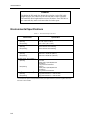
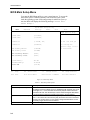
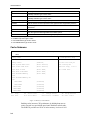
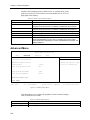
Chapter 3 – BIOS Setup Menus internal to the Pentium processor, and level two, or external cache, is the cache-on-a-stick site (COAST) which can accommodate 256 or 512 K of high-speed cache memory. Table 3-3. Memory Cache Submenu Options Option Memory Cache Cache System BIOS Area Description Controls the state of Pentium II memory cache. Allows the system BIOS memory area to be cached if enabled. Enabling also increases system performance. The default is enabled and write protected. Allows the video BIOS memory area to be cached if enabled. Enabling also increases system performance. The default is enabled and write protected. Controls caching of 512K base memory. Default is Write Back Caching. Controls caching of 512K and 640K base memory. Default is Write Back Caching. Controls caching of system memory above 1 MB. Default is Write Back Caching. Caches the corresponding memory when enabled. Memory in this area is usually extended BIOS or AT-bus memory. Enabling cache may increase system performance, depending on how the extended BIOS is accessed. The default is disabled. Cache Video BIOS Area Cache 0 - 512K Cache 512K - 640K Cache Extended Memory Area Cache Memory Region Advanced Menu Xycom BIOS Setup Utility Main Advanced Security Exit Item Specific Help ?I/O Device Configuration If the line item you are ?Advanced Chipset Control viewing has specific help Installed O/S [other] Reset Configuration Data [No] Large Disk Access Mode [DOS] Local Bus IDE adapter [Both] it will be listed here. ?On-board Socket Site ?Flat Panel F1 Help ¯ ESC Exit ¬® Select Menu Select Item -/+ Change Values Enter Select » Submenu F9 Setup Defaults F10 Previous Values Figure 3-4. Advanced Setup Menu This menu allows you to change the peripheral control, advanced chipset control, and disk access mode. Table 3-4. Advanced Menu Option Feature I/O Device Configuration Advanced Chipset Control 3-5 Description Allows entry into the I/O submenu. Allows entry into the chipset submenu.