1
9. Advance [ADV.]
1
1
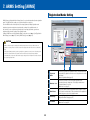
Language
Selection
Select the language in which menus are shown on the LCD screen in the
control panel of the plotter.
Select from [English], [Japanese], [Deutsch], [Francais], [Italiano],
[Espanol], and [Portugues]. This does not change the display language
of the controller.
2
Length Unit
Select the length unit that is shown on the LCD screen in the control
panel of the plotter. Select from [metric] and [inch]. This does not
change the display unit of the controller.
3
Move Step
Set the movement distance of the carriage and the media when one
of the [Position] keys (
) is pressed. Select from [0.1mm] and
[1.0mm].
5
2
3
6
4
7
8
4
Media Sensor
Specify whether to use the sensor that checks if media is set and
detects the media length (in the feed direction).
Disabled
The sensor will not be used.
Enabled
The sensor will be used.
Specify whether to check if a tool is attached on the station when the
media detection is performed.
9
5
10
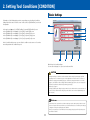
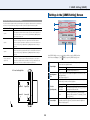
In the main screen (Æpage 9), click [ADV.] to open the [Advance] screen.
In the [Advance] screen, you make environment settings for the plotter.
CAUTION
Check Tool*1
6
Fan Power
7
Beep For Key
Ope.
When [Push Roller Sensor] is set to [Disabled], cross cutting cannot be done.
Disabled
The check will not be performed. Be sure to attach
Tool2 on the station before turning the power on.
Enabled
The check will be performed.
Set the air volume of the fan that sucks the media. Normally, select
[Normal]. For thin media, select [Weak].
Specify whether to beep when a key on the control panel of the plotter is
pressed.
Off
Beep will not be generated.
On
Beep will be generated.
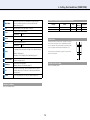
Specify whether to use the push roller sensors that detect the width of
the media. Normally, select [Enabled].(ÆChapter 10 "Settings Regarding
Operating Environment" in User's Manual)
8
9
10
Push Roller
Sensor
Disabled
The push roller sensors will not be used.
Inside Disabled*2
The push roller sensors other than ones at the
edges will not be used.
Enabled
The push roller sensors will be used.
OK
Saves the settings and closes the [Advance] screen.
Cancel
Cancels the settings and closes the [Advance] screen.
*1: Available only when you use a plotter with the 2 pen option.
*2: When more than three push rollers are used, the roller sensor(s) in midway will be disabled.
30