1
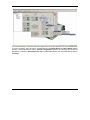
4.9. Evaluate the behaviour of motion controller drive part (optional) You can use the Data Logger or the Control Panel evaluation tools to quickly measure and analyze your application behavior. In case of errors like protections triggered, use the Drive Status control panel to find the cause. 4.10. Creating an Image File with the Setup Data Once you have validated the embeded drive setup, you can use the Application | Create EEPROM Programmer File | Setup… menu command to generate a software file (with extension .sw) with all the setup data. The software file provides a convenient way to automate the programming of TMC-3D. The software file is a text file that can be read with any text editor. It contains blocks of data separated by an empty raw. Each block of data starts with the block start address, followed by data values to place in ascending order at consecutive addresses: first data – to write at start address, second data – to write at start address + 1, etc. All the data are hexadecimal 16- bit values (maximum 4 hexadecimal digits). Each raw contains a single data value. When less then 4 hexadecimal digits are shown, the value must be right justified. For example 92 represent 0x0092. The .sw file can be programmed into a drive: from a host PC or PLC, using the TML_LIB functions for writing data into the drive EEPROM using the EEPROM Programmer tool, which comes with EasyMotion Studio but may also be installed separately. The EEPROM Programmer was specifically designed for repetitive fast and easy programming of .sw files into the Technosoft drives during production. 5. Step 3. Slave Axes Setup Each axis from the multi-axis system requires a separate application with Setup and Motion information. Use the Application | New… command to add the slave applications in motion controller project. Set the Axis ID for the slave equal with your intelligent drive/motor Axis ID. Press New button and select the product type followed by product, motor technology and feedback type. Remark: Each CAN network node must have a unique Axis ID. The mechanism of setting the Axis ID for the intelligent drives is identical with the one used for TMC-3D (section 4.6 Changing the Axis ID of the Motion Controller) © Technosoft 2008 57 TMC3D Technical Reference