1
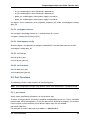
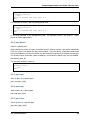
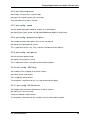
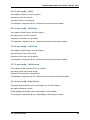
Testpmd Application User Guide
Release 2.0.0
April 24, 2015
CONTENTS
1 Introduction
1.1 Documentation Roadmap . . . . . . . . . . . . . . . . . . . . . . . . . . . . . . .
2
2
2 Overview
3
3 Compiling the Application
4
4 Running the Application
4.1 EAL Command-line Options . . . . . . . . . . . . . . . . . . . . . . . . . . . . .
4.2 Testpmd Command-line Options . . . . . . . . . . . . . . . . . . . . . . . . . . .
5
5
7
5 Testpmd Runtime Functions
5.1 Help Functions . . . . . .
5.2 Control Functions . . . .
5.3 Display Functions . . . .
5.4 Configuration Functions .
5.5 Port Functions . . . . . .
5.6 Link Bonding Functions .
5.7 Register Functions . . . .
5.8 Filter Functions . . . . .
.
.
.
.
.
.
.
.
.
.
.
.
.
.
.
.
.
.
.
.
.
.
.
.
.
.
.
.
.
.
.
.
.
.
.
.
.
.
.
.
.
.
.
.
.
.
.
.
.
.
.
.
.
.
.
.
.
.
.
.
.
.
.
.
.
.
.
.
.
.
.
.
.
.
.
.
.
.
.
.
.
.
.
.
.
.
.
.
.
.
.
.
.
.
.
.
.
.
.
.
.
.
.
.
.
.
.
.
.
.
.
.
.
.
.
.
.
.
.
.
.
.
.
.
.
.
.
.
.
.
.
.
.
.
.
.
.
.
.
.
.
.
.
.
.
.
.
.
.
.
.
.
.
.
.
.
.
.
.
.
.
.
.
.
.
.
.
.
.
.
.
.
.
.
.
.
.
.
.
.
.
.
.
.
.
.
.
.
.
.
.
.
.
.
.
.
.
.
.
.
.
.
.
.
.
.
.
.
.
.
.
.
.
.
.
.
.
.
.
.
.
.
.
.
.
.
.
.
.
.
.
.
.
.
.
.
.
.
.
.
.
.
.
.
.
.
.
.
12
12
13
13
15
25
30
32
33
i
Testpmd Application User Guide, Release 2.0.0
April 24, 2015
Contents
CONTENTS
1
CHAPTER
ONE
INTRODUCTION
This document is a user guide for the testpmd example application that is shipped as part of
the Data Plane Development Kit.
The testpmd application can be used to test the DPDK in a packet forwarding mode and also
to access NIC hardware features such as Flow Director. It also serves as a example of how to
build a more fully-featured application using the DPDK SDK.
1.1 Documentation Roadmap
The following is a list of DPDK documents in the suggested reading order:
• Release Notes : Provides release-specific information, including supported features,
limitations, fixed issues, known issues and so on. Also, provides the answers to frequently
asked questions in FAQ format.
• Getting Started Guide (this document): Describes how to install and configure the
DPDK; designed to get users up and running quickly with the software.
• Programmer’s Guide : Describes:
– The software architecture and how to use it (through examples), specifically in a
Linux* application (linuxapp) environment
– The content of the DPDK, the build system (including the commands that can be
used in the root DPDK Makefile to build the development kit and an application) and
guidelines for porting an application
– Optimizations used in the software and those that should be considered for new
development
A glossary of terms is also provided.
• API Reference : Provides detailed information about DPDK functions, data structures
and other programming constructs.
• Sample Applications User Guide : Describes a set of sample applications. Each chapter describes a sample application that showcases specific functionality and provides
instructions on how to compile, run and use the sample application.
Note: These documents are available for download as a separate documentation package at
the same location as the DPDK code package.
2
CHAPTER
TWO
OVERVIEW
The following sections show how to build and run the testpmd application and how to configure
the application from the command line and the run-time environment.
3
CHAPTER
THREE
COMPILING THE APPLICATION
The testpmd application is compiled as part of the main compilation of the DPDK libraries and
tools. Refer to the DPDK Getting Started Guide for details. The basic compilation steps are:
1. Set the required environmental variables and go to the source directory:
export RTE_SDK=/path/to/rte_sdk
cd $RTE_SDK
2. Set the compilation target. For example:
export RTE_TARGET=x86_64-native-linuxapp-gcc
3. Build the application:
make install T=$RTE_TARGET
The compiled application will be located at:
$RTE_SDK/$RTE_TARGET/build/app/testpmd
4
CHAPTER
FOUR
RUNNING THE APPLICATION
4.1 EAL Command-line Options
The following are the EAL command-line options that can be used in conjunction with the
testpmd, or any other DPDK application. See the DPDK Getting Started Guide for more information on these options.
• -c COREMASK
Set the hexadecimal bitmask of the cores to run on.
• -l CORELIST
List of cores to run on
The argument format is <c1>[-c2][,c3[-c4],...] where c1, c2, etc are core indexes between
0 and 128
• –lcores COREMAP
Map lcore set to physical cpu set
The argument format is ‘<lcores[@cpus]>[<,lcores[@cpus]>...]’
lcores and cpus list are grouped by ‘(‘ and ‘)’ Within the group, ‘-‘ is used for range
separator, ‘,’ is used for single number separator. ‘( )’ can be omitted for single element
group, ‘@’ can be omitted if cpus and lcores have the same value
• –master-lcore ID
Core ID that is used as master
• -n NUM
Set the number of memory channels to use.
• -b, –pci-blacklist domain:bus:devid.func
Blacklist a PCI devise to prevent EAL from using it. Multiple -b options are allowed.
• -d LIB.so
Load an external driver. Multiple -d options are allowed.
• -w, –pci-whitelist domain:bus:devid:func
Add a PCI device in white list.
5
Testpmd Application User Guide, Release 2.0.0
• -m MB
Memory to allocate. See also –socket-mem.
• -r NUM
Set the number of memory ranks (auto-detected by default).
• -v
Display the version information on startup.
• –xen-dom0
Support application running on Xen Domain0 without hugetlbfs.
• –syslog
Set the syslog facility.
• –socket-mem
Set the memory to allocate on specific sockets (use comma separated values).
• –huge-dir
Specify the directory where the hugetlbfs is mounted.
• –proc-type
Set the type of the current process.
• –file-prefix
Prefix for hugepage filenames.
• -vmware-tsc-map
Use VMware TSC map instead of native RDTSC.
• –vdev
Add a virtual device, with
vdev=eth_pcap0,iface=eth2.
format
“<driver><id>[,key=val,
...]”,
e.g.
–
• –base-virtaddr
Specify base virtual address.
• –create-uio-dev
Create /dev/uioX (usually done by hotplug).
• –no-shconf
No shared config (mmap’d files).
• –no-pci
Disable pci.
• –no-hpet
Disable hpet.
• –no-huge
Use malloc instead of hugetlbfs.
4.1. EAL Command-line Options
6
Testpmd Application User Guide, Release 2.0.0
4.2 Testpmd Command-line Options
The following are the command-line options for the testpmd applications. They must be separated from the EAL options, shown in the previous section, with a – separator:
sudo ./testpmd -c 0xF -n 4 -- -i --portmask=0x1 --nb-cores=2
• -i, –interactive
Run testpmd in interactive mode. In this mode, the testpmd starts with a prompt that
can be used to start and stop forwarding, configure the application and display stats on
the current packet processing session. See the Section Testpmd Runtime Functions for
more details.
In non-interactive mode, the application starts with the configuration specified on the
command-line and immediately enters forwarding mode.
• -h, –help
Display a help message and quit.
• -a, –auto-start
Start forwarding on init.
• –nb-cores=N
Set the number of forwarding cores, where 1 <= N <= number of cores or
RTE_MAX_LCORE from the configuration file. The default value is 1.
• –nb-ports=N
Set the number of forwarding ports, where 1 <= N <= number of ports on the board or
RTE_MAX_ETHPORTS from the configuration file. The default value is the number of
ports on the board.
• –coremask=0xXX
Set the hexadecimal bitmask of the cores running the packet forwarding test. The master
lcore is reserved for command line parsing only and cannot be masked on for packet
forwarding.
• –portmask=0xXX
Set the hexadecimal bitmask of the ports used by the packet forwarding test.
• –numa
Enable NUMA-aware allocation of RX/TX rings and of RX memory buffers (mbufs).
• –port-numa-config=(port,socket)[,(port,socket)]
Specify the socket on which the memory pool to be used by the port will be allocated.
• –ring-numa-config=(port,flag,socket)[,(port,flag,socket)]
Specify the socket on which the TX/RX rings for the port will be allocated. Where flag is
1 for RX, 2 for TX, and 3 for RX and TX.
• –socket-num=N
4.2. Testpmd Command-line Options
7
Testpmd Application User Guide, Release 2.0.0
Set the socket from which all memory is allocated in NUMA mode, where 0 <= N <
number of sockets on the board.
• –mbuf-size=N
Set the data size of the mbufs used to N bytes, where N < 65536. The default value is
2048.
• –total-num-mbufs=N
Set the number of mbufs to be allocated in the mbuf pools, where N > 1024.
• –max-pkt-len=N
Set the maximum packet size to N bytes, where N >= 64. The default value is 1518.
• –eth-peers-configfile=name
Use a configuration file containing the Ethernet addresses of the peer ports. The configuration file should contain the Ethernet addresses on separate lines:
XX:XX:XX:XX:XX:01
XX:XX:XX:XX:XX:02
...
• –eth-peer=N,XX:XX:XX:XX:XX:XX
Set the MAC address XX:XX:XX:XX:XX:XX of the peer port N, where 0 <= N <
RTE_MAX_ETHPORTS from the configuration file.
• –pkt-filter-mode=mode
Set Flow Director mode where mode is either none (the default), signature or perfect.
See the Section flow_director_filter for more detail.
• –pkt-filter-report-hash=mode
Set Flow Director hash match reporting mode where mode is none, match (the default)
or always.
• –pkt-filter-size=N
Set Flow Director allocated memory size, where N is 64K, 128K or 256K. Sizes are in
kilobytes. The default is 64.
• –pkt-filter-flexbytes-offset=N
Set the flexbytes offset. The offset is defined in words (not bytes) counted from the first
byte of the destination Ethernet MAC address, where N is 0 <= N <= 32. The default
value is 0x6.
• –pkt-filter-drop-queue=N
Set the drop-queue. In perfect filter mode, when a rule is added with queue = -1, the
packet will be enqueued into the RX drop-queue. If the drop-queue does not exist, the
packet is dropped. The default value is N=127.
• –crc-strip
Enable hardware CRC stripping.
4.2. Testpmd Command-line Options
8
Testpmd Application User Guide, Release 2.0.0
• –enable-rx-cksum
Enable hardware RX checksum offload.
• –disable-hw-vlan
Disable hardware VLAN.
• –disable-hw-vlan-filter
Disable hardware VLAN filter.
• –disable-hw-vlan-strip
Disable hardware VLAN strip.
• –disable-hw-vlan-extend
Disable hardware VLAN extend.
• –enable-drop-en
Enable per-queue packet drop for packets with no descriptors.
• –disable-rss
Disable RSS (Receive Side Scaling).
• –port-topology=mode
Set port topology, where mode is paired(the default) or chained. In paired mode, the
forwarding is between pairs of ports, for example: (0,1), (2,3), (4,5). In chained mode,
the forwarding is to the next available port in the port mask, for example: (0,1), (1,2), (2,0).
The ordering of the ports can be changed using the portlist testpmd runtime function.
• –forward-mode=N
Set forwarding mode. (N: io|mac|mac_retry|mac_swap|flowgen|rxonly|txonly|csum|icmpecho)
• –rss-ip
Set RSS functions for IPv4/IPv6 only.
• –rss-udp
Set RSS functions for IPv4/IPv6 and UDP.
• –rxq=N
Set the number of RX queues per port to N, where 1 <= N <= 65535. The default value
is 1.
• –rxd=N
Set the number of descriptors in the RX rings to N, where N > 0. The default value is
128.
• –txq=N
Set the number of TX queues per port to N, where 1 <= N <= 65535. The default value
is 1.
• –txd=N
Set the number of descriptors in the TX rings to N, where N > 0. The default value is 512.
4.2. Testpmd Command-line Options
9
Testpmd Application User Guide, Release 2.0.0
• –burst=N
Set the number of packets per burst to N, where 1 <= N <= 512. The default value is 16.
• –mbcache=N
Set the cache of mbuf memory pools to N, where 0 <= N <= 512. The default value is 16.
• –rxpt=N
Set the prefetch threshold register of RX rings to N, where N >= 0. The default value is
8.
• –rxht=N
Set the host threshold register of RX rings to N, where N >= 0. The default value is 8.
• –rxfreet=N
Set the free threshold of RX descriptors to N, where 0 <= N < value of –rxd. The default
value is 0.
• –rxwt=N
Set the write-back threshold register of RX rings to N, where N >= 0. The default value
is 4.
• –txpt=N
Set the prefetch threshold register of TX rings to N, where N >= 0. The default value is
36.
• –txht=N
Set the host threshold register of TX rings to N, where N >= 0. The default value is 0.
• –txwt=N
Set the write-back threshold register of TX rings to N, where N >= 0. The default value is
0.
• –txfreet=N
Set the transmit free threshold of TX rings to N, where 0 <= N <= value of –txd. The
default value is 0.
• –txrst=N
Set the transmit RS bit threshold of TX rings to N, where 0 <= N <= value of –txd. The
default value is 0.
• –txqflags=0xXXXXXXXX
Set the hexadecimal bitmask of TX queue flags, where 0 <= N <= 0x7FFFFFFF. The
default value is 0.
Note:
When using hardware offload functions such as vlan, checksum...,
add txqflags=0, since depending on the PMD,
txqflags might be set to a non-zero value.
• –rx-queue-stats-mapping=(port,queue,mapping)[,(port,queue,mapping)]
Set the RX queues statistics counters mapping 0 <= mapping <= 15.
4.2. Testpmd Command-line Options
10
Testpmd Application User Guide, Release 2.0.0
• –tx-queue-stats-mapping=(port,queue,mapping)[,(port,queue,mapping)]
Set the TX queues statistics counters mapping 0 <= mapping <= 15.
• –no-flush-rx
Don’t flush the RX streams before starting forwarding. Used mainly with PCAP drivers.
• –txpkts=X[,Y]
Set TX segment sizes.
• –disable-link-check
Disable check on link status when starting/stopping ports.
4.2. Testpmd Command-line Options
11
CHAPTER
FIVE
TESTPMD RUNTIME FUNCTIONS
Where the testpmd application is started in interactive mode, (-i|–interactive), it displays a
prompt that can be used to start and stop forwarding, configure the application, display statistics, set the Flow Director and other tasks.
testpmd>
The testpmd prompt has some, limited, readline support. Common bash command- line functions such as Ctrl+a and Ctrl+e to go to the start and end of the prompt line are supported as
well as access to the command history via the up-arrow.
There is also support for tab completion. If you type a partial command and hit <TAB> you get
a list of the available completions:
testpmd> show port <TAB>
info [Mul-choice STRING]: show|clear port info|stats|fdir|stat_qmap X
info [Mul-choice STRING]: show|clear port info|stats|fdir|stat_qmap all
stats [Mul-choice STRING]: show|clear port info|stats|fdir|stat_qmap X
stats [Mul-choice STRING]: show|clear port info|stats|fdir|stat_qmap all
...
5.1 Help Functions
The testpmd has on-line help for the functions that are available at runtime. These are divided
into sections and can be accessed using help, help section or help all:
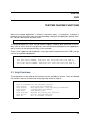
testpmd> help
Help
help
help
help
help
help
help
help
is available
control
:
display
:
config
:
ports
:
registers :
filters
:
all
:
for the following sections:
Start and stop forwarding.
Displaying port, stats and config information.
Configuration information.
Configuring ports.
Reading and setting port registers.
Filters configuration help.
All of the above sections.
12
Testpmd Application User Guide, Release 2.0.0
5.2 Control Functions
5.2.1 start
Start packet forwarding with current configuration:
start
5.2.2 start tx_first
Start packet forwarding with current configuration after sending one burst of packets:
start tx_first
5.2.3 stop
Stop packet forwarding, and display accumulated statistics:
stop
5.2.4 quit
Quit to prompt:
quit
5.3 Display Functions
The functions in the following sections are used to display information about the testpmd configuration or the NIC status.
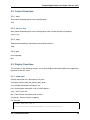
5.3.1 show port
Display information for a given port or all ports:
show port (info|stats|fdir|stat_qmap) (port_id|all)
The available information categories are:
info : General port information such as MAC address.
stats : RX/TX statistics.
fdir : Flow Director information and statistics.
stat_qmap : Queue statistics mapping.
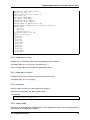
For example:
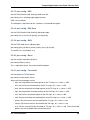
testpmd> show port info 0
********************* Infos for port 0 *********************
5.2. Control Functions
13
Testpmd Application User Guide, Release 2.0.0
MAC address: XX:XX:XX:XX:XX:XX
Connect to socket: 0
memory allocation on the socket: 0
Link status: up
Link speed: 40000 Mbps
Link duplex: full-duplex
Promiscuous mode: enabled
Allmulticast mode: disabled
Maximum number of MAC addresses: 64
Maximum number of MAC addresses of hash filtering: 0
VLAN offload:
strip on
filter on
qinq(extend) off
Redirection table size: 512
Supported flow types:
ipv4-frag
ipv4-tcp
ipv4-udp
ipv4-sctp
ipv4-other
ipv6-frag
ipv6-tcp
ipv6-udp
ipv6-sctp
ipv6-other
l2_payload
5.3.2 show port rss reta
Display the rss redirection table entry indicated by masks on port X:
show port (port_id) rss reta (size) (mask0, mask1...)
size is used to indicate the hardware supported reta size
5.3.3 show port rss-hash
Display the RSS hash functions and RSS hash key of a port:
show port (port_id) rss-hash [key]
5.3.4 clear port
Clear the port statistics for a given port or for all ports:
clear port (info|stats|fdir|stat_qmap) (port_id|all)
For example:
testpmd> clear port stats all
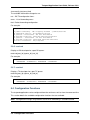
5.3.5 show config
Displays the configuration of the application. The configuration comes from the command-line,
the runtime or the application defaults:
5.3. Display Functions
14
Testpmd Application User Guide, Release 2.0.0
show config (rxtx|cores|fwd)
The available information categories are:
rxtx : RX/TX configuration items.
cores : List of forwarding cores.
fwd : Packet forwarding configuration.
For example:
testpmd> show config rxtx
io
nb
RX
RX
TX
TX
TX
packet forwarding - CRC stripping disabled - packets/burst=16
forwarding cores=2 - nb forwarding ports=1
queues=1 - RX desc=128 - RX free threshold=0
threshold registers: pthresh=8 hthresh=8 wthresh=4
queues=1 - TX desc=512 - TX free threshold=0
threshold registers: pthresh=36 hthresh=0 wthresh=0
RS bit threshold=0 - TXQ flags=0x0
5.3.6 read rxd
Display an RX descriptor for a port RX queue:
read rxd (port_id) (queue_id) (rxd_id)
For example:
testpmd> read rxd 0 0 4
0x0000000B - 0x001D0180 / 0x0000000B - 0x001D0180
5.3.7 read txd
Display a TX descriptor for a port TX queue:
read txd (port_id) (queue_id) (txd_id)
For example:
testpmd> read txd 0 0 4
0x00000001 - 0x24C3C440 / 0x000F0000 - 0x2330003C
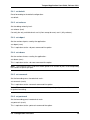
5.4 Configuration Functions
The testpmd application can be configured from the runtime as well as from the command-line.
This section details the available configuration functions that are available.
Note: Configuration changes only become active when forwarding is started/restarted.
5.4. Configuration Functions
15
Testpmd Application User Guide, Release 2.0.0
5.4.1 set default
Reset forwarding to the default configuration:
set default
5.4.2 set verbose
Set the debug verbosity level:
set verbose (level)
Currently the only available levels are 0 (silent except for error) and 1 (fully verbose).
5.4.3 set nbport
Set the number of ports used by the application:
set nbport (num)
This is equivalent to the –nb-ports command-line option.
5.4.4 set nbcore
Set the number of cores used by the application:
set nbcore (num)
This is equivalent to the –nb-cores command-line option.
Note: The number of cores used must not be greater than number of ports used multiplied by
the number of queues per port.
5.4.5 set coremask
Set the forwarding cores hexadecimal mask:
set coremask (mask)
This is equivalent to the –coremask command-line option.
Note: The master lcore is reserved for command line parsing only and cannot be masked on
for packet forwarding.
5.4.6 set portmask
Set the forwarding ports hexadecimal mask:
set portmask (mask)
This is equivalent to the –portmask command-line option.
5.4. Configuration Functions
16
Testpmd Application User Guide, Release 2.0.0
5.4.7 set burst
Set number of packets per burst:
set burst (num)
This is equivalent to the –burst command-line option.
In mac_retry forwarding mode, the transmit delay time and number of retries can also be set.
set burst tx delay (micrseconds) retry (num)
5.4.8 set txpkts
Set the length of each segment of the TX-ONLY packets:
set txpkts (x[,y]*)
Where x[,y]* represents a CSV list of values, without white space.
5.4.9 set corelist
Set the list of forwarding cores:
set corelist (x[,y]*)
For example, to change the forwarding cores:
testpmd> set corelist 3,1
testpmd> show config fwd
io packet forwarding - ports=2 - cores=2 - streams=2 - NUMA support disabled
Logical Core 3 (socket 0) forwards packets on 1 streams:
RX P=0/Q=0 (socket 0) -> TX P=1/Q=0 (socket 0) peer=02:00:00:00:00:01
Logical Core 1 (socket 0) forwards packets on 1 streams:
RX P=1/Q=0 (socket 0) -> TX P=0/Q=0 (socket 0) peer=02:00:00:00:00:00
Note: The cores are used in the same order as specified on the command line.
5.4.10 set portlist
Set the list of forwarding ports:
set portlist (x[,y]*)
For example, to change the port forwarding:
testpmd> set portlist 0,2,1,3
testpmd> show config fwd
io packet forwarding - ports=4 - cores=1 - streams=4
Logical Core 3 (socket 0) forwards packets on 4 streams:
RX P=0/Q=0 (socket 0) -> TX P=2/Q=0 (socket 0) peer=02:00:00:00:00:01
RX P=2/Q=0 (socket 0) -> TX P=0/Q=0 (socket 0) peer=02:00:00:00:00:00
RX P=1/Q=0 (socket 0) -> TX P=3/Q=0 (socket 0) peer=02:00:00:00:00:03
RX P=3/Q=0 (socket 0) -> TX P=1/Q=0 (socket 0) peer=02:00:00:00:00:02
5.4. Configuration Functions
17
Testpmd Application User Guide, Release 2.0.0
5.4.11 vlan set strip
Set the VLAN strip on a port:
vlan set strip (on|off) (port_id)
5.4.12 vlan set stripq
Set the VLAN strip for a queue on a port:
vlan set stripq (on|off) (port_id,queue_id)
5.4.13 vlan set filter
Set the VLAN filter on a port:
vlan set filter (on|off) (port_id)
5.4.14 vlan set qinq
Set the VLAN QinQ (extended queue in queue) on for a port:
vlan set qinq (on|off) (port_id)
5.4.15 vlan set tpid
Set the outer VLAN TPID for packet filtering on a port:
vlan set tpid (value) (port_id)
Note: TPID value must be a 16-bit number (value <= 65536).
5.4.16 rx_vlan add
Add a VLAN ID, or all identifiers, to the set of VLAN identifiers filtered by port ID:
rx_vlan add (vlan_id|all) (port_id)
Note: VLAN filter must be set on that port. VLAN ID < 4096. Depending on the NIC used,
number of vlan_ids may be limited to the maximum entries in VFTA table. This is important if
enabling all vlan_ids.
5.4.17 rx_vlan rm
Remove a VLAN ID, or all identifiers, from the set of VLAN identifiers filtered by port ID:
rx_vlan rm (vlan_id|all) (port_id)
5.4. Configuration Functions
18
Testpmd Application User Guide, Release 2.0.0
5.4.18 rx_vlan add(for VF)
Add a VLAN ID, to the set of VLAN identifiers filtered for VF(s) for port ID:
rx_vlan add (vlan_id) port (port_id) vf (vf_mask)
5.4.19 rx_vlan rm(for VF)
Remove a VLAN ID, from the set of VLAN identifiers filtered for VF(s) for port ID:
rx_vlan rm (vlan_id) port (port_id) vf (vf_mask)
5.4.20 rx_vlan set tpid
Set the outer VLAN TPID for packet filtering on a port:
rx_vlan set tpid (value) (port_id)
5.4.21 tunnel_filter add
Add a tunnel filter on a port:
tunnel_filter add (port_id) (outer_mac) (inner_mac) (ip_addr) (inner_vlan) (tunnel_type)
(filter_type) (tenant_id) (queue_id)
5.4.22 tunnel_filter remove
Remove a tunnel filter on a port:
tunnel_filter rm (port_id) (outer_mac) (inner_mac) (ip_addr) (inner_vlan) (tunnel_type)
(filter_type) (tenant_id) (queue_id)
5.4.23 rx_vxlan_port add
Add an UDP port for VXLAN packet filter on a port:
rx_vxlan_port add (udp_port) (port_id)
5.4.24 rx_vxlan_port remove
Remove an UDP port for VXLAN packet filter on a port:
rx_vxlan_port rm (udp_port) (port_id)
5.4.25 tx_vlan set
Set hardware insertion of VLAN ID in packets sent on a port:
tx_vlan set (vlan_id) (port_id)
5.4. Configuration Functions
19
Testpmd Application User Guide, Release 2.0.0
5.4.26 tx_vlan set pvid
Set port based hardware insertion of VLAN ID in packets sent on a port:
tx_vlan set pvid (port_id) (vlan_id) (on|off)
5.4.27 tx_vlan reset
Disable hardware insertion of a VLAN header in packets sent on a port:
tx_vlan reset (port_id)
5.4.28 csum set
Select hardware or software calculation of the checksum when transmitting a packet using the
csum forward engine:
csum set (ip|udp|tcp|sctp|outer-ip) (hw|sw) (port_id)
• ip|udp|tcp|sctp always concern the inner layer.
• outer-ip concerns the outer IP layer in case the packet is recognized as a tunnel packet
by the forward engine (vxlan, gre and ipip are supported). See “csum parse-tunnel”
command.
Note: Check the NIC Datasheet for hardware limits.
5.4.29 csum parse-tunnel
Define how tunneled packets should be handled by the csum forward engine.
csum parse-tunnel (on|off) (tx_port_id)
If enabled, the csum forward engine will try to recognize supported tunnel headers (vxlan, gre,
ipip).
If disabled, treat tunnel packets as non-tunneled packets (a inner header is handled as a packet
payload).
Note: The port argument is the TX port like in the “csum set” command.
Example:
Consider a packet as following: “eth_out/ipv4_out/udp_out/vxlan/eth_in/ipv4_in/tcp_in”
• If parse-tunnel is enabled, the ip|udp|tcp|sctp parameters of “csum set” command are
about inner headers (here ipv4_in and tcp_in), and the outer-ip parameter is about outer
headers (here ipv4_out).
• If parse-tunnel is disabled, the ip|udp|tcp|sctp parameters of “csum set” command are
about outer headers, here ipv4_out and udp_out.
5.4. Configuration Functions
20
Testpmd Application User Guide, Release 2.0.0
5.4.30 csum show
Display tx checksum offload configuration:
csum show (port_id)
5.4.31 tso set
Enable TCP Segmentation Offload in csum forward engine:
tso set (segsize) (port_id)
Note: Check the NIC datasheet for hardware limits
5.4.32 tso show
Display the status of TCP Segmentation Offload:
tso show (port_id)
5.4.33 set fwd
Set the packet forwarding mode:
set fwd (io|mac|mac_retry|macswap|flowgen|rxonly|txonly|csum|icmpecho)
The available information categories are:
• io: forwards packets “as-is” in I/O mode. This is the fastest possible forwarding operation
as it does not access packets data. This is the default mode.
• mac: changes the source and the destination Ethernet addresses of packets before forwarding them.
• mac_retry: same as “mac” forwarding mode, but includes retries if the destination queue
is full.
• macswap: MAC swap forwarding mode. Swaps the source and the destination Ethernet
addresses of packets before forwarding them.
• flowgen: multi-flow generation mode. Originates a bunch of flows (varying destination IP
addresses), and terminate receive traffic.
• rxonly: receives packets but doesn’t transmit them.
• txonly: generates and transmits packets without receiving any.
• csum: changes the checksum field with HW or SW methods depending on the offload
flags on the packet.
• icmpecho: receives a burst of packets, lookup for IMCP echo requests and, if any, send
back ICMP echo replies.
Example:
5.4. Configuration Functions
21
Testpmd Application User Guide, Release 2.0.0
testpmd> set fwd rxonly
Set rxonly packet forwarding mode
5.4.34 mac_addr add
Add an alternative MAC address to a port:
mac_addr add (port_id) (XX:XX:XX:XX:XX:XX)
5.4.35 mac_addr remove
Remove a MAC address from a port:
mac_addr remove (port_id) (XX:XX:XX:XX:XX:XX)
5.4.36 mac_addr add(for VF)
Add an alternative MAC address for a VF to a port:
mac_add add port (port_id) vf (vf_id) (XX:XX:XX:XX:XX:XX)
5.4.37 set port-uta
Set the unicast hash filter(s) on/off for a port X:
set port (port_id) uta (XX:XX:XX:XX:XX:XX|all) (on|off)
5.4.38 set promisc
Set the promiscuous mode on for a port or for all ports. In promiscuous mode packets are not
dropped if they aren’t for the specified MAC address:
set promisc (port_id|all) (on|off)
5.4.39 set allmulti
Set the allmulti mode for a port or for all ports:
set allmulti (port_id|all) (on|off)
Same as the ifconfig (8) option. Controls how multicast packets are handled.
5.4.40 set flow_ctrl rx
Set the link flow control parameter on a port:
set flow_ctrl rx (on|off) tx (on|off) (high_water) (low_water) (pause_time) (send_xon) (port_id)
Where:
5.4. Configuration Functions
22
Testpmd Application User Guide, Release 2.0.0
high_water (integer): High threshold value to trigger XOFF.
low_water (integer) : Low threshold value to trigger XON.
pause_time (integer): Pause quota in the Pause frame.
send_xon (0/1) : Send XON frame.
mac_ctrl_frame_fwd : Enable receiving MAC control frames
5.4.41 set pfc_ctrl rx
Set the priority flow control parameter on a port:
set pfc_ctrl rx (on|off) tx (on|off) (high_water) (low_water) (pause_time) (priority) (port_id)
Where:
priority (0-7): VLAN User Priority.
5.4.42 set stat_qmap
Set statistics mapping (qmapping 0..15) for RX/TX queue on port:
set stat_qmap (tx|rx) (port_id) (queue_id) (qmapping)
For example, to set rx queue 2 on port 0 to mapping 5:
testpmd>set stat_qmap rx 0 2 5
5.4.43 set port - rx/tx(for VF)
Set VF receive/transmit from a port:
set port (port_id) vf (vf_id) (rx|tx) (on|off)
5.4.44 set port - mac address filter (for VF)
Add/Remove unicast or multicast MAC addr filter for a VF:
set port (port_id) vf (vf_id) (mac_addr) (exact-mac|exact-mac-vlan|hashmac|hashmacvlan) (on|off)
5.4.45 set port - rx mode(for VF)
Set the VF receive mode of a port:
set port (port_id) vf (vf_id) rxmode (AUPE|ROPE|BAM|MPE) (on|off)
The available receive modes are:
• AUPE: accepts untagged VLAN.
• ROPE: accepts unicast hash.
• BAM: accepts broadcast packets
5.4. Configuration Functions
23
Testpmd Application User Guide, Release 2.0.0
• MPE: accepts all multicast packets
5.4.46 set port - tx_rate (for Queue)
Set TX rate limitation for queue of a port ID:
set port (port_id) queue (queue_id) rate (rate_value)
5.4.47 set port - tx_rate (for VF)
Set TX rate limitation for queues in VF of a port ID:
set port (port_id) vf (vf_id) rate (rate_value) queue_mask (queue_mask)
5.4.48 set port - mirror rule
Set port or vlan type mirror rule for a port.
set port (port_id) mirror-rule (rule_id) (pool-mirror|vlan-mirror) (poolmask|vlanid[,vlanid]*) dstpool (pool_id) (on|off)
For example to enable mirror traffic with vlan 0,1 to pool 0:
set port 0 mirror-rule 0 vlan-mirror 0,1 dst-pool 0 on
5.4.49 reset port - mirror rule
Reset a mirror rule for a port.
reset port (port_id) mirror-rule (rule_id)
5.4.50 set flush_rx
Flush (default) or don’t flush RX streams before forwarding. Mainly used with PCAP drivers to
avoid the default behavior of flushing the first 512 packets on RX streams.
set flush_rx off
5.4.51 set bypass mode
Set the bypass mode for the lowest port on bypass enabled NIC.
set bypass mode (normal|bypass|isolate) (port_id)
5.4.52 set bypass event
Set the event required to initiate specified bypass mode for the lowest port on a bypass enabled
NIC where:
• timeout: enable bypass after watchdog timeout.
5.4. Configuration Functions
24
Testpmd Application User Guide, Release 2.0.0
• os_on: enable bypass when OS/board is powered on.
• os_off: enable bypass when OS/board is powered off.
• power_on: enable bypass when power supply is turned on.
• power_off: enable bypass when power supply is turned off.
set bypass event (timeout|os_on|os_off|power_on|power_off) mode (normal|bypass|isolate)
(port_id)
5.4.53 set bypass timeout
Set the bypass watchdog timeout to ‘n’ seconds where 0 = instant.
set bypass timeout (0|1.5|2|3|4|8|16|32)
5.4.54 show bypass config
Show the bypass configuration for a bypass enabled NIC using the lowest port on the NIC.
show bypass config (port_id)
5.4.55 set link up
Set link up for a port.
set link-up port (port id)
5.4.56 set link down
Set link down for a port.
set link-down port (port id)
5.5 Port Functions
The following sections show functions for configuring ports.
Note: Port configuration changes only become active when forwarding is started/restarted.
5.5.1 port attach
Attach a port specified by pci address or virtual device args.
To attach a new pci device, the device should be recognized by kernel first. Then it should be
moved under DPDK management. Finally the port can be attached to testpmd. On the other
hand, to attach a port created by virtual device, above steps are not needed.
port attach (identifier)
For example, to attach a port whose pci address is 0000:02:00.0.
5.5. Port Functions
25
Testpmd Application User Guide, Release 2.0.0
testpmd> port attach 0000:02:00.0
Attaching a new port...
... snip ...
Port 0 is attached. Now total ports is 1
Done
For example, to attach a port created by pcap PMD.
testpmd> port attach eth_pcap0,iface=eth0
Attaching a new port...
... snip ...
Port 0 is attached. Now total ports is 1
Done
In this case, identifier is “eth_pcap0,iface=eth0”. This identifier format is the same as “–vdev”
format of DPDK applications.
5.5.2 port detach
Detach a specific port.
Before detaching a port, the port should be closed. Also to remove a pci device completely
from the system, first detach the port from testpmd. Then the device should be moved under
kernel management. Finally the device can be removed using kernel pci hotplug functionality.
On the other hand, to remove a port created by a virtual device, above steps are not needed.
port detach (port_id)
For example, to detach a port 0.
testpmd> port detach 0
Detaching a port...
... snip ...
Done
5.5.3 port start
Start all ports or a specific port:
port start (port_id|all)
5.5.4 port stop
Stop all ports or a specific port:
port stop (port_id|all)
5.5.5 port close
Close all ports or a specific port:
port close (port_id|all)
5.5. Port Functions
26
Testpmd Application User Guide, Release 2.0.0
5.5.6 port start/stop queue
Start/stop a rx/tx queue on a specific port:
port (port_id) (rxq|txq) (queue_id) (start|stop)
Only take effect when port is started.
5.5.7 port config - speed
Set the speed and duplex mode for all ports or a specific port:
port config (port_id|all) speed (10|100|1000|10000|auto) duplex (half|full|auto)
5.5.8 port config - queues/descriptors
Set number of queues/descriptors for rxq, txq, rxd and txd:
port config all (rxq|txq|rxd|txd) (value)
This is equivalent to the –rxq, –txq, –rxd and –txd command-line options.
5.5.9 port config - max-pkt-len
Set the maximum packet length:
port config all max-pkt-len (value)
This is equivalent to the –max-pkt-len command-line option.
5.5.10 port config - CRC Strip
Set hardware CRC stripping on or off for all ports:
port config all crc-strip (on|off)
CRC stripping is off by default.
The on option is equivalent to the –crc-strip command-line option.
5.5.11 port config - RX Checksum
Set hardware RX checksum offload to on or off for all ports:
port config all rx-cksum (on|off)
Checksum offload is off by default.
The on option is equivalent to the –enable-rx-cksum command-line option.
5.5. Port Functions
27
Testpmd Application User Guide, Release 2.0.0
5.5.12 port config - VLAN
Set hardware VLAN on or off for all ports:
port config all hw-vlan (on|off)
Hardware VLAN is on by default.
The off option is equivalent to the –disable-hw-vlan command-line option.
5.5.13 port config - VLAN filter
Set hardware VLAN filter on or off for all ports:
port config all hw-vlan-filter (on|off)
Hardware VLAN filter is on by default.
The off option is equivalent to the –disable-hw-vlan-filter command-line option.
5.5.14 port config - VLAN strip
Set hardware VLAN strip on or off for all ports:
port config all hw-vlan-strip (on|off)
Hardware VLAN strip is on by default.
The off option is equivalent to the –disable-hw-vlan-strip command-line option.
5.5.15 port config - VLAN extend
Set hardware VLAN extend on or off for all ports:
port config all hw-vlan-extend (on|off)
Hardware VLAN extend is off by default.
The off option is equivalent to the –disable-hw-vlan-extend command-line option.
5.5.16 port config - Drop Packets
Set packet drop for packets with no descriptors on or off for all ports:
port config all drop-en (on|off)
Packet dropping for packets with no descriptors is off by default.
The on option is equivalent to the –enable-drop-en command-line option.
5.5. Port Functions
28
Testpmd Application User Guide, Release 2.0.0
5.5.17 port config - RSS
Set the RSS (Receive Side Scaling) mode on or off:
port config all rss (all|ip|tcp|udp|sctp|ether|none)
RSS is on by default.
The off option is equivalent to the –disable-rss command-line option.
5.5.18 port config - RSS Reta
Set the RSS (Receive Side Scaling) redirection table:
port config all rss reta (hash,queue)[,(hash,queue)]
5.5.19 port config - DCB
Set the DCB mode for an individual port:
port config (port_id) dcb vt (on|off) (traffic_class) pfc (on|off)
The traffic class should be 4 or 8.
5.5.20 port config - Burst
Set the number of packets per burst:
port config all burst (value)
This is equivalent to the –burst command-line option.
5.5.21 port config - Threshold
Set thresholds for TX/RX queues:
port config all (threshold) (value)
Where the threshold type can be:
• txpt: Set the prefetch threshold register of the TX rings, 0 <= value <= 255.
• txht: Set the host threshold register of the TX rings, 0 <= value <= 255.
• txwt: Set the write-back threshold register of the TX rings, 0 <= value <= 255.
• rxpt: Set the prefetch threshold register of the RX rings, 0 <= value <= 255.
• rxht: Set the host threshold register of the RX rings, 0 <= value <= 255.
• rxwt: Set the write-back threshold register of the RX rings, 0 <= value <= 255.
• txfreet: Set the transmit free threshold of the TX rings, 0 <= value <= txd.
• rxfreet: Set the transmit free threshold of the RX rings, 0 <= value <= rxd.
• txrst: Set the transmit RS bit threshold of TX rings, 0 <= value <= txd. These threshold
options are also available from the command-line.
5.5. Port Functions
29
Testpmd Application User Guide, Release 2.0.0
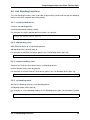
5.6 Link Bonding Functions
The Link Bonding functions make it possible to dynamically create and manage link bonding
devices from within testpmd interactive prompt.
5.6.1 create bonded device
Create a new bonding device:
create bonded device (mode) (socket)
For example, to create a bonded device in mode 1 on socket 0.
testpmd> create bonded 1 0
created new bonded device (port X)
5.6.2 add bonding slave
Adds Ethernet device to a Link Bonding device:
add bonding slave (slave id) (port id)
For example, to add Ethernet device (port 6) to a Link Bonding device (port 10).
testpmd> add bonding slave 6 10
5.6.3 remove bonding slave
Removes an Ethernet slave device from a Link Bonding device:
remove bonding slave (slave id) (port id)
For example, to remove Ethernet slave device (port 6) to a Link Bonding device (port 10).
testpmd> remove bonding slave 6 10
5.6.4 set bonding mode
Set the Link Bonding mode of a Link Bonding device:
set bonding mode (value) (port id)
For example, to set the bonding mode of a Link Bonding device (port 10) to broadcast (mode
3).
testpmd> set bonding mode 3 10
5.6. Link Bonding Functions
30
Testpmd Application User Guide, Release 2.0.0
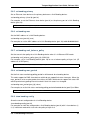
5.6.5 set bonding primary
Set an Ethernet slave device as the primary device on a Link Bonding device:
set bonding primary (slave id) (port id)
For example, to set the Ethernet slave device (port 6) as the primary port of a Link Bonding
device (port 10).
testpmd> set bonding primary 6 10
5.6.6 set bonding mac
Set the MAC address of a Link Bonding device:
set bonding mac (port id) (mac)
For example, to set the MAC address of a Link Bonding device (port 10) to 00:00:00:00:00:01
testpmd> set bonding mac 10 00:00:00:00:00:01
5.6.7 set bonding xmit_balance_policy
Set the transmission policy for a Link Bonding device when it is in Balance XOR mode:
set bonding xmit_balance_policy (port_id) (l2|l23|l34)
For example, set a Link Bonding device (port 10) to use a balance policy of layer 3+4 (IP
addresses & UDP ports )
testpmd> set bonding xmit_balance_policy 10 l34
5.6.8 set bonding mon_period
Set the link status monitoring polling period in milliseconds for a bonding device.
This adds support for PMD slave devices which do not support link status interrupts. When the
mon_period is set to a value greater than 0 then all PMD’s which do not support link status ISR
will be queried every polling interval to check if their link status has changed.
set bonding mon_period (port_id) (value)
For example, to set the link status monitoring polling period of bonded device (port 5) to 150ms
testpmd> set bonding mon_period 5 150
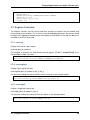
5.6.9 show bonding config
Show the current configuration of a Link Bonding device:
show bonding config (port id)
For example, to show the configuration a Link Bonding device (port 9) with 3 slave devices (1,
3, 4) in balance mode with a transmission policy of layer 2+3.
5.6. Link Bonding Functions
31
Testpmd Application User Guide, Release 2.0.0
testpmd> show bonding config 9
Bonding mode: 2
Balance Xmit Policy: BALANCE_XMIT_POLICY_LAYER23
Slaves (3): [1 3 4]
Active Slaves (3): [1 3 4]
Primary: [3]
5.7 Register Functions
The Register functions can be used to read from and write to registers on the network card
referenced by a port number. This is mainly useful for debugging purposes. Reference should
be made to the appropriate datasheet for the network card for details on the register addresses
and fields that can be accessed.
5.7.1 read reg
Display the value of a port register:
read reg (port_id) (address)
For example, to examine the Flow Director control register (FDIRCTL, 0x0000EE000) on an
Intel® 82599 10 GbE Controller:
testpmd> read reg 0 0xEE00
port 0 PCI register at offset 0xEE00: 0x4A060029 (1241907241)
5.7.2 read regfield
Display a port register bit field:
read regfield (port_id) (address) (bit_x) (bit_y)
For example, reading the lowest two bits from the register in the example above:
testpmd> read regfield 0 0xEE00 0 1
port 0 PCI register at offset 0xEE00: bits[0, 1]=0x1 (1)
5.7.3 read regbit
Display a single port register bit:
read regbit (port_id) (address) (bit_x)
For example, reading the lowest bit from the register in the example above:
testpmd> read regbit 0 0xEE00 0
port 0 PCI register at offset 0xEE00: bit 0=1
5.7. Register Functions
32
Testpmd Application User Guide, Release 2.0.0
5.7.4 write reg
Set the value of a port register:
write reg (port_id) (address) (value)
For example, to clear a register:
testpmd> write reg 0 0xEE00 0x0
port 0 PCI register at offset 0xEE00: 0x00000000 (0)
5.7.5 write regfield
Set bit field of a port register:
write regfield (port_id) (address) (bit_x) (bit_y) (value)
For example, writing to the register cleared in the example above:
testpmd> write regfield 0 0xEE00 0 1 2
port 0 PCI register at offset 0xEE00: 0x00000002 (2)
5.7.6 write regbit
Set single bit value of a port register:
write regbit (port_id) (address) (bit_x) (value)
For example, to set the high bit in the register from the example above:
testpmd> write regbit 0 0xEE00 31 1
port 0 PCI register at offset 0xEE00: 0x8000000A (2147483658)
5.8 Filter Functions
This section details the available filter functions that are available.
5.8.1 ethertype_filter
Add or delete a L2 Ethertype filter, which identify packets by their L2 Ethertype mainly assign
them to a receive queue.
ethertype_filter (port_id) (add|del) (mac_addr|mac_ignr)
(ether_type) (drop|fwd) queue (queue_id)
(mac_address)
ethertype
The available information parameters are:
• port_id: the port which the Ethertype filter assigned on.
• mac_addr: compare destination mac address.
• mac_ignr: ignore destination mac address match.
• mac_address: destination mac address to match.
5.8. Filter Functions
33
Testpmd Application User Guide, Release 2.0.0
• ether_type: the EtherType value want to match, for example 0x0806 for ARP packet.
0x0800 (IPv4) and 0x86DD (IPv6) are invalid.
• queue_id : The receive queue associated with this EtherType filter. It is meaningless
when deleting or dropping.
Example, to add/remove an ethertype filter rule:
testpmd> ethertype_filter 0 add mac_ignr ethertype 0x0806 fwd queue 3
testpmd> ethertype_filter 0 del mac_ignr ethertype 0x0806 fwd queue 3
5.8.2 2tuple_filter
Add or delete a 2-tuple filter, which identify packets by specific protocol and destination
TCP/UDP port and forwards packets into one of the receive queues.
2tuple_filter (port_id) (add|del) dst_port (dst_port_value) protocol (protocol_value) mask
(mask_value) tcp_flags (tcp_flags_value) priority (prio_value) queue (queue_id)
The available information parameters are:
• port_id: the port which the 2-tuple filter assigned on.
• dst_port_value: destination port in L4.
• protocol_value: IP L4 protocol.
• mask_value: participates in the match or not by bit for field above, 1b means participate.
• tcp_flags_value: TCP control bits. The non-zero value is invalid, when the pro_value is
not set to 0x06 (TCP).
• prio_value: priority of this filter.
• queue_id: The receive queue associated with this 2-tuple filter.
Example, to add/remove an 2tuple filter rule:
testpmd> 2tuple_filter 0 add dst_port 32 protocol 0x06 mask 0x03 tcp_flags 0x02 priority 3 que
testpmd> 2tuple_filter 0 del dst_port 32 protocol 0x06 mask 0x03 tcp_flags 0x02 priority 3 que
5.8.3 5tuple_filter
Add or delete a 5-tuple filter, which consists of a 5-tuple (protocol, source and destination IP
addresses, source and destination TCP/UDP/SCTP port) and routes packets into one of the
receive queues.
5tuple_filter (port_id) (add|del) dst_ip (dst_address) src_ip (src_address) dst_port
(dst_port_value) src_port (src_port_value) protocol (protocol_value) mask (mask_value)
tcp_flags (tcp_flags_value) priority (prio_value) queue (queue_id)
The available information parameters are:
• port_id: the port which the 5-tuple filter assigned on.
• dst_address: destination IP address.
• src_address: source IP address.
5.8. Filter Functions
34
Testpmd Application User Guide, Release 2.0.0
• dst_port_value: TCP/UDP destination port.
• src_port_value: TCP/UDP source port.
• protocol_value: L4 protocol.
• mask_value: participates in the match or not by bit for field above, 1b means participate
• tcp_flags_value: TCP control bits. The non-zero value is invalid, when the protocol_value
is not set to 0x06 (TCP).
• prio_value: the priority of this filter.
• queue_id: The receive queue associated with this 5-tuple filter.
Example, to add/remove an 5tuple filter rule:
testpmd> 5tuple_filter 0 add dst_ip 2.2.2.5 src_ip 2.2.2.4 dst_port 64 src_port 32 protocol 0x
testpmd> 5tuple_filter 0 del dst_ip 2.2.2.5 src_ip 2.2.2.4 dst_port 64 src_port 32 protocol 0x
5.8.4 syn_filter
By SYN filter, TCP packets whose SYN flag is set can be forwarded to a separate queue.
syn_filter (port_id) (add|del) priority (high|low) queue (queue_id)
The available information parameters are:
• port_id: the port which the SYN filter assigned on.
• high: this SYN filter has higher priority than other filters.
• low: this SYN filter has lower priority than other filters.
• queue_id: The receive queue associated with this SYN filter
Example:
testpmd> syn_filter 0 add priority high queue 3
5.8.5 flex_filter
With flex filter, packets can be recognized by any arbitrary pattern within the first 128 bytes of
the packet and routes packets into one of the receive queues.
flex_filter (port_id) (add|del) len (len_value) bytes (bytes_value) mask (mask_value) priority
(prio_value) queue (queue_id)
The available information parameters are:
• port_id: the port which the Flex filter is assigned on.
• len_value: filter length in bytes, no greater than 128.
• bytes_value: a string in hexadecimal, means the value the flex filter needs to match.
• mask_value: a string in hexadecimal, bit 1 means corresponding byte participates in the
match.
• prio_value: the priority of this filter.
5.8. Filter Functions
35
Testpmd Application User Guide, Release 2.0.0
• queue_id: the receive queue associated with this Flex filter.
Example:
testpmd> flex_filter 0 add len 16 bytes 0x00000000000000000000000008060000
mask 000C priority 3 queue 3
testpmd> flex_filter 0 del len 16 bytes 0x00000000000000000000000008060000
mask 000C priority 3 queue 3
5.8.6 flow_director_filter
The Flow Director works in receive mode to identify specific flows or sets of flows and route
them to specific queues.
Two types of filtering are supported which are referred to as Perfect Match and Signature filters,
the match mode is set by the –pkt-filter-mode command-line parameter:
• Perfect match filters. The hardware checks a match between the masked fields of the
received packets and the programmed filters.
• Signature filters. The hardware checks a match between a hash-based signature of the
masked fields of the received packet.
The Flow Director filters can match the different fields for different type of packet: flow type,
specific input set per flow type and the flexible payload. The Flow Director can also mask out
parts of all of these fields so that filters are only applied to certain fields or parts of the fields.
Different NICs may have different capabilities, command show port fdir (port_id) can be used
to acquire the information.
# Commands to add flow director filters of different flow types.
flow_director_filter (port_id) (add|del|update) flow (ipv4-other|ipv4-frag|ipv6-other|ipv6-frag) src
(src_ip_address) dst (dst_ip_address) vlan (vlan_value) flexbytes (flexbytes_value) (drop|fwd)
queue (queue_id) fd_id (fd_id_value)
flow_director_filter (port_id) (add|del|update) flow (ipv4-tcp|ipv4-udp|ipv6-tcp|ipv6-udp) src
(src_ip_address) (src_port) dst (dst_ip_address) (dst_port) vlan (vlan_value) flexbytes
(flexbytes_value) (drop|fwd) queue (queue_id) fd_id (fd_id_value)
flow_director_filter (port_id) (add|del|update) flow (ipv4-sctp|ipv6-sctp) src (src_ip_address)
(src_port) dst (dst_ip_address) (dst_port) tag (verification_tag) vlan (vlan_value) flexbytes
(flexbytes_value) (drop|fwd) queue (queue_id) fd_id (fd_id_value)
For example, to add an ipv4-udp flow type filter:
testpmd> flow_director_filter 0 add flow ipv4-udp src 2.2.2.3 32 dst 2.2.2.5 33 vlan 0x1 flexb
For example, add an ipv4-other flow type filter:
testpmd> flow_director_filter 0 add flow ipv4-other src 2.2.2.3 dst 2.2.2.5 vlan 0x1 flexbytes
5.8.7 flush_flow_director
flush all flow director filters on a device:
5.8. Filter Functions
36
Testpmd Application User Guide, Release 2.0.0
flush_flow_director (port_id)
Example, to flush all flow director filter on port 0:
testpmd> flush_flow_director 0
5.8.8 flow_director_mask
set flow director’s masks on match input set
flow_director_mask (port_id) vlan (vlan_value) src_mask (ipv4_src) (ipv6_src) (src_port)
dst_mask (ipv4_dst) (ipv6_dst) (dst_port)
Example, to set flow director mask on port 0:
testpmd> flow_director_mask 0 vlan 0xefff src_mask 255.255.255.255 FFFF:FFFF:FFFF:FFFF:FFFF:FF
5.8.9 flow_director_flex_mask
set masks of flow director’s flexible payload based on certain flow type:
flow_director_flex_mask (port_id) flow (none|ipv4-other|ipv4-frag|ipv4-tcp|ipv4-udp|ipv4-sctp|
ipv6-other|ipv6-frag|ipv6-tcp|ipv6-udp|ipv6-sctp|all) (mask)
Example, to set flow director’s flex mask for all flow type on port 0:
testpmd> flow_director_flex_mask 0 flow all (0xff,0xff,0,0,0,0,0,0,0,0,0,0,0,0,0,0)
5.8.10 flow_director_flex_payload
Configure flexible payload selection.
flow_director_flex_payload (port_id) (raw|l2|l3|l4) (config)
For example, to select the first 16 bytes from the offset 4 (bytes) of packet’s payload as flexible
payload.
testpmd> flow_director_flex_payload 0 l4 (4,5,6,7,8,9,10,11,12,13,14,15,16,17,18,19)
5.8.11 get_sym_hash_ena_per_port
Get symmetric hash enable configuration per port.
get_sym_hash_ena_per_port (port_id)
For example, to get symmetric hash enable configuration of port 1.
testpmd> get_sym_hash_ena_per_port 1
5.8. Filter Functions
37
Testpmd Application User Guide, Release 2.0.0
5.8.12 set_sym_hash_ena_per_port
Set symmetric hash enable configuration per port to enable or disable.
set_sym_hash_ena_per_port (port_id) (enable|disable)
For example, to set symmetric hash enable configuration of port 1 to enable.
testpmd> set_sym_hash_ena_per_port 1 enable
5.8.13 get_hash_global_config
Get the global configurations of hash filters.
get_hash_global_config (port_id)
For example, to get the global configurations of hash filters of port 1.
testpmd> get_hash_global_config 1
5.8.14 set_hash_global_config
Set the global configurations of hash filters.
set_hash_global_config (port_id) (toeplitz|simple_xor|default) (ipv4|ipv4-frag|ipv4-tcp|ipv4udp|ipv4-sctp|ipv4-other|ipv6|ipv6-frag|ipv6-tcp|ipv6-udp|ipv6-sctp|ipv6-other|l2_payload) (enable|disable)
For example, to enable simple_xor for flow type of ipv6 on port 2.
testpmd> set_hash_global_config 2 simple_xor ipv6 enable
5.8. Filter Functions
38