1
Operation
Typhoon Camera
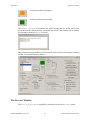
Other control commands, the default settings are usually
optimal but may be changed if desired. Digital Slow
Shutter On is useful for low light conditions.
Toggle between enable or disable the Wide Dynamic
Control and when enabled select which type of control
to use. This can be useful for enhancing images in low
light conditions.
Enable the frame noise reduction which helps to enhance
the image if there is a lot of suspended particles such as
sediment within the water column.
The zoom control changes the manner in which the
camera zooms and also provides zoom in and zoom out
buttons. The Instant check box will automatically
apply a digital zoom and the Continuous option is
for enabling the zoom to seamlessly transition between
optical and digital while it is zooming.
It is usually sufficient to have the camera auto focus
but if desired this can be turned off and a manual focus
undertaken using the control buttons.
Additional control is available from the menu in the form of the Invert Mode and
Auto Exposure.
0708-SOM-00001, Issue: 01
16
© Tritech International Ltd.